What Is Endpoint Protection and Why Canadian SMBs Need It
Learn what is endpoint protection, how it works, and why Canadian small and mid-sized businesses rely on it to defend laptops, servers, and mobile devices.

Learn what is endpoint protection, how it works, and why Canadian small and mid-sized businesses rely on it to defend laptops, servers, and mobile devices.
Endpoint protection is the continuous defence of every laptop, desktop, server, and mobile device that touches a business network. The federal cyber program had installed host-based sensors on approximately 770,000 IT endpoint devices by the end of September 2024, while traditional antivirus mainly scans for known malware and waits for updates.
That distinction matters to a Canadian business owner whose team works from offices, homes, client sites, and cloud applications. A firewall still has an important role, but it can't see everything that happens on a laptop after an employee opens a malicious document, enters credentials into a fraudulent website, or connects an infected removable drive.
Modern endpoint protection combines prevention, continuous monitoring, behavioural detection, investigation, and response. It treats each device as a security control that needs visibility and maintenance, not as a box that receives an antivirus licence.
A 25-person accounting firm in Mississauga receives an email that appears to come from the Canada Revenue Agency. An employee opens the message on her laptop, follows the link, and signs in to what looks like a familiar tax portal. A silent loader runs in the background. Nothing crashes, no warning appears, and the employee returns to work.
For the next three days, the attacker uses that laptop as a quiet foothold. The firewall hasn't necessarily failed. It may have blocked other suspicious traffic, but the initial compromise happened on an endpoint, through an employee's browser and credentials. Without endpoint telemetry, the firm can't easily see which process started, what it contacted, or whether the attacker is moving toward shared systems.
On the fourth day, ransomware detonates on the file server. QuickBooks files become inaccessible, staff can't complete client work, and the firm faces a week of downtime. Its cyber-insurance claim is denied because the policy required endpoint telemetry that the business couldn't produce.

The lesson isn't that every phishing email causes this outcome. The lesson is that a single laptop can become the place where an attack begins, hides, and gathers momentum.
Canadian organizations are dealing with frequent cyber incidents. Statistics Canada reported that 70% of Canadians experienced a cyber security incident in 2022, compared with 58% in 2020 and 52% in 2018 (Statistics Canada security incident data).
For an SMB, the practical question isn't whether the firewall exists. It is whether the business can answer these questions quickly:
Endpoint protection addresses that gap by placing security controls where employees work. It reduces the chance that a compromised laptop becomes an invisible staging ground for a wider incident.
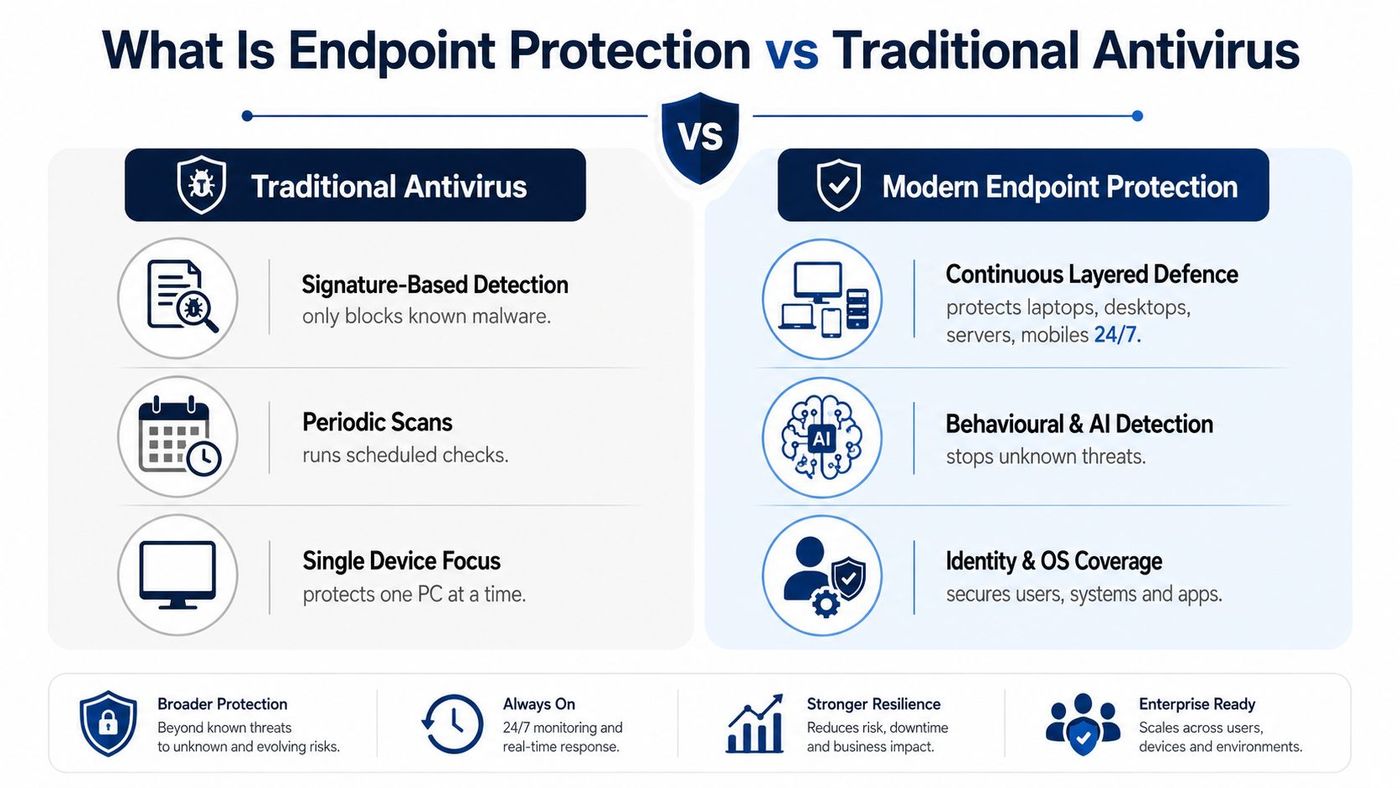
Endpoint protection is a continuous, layered defence for laptops, desktops, servers, smartphones, and tablets that connect to business resources. It covers more than malicious files. It also considers device health, operating system activity, applications, user behaviour, identity signals, and network connections.
Traditional antivirus is narrower. It compares files and activity against known signatures, performs scheduled or on-access scans, and relies heavily on updated detection rules. That remains useful for known malware, but it doesn't provide the full record or response capability needed when an attacker uses legitimate tools, stolen credentials, or a browser session.
Think of a commercial building. Antivirus is a doorman checking visitors against a paper list of known offenders. Endpoint protection adds lobby cameras, floor sensors, after-hours patrols, and a guard who can review footage, lock a room, and escort a suspicious visitor out.
The difference comes down to four practical upgrades:
The Canadian federal endpoint management requirements explicitly call for endpoint logging to improve anomaly detection. That policy direction reflects a broader shift from reactive file scanning to continuous device-level defence.
For a plain-language overview of the product category, Technovation LLC endpoint protection offers useful comparison context. For the deeper detection and investigation layer, CloudOrbis also explains what endpoint detection and response means.
A modern stack works as a group of cooperating layers. Buying an EDR agent without fixing patching, encryption, or device inventory can leave the business with excellent evidence after an incident but weak prevention before it.
Next-generation antivirus forms the first layer. It combines traditional signatures with behavioural and machine-learning detection to identify suspicious activity that doesn't match a known malware pattern.
Endpoint detection and response, or EDR, continuously records endpoint activity. It can capture process launches, registry changes, network connections, and related events, helping an analyst reconstruct how an attack unfolded. The CISA definition of EDR capabilities describes EDR as monitoring and controlling endpoint devices across detection, response, and recovery, including workstations, servers, laptops, thin clients, and virtual desktops.
Extended detection and response, or XDR, adds context from email, identity, and cloud systems. A suspicious sign-in, a phishing message, and a PowerShell command on a laptop are more useful when the platform connects them as one incident instead of presenting three unrelated alerts.
Patch and vulnerability management closes the software weaknesses attackers exploit. It should cover operating systems, browsers, business applications, servers, and mobile devices, with verification that updates installed.
Device control governs USB storage, Bluetooth peripherals, and removable media. This layer helps prevent unauthorised data transfer and reduces the chance that an infected device introduces malware.
Full-disk encryption and mobile device management protect information when a laptop or phone is lost. Encryption protects stored data, while mobile management applies access, configuration, and compliance policies to devices outside the office.
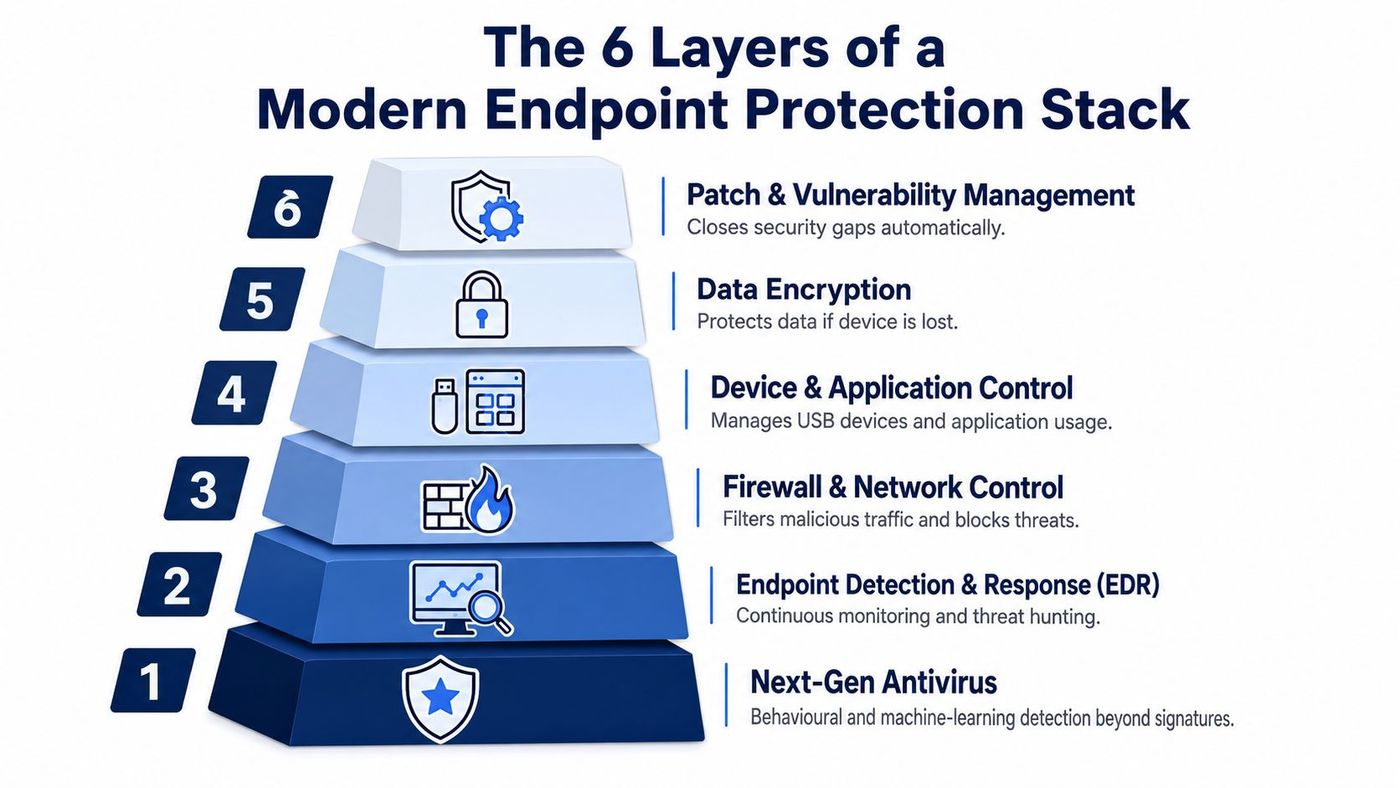
These layers reinforce one another. EDR can identify an old browser exploit, but patch management prevents the weakness from remaining open. Antivirus can block a known payload, but device control can stop an employee from copying sensitive files to an unmanaged thumb drive. Encryption limits the consequences when physical security fails.
For Microsoft environments, Intune device management can form part of the device configuration and policy layer, provided the organisation also defines who monitors alerts and responds to incidents.
Canadian threat data shows why endpoint protection must address more than downloaded executable files. In a 2025 Canada cybersecurity report, browser-based attacks represented 70% of threats seen in the vendor's global customer base, while ransomware and phishing together accounted for 62% of reported incidents in Canada's energy sector (2025 Canada cybersecurity report).
The Canadian federal threat assessment also recorded high-severity events increasing from 6,681 in 2017 to 9,602 in 2023, while critical events rose from 2,163 to 3,960 over the same period (National Cyber Threat Assessment 2025–2026). Those figures don't identify one universal cause for every incident, but they support a practical buying conclusion. A business needs controls that can spot activity across browsers, credentials, applications, and devices.
| Threat type | Example | Endpoint layer that stops it |
|---|---|---|
| Phishing and ransomware | A fraudulent invoice or tax message delivers a malicious payload | Email controls, next-generation antivirus, EDR, user training |
| Credential harvesting | An employee enters a password on a convincing browser landing page | Browser protection, identity controls, MFA, XDR correlation |
| Malicious documents | An Office file launches macros or scripts that change system settings | Behavioural detection, application control, EDR |
| Fileless activity | PowerShell or another legitimate utility runs an unauthorised command | EDR telemetry, behavioural analytics, automated isolation |
| Unpatched software | An outdated browser, VPN appliance, or application exposes a known weakness | Patch and vulnerability management |
| Data theft through devices | Sensitive files are copied to removable media | Device control, data policies, encryption |
Signature-based antivirus remains valuable for known malware. EDR adds the ability to identify suspicious chains, investigate lateral movement, and isolate a device before the attacker reaches shared resources. For a sector-specific view of this risk, CloudOrbis discusses ransomware protection for Edmonton businesses.
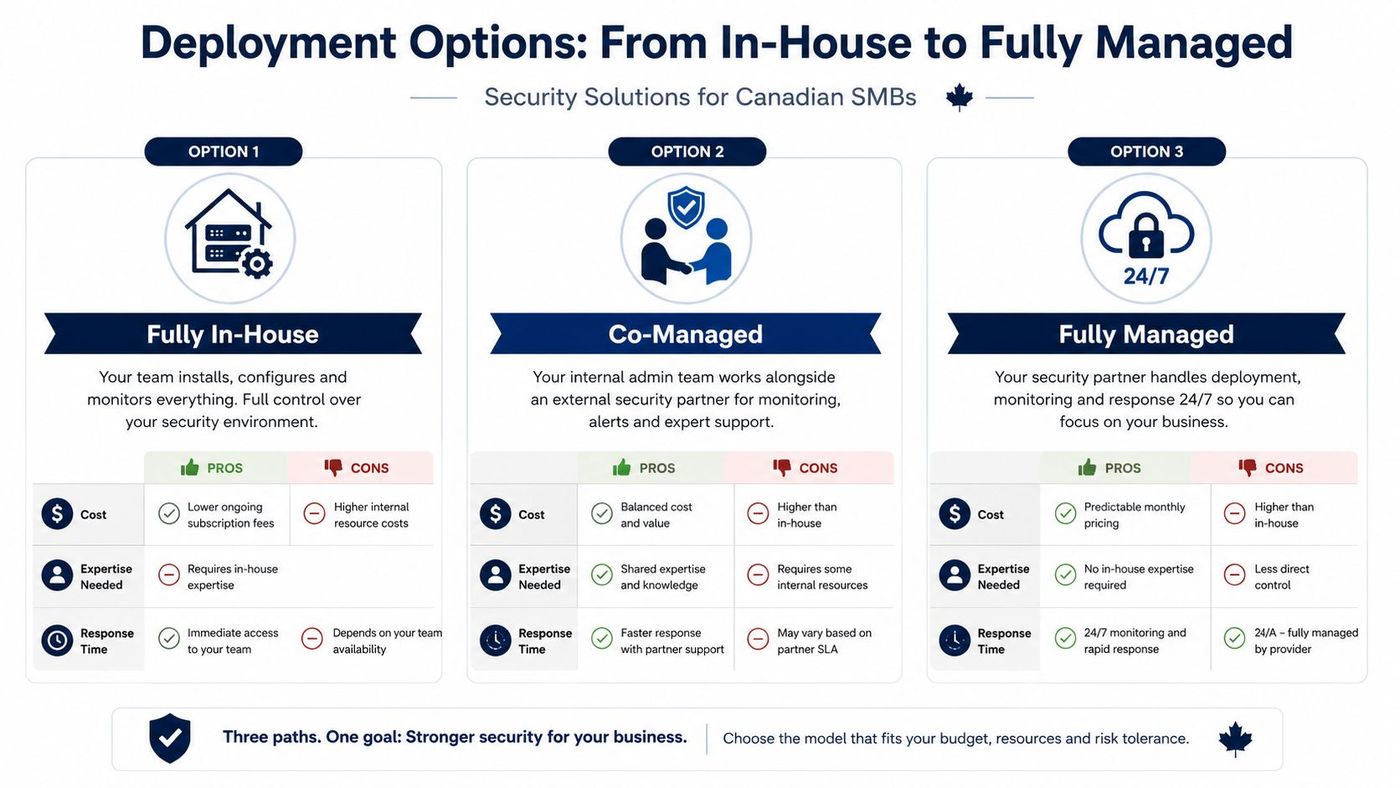
The right deployment model depends less on company size than on who can perform the work consistently. Endpoint protection needs someone to install agents, tune policies, review alerts, investigate incidents, verify remediation, and report meaningful outcomes to ownership.
An in-house model gives the organisation direct control. An internal IT or security team deploys agents, manages the console, configures policies, monitors alerts, and leads incident response. The management plane may sit in the cloud or on premises, but the responsibility remains with the business.
This model suits an organisation with dedicated security expertise and enough coverage to respond outside normal office activity. The risk isn't the technology. It is an alert that arrives when the responsible person is unavailable or a policy change that never receives a follow-up review.
Co-managed endpoint protection combines an internal administrator with an external security partner. The internal team may own deployment, user communication, and routine device support, while the partner helps with threat hunting, alert triage, policy tuning, or incident escalation.
This option works well for a growing business with capable IT staff but limited security capacity. It also allows ownership to remain close to the business while providing overflow support during complex investigations or high-alert periods.
A managed security service provider handles deployment, monitoring, response, and reporting. The provider typically operates the security console and maintains defined escalation paths, while the customer retains approval over major containment and recovery decisions.
This approach fits a company without a dedicated security team or one seeking predictable operating costs. Before signing, ask how quickly the provider responds, where telemetry is stored, how reports reach management, and who can isolate a device during an active incident.
A managed endpoint detection and response model can be especially useful when an SMB wants internal IT ownership but lacks round-the-clock security monitoring.
A non-technical buyer can build a defensible shortlist by scoring vendors in priority order. Start with the capabilities that reduce the greatest uncertainty, then assess operating fit.
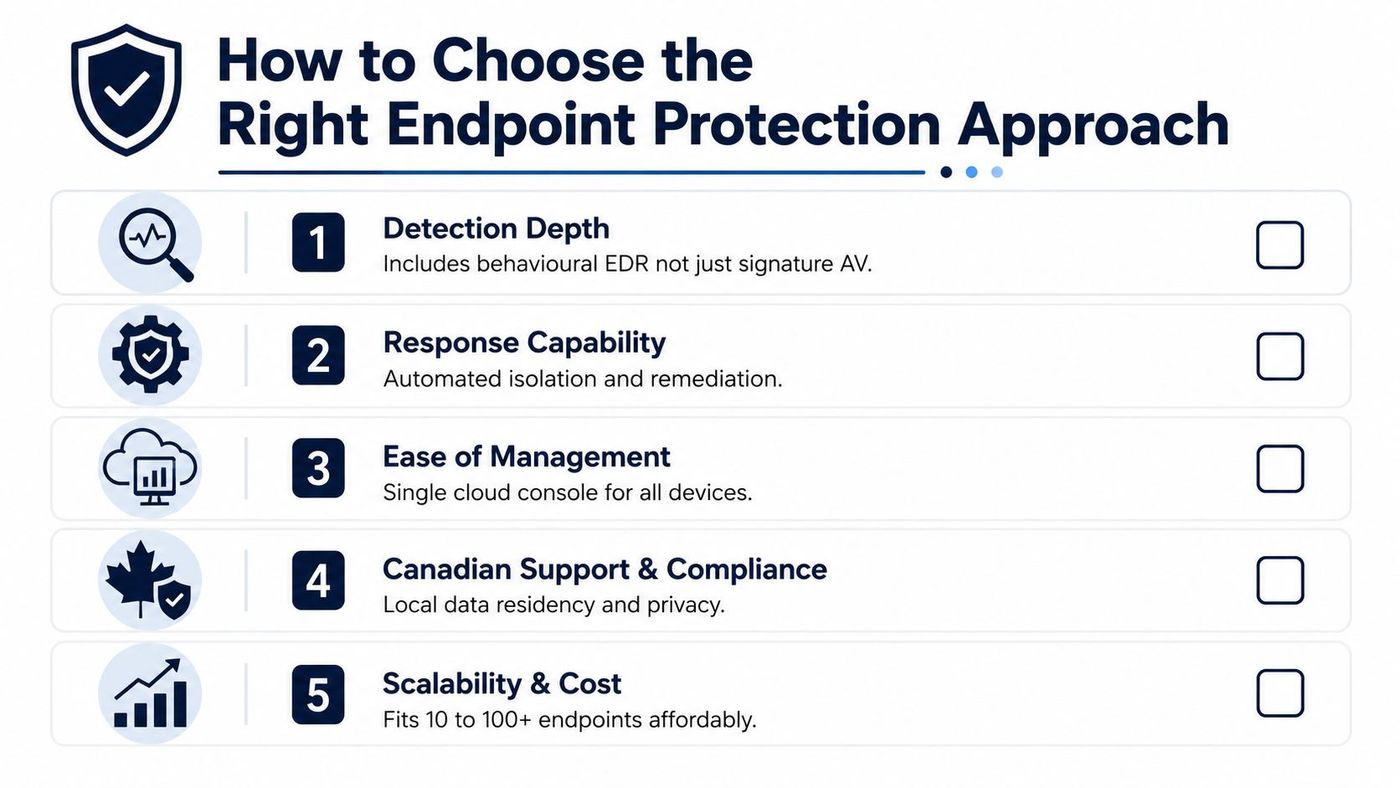
Buying rule: A platform that generates alerts nobody owns won't protect the business. Score the response process, not just the feature list.
A practical rollout can follow three phases across a 90-day implementation window. The exact schedule depends on the environment, but the sequence matters because deployment without inventory creates false confidence.
Inventory every laptop, desktop, server, smartphone, and tablet that accesses business data. Record the operating system, patch level, assigned user, ownership status, and applications that matter to operations. Mark systems holding customer records or other information subject to PIPEDA or provincial privacy obligations.
Deploy the selected endpoint agent through a controlled pilot before expanding coverage. Establish baseline policies for antivirus, EDR telemetry, device control, full-disk encryption, administrator access, and tamper protection. Enable automatic operating system and third-party application patching on a tested cadence, then verify installation rather than relying only on deployment status.
Give employees short, role-relevant phishing training. Document an incident-response playbook that identifies who can approve isolation, who contacts affected users, who preserves evidence, and who communicates with insurers or legal advisers. Schedule monthly health reviews covering missing agents, stale devices, patch exceptions, alert trends, and policy drift.
For teams formalising implementation work, DevArmor's secure development implementation checklist provides a useful complementary reference for organising security tasks and ownership.
Use this ongoing checklist:
CloudOrbis also maintains guidance on endpoint security best practices for organisations building a repeatable operating routine.
Endpoint protection becomes valuable when the business operates it as a discipline rather than treating it as a one-time purchase. EDR and XDR telemetry can improve vulnerability prioritisation, support faster investigation, and provide evidence of how the organisation detected and handled risk.
The strategic benefits are practical:
The Canadian federal programme's scale reinforces the operational nature of this work. Its network-based sensors blocked about 2.4 trillion suspicious cyber security events from April 2023 through March 2024, according to the federal endpoint requirements reference. SMBs won't operate at that scale, but they face the same basic need for useful telemetry, central visibility, and action when activity becomes suspicious.
The goal isn't to buy the largest collection of tools. It is to maintain a tuned stack that reflects how employees work, including remote access, cloud applications, mobile devices, and third-party software. If your business lacks dedicated security staff, a managed endpoint protection conversation can turn those capabilities into an accountable operating service rather than another unattended console.
CloudOrbis Inc. helps Canadian SMBs assess endpoint exposure, deploy layered endpoint protection, manage EDR monitoring, and coordinate response with existing IT teams. Visit CloudOrbis Inc. to discuss a practical endpoint security plan built around your devices, data, compliance needs, and available internal capacity.
Book a 30-minute call with a senior engineer. No sales script, just straight answers about your environment.


