Copilot for Business Privacy: A Canadian Deployment Guide
Secure your Microsoft Copilot for business privacy rollout. Learn tenant controls, data residency, DLP, and PIPEDA compliance steps for Canadian SMBs.

Secure your Microsoft Copilot for business privacy rollout. Learn tenant controls, data residency, DLP, and PIPEDA compliance steps for Canadian SMBs.

A Canadian business leader approves Microsoft Copilot, expecting faster email drafting, meeting summaries, and document analysis. The privacy questions usually arrive later: Which files can Copilot see? Where are prompts processed? What happens when an employee asks for information that sits in a broadly shared SharePoint site?
Those questions define Copilot for business privacy. Microsoft provides important privacy and security commitments, but Copilot works within the permissions, identities, policies, and data structures your organisation has already configured. A secure deployment therefore starts before licensing and enablement. It starts with an audit of what users can access, how they authenticate, where data flows, and how the organisation will monitor use.
A mid-sized healthcare clinic enables Copilot for a group of administrators. The team expects help preparing appointment communications and summarising internal procedures. During testing, an employee asks Copilot to find information related to a patient-services process. The response includes material from a SharePoint folder containing patient records.
Copilot didn't bypass the employee's permissions. The employee already had access because an old SharePoint group had never been reviewed. Copilot made that accessible content easier to discover. This is the central operational risk: Copilot can amplify existing permission weaknesses rather than create a new permission boundary around poorly organised data.

A privacy incident may involve regulatory scrutiny, reputational damage, and lost client trust. The technical cause, however, may be unremarkable:
Microsoft's privacy documentation explains that commercial Copilot follows the privacy, security, and compliance commitments provided for Microsoft 365 commercial services. It also states that, for customers outside the European Union, queries may be processed in the United States, the European Union, or other regions, which makes configuration and data-flow review important for Canadian organisations. Microsoft's commercial Copilot privacy and protection documentation is useful alongside an independent privacy compliance guide for developers when building internal governance standards.
A pre-launch review should identify who can access sensitive SharePoint libraries, Exchange content, Teams files, and business records. It should also test realistic prompts, including requests involving client files, employee information, financial material, and clinical or legal records.
Copilot privacy isn't a switch you turn on in the Microsoft 365 admin centre. It's the result of least-privilege access, controlled identities, data classification, DLP, monitoring, and user behaviour working together. Teams that want to understand Copilot's wider productivity model can also review CloudOrbis's guide on how to use Microsoft Copilot, then treat privacy readiness as a separate deployment workstream.
Canadian organisations can't treat Copilot as outside the normal privacy regime because a vendor operates the AI service. Generative AI in Canada is governed by existing privacy law rather than a standalone AI statute, so PIPEDA remains the baseline for private-sector Copilot deployments that touch personal information. Canadian guidance on AI and PIPEDA provides useful context for that position.
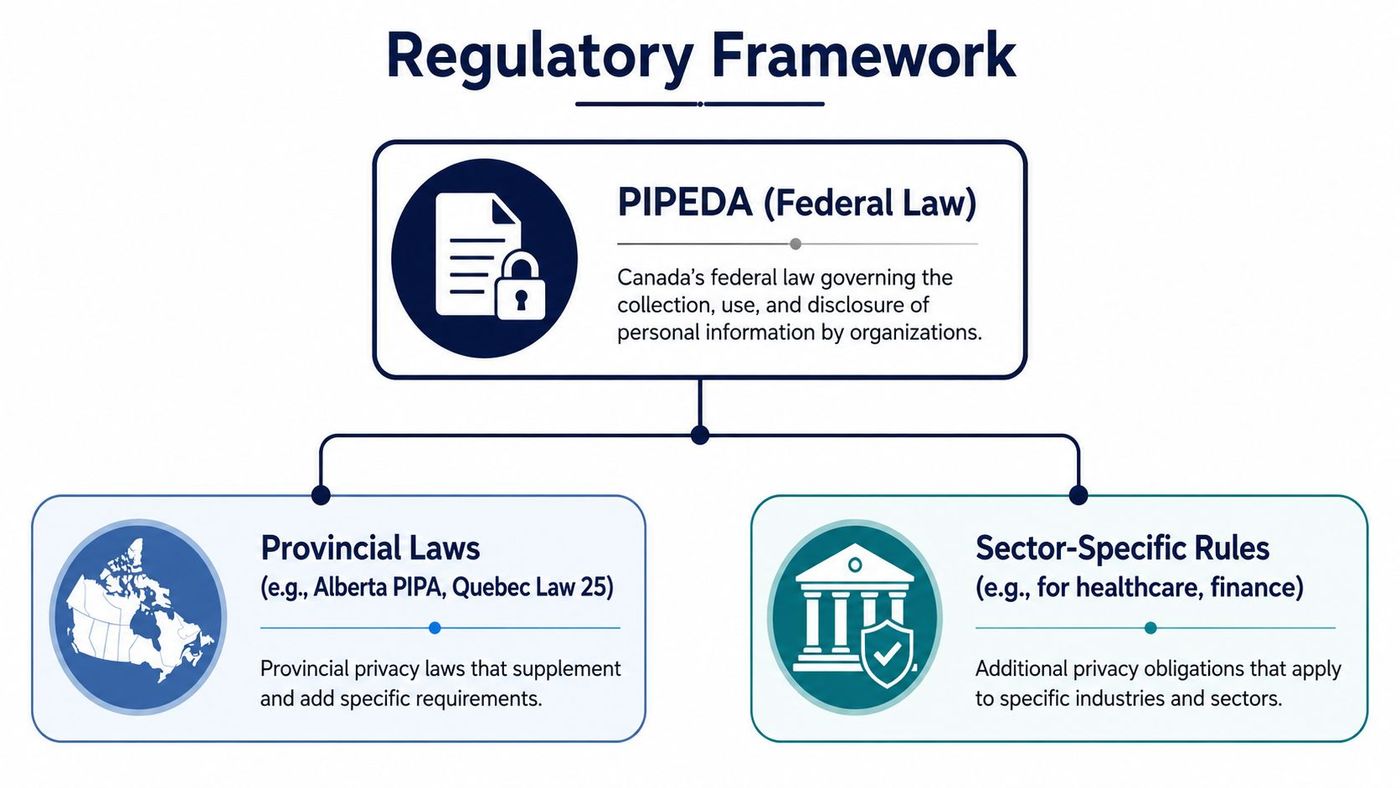
PIPEDA obligations remain relevant when Copilot processes personal information during commercial activities. Canadian privacy guidance emphasises necessity, proportionality, accountability, safeguarding, and limiting collection, use, and disclosure. These principles affect what information Copilot may access, which employees may use it, and how the organisation explains that use to individuals.
Provincial privacy laws and sector-specific requirements may also apply, depending on the organisation's location and activities. A healthcare clinic, law firm, accounting practice, and financial services business may face different operational expectations, even when each uses Microsoft 365.
The Office of the Privacy Commissioner of Canada recommends privacy-by-design for business AI use. It also advises organisations to document decisions in a privacy impact assessment and ensure AI is explainable to users. Federal and provincial privacy regulators have recommended additional governance mechanics, including adversarial or red-team testing, appropriate-use policies, and documentation of training datasets and the legal authority for collection and use. The Office of the Privacy Commissioner's AI guidance for businesses is a practical starting point.
A useful pre-deployment record should explain:
This documentation supports accountability and gives privacy, security, and business leaders a shared decision record. CloudOrbis's overview of Canadian data privacy laws can help teams organise the wider legal context before they approve a Copilot rollout.
Copilot should never be the first reason an organisation examines its Microsoft tenant. It should be the point at which identity and access weaknesses become unacceptable.
Microsoft's published guidance for Canadian federal institutions requires Enterprise Data Protection through Entra ID before using Microsoft Copilot for Work and mandates Government of Canada identities for authentication. That notice is written for federal institutions, but it establishes a sensible standard for regulated Canadian businesses: enterprise identity, access boundaries, and protected data handling should come before broad AI adoption. The Government of Canada's Copilot implementation notice sets out those conditions.
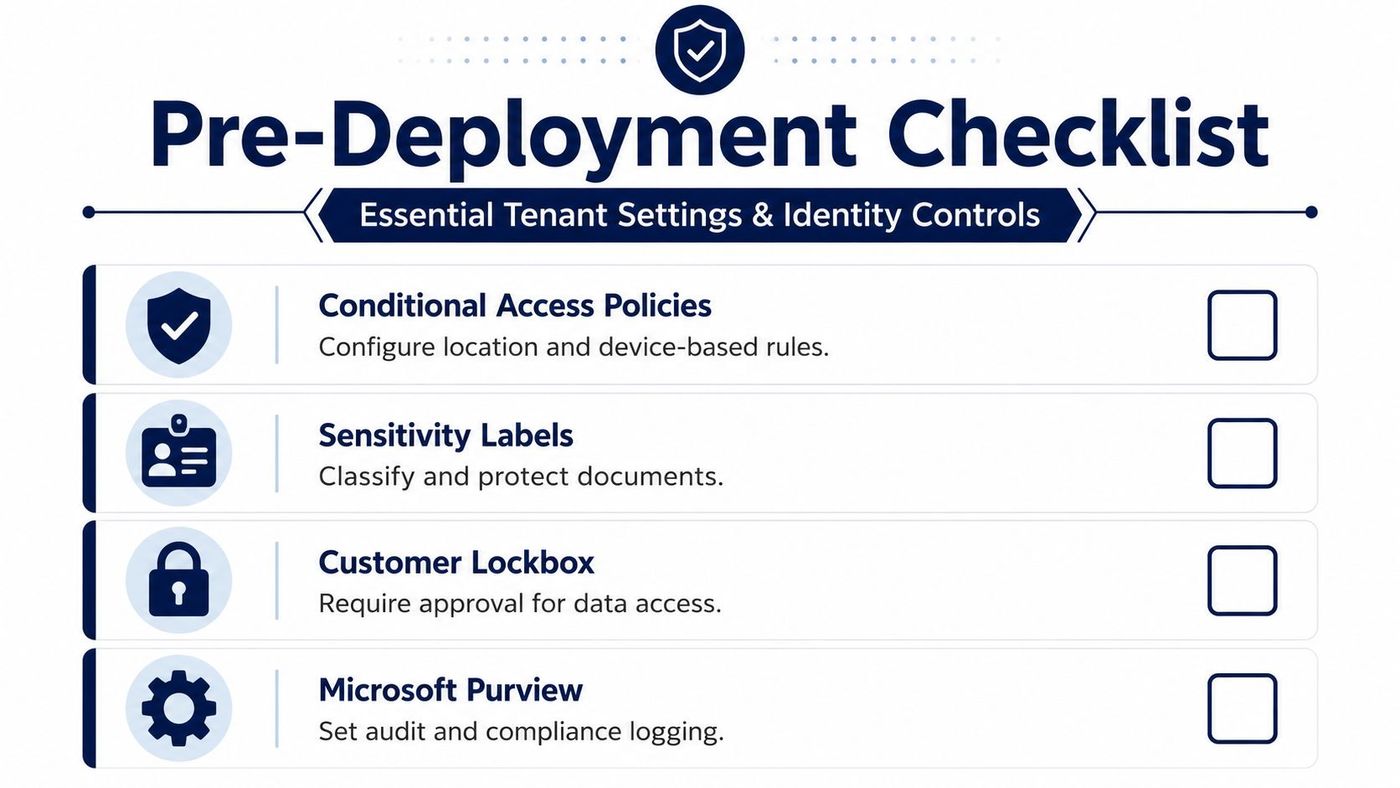
Before enabling users, confirm that Microsoft Entra ID is the authoritative identity source and that approved organisational accounts are the only route into Copilot. Review guest accounts, dormant accounts, shared accounts, privileged roles, and external collaboration groups. Remove access that can't be justified by a current business need.
Multi-factor authentication should protect every user who can access business data, with stronger Conditional Access requirements for administrators and higher-risk sign-ins. Device compliance, location signals, and sign-in risk can help determine whether access is allowed, challenged, or blocked.
The practical audit questions are straightforward:
Tenant settings should support the organisation's risk model, not merely mirror a vendor checklist. Review Conditional Access, Microsoft Purview audit settings, sensitivity labels, retention requirements, and administrative role separation. Customer Lockbox may also be relevant where the organisation requires approval for certain support access scenarios.
Practical rule: If an employee's access would be inappropriate without Copilot, it remains inappropriate with Copilot.
A staged pilot can expose configuration gaps without giving the entire workforce access at once. Select users from different roles, use representative business data, record unexpected results, and correct permissions before expanding the group. CloudOrbis's material on identity and access management offers additional background for organisations formalising this foundation.
“Is our Copilot data stored in Canada?” is an incomplete question. Canadian businesses should separate storage residency from processing location, then document both in a data-flow assessment.
Microsoft's product terms say Canadian tenants receive at-rest storage for core Microsoft 365 data in the Canada geo, including stored Copilot interactions. That is a meaningful residency commitment, but it doesn't guarantee that every AI operation stays in Canada. Microsoft's Copilot privacy and protection documentation should be read with the organisation's contract, tenant configuration, and workload scope.
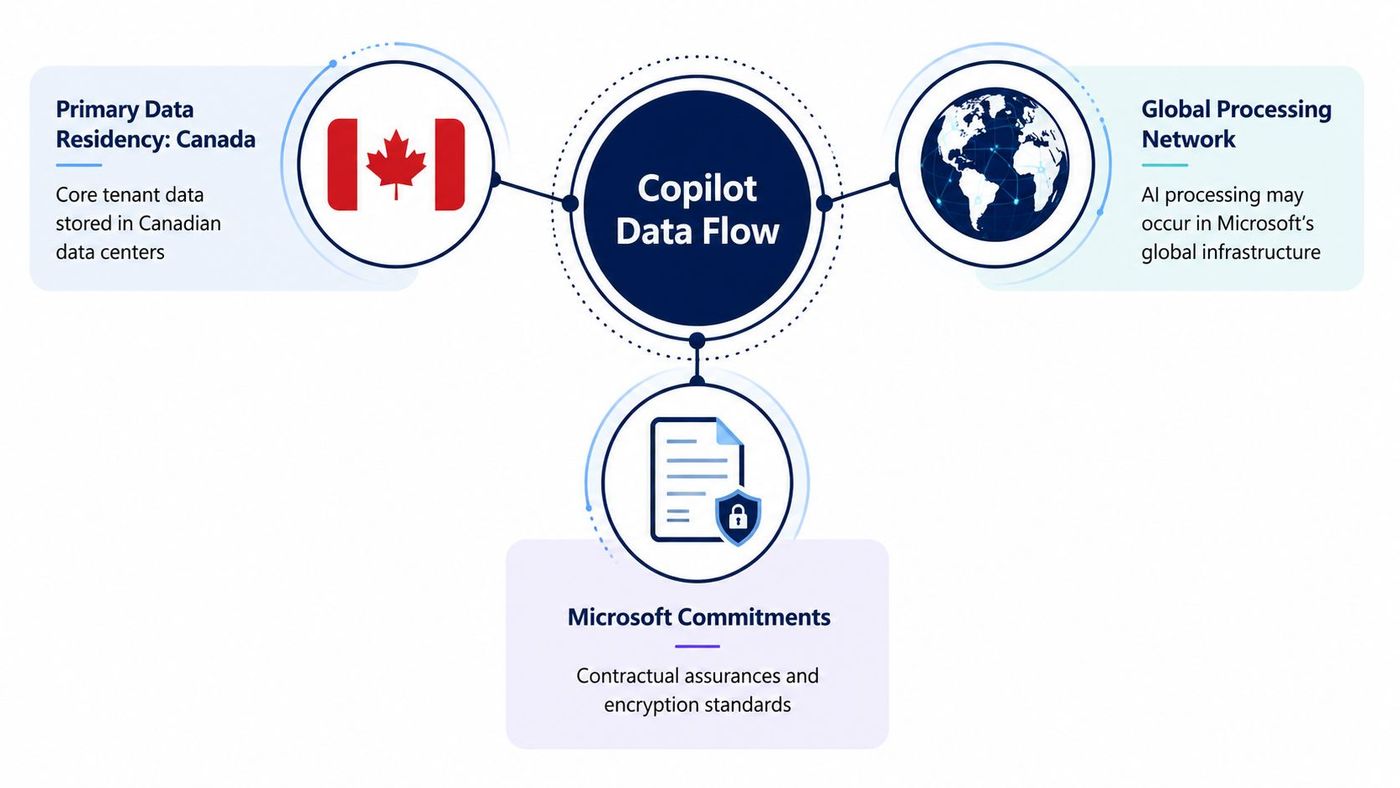
A privacy review should trace more than the final document or chat transcript. Ask where prompts originate, where relevant Microsoft 365 content is retrieved, where semantic indexes are maintained, how interactions are stored, and where telemetry or support data may be processed.
That map should distinguish:
The exact scope can change as Microsoft expands or modifies data-residency language. Don't rely on a simple “Canada-hosted” label when your privacy officer needs to understand cross-border processing.
Your Microsoft account team or managed IT provider should be able to help answer:
Canadian privacy guidance expects businesses to map personal-data flows end to end, including storage and processing locations. A clear technical register is more useful than a broad vendor assurance because it shows which data moves, why it moves, and which control applies. For wider cloud planning, teams can consult this overview of the Microsoft Cloud Adoption Framework what why and then apply the same discipline to Copilot-specific flows.
Copilot can surface content a user already has permission to access. That makes oversharing in SharePoint, Exchange, and Teams a direct privacy concern. A DLP policy can't compensate for an employee who belongs to an overly broad group, and a sensitivity label can't protect a document if the organisation hasn't applied it consistently.
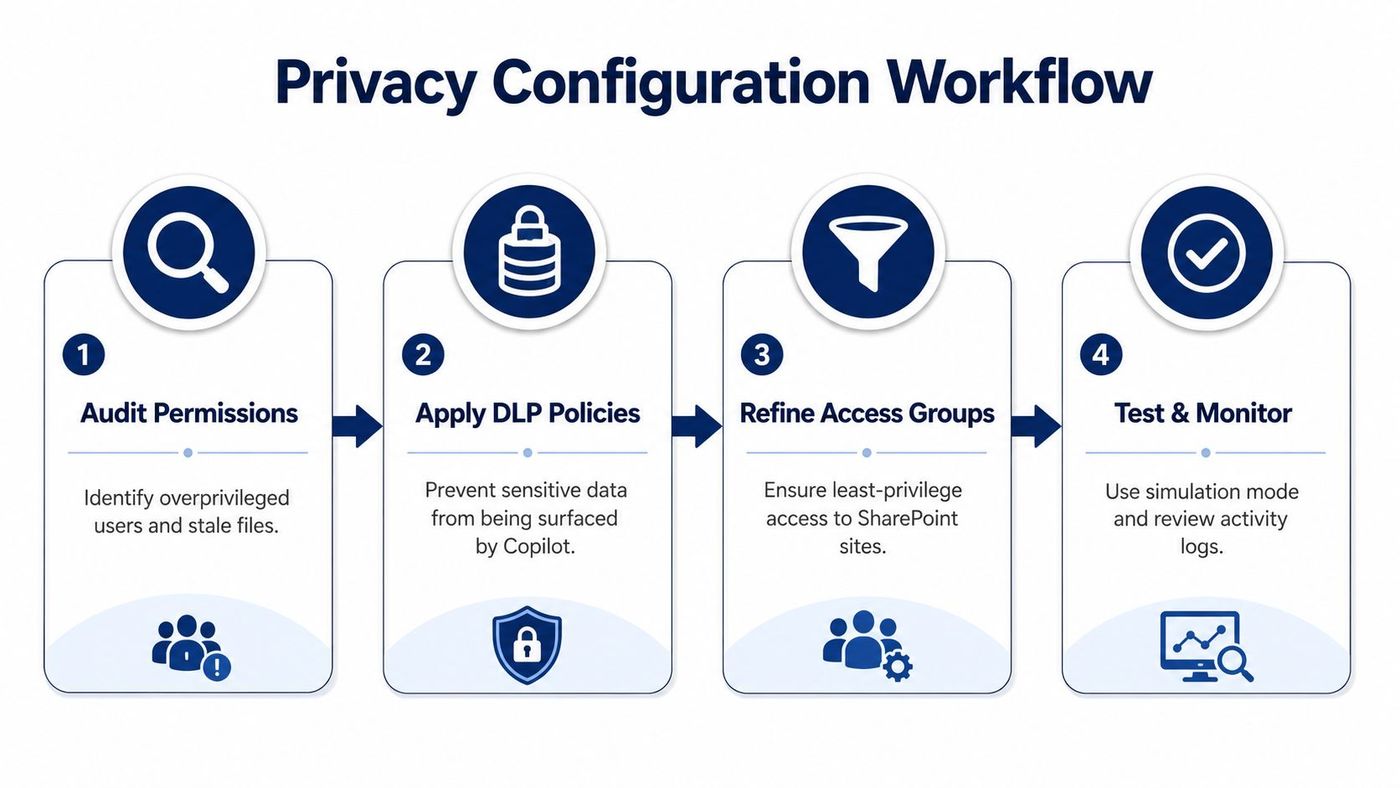
Run an access-minimisation audit across the sites and libraries Copilot will search. Prioritise patient, client, employee, financial, legal, and intellectual-property repositories. Identify anonymous links, broad “everyone” access, external guests, orphaned permissions, inherited access, and sites with no accountable owner.
Then validate the results with business owners. IT can find technical access, but department leaders must confirm whether that access still matches the employee's responsibilities. Remove stale groups and separate high-sensitivity repositories from routine collaboration areas.
Microsoft Purview sensitivity labels can classify documents and apply protection rules. Labels work best when they reflect a small number of understandable handling categories, such as internal, confidential, and highly restricted. Users need clear guidance, otherwise they may ignore labels or apply them inconsistently.
DLP policies should address the information employees might paste into prompts or move through connected Microsoft 365 services. Test policies in simulation mode first, review matches, and tune them before enforcement. Include realistic samples that contain personal information, client identifiers, financial records, and confidential legal content.
A practical test set should include:
The model isn't your access-control system. Your tenant permissions are.
Healthcare organisations should align controls with their clinical privacy obligations and avoid treating generic business labels as a substitute for sector-specific review. Legal practices need to protect client confidentiality and matter segregation. Finance teams should examine records involving customers, transactions, and employee information. Manufacturing and logistics businesses should include designs, supplier terms, operational data, and location information in their review.
Use CloudOrbis's data loss prevention guidance to structure the policy work, then retain test results and approvals as evidence. Monitoring should continue after enforcement because new sites, integrations, and group memberships can reintroduce exposure.
A Copilot rollout isn't complete when users receive licences. Microsoft will change features, employees will change roles, SharePoint sites will accumulate content, and business processes will evolve. Privacy governance must therefore combine technical monitoring, user training, permission reviews, and documented accountability.
The adoption pressure is real. The Office of the Privacy Commissioner of Canada reports that business AI use rose from 6% in 2023 to 16% in 2025. That finding suggests adoption is moving faster than many organisations' privacy governance maturity, which makes post-deployment oversight especially important. The Commissioner's business AI research provides that context.
Assign responsibility for Copilot privacy to named people across IT, security, privacy, and business operations. Their work should include:
Training should use the organisation's own scenarios. Show employees why copying a patient record, legal file, employee investigation, or confidential contract into an unapproved workflow creates risk. Explain that a polished answer can still be based on information the user shouldn't have been able to access.
For managed security providers, organisations may also evaluate specialised monitoring resources such as find Sylas for MSSPs, provided the tool fits their privacy, logging, and contractual requirements.
CloudOrbis's AI governance framework can help leaders connect policy, risk ownership, monitoring, and review into one operating model. The strongest approach treats Copilot as a governed business capability, not a standalone application.
CloudOrbis Inc. helps Canadian SMBs assess Microsoft 365 permissions, configure identity and security controls, establish DLP and governance practices, and support Copilot adoption across regulated environments. Visit CloudOrbis Inc. to discuss a practical privacy-first deployment plan for your organisation.
Book a 30-minute call with a senior engineer. No sales script, just straight answers about your environment.


