Cloud Migration Benefits for Canadian SMBs Explained
Discover the top cloud migration benefits for Canadian SMBs, from cost savings and scalability to security and resilience, with practical ROI examples and next

Discover the top cloud migration benefits for Canadian SMBs, from cost savings and scalability to security and resilience, with practical ROI examples and next
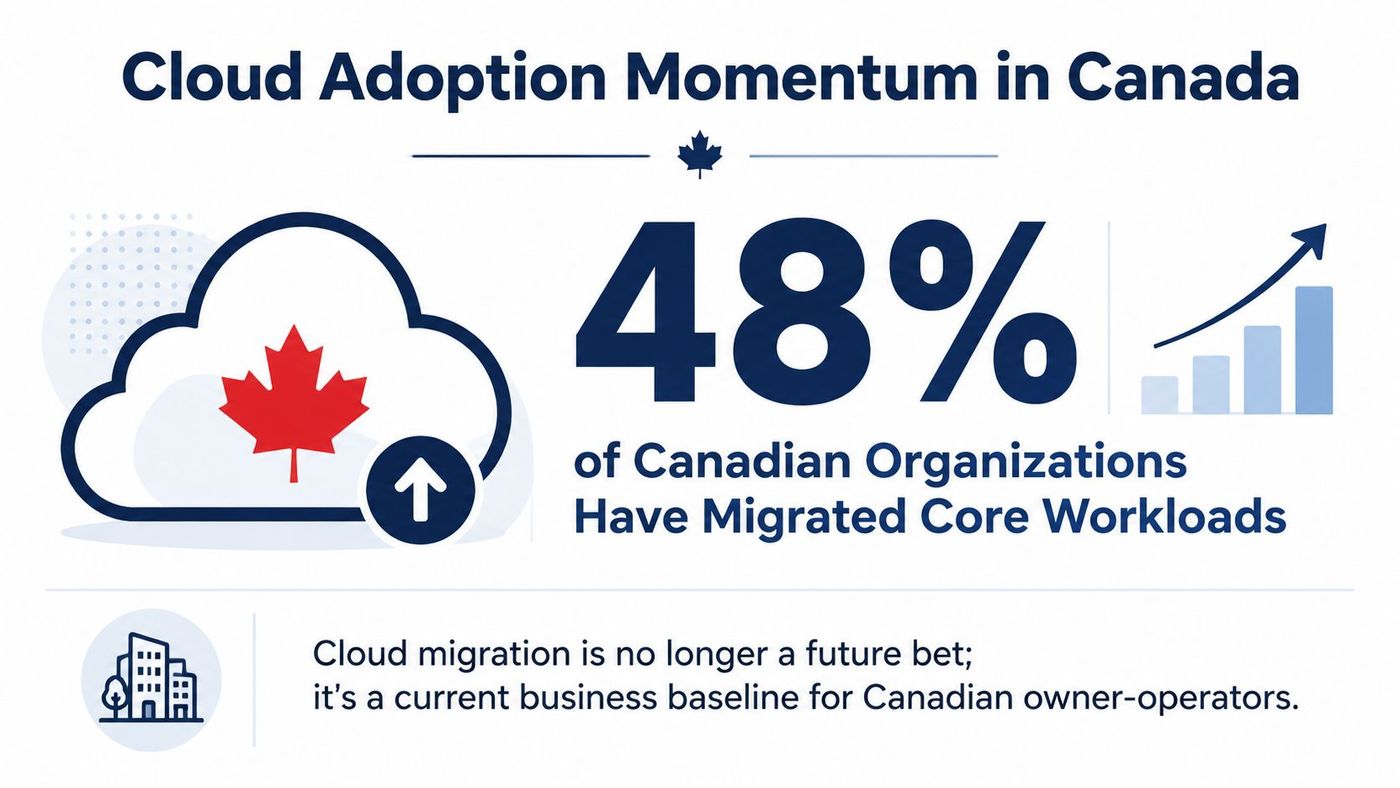
In 2023, 48% of Canadian businesses used cloud computing, making it the most commonly used business technology measured in Statistics Canada's survey, up 3 percentage points from 2021. Statistics Canada's cloud adoption data, cited by Fusion Computing makes the business reality clear: cloud migration has moved beyond experimentation.
For a Canadian owner-operator, the question isn't whether cloud technology is fashionable. It's whether your current infrastructure gives you the cash-flow control, resilience, security, and operating flexibility your business needs. The right migration can reduce dependence on ageing hardware and make it easier to support remote staff, new locations, and changing customer demand. A poorly planned move can create duplicated costs, disrupted workflows, and a cloud bill nobody understands.
The benefits are real, but they don't arrive automatically. They come from choosing the right workloads, setting clear controls, and treating migration as an operating-model decision rather than a weekend server replacement.
Canadian businesses have already crossed the adoption threshold. Statistics Canada reported that 48% of Canadian businesses used cloud computing in 2023, and the underlying Canadian cloud migration analysis identifies cloud computing as the survey's most commonly used business technology. That matters to an owner because early adopters have already absorbed much of the uncertainty around cloud platforms, managed services, remote access, and subscription-based infrastructure.
The economic case is more important than the technology label. On-premises infrastructure ties cash to servers, storage, warranties, power, cooling, and replacement cycles. Cloud migration shifts more of that spending toward consumption, subscriptions, and managed capacity. That doesn't guarantee a lower invoice, but it can give management better control over what the business is paying for and why.
Federal policy is another reason cloud has become a baseline operating decision. The Government of Canada Cloud First strategy supports public cloud for elasticity, self-service provisioning, security capabilities, continuous feature delivery, and access to innovation without large upfront capital investment. SMBs that sell to government or operate in regulated sectors should understand these expectations when evaluating providers, data handling, procurement requirements, and service controls.
Canadian businesses also have a stronger basis for continuity planning than they did when local servers were the default. Public First found that 70% of Canadian businesses said operating without online or cloud tools during the pandemic would have been more difficult, while 11% said it would have been impossible, as reported in Fusion Computing's Canadian cloud migration overview. Those figures are historical, but the lesson remains current: cloud-enabled access and recovery capabilities support business continuity.
I wouldn't recommend migrating everything just because peers have migrated. I would recommend ending the assumption that on-premises is automatically safer, cheaper, or easier. Compare both operating models in cloud computing versus on-premises infrastructure, then make the decision workload by workload.
Cloud migration means moving selected business applications, files, data, and infrastructure from local servers or ageing hardware into a cloud environment. That might mean Microsoft Azure, Amazon Web Services, Google Cloud, or a software-as-a-service platform such as Microsoft 365. A managed service provider can design the environment, execute the move, train staff, and operate the platform afterward.
The financial shift is straightforward. With on-premises infrastructure, you buy equipment before you need it, pay for capacity that may sit idle, maintain the room around it, and absorb occasional repair or replacement bills. With cloud infrastructure, you pay for the storage, compute, backup, identity, and security services your business uses. The invoice is recurring, so it needs active management, but capacity becomes easier to adjust.
A lift-and-shift move transfers a workload with minimal changes. It's usually the quickest path and can reduce dependence on local hardware, but it may carry inefficient configurations into the cloud.
A replatform move makes targeted changes, such as moving a database to a managed service or updating the operating environment. It takes more planning but can reduce maintenance work and improve reliability.
A refactor redesigns an application for cloud-native operation. This can support stronger automation and flexibility, but it demands more engineering effort and isn't justified for every legacy system.
The right answer is often a combination. Retire obsolete workloads, retain systems that still belong on-premises, rehost straightforward applications, and modernise only where the expected business value supports the additional work. CloudOrbis's guide to cloud migration strategies provides a useful framework for comparing those choices.
| Dimension | On-Premises | Cloud |
|---|---|---|
| Infrastructure spending | Hardware purchases, warranties, power, and facilities | Recurring charges for selected services and capacity |
| Capacity | Fixed until equipment is purchased and installed | Can expand or contract with demand |
| Maintenance | Internal teams manage hardware and core infrastructure | Provider manages defined service layers |
| Access | Often depends on office networks or VPNs | Approved users can access services from connected locations |
| Recovery | Requires separately designed backup and recovery systems | Can include managed backup, replication, and recovery services |
| Financial control | Costs can be hidden across facilities and refresh projects | Usage can be tracked by service, workload, owner, or department |
The practical outcome is simple. A staff member in a Tim Hortons in Thunder Bay can access the same approved systems as a colleague in the office, provided identity, security, and connectivity controls are designed properly. Cloud migration isn't one purchase. It's a set of decisions about where each workload should run and how the business will manage it.
Cloud migration benefits should show up in daily operations, not just in an architecture diagram. The strongest business cases usually combine cost visibility, flexible capacity, recovery planning, security controls, and better access to shared work.
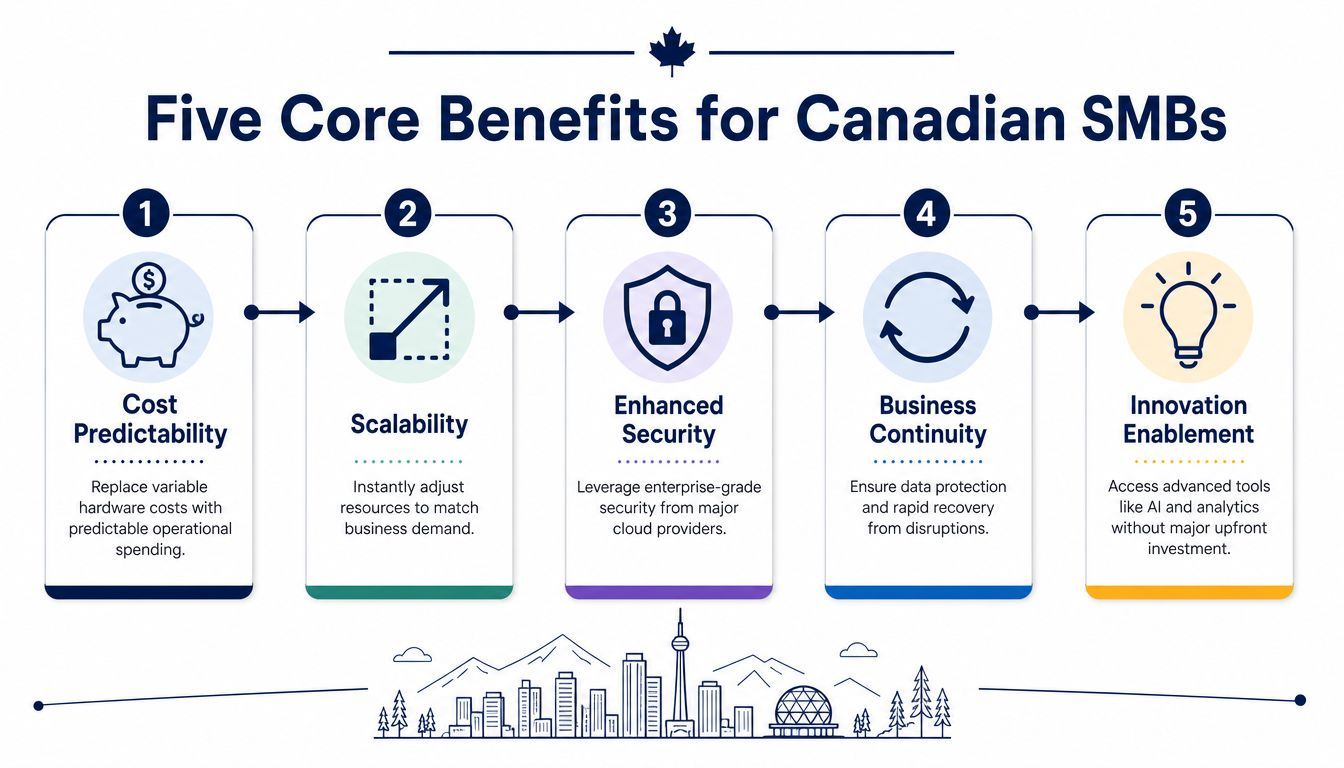
Cloud can replace large, irregular hardware purchases with recurring operating expenditure. You still need to manage the bill, and consumption pricing can punish poor sizing, but you gain a clearer connection between a workload and its cost. That makes it easier to retire unused services, allocate spending, and plan investment.
The federal cloud strategy describes how providers spread the cost of developing new services across a global customer base, allowing organisations to access new capabilities through subscriptions “without large capital investments”. The Government of Canada's cloud strategy update also highlights experimentation, because on-demand pricing can make it less expensive to test an idea before committing to a larger build.
Elasticity is one of the clearest cloud advantages. A Mississauga online retailer can increase resources during a major sales period and reduce them afterward instead of buying permanent hardware for a temporary peak. The Government of Canada describes this model as growing and shrinking commoditised services with demand, so consumers pay for what they need when they need it.
That flexibility also helps a business open a branch, onboard a project team, or launch a new application without waiting for a server purchase and installation.
Cloud doesn't eliminate outages. It gives you more options for reducing the effect of equipment failure, local disruption, or accidental deletion. Managed backups, replicated storage, documented recovery procedures, and tested restoration can protect payroll, point-of-sale systems, shared files, and line-of-business applications.
The important word is tested. A backup that nobody has restored isn't a recovery plan. Your provider and internal sponsor should agree on which workloads are critical, how recovery will be approved, and how often the process will be validated.
Major cloud providers offer identity management, encryption, logging, threat detection, vulnerability controls, and policy tools that would be difficult for many SMBs to build alone. That doesn't transfer accountability to the provider. Your business still controls user access, configurations, data classification, endpoint security, and staff behaviour.
Use the move to enforce multi-factor authentication, least-privilege access, centralised logging, and clear ownership. A managed cloud computing approach from CloudOrbis can help an SMB operate those controls instead of leaving them as a one-time implementation task.
Cloud-based Microsoft 365 services can give approved users shared access to documents, email, calendars, and collaboration tools across locations. Teams in Vancouver and Halifax can edit the same client file without passing attachments back and forth or relying on a server in one office.
The five benefits reinforce one another. Flexible capacity is more useful when security is consistent, collaboration is more valuable when recovery is reliable, and cost savings are easier to defend when management can see who uses each service. That's the foundation for a credible ROI case.
A cloud business case should survive questions from your accountant, lender, or board. Start with verified evidence, then replace broad assumptions with your own invoices, licence records, support hours, energy costs, and outage history.
Independent Canada-focused research found that 84% of AWS users in Canada reported saving money compared with traditional on-premises servers, while small-business users reported average annual savings of around CAD 30,000, according to Grand View Research's Canada cloud migration services outlook. Treat that as a benchmark, not a promise. Your result depends on workload fit, migration effort, licences, support arrangements, and post-migration governance.
For a 25-person Ontario professional services firm, the starting point might include server refresh spending, a part-time IT contractor, unused Microsoft 365 licences, energy or colocation, backup tooling, and staff time lost to slow file access. Don't assign invented savings to each line. Pull the actual annual amounts from your accounts payable system and usage reports.
| Cost line | On-Premises, CAD | Cloud-Migrated, CAD | Annual saving |
|---|---|---|---|
| Server hardware and refresh reserve | Use your audited spend | Use the proposed service cost | Difference |
| IT support and maintenance | Use contractor and support invoices | Use managed support and administration cost | Difference |
| Power, cooling, and colocation | Use facilities or provider invoices | Use the cloud service allocation | Difference |
| Backup and recovery | Use current backup contracts and storage | Use the proposed protection design | Difference |
| Microsoft 365 and other licences | Use current assigned and unused licences | Use right-sized subscriptions | Difference |
| Productivity lost to access issues | Estimate from documented internal time | Use the measured post-pilot result | Difference |
| Total | Your baseline | Your forecast | Your defensible case |
The key is separating one-time migration costs from recurring run costs. Discovery, data transfer, configuration, testing, training, and temporary overlap belong in the project budget. The ongoing cloud bill, support, backup, security, and governance belong in the operating forecast. CloudOrbis's cloud cost management guidance can help structure that review.
Revenue-side value matters too. Faster staff onboarding can let a firm accept work sooner. Secure remote access can support clients outside the local office. Quicker application deployment can reduce the delay between approving an idea and testing it.
Don't promise a universal payback period. Calculate yours from documented costs, pilot results, and the workloads that will move. The first-year return usually comes from retiring unused infrastructure, right-sizing licences, avoiding planned hardware spending, and reducing avoidable support effort.
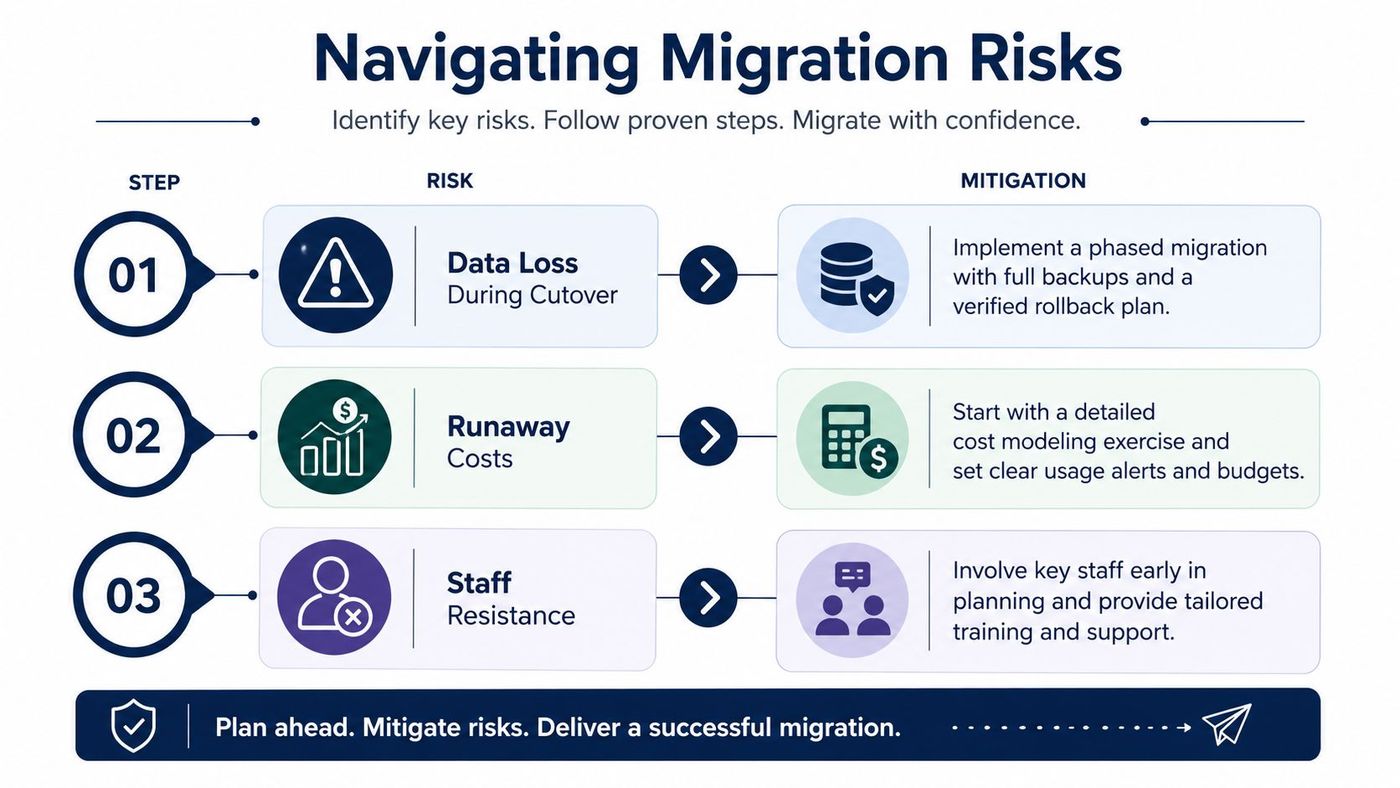
Migrations fail when owners treat them as a weekend server swap. The technical cutover may be short, but discovery, dependency mapping, testing, training, security review, and rollback preparation determine whether the business experiences a controlled transition or a costly interruption.
Begin with an inventory of applications, data stores, owners, integrations, and dependencies. Run a pilot on a non-critical workload, such as a controlled file-share migration or a collaboration service, before moving systems that run payroll, production, or customer transactions.
Before each phase, approve a rollback plan in writing. It should identify the decision-maker, the validation checks, the recovery point, and the conditions that trigger a return to the previous environment. A backup is only meaningful after the team has restored it and confirmed that the recovered data is usable.
Cloud costs can rise when teams leave test resources running, choose oversized capacity, duplicate data, or fail to assign ownership. Require budgets, usage alerts, tagging, and a dashboard that separates production, testing, migration, and shared services.
Owner approval: Don't approve a migration plan that shows only the target cloud invoice. Require the temporary migration costs, overlap period, support effort, and optimisation work to appear separately.
Staff resistance usually reflects uncertainty. People want to know how they'll find files, request access, work remotely, recover a deleted document, and get help when a familiar process changes. Assign one internal sponsor, publish training windows, and give department leads a clear way to report problems during the pilot.
Use the following owner-level approvals:
A cloud data protection plan from CloudOrbis can support the backup, recovery, and governance work, but the owner still needs to approve the controls and hold people accountable.
The best cloud migration benefits look different on a clinic floor, in a plant, and inside a law office. Start with the workflow that creates the most operational friction, then choose the cloud service that removes that bottleneck without weakening privacy or access controls.
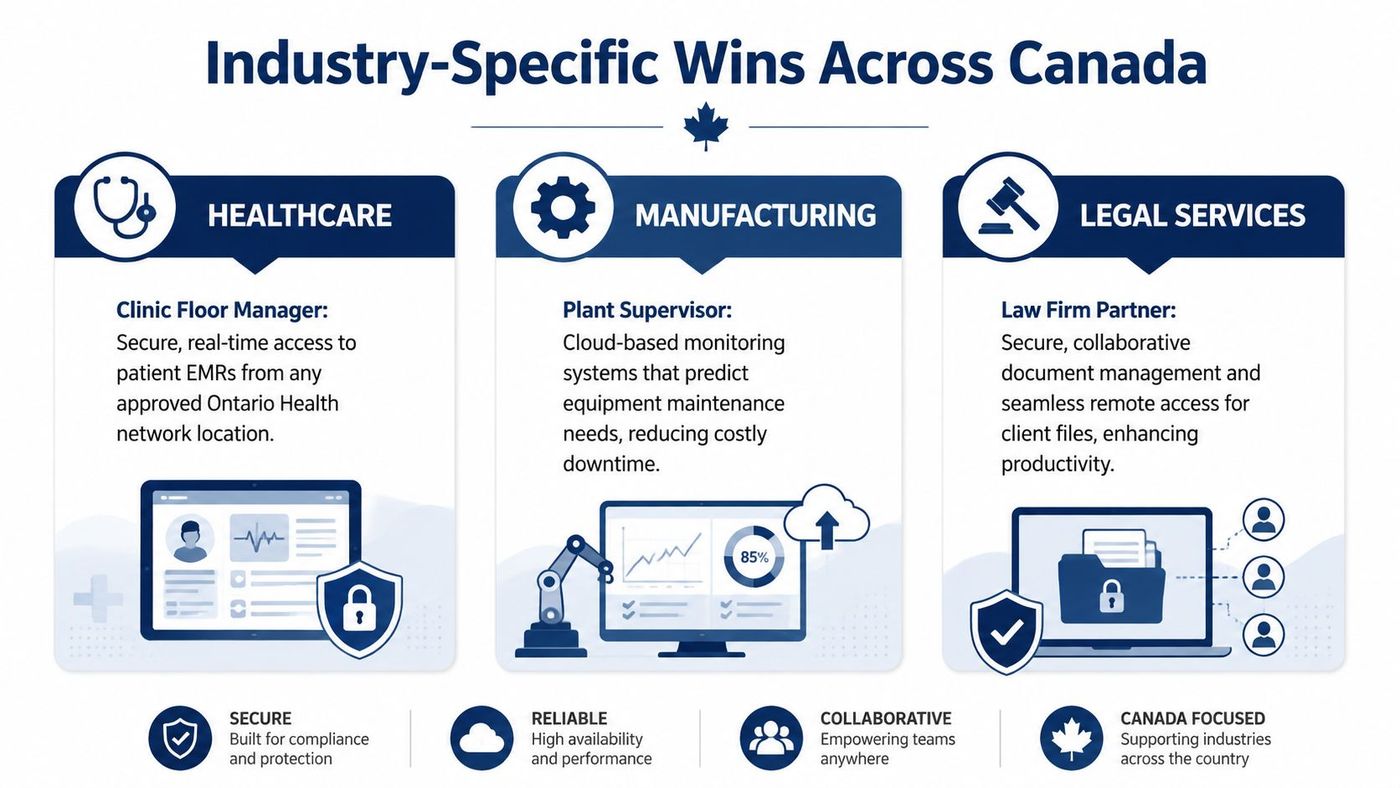
A clinic manager may need approved staff to access electronic medical records across multiple Ontario Health atHome locations or from an on-call laptop. A properly designed cloud environment can make that access more consistent while supporting encryption, identity controls, audit logging, and data-handling requirements.
Cloud doesn't make a healthcare organisation compliant by itself. The provider, configuration, contracts, access model, retention rules, and staff practices all matter under PIPEDA and applicable provincial privacy obligations. In healthcare, the first workloads to assess are usually identity, secure collaboration, backup, and systems that require access across approved locations.
The year-one win should be defined operationally, such as fewer access delays, more reliable recovery, and clearer audit evidence. Avoid claiming that migration alone improves patient outcomes.
A Mississauga or Kitchener-Waterloo manufacturer running two shifts may have production data trapped in local systems or summarised in weekly reports. A cloud ERP, connected operational data platform, or IoT dashboard can help supervisors review downtime, maintenance signals, inventory, and production performance without waiting for manual consolidation.
The first workload is often reporting, backup, ERP integration, or a plant-to-management data pipeline. Keep production controls stable during the transition and isolate the pilot from safety-critical operations until the team has validated performance and recovery.
The measurable year-one result might be faster reporting, more consistent inventory visibility, fewer manual reconciliations, or earlier maintenance decisions. Track the metric before migration, then compare it after the pilot.
A 10-lawyer firm needs secure document management, reliable search, controlled sharing, and access for lawyers working away from the office. Cloud-based document systems can support collaboration on cross-border matters while applying role-based access, retention policies, audit trails, and legal hold procedures.
The firm should review conflict-search workflows, client-matter permissions, mobile access, backup, and Law Society of Ontario record-keeping expectations before selecting a platform. The first move may be document management, Microsoft 365 governance, identity, or backup rather than a wholesale application migration.
A practical year-one win is a cleaner matter workspace, faster collaboration, fewer duplicate files, and stronger evidence about who accessed or changed client information. The partner responsible for risk should approve the design before staff adoption begins.
Cloud migration is now a baseline operating choice for many Canadian SMBs. Delaying a decision doesn't preserve the status quo. It extends hardware dependency, keeps recovery weaknesses in place, and may leave staff working around systems that no longer fit the business.
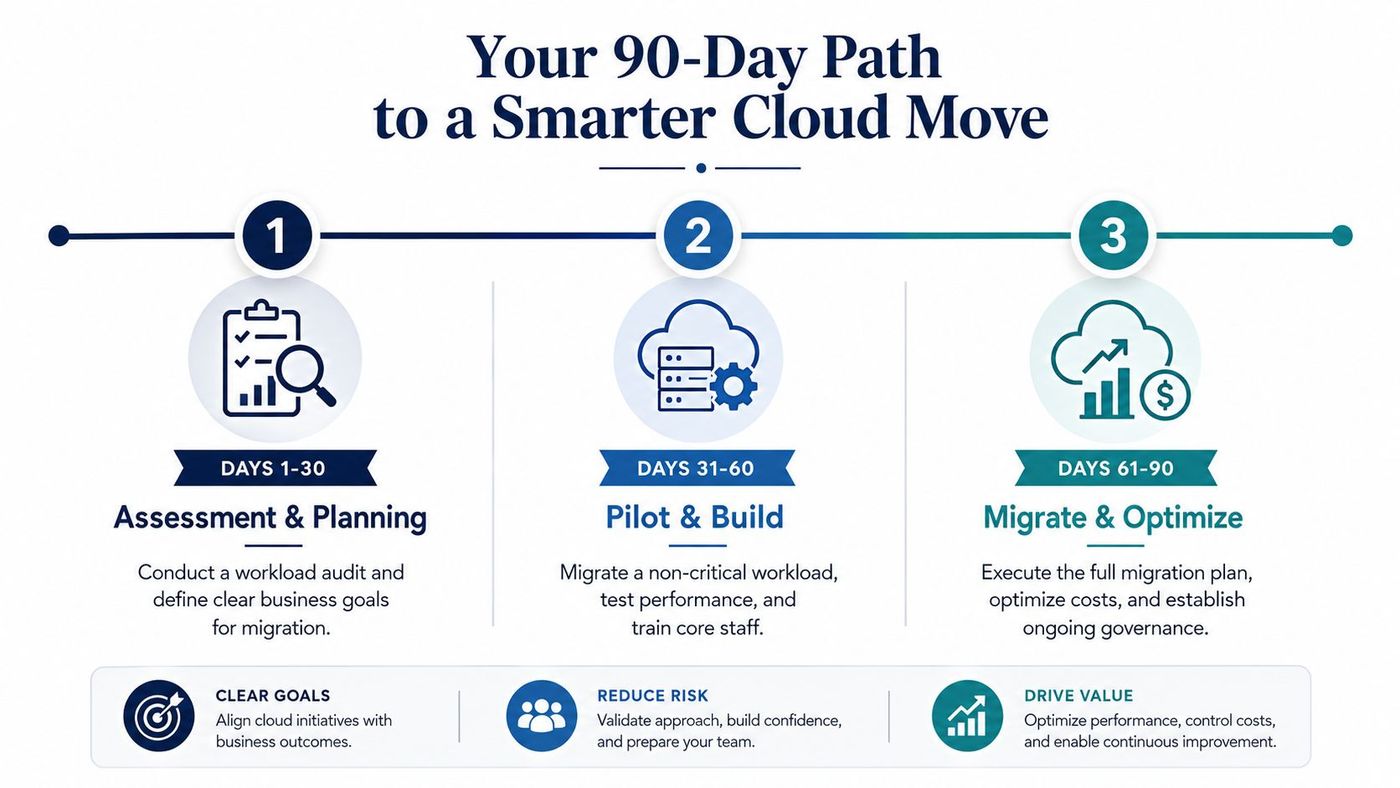
A disciplined 90-day path gives you enough time to understand the estate, test the approach, and make a budget decision without committing to a blind transformation.
Start with facts, not provider presentations. Inventory servers, applications, file shares, identities, endpoints, integrations, backup jobs, contracts, and owners. Audit current spending in CAD, including support, licences, facilities, hardware replacement, backup, and recovery.
Review PIPEDA and applicable provincial requirements with the people responsible for privacy and risk. Identify stakeholders from finance, operations, HR, compliance, and department leadership. The first phase of a managed engagement should establish the baseline and the business goals.
Choose the cloud model by workload. Some services may fit software as a service, others may need infrastructure or platform services, and some may remain local for operational or regulatory reasons. Shortlist providers and partners that can support Canadian data residency requirements where your risk assessment calls for it.
Build the business case using actual invoices and measured workload data. Separate project costs from ongoing run costs, then document the assumptions behind each forecast. Select the pilot, define success criteria, set budgets and alerts, and approve the rollback plan before anyone schedules production work.
Migrate one non-critical workload. Test access, performance, backup, restoration, security controls, user experience, and cost behaviour. Train the core staff who will use and support it, then record issues instead of relying on informal feedback.
The pilot should lead to a decision, not an automatic full migration. If the workload performs well and the financial model still holds, refine the roadmap for the next wave. If it doesn't, change the design before moving a critical system.
CloudOrbis's 10-step engagement model fits this sequence by connecting assessment and strategy with implementation, employee training, support, and ongoing optimisation. A practical engagement should include:
Decision rule: Move a workload when the evidence shows better control, resilience, flexibility, or value. Don't move it simply because the provider makes the platform available.
Book a 30-minute scoping call with CloudOrbis Inc. to review your current environment, request a cloud readiness assessment, and map a practical migration roadmap. Use the discussion to pressure-test your ROI worksheet, identify a safe pilot workload, and decide what should move, stay, or be retired.
CloudOrbis Inc. helps Canadian SMBs plan and execute cloud migrations, including workload assessment, Azure migration services, server migration, employee readiness, backup, security, and ongoing optimisation. Visit CloudOrbis Inc. to request a 30-minute scoping call and start building a migration plan grounded in your actual costs and business priorities.
Book a 30-minute call with a senior engineer. No sales script, just straight answers about your environment.


