Dynamics 365 Pros and Cons for Canadian SMBs
Explore Dynamics 365 pros and cons for Canadian SMBs. We analyse costs, AI readiness, privacy compliance, and implementation realities to guide your choice.

Explore Dynamics 365 pros and cons for Canadian SMBs. We analyse costs, AI readiness, privacy compliance, and implementation realities to guide your choice.

The most popular advice about Dynamics 365 pros and cons is usually too simple: choose it for scale, integration, and AI, or avoid it because it's expensive and complex. That framing misses the decision Canadian SMB leaders need to make. Dynamics 365 doesn't modernise a business by itself. It exposes whether the business has organised data, documented processes, accountable owners, and enough operational capacity to adopt a large platform properly.
For a Microsoft 365 organisation with fragmented finance, sales, service, inventory, or project systems, Dynamics 365 can create a coherent operating foundation. For a smaller company with simple bookkeeping and limited technical resources, the same breadth can become a costly governance burden. The right question isn't whether the software is powerful. It's whether your organisation is ready to use that power.
| Area | Potential advantage | Practical drawback |
|---|---|---|
| Cloud platform | Centralised access, scalable capacity, and integration across business functions | Migration, identity, security, and administration require internal ownership |
| Business Central | Finance, supply chain, projects, service, and manufacturing can share one platform | Configuration and process redesign can exceed the needs of simpler firms |
| Microsoft ecosystem | Strong alignment with Microsoft 365, Azure, Power Platform, and reporting tools | Licensing and dependencies become harder to model across modules |
| Canadian deployment | Azure datacentres in Toronto and Quebec City can support Canadian data-residency requirements | Residency alone doesn't satisfy privacy, retention, access, or breach obligations |
| Copilot and automation | Advanced assistance can support sales, service, and operational workflows | Poor data and undocumented processes can leave AI features underused |
| Implementation | A structured rollout can standardise operations across entities and provinces | Poor migration planning, excessive customisation, and weak training delay value |
Buying a premium cloud ERP does not modernise a company on its own. It gives leadership a better system to run the business, but the hard part is still organisational: setting standard processes, cleaning up records, assigning ownership, and getting managers to enforce new ways of working. In Canadian mid-market firms, that is usually where projects slow down.
Adoption figures show why. 48% of Canadian companies used cloud services in 2023, according to data cited in a Canadian ERP market analysis. The same source notes that a small-business study found 72% of surveyed small businesses were not using cloud applications and 60% were not using a single cloud application to integrate major business functions. That spread matters more than any feature checklist. Plenty of organisations are still trying to move from spreadsheets, email approvals, and disconnected point tools to a shared operating model.
That shift is bigger than a software purchase.
A company adopting Dynamics 365 often has to settle arguments it has postponed for years. Which customer record is the master. Who approves purchasing exceptions. How inventory adjustments are documented. Which finance, service, and sales data can be trusted for reporting. If those decisions are still unresolved, the system will reflect confusion at scale. In Canada, the operational work can also expand once privacy governance enters the discussion. Data residency may be available, but retention rules, access controls, role design, auditability, and breach handling still need internal ownership.
Before approving the project, leadership should test readiness in four areas:
A move to cloud infrastructure can improve access, resilience, and coordination, but those gains depend on preparation. CloudOrbis outlines many of the same planning factors in its article on cloud migration benefits. The ERP lesson is straightforward: technology follows operating discipline, not the other way around.
Practical rule: If the organisation cannot agree on the process before configuration begins, the software will preserve the disagreement instead of fixing it.
The strongest candidates are companies that have outgrown fragmented systems and need one system of record across functions or entities. The weaker candidates are firms looking for a quick bookkeeping replacement without the operational complexity to justify broader ERP governance. Dynamics 365 can support growth, but only when leaders are prepared to fund the people, controls, and process work around it.
Dynamics 365 pricing is modular, so a licence quote rarely tells the whole story. A leadership team might start with Sales or Business Central, then add Customer Service, Finance, Supply Chain Management, premium capabilities, integration capacity, or additional full users. Each decision can be reasonable in isolation, yet the combined subscription and service commitment can become difficult to forecast.
Microsoft lists the following Canadian prices when paid annually:
| Application Module | Base / Professional Tier (CAD) | Premium / Enterprise Tier (CAD) |
|---|---|---|
| Sales | $88.20 per user per month | Enterprise $142.50, Premium $203.50 |
| Customer Service | $67.80 per user per month | Enterprise $142.50, Premium $264.60 |
| Finance | Not listed as a professional tier in the cited pricing data | $284.90 per user per month |
| Supply Chain Management | Not listed as a professional tier in the cited pricing data | $284.90 per user per month |
The Microsoft Dynamics 365 Sales pricing page identifies higher Sales tiers with capabilities such as contextual insights, advanced customisation, AI-driven sales intelligence, and agentic automation. The Customer Service pricing page shows a similar spread, with Premium combining customer engagement, an integrated contact centre, and generative AI. An Azure subscription is required for Dynamics 365 agents, and agent usage can involve Copilot Credits, so the subscription line isn't necessarily the full cost of AI-enabled service operations.
Finance and Supply Chain Management carry a different scale of commitment. Microsoft lists each at CAD $284.90 per user per month, while Canadian SMB deployments are commonly estimated at CAD $30,000 to $150,000, depending on process complexity and data migration requirements, as described in the cited Dynamics 365 Finance pricing information. Supply Chain Management also offers Intelligent Order Management at CAD $427.35 per month for 1,000 order lines, which means transaction volume can influence the budget alongside named users.
Role-based licensing can reduce waste, but only if roles are mapped properly. Microsoft's Canadian Finance and Operations guide distinguishes between Team Members, who mainly consume data, reports, and light tasks such as time entry, and Full Users, who access broad business-application functionality. A Full User licence includes rights for one external accountant at no additional cost, although the external-user licence must be requested separately.
A practical licence review should document:
The financial model should cover a five-year total cost of ownership, including data cleansing, integration development, training, support, administration, change management, Azure dependencies, and transaction capacity. Use CloudOrbis's SaaS licence management guidance to strengthen the broader licence-governance process, but don't treat licence optimisation as a substitute for business-process planning.
A smaller company with simple bookkeeping may find the module breadth unnecessary. A manufacturer, distributor, or professional-services firm with fragmented finance, inventory, projects, and service operations may find consolidation economically sensible. The difference lies in operational complexity, not in the attractiveness of a particular feature tier.
Canadian data residency is a meaningful Dynamics 365 advantage, especially for organisations handling sensitive health, legal, financial, or public-sector-adjacent information. Canadian tenants can use Azure datacentres in Toronto and Quebec City, with Canadian data residency described as the default configuration for Dynamics workloads. That can simplify procurement discussions and documentation for organisations assessing PIPEDA and provincial privacy obligations.
Infrastructure location, however, isn't the same as compliance. A Canadian datacentre doesn't decide who should access a patient record, how long a client file should be retained, whether an integration sends information to another jurisdiction, or how the organisation responds to a breach. Those decisions remain with the customer and require documented controls.
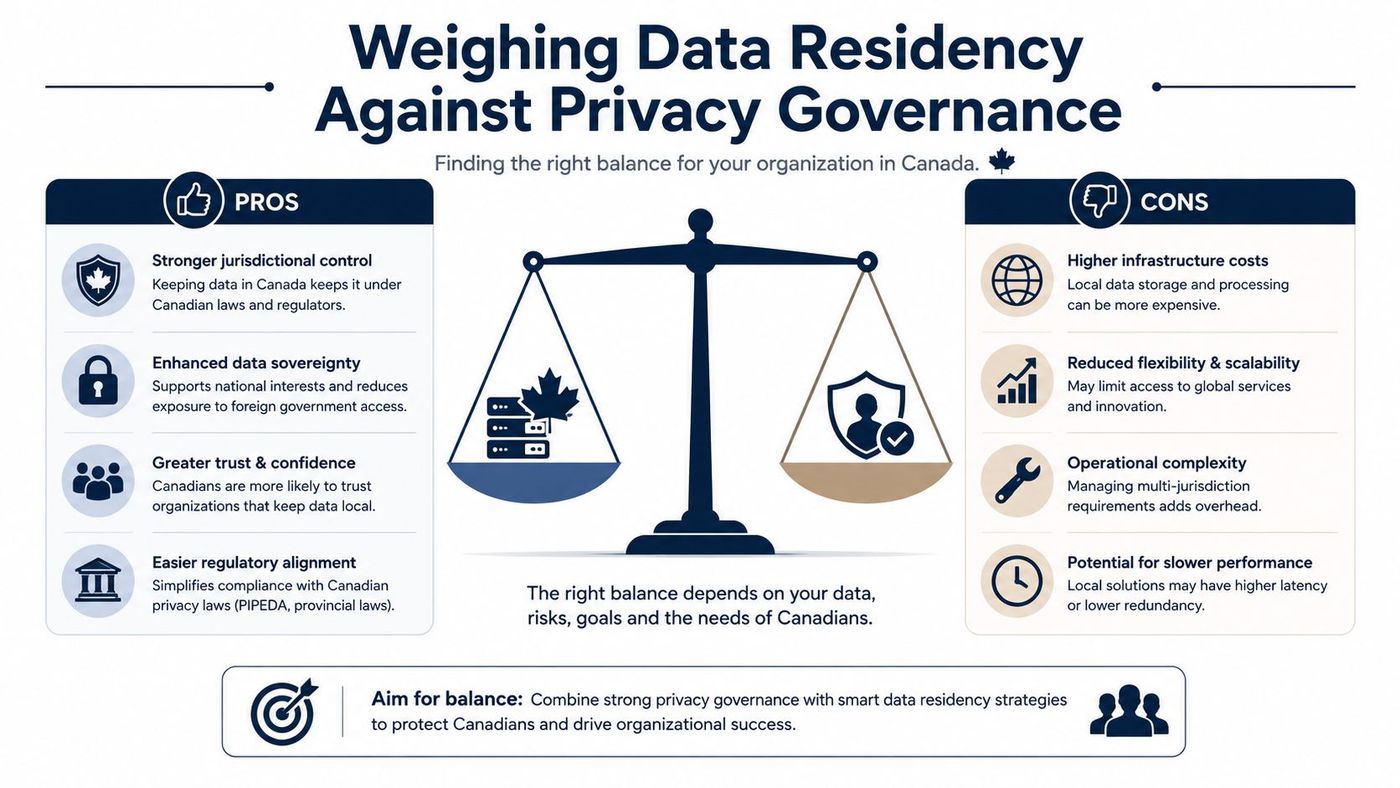
The Office of the Privacy Commissioner's 2025–26 business survey found that 50% of Canadian businesses store customer information with an off-site third party, yet nearly one-third couldn't estimate their ongoing compliance costs. The survey is a useful warning for Dynamics 365 buyers: cloud outsourcing is common, but accountability often remains poorly measured. Further context is available in the Office of the Privacy Commissioner's business survey.
| Canadian concern | What local residency can help with | What the customer still needs to control |
|---|---|---|
| Location of records | Provides a clearer basis for documenting where Dynamics workloads are hosted | Confirm the treatment of connected services and third-party applications |
| Access management | Supports centralised identity and role controls | Define least privilege, approvals, reviews, and segregation of duties |
| Privacy assessment | Gives assessors a concrete hosting configuration to evaluate | Complete a privacy impact assessment and document lawful data use |
| Incident response | Provides a known platform and vendor relationship | Maintain breach procedures, escalation paths, and evidence |
| Retention | Enables configurable business rules and records management | Set retention schedules and verify deletion across integrations |
A defensible deployment should include a data-residency statement, role-and-privilege matrix, integration inventory, migration rehearsal, privacy impact assessment, and acceptance criteria for reporting and performance. Healthcare clinics, legal practices, accounting firms, and Quebec-based organisations should involve privacy and security owners before configuration begins, not after go-live.
Master-data quality also belongs in the privacy conversation. Duplicate customers, inconsistent identifiers, and uncontrolled exports increase the chance that employees will access or share information incorrectly. Dynamics 365 can improve auditability and control, but it won't compensate for an organisation that hasn't assigned ownership for data classification, permissions, retention, and monitoring. The Canadian data privacy laws resource offers useful context for building that governance work into the project rather than treating it as paperwork at the end.
Copilot demonstrations make AI look ready on day one. In practice, AI is only as useful as the records, workflows, and permissions behind it. A sales assistant can't produce dependable recommendations from incomplete opportunities, inconsistent customer names, or pipeline stages that each salesperson interprets differently.
Canadian adoption figures reinforce the point. Statistics Canada reported that only 12.2% of Canadian businesses had used AI to produce goods or deliver services in the 12 months preceding Q2 2025, while 66.7% had no plans to adopt AI within the following year. Those figures don't mean Canadian businesses lack interest in automation. They show that access to AI and readiness to operationalise it are different conditions. The source is the Statistics Canada analysis of business AI adoption.
Before paying for advanced AI functionality, leaders should test whether the organisation can answer basic questions:
A phased programme normally works better than buying the broadest feature set immediately. Stabilise core records and processes first. Then test one role-specific workflow, document the result, correct the data or permissions issues it exposes, and expand only when users can explain how the feature supports their work.
AI readiness is an operating-model question before it's a licensing question.
Legal and compliance teams should be particularly cautious with generated content, privileged information, and review obligations. Teams exploring specialised applications can also examine this expert legal guidance chatbot as an example of how a focused legal use case differs from deploying general-purpose automation across an entire organisation.
Copilot and agentic automation may become valuable once the foundation is stable. They're a poor reason to purchase Dynamics 365 when the organisation still relies on ungoverned spreadsheets, undocumented approvals, or duplicate customer records. A practical AI governance framework should define acceptable use, data boundaries, human review, monitoring, and escalation before the first production pilot.
Dynamics 365 earns its cost when a business has enough operational complexity to benefit from shared data and structured controls. It's less compelling when the business mainly needs basic bookkeeping, a straightforward contact list, or a small number of standard workflows.
Business Central illustrates the distinction. Its Essentials tier combines financial management, supply chain, and project management, while Premium adds service order management and manufacturing capabilities for more complex operations, according to the Canadian implementation overview from Gestisoft.

Manufacturers can benefit when production, purchasing, inventory, quality, service, and finance depend on the same operational information. The platform's depth becomes useful when a change in demand affects materials, capacity, fulfilment, and reporting rather than only a sales forecast.
Distributors and logistics businesses are stronger candidates when they manage multiple entities, warehouses, purchasing rules, inventory movements, and customer-service commitments. A shared system can reduce reconciliation between separate accounting, inventory, and service applications.
Professional-services firms may find value in connected project, finance, resource, and customer processes. The fit is strongest when leaders need consistent project reporting, billing controls, approvals, and visibility across teams.
A small organisation with simple bookkeeping and limited operational variation may not need Business Central's configuration surface. The platform can introduce governance work that outweighs its benefits, particularly when there's no dedicated owner for permissions, master data, testing, and ongoing administration.
Use this decision test:
The right fit isn't determined by company ambition or Microsoft preference alone. It depends on whether the business has enough complexity to benefit from standardisation and enough discipline to maintain it.
A Dynamics 365 deployment should be treated as an operating change, not an installation project. The contract should cover process design, data ownership, migration testing, training, permissions, reporting, and post-launch support. If those activities sit outside the agreed scope, they'll often become rushed decisions when the go-live date is already fixed.
A straightforward Canadian Business Central deployment is commonly estimated at roughly 3 to 9 months, while complex Finance and Supply Chain implementations involving multiple entities and data migration may take 9 to 18 months or longer, according to the cited Dynamics 365 implementation comparison. The timeline depends heavily on data quality, integrations, customisation, decision speed, and the number of business processes being changed.
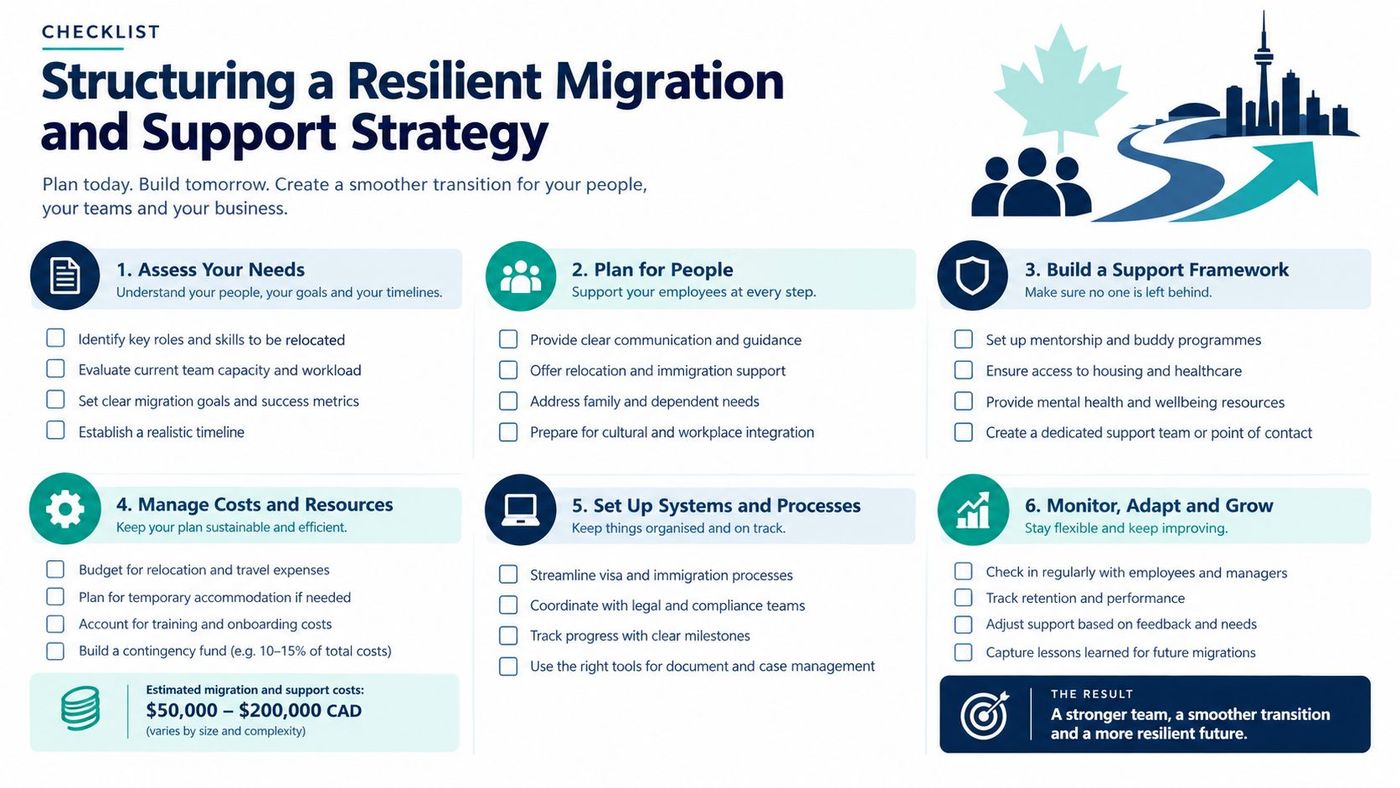
A resilient programme should include the following work before production release:
Leaders should also plan for the period after launch. Automatic product updates are included with all licences, but the organisation still needs to assess changes, test critical workflows, review security roles, monitor integrations, and train employees as processes evolve. A managed IT partner can support that ongoing work, but accountability must remain clear inside the business.
For broader planning, the top migration practices for IT leaders provide useful preparation principles that apply beyond ERP. CloudOrbis also provides a practical cloud migration roadmap template for organising assessment, sequencing, testing, training, and optimisation activities.
CloudOrbis Inc. provides managed IT support and Dynamics 365 consulting for Canadian SMBs, including assessment, migration planning, implementation support, employee training, cybersecurity, and ongoing optimisation. Visit CloudOrbis Inc. to discuss your readiness, privacy controls, licensing model, and migration strategy before committing to a Dynamics 365 rollout.
Book a 30-minute call with a senior engineer. No sales script, just straight answers about your environment.


