Database Migration Services Explained for Canadian SMBs
Learn how database migration services move data to the cloud securely with minimal downtime. Types, risks, costs and a Canadian provider checklist.

Learn how database migration services move data to the cloud securely with minimal downtime. Types, risks, costs and a Canadian provider checklist.

Your database might still be “working,” but that doesn't mean it's serving the business well. Many mid-sized Canadian firms are in that spot right now. The accounting system lives on one server, the reporting database sits somewhere else, backups depend on old routines, and every upgrade feels risky because too many processes touch the same data.
That usually starts as a technical problem and quickly becomes an operations problem. Leaders feel it through slow reporting, security pressure, limited scalability, and the constant worry that one poorly timed outage could disrupt payroll, patient records, client files, or production schedules. That's why database migration services matter. They don't just move data. They help a business move safely, with a plan for continuity, governance, and future growth.
A common scenario looks like this. A growing Ontario company has outpaced the server room it set up years ago. Its finance team wants better analytics, its operations team needs more reliable uptime, and its compliance requirements have become stricter as more customer and employee data moves through the business. The database at the centre of all this isn't just old. It's become hard to change without affecting everything around it.
This pressure isn't limited to private business. Public-sector planning in Canada shows the same broader shift. In Ontario's 2024 to 2025 published plans, the Ministry of Public and Business Service Delivery said it aimed to have approximately 50% of government applications, including workloads and data, hosted in the cloud by March 2025 (Ontario published plans and annual reports). That matters because applications and databases move together. When organisations modernise services, the data layer can't stay behind.
Most leaders aren't deciding whether copying data is possible. They're deciding whether the move will reduce risk or create more of it.
Three questions usually sit underneath the project:
Database migration is usually less about “moving a server” and more about deciding how the business wants its data to behave for the next several years.
That's also why provider choice matters. If you're sorting through options, this practical guide on how to find a cloud migration partner is useful because it frames the decision around capability, planning, and support instead of marketing claims.
People often hear “migration” and picture a giant copy-and-paste job. That's too simple. A better analogy is moving a busy office while the company is still open. You're not just carrying boxes to a new building. You're labelling everything, checking what still belongs, deciding what gets archived, and making sure staff can keep working.
That's what database migration services do. They combine technical work with business continuity planning.
A proper migration service usually includes several distinct activities:
Leaders often mix up three related moves:
They overlap, but they aren't the same. A company can move an application to Azure or AWS and still keep the same database engine. It can also change from one database platform to another while leaving much of the application untouched.
Practical rule: If users depend on the data every day, the migration is a continuity exercise first and a technical task second.
That's why managed support matters for mid-sized firms. Internal teams often know the business well, but they may not have spare capacity for repeated testing, after-hours cutovers, and post-migration troubleshooting. Ongoing oversight such as DBA as a service can also help after the move, especially when performance tuning and backup validation continue long after launch weekend.
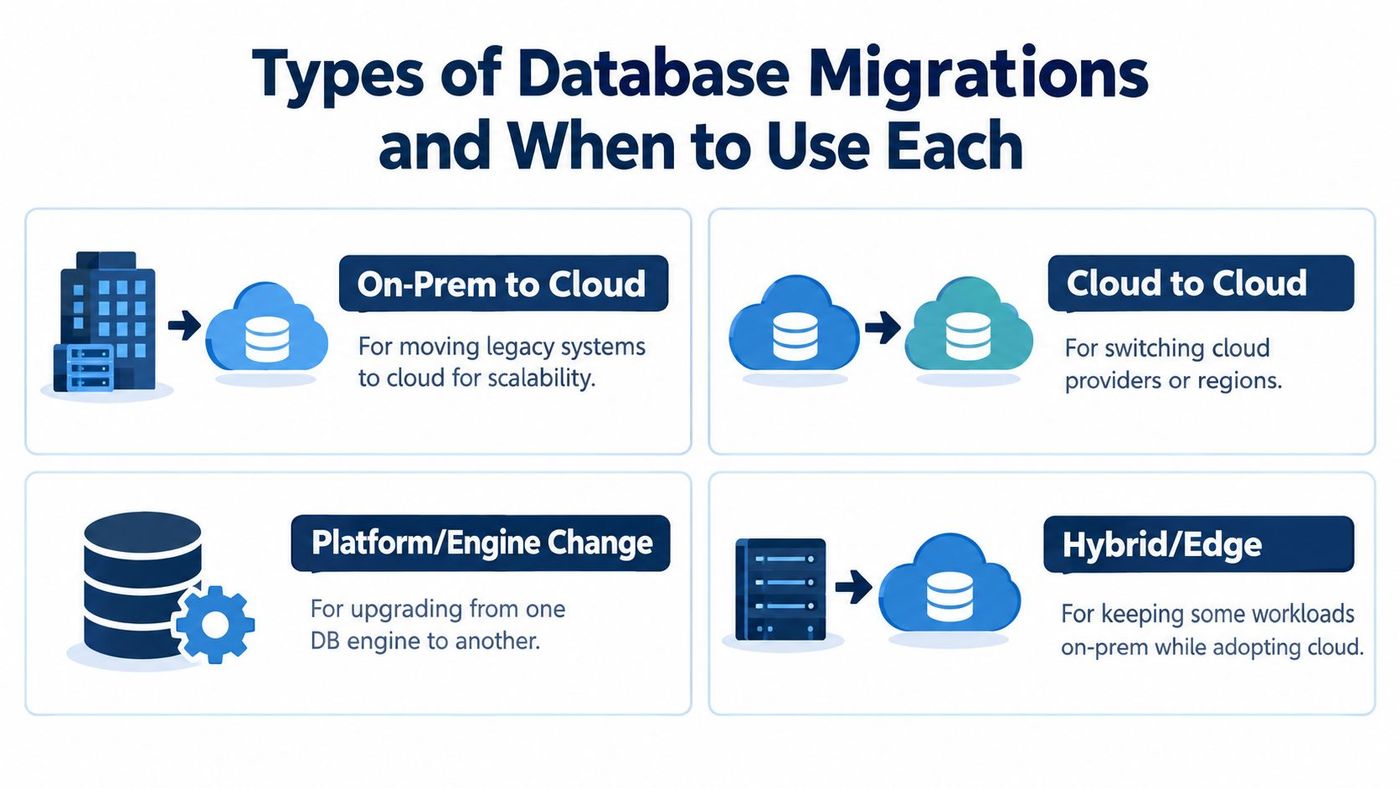
Not every database move solves the same problem. Some businesses need scale. Others need compliance alignment, lower operational burden, or a cleaner analytics foundation. The type of migration should match the reason for moving.

On-prem to cloud is the path most leaders picture first. It fits businesses with aging hardware, backup headaches, or limited room to scale. A manufacturer running SQL Server in its own server room may move to a managed cloud database to reduce maintenance burden and improve resilience.
Cloud to cloud happens more often than people expect. Sometimes a company outgrows its first provider choice. Sometimes it needs a different region, service model, or commercial arrangement. A legal firm may move between cloud platforms because the original setup no longer fits its governance or integration needs.
Platform or engine change is more fundamental. This is when the business changes the database technology itself, not just the hosting location. For example, a team may move from one relational engine to another to gain compatibility, lower licensing complexity, or support a modern application roadmap.
Hybrid or edge-aware migration keeps some data or workloads close to specific locations while moving other components to cloud platforms. This suits organisations that need local system responsiveness, equipment integration, or tighter control over where certain records live.
A straight transfer can be sensible if the current database design is still sound. But if reporting is brittle, integrations are messy, or old structures are blocking change, simple relocation may lock those problems into the next platform.
Canadian organisations also need to think about interoperability and records context. Federal guidance highlights the importance of import and export capability, interoperability, and maintaining adequate context through metadata in information systems (Government of Canada metadata needs guidance). In practice, that means a migration plan should preserve meaning, not just rows.
| Migration Type | Best For | Key Consideration |
|---|---|---|
| On-prem to cloud | Businesses replacing aging infrastructure | Hosting choice affects security, management model, and future scalability |
| Cloud to cloud | Teams changing provider, region, or service model | Interoperability and data movement between platforms need planning |
| Platform or engine change | Organisations improving compatibility or modernising apps | Schema conversion and testing become more demanding |
| Hybrid or edge | Regulated or operationally complex environments | Governance, connectivity, and local processing requirements shape architecture |
If your wider strategy is still taking shape, these cloud migration strategies give useful context for deciding whether a phased move, replatforming, or selective modernisation fits best.
A good migration follows a sequence. Skip a stage and the project usually pays for it later through rework, extended downtime, or trust issues from business teams. The safest moves are organised like a controlled handover, not a last-minute switchover.
The first step is finding out what exists. That sounds obvious, but many companies discover undocumented databases, old integrations, and reporting tools that still rely on legacy fields.
Teams need to catalogue:
This is also where leaders decide whether every dataset should move at all. Some should be archived. Some should be cleaned before migration.
Once inventory is complete, the team maps source structures to the target environment. That includes field types, naming conventions, relationships, and metadata. If this step is weak, analytics and downstream reporting often break rather than dramatically.
A pilot migration reduces that risk. Instead of moving the whole estate in one attempt, the team migrates a smaller representative slice, validates the outcome, and fixes issues before full execution.
A pilot doesn't slow the project down. It prevents the full migration from becoming the pilot.
For active systems, teams usually need a way to keep the target current while users still work in the source system. Replication or change-data-capture supports that goal by carrying over changes during the migration window. Then comes cutover, when production traffic switches to the target database.
Good cutovers have clear checkpoints:
Post-migration work matters too. Permissions may need tightening, indexes may need tuning, and backup jobs may need redesign in the new environment. Businesses that treat cutover as the finish line often miss the period when most practical issues show up. A structured cloud migration roadmap template can help leaders assign those follow-up actions before the move starts.
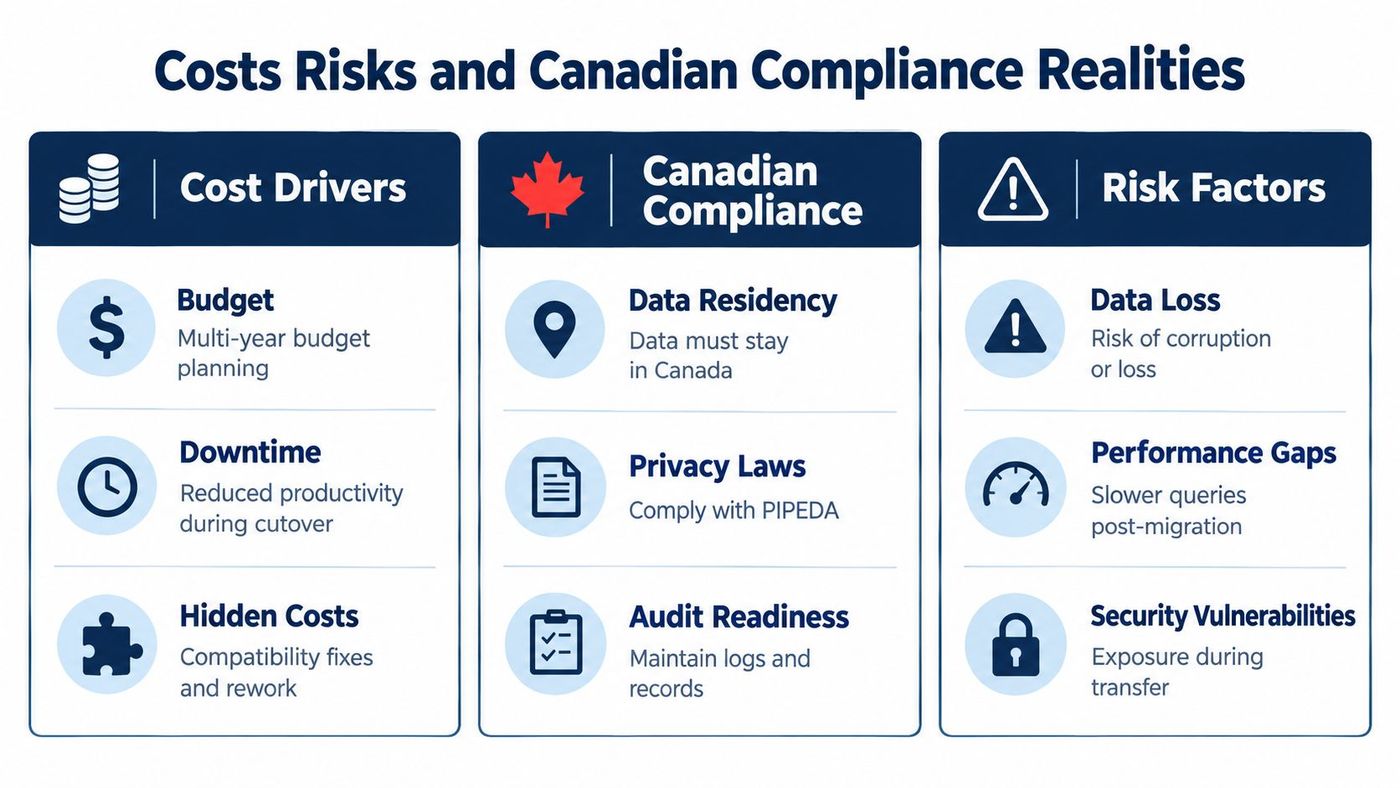
Many migration projects become harder than expected. Budgeting usually starts with infrastructure and labour, but the cost picture also includes testing, temporary parallel environments, validation effort, retention handling, and post-cutover remediation.
A Canadian government procurement example shows the scale of serious migration work. A federal contract for Database and Application Migration Services for the Receiver General for Canada was valued at CAD 1,016,304.27 over 24 months from 2024-06-17 to 2026-06-16 (federal contract history listing). Even if your business is smaller, the lesson is clear. Mature migrations are often multi-stage programmes, not one-weekend tasks.
Data volume matters, but transformation complexity often matters more. Published modernization benchmarks show one-to-one relational schema migrations sustaining about 11.11 MB/s on 10 GB datasets and roughly 11.04 MB/s on 100 GB datasets, while more complex embedded or advanced mappings drop to about 4.50 MB/s and 3.55 MB/s on 10 GB datasets and 1.69 MB/s to 1.76 MB/s on 100 GB datasets (migration benchmark reference). That's a practical reminder that a “simple” volume estimate won't predict the schedule if the schema needs heavy translation.
Hidden costs usually appear in places leaders don't first see:
In Canada, storage location is only part of the answer. The Government of Canada's Direction for Electronic Data Residency states that sensitive electronic data under government control classified as Protected B, Protected C, or Classified must be stored in a GC-approved computing facility located within Canada, or within a government department abroad such as a diplomatic or consular mission (Direction for Electronic Data Residency). That policy directly affects federal workloads and shapes expectations in regulated sectors.
Private-sector organisations face a different rule set. There's no blanket federal requirement that business data remain in Canada, but organisations remain accountable when personal information is transferred for processing and must maintain comparable protection (Canadian data residency and public cloud discussion). In plain terms, cross-border migration can be lawful, but it still needs safeguards, vendor oversight, and accurate privacy handling.
Compliance check: A database move isn't finished when the primary server lands in a Canadian region. You still need to review backups, replicas, logs, and support access.
For leaders weighing options, a disciplined cost benefit analysis helps compare short-term hosting savings against governance, support, and rework costs that only show up later.
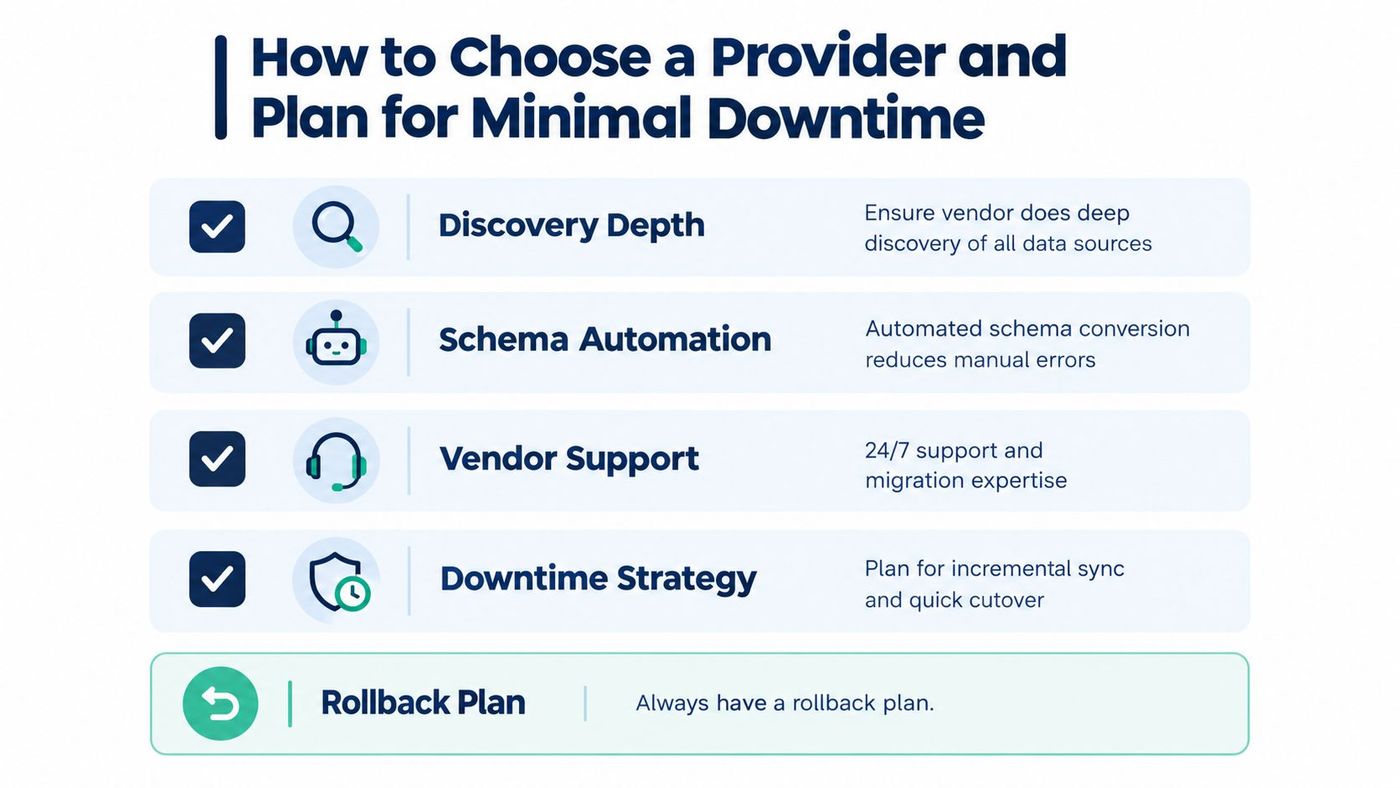
By the time you're selecting a provider, the goal isn't just technical capability. You're looking for a team that can reduce operational risk while respecting Canadian governance realities. The strongest proposals usually sound less like “we'll move your database fast” and more like “we know how to discover dependencies, validate outcomes, and keep the business running.”

Ask how the provider handles the parts that usually cause trouble:
Managed support also matters after go-live. Some firms need a project-only engagement. Others need operational coverage when staff return on Monday and start using the system at full pace. CloudOrbis Inc. is one example of a provider model that combines migration planning with managed IT support, cybersecurity, and ongoing optimisation for Canadian SMB environments.
A practical shortlist should also cover governance and cost discipline. If the provider can't answer how metadata will be preserved, where replicas will reside, or how post-migration support will work, the proposal is probably incomplete.
A useful checklist looks like this:
Choose the provider that explains trade-offs clearly, not the one that makes the migration sound effortless.
A database migration can look like an infrastructure project from a distance. Up close, it's a business decision about continuity, cost control, governance, and how confidently your organisation can grow. That's especially true for Canadian SMBs, where residency, privacy accountability, and integration needs often shape the target design as much as performance does.
The strongest migration plans don't start with a destination platform. They start with a clear inventory, a realistic view of downtime tolerance, and an honest answer to a simple question. Are you relocating the database, or are you improving the way the business uses data?
If your systems are aging, your reporting is fragile, or your compliance obligations are getting harder to manage, now is the right time to assess the database estate properly. A measured migration almost always costs less than a rushed one that leaves cleanup for later.
CloudOrbis helps Canadian SMBs assess legacy environments, plan database and cloud migrations, and support the systems that depend on them after cutover. If you need a practical roadmap that balances downtime, security, residency, and cost, visit CloudOrbis Inc. to start the conversation.
Book a 30-minute call with a senior engineer. No sales script, just straight answers about your environment.


