Cost Benefit Analysis for IT Projects: A Practical Guide
Learn how to conduct a cost benefit analysis for major IT projects like cloud migration or cybersecurity. A practical guide for Canadian business leaders.

Learn how to conduct a cost benefit analysis for major IT projects like cloud migration or cybersecurity. A practical guide for Canadian business leaders.

A budget meeting is coming up. The IT team wants a major upgrade. It could be a cloud migration, a security overhaul, or a line-of-business platform that finally replaces spreadsheets and workarounds. The promise sounds right. Better resilience, fewer disruptions, tighter compliance, cleaner reporting. But when the board asks what the business gets back, the answer often gets fuzzy.
That's where a cost benefit analysis earns its place. Not as a finance exercise for its own sake, but as a decision tool that helps leaders compare options, surface trade-offs, and explain why one path deserves funding over another. Good analysis forces clarity. It separates “this feels important” from “this creates value and we can defend the decision.”
That matters even more in IT, where some of the biggest benefits don't arrive as a tidy line item. Faster recovery after an outage, fewer security incidents, less time lost to manual work, better audit readiness, and stronger staff retention all have business value, even when they don't show up on a vendor quote.
Canadian public-sector examples show why this broader view matters. A community healing process cost-benefit analysis found that for every $2 the government spent, the community received between $6 and $15 worth of services and value-added benefits. That isn't an IT project, but it proves the core point. A structured analysis can reveal value that simple cost comparisons miss.
Most technology decisions stall in the same place. Everyone agrees the current setup is causing friction, but nobody has translated that friction into a business case strong enough to survive scrutiny.
A six-figure IT investment can be sensible and still fail at approval time because the case was framed too narrowly. Leaders often get a list of products, implementation tasks, and subscription fees. What they need is a decision model that shows business impact across operations, risk, and future flexibility.
A proper cost benefit analysis asks a more useful set of questions:
If you want a better finance lens for building that argument, this overview of the financial planning and analyst role is useful because it shows how strong business cases connect operational choices to executive decision-making.
A practical CBA also works best when paired with a full cost view. This breakdown of total cost of ownership is worth reviewing before any major IT approval, because sticker price is rarely the true price.
Practical rule: If the business case depends only on licence savings or headcount reduction, it's probably incomplete.
Confidence doesn't mean predicting the future perfectly. It means making the decision with a clear view of likely costs, expected benefits, and the assumptions underneath both. That's what lets a leadership team say yes, no, or not yet for the right reasons.
Before you can evaluate an IT proposal, you need clean definitions. Most weak analyses break down because teams mix hard costs, soft benefits, risks, and assumptions into one vague narrative.
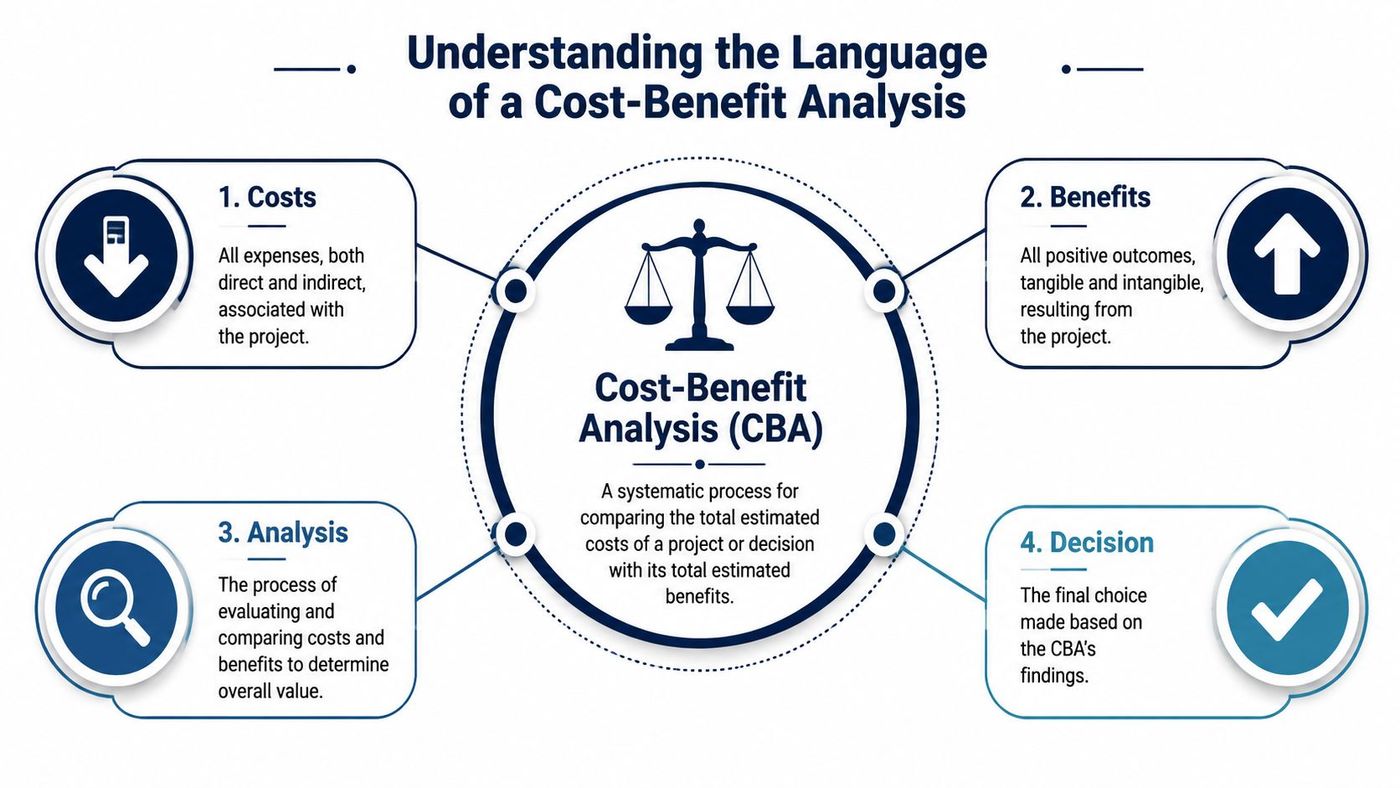
Start with two buckets.
Quantitative items are the easiest to work with. They can usually be measured in dollars with reasonable confidence. Think software subscriptions, hardware refresh costs, implementation fees, support contracts, or reduced spend on retired systems.
Qualitative items are harder to price, but they still belong in the analysis. Examples include better employee experience, improved trust in reporting, reduced stress during audits, and lower operational friction. Some of these can eventually be monetized. Some should remain qualitative but clearly documented.
A home renovation is a simple analogy. The invoice for cabinets and flooring is quantitative. The value of a more functional kitchen, fewer workarounds, and a layout that fits daily life starts as qualitative. Both matter to the decision.
IT projects also create direct and indirect costs and benefits.
| Category | What it means in IT | Example |
|---|---|---|
| Direct cost | Money spent specifically on the project | Microsoft 365 licences, migration labour, endpoint security tools |
| Indirect cost | Secondary spending or disruption | Staff training, temporary productivity loss, process redesign |
| Direct benefit | Clear operational or financial gain | Retiring old servers, reducing maintenance burden |
| Indirect benefit | Wider organisational improvement | Better collaboration, fewer workarounds, stronger morale |
This is why software governance matters. A tool may look affordable until duplicate subscriptions, underused seats, and overlapping platforms inflate the total cost base. Good SaaS licence management tightens that part of the equation.
A Canadian example makes the point well. A Managed Alcohol Program cost-benefit analysis in Thunder Bay found annual savings of $6,284 per person, with a benefit-to-cost ratio between $1.09 and $1.21 for every dollar invested. The lesson for IT leaders isn't about the program itself. It's that a disciplined CBA can identify savings and value that aren't obvious until costs and benefits are carefully categorized.
Strong analysis doesn't just count spending. It defines what counts as value.
Once the categories are clear, the next step is translating the project into metrics decision-makers recognize. In practice, three measures do most of the heavy lifting: Total Cost of Ownership, Net Present Value, and Return on Investment.

Total Cost of Ownership (TCO) is the full cost of buying, running, supporting, and eventually replacing a solution.
For an IT project, TCO usually includes:
Often, many business cases go wrong. A cloud platform may reduce capital spending on servers, but if nobody includes security tooling, governance, data egress exposure, or user training, the forecast will be too optimistic. That's why a disciplined view of cloud cost management belongs inside the CBA, not beside it.
Net Present Value (NPV) adjusts future costs and benefits into today's dollars so you can compare them fairly.
That matters because savings expected over several years aren't worth the same as money spent or saved today. In Canadian regulatory analysis, the federal framework applies a social discount rate of around 3% when comparing future costs and benefits over time, as set out in the Government of Canada policy on cost-benefit analysis.
For business IT, the exact discount approach may differ by project and capital policy, but the principle is the same. If a cybersecurity platform creates avoided losses and operating efficiencies over multiple years, discounting helps you judge whether those future gains justify today's spend.
Return on Investment (ROI) tells you whether the gains from the project outweigh the cost.
In plain terms, ROI answers one executive question: “After we spend this money, do we come out ahead?”
It's useful because it's simple. It's dangerous because teams often make it too simple.
A basic ROI view works well for projects with clear savings, such as retiring legacy maintenance contracts or consolidating vendors. It's less reliable when the value comes from risk reduction, resilience, or compliance. In those cases, ROI should sit beside TCO and NPV, not replace them.
A helpful cross-industry example is this explanation of PEO Metrics on PEO ROI. It's outside IT, but it shows how leaders can evaluate service models by looking past upfront cost and into total business impact.
What works:
What doesn't:
The most reliable IT business cases follow a disciplined process. In Canadian practice, expert application of CBA uses a 10-step protocol that includes full life-cycle impacts, monetizing intangible factors, and discounting flows to reach NPV, with the final recommendation based on the option that produces the highest net social benefits, as outlined in the TIESS guide to cost-benefit analysis.
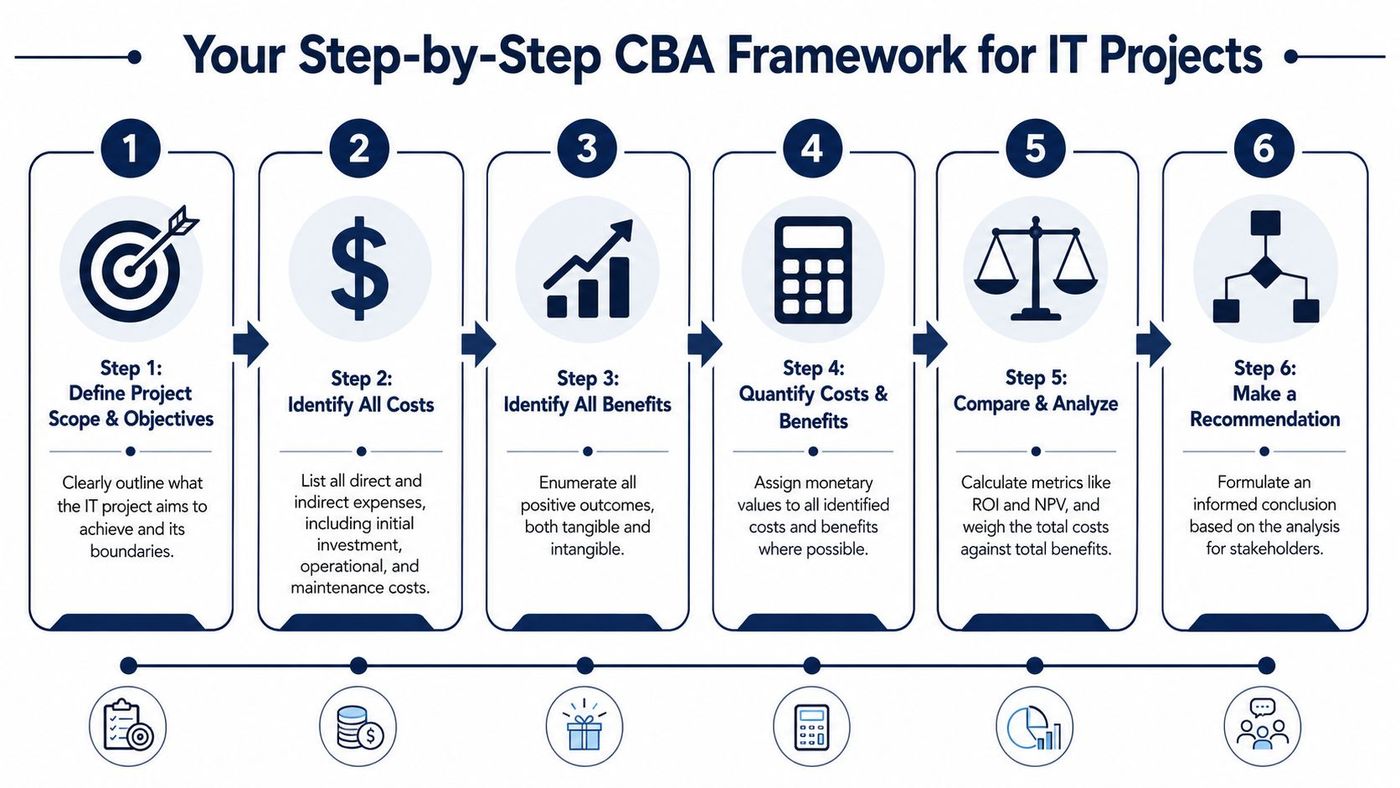
A good CBA for IT doesn't need to be academic. It does need to be complete.
Decision discipline: If a benefit matters enough to mention in a steering committee, it matters enough to include in the CBA.
This process works best when finance, operations, and IT build it together. A single department rarely sees the full picture. Operations understands workflow friction. Finance sees capital pressure and cost timing. IT understands implementation effort and support implications.
That cross-functional view also improves project planning. For teams building a stronger delivery process around these decisions, these IT project planning best practices are a practical companion.
Abstract frameworks are fine until you need to approve a real project. Then the question becomes simple. What would this analysis look like for a common IT decision?
A mid-sized firm is deciding whether to move file services, collaboration workloads, and core productivity tools into a modern cloud environment. The old setup still works, but it requires ongoing maintenance, creates recovery concerns, and slows remote work.
The analysis starts by comparing the current environment against the future-state platform over five years.
| Item | Cost/Benefit Type | Year 1 | Year 2-5 (Annual) | Total 5-Year Value |
|---|---|---|---|---|
| Cloud subscriptions | Cost | To be estimated | To be estimated | To be estimated |
| Migration labour | Cost | To be estimated | Minimal ongoing | To be estimated |
| User training | Cost | To be estimated | Refresh training as needed | To be estimated |
| Legacy server maintenance removed | Benefit | To be estimated | To be estimated | To be estimated |
| Reduced backup infrastructure burden | Benefit | To be estimated | To be estimated | To be estimated |
| Improved remote access and collaboration | Benefit | Qualitative and monetized where possible | Qualitative and monetized where possible | To be estimated |
| Faster recovery capability | Benefit | Qualitative and monetized where possible | Qualitative and monetized where possible | To be estimated |
The decision logic is straightforward. If the five-year benefit pool exceeds the five-year cost pool, and the operational risk profile improves, the project likely deserves approval. If the savings depend on aggressive assumptions about user adoption or immediate retirement of old systems, pause and tighten the plan.
A migration case also improves when the scope is specific. “Move to the cloud” is too loose. “Retire on-prem file servers, standardise collaboration, reduce recovery complexity, and support hybrid work more reliably” is measurable. For firms evaluating that path, these Azure migration services show the types of workstreams a proper migration CBA should include.
A second scenario is a security investment. These projects often get challenged because the upside isn't a new revenue stream. The business case usually rests on avoided disruption, reduced incident response burden, stronger compliance posture, and better visibility.
The cost side may include platform licensing, deployment services, policy work, staff training, and process changes for access control or endpoint management. The benefit side is less obvious, but still real:
A cybersecurity CBA is rarely about proving catastrophe. It's about comparing the cost of preparedness with the cost of avoidable fragility.
The final decision criteria should reflect that reality. If the proposed controls materially improve resilience, simplify compliance, and reduce ongoing support burden at a justifiable cost, the investment may be sound even without a dramatic short-term ROI figure.
A generic cost benefit analysis gives you a baseline. A sector-specific one gives you a decision tool that reflects how your organisation actually operates.
In clinics and healthcare environments, a major benefit often sits in compliance support and continuity of care. Systems that improve access control, audit trails, and recovery readiness can reduce operational stress around sensitive patient information and service disruption.
A unique cost to include is workflow interruption during rollout. Clinical teams can't absorb process friction the same way an administrative department can. Training time, temporary slowdowns, and policy changes need explicit attention or the project will look cheaper than it really is.
For manufacturers, one of the clearest benefits is reduced downtime risk. If a network failure, server issue, or application bottleneck disrupts the production environment, the business impact ripples across scheduling, shipping, and customer commitments.
A unique cost is integration complexity. Shop-floor systems, inventory platforms, production planning tools, and supplier data often connect in messy ways. The CBA has to account for testing, compatibility work, and phased cutovers.
Legal firms usually care most about secure, auditable client data handling. Better document controls, access governance, and recovery capability support both client trust and internal risk management.
The cost that often gets missed is behavioural change. Lawyers and legal staff are under time pressure, so even small changes to document access, authentication, or collaboration tools can create resistance if adoption planning is weak.
Canadian leaders should also remember that public decision-making in this country already treats rigorous economic comparison as standard practice. In the federal framework, a cost-benefit analysis is mandatory for regulatory proposals with average annual costs over $1 million, and the policy requires monetization of effects and use of a social discount rate of around 3%, as described earlier in the Government of Canada policy. That doesn't mean every private-sector IT project needs the same level of formality. It does mean disciplined evaluation is normal, practical, and expected when consequences are substantial.
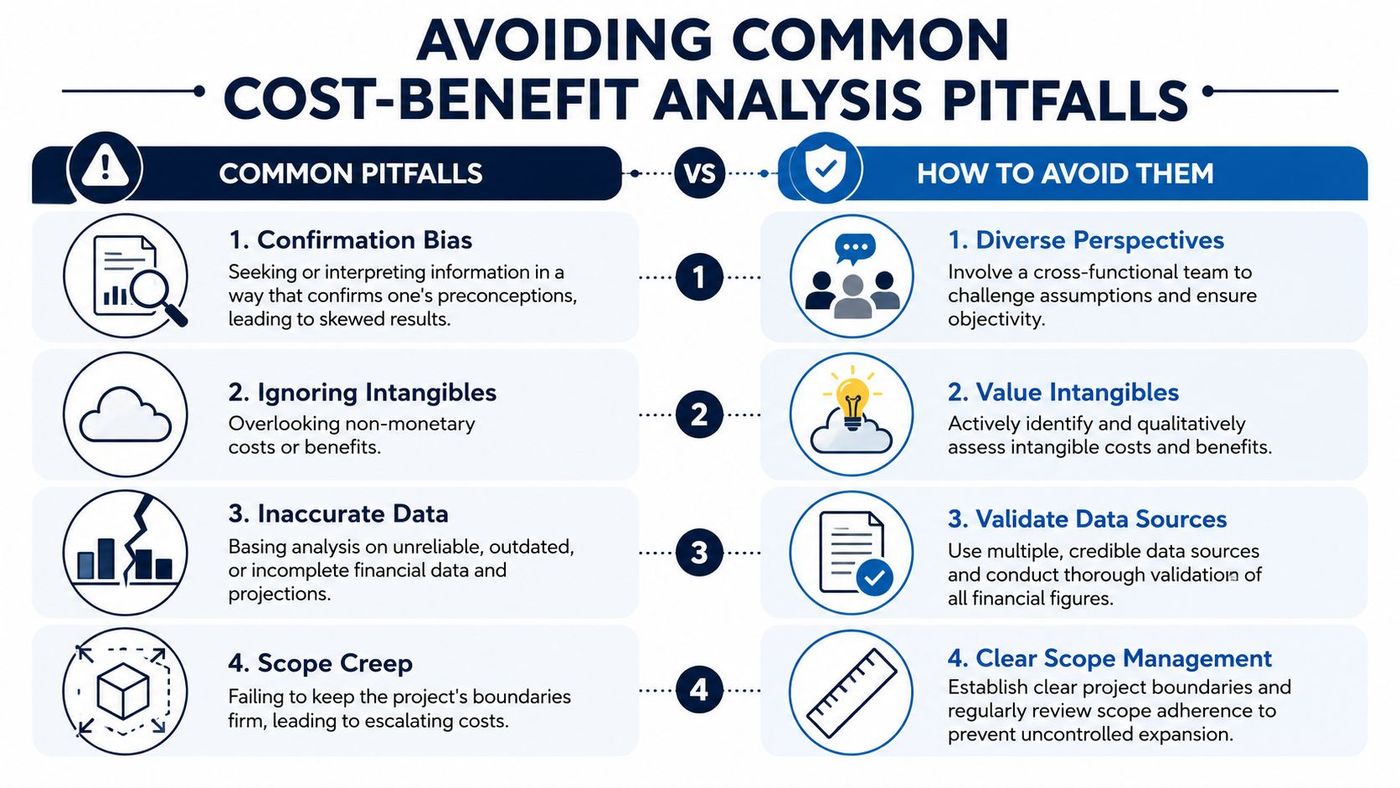
The biggest CBA failures usually aren't mathematical. They're strategic.
This issue of hidden value isn't unique to IT. Even funding decisions in other markets often depend on whether leaders can frame soft and delayed benefits clearly. For example, this R&D loan guide for Australian startups is a good reminder that financing choices often hinge on timing, uncertainty, and how benefits are presented, not just on headline cost.
A good cost benefit analysis does more than help you get a project approved. It helps you reject weak ideas, refine promising ones, and back the right investments with confidence. That's the primary advantage. You're no longer buying technology because it sounds modern or urgent. You're choosing it because the business case holds up.
The strongest IT leaders use CBA as a management discipline. They look at full costs, real benefits, operational trade-offs, and who feels the impact across the business. That's how smarter technology decisions get made.
If you want help building the business case for your next IT investment, CloudOrbis Inc. can help with vCIO guidance, strategic IT consulting, and practical planning that connects technology decisions to business outcomes.
Book a 30-minute call with a senior engineer. No sales script, just straight answers about your environment.


