8 Network Monitoring Best Practices for SMBs in 2026
Boost your SMB's security and uptime with our top network monitoring best practices for 2026. Actionable tips for Canadian businesses. Learn more now.

Boost your SMB's security and uptime with our top network monitoring best practices for 2026. Actionable tips for Canadian businesses. Learn more now.
Network outages and missed anomalies do more than frustrate staff. For Canadian SMBs in healthcare, manufacturing, finance, and legal, they can delay patient care, interrupt production, trigger compliance issues, and create costs that show up fast in overtime, lost revenue, and recovery work.
That is why network monitoring belongs in business planning, not just IT operations. A reliable monitoring program helps leaders reduce operational risk, shorten outages, and catch security issues earlier. It also supports the documentation and control standards regulated organizations are expected to maintain.
The challenge is rarely awareness. It is execution.
Many mid-sized organizations know they need visibility, alerting, logging, and clear response processes. Few have the internal capacity to tune thresholds, review alerts after hours, investigate anomalies properly, and keep monitoring aligned with changing sites, cloud services, and compliance requirements. A tool can generate data all day and still leave the business exposed if nobody owns the process behind it.
That gap is where co-managed and fully managed IT models matter for regulated Canadian SMBs. Internal teams keep operational context and business priorities. A managed partner adds coverage, platform expertise, escalation discipline, and the day-to-day upkeep that keeps monitoring accurate instead of noisy. In practice, that often means fewer blind spots, faster incident response, and less time spent by senior staff chasing avoidable network issues.
If you need a basic primer first, start with this guide to network oversight. If you are assessing how monitoring is maintained in real environments, this overview of remote monitoring and management practices provides useful context. The eight practices below focus on how Canadian SMBs can build a monitoring approach that supports resilience, audit readiness, and steady operations without relying on an enterprise-sized internal team.
Downtime and degraded performance rarely start as major incidents. They usually begin as small changes in latency, packet loss, interface errors, or device resource use that go unnoticed until staff or customers feel the impact.
For Canadian SMBs in regulated sectors, that delay carries a business cost. A healthcare clinic can end up with disrupted virtual appointments and frustrated patients. A manufacturer can lose production time when scanners, ERP transactions, or line-side systems slow down even though the internet circuit still appears available. Real-time visibility reduces that gap between early warning and operational disruption.
The practical starting point is continuous monitoring across the systems that carry business traffic every day. That usually means routers, switches, firewalls, Wi-Fi infrastructure, WAN links, and the servers tied to critical workflows. The goal is not to collect every metric available. It is to watch the indicators that show whether the network is behaving normally for your environment and to flag exceptions quickly enough for someone to act.
Here's the dashboard view teams need early on:
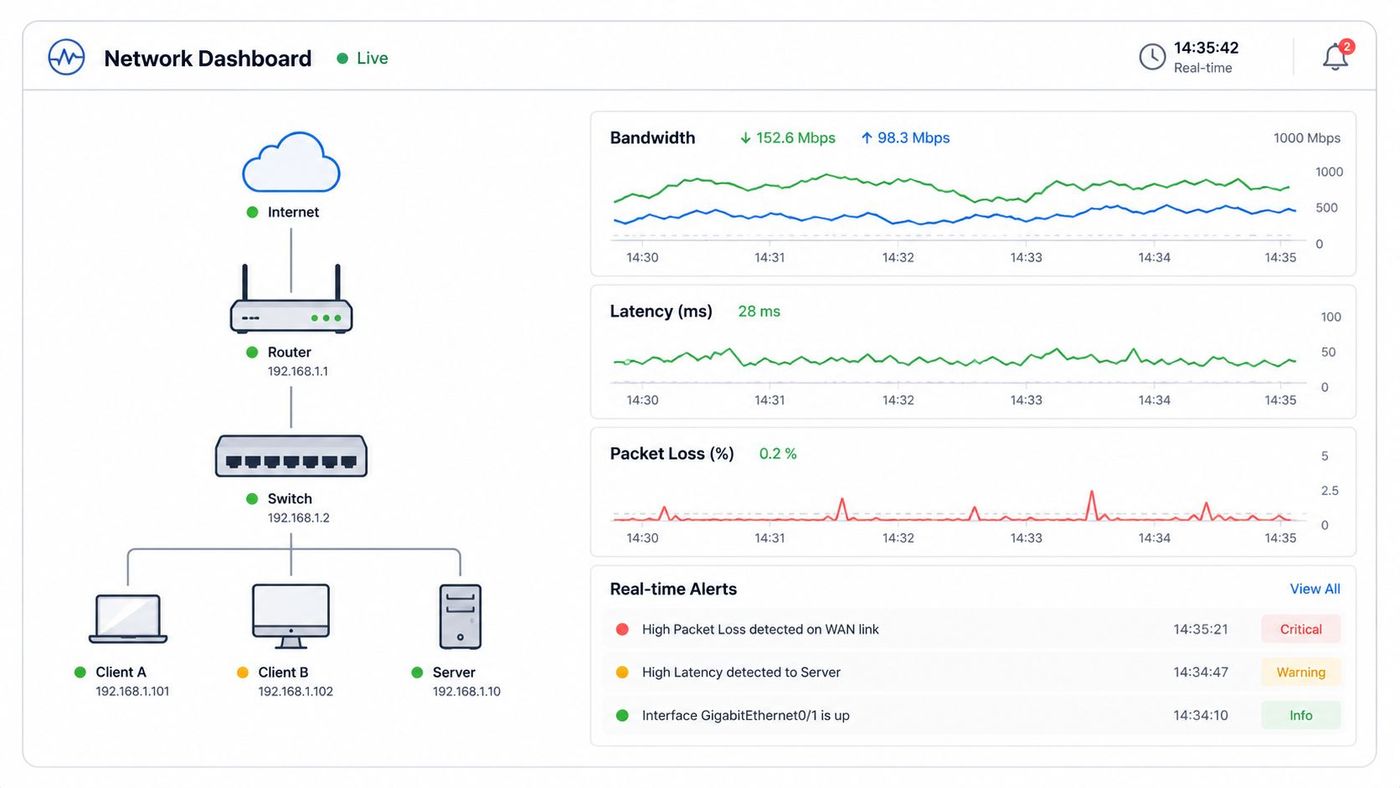
A baseline should show what normal looks like by site, application, and time of day. Industry guidance from the Canadian Centre for Cyber Security stresses the importance of understanding normal network activity so teams can detect anomalies faster and investigate with context, not guesswork. That matters in regulated environments where proving that you monitor for abnormal behaviour can support both incident response and audit readiness.
Normal is rarely uniform. A clinic may see peaks during appointment blocks and image transfers. A manufacturer may have predictable traffic spikes at shift changes, during inventory syncs, or when vendors connect for equipment support. If monitoring treats all hours and all segments the same, alerts become noisy and important issues get buried.
Two setup choices make the difference early:
This is also where execution usually breaks down for internal teams. Baselines drift. New cloud services appear. A plant adds equipment. A clinic opens another site. Someone has to keep the monitoring map current, review thresholds, and connect alerts to ticketing and escalation workflows such as remote monitoring and management processes.
A co-managed or fully managed IT partner often handles that upkeep more consistently than a stretched internal team can. Internal staff know which systems matter most to the business. The partner adds after-hours coverage, platform administration, and the discipline to keep thresholds, device inventories, and escalation paths aligned with change. For organizations planning segmented environments, that visibility work also supports later controls such as network segmentation for regulated business networks.
Practical rule: If staff report a network issue before your monitoring platform does, your visibility model is still missing a critical signal.
Flat networks increase both operational risk and incident cost. In Canadian SMBs that handle patient data, production systems, or regulated financial records, one poorly controlled connection can turn a small compromise into a multi-site outage, a privacy incident, or a shutdown on the plant floor.
Segmentation reduces that blast radius. It also makes monitoring more useful because abnormal traffic has fewer places to hide. In practice, the goal is simple. Separate business functions that carry different risk, then control and watch the traffic that moves between them.
A clinic usually needs clear separation between guest Wi-Fi, administrative systems, medical devices, EHR access, and third-party remote support. A manufacturer often needs different boundaries for office IT, ERP, warehouse operations, OT networks, and vendor maintenance access. The exact design varies, but the business case does not. Smaller trust zones limit lateral movement, support audit requirements, and make recovery faster when something goes wrong.
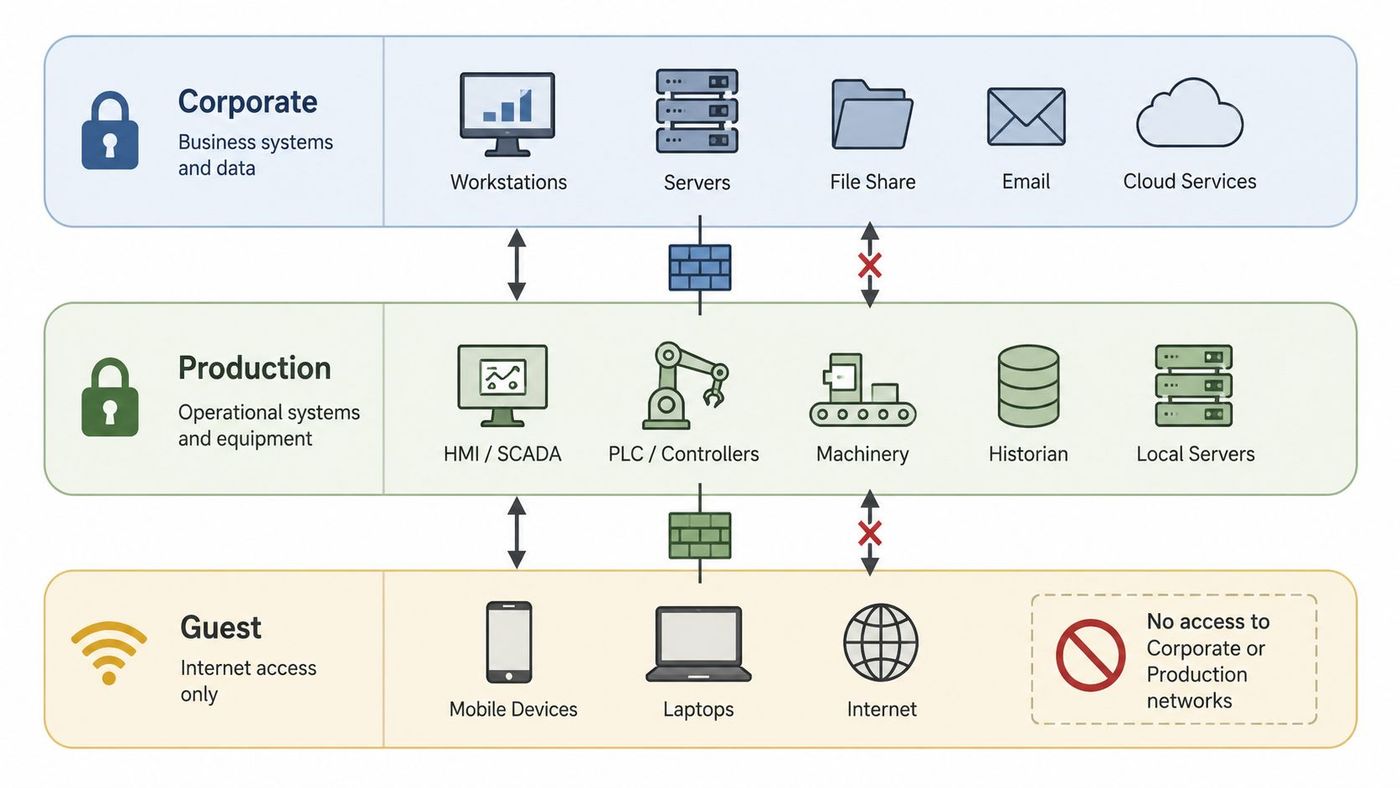
Good segmentation starts with process, not hardware. Identify which systems must communicate, which ones should never communicate, and which users or vendors need exceptions. Then enforce those rules through VLANs, firewalls, NAC policies, identity controls, and remote access restrictions.
Useful practices include:
Vendor access deserves special attention in regulated sectors. Many incidents do not start with a failed perimeter firewall. They start with a legitimate third party connecting to the wrong segment, keeping broader access than required, or using remote tools with weak controls. That is why segmented environments work best when access reviews, session monitoring, and event logging for modern business security operations are treated as one operating model, not separate projects.
Internal teams often know which workflows cannot tolerate disruption. A co-managed or fully managed IT partner adds the discipline to maintain the policy set as the business changes. New equipment gets added. Clinics open satellite locations. Vendors switch support tools. Cloud applications create fresh pathways into core systems. Without ongoing rule reviews and boundary monitoring, segmentation drifts and exceptions pile up.
If you need a practical framework for designing those zones, this overview of network segmentation fundamentals is a good starting point.
Segmenting a network without monitoring inter-segment traffic is like locking interior doors and then never checking who's walking through them.
Security teams often discover a problem twice. First when operations slow down, and again when they realise the logs do not show enough detail to explain it.
For Canadian SMBs in healthcare, manufacturing, legal, and financial services, that gap creates business risk fast. If a clinic needs to confirm who accessed a patient record, or a manufacturer needs to trace the source of an outage that affected production, scattered device logs are not enough. Leaders need a clear record of access, changes, and system events that can support incident response, internal review, and retention requirements already defined by policy.
Centralizing logs from firewalls, switches, servers, identity systems, VPNs, cloud platforms, and core business applications shortens investigations and reduces downtime. It also helps separate security incidents from ordinary operational faults, which matters when every hour of uncertainty pulls staff away from patient care, customer service, or production targets.
The right starting point is not every available log source. It is the systems most likely to answer high-impact questions quickly.
A practical rollout usually follows this order:
The trade-off is straightforward. Broader log collection improves visibility, but it also increases storage costs, tuning effort, and review time. Teams that collect everything without a plan usually end up with noisy dashboards and weak response discipline.
That is why many organisations pair logging with a co-managed or fully managed IT and network support model. Internal staff know the business systems and compliance pressure points. A service partner brings SIEM tuning, after-hours monitoring, escalation coverage, and the operational consistency that smaller in-house teams often cannot maintain alone.
This operating model also supports infrastructure efficiency. The same discipline used to centralize event data, reduce alert noise, and standardise operational response underpins many enterprise data center efficiency gains.
CloudOrbis also provides a useful overview of event logging as a cybersecurity control for businesses that need to strengthen review processes, not just collect more data.
Not all traffic deserves equal treatment. That's the practical truth behind Quality of Service.
If Microsoft Teams calls, VoIP, telemedicine sessions, or plant-floor systems compete with backups, software downloads, and general browsing on the same links, users feel it first as lag, jitter, and dropped sessions. Monitoring QoS turns those complaints into measurable signals so IT can protect the traffic that keeps the business running.
For Canadian medium-sized businesses, the metrics still come back to basics. Watch loss, latency, and bandwidth on WAN links, and monitor device resource use and interface health throughout the network. In cloud-heavy environments, that should extend to application paths, not just edge circuits.
A healthcare clinic should prioritise telemedicine and EHR-related traffic above guest browsing. A construction company may prioritise VoIP and project systems between sites. A manufacturer may need to protect ERP traffic and production communications during business hours while allowing less critical transfers later.
That doesn't mean QoS creates bandwidth out of thin air. It allocates scarcity more intelligently.
For teams that support multiple sites and voice-heavy environments, this is often where managed support adds value. It's not just about setting classes on a firewall. It's about ongoing review, path validation, and user impact analysis, especially when cloud migrations increase traffic complexity. That operational discipline is closely tied to broader IT and network support planning.
Leaders looking at infrastructure more broadly can also compare network initiatives with wider enterprise data centre efficiency gains when planning improvement roadmaps.
Most SMBs don't suffer from too little monitoring. They suffer from too many low-value alerts.
When every fluctuation generates a notification, teams stop trusting the system. The right model is smaller and sharper. Alert only on conditions that indicate real risk, then route those alerts through clear escalation paths that match business impact.
This challenge is especially visible in the SMB market. Only 27% of enterprises currently believe their network operations teams are successful, and one reason is operational overload. Alarm swarms bury the few alerts that deserve immediate action.
Good alerting connects a symptom to a response owner. If a firewall VPN licence limit is reached, someone should know exactly who investigates and what they check first. If packet loss spikes on a WAN link supporting voice, the issue should move quickly from service desk to network support to ISP escalation without ambiguity.
Useful escalation design usually includes:
A manufacturing business might escalate plant connectivity failures immediately to a shift lead and IT. A legal firm may route document management outages straight to senior support because billable work is at risk. A clinic may need direct escalation for EHR access issues because care delivery is affected.
The best alert is the one that reaches the right person with enough context to act, and not a minute earlier or later.
This is one area where managed security and network operations services often outperform DIY setups. The technology isn't usually the problem. The hard part is maintaining threshold logic, on-call workflows, and response discipline over time. CloudOrbis outlines that operating model in its approach to threat detection and response.
Networks usually fail capacity tests gradually, then all at once. For Canadian SMBs in healthcare, manufacturing, and other regulated sectors, that often shows up as dropped calls, slow cloud access, backup overruns, or Wi-Fi issues during the busiest part of the day.
A baseline gives IT leaders a working definition of normal. That includes utilisation by site, application behaviour by time of day, expected latency between key systems, and the difference between routine growth and a genuine problem. Without that reference point, teams guess. Guessing leads to early hardware purchases in some cases and late upgrades in others.
Static baselines rarely hold up in hybrid environments. Exabeam notes that teams using one-size-fits-all baseline models in hybrid settings can face higher false-positive alert rates in hybrid environments as traffic shifts between on-prem workloads, voice traffic, remote access, and cloud services. That matters for smaller IT teams because wasted investigation time has a direct labour cost.
The practical fix is to baseline against business rhythm, not just technical averages.
A manufacturer may run large backup jobs overnight and push production data at shift changes. A clinic may see steady daytime use tied to EMR access, imaging, and guest Wi-Fi, then very little activity after hours. An office supporting remote staff may see internet and VPN demand spike on Monday mornings and month-end close. Those patterns should shape thresholds, forecasts, and upgrade timing.
Useful capacity planning usually includes:
For SMBs, the challenge is rarely collecting some data. The harder part is turning six months of usage trends into a justified budget request, procurement plan, and change window the business can accept.
That is one reason co-managed and fully managed IT partnerships are valuable here. Internal teams know the business cycle, compliance obligations, and operational pressure points. A partner brings broader benchmarking, lifecycle planning, and experience spotting where a circuit, uplink, firewall, or wireless design will become the next bottleneck. In regulated Canadian environments, that planning discipline reduces outage risk, avoids rushed capital spend, and helps leadership time upgrades before service quality slips.
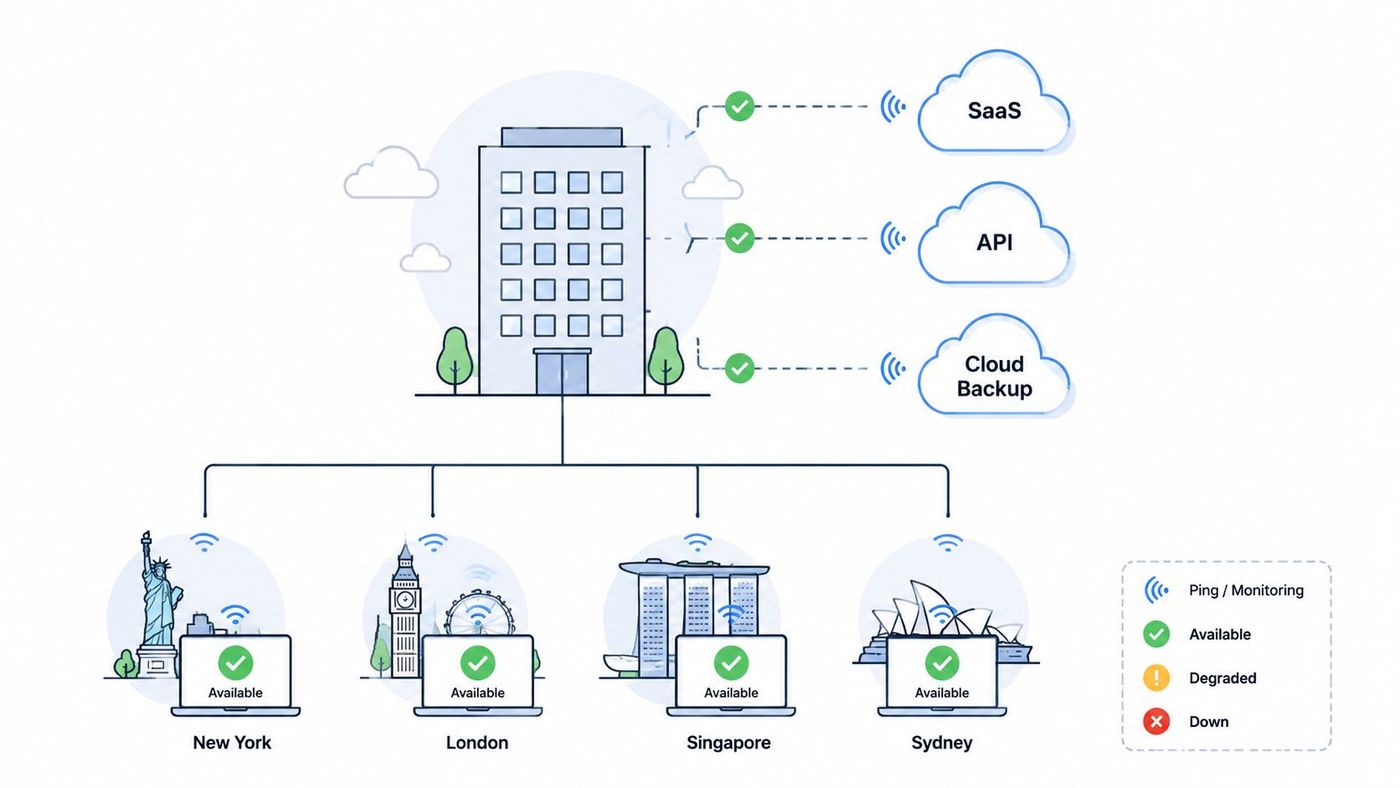
For many Canadian SMBs, the fastest way to lose productive hours is a cloud slowdown that nobody can isolate quickly.
That problem shows up every day in regulated environments. Staff report that Microsoft 365 is lagging, an EHR session keeps timing out, a supplier portal will not load, or a plant system cannot sync to a hosted ERP. The business does not care whether the fault sits with the local firewall, the ISP, the SaaS provider, a site-to-site tunnel, or a vendor integration. Leadership needs a clear answer, an owner, and a realistic timeline.
Continuous monitoring of third-party and cloud connectivity shortens that diagnosis window. It also reduces a second risk that often gets missed. Security teams need visibility into outbound traffic patterns, failed and successful external connections, and unusual egress paths that may point to misconfiguration, policy drift, or compromised devices. The Canadian Centre for Cyber Security addresses that need in its Top 10 IT Security Actions guidance, which stresses logging, monitoring, and control of network activity as part of a practical security baseline for small and mid-sized organisations.
A useful monitoring approach covers more than whether a cloud app answers a ping. Canadian healthcare and manufacturing firms often depend on chains of providers. One weak link can disrupt scheduling, production reporting, remote support, or backup jobs.
Priority checks usually include:
That last point matters more than many SMBs expect. During an incident, time is lost not on troubleshooting alone, but on finding the right vendor contact, proving scope, and confirming whether the issue falls under your team, your ISP, or the application provider.
A co-managed or fully managed IT partner often adds the most value here because execution is messy. Internal teams know which cloud systems affect patient care, production, finance, and compliance. A partner can maintain external tests, tune alerting for each location, collect evidence for escalations, and push issues through ISP or SaaS support channels with less delay. For regulated Canadian organisations, that means shorter outages, cleaner incident records, and less staff time wasted arguing about where the problem started.
Teams that review network performance on a fixed cadence catch waste, recurring faults, and upgrade priorities earlier than teams that only look during an outage.
For Canadian SMBs in healthcare, manufacturing, and other regulated sectors, that review should function as an operating meeting, not a technical status call. Leaders need to see how network issues affected patient scheduling, production uptime, remote access, audit readiness, and staff productivity. They also need clear decisions: what to fix now, what to defer, and what risk the business accepts if spending waits until next quarter.
Tooling is changing quickly, including more AI-assisted monitoring and correlation features. The practical question is simpler. Does the current stack help your team spot meaningful issues sooner, cut false alerts, and support decisions with evidence? If the answer is no, more dashboards will not solve the problem.
A useful monthly or quarterly review usually covers four areas: service reliability, incident patterns, cost pressure, and planned improvements. That keeps the conversation tied to outcomes instead of raw metrics. It also helps separate one-off noise from trends that deserve budget.
I have seen many SMBs collect months of monitoring data and still struggle to answer a basic leadership question: what should we change first? Regular review meetings fix that by turning technical evidence into a shortlist. Sometimes the right move is a circuit upgrade. Sometimes it is retiring noisy alerts, adjusting maintenance windows, or replacing a weak vendor process that keeps slowing incident response.
This is also where co-managed and fully managed IT arrangements earn scrutiny. An internal team often knows which systems affect care delivery, production, finance, or reporting obligations. A managed partner should bring trend analysis, remediation options, budget context, and follow-through. For regulated Canadian organisations, that combination usually means fewer repeat incidents, cleaner documentation for audits, and less time spent debating priorities during budget season.
| Practice | Implementation complexity | Resource requirements | Expected outcomes | Ideal use cases | Key advantages |
|---|---|---|---|---|---|
| Implement Real-Time Network Visibility and Baseline Monitoring | Moderate–High: deploy monitoring tools and baselines | Monitoring software, storage, skilled analysts | Immediate anomaly detection, reduced MTTR, capacity insights | Medium orgs needing proactive network management (telemedicine, manufacturing) | Proactive detection, data-driven capacity planning, SLA support |
| Deploy Multi-Layer Network Segmentation and Access Controls | High: design and enforce segment policies | VLAN/firewall tech, RBAC, skilled network/security admins | Reduced lateral movement, improved compliance and performance | Regulated industries and OT/IT separation (healthcare, manufacturing) | Limits breach blast radius, regulatory compliance, traffic isolation |
| Establish Comprehensive Logging and Event Monitoring | High: centralize logs and tune correlations | SIEM, long-term storage, security analysts | Faster incident detection, forensic capability, audit trails | Highly regulated or security-sensitive organizations (finance, healthcare) | Complete audit trails, cross-source correlation, compliance reporting |
| Monitor Network Performance and Quality of Service (QoS) | Moderate: classify traffic and apply policies | QoS-capable devices, monitoring tools, app inventory | Consistent performance for critical apps, fewer user complaints | Environments with VoIP, real-time apps, ERP or telemedicine needs | Guarantees for mission-critical apps, improved user experience |
| Implement Automated Alerting with Intelligent Escalation Procedures | Moderate: configure thresholds and workflows | Alerting platform, communications integrations, on-call staff | Faster notifications, ensured escalation, reduced manual monitoring | Small IT teams and 24/7 operations (remote sites, critical services) | Rapid response, reduced burnout, documented incident handling |
| Establish Network Baseline and Capacity Planning Processes | Moderate: collect history and model growth | Historical metrics, analytics tools, planning expertise | Predictable upgrades, fewer surprise outages, budget alignment | Growing organizations planning scale (new offices, IoT expansion) | Prevents capacity exhaustion, enables proactive procurement |
| Monitor Third-Party and Cloud Connectivity Continuously | Moderate: external probes and synthetic tests | External monitoring services, multi-location probes | Quick isolation of internal vs external issues, SLA validation | Cloud-first and distributed firms relying on SaaS/APIs | Early detection of provider outages, validates third-party SLAs |
| Conduct Regular Network Performance Reviews and Optimization Meetings | Low–Moderate: schedule and prepare reports | Dashboards, executive reports, stakeholder time | Strategic alignment, prioritized optimizations, accountability | Mid-sized orgs needing IT-business alignment and planning | Converts data into decisions, improves communication and ROI |
Implementing these network monitoring best practices is a continuous discipline, not a one-time project. Tools matter, but process matters more. Baselines drift. Cloud dependencies change. Thresholds need tuning. Compliance obligations evolve. If nobody owns those tasks consistently, monitoring becomes noisy, incomplete, and far less useful than leaders expect.
That's the reality for many medium-sized businesses in healthcare, manufacturing, legal, finance, logistics, and construction. Internal IT teams are already stretched across end-user support, vendor coordination, projects, cybersecurity, Microsoft 365 administration, and day-to-day operations. Asking the same team to run a mature monitoring program around the clock often isn't realistic. The issue isn't commitment. It's available time, specialist depth, and the need for disciplined follow-through.
A strategic partner helps close that gap. In a co-managed model, your internal team keeps control of priorities while external specialists help with network status monitoring, threshold tuning, log review, escalation workflows, and compliance-oriented oversight. In a fully managed model, that provider takes on the ongoing operational burden, including after-hours monitoring and incident response coordination. Both approaches can work well for SMBs that need stronger resilience without building a large in-house NOC or SOC.
CloudOrbis offers co-managed and fully managed IT services, including proactive monitoring backed by a 24/7, 100% Canada-based helpdesk. That matters for organizations that need support aligned with Canadian business hours, local compliance expectations, and regulated-sector realities. It also matters for leaders who want one operating partner to connect network monitoring with cybersecurity, cloud infrastructure, backup, VoIP, and strategic IT planning.
A managed relationship transcends outsourced troubleshooting. It gives your business a repeatable way to improve visibility, reduce alert fatigue, tighten vendor access control, document compliance, and plan upgrades before performance issues become outages. It also gives executives clearer reporting on what the network is doing for the business, not just whether a device is up or down.
If your organization is trying to scale operations, support hybrid cloud, or reduce risk in a regulated environment, it's worth building that capability with the right operating model. Strong technology is only half the answer. Consistent execution is what turns monitoring into lower risk, better uptime, and more predictable performance. For some growing firms, that same idea shows up in adjacent areas too, including broader partnerships for scaling AI employees and digital operations support.
Contact CloudOrbis today for a free network assessment and find out how a proactive, Canada-based support model can help you build a more resilient, secure, and high-performing network.
If you want help putting these network monitoring best practices into operation, talk to CloudOrbis Inc.. Their team works with Canadian SMBs on co-managed and fully managed IT, including proactive network monitoring, cybersecurity, cloud services, VoIP, backup, and strategic IT planning.
Book a 30-minute call with a senior engineer. No sales script, just straight answers about your environment.


