HIPAA Compliant Email: A Guide for Canadian Healthcare
A practical guide to HIPAA compliant email for Canadian healthcare SMBs. Learn how to meet US HIPAA and Canadian PIPEDA/PHIPA requirements.

A practical guide to HIPAA compliant email for Canadian healthcare SMBs. Learn how to meet US HIPAA and Canadian PIPEDA/PHIPA requirements.
If you run a clinic in Canada, this problem usually starts with a normal email. A patient moves to the U.S. and asks for records. A specialist across the border wants intake details. Your team replies from Outlook, Gmail, or a front-desk shared mailbox because that's how the clinic has always communicated.
That's where risk shows up.
Most clinic owners know HIPAA matters in the U.S. Fewer realise the harder truth for Canadian organisations. HIPAA compliant email isn't just a U.S. issue if you handle U.S. patient information. You also can't ignore Canadian privacy rules while trying to satisfy an American standard. If your email setup doesn't account for both, you can end up non-compliant on both sides of the border.
An Ontario clinic sends follow-up information to a former patient now living in the U.S. The message includes appointment history, treatment notes, and identifying details. The staff member thinks, reasonably enough, that sending it from the clinic's normal mailbox is fine because the organisation is Canadian.
It may not be.
HIPAA does not apply directly in Canada, but for Canadian healthcare organizations handling U.S. patient information, a dual-compliance approach is essential. They must meet HIPAA's strict mandates, such as breach notifications within 60 days and multi-factor authentication, while also adhering to Canadian privacy laws like PIPEDA and Ontario's PHIPA. This is particularly critical for clinics serving U.S. patients or processing Protected Health Information (PHI) across borders, as outlined in this guidance on HIPAA compliance for Canadian healthcare providers.
That creates a practical challenge for clinic owners. You don't get to choose one rulebook. If your team handles cross-border PHI, your email system, your policies, your staff training, and your incident response process all need to reflect both sets of obligations.
A lot of clinics assume compliance is about intent. It isn't. Regulators care about controls.
Practical rule: If your clinic emails patient information across the border, treat email as a compliance system, not a convenience tool.
If you want a broader view of how this fits into healthcare operations, this overview of healthcare IT compliance is a useful starting point.
A lot of people talk about HIPAA compliant email as if it's a product you buy. It isn't. It's the result of building the right safeguards around how your clinic sends, receives, stores, and manages email containing ePHI.
Think about your clinic building. You don't secure it with one lock and call it done. You set rules about who gets keys, you lock the doors, and you control who can enter sensitive areas. Email works the same way.
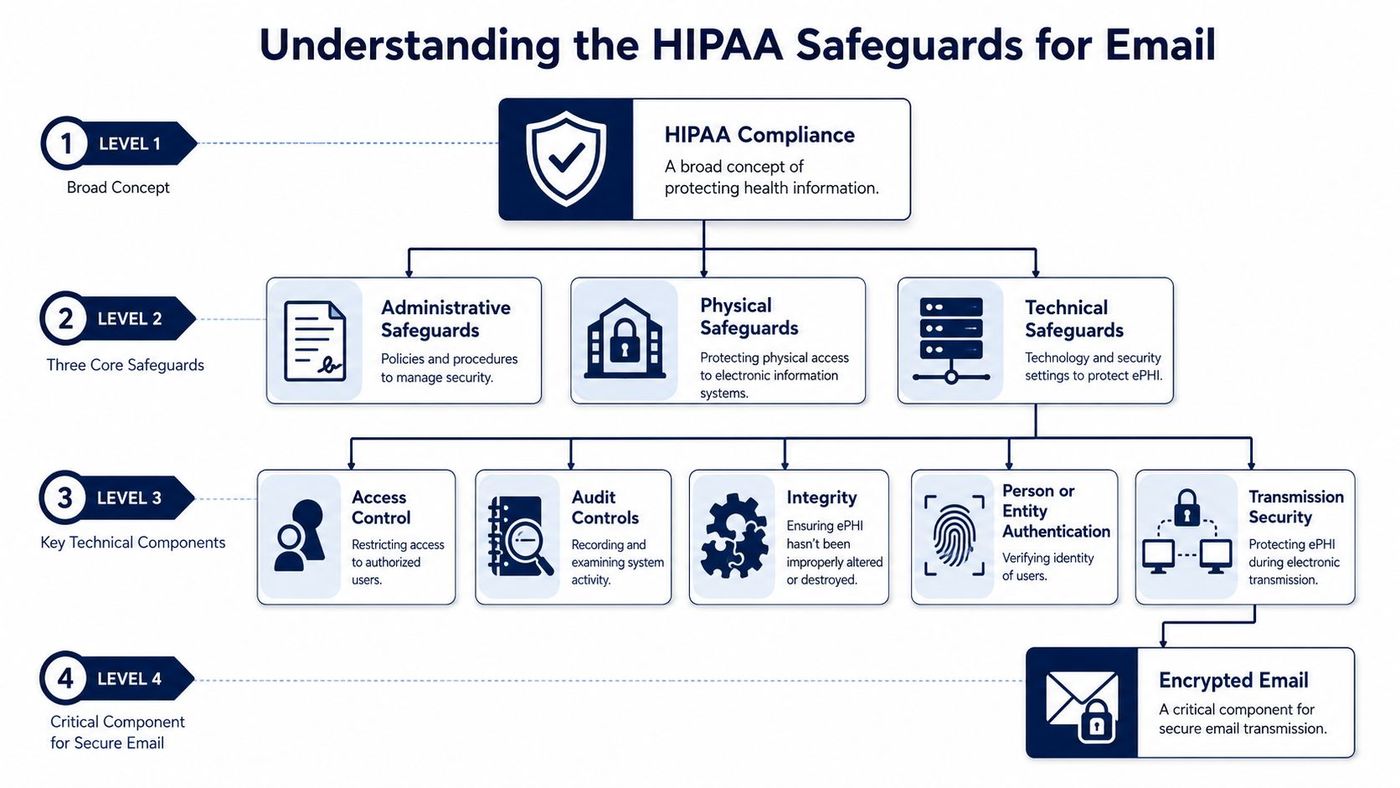
These are your clinic's rules and management controls. They answer questions such as who is allowed to send records, who approves access, what training staff receive, and what happens when someone leaves the organisation.
If nobody has documented rules for email use, you don't have a compliance program. You have wishful thinking.
Administrative safeguards usually include:
For clinics also disposing of old laptops, phones, or storage devices that once held patient communications, secure retirement matters too. This overview of responsible data destruction solutions is a helpful reminder that compliance doesn't stop at the inbox.
These are the controls around the devices and spaces where email is accessed. If a physician checks records on an unsecured workstation at the nurses' station, or if an old desktop with stored mail is sitting in an open storage room, you have a problem.
Physical safeguards cover things like:
The primary focus often lies here, and justifiably so. Technical safeguards protect ePHI inside the email system itself.
They include:
Secure email isn't one setting. It's a layered control set that has to work together.
If you need a stronger operational framework, use a formal HIPAA compliance checklist and map each safeguard to a real owner inside your clinic.
Here's the non-negotiable part. If your clinic sends email containing PHI, the technology must enforce the right baseline protections. Good intentions don't encrypt anything.
To be HIPAA-compliant, any email containing Protected Health Information (PHI) absolutely must use TLS 1.2+ for encryption in transit and AES-256 encryption at rest. Failure to secure ePHI with these standards results in automatic non-compliance and can lead to penalties of up to $50,000 per violation, according to this review of HIPAA-compliant email providers.
These two controls do different jobs.
Encryption in transit protects the message while it travels between systems. Think of it as protecting the shipment on the road.
Encryption at rest protects stored messages, archives, and mailbox contents. That's your vault.
If a provider can't clearly tell you how it handles both, don't use it for PHI.
Every user needs their own account. Shared passwords are unacceptable. Generic front-desk logins are unacceptable. A “we all know the password” approach is a compliance failure waiting to happen.
A secure clinic email setup should include:
When something goes wrong, you need records. Who accessed the message? Who forwarded it? Was it deleted? Was it opened from an unmanaged device?
Without logs, you can't investigate properly and you can't prove control.
Operational advice: If your vendor can't show you audit visibility in plain language, your clinic is buying blind.
This is one of the most overlooked pieces. Staff make mistakes. They send to the wrong address, attach the wrong file, or copy too much patient information into a message.
That's why mature systems use policy tools to inspect outbound email and flag or block risky content. This is also why standard mailbox setups often fall short unless they're configured properly. For a practical companion read, see these email security best practices.
If you want a simple example of how a healthcare-related platform explains its handling of sensitive information, this note on personal data security at ProMedCert is worth a look. It reinforces the core point. Security has to be designed into the service, not assumed after the fact.
Most clinics don't need a custom-built mail platform. They need a sensible solution that matches their workflow, staffing, and legal obligations in Canada. The mistake is choosing based only on convenience.
Some clinics use Microsoft 365 with the right security and compliance configuration. That can work well, especially if the environment is set up deliberately and aligned to Canadian requirements.
Others add a secure email gateway in front of their existing platform. That approach can improve outbound protection without changing how staff work day to day.
Some organisations prefer secure portals or encrypted messaging systems for patient communication. They're stricter, but they can add friction for patients.
Smaller practices often look at specialised healthcare email services. For Canadian practitioners, Hushmail for Healthcare is a notable option because it's designed for healthcare and aligns with Canadian privacy needs. Hushmail states that it complies with both Canadian privacy laws and HIPAA standards, offers single-user accounts at $16.99 CAD per month and additional email accounts for $20.99 CAD per month, and positions security, data storage in Canada, and signed Information Management Agreements as core pillars in its healthcare offering for Canadians through its secure healthcare email service.
| Solution | How It Works | Best For | Pros | Cons |
|---|---|---|---|---|
| Microsoft 365 with compliant configuration | Uses your existing Microsoft environment with added security, retention, and compliance controls | Clinics already standardised on Microsoft | Familiar user experience, strong integration, scalable | Requires careful setup and governance |
| Secure email gateway | Adds encryption and policy enforcement between your mail platform and the outside world | Clinics wanting stronger outbound control without replacing email | Minimal workflow change, good policy control | Still depends on the underlying platform being managed properly |
| Patient portal messaging | Patients log in to read messages securely | Clinics sharing sensitive documents regularly | Tight control, secure delivery | More friction for patients and staff |
| Specialised healthcare email provider | Purpose-built secure email for regulated healthcare use | Solo practitioners and smaller clinics | Simpler deployment, healthcare-focused features | May be less flexible if your clinic has broader IT needs |
For most Canadian clinics, the best choice is usually one of these:
If your clinic runs on Microsoft already, this guide to Microsoft 365 security is worth reviewing before you decide.
A compliant email rollout shouldn't be treated like a software purchase. It's an operational project. The clinics that do this well build the process first, then fit the technology into it.
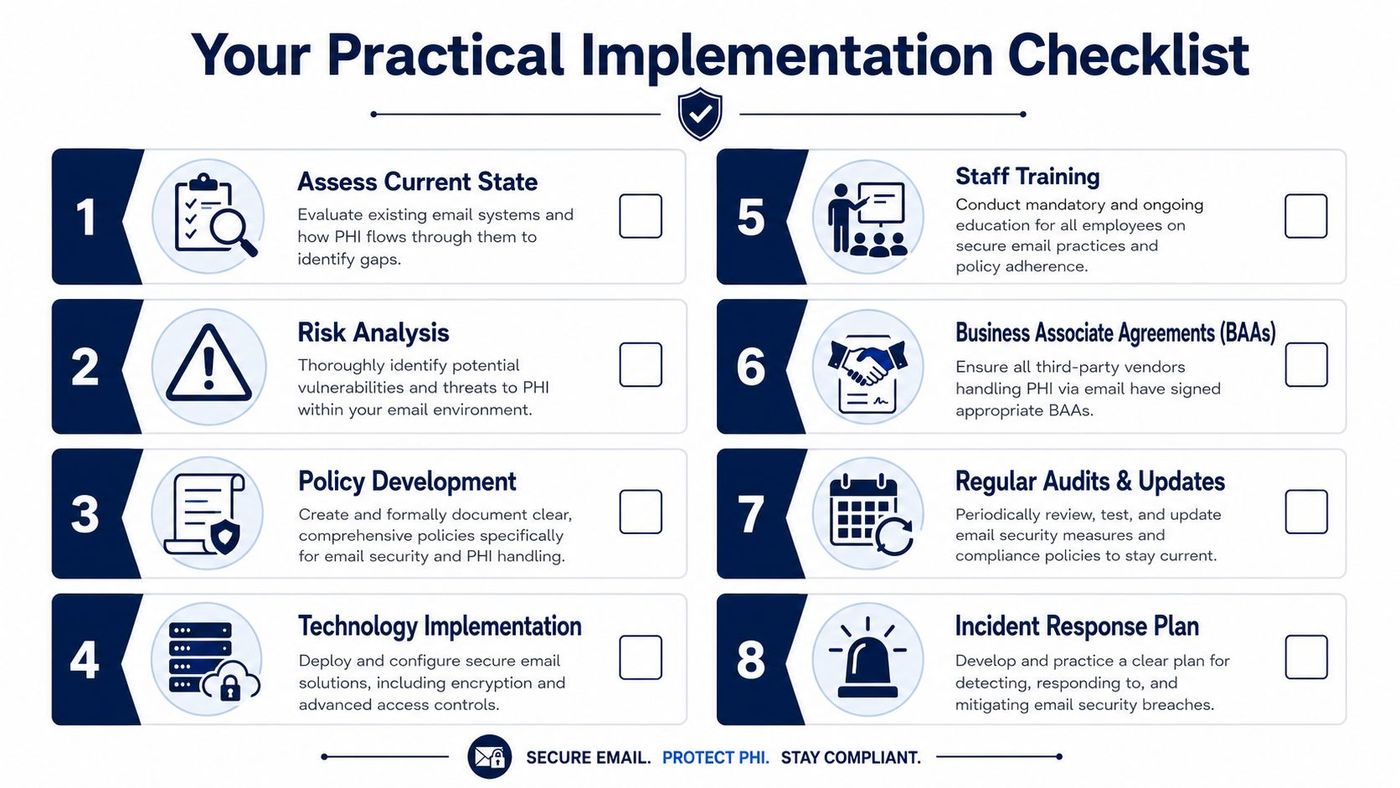
First, identify where PHI touches email in your clinic. Don't guess. Map it.
Look at appointment reminders, referral communications, scanned forms, billing questions, physician-to-physician messages, and messages sent from mobile devices. You need to know which workflows involve PHI and who participates in them.
Then perform a risk analysis. That means identifying weak points such as shared mailboxes, missing MFA, unmanaged phones, poor retention settings, and staff using personal accounts.
A practical starting point is this HIPAA risk assessment checklist.
Technology without policy won't hold.
Write down the rules your clinic will enforce. Keep them practical and specific. For example:
“Protected Health Information must never be sent to personal email accounts.”
That sentence belongs in your policy.
Once you've chosen a platform, lock it down.
Your technical checklist should include:
HIPAA also imposes a specific recordkeeping burden here. Covered entities must retain copies of all electronic communications containing patient data for a minimum of 6 years, and those archives must remain encrypted throughout the storage period, according to Mailchimp's summary of HIPAA-compliant email requirements.
That requirement gets missed all the time. Clinics focus on sending securely and forget they also need to store securely.
Most email incidents start with people, not software.
Run training that reflects real clinic behaviour:
Training should be repeated, not delivered once and forgotten.
You need a breach response plan tied to email. If the wrong message goes out, staff should know exactly who to tell, how to preserve evidence, and how to stop the damage from spreading.
Your plan should define:
Good clinics rehearse this. They don't improvise it during a bad day.
The biggest mistake I see is simple. Clinics buy a tool labelled “HIPAA-compliant” and assume the problem is solved.
For Canadian providers, that assumption can create a legal mess.
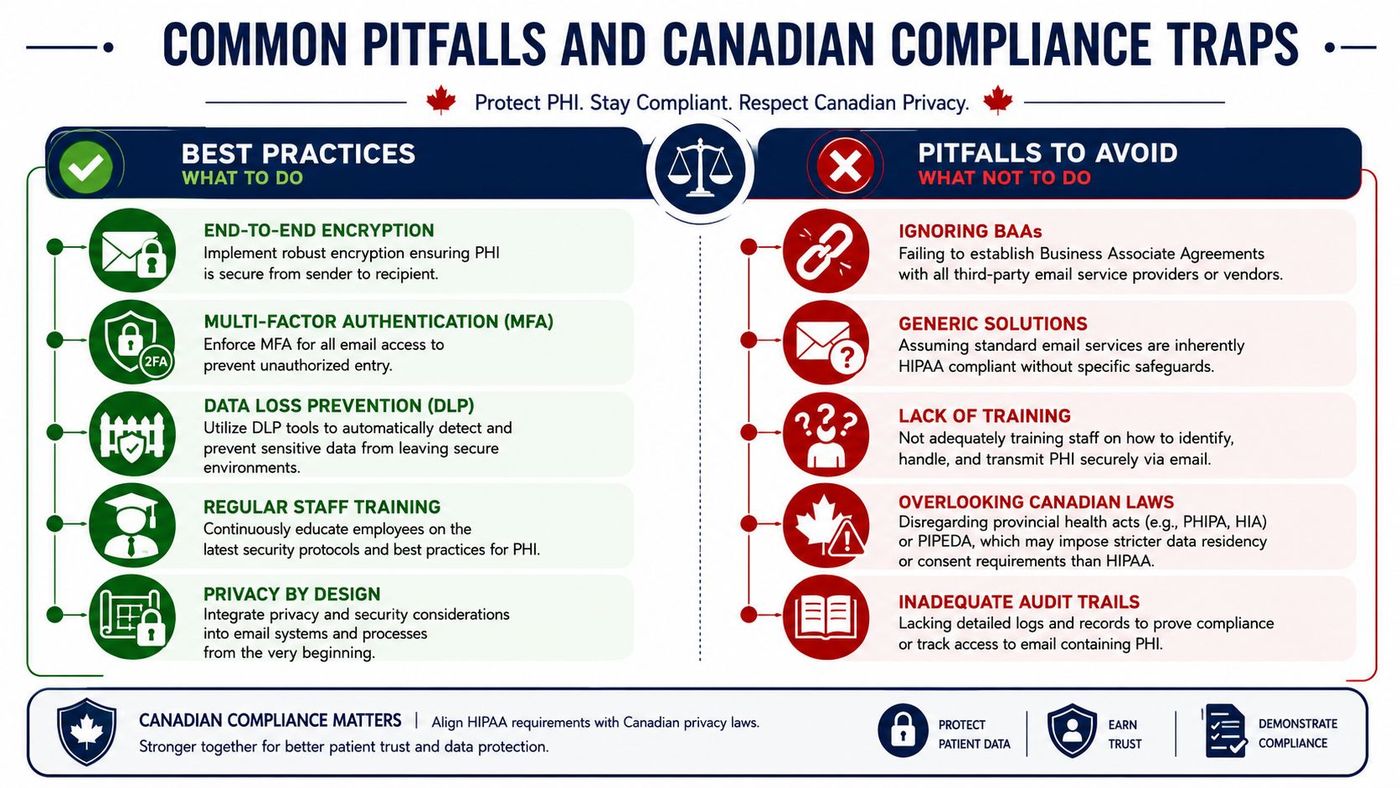
A critical compliance trap for Canadian providers is assuming a U.S. HIPAA-compliant tool is sufficient. Ontario's PHIPA, for instance, requires patient data to be stored physically within Canada. A service like Paubox, while HIPAA-compliant, fails PHIPA compliance because it does not offer data storage in Canada, as explained in this Canadian email compliance checklist.
That point matters more than most vendors admit. If your email provider can't satisfy Canadian data residency expectations, the HIPAA label doesn't rescue you.
Another trap is bad advice from oversimplified articles. They say every healthcare email must always be encrypted, no exceptions, no nuance.
The more accurate view is that HIPAA's Security Rule treats encryption as required when, after a risk assessment, it's determined to be a reasonable and appropriate safeguard, and HHS also allows treatment-related communications by unencrypted email if providers apply reasonable safeguards and limit what they disclose. That nuance is explained clearly in this review of what makes email HIPAA compliant.
If your clinic relies on nuance, document the risk assessment and the safeguards. Don't leave that decision informal.
HIPAA compliant email isn't about buying a magic platform. It's about running a controlled system. Canadian clinics need to get three things right at the same time: the technical protections, the staff behaviour, and the legal fit with Canadian privacy obligations.
If you handle U.S. patient information, you need a dual-compliance mindset. If you operate in Ontario, data residency can decide whether a tool is usable at all. If your team sends PHI by email, you need encryption, access control, retention, logging, and training that work in real life, not just on paper.
The clinics that stay out of trouble do the basics consistently. They assess risk. They choose tools deliberately. They document policy. They train staff. They revisit the setup before a problem forces them to.
If your current email setup was pieced together over time, that's normal. It's also a reason to review it now, before a patient complaint, privacy incident, or cross-border request exposes the gaps.
If your clinic needs help validating whether its email setup meets HIPAA, PIPEDA, and PHIPA expectations, talk to CloudOrbis Inc.. A proper assessment can show where PHI is exposed, which controls are missing, and what to fix first without disrupting patient care.
Book a 30-minute call with a senior engineer. No sales script, just straight answers about your environment.


