Azure Migration Services: 2026 Guide for Canadian SMBs
Navigate your cloud journey with our 2026 guide to Azure migration services. Canadian SMBs get expert help with process, costs, and compliance for a smooth

Navigate your cloud journey with our 2026 guide to Azure migration services. Canadian SMBs get expert help with process, costs, and compliance for a smooth
Your team probably isn't debating cloud migration in the abstract. You're dealing with a file server that's out of warranty, line-of-business apps tied to ageing infrastructure, growing security expectations from clients, and a finance lead who wants less surprise spending, not more. In many mid-sized Canadian organisations, that mix shows up all at once.
The issue usually isn't one bad server or one overdue upgrade. It's that the business has outgrown an IT model built for a smaller, slower, less regulated company. Growth creates pressure. So do compliance reviews, remote work, vendor integrations, and recovery expectations after an outage.
That's where Azure migration services become useful. Not as a technology trend, but as a practical route to stronger resilience, better governance, and room to scale without rebuilding everything from scratch. For Canadian SMBs, especially in healthcare, finance, logistics, and manufacturing, the question isn't whether the cloud matters. It's how to move in a way that protects operations and supports compliance.
A familiar scenario plays out in growing businesses. The organisation started with a sensible on-premises setup. Over time, more systems were added. A new clinic application. A reporting database. A remote access tool patched together during an urgent expansion. Nothing looked unreasonable on its own.
Then complexity took over.
Leaders start hearing the same themes in different forms. Projects take too long because infrastructure has to be worked around. Security reviews uncover inconsistent controls. Recovery planning depends too heavily on a few internal people who know where everything lives. The business wants flexibility, but the environment resists change.
That's usually the point where cloud migration becomes a business discussion, not just an IT one.
A well-run Azure migration isn't just about moving servers. It's about deciding which workloads should be modernised, which should be rehosted, and which should be retired because they no longer justify the effort to maintain them. That creates space for better governance and fewer operational bottlenecks.
For many mid-sized firms, the first win is clarity. You stop treating every system as equally critical. You map dependencies, assign business value, and align technology decisions with actual risk.
Practical rule: If your infrastructure roadmap is driven mostly by warranty expiry dates and urgent fixes, your business is already paying the cost of delay.
Strategic planning also changes the internal conversation. Instead of asking, “How do we keep this old environment alive for another year?” leaders can ask, “What platform best supports our next three years of growth?”
If your organisation is still working through that shift, a broader digital transformation roadmap for mid-sized businesses helps put migration into a more useful business context.
When people hear “Azure migration services,” they often assume it's a single tool. It isn't. Think of it more like a professional moving company for your digital operations. One part inventories what you own. Another plans the route. Another handles specialty items that can't be moved casually. The process matters as much as the truck.
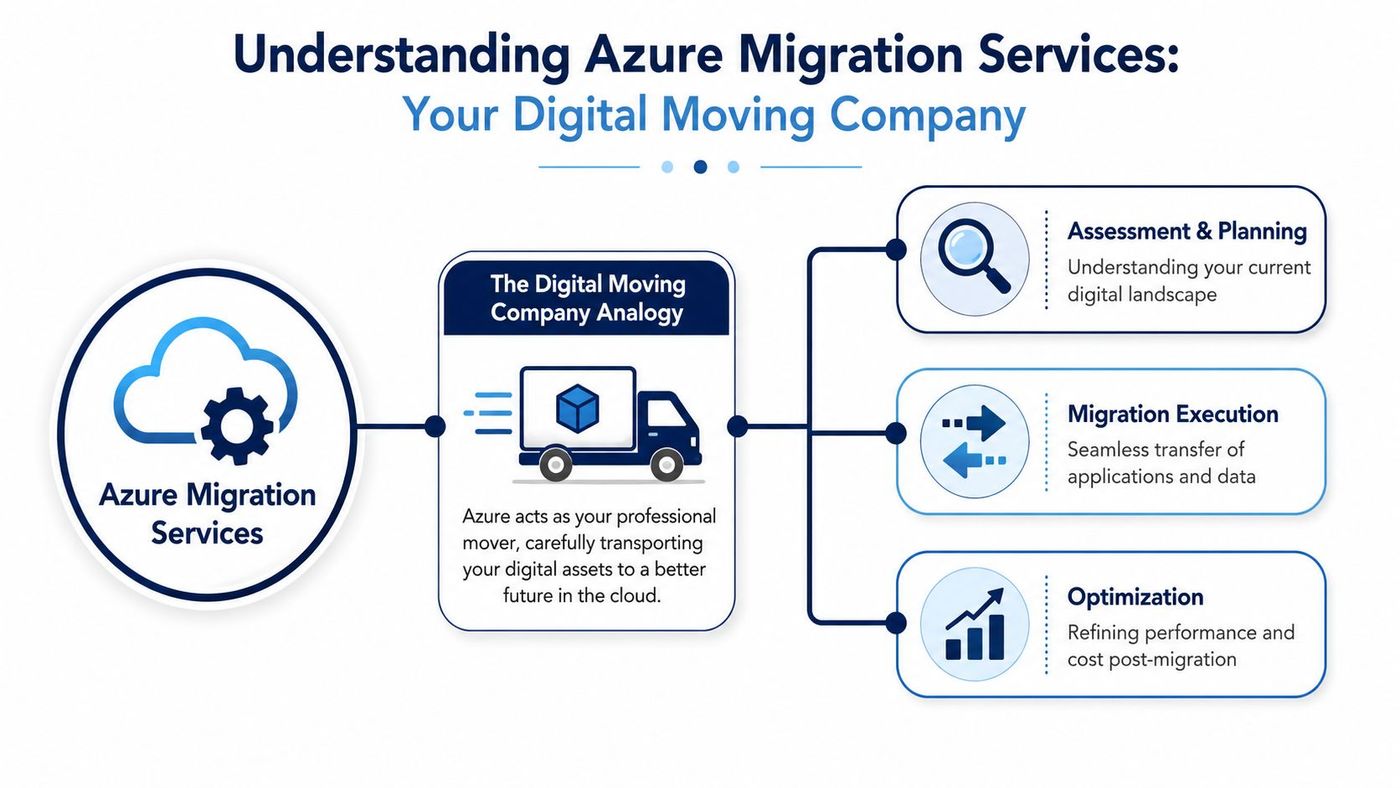
Azure Migrate is the hub that brings assessment, planning, and execution into one place. In practice, that matters because migrations fail when teams work from partial inventories, unclear dependencies, or assumptions about performance that haven't been tested.
Azure Migrate is useful when the environment includes several moving parts at once. Servers, web apps, SQL workloads, VMware or Hyper-V estates, and mixed environments need a common process. Without that, decisions get fragmented quickly.
A strong local example of how planning affects outcomes is this look at Azure migration work for Calgary businesses, where geography, industry, and operating model all shape the right migration path.
Databases deserve their own lane because they're usually the hardest part of the move. Azure Database Migration Service is built for that. Microsoft describes it as a fully managed, end-to-end migration tool that supports transitions from multiple database sources to Azure data platforms with minimal downtime, including online and offline migrations. The Standard tier for offline migrations is free, and the Premium tier is free for the first 183 days from service creation, with predictable billing after that in the Premium offering, as outlined in the Azure Database Migration Service overview.
That pricing model matters for practical reasons. It lets teams test migration patterns without turning every database decision into a procurement delay.
The do-it-yourself version of migration often sounds cheaper than it is. Internal teams know their environment, but they're also supporting users, handling security issues, and keeping operations running. Migration adds discovery, sequencing, testing, rollback planning, and cutover management. That's a separate discipline.
For newer companies or firms launching a new Azure footprint alongside a migration, it's also worth understanding what support programmes may be available. Founders and finance leads sometimes look at Microsoft Azure startup credits when they're building an early-stage cloud operating model.
A clean migration rarely depends on one heroic weekend. It depends on accurate discovery, disciplined testing, and a cutover plan that respects business operations.
The migration lifecycle works best when leadership sees it as a managed sequence, not a one-time event. Microsoft's Azure Migrate framework uses a five-step workflow that includes project setup, discovery and assessment with TCO reporting, replication and sandbox testing, production cutover, and post-migration optimization using Azure Advisor, as detailed in the Azure Migrate services overview.
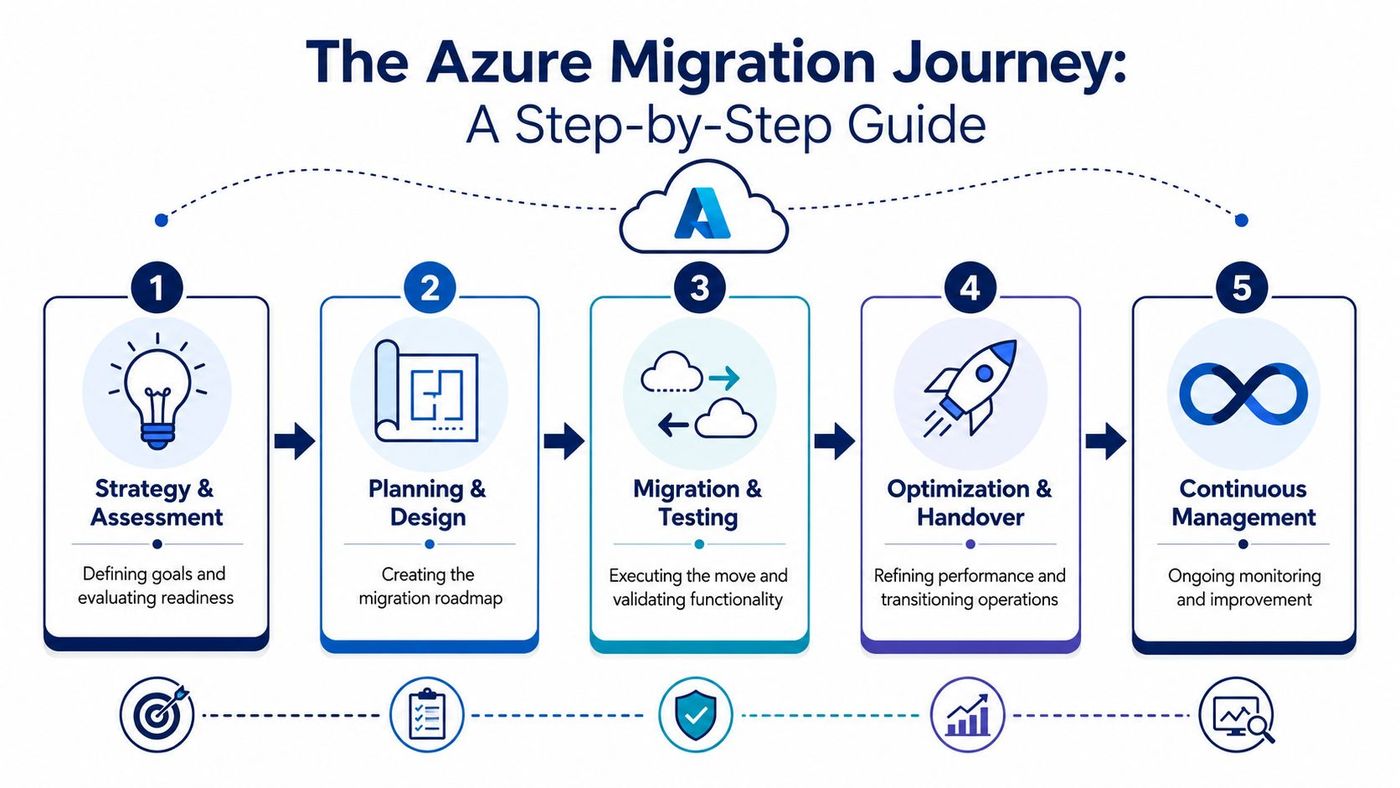
During discovery, many organisations realise their documentation is less complete than expected. Discovery should identify workloads, usage patterns, dependencies between applications, and what can't tolerate interruption.
The key mistake here is rushing to target architecture before understanding the current estate. If a business-critical application depends on an overlooked service or scheduled process, the migration plan will look solid on paper and break in production.
Planning turns inventory into decisions. Which systems move first. Which ones need remediation. Which should remain where they are for now. Good planning also deals with governance, identity, security baselines, backup expectations, and business timing.
This phase should also include business-side coordination. Finance, operations, compliance, and department heads all affect cutover timing more than many IT teams expect.
A thoughtful change management process for technology initiatives often determines whether users experience migration as a smooth transition or as disruption imposed on them.
This is the execution phase, but it shouldn't begin with production. Teams should replicate workloads into a controlled environment and validate how applications behave, not just whether they start.
Testing needs to answer practical questions:
One of the most useful disciplines here is sandbox validation. It catches sequencing issues before business users do.
Production cutover should be boring. That's the goal. If cutover feels dramatic, the testing phase was probably incomplete. DNS changes, traffic switching, final data sync, and rollback criteria should all be defined before the window opens.
After go-live, the work isn't finished. Post-migration optimisation is where teams right-size resources, tune policies, improve monitoring, and remove old infrastructure that still creates cost and confusion.
Leadership cue: Judge migration success by operational stability after go-live, not by how quickly workloads were copied.
The business case for Azure migration services is strong, but only when leaders weigh benefits against execution risks. Too many discussions focus on upside without examining where projects go off course.
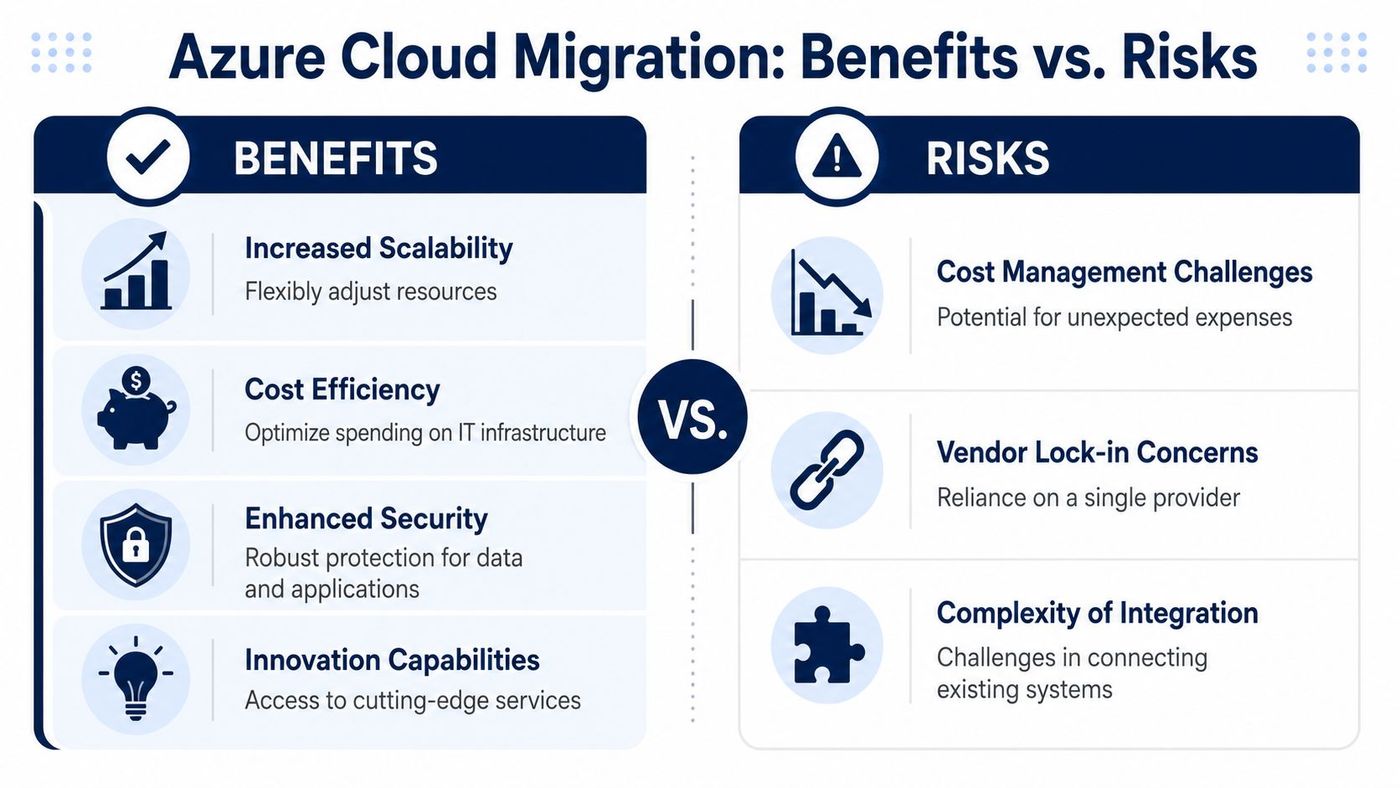
The first major benefit is operational flexibility. Azure lets businesses adjust infrastructure without long hardware refresh cycles. That's useful when demand changes by season, location, or growth stage.
The second is security and governance consistency. A cloud environment doesn't secure itself, but it does provide a more structured foundation for identity controls, monitoring, backup discipline, and policy enforcement than many patchwork legacy environments.
The third is business continuity. For disaster recovery planning, most Azure regions are paired with another region within the same geography located at least 300 miles apart, enabling geo-redundant storage replication and prioritised recovery during widespread outages, according to Azure region pairing information.
The biggest migration risk isn't the platform. It's poor execution. I've seen projects stall because teams moved low-value systems first and postponed the complicated dependencies until budgets and patience were already strained.
The common failure points usually look like this:
Cloud migration improves resilience and agility, but it also exposes operational habits that were hidden in an older environment. Informal processes don't survive well in the cloud. That's not a drawback. It's a forcing function.
A well-led migration uses that moment to standardise controls, document ownership, and simplify what the business needs to run.
Most migration pain comes from carrying unnecessary complexity forward, not from moving to Azure itself.
For Canadian SMBs, especially in healthcare and finance, migration decisions often turn on one concern first. Where will the data live, and who controls it?
That's a sensible question. Data residency affects privacy posture, contractual commitments, and industry-specific obligations. It also shapes how confidently leadership can answer customer and regulator questions during audits, reviews, or vendor due diligence.

Microsoft Azure is generally available from local datacentre regions in Toronto and Quebec City, enabling Canadian business customers to achieve data residency and in-country data replication for business continuity, as noted in Microsoft's announcement on Azure regions in Canada.
For regulated organisations, that changes the conversation. A business can design cloud architecture around domestic hosting and continuity goals without defaulting to cross-border data transfer.
Canadian compliance doesn't begin and end with geography. PIPEDA, PHIPA, contractual obligations, retention rules, access controls, auditability, and incident response all matter. Data residency supports compliance. It doesn't replace governance.
That's why migration planning should include:
A practical starting point is reviewing your broader data security and privacy obligations in Canadian business environments.
If leadership can't explain where regulated data resides, who can access it, and how recovery works, the migration plan isn't ready.
The right migration partner reduces risk long before the first workload moves. The wrong one creates polished presentations, vague milestones, and difficult surprises near cutover.
In Canadian SMB environments, I'd look less at sales language and more at operating discipline. Can the provider show a repeatable methodology? Do they understand your sector's regulatory pressure? Can they explain testing, rollback, and post-migration support in plain language?
A useful screening process should focus on evidence, not assurances. For SMBs in key Canadian sectors, a partner-led migration using validated sandbox testing before go-live can reduce migration risk by up to 40%. That makes pre-production validation one of the strongest questions to ask during vendor review.
Here's a practical checklist.
| Evaluation Criteria | What to Look For |
|---|---|
| Industry experience | Proven work with organisations similar to yours, especially in healthcare, finance, logistics, manufacturing, or legal environments |
| Azure platform depth | Clear familiarity with Azure Migrate, Azure Database Migration Service, identity, backup, monitoring, and governance tooling |
| Discovery methodology | A documented process for inventory, dependency mapping, and workload prioritisation |
| Testing discipline | Validated sandbox testing before go-live, with defined acceptance criteria and rollback planning |
| Compliance understanding | Working knowledge of Canadian privacy expectations, sector-specific obligations, and data residency requirements |
| Security approach | Baseline controls for access, monitoring, backup, vulnerability management, and configuration review |
| Communication style | Plain-language reporting, realistic milestones, and clear escalation paths |
| Post-migration support | A structured plan for optimisation, support handoff, documentation, and continuous improvement |
Some warning signs show up early if you know where to look.
Good vendor selection is part of governance. It belongs beside procurement, security, and operational planning, not outside them. This broader guide to IT vendor management for growing businesses is useful if you're formalising that process.
Azure migration services work best when they're treated as a structured business initiative. The technical tools matter. So do the migration sequence, testing discipline, security controls, and compliance decisions that surround them.
For Canadian SMBs, that's especially true in regulated sectors. Migration planning has to respect operational continuity, data residency expectations, and the reality that internal teams are already stretched. A sound process removes uncertainty. It also makes it easier for leadership to approve the move with confidence.
That's where execution quality separates successful cloud programmes from expensive detours. Businesses need a partner that can assess the current estate, build a realistic roadmap, validate workloads before cutover, and stay engaged after go-live to optimise what was moved.
CloudOrbis approaches that work through a proven 10-step engagement model that covers assessment, strategy, implementation, employee readiness, support, and ongoing optimisation. For organisations that want a clear path rather than a risky leap, that kind of structure matters.
If your organisation is weighing Azure migration and needs practical guidance grounded in Canadian compliance, operational continuity, and real-world execution, connect with CloudOrbis Inc.. A no-obligation conversation can help you assess readiness, clarify risks, and decide what a successful migration should look like for your business.
Book a 30-minute call with a senior engineer. No sales script, just straight answers about your environment.


