8-Step PIPEDA Compliance Checklist for Canadian SMBs
Use this PIPEDA compliance checklist to protect personal information, prepare for breaches, and maintain privacy compliance in your Canadian business.

Use this PIPEDA compliance checklist to protect personal information, prepare for breaches, and maintain privacy compliance in your Canadian business.

PIPEDA compliance isn't achieved by publishing a privacy policy and filing it away. Business leaders need to know what personal information the organization holds, why it's used, who can access it, how it's protected, and what happens when a control fails. That requires an operating routine supported by accountable people, documented decisions, reliable systems, and evidence that can be retrieved when needed.
This PIPEDA compliance checklist turns those requirements into eight practical workstreams. It's designed for Canadian small and mid-sized businesses managing Microsoft 365, cloud applications, backups, remote work, and third-party vendors. It also reflects the operational reality that privacy responsibilities can span IT, HR, finance, marketing, customer service, and executive leadership.
PIPEDA is Canada's federal private-sector privacy law. The Office of the Privacy Commissioner of Canada oversees compliance for businesses handling personal information in commercial activities, including information that moves across provincial or national borders. The OPC's self-assessment tool organizes compliance around the 10 fair information principles in Schedule 1, beginning with accountability and requiring organizations to designate an accountable representative whose identity can be made known on request. The OPC's PIPEDA self-assessment tool treats compliance as an operational system, not a one-time form.
When internal capacity is limited, CloudOrbis's managed IT, cybersecurity, backup, cloud, and vCIO services can help connect privacy requirements with the systems your teams already use.
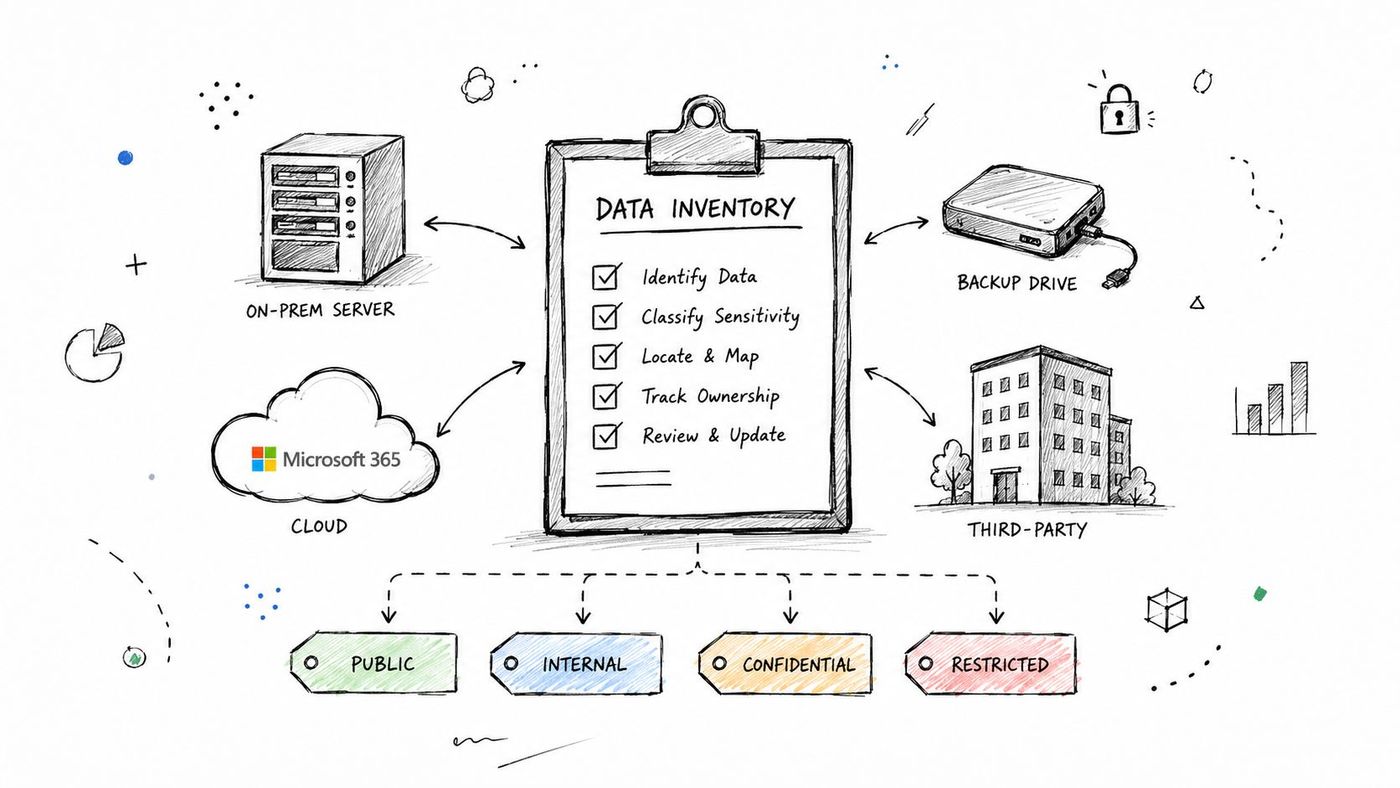
You can't protect information you can't locate. Start by creating a central inventory of every place your organization collects, stores, processes, or shares personal information. Include customer records, employee files, supplier contacts, payment details, email conversations, form submissions, support tickets, security logs, paper records, and information held by vendors.
For each data asset, record the purpose, system owner, categories of information, user groups with access, retention practice, backup location, and third parties involved. Map movement between systems, not just storage locations. A customer may submit information through a website, trigger a record in a CRM, generate an email in Microsoft 365, and then appear in a backup platform or analytics service.
A simple classification scheme can make decisions easier:
The labels matter less than consistent use. A legal firm might classify client identification records and case documents as restricted, while a manufacturer may place payroll records and employee banking information in that category. A clinic should map patient information across its electronic health record, email, document storage, and backup environment.
Practical rule: Ask each department to show where information actually lives. Don't rely only on system diagrams or vendor descriptions.
Use Microsoft 365 administration tools to review SharePoint sites, OneDrive locations, Teams workspaces, Exchange mailboxes, and sharing settings. Add on-premises file shares, laptops, mobile devices, removable media, and third-party applications. Keep the inventory in a controlled location with an owner and change history, then review it quarterly so new applications and repositories don't disappear from view.
Consent should be understandable, specific, and traceable. Under PIPEDA's accountability framework, organizations generally need knowledge and consent for the collection, use, or disclosure of personal information, except where consent is inappropriate. PIPEDA's accountability and consent requirements make the practical standard clear: people need to understand what they're agreeing to and the organization must be able to demonstrate how consent was obtained.
Separate consent by purpose when the purposes aren't the same. A construction company might need contact and project information to deliver a service, while marketing emails are optional. A healthcare provider may need information for treatment but require a distinct decision for a secondary use, such as a research initiative. Combining every purpose into one unchecked statement creates confusion and makes later withdrawal difficult.
A consent record should connect the person, purpose, channel, date, notice presented, choice made, and any withdrawal or change. Store those records where customer service, marketing, and privacy staff can use them without searching through email threads.
An e-commerce business can place privacy preferences in account settings, while a clinic may use a documented intake workflow. The right interface depends on the interaction, but the result should be the same, a clear record tied to the stated purpose.
Review consent language whenever a product, vendor, data use, or communication channel changes. For long-term customer relationships, schedule periodic checks to confirm that the original purpose still matches current practice. Your privacy policy should describe the organization's approach, but the underlying consent workflow must operate in the systems where collection and communication occur.
A privacy programme fails quickly when employees can reach information unrelated to their roles. Apply least privilege, giving each person only the access required to perform assigned work. Role-based access control is more reliable than managing permissions individually, especially as teams grow, change departments, or work across several cloud platforms.
A legal firm could restrict client files to the assigned lawyers and paralegals. A manufacturing company could limit payroll records to HR and finance. A clinic might separate clinical access from administrative access and restrict visibility according to job responsibilities. Contractors and external partners need the same discipline, with time-limited access and explicit ownership.
Connect access to employment and role changes. New staff should receive approved access through a documented process. Departing employees should lose access promptly, and transfers should trigger a review rather than leaving old permissions in place.
Use Microsoft Entra ID, formerly Azure Active Directory, to manage identities across Microsoft 365. Apply multi-factor authentication, conditional access, group-based permissions, and automated provisioning where the configuration supports it. Review SharePoint, Teams, OneDrive, Exchange, databases, file shares, and line-of-business applications together, because a user may be restricted in one system and overexposed in another.
Privileged access deserves additional controls. An oil and gas organization, for example, may need privileged access management for contractors working around operational technology. Record who approved access, when it starts, what it covers, and when it ends.
Monitor unusual access patterns through Microsoft security tooling or a security information and event management platform. A sudden download, access from an unexpected location, or repeated failed authentication attempts should create an investigation path, not just another unreviewed alert. For deeper identity design, see CloudOrbis's guide to identity and access management.
Schedule access reviews quarterly, and review privileged accounts more often when the risk warrants it. Keep approval records and remediation evidence so you can show not only that permissions exist, but that someone actively checks whether they remain appropriate.
A privacy policy should describe actual practice in language customers and employees can understand. It needs to explain how the organization collects, uses, discloses, protects, retains, and manages personal information. It should also identify the accountable privacy contact and provide a clear route for questions, access requests, corrections, and complaints.
The policy should reflect the 10 fair information principles in Schedule 1, including accountability, identifying purposes, consent, limiting collection, limiting use and disclosure, accuracy, safeguards, openness, individual access, and challenging compliance. It should address third-party processors, cross-border flows, access procedures, breach handling, and the organization's approach to retention and secure disposal.
A Toronto healthcare provider may need separate schedules for patient information, employee information, and marketing communications. An accounting firm should explain how client records move through email, document management, tax platforms, and backup systems. A construction company should disclose relevant sharing with subcontractors instead of hiding it in broad language.
Avoid copying a generic template and changing the company name. Templates often omit the workflows that create the most friction, particularly access requests, complaint handling, vendor processing, cloud storage, bring-your-own-device use, and emerging tools such as artificial intelligence. CloudOrbis's overview of Canadian data privacy laws can help leaders place PIPEDA alongside other Canadian requirements, but the final policy must match the organization's own operations.
Publish the policy where people can find it, train employees on their responsibilities, and require acknowledgment where appropriate. Review it annually and whenever the organization launches a service, changes a vendor, migrates systems, adopts AI, changes its BYOD approach, or materially changes retention practices.
The Securitec Security privacy policy provides another example of how a public-facing policy can organize information about collection, use, disclosure, and privacy contact processes. Use examples for structure, not as a substitute for Canadian legal review or operational accuracy.
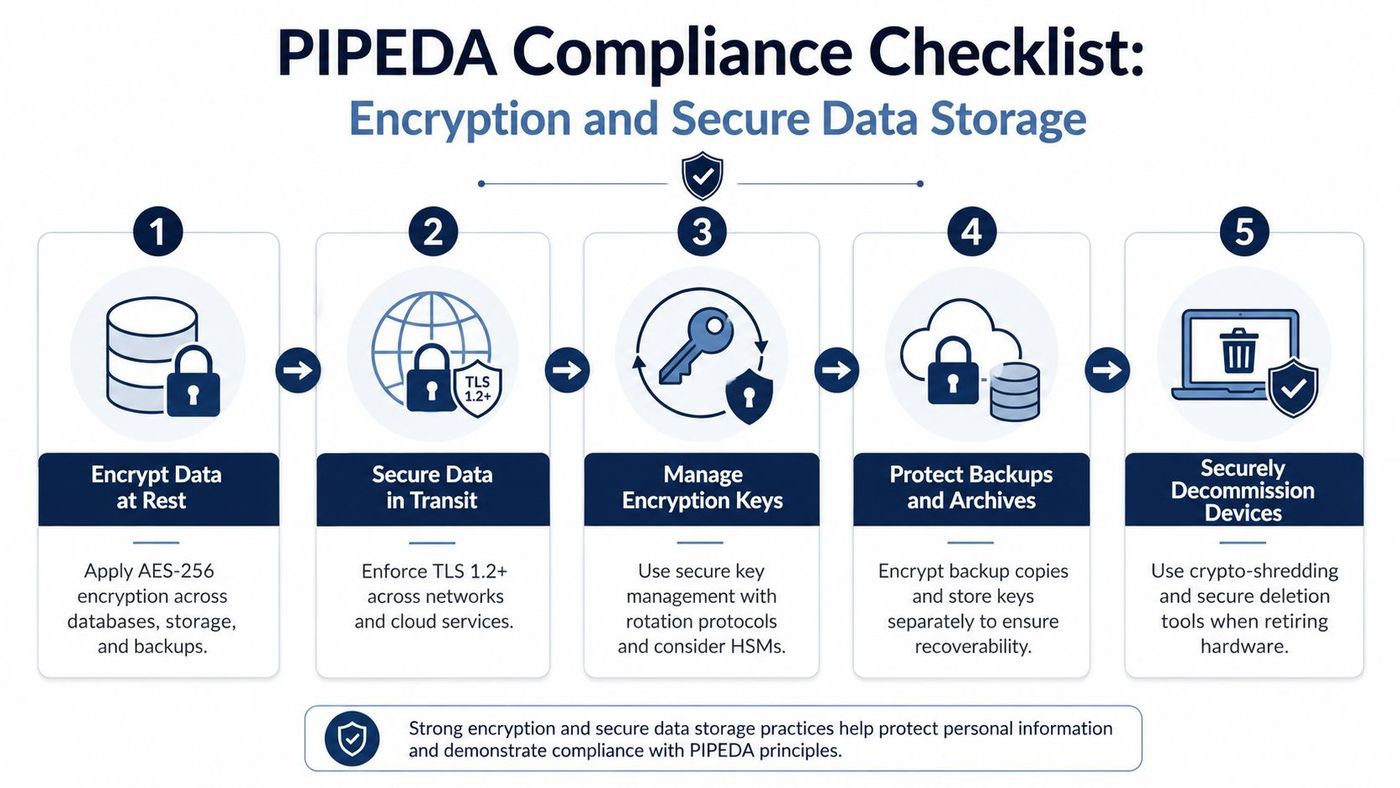
Encryption is one layer of a safeguard programme, not the whole programme. Apply protection according to the sensitivity and exposure of the information. Data moving between a user and a service should use secure transport such as TLS. Information stored in databases, laptops, cloud services, file systems, and backups should use encryption at rest where supported.
A healthcare clinic might protect patient records in its electronic health record and backup environment. A legal firm could use Microsoft Purview Information Protection to apply sensitivity labels and encryption to client documents. A manufacturer should examine payroll and HR applications separately from production systems, because the appropriate controls and owners may differ.
Review encryption at the application and database levels, not only the underlying disk. An encrypted server does not automatically prevent an authorized but inappropriate application export. Secure key management matters just as much. Limit who can administer keys, separate key access from routine data access, and document rotation and recovery procedures.
Encrypted backups are essential, but they must also be isolated from ordinary administrator credentials and tested for restoration. A backup that exists but can't be recovered doesn't provide reliable protection. When devices leave service, use secure deletion processes appropriate to the media, and document disposal for laptops, drives, and removable storage.
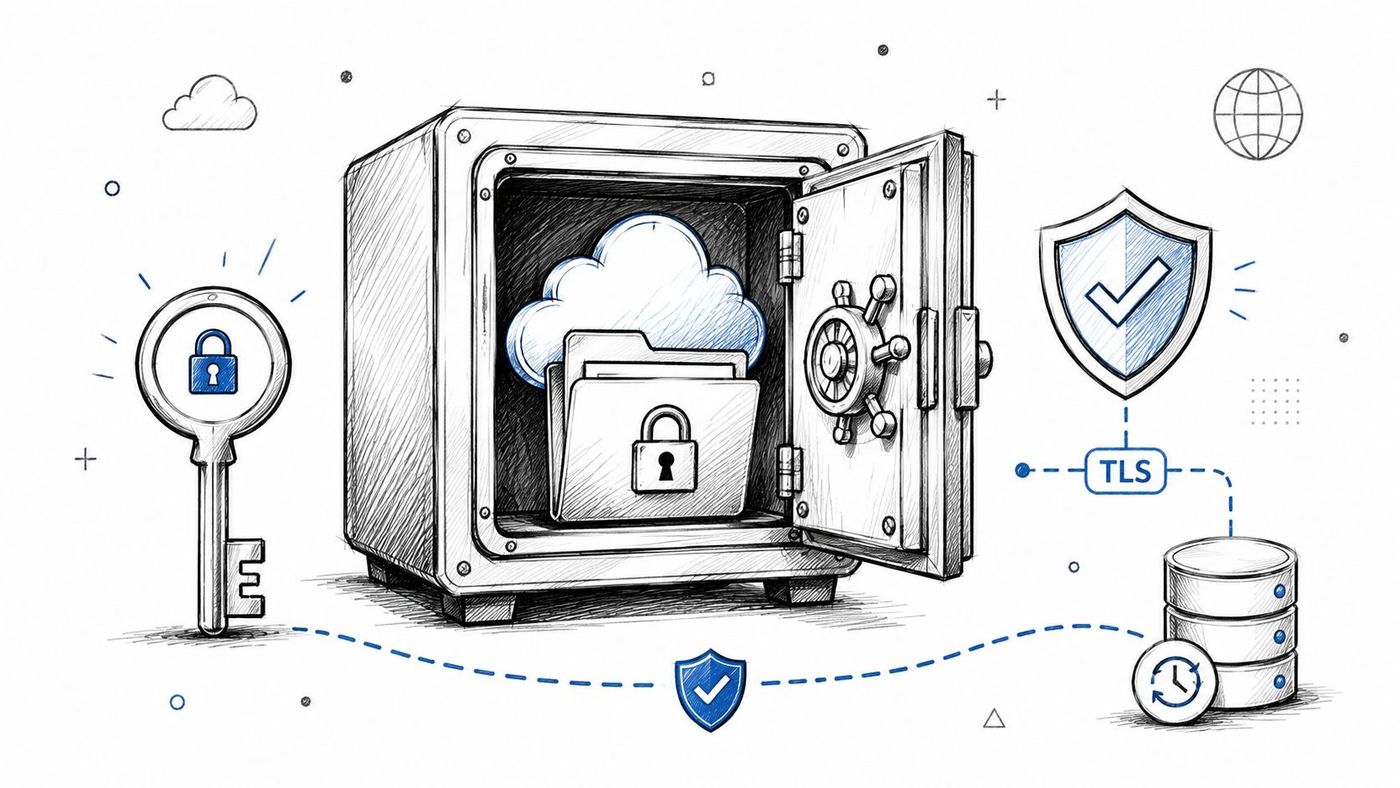
Encryption decisions should be recorded in the data inventory, including exceptions and compensating safeguards. CloudOrbis's explanation of SMB encryption offers practical context for organizations deciding where encryption belongs in a broader security architecture. Review storage controls after migrations, major application changes, backup platform changes, and new remote-access arrangements.
A breach plan must tell people what to do before an incident happens. Assign an incident lead, technical responders, privacy and legal contacts, communications owners, executive decision-makers, and vendor escalation contacts. Document how staff report suspected incidents, how the team preserves evidence, and who decides whether notification obligations apply.
PIPEDA's breach framework requires notification to affected individuals when it's reasonable to believe a breach creates a real risk of significant harm. The notice must be provided as soon as feasible after the organization determines that the breach occurred, should be conspicuous, and will generally be delivered directly to the affected individual. The OPC's breach guidance explains the federal notification approach and its practical expectations.
PIPEDA requires organizations to keep records of every breach of security safeguards involving personal information under their control, even when the event doesn't meet the reporting threshold. Those records must be retained for at least two years under the federal requirement described by the OPC. The OPC's breach record-keeping guidance makes this obligation especially important for near misses, misdirected emails, lost devices, and contained access events.
Your response workflow should cover detection, containment, investigation, risk assessment, notification, remediation, and post-incident review. A legal firm may need forensic support after unauthorized access to client files. An online retailer may need coordinated technical and customer communications after a payment-system incident. A healthcare organization must also consider applicable provincial requirements and sector obligations.
Run tabletop exercises after major system or organizational changes. Test contact lists, decision authority, evidence collection, notification templates, backup restoration, and vendor response. Keep the exercise record, unresolved actions, and completion dates as part of your compliance evidence.
The need for operational readiness is visible in OPC activity. The regulator received 686 breach reports under PIPEDA in 2024–2025 and 1,458 PIPEDA complaints, with complaints up 32% year over year. The OPC's 2024–2025 annual report provides the source for those figures.
A privacy impact assessment should happen before a project becomes expensive to change. Use it for a new customer portal, cloud migration, vendor relationship, AI-enabled workflow, remote-access design, or major change to data collection. The assessment should identify the information involved, purpose, users, recipients, retention, safeguards, assumptions, and possible effects on individuals.
A clinic implementing a cloud patient portal should examine authentication, delegation, notifications, vendor access, mobile use, and backup handling before launch. A legal firm evaluating AI document review should determine whether client documents are sent to an external service, how the provider uses them, how access is controlled, and how outputs are retained. A construction company should assess information exchanged with subcontractors before adding a new project platform.
A useful PIA doesn't need to become a lengthy academic report. It should answer practical questions:
The Office of the Privacy Commissioner's PIPEDA business resources frame privacy management as an assessment of personal-information practices, which supports using PIAs as working governance documents rather than decorative paperwork.
CloudOrbis's guide to privacy impact assessments in Alberta offers relevant operational context for organizations working with Alberta requirements and cloud systems. Review PIAs annually for active high-risk processes, and reopen them whenever a significant change affects the original assumptions.
Employees make daily decisions that determine whether privacy controls work. Training should explain how staff collect information, verify consent, share documents, respond to access or correction requests, recognize phishing, use passwords and MFA, handle portable devices, and report suspected breaches.
A healthcare clinic should separate clinical and administrative scenarios. A legal firm should emphasize confidentiality during onboarding and explain how client files may be shared through Microsoft 365. A manufacturer can train production staff not to disclose colleagues' personal information. A construction company should explain what workers may share with subcontractors and what must remain restricted.
One general annual module rarely changes behaviour on its own. Use a common foundation, then add targeted material:
Track completion, missed training, acknowledgments, and remediation. Use short refreshers after incidents or policy changes. Microsoft 365 learning resources and third-party platforms can help with delivery and evidence, but managers should reinforce the expected behaviour in team workflows.
CloudOrbis's resource on compliance training for employees provides additional guidance for scaling role-based learning. Review the training programme annually, during onboarding, and whenever a new system or material privacy risk enters the environment.
| Control / Action | Implementation Complexity | Resource Requirements | Expected Outcomes | Ideal Use Cases | Key Advantages |
|---|---|---|---|---|---|
| Conduct a Comprehensive Data Inventory and Classification | High, extensive discovery and mapping across systems | Moderate–High, automated discovery tools, IT, compliance, cross‑dept effort | Full data visibility, prioritized safeguards, audit readiness | Hybrid environments, legacy systems, regulated sectors (health, legal) | Enables targeted security, finds shadow IT, supports breach response |
| Implement Clear Consent and Opt-In Mechanisms | Medium, design UX and integrate with systems | Low–Moderate, consent platform/CRM integration, legal review | Documented, granular consent and audit trails; lower legal risk | Healthcare, finance, marketing, B2C | Demonstrates compliance, builds trust, enables segmented communications |
| Establish Robust Access Controls and User Permissions | High, RBAC, PAM, MFA, automated provisioning | High, IAM/PAM tools (Azure AD), IT resources, ongoing reviews | Reduced unauthorized access, detailed audit logs, faster incident response | Large user bases, sensitive data environments, contractor access | Minimizes breach risk, creates accountability, simplifies compliance |
| Develop and Maintain a Data Privacy Policy | Medium, drafting and regular review with legal input | Low–Moderate, legal counsel, privacy owner, communications | Clear governance, customer transparency, evidence for audits | All organizations seeking compliance and stakeholder trust | Clarifies responsibilities, supports training and consistent practices |
| Implement Encryption and Secure Data Storage Practices | Medium–High, multi-layer encryption and key management | Moderate–High, crypto expertise, HSMs or key management, backup testing | Data unreadable if breached; reduced breach impact; regulatory alignment | Regulated industries, cloud storage, remote access scenarios | Strong technical safeguard, supports breach mitigation and recoverability |
| Create a Data Breach Response and Notification Plan | Medium, documented processes, templates, exercises | Moderate, cross-functional team, forensic readiness, tabletop drills | Faster containment, compliant notifications, reduced liability | Organizations with significant personal data or regulatory exposure | Minimizes damage, demonstrates preparedness, speeds coordinated response |
| Conduct Regular Privacy Impact Assessments (PIA) | Medium, integrate into project governance early | Moderate, privacy/security experts, stakeholder time, templates | Early risk identification, built‑in safeguards, improved vendor assessment | New projects, migrations, AI implementations, vendor integrations | Prevents costly redesigns, shows proactive privacy governance |
| Train Employees on PIPEDA and Privacy Best Practices | Low–Medium, create role‑specific modules and assessments | Low–Moderate, training platform, content, tracking and renewal | Reduced human error, better reporting, culture of privacy awareness | All organizations, especially high‑turnover or regulated sectors | Low-cost risk reduction, documents due diligence, improves detection |
A PIPEDA compliance checklist becomes useful when it creates ownership and repeatable evidence. Begin with the data inventory and a risk review, then assign each workstream to a named person. The privacy lead should coordinate the programme, but accountability shouldn't sit with one individual while IT, HR, marketing, finance, and operations continue making unreviewed data decisions.
Create an evidence folder or controlled compliance workspace. Keep the inventory, classification decisions, consent records, access reviews, policy versions, vendor assessments, encryption exceptions, breach records, PIA approvals, training completion, and remediation tickets together. Each record should show an owner, date, status, and next review point. That structure gives leaders a practical view of open risk without requiring a formal audit for every change.
Build the programme into the operating calendar:
The historical breach framework changed the shape of Canadian privacy operations. Mandatory breach notification rules were introduced in 2015, and the formal reporting and record-retention obligations came into force on 1 November 2018. The OPC's PIPEDA legislation page describes the broader federal compliance framework, while the OPC's explanation of the 2018 amendments identifies the formal obligations to report breaches posing a real risk of significant harm and maintain breach records.
The OPC's 2024–2025 annual reporting also identifies an active Compliance Directorate and separate Intake and Resolution functions for complaints. That operational structure reinforces a practical point for Canadian SMB leaders. A policy statement isn't enough if the organization can't answer an access request, investigate a complaint, identify a vendor's role, or produce evidence of how it protected personal information.
Compliance should be proportionate to the organization's risks. A smaller company may not need an elaborate governance office, but it does need a named accountable representative, documented practices, sensible technical safeguards, trained staff, and a reliable way to demonstrate that the programme operates. The strongest approach connects privacy to identity management, Microsoft 365 administration, backup and disaster recovery, security monitoring, vendor management, and business planning.
CloudOrbis Inc. can support that operating model through managed IT, cybersecurity monitoring, cloud services, backup and disaster recovery, employee training, and strategic vCIO support. Business and IT leaders should assess where their current team has the capacity to maintain the inventory, review permissions, test recovery, investigate alerts, and keep evidence current. Where those routines are inconsistent, an external managed services partner can help define ownership, implement controls, and maintain the cadence without separating privacy from everyday IT operations.
CloudOrbis Inc. provides managed IT support, cybersecurity monitoring, Microsoft 365 and cloud services, backup and disaster recovery, employee training, and strategic vCIO guidance for Canadian SMBs building resilient privacy programmes. Visit CloudOrbis Inc. to assess your environment and discuss practical support for turning PIPEDA requirements into repeatable operating routines.
Book a 30-minute call with a senior engineer. No sales script, just straight answers about your environment.


