What Is Information Lifecycle Management and Why It Matters
Learn what is information lifecycle management, how it reduces risk, ensures Canadian compliance, and cuts storage costs for SMBs with practical steps.

Learn what is information lifecycle management, how it reduces risk, ensures Canadian compliance, and cuts storage costs for SMBs with practical steps.

Most advice about information lifecycle management starts with “keep data only as long as you need it.” That sounds sensible, but it leaves out the difficult part: who decides when the need ends, what happens during a legal hold, and how deletion works across cloud storage, backups, and AI systems.
So, what is information lifecycle management in practical terms? It's the governance of information from planning and creation through use, protection, retention, disposal, and evaluation. For a Canadian business, ILM isn't just a way to control storage. It helps determine whether information is accessible for work, protected from misuse, retained for a defensible reason, and destroyed or anonymised at the right time.
Many businesses treat data management as a storage problem. They buy more cloud capacity, create another backup policy, and keep every file because nobody wants to delete something important. That approach may preserve information, but it doesn't explain what the information is, who may use it, how long it should remain available, or when disposal is required.
Canadian federal guidance defines information lifecycle management as a full process covering planning; creating, acquiring, and capturing information; organising and storing it; using, reusing, and disseminating it; maintaining, protecting, and preserving it; disposing of it; and evaluating the process. The aim includes improving understanding of information, supporting appropriate reuse, and reducing the effort required to manage and locate holdings. The Government of Canada guidance on metadata and life-cycle management describes the framework in operational terms.
A useful analogy is a library. A library doesn't rent a larger building and keep every item forever. It decides what to acquire, catalogues each item, controls access, tracks use, preserves material with continuing value, and removes items according to a documented policy. ILM applies the same logic to business information, except the consequences can include privacy exposure, failed access requests, disrupted investigations, and non-compliance.
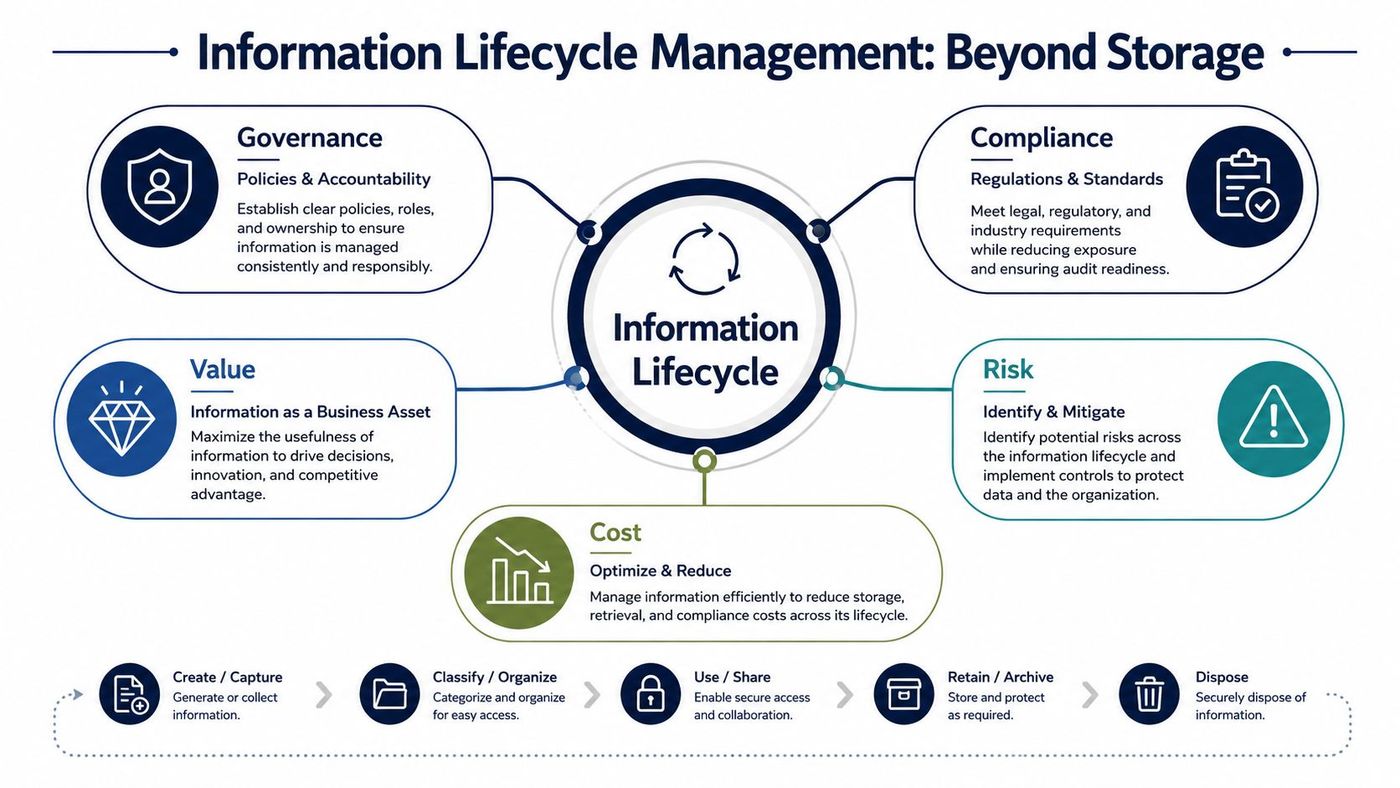
A retention label without an owner is just decoration. Someone must define the business value of a record, approve its retention period, manage access, and document the reason for disposal or preservation. This matters particularly in healthcare, legal, finance, and other sectors where personal or commercially sensitive information moves between people and systems.
Legal teams can also benefit from a strategic guide to legal document management, especially when matter files, correspondence, discovery material, and privileged information must remain controlled throughout their useful life. For broader protection of cloud-held information, businesses can also review CloudOrbis guidance on cloud data protection.
A patient intake form shows why ILM works best as a sequence of governance decisions rather than a simple storage diagram. The form begins as personal information, becomes part of a clinical record, supports care and administration, and eventually reaches an approved endpoint.
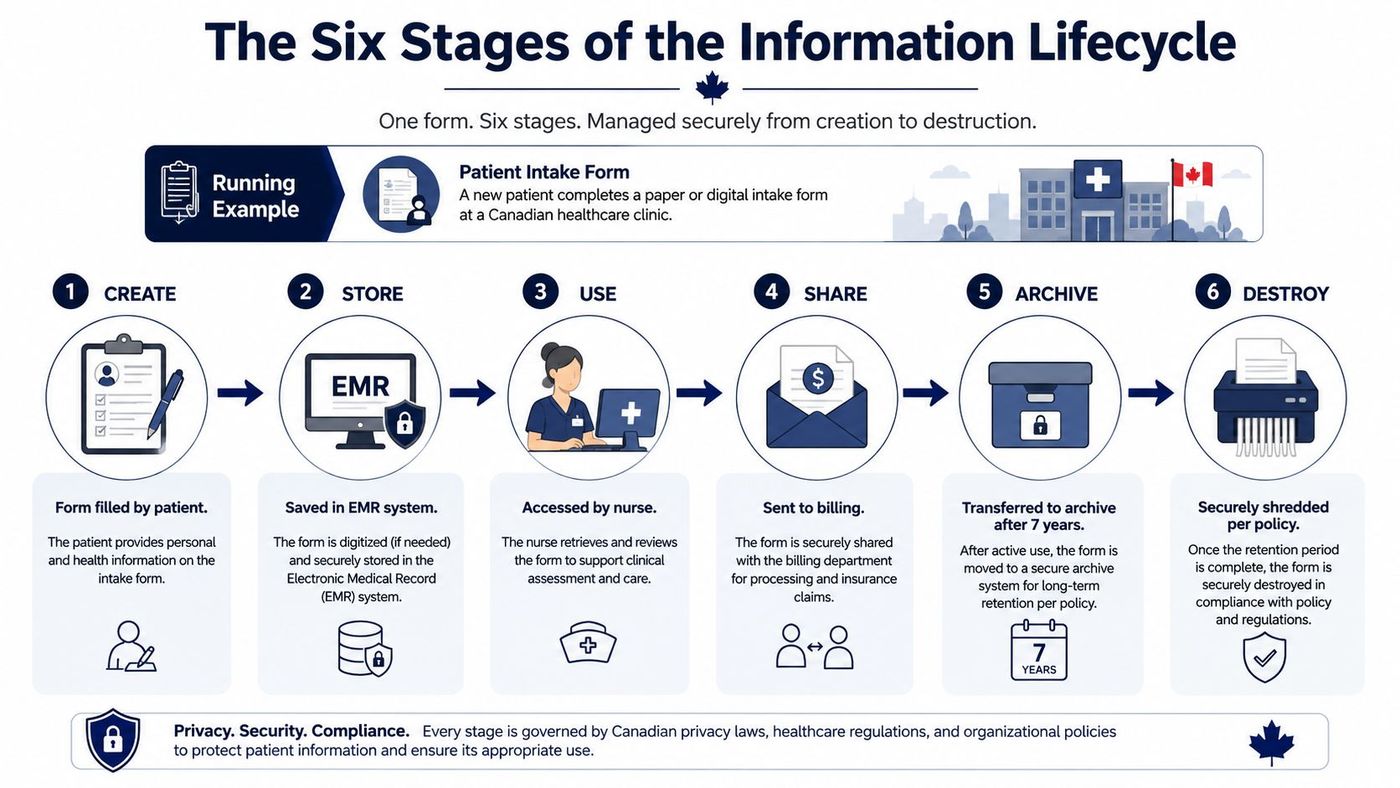
These stages are checkpoints. Automating movement between storage tiers won't fix an incorrect classification, an unknown legal hold, or a retention rule that never reaches backup copies.
Information hoarding feels safe because nobody has to make a difficult deletion decision. It also creates a larger environment to search, secure, back up, restore, and review. A retention schedule gives the business a defensible reason to keep information, move it to a lower-cost tier, or remove it when the business and legal need ends.
Canadian rules demonstrate why generic “archive everything” policies fail. Under the federal Privacy Act framework, personal information used for an administrative purpose must generally be retained for at least two years after its last use, unless the individual consents to earlier disposal. The federal recordkeeping directive connects retention to information used in decisions and access rights, so a department or organisation can't casually delete material that may be needed to support an individual's request.
Tax records create a separate retention obligation. The Canada Revenue Agency generally requires business records and supporting documents to be retained for six years from the end of the last tax year they relate to, and early destruction requires written permission from the CRA. The CRA recordkeeping requirements also address where those records must be kept unless permission is granted.
A functioning ILM programme can help a mid-sized organisation:
CloudOrbis information governance resources can help leaders connect policy, ownership, classification, and technology instead of treating compliance as an isolated IT task.
The terms overlap, but they answer different questions. Records management asks which documents have legal, regulatory, or business value and how the organisation should retain, retrieve, protect, and dispose of them. Data lifecycle management, or DLM, usually focuses more heavily on technical attributes such as storage location, access patterns, performance, backup, and movement between infrastructure tiers.
Information lifecycle management includes both perspectives and adds coordination. It connects business classification with technical enforcement across repositories, endpoints, cloud services, archives, backups, and data used for analytics or AI.
| Criteria | Information Lifecycle Management | Records Management | Data Lifecycle Management |
|---|---|---|---|
| Scope | Information across business and technical systems | Documents and records with ongoing business or legal value | Data objects, databases, files, and infrastructure |
| Primary focus | Governance, value, access, retention, protection, and disposition | Authenticity, accountability, retention schedules, and evidentiary value | Performance, availability, storage tiers, backup, and technical disposal |
| Typical tools | Classification policies, metadata, retention labels, eDiscovery, workflow, and audits | File plans, repositories, disposition reviews, legal holds, and records schedules | Storage policies, backup platforms, archiving, monitoring, and automation |
| Compliance relevance | Coordinates requirements across the full information environment | Demonstrates that required records are preserved and disposed of properly | Supports security, availability, recovery, and technical control obligations |
A business can have excellent DLM and still fail to retain a decision record. It can also have a well-written records schedule while unmanaged cloud copies and backups remain outside its control. ILM closes that gap by assigning owners and connecting policy decisions to the systems that hold information.
The hardest ILM decisions happen when two reasonable obligations collide. A privacy rule may favour deletion once personal information is no longer needed, while a legal hold requires preservation. A backup may retain an older copy after the primary system deletes the record. An AI model may have been trained using information whose original purpose has expired.
Canadian privacy guidance from the Office of the Privacy Commissioner states that personal information no longer required for its identified purpose should be destroyed, erased, or made anonymous, supported by internal schedules with minimum and maximum retention periods. The PIPEDA safeguards and retention guidance provides a practical foundation for policy design.
A workable process starts by separating the ordinary retention schedule from exceptions:
The Canadian data privacy laws overview offers useful context for leaders mapping these obligations. Federal privacy work described in the Government of Canada keep-or-delete guidance also signals tighter expectations around unnecessary personal data and defensible disposal.
The answer isn't to choose one rule and ignore the others. Build a decision record that explains the applicable purpose, retention trigger, exception, system scope, and final disposition.
A mid-sized organisation doesn't need to govern every information type on the first day. Start with the categories that create the greatest privacy, financial, operational, or legal risk, then expand as the controls become reliable.
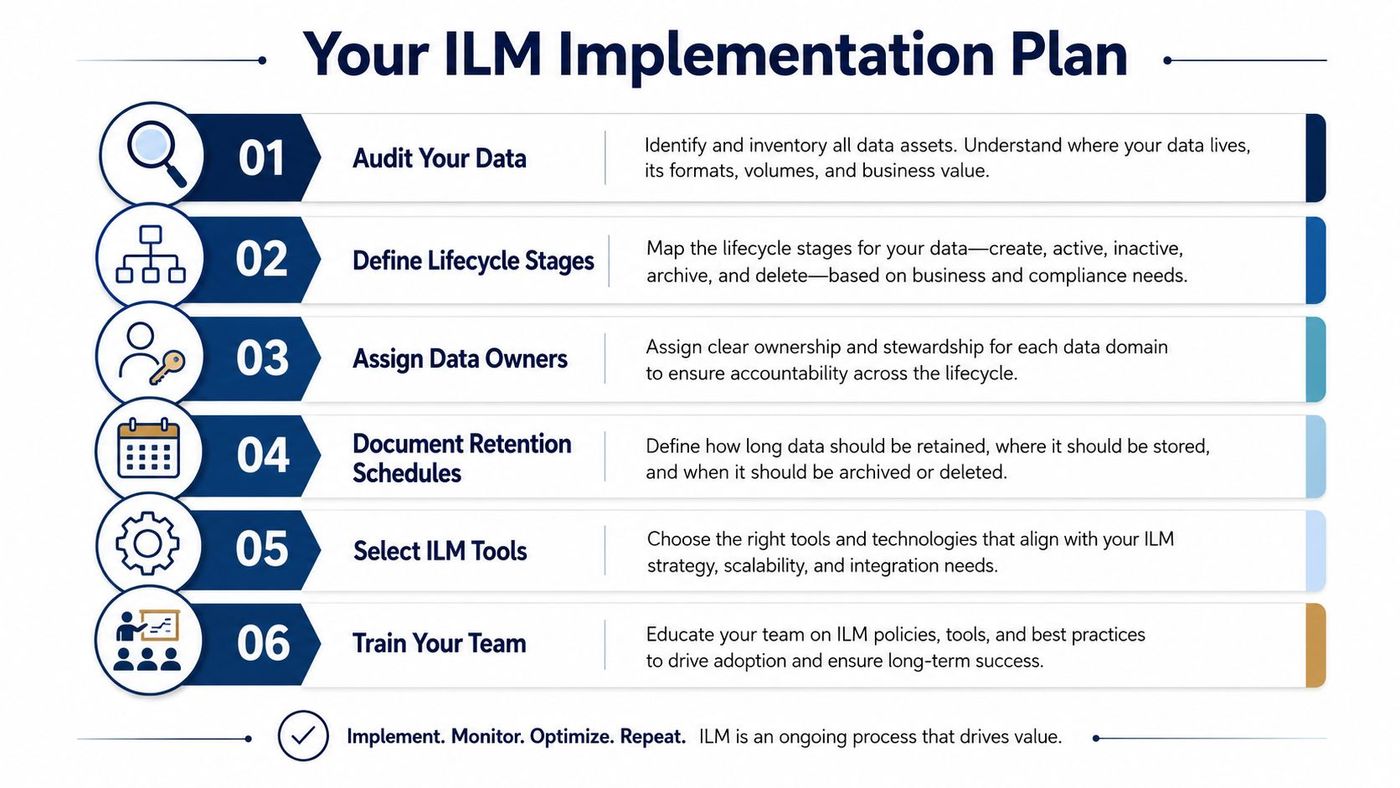
Measure progress through visible controls: known repositories, assigned owners, approved schedules, active holds, successful deletion tests, and documented exceptions. Review the programme when systems, business purposes, or privacy obligations change.
ILM often fails because policy owners, IT administrators, legal advisers, and employees work from different assumptions. A managed IT partner can coordinate the assessment, configuration, monitoring, backup design, cybersecurity controls, Microsoft 365 policies, and ongoing reviews that keep those assumptions aligned.
CloudOrbis Inc. can support this work through managed data services covering information mapping, governance configuration, backup and disaster recovery, security controls, and analytics. Its data management and analytics services can fit into a broader engagement that begins with assessment and strategy, continues through implementation and training, and includes ongoing optimisation. That approach is useful for healthcare, legal, finance, and other Canadian organisations where retention and access decisions must work across cloud platforms and business applications.
CloudOrbis Inc. helps Canadian businesses assess their information environment, align retention and protection controls, and coordinate cloud, backup, security, and Microsoft 365 governance. Visit CloudOrbis Inc. to request an assessment and identify the first ILM controls your organisation should implement.
Book a 30-minute call with a senior engineer. No sales script, just straight answers about your environment.


