What Is SMB Encryption: A Complete Guide for Data Security
Discover what is smb encryption and how it secures data in transit. Our guide covers configuration, compliance benefits, and best practices for SMBs.

Discover what is smb encryption and how it secures data in transit. Our guide covers configuration, compliance benefits, and best practices for SMBs.
SMB encryption is a built-in security feature in Microsoft's SMB protocol that protects file data from being read while it travels over a network. Think of it as a secure envelope for digital files, especially useful when staff open shared documents from home, branch offices, or public Wi-Fi.
If you run a business with shared folders on Windows, there's a good chance people are accessing those files from places your network team doesn't fully control. A clinic employee might open a patient form from home. A finance manager might review reports from a hotel. A legal assistant might connect to a file share over a guest network at a client site. In each case, the file has to move across a network before it reaches the user.
That movement matters. Data is often most exposed when it's in transit, not just when it's stored on a server. That's why SMB encryption has become an important control for business owners, not just system administrators. It helps protect file-sharing traffic from eavesdropping, supports compliance efforts, and gives IT teams a practical way to reduce risk in hybrid work environments.
For many organizations, this also connects to broader security planning. File-sharing protection works best when paired with network controls, endpoint protection, and a sensible firewall strategy. If you're reviewing perimeter security alongside file access, a reliable firewall for BPO companies is one example of the kind of hardware businesses consider when they want tighter control over remote and branch connectivity.
Businesses already investing in Microsoft security often see SMB encryption as one more layer in the same direction. If that's your environment, CloudOrbis has also published a practical guide on Microsoft 365 security in Calgary that fits well with this topic.
A Calgary employee opens a budget file from a hotel Wi-Fi network before a client meeting. A colleague in Vancouver updates a contract from home. Both are doing routine work, but both are sending company data across networks the business does not fully control.
That is the primary reason SMB encryption matters.
For many Canadian businesses, file sharing is no longer limited to one office, one server room, or one trusted network. Staff work from home, travel between sites, connect through VPNs, and use branch offices that depend on internet links. Each time a file moves between a user and a server, there is a chance that someone could intercept readable traffic if that connection is not protected.
SMB encryption addresses that risk by scrambling file-sharing traffic while it is in transit. A useful comparison is a courier pouch with a lock instead of a clear plastic sleeve. The document still gets delivered, but people along the route cannot read it.
This matters for security, but it also matters for compliance. Canadian organizations that handle personal information need to show that they are using reasonable safeguards. For many employers, that brings PIPEDA into the conversation, along with sector-specific client requirements, cyber insurance questions, and contract language around protecting sensitive data. If staff can reach shared folders from outside the office, encrypted file traffic is often part of proving that the business took sensible steps to reduce exposure.
There is also an operational shift happening. In older environments, encryption was often treated as optional and enabled only for selected shares. That approach is getting harder to defend. Many IT teams now treat encrypted SMB traffic as the default, then make careful exceptions only where an older device, application, or legacy workflow cannot support it yet. For Canadian SMBs, the challenge is not just turning encryption on. It is planning the transition so an old copier, line-of-business app, or branch system does not suddenly lose access to a file share.
A good starting rule is simple. If a user can open company files from outside your main office, protect that traffic by default and review the exceptions separately.
SMB encryption also works best as one layer in a wider security plan. Perimeter controls still matter, especially for firms with branch offices, remote users, or outsourced teams. If you are reviewing edge security at the same time, a reliable firewall for BPO companies shows the kind of hardware businesses often consider for tighter control over remote connectivity. Organizations that already rely on Microsoft tools may also want to review this related guide to Microsoft 365 security for Calgary businesses, since file-sharing security is strongest when identity, endpoints, and access policies are aligned.
For a business owner, the bottom line is straightforward. SMB encryption helps protect confidential files during everyday work, supports Canadian privacy expectations, and reduces the risk that hybrid work creates weak points you cannot see.
A lot of business owners use SMB every day without ever seeing its name.
SMB, short for Server Message Block, is the file-sharing method Windows uses when staff open a shared folder, save a spreadsheet to the office server, or connect to a mapped drive. If your team stores files in one place and accesses them from another device, SMB is often the mechanism carrying that traffic.
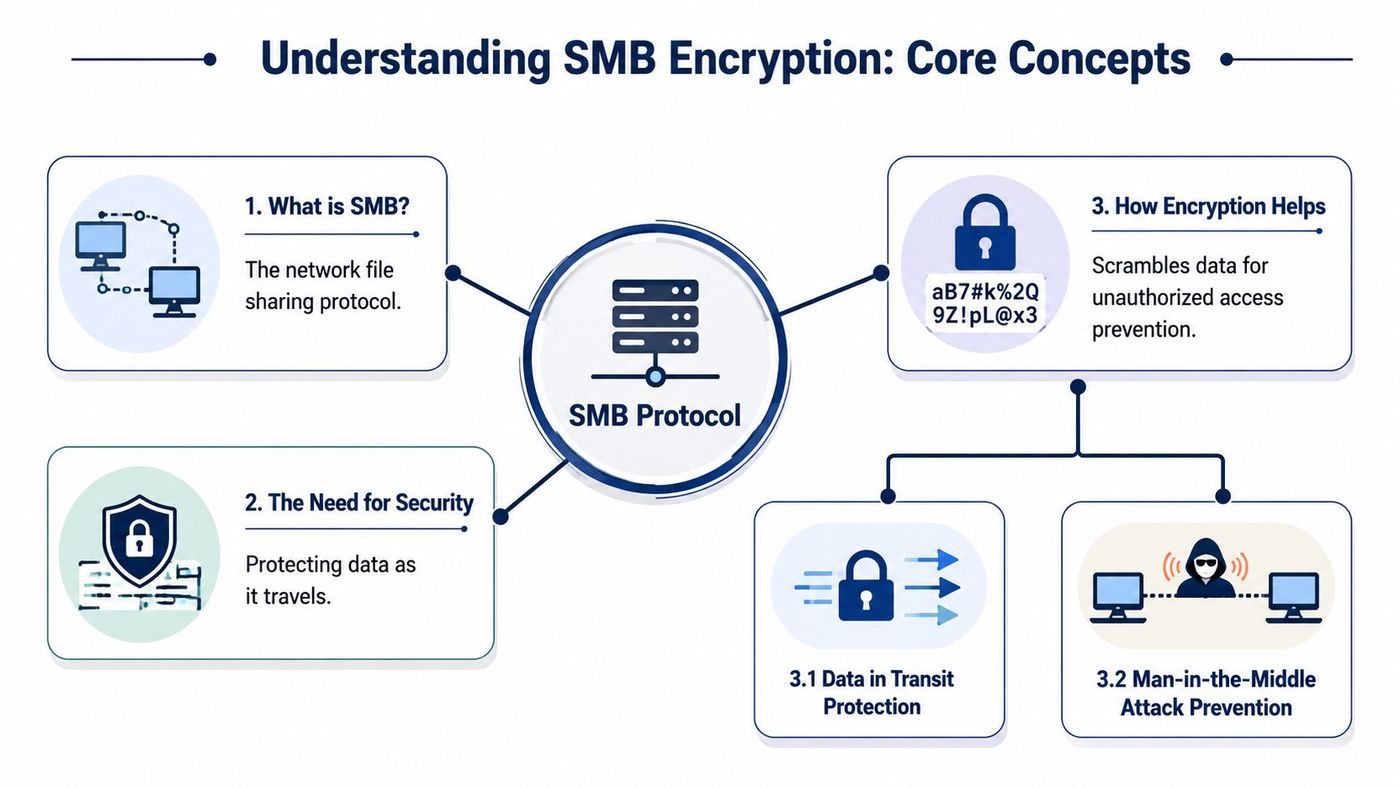
The easiest way to understand SMB encryption is to separate two moments in a file's life. One is when the file is stored on a device or server. The other is when it is travelling across the network between a user and that storage location.
That second moment is where many companies get caught out.
A payroll file sitting on a server is data at rest. The same payroll file being opened by someone in a branch office, at home, or over VPN is data in transit. During that trip, the contents can be exposed if the connection is not properly protected.
Unencrypted SMB traffic resembles sending a paper document in a standard envelope. Someone who intercepts it may be able to read what is inside. Encrypted SMB traffic resembles sending that same document in a sealed tamper-resistant pouch. The file still arrives and opens normally for the intended user, but anyone watching the traffic sees scrambled data instead of readable content.
SMB encryption protects file-sharing traffic while it moves between systems. It does not change who is allowed to access a file. It changes what an outsider can see if they intercept the connection.
That distinction matters for Canadian SMBs. Privacy obligations, client confidentiality, cyber insurance questions, and remote work all push businesses toward stronger protection for file transfers, not just stronger passwords on the server itself. In practice, this is one reason many organizations are shifting from treating SMB encryption as optional to treating it as the default, then reviewing older devices and applications that may need exceptions.
Disk encryption and SMB encryption solve different problems. Disk encryption helps if a laptop is lost or a server drive is stolen. SMB encryption helps when files are crossing the network between users, servers, branch offices, and line-of-business systems.
For IT planning, the practical question is simple. Which file shares can be encrypted by default, and which legacy systems need testing before that change is enforced? That operational review matters just as much as the definition itself.
If your team is also reviewing policies around file access, retention, and protection, this companion guide to data security management practices for business environments adds useful context.
A Canadian company might decide to require encryption for every file share, only to find that one old accounting server or storage appliance can no longer connect. That is the practical version problem with SMB encryption. The security setting is simple in principle, but the business impact depends on what is still running in your environment.
The main turning point was SMB 3.0, introduced with Windows Server 2012. Before that, Windows file sharing could still move data, but built-in modern encryption was not part of the platform in the same practical way. From SMB 3.0 onward, administrators gained the option to encrypt traffic at the share level or more broadly across the server.
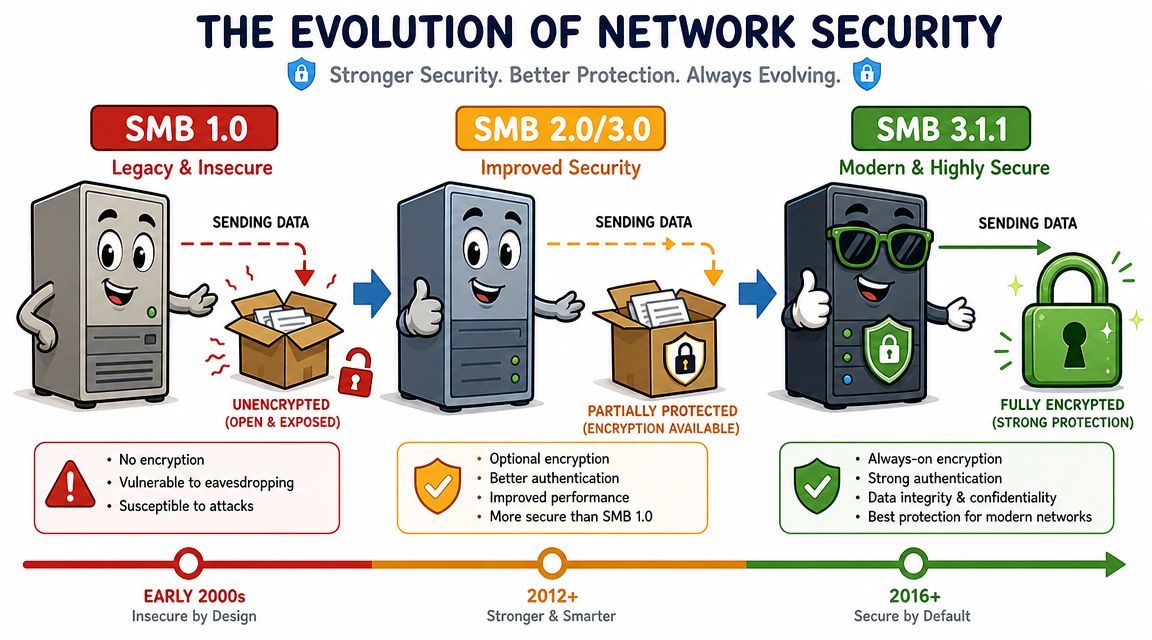
A useful way to read the version history is to treat it like a building code. Older buildings may still stand and still be usable, but they were not designed around current fire-safety expectations. Older SMB versions are similar. They may still function for file access, yet they were not built around the level of in-transit protection many businesses now expect.
For planning purposes, the split is straightforward:
That shift matters for Canadian SMBs because the question is no longer just, "Can this server share files?" The better question is, "Can it share files in a way that matches our security policy, client commitments, and insurer expectations?"
Many businesses are in a transition phase. Staff work from the office, from home, and through VPN or cloud-connected setups. At the same time, the back end may still include an old NAS, a legacy line-of-business application, or a server that has been left in place because replacing it affects operations.
That mix is where SMB encryption projects succeed or stall.
If you enable encryption broadly, newer Windows systems usually handle it well. Legacy systems may not. Some will fail to connect. Others may require configuration changes, software updates, or a temporary exception while you plan a replacement. This is why the move from optional encryption to mandatory encryption should be handled like an infrastructure change, not just a box to tick in Group Policy.
A security control only protects the business if every required system can support it, or if unsupported systems are identified and isolated on purpose.
Before making encryption mandatory, inventory the systems that use file shares. Include workstations, servers, storage devices, scanners, and business applications that write to shared folders. Then test the connections that matter most to daily operations.
If your environment still includes older Windows infrastructure, the review often overlaps with server lifecycle planning. CloudOrbis has a related article on Windows Server 2012 R2 end of life planning for older business systems, which often comes up during the same modernization effort.
In practice, version support is what turns SMB encryption from a simple security feature into an operational decision. The businesses that handle this well usually follow the same pattern. Encrypt by default where the platform supports it, test legacy dependencies early, and keep short-term exceptions visible so they do not become permanent risk.
For a Canadian business, SMB encryption is less about protocol theory and more about responsible handling of sensitive information.
A law office may store contracts and client records on shared folders. A clinic may rely on file shares for internal documents. A finance team may move reports between departments through mapped drives. In each case, the business depends on file access, but also has to show that access is handled with care.
The first benefit is straightforward. SMB encryption helps keep file data confidential while it moves across the network. That's useful when teams work across offices, from home, or through mixed network conditions.
It also supports a due-diligence mindset. If your organization knows staff are accessing sensitive files remotely, leaving that traffic unprotected is harder to justify than it used to be.
Canadian organizations often look at this through the lens of privacy and regulatory responsibility. Even when a regulation doesn't name SMB specifically, encryption in transit is often part of the wider expectation for protecting sensitive data.
That's especially relevant in sectors such as healthcare, legal, and finance, where data sensitivity is obvious and documentation matters. A security control that's built into Windows and manageable by policy is easier to explain to auditors, insurers, and clients than an informal “we trust the network” approach.
There's also a commercial side to this. Clients want to know their information is handled properly.
You may never hear a customer ask, “Do you use SMB encryption?” But they will ask about data protection, remote access security, and internal controls. Being able to answer those questions confidently matters.
A simple way to think about it is this:
| Business concern | Why SMB encryption helps |
|---|---|
| Sensitive file access | Protects file data while it travels |
| Regulatory pressure | Supports stronger transport security controls |
| Client confidence | Shows a more mature approach to handling information |
A common real-world scenario looks like this. Your IT team enables stronger file-sharing security on a Windows server, remote staff connect the next morning, and one older NAS or line-of-business system suddenly cannot open the share. That is why configuration matters as much as the definition. For many Canadian businesses, the job is no longer just turning encryption on. It is turning it on in a way that protects sensitive data, supports compliance goals, and does not interrupt operations.
Windows gives you a few ways to apply SMB encryption. You can enable it on a single share, across the whole file server, or, on newer Windows clients, require encryption for outbound SMB connections. The right choice depends on your risk level and your environment. If payroll or client records live on one share, start there. If the whole server handles confidential data, a server-wide setting may make more sense.
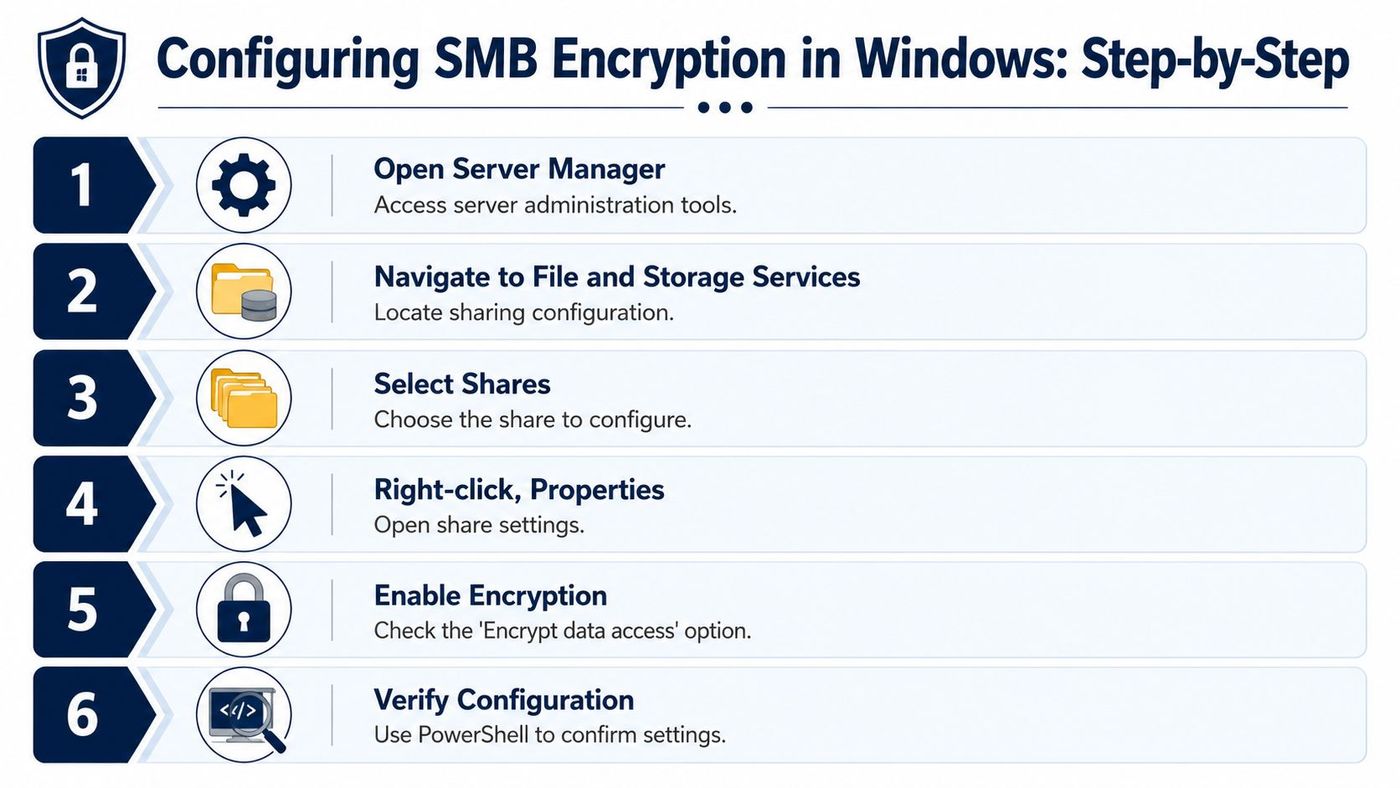
On the file server, the PowerShell settings are straightforward:
If you prefer a visual workflow, you can also enable encryption in Server Manager by opening the share properties and selecting the option to encrypt data access. Smaller IT teams often start there because it makes the change easier to review before standardizing it through scripts or policy.
The practical difference is simple. Per-share encryption works like putting a stronger lock on one filing cabinet. Server-wide encryption is closer to securing the whole records room. One is more targeted. The other is broader and easier to apply consistently.
The bigger shift for many businesses is happening on the client side. Newer Windows versions can require encryption for outbound SMB connections. If a target server or device cannot support modern SMB encryption, the connection is blocked.
That is a meaningful change in day-to-day operations.
In older environments, encryption was often treated as an option you could enable where convenient. In newer deployments, organizations are starting to treat encrypted SMB traffic as the expected baseline, especially for hybrid work, regulated data, and cyber insurance reviews. For Canadian SMBs, this is where planning matters. A policy that improves security on paper can still create support tickets if legacy storage has not been checked first.
Enable enforcement only after you know which servers, NAS devices, and appliances support it.
A safer rollout usually follows this order:
Verification matters as much as configuration. If users can still reach a share without encryption where policy says they should not, you do not yet have the control you think you have. If they cannot connect at all, the issue is often compatibility rather than a Windows failure.
Mixed storage environments need extra attention. This background article on what a NAS drive means in business IT helps explain where those compatibility gaps often show up. If remote access is also part of your setup, Throughwire's VPN guide for China is a useful reference for understanding how VPN choices and encrypted file access fit together.
Encryption always introduces some processing overhead. That's normal. The useful question isn't whether there's any cost. It's whether the security gain is worth the operational impact in your environment.
For most office file-sharing workloads, many businesses accept that trade-off. The files matter, the risk is real, and modern systems are generally better equipped to handle encrypted traffic than older hardware.
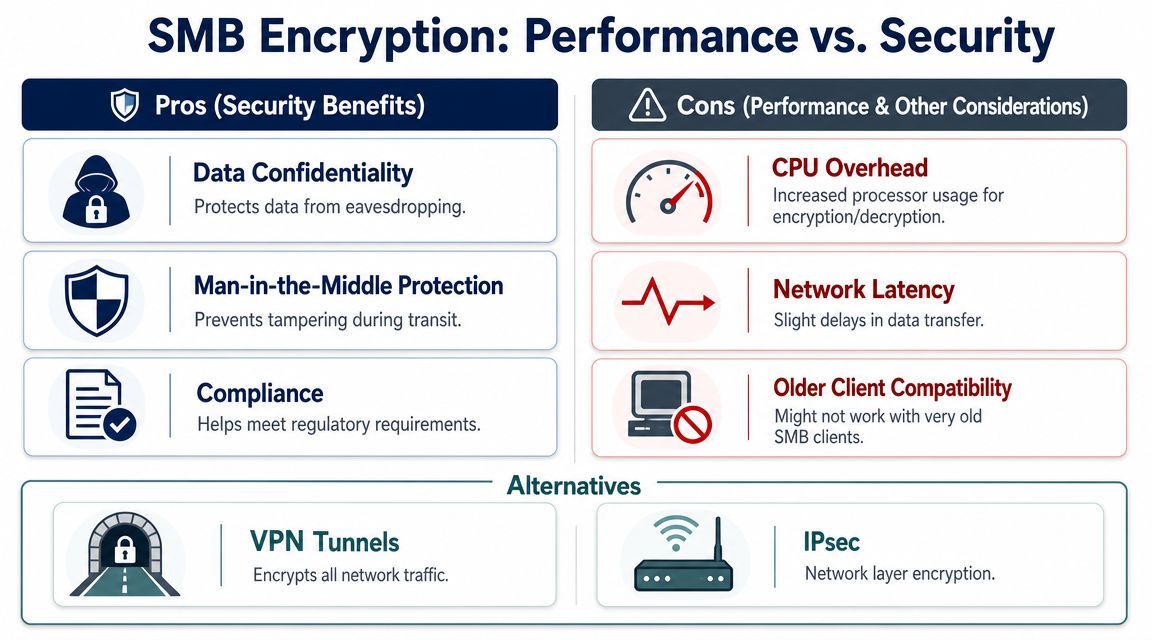
The impact tends to be most relevant when:
That's why staged testing matters. Security teams need to know not just whether encryption is safer, but whether core business workflows still run cleanly.
SMB encryption protects the file-sharing layer. Other controls protect different parts of the path.
A VPN, for example, can protect broader network traffic between the user and the company environment. IPsec does something similar at the network layer instead of specifically at the SMB layer. If your team is comparing remote access approaches, Throughwire's VPN guide for China offers a useful primer on how IPsec and SSL VPNs differ at a high level.
That doesn't make SMB encryption redundant. It means each control solves a different problem. Many businesses use layered protection because secure file sharing is stronger when the network path and the application traffic both have safeguards.
The best SMB encryption strategy is rarely “flip one switch everywhere.” Good outcomes come from combining policy, compatibility checks, and a realistic rollout plan.
Microsoft's more recent Windows changes make that even clearer. Industry coverage of Microsoft's Windows 11 build 25982 noted the introduction of mandatory SMB client encryption for outbound connections, with enforcement available through Set-SmbClientConfiguration -RequireEncryption $true. That shift turns encryption from an optional hardening measure into an enforceable policy baseline for managed Windows devices (MSP Corp on SMB client encryption in Windows 11).
Use this as a working standard for secure file sharing:
You don't need to manage PowerShell to guide this properly. Ask a few direct questions:
Strong file-sharing security comes from controlled adoption, not rushed enforcement.
For firms that handle confidential records daily, this is especially relevant. If your environment includes accounting workflows, CloudOrbis has a related guide on secure file sharing for accountants. And if you need outside help, CloudOrbis Inc. provides managed IT and cybersecurity services that can include reviewing Windows file-sharing environments, identifying legacy compatibility risks, and implementing SMB encryption policies as part of a broader security program.
If your team is asking what SMB encryption is, the better question may be whether your current file-sharing setup is secure enough for hybrid work, compliance pressure, and older infrastructure. CloudOrbis Inc. can help you assess your Windows environment, identify legacy systems that may block enforcement, and build a practical rollout plan that strengthens security without disrupting the business.
Book a 30-minute call with a senior engineer. No sales script, just straight answers about your environment.


