Canadian SMB Security Awareness Training Guide 2026
Build an effective security awareness training program for Canadian SMBs. This guide offers a step-by-step playbook: planning, compliance, measurement, and ROI.

Build an effective security awareness training program for Canadian SMBs. This guide offers a step-by-step playbook: planning, compliance, measurement, and ROI.
Seventy per cent of Canadians experienced a cybersecurity incident in 2022 (Statistics Canada). That should change how any SMB leader thinks about cyber risk.
Most businesses still start with tools. They buy endpoint protection, add email filtering, tighten access controls, and move on. Those controls matter. But attackers keep aiming at people because people approve payments, open attachments, reuse passwords, and handle sensitive records. In a clinic, that might be patient data. In manufacturing, it might be supplier invoices or remote access to production systems. In a law office, it might be a single email thread that contains everything an attacker needs.
Security awareness training works best when you treat it as an operational process, not an HR checkbox. Many Canadian SMBs get stuck here. They know they need training, but they don't know what to build, how often to run it, or whether they should manage it in-house.
Phishing, invoice fraud, and credential theft still get through in businesses that already pay for security tools. In Canadian SMBs, the deciding moment often happens when an employee has to judge whether a message, link, file, or request is legitimate.
A firewall can filter traffic. It cannot verify that a front-desk employee should trust a fake courier email, or that a finance lead should release funds based on a rushed request that appears to come from the owner. Human judgement sits in the middle of daily operations, especially in healthcare clinics, manufacturing firms, and other small teams where staff wear multiple hats and move quickly.
For Canadian SMBs, this is critical because attacks rarely arrive as obvious break-ins. They arrive as routine work. A vendor email. A password reset prompt. A cloud file share. A text message about payroll. A remote access request tied to a production issue.
Practical rule: If a threat reaches an employee's screen, part of the security decision has already shifted from your tools to your staff.
That is why effective awareness training should be treated as an operational control, not a once-a-year policy exercise. In a clinic, that means helping staff spot suspicious requests involving patient information and report them before privacy obligations under PIPEDA or health-sector rules are breached. In manufacturing, it often means teaching supervisors, office staff, and plant users how to question unusual login prompts, supplier invoice changes, and remote support requests without slowing production more than necessary.
There is a trade-off here. Tighter controls and more frequent training can reduce risk, but they also add friction if they are rolled out without context. The programs that work best for SMBs are the ones tied to actual workflows, not generic slides copied from a compliance portal.
If your team has not reviewed the exposure created by shared inboxes, cloud apps, mobile access, and remote work, this overview of top cybersecurity threats facing SMBs is a useful companion. For a practical outside view on how collaboration tools and data-handling practices affect privacy obligations, the AONMeetings data security insights page is also worth reviewing.
The goal is simple. Reduce the number of bad decisions employees have to make under pressure, and improve the odds that when they do have to decide, they make the safe call.
A workable security awareness training program starts with scope, not software. Before assigning content, decide what business problem you're trying to solve.
“Make staff more aware” is too vague to guide a program. Stronger goals are tied to workflows and consequences. A healthcare clinic might want better handling of patient information and faster reporting of suspicious emails. A manufacturer might want fewer credential-sharing habits on shared workstations. A legal firm might want tighter file-handling and client confidentiality practices.
Set goals around behaviours you can observe:
These are better starting points than completion rates alone. Completion tells you who watched the training. It doesn't tell you whether they'll make the right call under pressure.
Canadian SMBs often split compliance from operations, and that creates weak programs. If your clinic handles protected health information, your training can't stop at generic phishing examples. If your firm falls under PIPEDA obligations, staff need specific guidance on collection, use, disclosure, storage, and reporting practices that match their daily work.
The Canadian Centre for Cyber Security states that security and privacy literacy training must be provided to all system users, including managers, senior executives, and contractors, at initial hire and at a defined frequency thereafter (Canadian Centre for Cyber Security guidance). That point matters because SMBs often train front-line staff while exempting leadership or external contractors. Attackers won't make that distinction.
Training fails when leadership treats it as employee content instead of organisational discipline.
This is usually the first operational decision that exposes whether a company is serious.
Use this quick ownership model:
| Area | Best owner | What that owner does |
|---|---|---|
| Policy alignment | Leadership and operations | Approves standards, exceptions, and enforcement |
| Technical integration | IT or security lead | Connects reporting workflows, user groups, and simulations |
| Compliance review | Privacy, legal, or external advisor | Confirms sector and regulatory requirements |
| Staff communication | HR and people managers | Reinforces expectations and completion |
| Incident lessons | IT and leadership | Feeds real events back into future training |
If one person is carrying all five, the program usually becomes inconsistent within a few months.
Employees notice what leaders do faster than what slide decks say. If executives skip training, use weak practices, or push staff to bypass controls, the program loses credibility immediately. The opposite is also true. When leaders complete training, report suspicious messages, and follow approval processes, staff take the program seriously.
Most bad security awareness training has the same flaw. It assumes everyone needs the same examples, at the same depth, in the same format.
That's why annual slide decks get ignored. They feel disconnected from the actual work people do.
Every program needs a common baseline. These aren't advanced topics. They're the habits that reduce preventable mistakes across the business.
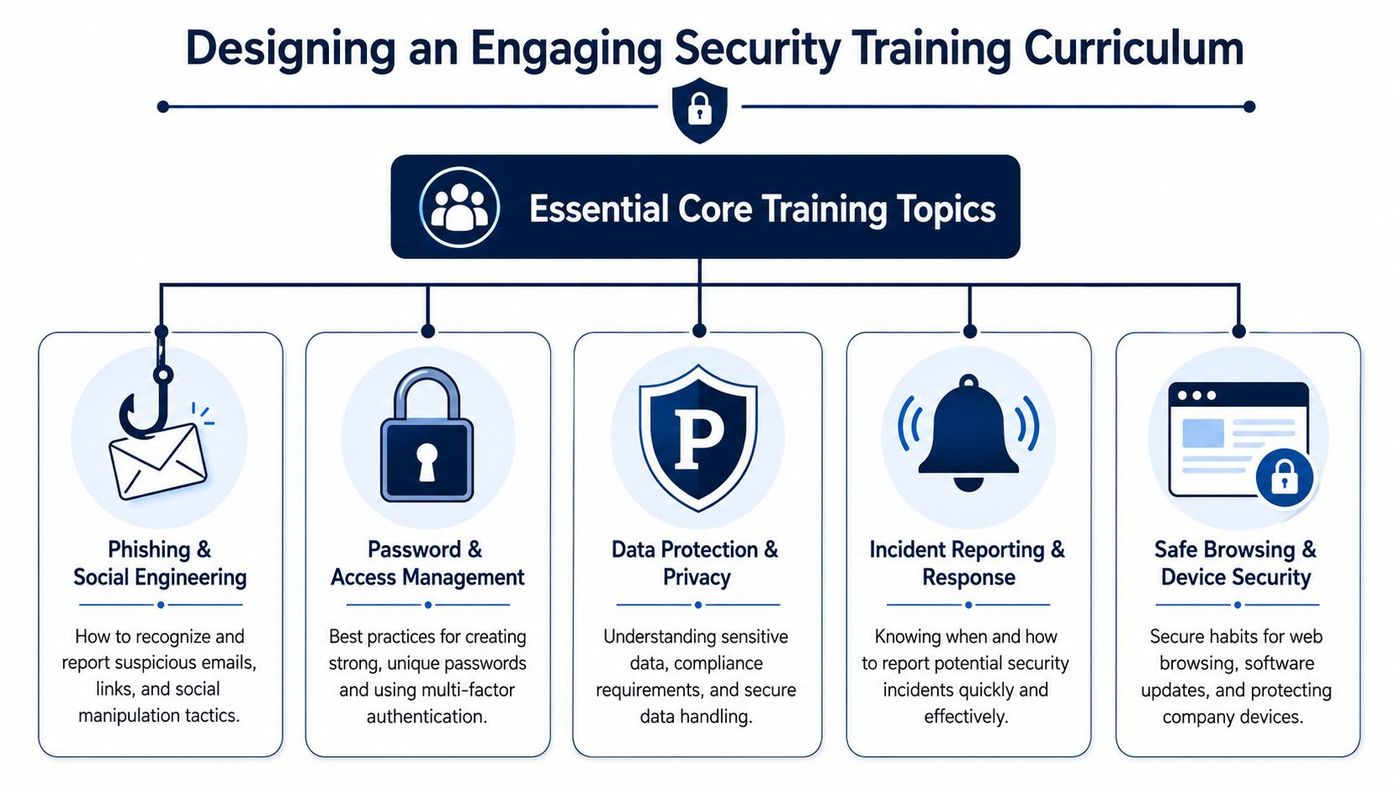
A practical curriculum should include:
Generic libraries are better than nothing. They're not enough for high-risk environments.
In Canada, phishing susceptibility is reduced by 86% only when training includes monthly industry-specific modules and simulations, with a particular gap in healthcare and legal environments where PIPEDA compliance depends on precise data-handling scenarios (industry-tailored Canadian training guidance). That's the difference between teaching “don't click bad links” and teaching “this is what a fake lab results request looks like at your front desk” or “this is how a fraudulent client wire instruction appears in a legal inbox”.
Here's what tailoring looks like in practice:
A receptionist should see scenarios about appointment reminders, patient portal messages, scanned referrals, and requests for records. A clinic manager should see examples tied to vendor invoices, payroll, and staff scheduling. A physician or practitioner should get guidance on mobile access, chart access, and urgent-message impersonation.
A coordinator should train on shipping updates, purchase orders, customs paperwork, and urgent supplier messages. Supervisors need scenarios involving remote access requests, device use on the floor, and shared mailbox risks.
Staff need examples involving client document shares, trust-related communication, invoice changes, account credential theft, and confidentiality breaches through everyday collaboration tools.
Relevance drives retention. Staff remember training when the scenario sounds like the workday they actually have.
For teams already using structured learning platforms, it helps to think of security content the same way you'd structure operational training. This piece on Moodle LMS for Alberta private career colleges is education-focused, but the lesson applies broadly: people engage better when content is organised, role-specific, and delivered in manageable pieces.
Micro-learning works because it respects attention. Use short modules, simple language, and examples from current operations. Mix formats so staff don't tune out. A short video, a scenario-based quiz, a one-page checklist, and a follow-up reminder often outperform a single annual course.
What doesn't work? Long compliance videos, generic test questions, and content that assumes every employee has the same risk profile.
Training explains the signs. Simulations show how people respond when work feels rushed and the message looks plausible.
A phishing simulation program should feel like a practice field, not a trap.
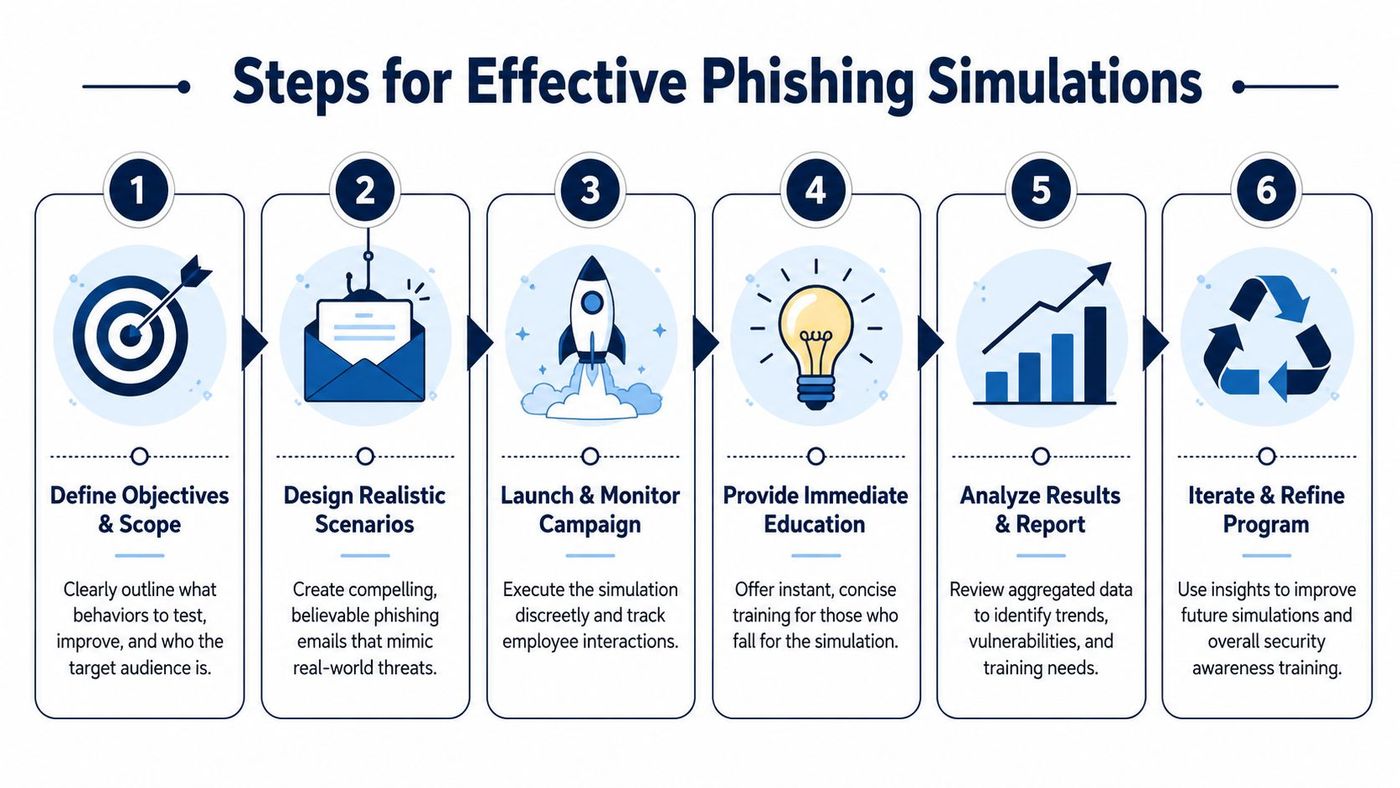
The strongest programs use a repeatable loop:
Groups in Canadian and North American enterprises that conduct weekly simulated phishing tests are 2.74 times more effective at reducing phishing risk than groups performing tests less than quarterly (KnowBe4 phishing simulation research). That doesn't mean every SMB must launch elaborate weekly campaigns. It does mean that infrequent testing leaves long gaps between learning moments.
For smaller teams, lighter and more regular simulations usually work better than occasional “big” tests. A short, targeted campaign tied to payroll season, invoice processing, benefits renewals, or vendor communications often teaches more than a generic blast.
Programs can quickly fail. If staff think simulations are designed to embarrass them, they'll hide mistakes during real incidents.
Use simulations to create muscle memory:
A good companion read here is this guide to email security best practices, especially if you want to align user behaviour with technical mail protections.
The best phishing simulation result isn't “nobody clicked”. It's “people spotted it, reported it, and knew what to do next”.
Organisations that treat security awareness as a yearly checkbox rarely get the behaviour change they expect. The programs that hold up in real SMB environments track whether staff spot threats sooner, report them faster, and make fewer costly mistakes in daily work.
In Canadian healthcare clinics, manufacturing firms, and professional services teams, that matters more than a completion report. Leaders need evidence that training is reducing operational risk, supporting PIPEDA obligations, and helping staff handle common situations such as invoice changes, password resets, patient record access, and vendor email requests.
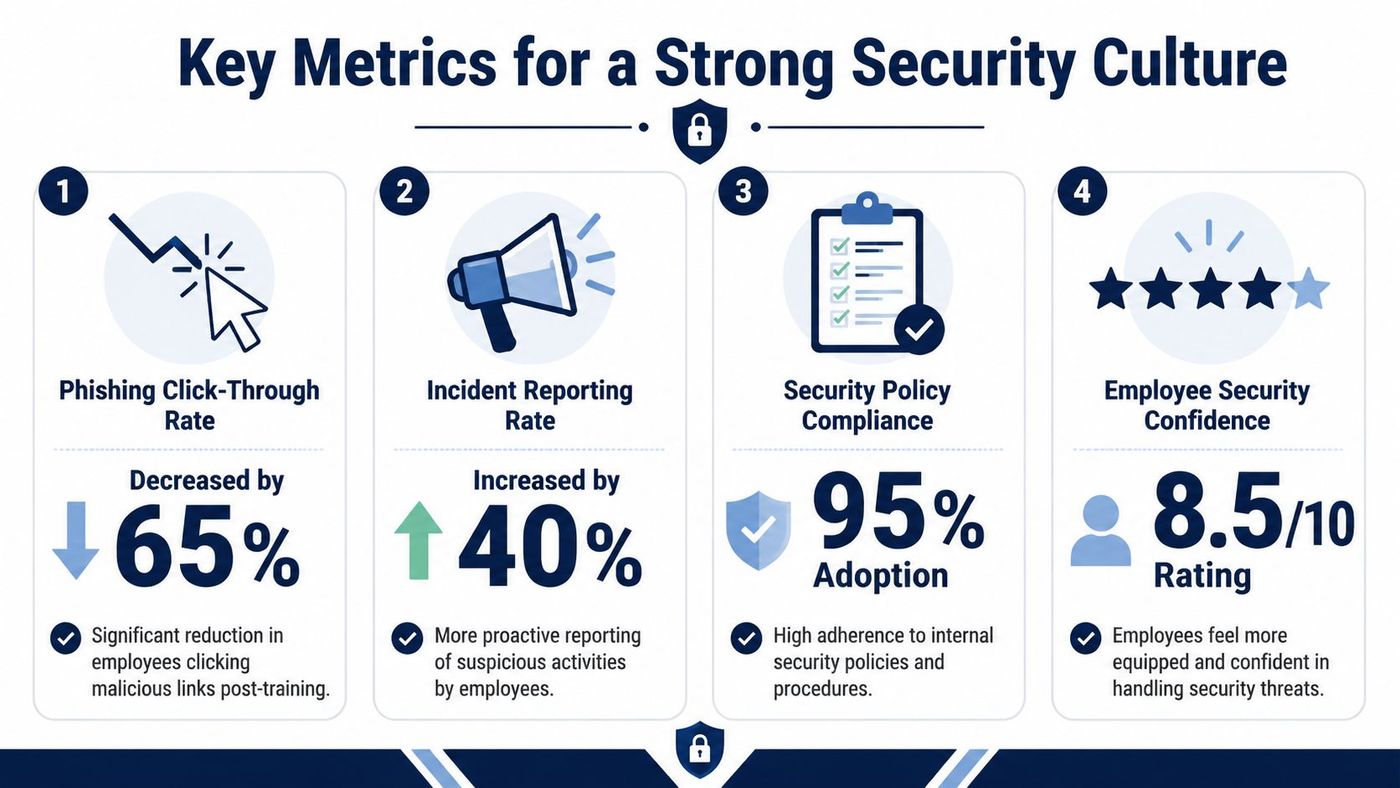
The infographic above is useful for planning, but internal reporting should focus on metrics you can verify in your own environment.
For most SMBs, a small set of operational metrics is enough to show whether the program is working:
| KPI | Why it matters | What to look for |
|---|---|---|
| Phishing simulation outcomes | Shows whether recognition is improving | Fewer risky interactions over time |
| Reporting volume | Indicates vigilance and trust | More staff using the reporting path correctly |
| Time to escalate | Affects containment | Faster handoff to IT or management |
| Repeat failure patterns | Reveals process or role issues | The same lure category failing repeatedly |
| Real incident trends | Connects training to business risk | Fewer avoidable user-driven incidents |
Completion remains a useful administrative measure, but it is not the end goal.
I usually advise clients to review these metrics by department, role, and location. A plant supervisor, a finance clerk, and a front-desk healthcare employee do not face the same risks, so one blended score can hide specific problem areas.
Security culture is visible in small moments. A staff member pauses before changing banking details. A receptionist checks an unusual request instead of guessing. An employee reports a mistaken click within minutes because they know the response will be constructive.
That last point affects outcomes fast.
If staff expect blame, they stay quiet. In a business email compromise or ransomware event, even a short reporting delay can increase downtime, recovery cost, and exposure to customer or patient data issues.
A mature security culture makes the secure choice easier, and it makes reporting safe.
Metrics are most useful when they lead to an operational change. If phishing reports stay low, the issue may be awareness. It may also be that the reporting button is missing on mobile devices, the shared mailbox is rarely checked, or supervisors have never told staff what happens after a report is submitted.
If one team keeps failing the same type of test, review the workflow around that task. Repeated errors often point to weak approval steps, unclear escalation paths, or outdated communication habits. Teams that tighten those process gaps usually get better training results because staff are no longer working around broken procedures. This is why change management process best practices belong in the conversation.
For SMB leaders deciding between a DIY platform and a managed partner, this section is where the trade-off becomes clear. Good tools can produce charts. A good program turns those charts into policy updates, manager coaching, and simpler reporting paths that people will use under pressure.
At this point, most SMB leaders ask the practical question. Should we run this ourselves, or should we hand it to a specialist?
That decision usually comes down to internal capacity, not intent.
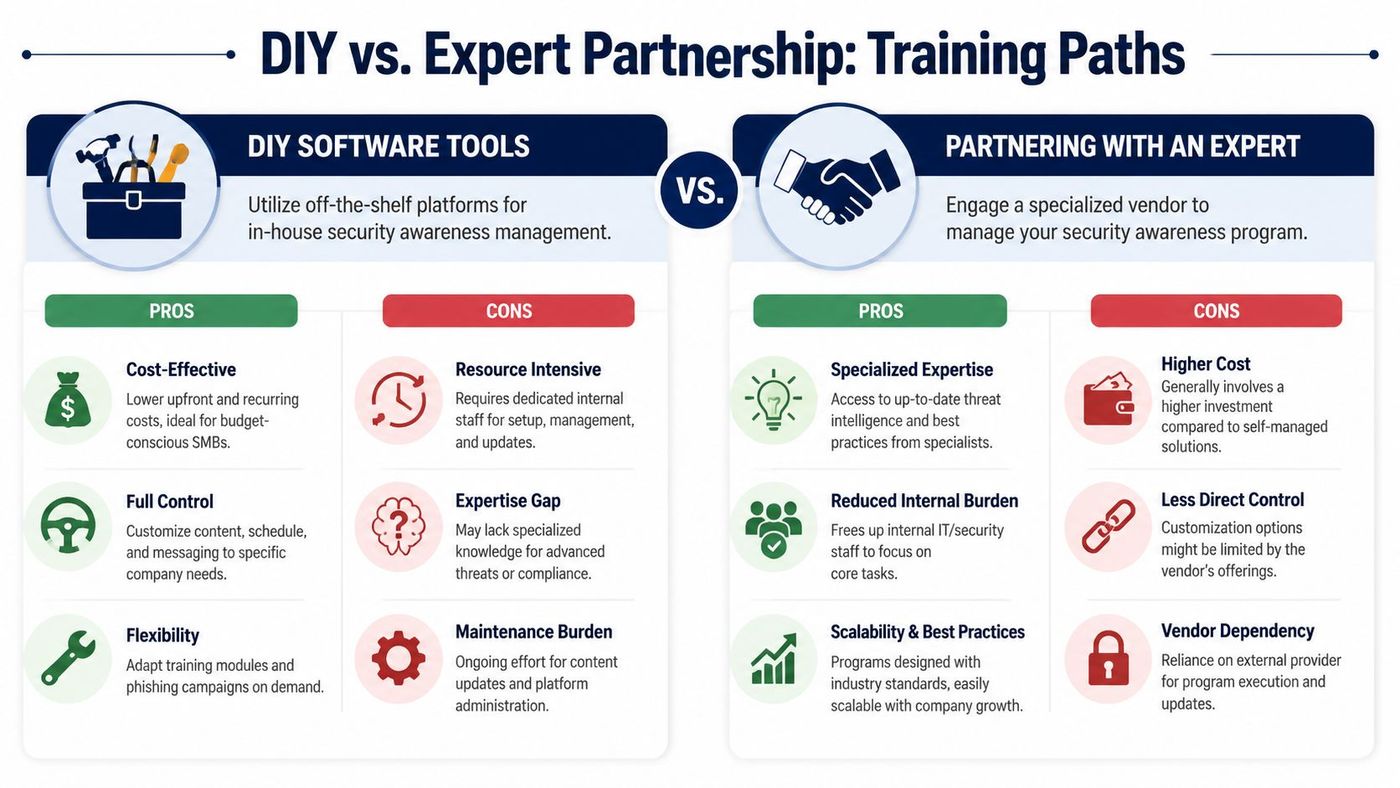
A self-managed platform can work well if you already have someone internally who can own the full cycle. That means more than assigning modules. It includes audience targeting, simulation planning, reporting review, exception handling, policy alignment, and follow-up with leaders.
DIY tends to fit organisations that:
The trade-off is maintenance. Software doesn't replace judgement. Someone still has to tune lures, review results, coordinate departments, and manage the politics that come with employee testing.
A managed option is often stronger for SMBs where IT is already stretched. That's common in clinics, manufacturers, and professional services firms where a small team is supporting Microsoft 365, endpoints, backups, vendors, and user support at the same time.
An expert partner usually helps with:
The trade-off is less day-to-day control and a higher service cost than buying software alone. But in practice, many SMBs save time, reduce inconsistency, and get better follow-through when a specialist runs the programme properly.
If you're unsure which path fits, ask four questions:
| Question | DIY points to yes if... | Managed service points to yes if... |
|---|---|---|
| Do we have internal time? | A named owner can run it monthly | IT is already overloaded |
| Do we have content expertise? | We can tailor scenarios by role | We need help translating risk into training |
| Do we need reporting for leadership? | We can analyse and present results | We need executive-ready reporting |
| Do we operate in a regulated setting? | Internal teams understand requirements well | We want outside support for consistency |
If several answers fall on the right-hand side, a managed path is usually the safer operational choice. If you're weighing that route more broadly, this overview of managed cyber security services gives a useful frame for what external support should include.
Buying a platform is a tool decision. Choosing who runs the programme is a risk management decision.
Security awareness training works when it becomes part of how your business operates. It should shape onboarding, reinforce daily decisions, support compliance, and give employees a safe path to report concerns quickly. For Canadian SMBs, especially in healthcare, legal, finance, and manufacturing, the strongest programs are continuous, role-based, and tied to real workflows.
If your current approach is a yearly module and a hope that staff remember it, you're carrying unnecessary risk. Build the process properly, measure what changes, and treat your people as an active security control.
If you want help building a practical, compliant security awareness training programme for your organisation, CloudOrbis Inc. can help assess your current gaps, map the right delivery model, and put a managed plan in place that fits your team, industry, and risk profile.
Book a 30-minute call with a senior engineer. No sales script, just straight answers about your environment.


