Data Security and Privacy: A Guide for Canadian SMBs
Master data security and privacy with our guide for Canadian SMBs. Learn to navigate PIPEDA, protect data, and create a security roadmap for your business.

Master data security and privacy with our guide for Canadian SMBs. Learn to navigate PIPEDA, protect data, and create a security roadmap for your business.
A lot of Canadian SMB leaders are in the same spot right now. Your team uses Microsoft 365, a line-of-business app, shared cloud storage, mobile devices, and a handful of vendors. Customer records move between systems every day. Staff work from the office, home, job sites, clinics, and warehouse floors. Meanwhile, every discussion about growth seems to come with a second discussion about risk.
That pressure shows up in practical questions, not legal theory. Can staff access files safely from anywhere? Are backups enough if someone sends data to the wrong person? Does storing data in the cloud satisfy your obligations, or just move the problem? If a breach happens, who decides whether you must report it?
Data security and privacy stops feeling abstract when you're the one accountable for revenue, operations, and reputation. The good news is that Canadian SMBs don't need a law degree or an enterprise-sized security team to make solid decisions. They need a clear model, a sensible order of operations, and controls that match how the business functions.
A familiar scenario plays out in many small and mid-sized companies. A clinic manager wants to roll out online intake forms. A manufacturer wants better reporting from shop-floor systems. A logistics firm wants drivers and dispatch to collaborate from mobile devices. All of those moves improve speed. All of them also increase the amount of sensitive data flowing through the business.
Customers feel that tension too. Nine in ten Canadians (89%) are at least somewhat concerned about the protection of their privacy, with 36% expressing extreme concern, according to the Office of the Privacy Commissioner of Canada's 2024-2025 public opinion research on privacy issues. When your clients hesitate before sharing information, that isn't paranoia. It's the market signalling that trust now affects sales, service, and retention.
What SMB leaders usually need isn't another scary headline. They need a way to reduce uncertainty. The first step is recognising that most privacy problems start as ordinary business decisions. A rushed software purchase. Shared accounts that nobody cleans up. Vendors added without clear rules on data handling. If that sounds familiar, it's worth reviewing the top cybersecurity threats SMBs face through a business lens, not just a technical one.
Practical rule: If a process saves time for your team but nobody can clearly explain how it protects customer data, it isn't finished.
That's why a practical approach to data security and privacy has to connect regulation, technology, and day-to-day operations.
Most confusion starts here. People use data security and data privacy as if they mean the same thing. They don't.
Think of your business like a castle. Security is the walls, gates, locks, guards, cameras, and alarm bells. Privacy is the rulebook that says who may enter, which rooms they may access, what records they may read, and why they're allowed to use that information in the first place.
Security is the operational side. It includes controls such as:
If you want a practical starting point, identity and access management is one of the highest-value areas to tighten first. It's often the shortest path to reducing preventable exposure.
Privacy governs legitimacy and restraint. It answers different questions:
| Question | Security concern | Privacy concern |
|---|---|---|
| Who can get in? | Authentication and access controls | Whether access should be allowed at all |
| What can they do? | Permissions and monitoring | Purpose limitation and appropriate use |
| Where is data stored? | Encryption and backup controls | Jurisdiction, consent, and disclosure rules |
| How long is it kept? | Archive integrity | Retention and deletion obligations |
A company can have strong security and still fail privacy. A locked filing cabinet full of customer data you shouldn't have collected is still a privacy problem. The reverse isn't true. You can't respect privacy without security because rules mean little if anyone can bypass them.
A useful test is simple. If you lost a device, changed a vendor, or had an employee leave tomorrow, would your controls still protect both the data and the rules around its use?
That distinction matters because Canadian SMBs need both. Security protects the business from threats. Privacy protects the business from misuse, over-collection, and regulatory mistakes.
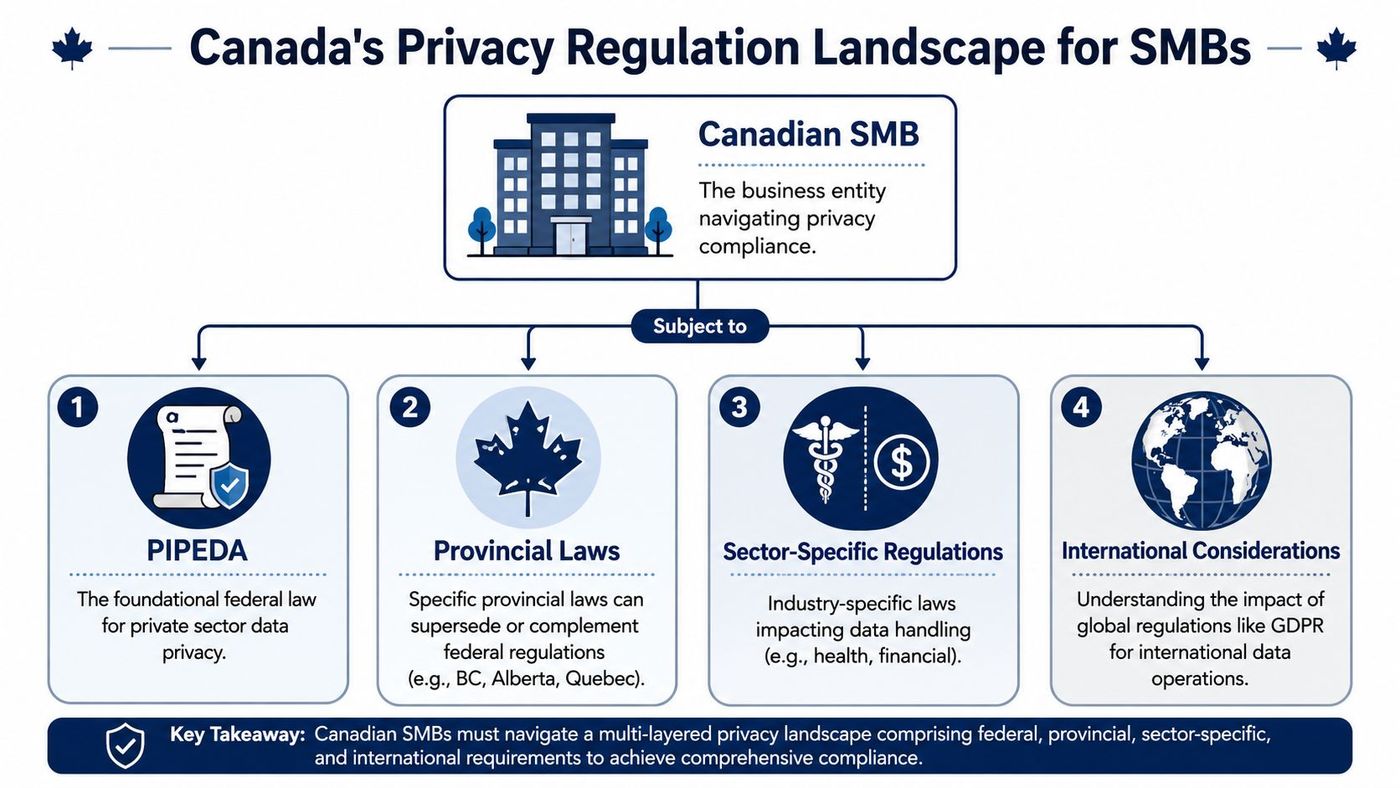
Canadian privacy compliance gets messy when leaders assume one law covers everything. In practice, that's rarely true. For many private-sector businesses, PIPEDA is the baseline. But it isn't the whole map.
Most content stops there, and that's where SMBs get into trouble. As the DLA Piper Canada overview notes, most content focuses on PIPEDA alone, ignoring the reality that organizations must also comply with sector-specific rules like Quebec's Bill 64 (which grants data deindexing and portability rights) and Alberta's mandatory breach notification laws for "significant harm". This complexity is especially acute for cross-jurisdictional firms.
A practical way to think about compliance is to treat it like building code.
For firms with locations or clients in Toronto, Calgary, and Edmonton, one incident can trigger multiple obligations. That's why compliance should be run as an operational framework, not as a PDF someone downloads once a year.
In June 2026, the Government of Canada tabled Bill C-36, the Protecting Privacy and Consumer Data Act (PPCDA). According to the Government of Canada announcement, it introduces fines of up to $10 million or 3% of global revenue, and up to $25 million or 5% of global revenue for the most serious offences. The bill also recognizes privacy as a fundamental right, requires meaningful consent, and demands transparency in automated decision-making that significantly affects individuals.
That matters for SMBs because it shifts privacy from a back-office compliance task into board-level risk management. If your business uses workflows, portals, forms, analytics, or AI-driven decisions that touch personal information, governance has to become more deliberate.
Leadership view: Compliance work feels expensive until you compare it with the cost of cleaning up a preventable incident, rewriting contracts, and rebuilding customer trust.
What works in practice is a single control framework mapped to your obligations. Inventory your data, classify what's sensitive, define who owns each process, and attach legal requirements to the workflow rather than keeping them in a separate binder. For Alberta-based assessments and governance planning, a privacy impact assessment approach is far more useful than treating privacy as an annual checklist.
If your business also operates internationally, cross-border access adds another complication. Teams dealing with travel, offshore staff, or China-connected operations often need to evaluate network controls carefully. In that context, guidance on secure VPN use for China compliance can be a useful operational reference because privacy and network routing decisions often intersect in real deployments.
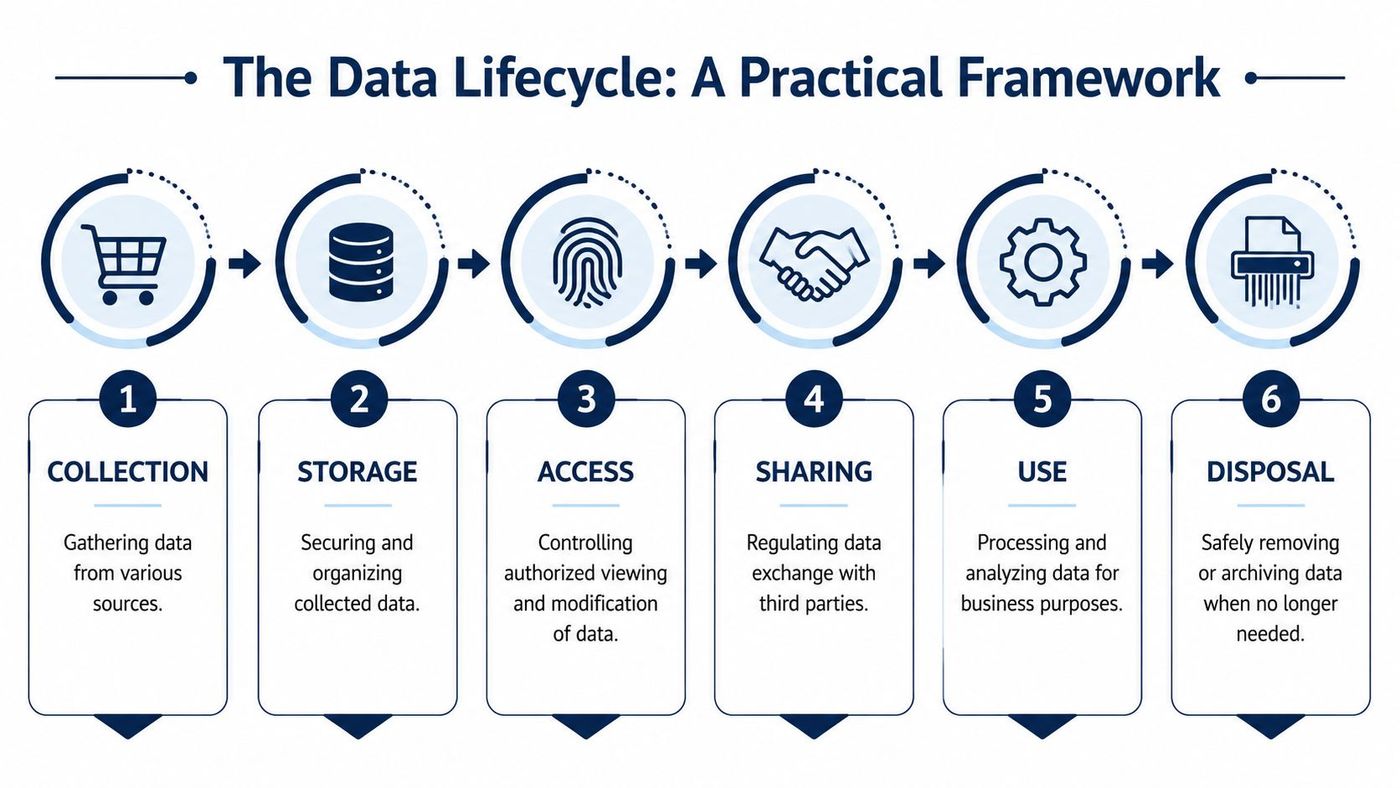
Most SMBs improve faster when they stop treating privacy as paperwork and start treating it as a lifecycle. Data is collected, stored, accessed, shared, used, and eventually removed. If you don't control each stage, weak points pile up.
Collection is where many problems begin. Businesses gather too much because forms are easy to expand and nobody asks whether each field is necessary.
Storage is where convenience often defeats control. Shared drives become dumping grounds, and cloud folders inherit broad access by default.
Access should follow the principle of least privilege. Staff need enough access to do their jobs, not unlimited visibility because that's easier to manage.
A simple model works well in SMBs: role-based groups for finance, operations, leadership, HR, and frontline teams. Then review exceptions. Temporary access must be temporary.
Sharing needs similar discipline. Many breaches aren't dramatic hacks. They're ordinary mistakes: the wrong attachment, a personal email account, an over-permissioned vendor portal.
| Lifecycle stage | What usually goes wrong | What works better |
|---|---|---|
| Access | Shared accounts and broad folder permissions | Named accounts and role-based access |
| Sharing | Sending files ad hoc | Approved methods with logging and expiry |
| Use | Data copied into side spreadsheets | Controlled systems with ownership |
| Disposal | Old records kept forever | Defined retention and deletion rules |
Use is where data creates value, but it's also where shadow processes appear. Staff export data into spreadsheets, save local copies, or build unofficial reports. That may feel efficient, but it weakens oversight and multiplies risk.
Disposal is the stage many businesses ignore. If you keep everything forever, you also keep every future problem forever. Retention schedules don't need to be fancy. They need to be documented, approved, and enforced.
Keep only what you can justify, protect what you keep, and delete what no longer serves a business or legal purpose.
One practical option for SMBs is to assign a data owner in each department and have IT enforce the technical controls around those decisions. That split works because operations knows why the data exists, while IT knows how to protect it. Service providers such as CloudOrbis Inc. can support the implementation side with managed security, backup, endpoint protection, and compliance-aligned cloud controls, but the business still has to decide what data it needs.
An incident response plan isn't an enterprise luxury. It's a business continuity tool. Without one, teams waste the first critical hours arguing about whether something is serious, who owns the decision, and what to tell customers.
Under mandatory PIPEDA breach notification requirements, organizations must report any breach of security safeguards involving personal information to the Privacy Commissioner if it is reasonable to believe the breach creates a real risk of significant harm to an individual, as outlined in Linklaters' Canada breach notification summary. That threshold matters because many SMBs still assume they only report a breach after proving major damage. That's not how the obligation is framed.
A workable plan should answer four questions fast:
Don't build the plan around job titles that may change. Build it around functions.
The proposed CPPA has also been described as carrying severe penalties for serious cases, including failures tied to breach reporting, with fines of up to 5% of worldwide annual revenues or $25 million Canadian dollars, whichever is greater, according to Didomi's summary of Canadian privacy law developments. Even where the legal context is evolving, the lesson is straightforward: reporting obligations and evidence handling can't be improvised.
When an incident starts, your plan should already tell people what to do in the first hour. If they need to invent the process under pressure, you don't have a plan.
If your team needs a technical playbook for detection, escalation, and containment, threat detection and response planning is a good place to tighten the operational side.
Cloud systems and remote work didn't create privacy risk. They exposed weak assumptions that were already there. Many businesses still act as if a file is safe because it lives in a reputable platform. That's only part of the story.
The harder question is jurisdiction. For Ontario healthcare providers, a key issue is ensuring data remains under Canadian legal jurisdiction. The NIH-hosted analysis on Canadian health data governance highlights the development of sovereign Canadian cloud servers as a critical recommendation to prevent foreign government access. That point gets missed in generic cloud guidance that focuses only on encryption or uptime.
For sensitive sectors, “cloud” is too vague to be useful. You need to know:
A provider can offer strong technical controls and still create jurisdictional concerns if the underlying architecture puts data under foreign legal reach. For healthcare, legal, finance, and some public-adjacent work, that's not a minor detail. It affects auditability, breach handling, and client trust.
In a traditional office, IT had a clear perimeter. In hybrid work, the perimeter is every laptop, smartphone, browser session, and home network your team uses. That changes what “secure enough” looks like.
A practical remote-work baseline includes:
One common mistake is assuming remote work is mainly a user training problem. It isn't. Training matters, but architecture matters more. If your design depends on every employee making perfect security decisions every day, the design is fragile.
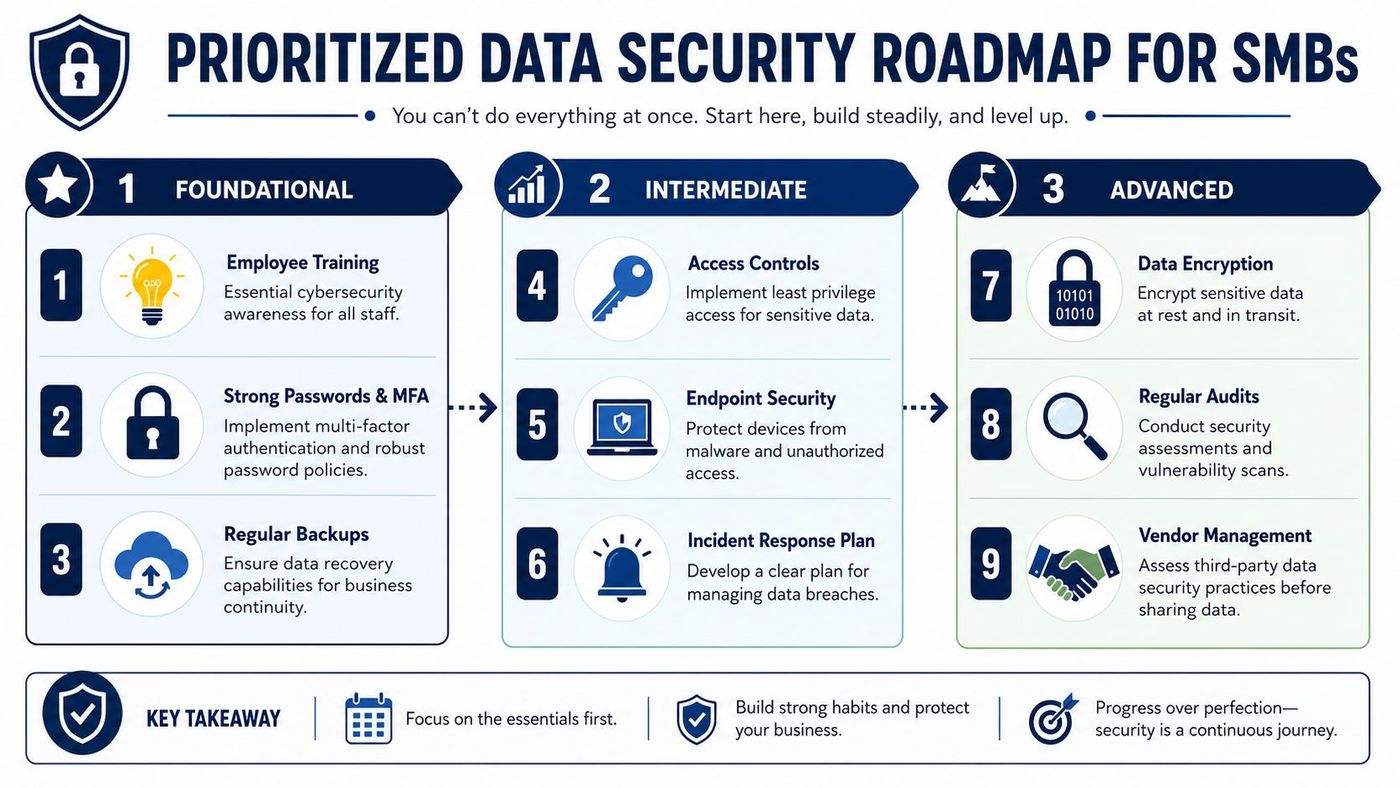
Most SMBs fail by trying to fix everything at once. The better approach is to sequence the work. Handle the controls that reduce the most risk first, then build policy and governance around them.
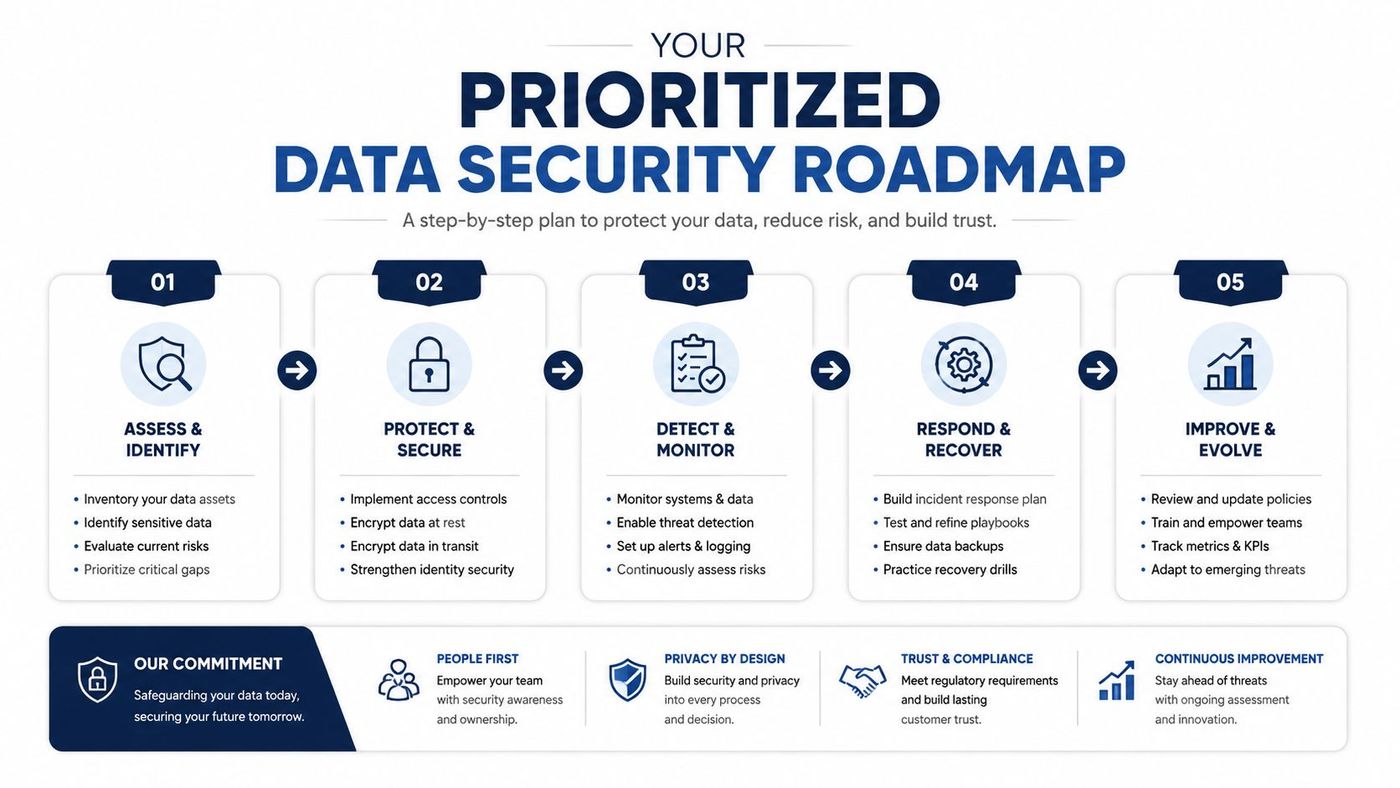
Start with visibility and obvious gaps.
Use the second phase to add structure.
Use the final phase to make the program sustainable.
| Priority | Action | Business reason |
|---|---|---|
| High | Formalize role-based access | Reduces preventable exposure |
| High | Review vendor handling of data | Limits third-party risk |
| Medium | Conduct a privacy impact review | Catches weak points before expansion |
| Medium | Revisit cloud jurisdiction decisions | Supports compliance in sensitive sectors |
| Ongoing | Train staff with real scenarios | Improves judgement at the point of use |
The point isn't perfection. It's control. Once you know what data you hold, why you hold it, where it lives, and who can touch it, data security and privacy becomes manageable instead of vague.
If your team needs help turning this into an operational plan, CloudOrbis Inc. can support SMBs with vCIO guidance, managed IT, cybersecurity controls, cloud governance, backup and disaster recovery, and compliance-aligned security planning. The value of outside support isn't just technical labour. It's helping leadership set priorities, reduce avoidable risk, and build an environment that supports growth without losing control of sensitive data.
Book a 30-minute call with a senior engineer. No sales script, just straight answers about your environment.


