

September 18, 2026
Business VoIP Telephone Systems Explained for SMBsLearn how business VoIP telephone systems work, what they cost and how to choose a secure, resilient option for your Canadian SMB.
Read Full Post%20(1).webp)
Usman Malik
Chief Executive Officer
June 20, 2026
A staff member gives notice on Friday. Their last day is next week, but the actual deadline is much sooner. Someone needs to remove access to email, shared files, CRM records, Teams chats, finance tools, and any app tied to their work account. If they used a personal phone, you also need to know what company data still sits there. If they handled client files, you need proof that access changed when it should have.
That's where many business owners realise the problem isn't just passwords. It's control. More specifically, it's knowing who has access to what, why they have it, and how fast that access can be changed when roles change.
For Canadian SMBs, identity and access management often starts as a loose collection of habits. The office manager creates accounts. A department lead approves app access. Someone in IT resets passwords when people get locked out. Offboarding happens through email and memory. That works until it doesn't.
A departing employee exposes the cracks in access control faster than almost anything else.
They may no longer be on payroll, yet their Microsoft 365 account still works. Their saved login still opens a file-sharing app. Their name still appears in a vendor portal. Nobody is fully sure whether they had admin rights in one system, access to client folders in another, or old permissions that no longer matched their role.

This is what identity and access management solves. At its simplest, IAM is the discipline of making sure the right person gets the right access at the right time, and loses that access when it's no longer needed. It turns access from an informal habit into a business process.
Small businesses rarely struggle because they don't care about security. They struggle because access grows faster than process.
Practical rule: If access removal depends on someone remembering every system manually, you don't have a reliable IAM process yet.
A strong IAM approach also works alongside basics like password hygiene. If your team still manages passwords inconsistently, start by reviewing a practical guide to managing your business passwords.
For owners, the key mindset shift is simple. Identity and access management isn't an IT side task. It's the set of controls that protects revenue, client trust, and compliance.
Identity and access management is the system that verifies who users are, manages identities through their lifecycle, and controls who can access data, applications, and systems. IBM describes IAM in those terms and ties it directly to security outcomes in modern environments where identity is a major attack surface. In Canada, that matters because the average cost of a data breach reached US$5.64 million, and IBM notes that IAM technology lowers breach cost by an average of US$189,838 through better control over access and identity-related risk (IBM on identity and access management).
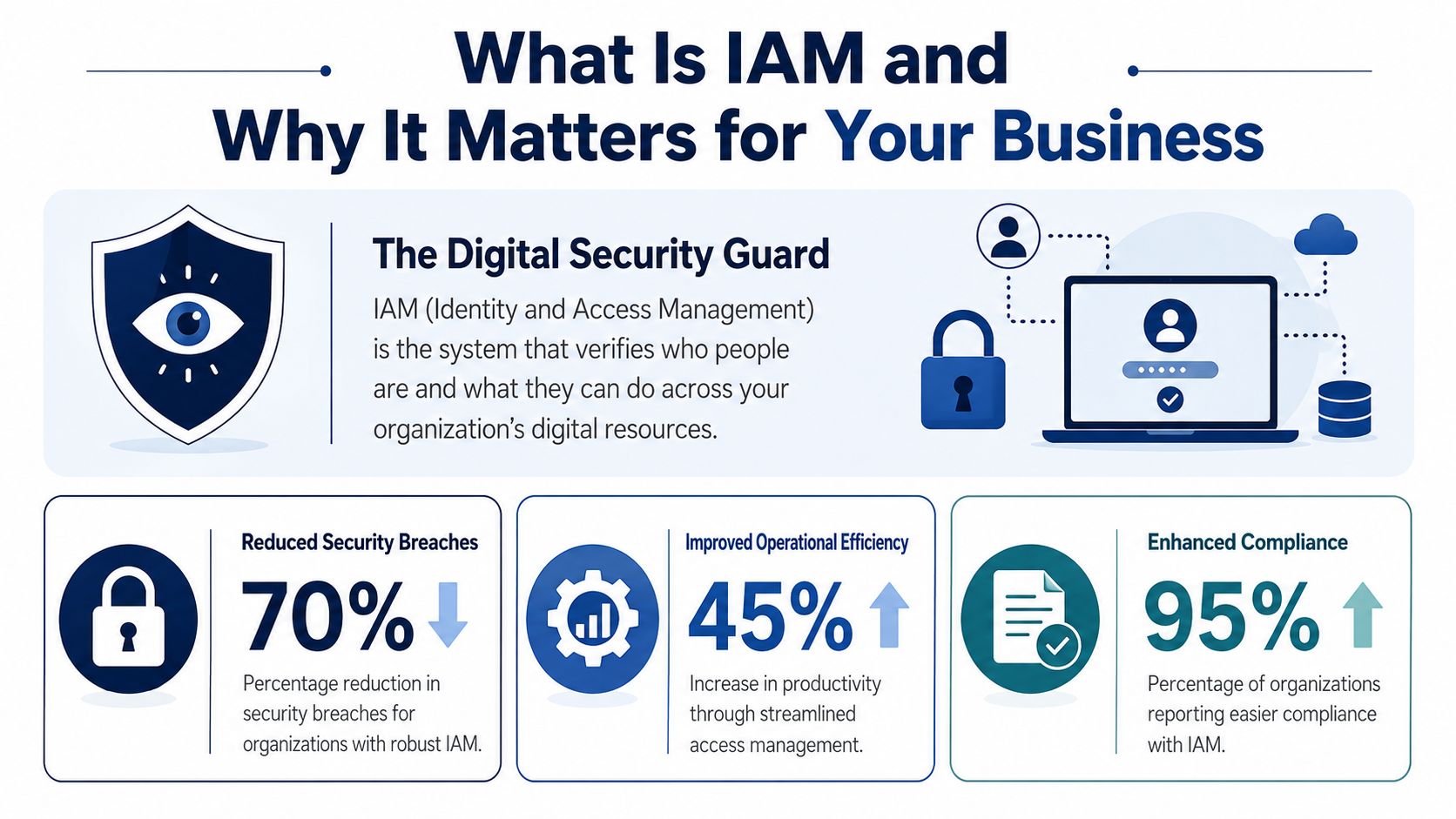
That business case gets stronger when you look at how attacks happen now. A 2025 IAM roundup cites CrowdStrike's finding that 80% of cyberattacks use identity-based attack methods, which is why IAM has shifted from background administration to a front-line security control for phishing resistance and access governance (identity-based attack statistics roundup).
Most owners first think of IAM as password management. That's only one piece.
A proper IAM program handles the full life cycle of a digital identity:
| Business event | IAM response |
|---|---|
| New employee starts | Creates account, assigns role, grants approved access |
| Employee changes job | Removes old permissions, adds new ones |
| Contractor joins temporarily | Gives time-bound access to only required systems |
| Employee leaves | Revokes access across systems and records the change |
That's why IAM acts like one of your digital world identity gatekeepers, controlling entry across cloud apps, internal systems, and sensitive data rather than relying on scattered manual approvals.
The old security model assumed your office network was the safe zone. That model broke when work moved into Microsoft 365, mobile devices, home offices, cloud storage, and third-party apps. Your identity layer is now one of the main places attackers target.
That's also why IAM aligns so closely with a Zero Trust security model. Instead of assuming a logged-in user should be trusted, you verify identity, apply policy, and limit access continuously.
When a business knows exactly who has access, why they have it, and how to revoke it quickly, security decisions stop being reactive.
For a business owner, the outcome is practical. Fewer access mistakes. Faster onboarding. Cleaner offboarding. Better audit evidence. Less reliance on tribal knowledge.
When people hear identity and access management, they often get hit with acronyms. The easier way to understand it is to think of your business as an office building with controlled entry, room-specific keycards, a front desk, a facilities team, and a security log.
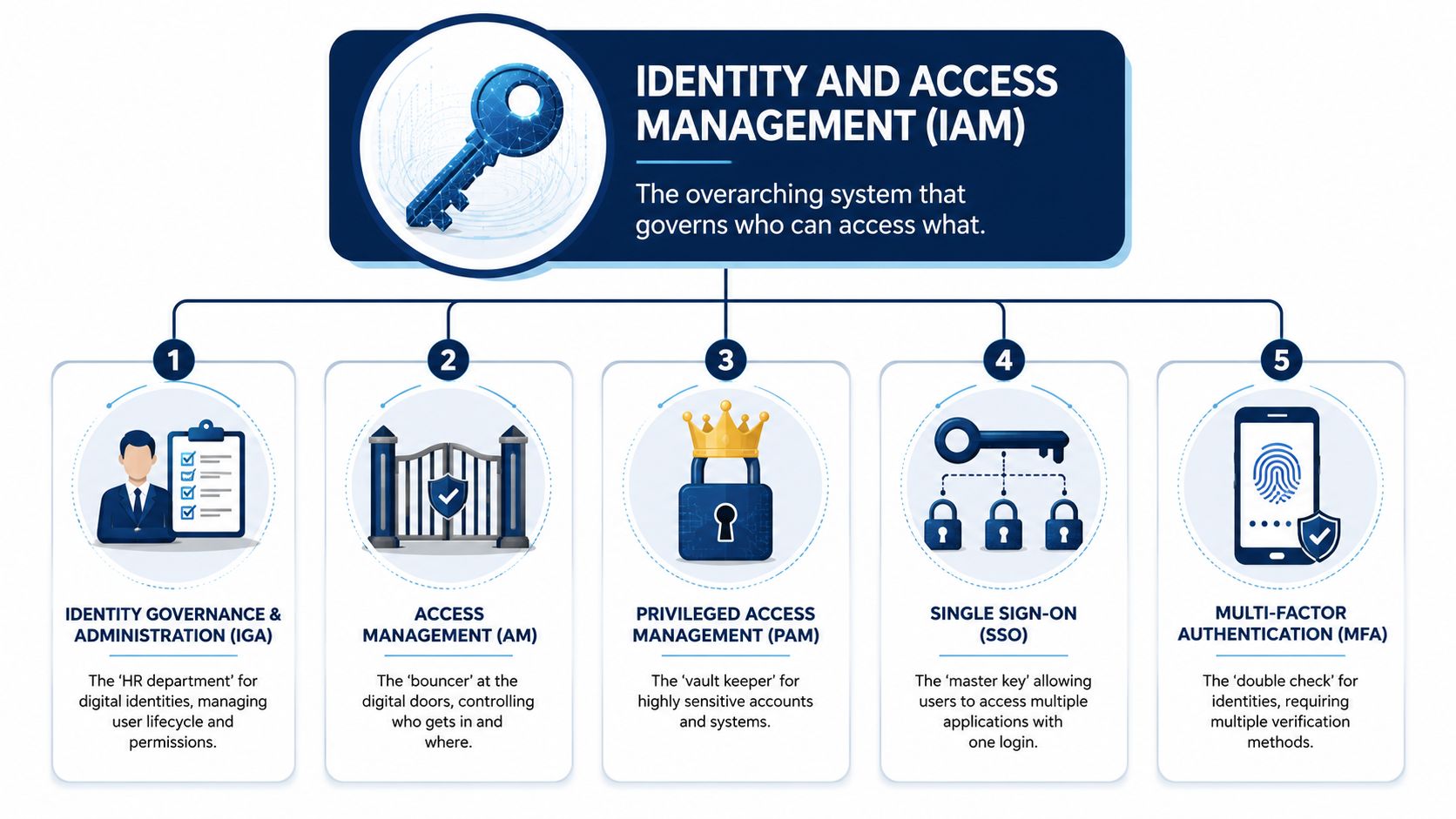
The core IAM stack consists of administration, authentication, authorization, and auditing. Controls like role-based access control and multi-factor authentication make sure users get only the access they need. For SMBs, centralised management helps reduce standing privileges and orphaned accounts (IAM technical guide).
These two terms get mixed up constantly.
Authentication is the ID check at the door. It answers one question. Are you really who you say you are? Passwords sit here, but so does MFA. If a user enters the correct password and then approves a sign-in on their phone, the system has stronger proof of identity.
Authorization happens after the ID check. It decides what that person can do. A clinic administrator might be allowed to book appointments and manage schedules, but not open clinical notes. A warehouse supervisor might approve shipping actions, but not see payroll data.
A simple way to remember it:
Administration is where accounts are created, changed, and removed. This is the operational engine behind onboarding, promotions, departmental changes, leave of absence, contractor setup, and offboarding.
Auditing is the record of what happened. It shows who had access, when permissions changed, and whether your rules were followed.
Owner's lens: If you can't produce a clear access record during a client dispute, internal investigation, or compliance review, your IAM controls are incomplete.
Not every company needs a massive enterprise platform. Most Canadian SMBs can build a strong foundation with a few key controls.
SSO lets staff use one login to access multiple approved applications. It reduces password sprawl and makes account control easier because access ties back to one identity.
MFA adds a second proof point. Even if a password is stolen, the attacker still has another barrier to clear. It's one of the most practical controls an SMB can deploy quickly.
RBAC groups permissions by role rather than person. Instead of manually deciding access for every individual, you create standard roles such as finance clerk, operations manager, clinician, or sales coordinator.
PAM handles powerful accounts like administrators, server operators, and senior IT roles. These accounts need stricter controls because they can make wide-reaching changes. If you want a plain-language overview, this guide on privileged access management is a useful next read.
A healthy IAM setup usually includes:
For most SMBs, the breakthrough isn't buying more software. It's connecting these components into one consistent operating model.
Security and compliance often get treated as separate workstreams. In practice, they overlap. If you can't control access properly, you'll struggle to prove compliance. If you can't prove compliance, your access controls may not stand up under scrutiny.
For Canadian businesses in regulated sectors, IAM helps simplify audits by producing automated reports of access rights, privileges, and data protection controls. That matters for healthcare, legal, finance, and public-sector-adjacent firms that need to show regulators, clients, or partners that access is restricted and enforced (SailPoint on IAM and audit readiness).
Owners often ask whether IAM makes them “compliant.” That's the wrong question. Technology doesn't create compliance on its own. What it does is support the controls you need to demonstrate.
For Canadian organisations, that usually means aligning IAM practices with obligations under PIPEDA, Quebec's Law 25, and sector-specific privacy or confidentiality requirements. In healthcare, it also means making access decisions that respect provincial health privacy rules. In legal and financial settings, it means protecting sensitive client records and limiting exposure to only those with a legitimate business need.
A useful standard is least privilege. Give people the minimum access they need to do their work, then review that access regularly.
When a regulator, insurer, or major client asks about access control, they usually want evidence, not policy language.
IAM helps you produce that evidence through:
A policy says what your business intends to do. An IAM audit trail shows what your business actually did.
If you handle sensitive information, your IAM approach should answer these questions clearly:
| Compliance question | IAM evidence |
|---|---|
| Who has access to sensitive records? | Role and entitlement reports |
| Why do they have that access? | Role definitions and approval history |
| When was access changed? | Logged provisioning and de-provisioning events |
| How do you reduce misuse? | MFA, least privilege, and review controls |
That's why IAM belongs in compliance conversations early. It gives structure to access control and turns vague security claims into documented, reviewable proof.
Many Canadian SMBs already own more IAM capability than they realise. If your business runs on Microsoft 365, you're not starting from zero. You already have a platform that can become the centre of your identity and access management strategy.
That matters because there's a real execution gap in the SME market. The CFIB reports that 68% of Canadian small businesses cite lack of specialised IT security talent as a barrier to cybersecurity adoption, while practical guidance for the Microsoft 365 environments used by 90% of them remains limited. That gap leaves many firms exposed to stale accounts and inconsistent access control.
In Microsoft environments, Azure AD is now commonly referred to as Microsoft Entra ID, but many business owners still know it by the older name. Whatever label you use, it provides the identity layer behind Microsoft 365 sign-ins, user roles, and access policy enforcement.
A practical rollout often starts with:
If you run a clinic, legal office, or logistics company, think in terms of job roles first.
Create standard access groups for each role. Tie Microsoft 365 permissions, Teams access, SharePoint sites, and approved third-party applications to those groups. When someone joins, they inherit the right baseline access. When they move roles, you change the group. When they leave, you disable and remove access in a controlled sequence.
That approach is far easier to manage than assigning permissions one by one.
The biggest problems usually aren't technical. They're operational.
A structured partner can help close that gap. For example, businesses already using Microsoft often work with managed providers to harden tenant settings, standardise RBAC, and align sign-in controls with policy. If your team wants a practical Microsoft-focused starting point, this article on Microsoft 365 security for Canadian businesses is a useful companion.
The best IAM project for an SMB is usually the one that reduces manual work inside the systems you already depend on every day.
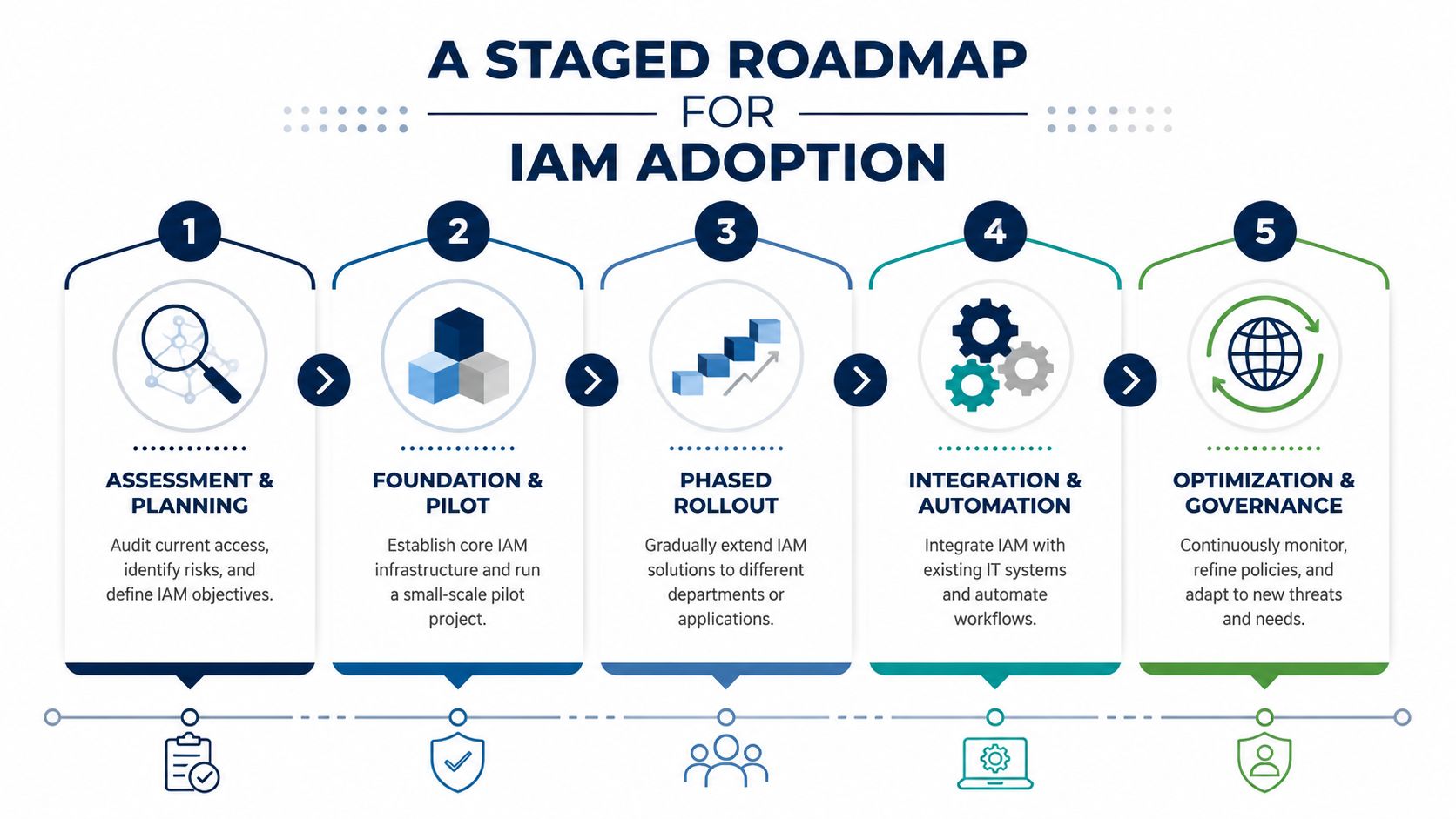
IAM projects fail when owners treat them like a single software purchase. They succeed when the business treats identity as an operating process with defined stages, owners, and milestones.
That staged approach also makes financial sense. In Canada, the average data breach cost reached US$5.64 million, and IBM reports that organisations using IAM technology lower breach cost by an average of US$189,838 (IBM research on the business case for IAM).
The first two stages are about clarity, not complexity.
Assessment
Review your current identities, apps, admin accounts, and offboarding process. Find out where access is granted manually, where shared accounts exist, and which users have more access than their role requires.
Design
Define role groups, approval paths, MFA requirements, and your joiner-mover-leaver process. If your business has multiple departments, avoid trying to perfect every role immediately. Start with the highest-risk or highest-volume groups.
Once the design is good enough, move into controlled deployment.
Implementation
Turn on core controls in phases. That usually means MFA first, then role clean-up, then SSO expansion, then admin account tightening. Pilot with one department if needed.
Training
Staff need to know what changed and why. Managers need to understand approval responsibilities. HR or operations staff need a repeatable handoff process for onboarding and offboarding. Many firms, therefore, benefit from a formal change management process, because access changes affect people, not just systems.
The final stage is ongoing governance.
A simple maturity view helps:
| Stage | Focus | Business result |
|---|---|---|
| Assessment | Visibility | You know where the gaps are |
| Design | Policy and roles | Access rules become consistent |
| Implementation | Technical controls | Risk begins to fall |
| Training | Adoption | Fewer workarounds and mistakes |
| Monitoring | Governance | Controls stay current over time |
Most SMBs don't have a dedicated identity team. That's normal.
A managed provider can support role design, Microsoft 365 policy configuration, access reviews, and offboarding workflows without forcing the business to build a full internal security function. In Canada, one option is CloudOrbis Inc., which provides managed IT, cybersecurity, Microsoft 365 support, and IAM-related services such as SSO, MFA, and PAM for SMB environments.
The point isn't to over-engineer the program. It's to make access control dependable enough that a resignation, a new hire, a compliance review, or a phishing incident doesn't turn into a scramble.
Identity and access management is one of the clearest examples of security, compliance, and operational efficiency working together. When access is well managed, staff get what they need faster, former users lose access on time, and leadership has stronger evidence when clients, insurers, or regulators ask questions.
For Canadian SMBs, the path forward doesn't need to be complicated. Start with your current realities. Microsoft 365. Limited internal security bandwidth. A need to meet privacy obligations without slowing the business down. Build from there with role clarity, stronger sign-ins, disciplined offboarding, and regular access reviews.
Business owners don't need to become identity engineers. They do need a system that makes access predictable, reviewable, and aligned with risk. That's what turns IAM from a technical concept into a business control.
If you want a practical starting point, CloudOrbis Inc. can help you assess your current access risks, tighten Microsoft 365 identity controls, and build an IAM approach that fits your size, compliance needs, and internal capacity.
September 18, 2026
Business VoIP Telephone Systems Explained for SMBsLearn how business VoIP telephone systems work, what they cost and how to choose a secure, resilient option for your Canadian SMB.
Read Full Post
September 17, 2026
Cloud Migration Roadmap Template That Prevents Costly ReworkGet a practical cloud migration roadmap template plus steps to customize it for assessment, waves, testing and cutover without budget surprises.
Read Full Post
September 16, 2026
How to Send Secure Email in Outlook Made SimpleLearn how to send secure email in Outlook with encryption, S/MIME and compliance tips for Canadian businesses. Step-by-step guide inside.
Read Full Post
