Accounting Software Integration: A 2026 Guide
Learn how accounting software integration streamlines financial operations for Canadian SMBs, covering patterns, security, and compliance.

Learn how accounting software integration streamlines financial operations for Canadian SMBs, covering patterns, security, and compliance.

It's Monday evening, the invoice batch still hasn't cleared, and your bookkeeper is hunting for the same numbers in QuickBooks, the bank feed, the CRM, and a spreadsheet that everyone swears is current. Someone already exported the sales report twice, payroll has a different vendor name format than accounting, and now a refund from last week sits in limbo because no system agrees on where it belongs.
That's the everyday cost of disconnected tools. In Canadian SMBs, the problem usually isn't a lack of effort, it's that finance, operations, and sales are each working from separate systems that never learned to speak the same language. Accounting software integration is what turns that pile of partial truths into one connected financial flow, so the business stops paying staff to act as a bridge between applications.
A lot of owners assume late nights in accounting mean the team needs more discipline or another hire. In practice, the issue is usually the stack itself. When invoices live in one platform, payments in another, and expenses in a third, someone has to re-key every transaction, verify every mismatch, and chase every exception by hand.
That manual work is exactly what integration is meant to remove. A connected setup moves invoices, expenses, payments, and journal entries automatically between systems, instead of asking staff to re-enter the same data in two or three places Merge on accounting integration. For Canadian businesses, that matters most when payroll, banking, invoicing, CRM, and inventory all touch the general ledger.
Practical rule: if one person is acting as the sync engine, the business has already outgrown the current workflow.
The market signal backs that up. North America represented about 38.5% of global cloud accounting software revenue in 2023, the largest regional share, while the global market was valued at USD 14.47 billion in 2023 and is projected to reach USD 28.67 billion by 2030 in one forecast, with a 10.2% CAGR cloud accounting software market data. A separate 2025 to 2034 estimate places integrated accounting software at USD 21.38 billion in 2025 and USD 44.78 billion by 2034, growing at 8.56% annually integrated accounting software market data. That's a strong historical signal that integration has moved from nice-to-have to core infrastructure.
If your team is still stitching finance together manually, this is a process issue, not a staffing failure. The fix is to stop asking people to reconcile systems that should already be reconciled for them. Streamline business process
At its simplest, accounting software integration is a programmatic link between your accounting platform and other business systems that automatically moves financial data, such as invoices, expenses, payments, and journal entries Merge definition. That's the baseline. Value appears when the connection works both ways, so records entered in one application can update the accounting system and send status changes back to the source system two-way sync overview.
A one-off CSV import is like pouring a bucket of water into a pipe. It might move data once, but it doesn't keep the building supplied. A well-designed integration behaves more like a plumbing network, with valves, filters, and pressure control that keeps the whole system flowing on demand.
That distinction matters because many businesses think they want “an integration” when they really want durable sync logic. The difference shows up in the ledger, where a static export leaves the finance team to clean up mismatches, while a true integration keeps the operational system and the accounting system aligned.

The core mental model is simple. A proper integration is not a set-and-forget file transfer, and it's not a spreadsheet merge with better branding. It's an ongoing data flow that needs authentication, mapping, error handling, and monitoring if you want it to keep working after the first month.
For a plain-English reference on the broader concept, software integration meaning for CEFs is a useful starting point because it frames integration as a business connection, not just a technical one. In Canadian SMB environments, that distinction matters because the accounting layer usually has to talk to payroll, banking, CRM, and operational systems at the same time.
Microsoft Dynamics NAV software is a good example of why the definition matters, because the challenge is rarely “can the systems connect,” it's whether the connection can survive real-world finance data.
Integration projects don't fail because one pattern is universally bad. They fail because the business picks the wrong pattern for the job. A startup with a clean stack can move fast with a simple connector, while a mid-market operator juggling ERP, payroll, inventory, and accounting needs a more disciplined architecture.

Native integrations are the fastest on-ramp. They're built by the software vendor, usually cover the common workflows, and work well when you only need a couple of tools to cooperate. The trade-off is narrow scope, which becomes obvious as soon as your workflow gets more specialised.
Custom API integrations give you the most control. They're the right choice when you need real-time behaviour, custom mappings, or complex approval logic, but they come with the highest engineering burden. The source systems differ in authentication, schema, and error handling, so every new connection adds maintenance.
iPaaS and middleware sit in the middle. They're useful when you have multiple systems that need to exchange data through one hub, especially if operations want visibility without owning all the code. They're also where teams start to feel the hidden cost of orchestration, because the platform becomes another thing to monitor.
File-based exchange still has a place for periodic data transfer, historical loads, or legacy environments that can't support modern APIs. It's not elegant, and it's rarely enough for daily finance operations, but it's sometimes the most realistic bridge. Database-level integration is the most invasive option, and it only makes sense when you control both ends and understand the risk clearly.
For teams trying to understand event-driven sync in practice, webhook integration setup is a good reference point because webhooks are often what makes “real-time” work. If you're connecting billing, payments, or order systems, the difference between batch and live updates becomes operationally visible.
The best integration projects don't start with a diagram. They start with a finance leader who wants fewer manual fixes and a clearer close. That business case is stronger than the technical one, because the value lands in less time wasted on duplicate entry, fewer reconciliation headaches, and better visibility across the company.
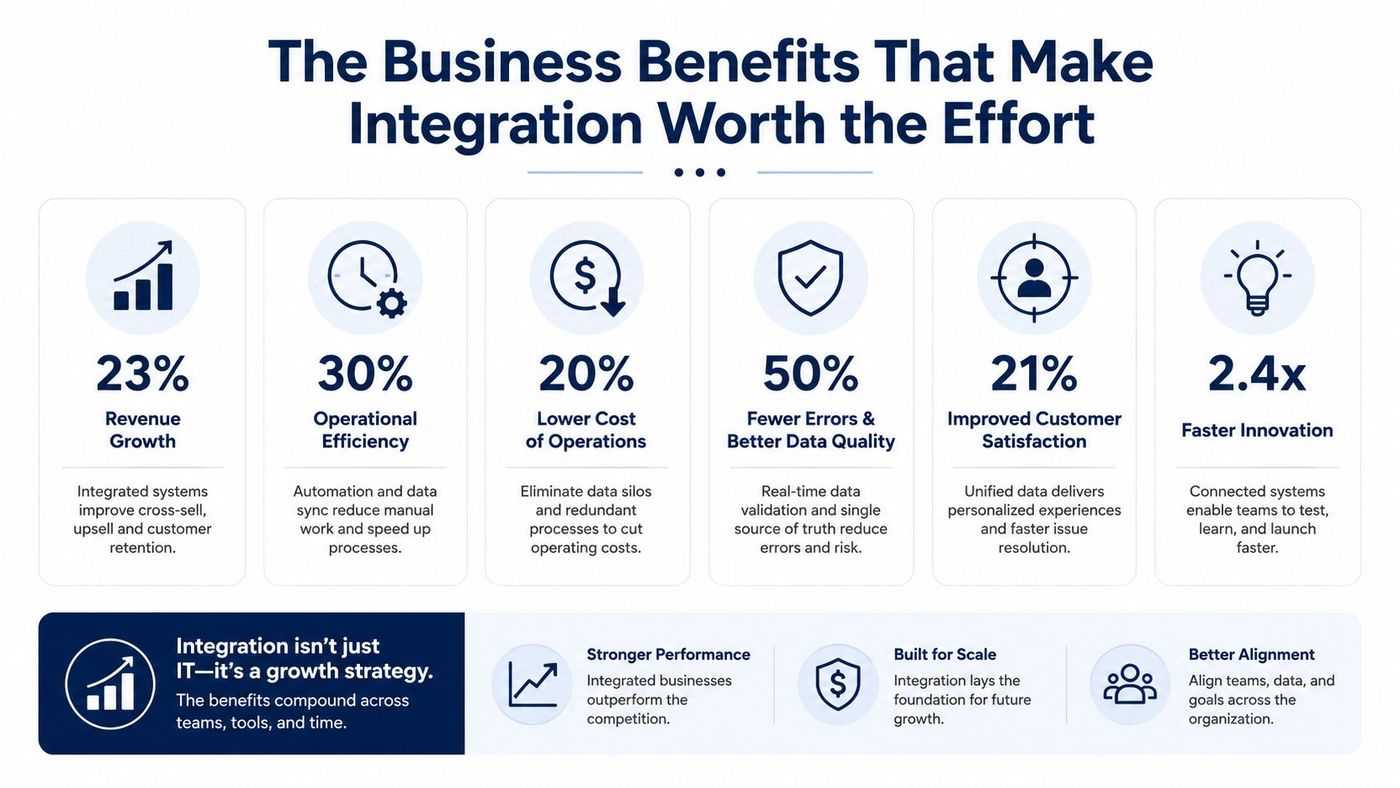
Manual entry drops sharply when invoices, expenses, and payments move automatically between systems. That saves the finance team from retyping the same records and reduces the chance of a typo becoming a reconciliation problem.
Financial visibility improves because leaders can see current data instead of waiting for a monthly export. That matters when sales, operations, and finance need the same picture before approving spend or chasing collections.
Compliance gets easier to defend because integrated systems preserve a clearer audit trail than a chain of spreadsheets and email attachments. In regulated sectors, that's not a convenience, it's risk management.
Integration doesn't fix broken processes, it makes them move faster. If the workflow is messy before automation, it'll be messier at scale.
For Canadian SMBs, there's also a structural benefit. Integration that keeps payroll, banking, CRM, e-commerce, and accounting aligned reduces duplicate entry and lowers the odds of inconsistent reporting across departments Canadian business integration use. That's especially important in SMB-heavy sectors where the same people often manage several systems at once.
The business payoff isn't abstract. It shows up when a controller doesn't need to ask for the same report twice, when sales stops sending finance a CSV to “please import”, and when month-end stops depending on one employee who knows all the workarounds.
A production-grade integration isn't a single API call with a nice dashboard on top. It needs OAuth 2.0 consent handling, secure token storage, refresh logic, schema mapping for each provider, webhooks where they're available, and polling where they're not integration architecture and reliability. It also needs retry controls, because accounting APIs fail in predictable but inconvenient ways, including rate limits, validation errors, temporary outages, and schema changes.
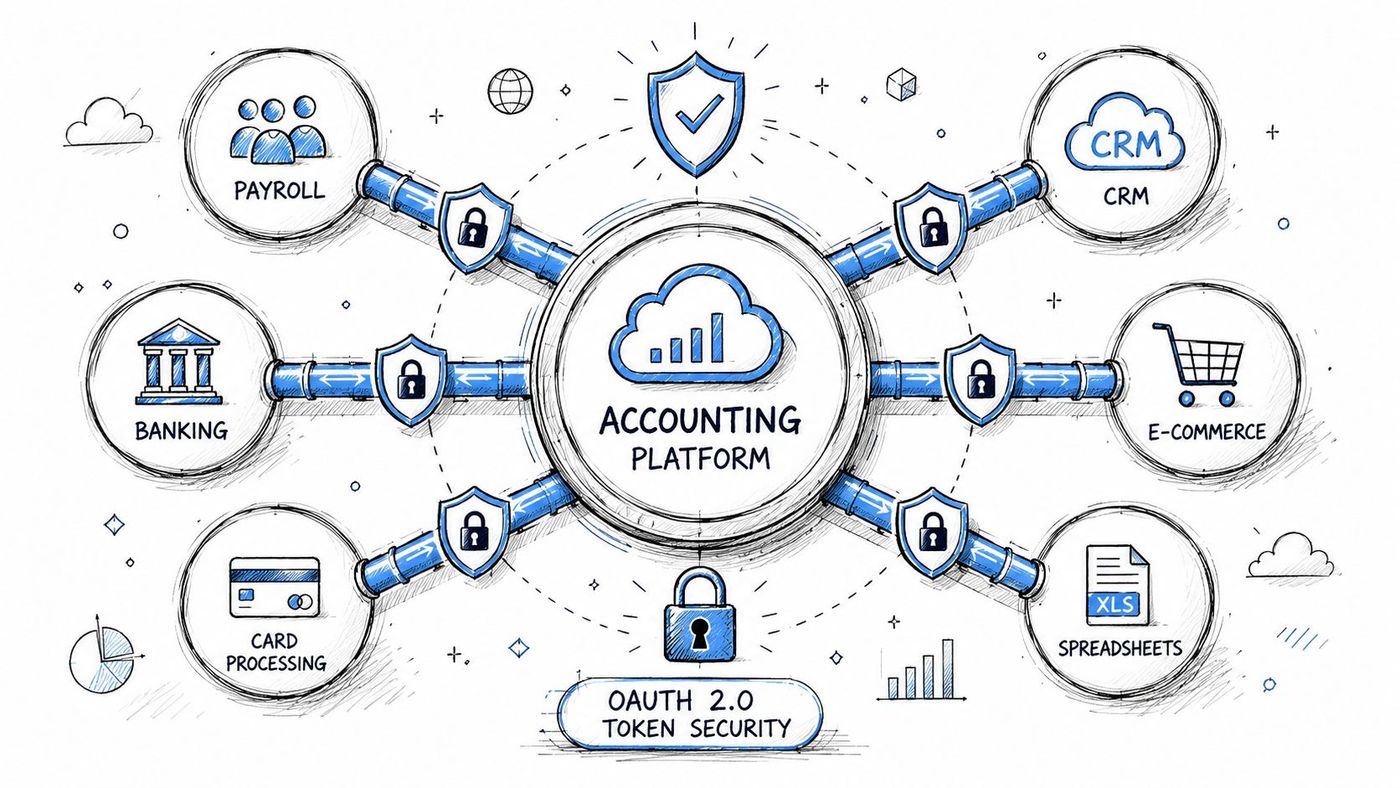
The minimum bar is straightforward. Encrypt data in transit and at rest, restrict access by role, and keep the integration layer on the principle of least privilege. If the connector only needs invoices and payments, it shouldn't roam across the rest of the accounting environment.
Canadian compliance makes this more than an IT preference. PIPEDA affects how personal data is handled, HIPAA matters for clinics and healthcare organisations storing patient billing data, and some firms also need to think about data residency and cross-border handling when financial records move between systems. The same issue becomes sharper in multi-entity setups, where tax fields, currency, refunds, and partial payments need to be mapped before go-live Canada-specific integration and compliance guidance.
If the field mapping is wrong, the ledger will be wrong. Security without data accuracy is just a more expensive way to be wrong.
A practical integration also has to normalise data before posting it to the general ledger. Older systems, spreadsheets, and custom databases often store customer names, tax fields, or chart-of-accounts values differently, and that inconsistency is a common source of reconciliation friction TechTarget on integration examples and benefits. That's why a security review and a data-mapping review need to happen together, not as separate projects.
For a deeper look at hardening the connection layer, API security best practices is a useful companion resource. Security and compliance aren't add-ons here, they're design constraints.
Most integration failures happen before the first live sync. Teams rush into build mode without agreeing on the source of truth, the mapping rules, or who owns exceptions when something doesn't match. The better approach is slower at the start and much cheaper later.
Start with discovery. List every system that touches financial data, then decide which ones must sync and which ones can stay independent. That audit sounds basic, but it often exposes duplicate tools, stale spreadsheets, and undocumented manual work.
Map the data carefully. Compare field definitions before anything touches production. Customer, vendor, tax, and chart-of-accounts values need consistent definitions, or the connector will spend its life asking for human intervention.
Test in a sandbox. Edge cases are where integration plans usually break, especially foreign-currency orders, mixed-tax transactions, and partial payments. If those scenarios aren't tested early, they show up in month-end close when nobody wants to debug them.
That same discipline applies after go-live. Set alerting for failed syncs, review logs regularly, and plan for API version updates before the vendor forces the issue. A connector that worked last quarter can degrade if nobody is watching it.
Avoid this mistake: treating integration as a one-time project. The real cost sits in monitoring, exception handling, and change management.
For organisations that need a broader operational rollout, change management process matters just as much as the technical build. If staff don't know how exceptions are handled, they'll create shadow processes the moment something stalls.
One practical partner option in Canada is CloudOrbis Inc., which provides managed IT support, cloud help, and security-oriented operational oversight for SMB environments. That kind of service model is useful when the integration touches finance, identity, endpoint security, and backup all at once.
Healthcare clinics don't need the same integration design as a logistics company, and neither one looks like a law firm. The common thread is that each industry has a different tolerance for delay, error, and data exposure, so the integration pattern has to fit the business reality.
In healthcare, the priority is keeping patient billing connected to accounting without exposing sensitive records through unsecured channels. HIPAA-aware controls matter here, and the finance workflow needs a narrow data path that doesn't leak more information than necessary.
In manufacturing and logistics, the useful connection usually runs through ERP, inventory, payroll, and accounting. Orders move through production, finished goods hit the books, and finance needs the numbers to be trustworthy without waiting for someone to reconcile three systems manually.
For legal, finance, and accounting firms, the integration has to respect confidentiality and auditability at the same time. Time tracking, case management, billing, and tax preparation all need to feed the accounting layer without making it harder to prove who changed what.
If you're comparing finance-stack options, find CRM with fund accounting is a helpful reference because it shows how tightly customer records and accounting data can be linked when the workflow demands it. The right pattern is usually the one that preserves control over sensitive fields while still cutting out duplicate entry.
Secure file sharing for accountants is also relevant when the integration has to move supporting documents alongside the financial record. Different industries need different guardrails, but they all need the same outcome, cleaner data with less manual handling.
A good integration is never finished. Vendor APIs change, field mappings drift, staff forget the workaround, and one silent sync failure can turn into a messy month-end reconciliation. That's why ongoing monitoring belongs in the operating model, not in a post-launch wish list.
Set alerts for failed syncs, review reconciliation exceptions on a schedule, and check logs often enough to catch patterns before they become outages. Build a plan for version updates from the accounting platform, because those changes usually arrive with little sympathy for your reporting calendar.
For SMBs, the best partner is usually the one that can stay involved after the connector is live. As your business grows, the number of systems touching accounting usually grows too, and the integration layer has to scale with that change instead of becoming a bottleneck.
CloudOrbis Inc. can help assess how your finance systems, cloud tools, and support processes fit together, then support the monitoring and maintenance side once the integration is in place. If you're ready to reduce manual accounting work and make your systems easier to trust, visit CloudOrbis Inc. and start a conversation about your current stack.
Book a 30-minute call with a senior engineer. No sales script, just straight answers about your environment.


