Secure File Sharing for Accountants: A Complete Guide
Protect client data and meet PIPEDA compliance with our guide to secure file sharing for accountants. Learn about tools, policies, and best practices.

Protect client data and meet PIPEDA compliance with our guide to secure file sharing for accountants. Learn about tools, policies, and best practices.
Every accounting firm has a version of the same risky routine. A staff member exports a T1 package, attaches supporting slips, adds a quick note, and hits send. Ten seconds later, the second-guessing starts. Was the file password protected? Did it go to the right contact? Was the old email thread still forwarding to a former controller or outside bookkeeper?
That anxiety is justified. Sensitive files move through accounting firms all day: financial statements, payroll records, GST/HST filings, shareholder documents, audit support, and tax returns. If your firm still relies on ordinary email attachments or loosely controlled shared folders, your process is convenient, but it isn’t secure enough for the level of data you handle.
Secure file sharing for accountants isn’t just about buying a portal. It’s about building a system that combines the right platform, the right controls, and the right staff habits so client information stays protected and your firm can prove it.
Email feels normal because it’s familiar. That’s the trap. Most firms didn’t choose email because it was the safest way to exchange tax files. They chose it because everybody already had it, clients understood it, and nobody had to change their workflow.
That convenience comes with a cost. The 2024 Canadian Institute of Chartered Accountants Cybersecurity Report found that 34% of Canadian accounting firms experienced a security incident in 2023, and 70% of those incidents involved client financial documents shared via email, as noted in this guide to secure file sharing for accountants.

Email wasn’t built for controlled document exchange. Once an attachment leaves your mailbox, control drops fast. Recipients can forward it, download it to unmanaged devices, save it into personal cloud storage, or keep it long after the business need is over.
Even when a firm has decent email hygiene, the file-sharing problem remains. Proper email authentication matters, and teams that want a better grasp of deliverability and message trust should understand the basics of mastering DNS for email. But authenticated email still isn’t a secure client document workflow.
The core issue is that email is message-first, not security-first. It doesn’t naturally enforce least-privilege access, expiry, client-specific folder segregation, or reliable document-level audit history.
Practical rule: If the file would create a serious client, legal, or reputational issue if misdirected, it shouldn’t be sent as a normal attachment.
Partners often focus on external attackers and miss the more common operational failures. The wrong autocomplete recipient. An outdated distribution list. A former employee’s shared mailbox. A client forwarding records to a spouse, assistant, or outside consultant without your knowledge.
That’s why secure file sharing for accountants has to be treated as a business process, not an app choice. Your sent mail folder shouldn’t be your document management system, your compliance record, or your transfer log.
If your firm still leans on attachments, start by tightening email security best practices. Then move the actual document exchange into a controlled platform where access, retention, and verification are built in.
Accountants hold some of the most commercially sensitive information in any client relationship. The files aren’t just confidential. They’re actionable. Tax identifiers, payroll data, shareholder information, banking records, and year-end statements can all be used for fraud, extortion, identity theft, or targeted phishing.
That’s why the risk isn’t confined to the IT department. A file-sharing failure lands on partners, managers, operations, and client service teams. It disrupts deadlines, damages trust, and forces the firm into incident response mode when it should be serving clients.
The finance and accounting sector represented 22% of all reported data breaches in Canada, and 65% of those incidents involved insecure file transfer methods, with an average breach cost of CAD $4.85 million per incident, according to the Osuria summary of Canadian secure file-sharing risks for accountants.
That figure matters because it reframes the discussion. Secure file sharing for accountants isn’t a line item to minimise. It’s a control that protects firm value.
When firms assess breach impact, they often count only direct technical recovery. They miss other costs that hit just as hard:
In Canada, most accounting firms don’t have the option to treat document security casually. PIPEDA, enacted in 2000, requires organisations to use appropriate safeguards for personal information. For accountants, that means client financial data must be protected during storage, access, and sharing.
A secure process usually needs more than a password on a PDF. It means using encryption, restricting access to the right users, and keeping a record of who accessed what. Provincial requirements can also matter depending on the data involved and the nature of the client relationship.
One reason firms get this wrong is that they confuse “common practice” with “defensible practice”. Emailing a file because the client asked for it doesn’t make the method compliant.
When regulators, insurers, or clients ask how your firm protects sensitive files, “we usually email them” is not a strong answer.
For firms reviewing alternatives, this practical overview of how to send tax documents securely is useful because it focuses on the handling process, not just the transport method.
Policies that sit in a binder don’t protect client records. Controls that aren’t consistently enforced don’t help much either. Secure file sharing becomes real only when it is tied to daily work: client onboarding, tax season handoffs, audit requests, payroll uploads, and final deliverables.
A good internal benchmark is simple. Could your firm show that it has identified sensitive data, restricted access, and documented how files were shared? If not, your security programme needs work. That’s where stronger data security management practices become part of the compliance foundation, not a separate IT project.
The safest platform in the market won’t help if it’s missing basic controls or if your team doesn’t know what those controls do. Partners don’t need to become security engineers, but they do need to recognise the controls that separate a serious system from a dressed-up shared folder.
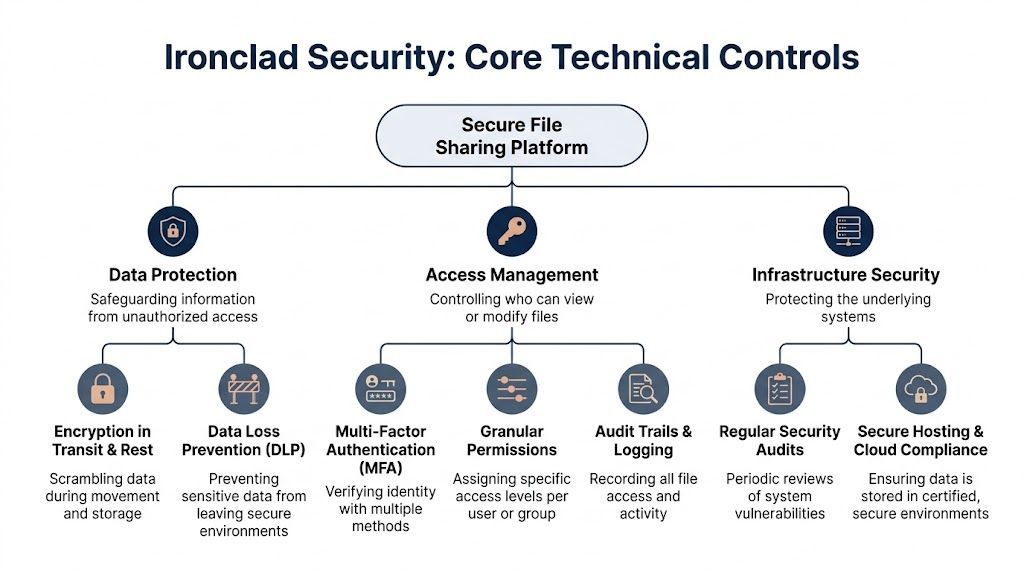
End-to-end encryption is the first requirement. Think of it as a sealed courier envelope that only the intended recipient can open. It protects the file while it moves, so interception doesn’t automatically mean exposure.
According to this accounting file-sharing security best practices article, AES-256 end-to-end encryption reduces breach risk by 95%. The same source notes that expiring links and two-factor authentication can cut unauthorised access by 87%.
Those numbers line up with what works in practice. Encryption matters, but secure delivery controls matter too. If your platform lets users create open-ended links that live forever, you’ve solved only part of the problem.
Use these controls together:
A common mistake is giving broad folder access because it’s easier to administer. That’s fine until an intern sees partner-only files, a contractor accesses the wrong client set, or an audit team member downloads tax records unrelated to their engagement.
Role-based access control fixes that. People should see only the files they need for their role, client, and assignment. In accounting firms, that usually means permissions by service line, engagement team, office, and client matter.
A sound permission model should answer these questions:
If your current setup can’t answer those clearly, access is probably too broad.
For firms that want to tighten administrative oversight, the principles behind privileged access management are useful. Not every employee should be able to create public links, alter retention settings, or grant exceptions.
A secure file sharing platform should log every meaningful action. You want a record of uploads, downloads, views, deletions, link creation, permission changes, and failed access attempts. That audit trail matters during client disputes, internal investigations, and compliance reviews.
If a platform can’t tell you who accessed a file and when, it’s not ready for professional services handling regulated data.
Then there’s Data Loss Prevention, or DLP. This control scans for sensitive information and blocks or flags unsafe sharing. For accountants, that can mean stopping a user from sending a file that contains personal identifiers or financial records outside approved channels.
Don’t ignore the infrastructure layer either. Secure hosting, regular patching, tested backups, and version history all matter. A polished client portal sitting on weak administration is still a weak system.
What works in real firms is usually a stack, not a single feature. Encryption protects content. Permissions restrict exposure. MFA validates identity. Audit logs prove activity. DLP catches mistakes. Together, those controls make secure file sharing for accountants dependable instead of hopeful.
Most firms evaluating secure file sharing end up choosing between three paths. They either secure what they already own in Microsoft 365, buy a dedicated client portal, or implement a managed file transfer platform for more specialised requirements.
There isn’t one universal winner. The right fit depends on how your firm works, how many clients you serve, how much structure your processes need, and whether your team can configure and govern the platform properly.
Many firms already use OneDrive and SharePoint. That makes Microsoft 365 an appealing starting point because the licences are often in place, users know the interface, and the platform integrates with Teams, Outlook, and Entra identity controls.
When configured with a zero-trust model and DLP policies, Microsoft 365 can be very effective. According to SmartVault’s access control overview, properly optimised environments can reduce accidental data leaks by 92%. The same source also notes that more advanced platforms may add double encryption and hardened virtual appliances for higher-risk use cases.
Microsoft 365 works best when the firm has the discipline to configure it well. Out of the box, it can be too permissive. Shared links, inherited permissions, and ad hoc folder structures create risk if nobody owns the governance.
Good fit:
Less ideal:
Dedicated portals are built around external document exchange. They usually offer cleaner client-facing workflows, branded access, easier document requests, and more deliberate separation between internal files and client submissions.
For tax, bookkeeping, CAS, and audit support, that structure can be a major advantage. Clients know where to upload. Staff know where to retrieve. Permissions are easier to reason about because the tool was designed for that use case.
The trade-off is one more platform to manage. Some portals also create friction if clients have to learn a new login process or if the portal doesn’t integrate cleanly with the rest of the firm’s systems.
A portal is often the better choice when client behaviour is the main problem, not just internal storage.
Managed File Transfer, or MFT, is the heavier-duty option. It makes sense where firms exchange large volumes of sensitive files, need stricter workflow controls, or have specialised compliance and automation requirements.
MFT platforms usually provide deeper policy enforcement, stronger transfer governance, and tighter operational control than standard sharing tools. They’re often more than a mid-sized accounting firm needs, but they can be the right answer for firms with complex engagements, recurring bulk transfers, or high security expectations.
The downside is complexity. MFT takes more planning, more administration, and usually more change management.
| Feature | Microsoft 365 (OneDrive/SharePoint) | Dedicated Client Portal | Managed File Transfer (MFT) |
|---|---|---|---|
| Best use case | Firms standardised on Microsoft tools | Structured client document exchange | High-control or high-volume transfers |
| User experience for staff | Familiar for most teams | Usually straightforward after rollout | More specialised |
| User experience for clients | Can be inconsistent if not well designed | Usually clearer and more guided | Often functional rather than friendly |
| Security strength | Strong when properly configured with zero-trust and DLP | Strong for external sharing workflows | Strongest policy and transfer control |
| Compliance support | Good, depends on configuration and governance | Good, depends on vendor design | Strong for rigorous transfer oversight |
| Administrative effort | Moderate to high | Moderate | High |
| Integration with firm workflow | Excellent within Microsoft ecosystem | Varies by vendor | Varies, often requires more setup |
| Typical weakness | Over-sharing from weak permissions | Added platform sprawl | Complexity and adoption burden |
Start with your workflow, not the feature sheet. Ask where files originate, who touches them, who needs external access, and where mistakes happen today.
If your risk comes from casual internal sharing, Microsoft 365 may be enough if governed properly. If your problem is inconsistent client exchange, a portal often improves both security and usability. If you need policy-heavy transfer controls, automation, or highly structured exchange, MFT deserves a look.
Whatever you choose, avoid the most common mistake. Firms buy a capable platform, then leave default sharing settings in place and assume the product solved the problem on its own. It didn’t.
Technology only works when the firm wraps it in rules that people can follow. Without policies, even a strong platform turns into an inconsistent patchwork of exceptions.
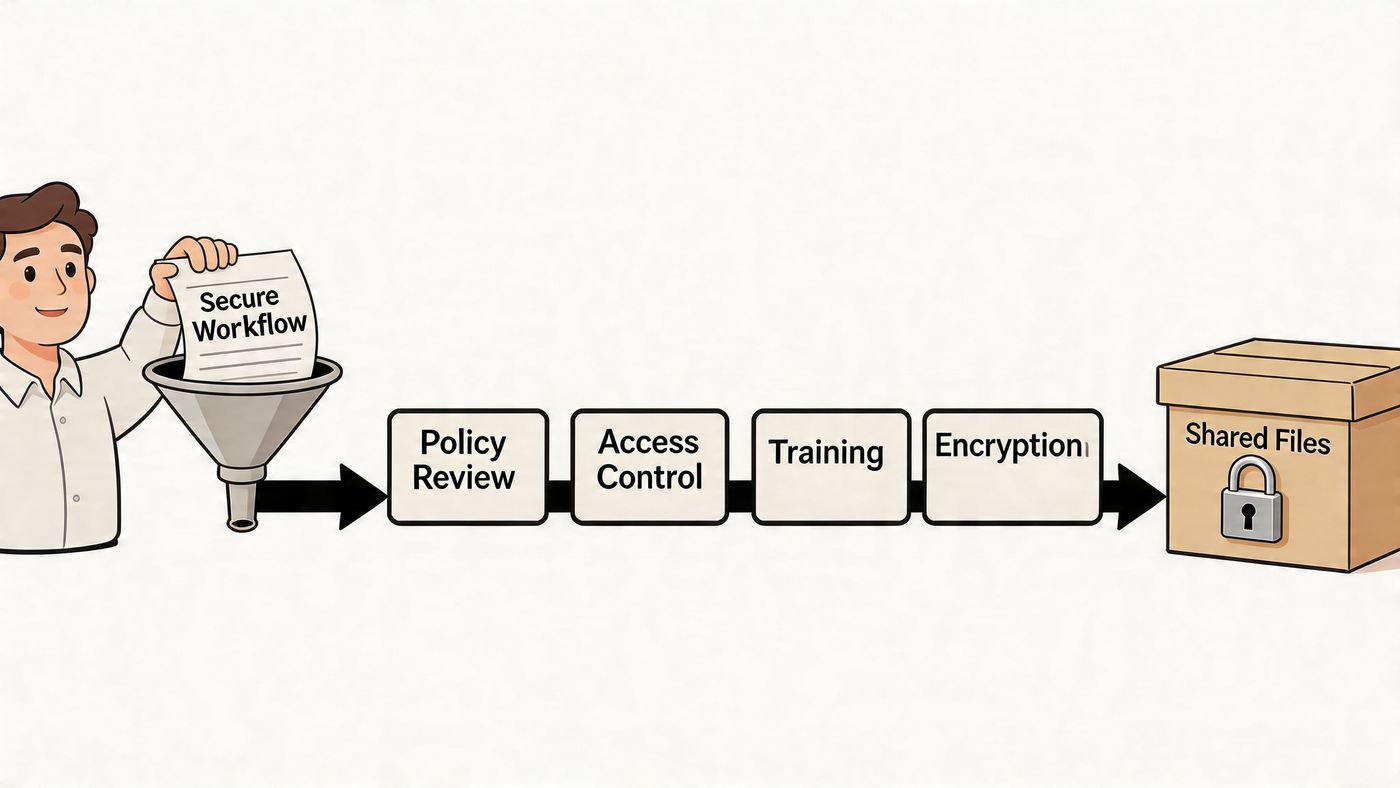
Start with a short, enforceable set of policies tied directly to daily work.
Policies should answer real operational questions. Can a manager text a PDF to a client in a rush? Can a departing employee keep offline copies of client files? Can a partner ask staff to “just email this one”?
If the answer depends on who’s asking, the policy isn’t mature enough.
Good workflows are specific. They remove guesswork at the point of action.
A few examples:
Keep the rule simple enough that staff can follow it under deadline pressure. Complex policy language usually fails during busy season.
Every firm has edge cases. Urgent filings. A client executive travelling abroad. A last-minute lender request. Those situations are exactly where insecure workarounds appear.
Write exception handling into the process. Require approval for off-process sharing. Log the reason. Set a time limit. Revoke access after the need passes.
That approach keeps the firm disciplined without freezing operations. Secure file sharing for accountants has to support real work, but it also has to stop “temporary” shortcuts from becoming permanent habits.
Most file-sharing failures aren’t caused by a lack of tools. They happen because someone takes the faster path. They reply to an old email thread, upload to the wrong folder, approve a vague request, or trust a phishing message that looks close enough to legitimate.
That’s why training can’t be a one-time demo of the new portal. Staff need to understand which data belongs in the secure platform, how to use it, and what risks they’re expected to catch before a file leaves the firm.
Training has to be practical and role-based. A tax preparer, a payroll clerk, a partner, and a front-desk administrator won’t all use the platform the same way.
A useful programme includes:
For many firms, formal cybersecurity training for employees proves its worth. It turns abstract security expectations into day-to-day behaviour.
Staff watch what partners do. If partners bypass the portal for convenience, the rest of the firm will too. If leadership uses the approved workflow consistently, adoption rises much faster.
A few change practices work well:
The firm doesn’t need everyone to love the new process on day one. It needs everyone to stop improvising with sensitive files.
By this point, the pattern is clear. Secure file sharing for accountants isn’t one decision. It’s a stack of decisions about platforms, identity, permissions, logging, DLP, client experience, policies, and training. Most accounting firms don’t have the internal time or specialised security depth to manage all of that well on their own.
That gap gets wider as threats change. The FileCloud overview of secure file sharing for accountants notes that ransomware attacks against Canadian accounting firms increased 28% year over year from Q1 2025 to Q1 2026, and that the Canadian Centre for Cyber Security now urges SMBs to adopt AI-driven threat detection. That matters because file sharing is no longer just about locking down links. Firms also need better monitoring for unusual behaviour, suspicious access patterns, and risky data movement.
A capable managed IT partner doesn’t just provision licences and move on. They help the firm make the system governable.
That usually includes:
The value is partly technical and partly operational. Good security tools are easy to misuse. A managed partner reduces that risk by creating standards, enforcing reviews, and keeping the environment aligned with current threats.
Accounting leaders should spend time on client service, staffing, workflow quality, and growth. They shouldn’t be reverse-engineering sharing permissions, chasing DLP exceptions, or trying to interpret security telemetry after hours.
A managed partner also helps firms avoid a common cycle. A breach scare triggers a rushed tool purchase. The rollout is incomplete. Staff fall back to email. The firm thinks the product failed when the underlying issue was design, governance, and support.
If your firm is serious about reducing file-sharing risk, modernising Microsoft 365, or building a stronger long-term security posture, the case for external expertise is strong. That’s especially true for teams evaluating the broader benefits of managed IT services in regulated, client-facing environments.
The firms that handle this well don’t just buy secure software. They build a secure operating model around it.
If your accounting firm needs a more defensible way to share tax files, payroll records, audit support, and client financial documents, CloudOrbis Inc. can help. Their team works with Canadian businesses to assess current risks, strengthen Microsoft 365 and cloud security, build practical policies, train staff, and support ongoing compliance. If you’re ready to move beyond email attachments and ad hoc sharing, contact CloudOrbis for a security assessment and a roadmap designed for your firm.
Book a 30-minute call with a senior engineer. No sales script, just straight answers about your environment.


