IT Asset Management: A Guide for Canadian SMBs
Learn how effective IT asset management can boost security, control costs, and drive growth for your Canadian SMB. A practical guide to getting started.

Learn how effective IT asset management can boost security, control costs, and drive growth for your Canadian SMB. A practical guide to getting started.
A lost laptop. A forgotten Microsoft 365 account that still has access to client files. A surprise software audit that sends your team searching through inboxes, purchase records, and old spreadsheets.
That's usually when business owners realise IT asset management isn't an admin chore. It's a control problem.
For Canadian SMBs, that problem has grown steadily. Devices move between office, home, clinic, warehouse, and job site. Software is licensed by subscription. Cloud services can be activated in minutes and forgotten just as quickly. If nobody owns the full picture, costs drift up, security weakens, and compliance gets harder to prove.
Good IT asset management gives you a current record of what you have, who uses it, how it supports the business, and what risks come with it. Done well, it helps you reduce waste, support users faster, plan refreshes properly, and close security gaps before they turn into incidents.
Many businesses still treat IT asset management as a list of equipment. Laptop serial numbers. Printer models. Maybe a tab for software licences if someone has time to maintain it.
That approach breaks down fast.
A modern business runs on more than physical devices. It runs on user accounts, SaaS subscriptions, cloud workloads, mobile phones, network gear, and the relationships between them. If you only track what was purchased, you miss what was deployed, reassigned, left unused, misconfigured, or never removed after an employee left.
A spreadsheet can tell you that a laptop exists. It usually can't tell you whether that laptop is encrypted, patched, assigned to the right person, still under warranty, or due for replacement. It also won't help much when finance wants to understand renewal risk or when IT needs to respond to a security alert.
The market has moved in that direction for a reason. The global asset management system market is projected to exceed US$27 billion by 2025, growing at 10.3% annually, according to asset management market statistics compiled by GoCodes. For Canadian businesses, that reflects the shift from occasional spreadsheet updates to continuous, systemized tracking across laptops, servers, SaaS subscriptions, and cloud resources.
Practical rule: If your asset list depends on one person remembering to update it, you don't have control. You have hope.
When IT asset management is handled properly, it supports three outcomes at once:
That's one reason many organisations pair ITAM with broader operational support such as managed IT services. Asset data becomes more useful when it feeds service desk, monitoring, patching, and change management workflows.
Software deserves special attention here. Many businesses overspend because they don't have a clean view of assigned versus active use. If licence waste is already on your radar, this guide on optimizing software licenses is a useful companion read because it focuses on the operational side of software entitlement management.
When people hear IT asset management, they often think “computers and servers.” That's too narrow for how most Canadian SMBs operate today.
Statistics Canada has reported that remote work remains structurally higher than pre-pandemic levels, while federal guidance continues to push cloud adoption. As noted in this overview of ITAM best practices for maximum visibility, that shifts ITAM from a simple hardware register into an ongoing control issue across distributed endpoints, software, and users.
A useful starting point is to group assets by function, not by who bought them.
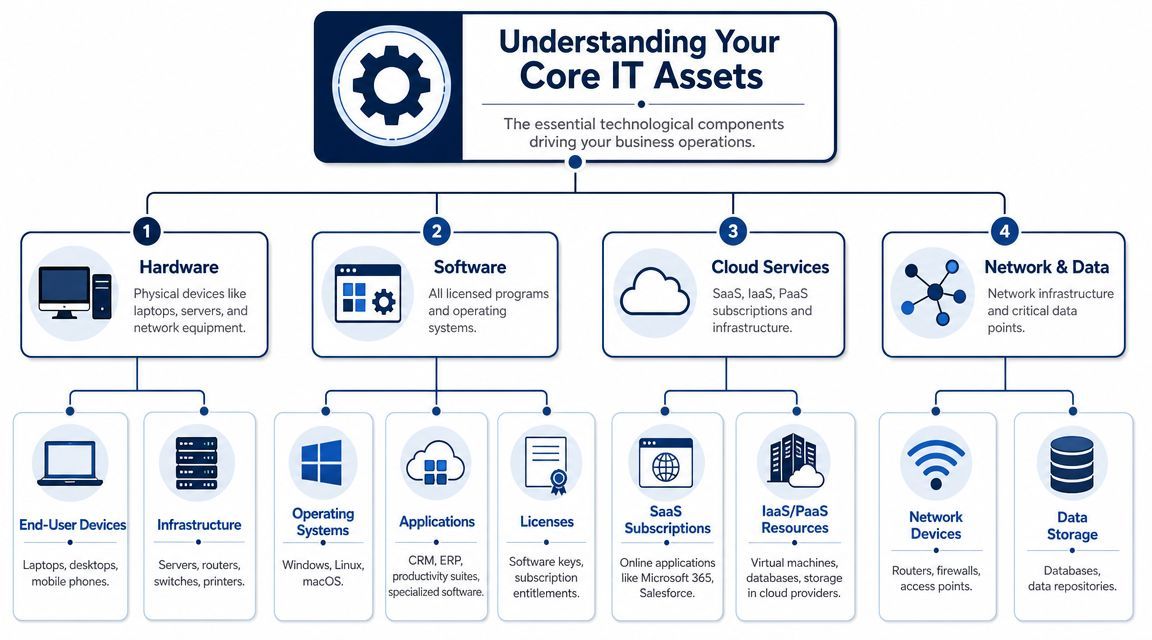
This is the easiest category to understand and the one most companies start with. It includes laptops, desktops, monitors, mobile phones, tablets, printers, routers, switches, firewalls, and on-premises servers.
The challenge isn't identifying these assets. The challenge is keeping the records current after moves, replacements, repairs, loaners, and remote deployments.
A clinic, law office, or accounting firm might have devices spread across reception desks, private offices, employee homes, and satellite locations. Without a central record, support becomes reactive and refresh planning turns into guesswork.
Software assets include operating systems, productivity suites, line-of-business applications, endpoint security tools, accounting platforms, and specialty programs used by engineering, healthcare, or finance teams.
You also need to track the licence model. Per user, per device, subscription, perpetual, shared, or usage-based. That distinction matters when staff changes, machines are reimaged, or finance asks whether a renewal is still justified.
A licence count without deployment context doesn't tell you much. You need to know who has access, what's installed, and whether the entitlement still matches the business need.
This category is where many asset registers fall apart. SaaS applications such as Microsoft 365, CRM platforms, HR systems, file-sharing tools, and project platforms are all IT assets. So are virtual machines, storage instances, hosted databases, and tenant configurations in cloud environments.
These assets often don't appear in procurement records in a tidy way. One team may buy them with a credit card. Another may activate a trial that later becomes business-critical. Over time, you get fragmented ownership and weak visibility.
That's why a broader view of IT infrastructure components matters. Hardware, software, cloud platforms, and network services all affect uptime, security, and compliance.
Some organisations stop at “things with serial numbers.” That's a mistake. Network devices, shared storage, repositories, domain records, and other critical data points belong in the conversation because they support the business just as directly as end-user devices do.
A strong ITAM programme recognises that the asset isn't just the laptop. It's the laptop, the user, the applications, the permissions, the data access, and the support dependencies around it.
The easiest way to explain lifecycle management is to follow one device from day one to retirement.
Take a new employee laptop. If it's managed well, every stage is documented. If it isn't, the problems show up later as wasted spend, support delays, or security exposure.
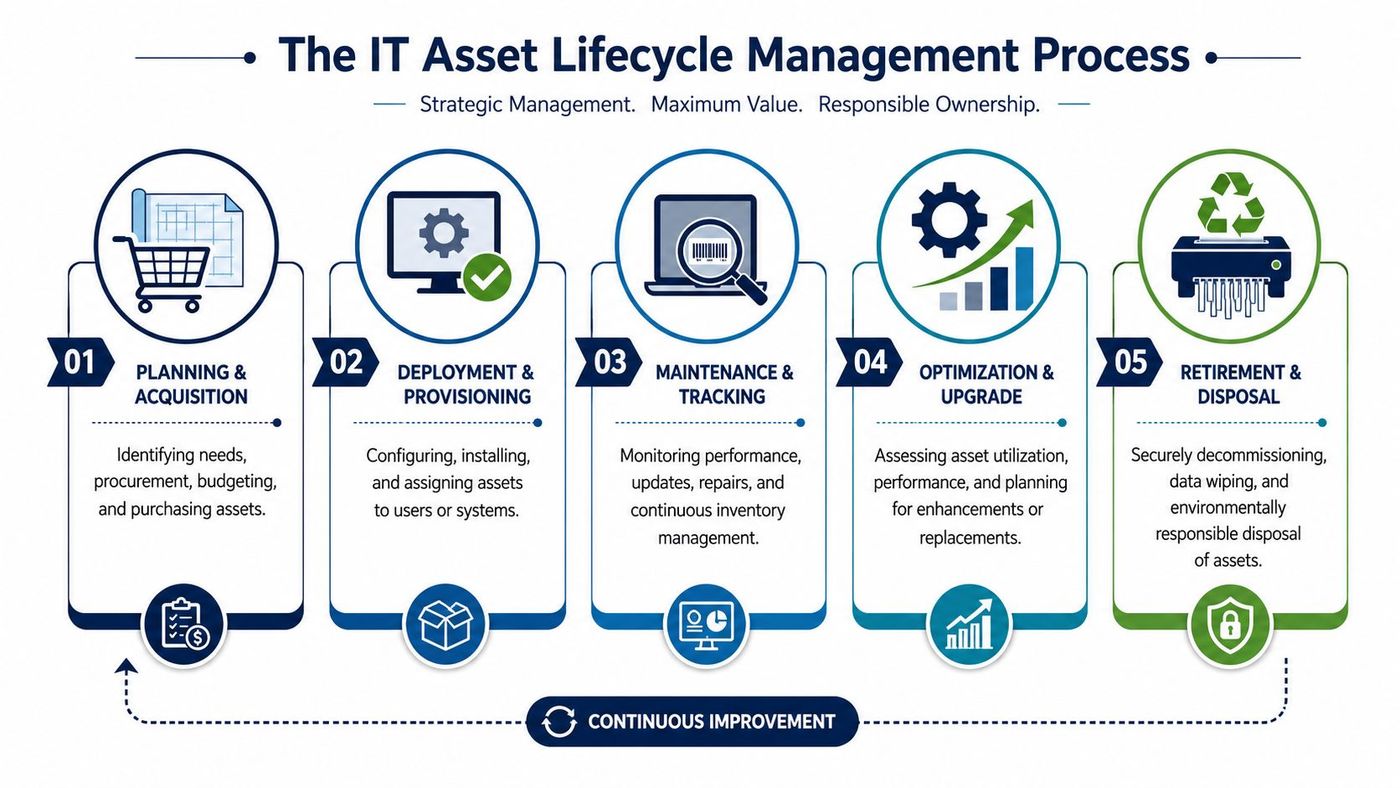
The process starts before the purchase. Someone decides what role the laptop supports, what specifications are needed, what software it requires, and whether it fits existing standards.
Disciplined organisations avoid random purchasing. Standard models simplify support, warranty handling, accessories, imaging, and replacement planning. They also make budgeting more predictable.
Once the laptop arrives, it should be tagged, recorded, configured, and assigned to a named user. The record should include purchase details, warranty status, software load, security controls, and location.
After deployment, the asset needs active oversight. Patching, performance issues, repairs, battery degradation, replacement parts, and reassignment all belong in the same lifecycle record. Teams that separate support activity from asset records usually end up with blind spots.
For businesses that need a structured support process around physical infrastructure, services such as IT hardware maintenance can help keep maintenance history and operational status from being scattered across email threads and ticket notes.
A good lifecycle programme doesn't wait for failure. It looks at whether the asset still suits the role. Some machines can be upgraded or reassigned. Others cost more in downtime and support effort than they're worth.
ITAM helps business owners make cleaner decisions. Replace now, extend for another term, or move the device to a lighter-use role. Without records, those choices become subjective.
This is the stage many organisations rush through, and it's one of the riskiest. In Canada, organisations remain responsible for personal information on retired devices. Secure disposal and verified data wiping matter because undocumented disposal breaks chain-of-custody and creates privacy exposure, as highlighted in this discussion of IT asset disposal risks in Canada.
That means retirement should include:
Retiring a device without proof of sanitisation is not a completed ITAM process. It's an unfinished risk.
Most ITAM problems aren't caused by bad intentions. They're caused by weak process.
A business buys hardware through one workflow, deploys software through another, handles support tickets in a separate system, and leaves cloud subscriptions to department managers. The result is predictable. No single record stays trustworthy for long.
Effective IT asset management usually depends on a few practical disciplines:
In larger environments, this often connects to a CMDB. In plain terms, that's the place where asset records and service relationships are tied together so teams can see what supports what.
If your team is building maturity in platforms that support this kind of service and asset structure, formal training can help. For example, people who want to prepare for ServiceNow CSA certification often benefit from learning how service records, configuration items, and operational workflows fit together.
At a certain size, spreadsheets stop being frugal and start being expensive.
| Aspect | Manual Tracking (Spreadsheets) | Automated ITAM System |
|---|---|---|
| Asset discovery | Relies on someone entering data | Pulls data from connected systems and tools |
| Accuracy | Falls behind after moves and changes | Updates more consistently when integrated properly |
| Software visibility | Usually partial | Better visibility into installs, assignments, and renewals |
| Audit readiness | Depends on cleanup before review | Easier to report from a maintained system |
| Support impact | Technicians search in multiple places | Asset context can sit beside ticket history |
| Scale | Hard to maintain as users and locations grow | Better suited to hybrid and multi-site environments |
There's also a middle ground. Some SMBs don't need a heavy enterprise platform, but they do need structured monitoring, endpoint visibility, and asset-linked support. That's where tools used for remote monitoring and management become useful because they help connect asset records to actual operational activity.
CloudOrbis is one example of a provider that can manage those operational layers for SMBs that don't want to build the process internally.
If you strip away the jargon, the security case for IT asset management is simple. You can't protect systems you haven't identified.
The Canadian Centre for Cyber Security treats ITAM as a core control and states that an organisation cannot secure what it cannot inventory. Its guidance also stresses that weak visibility creates operational and compliance exposure, especially in regulated sectors such as healthcare, finance, and legal. You can read that directly in the Cyber Centre's guidance on using IT asset management to enhance cybersecurity.
Security tools work best when they know what they're supposed to cover. That sounds obvious, but many incidents begin with unmanaged devices, stale accounts, unsupported software, or systems nobody realised were still active.
A mature ITAM practice helps teams answer questions quickly:
That speeds up patching, containment, offboarding, and audit preparation.
Canadian businesses in healthcare, legal, finance, and similar sectors often need to show more than good intent. They need to show due diligence. If a regulator, client, or insurer asks how devices are controlled, assigned, maintained, and retired, vague answers won't help.
ITAM supports that proof by linking assets to policy, access, and lifecycle records. It also strengthens related practices such as endpoint security, identity management, and data governance. If your organisation is reviewing those controls more broadly, this guide to data security management is a useful next step.
ITAM also helps define the scope of security testing. Before you decide whether a system needs a vulnerability assessment, a penetration test, or both, it helps to understand the differences in security testing. That decision is much harder when your asset inventory is incomplete.
The first control in many security programmes isn't a tool. It's an accurate list of what the business actually depends on.
A useful ITAM programme should change how the business operates. If it doesn't improve decisions, reduce confusion, or tighten control, it's probably too shallow.
That means success shouldn't be measured by the size of the asset register alone. A long list of records can still be wrong, outdated, or disconnected from day-to-day operations.
For most SMBs, the best indicators are operational.
Use measures such as:
You don't need a complicated scorecard to start. You need a small set of measures that reveal whether the records are trusted and used.
Some mistakes show up again and again.
A simple process followed consistently beats an ambitious process nobody maintains.
The strongest SMB programmes are usually boring in the best way. They standardise purchasing, define naming and ownership rules, connect support activity to asset records, and review exceptions regularly.
That discipline doesn't feel exciting. It does make audits easier, budgeting cleaner, and security controls more reliable.
Most SMBs don't need to solve IT asset management in one big project. They need a practical rollout that builds control in layers.
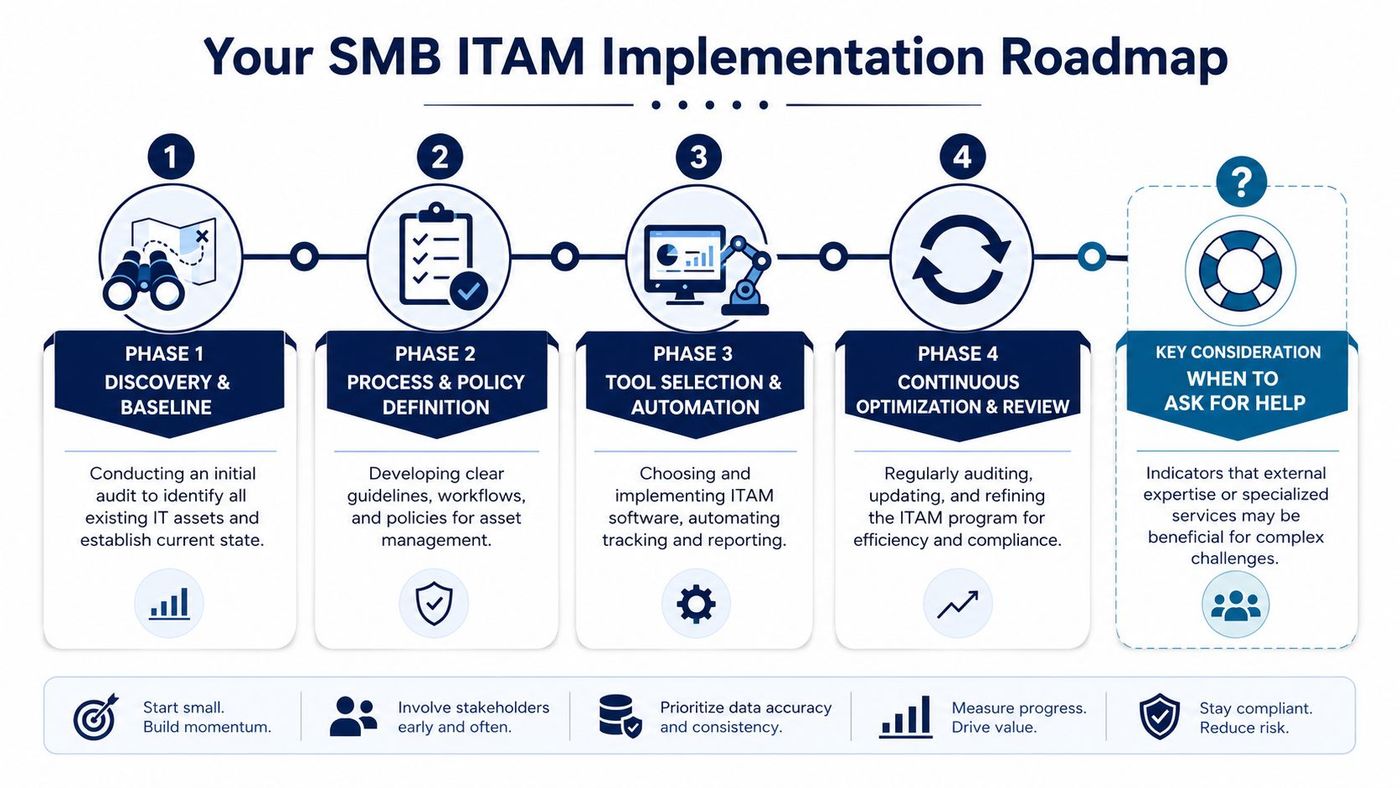
First, identify what you already have. That includes devices, major software, core SaaS platforms, shared infrastructure, and any high-risk or regulated assets.
Don't wait for perfection. The point is to establish a baseline that the business can trust enough to improve.
Next, document how assets enter service, how they're assigned, what fields must be recorded, how changes are approved, and how retirement is handled. Even a short policy is better than relying on memory.
For many organisations, this is the point where hidden process gaps appear. HR may onboard users without a hardware standard. Finance may renew software without knowing whether it's still used. Department leaders may buy tools outside IT review.
Once the process exists, choose tools that support it. That may mean discovery, endpoint management, service desk integration, or cloud administration controls. Automation should reduce manual effort, not hide a broken process underneath it.
You should consider outside help when any of these are true:
When that point arrives, a managed provider can take on the operational burden and help standardise the environment. If your business needs that kind of support, CloudOrbis Inc. can assess your current ITAM maturity, help formalise lifecycle controls, and align asset management with support, security, and compliance requirements.
If your team is still managing devices, licences, and cloud services through scattered spreadsheets and tribal knowledge, this is a good time to fix it. CloudOrbis Inc. works with Canadian SMBs that need clearer asset visibility, stronger cybersecurity controls, and more reliable day-to-day IT operations. Book a consultation to review your current environment and identify the next practical steps for a workable IT asset management programme.
Book a 30-minute call with a senior engineer. No sales script, just straight answers about your environment.


