Information Technology Managed Services for Canadian SMBs
Discover what information technology managed services are and how they boost security, efficiency, and ROI for Canadian SMBs. A complete guide.

Discover what information technology managed services are and how they boost security, efficiency, and ROI for Canadian SMBs. A complete guide.
Your business adds staff, opens a new location, rolls out another software platform, and suddenly the cracks in IT start showing. Printers drop offline. Microsoft 365 permissions are a mess. Backups exist, but nobody’s sure whether they’ll restore. Your office manager becomes the unofficial helpdesk, and your internal IT lead spends the week chasing password resets instead of improving security or planning the next phase of growth.
That’s the point where many Canadian SMBs realise their technology isn’t just “annoying.” It’s starting to limit the business.
The problem usually isn’t a lack of effort. It’s the model. If your team only reacts when something breaks, you stay trapped in a cycle of downtime, patchwork fixes, and recurring risk. A proactive model changes that. With information technology managed services, the goal is to keep systems healthy, users supported, and business operations moving without constant firefighting.
If you're weighing whether to keep building in-house, continue with a break-fix vendor, or move to a managed model, it helps to understand what the shift means in practice. This overview of the benefits of managed IT services is a useful starting point, especially if you're trying to connect IT decisions to business results rather than technical checklists.
Most business owners don’t wake up wanting to think about endpoint protection, backup policies, or patch cycles. They want staff to work efficiently, customer data to stay protected, and systems to stay online.
When that isn’t happening, IT becomes a drag on every department. Sales loses time to sluggish systems. Finance worries about data exposure. Leadership postpones useful projects because the basics still aren’t stable.
That’s where managed services earns its place. The shift isn’t just outsourcing support. It’s moving responsibility for day-to-day IT health, security, and performance into a structured service model designed to prevent issues before they disrupt the business.
Practical rule: If your team spends more time escalating recurring IT issues than improving operations, the current support model has already hit its limit.
A good managed services relationship gives you predictable support, clearer accountability, and a roadmap for change. It also gives your internal team breathing room. Instead of resetting accounts, rebuilding laptops, and chasing failed updates, they can focus on business systems, process improvements, and the projects that move the company forward.
For Canadian organisations dealing with compliance, hybrid work, cloud sprawl, or older line-of-business systems, that proactive structure matters even more. It turns IT from a source of recurring disruption into something leadership can plan around.
Think of a managed service provider as the property manager for your digital estate. You still own the environment. You still decide what matters to the business. But the day-to-day upkeep, monitoring, maintenance, and risk management stop depending on whoever happens to notice a problem first.
That distinction matters because many SMBs still confuse managed services with ad hoc support. They are not the same thing.
In a proper managed arrangement, the provider doesn’t wait for users to complain. They use tools and processes to watch systems continuously, maintain devices, apply updates, support users, and keep security controls aligned with business needs.
That can include:
If you want a clearer operational view of the tooling side, this explanation of remote monitoring and management is useful because it shows how proactive support happens behind the scenes.
The old break-fix model sounds simple. Something fails, you call someone, they repair it, and you pay the bill. That can be acceptable for a very small office with limited complexity. It breaks down fast once the business depends on cloud platforms, remote access, compliance controls, and staff uptime.
The trade-off is straightforward.
| Model | What triggers action | Cost pattern | Operational result |
|---|---|---|---|
| Break-fix | Failure or complaint | Unpredictable | Downtime becomes the trigger for service |
| Managed services | Continuous oversight | Recurring and planned | Prevention becomes part of the service |
With break-fix, the provider gets involved after disruption has already affected staff or customers. With managed services, the provider is accountable for reducing disruption in the first place.
A reactive vendor repairs incidents. A managed partner works to reduce how often incidents happen at all.
That difference also changes incentives. In a managed model, stability is the product. In a break-fix model, instability often creates the work.
For many mid-sized firms, the best answer isn’t “replace internal IT.” It’s co-managed support. Internal staff keep ownership of business applications, vendor relationships, and strategic priorities. The MSP handles monitoring, support coverage, patching, security operations, and standardised processes.
That’s one reason the model often works better than staff augmentation alone. If you're comparing service structures more broadly, Refact’s piece on Comparing product building services gives a helpful lens on when managed ownership makes more sense than adding more hands.
The key test is simple. If your business needs reliability, repeatable support, and accountability beyond one person’s bandwidth, managed services usually fits better than informal IT support dressed up as a strategy.
A managed IT partnership should close operational gaps, not patch over them. If support, security, backup, cloud administration, and planning all sit in separate silos, issues slip between owners and leadership ends up paying for the confusion.
That matters quickly in regulated and operationally sensitive environments. A clinic cannot afford a stalled EMR system during patient intake. A manufacturer cannot wait until a line stops to find out a server has been throwing storage alerts for weeks. A finance team cannot explain weak access controls after an audit finding. The value of managed IT comes from putting the right disciplines around those day-to-day risks.
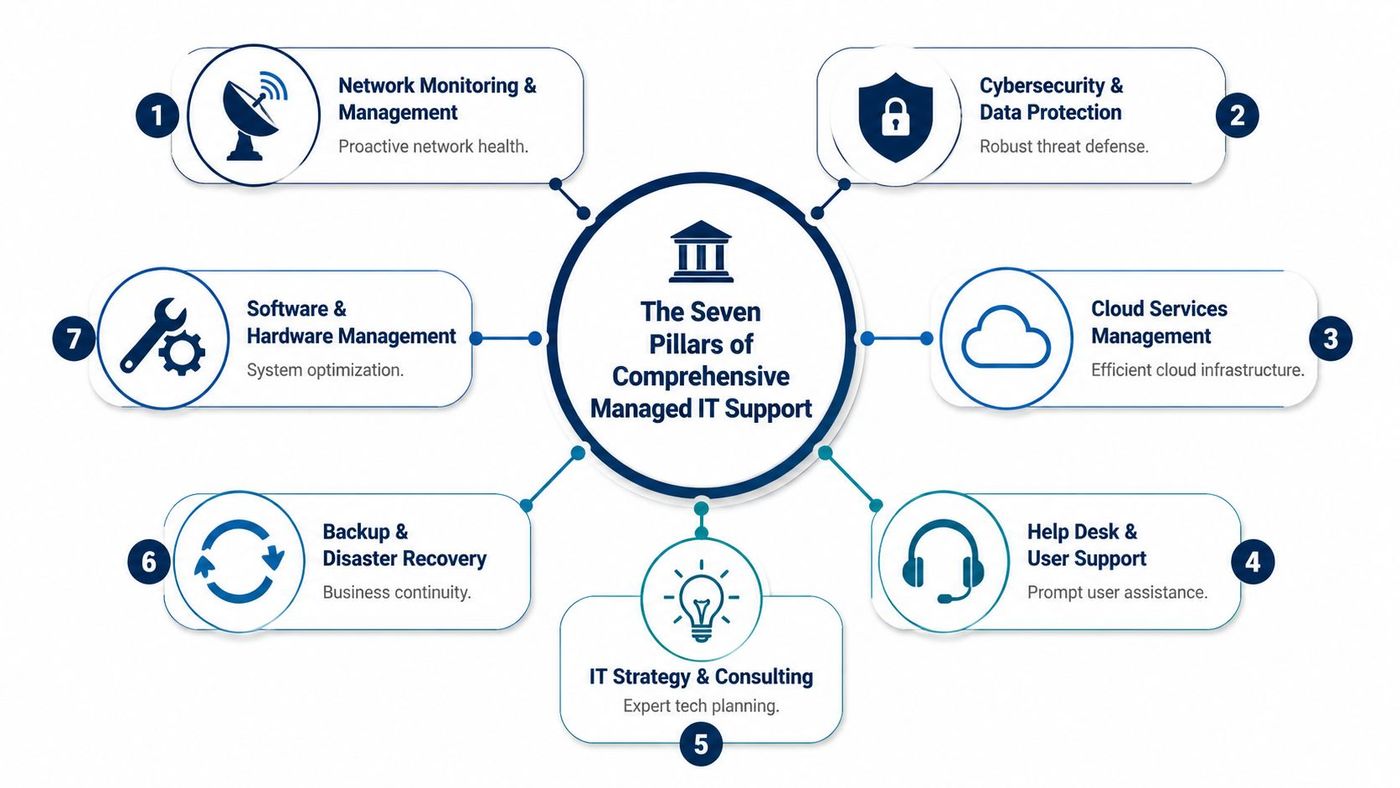
This is the operating foundation. Devices, servers, networks, and cloud services are monitored continuously so recurring faults, failed backups, storage pressure, patch issues, and hardware degradation are caught early.
In manufacturing, that translates directly into fewer production interruptions and less scrambling from operations managers. In a professional office, it means staff are not discovering system problems first at 8:15 on a Monday. The principle is the same across sectors. Find the issue before it spreads into downtime, missed deadlines, or client frustration.
The trade-off is straightforward. Proactive maintenance requires standards, scheduled changes, and some discipline around asset lifecycle decisions. Businesses that avoid those conversations usually pay for it later through outages and rushed replacements.
Users need a support desk that responds consistently, documents issues properly, and resolves the routine work without turning every request into a project.
That has practical value fast. Staff stay focused on their jobs. Department heads stop chasing updates. Internal IT, if you have it, can spend time on systems and planning instead of password resets, printer issues, and device triage.
A good helpdesk also exposes patterns. If multiple employees in a finance office keep running into MFA lockouts, that points to a configuration or training issue. If nurses on a healthcare floor are struggling with workstation logins, that is an operational workflow problem, not just a ticket queue problem.
Security only works when someone owns the routine work behind it. That includes patching, endpoint protection, identity controls, vulnerability remediation, log review, access cleanup, and response procedures.
For Canadian healthcare providers, that work supports privacy obligations under PIPEDA and often aligns with HIPAA-driven vendor expectations when cross-border systems or partners are involved. For finance firms, it supports audit readiness, access governance, and incident handling. For manufacturers, it reduces the chance that an infected endpoint in the office reaches plant operations or shared production data.
Businesses comparing service models should understand the difference between general IT support and active security oversight. This overview of security managed services explains where that line usually sits.
Security gaps rarely start with a dramatic breach. They start with overdue patches, old accounts, ignored alerts, and nobody checking whether controls still match the way the business actually works.
Many businesses have already adopted Microsoft 365, cloud storage, and SaaS applications. The issue is not whether the cloud is in use. The issue is whether it is governed properly.
I see the same pattern often. Files live in three places. Permissions grew by inheritance instead of policy. Former staff still appear in access groups. Legacy applications still depend on one aging server in the back office because nobody wanted to touch it during a busy quarter.
Managed IT brings order to that environment. That may involve cleaning up identity management, deciding what stays on-premises, standardizing device policies, or reducing risk in SharePoint and OneDrive. In regulated sectors, those decisions also affect retention, auditability, and how confidently leadership can answer client or regulator questions.
A backup job that reports "successful" is not the same as a recovery plan.
Reliable backup and disaster recovery includes retention rules, off-site copies, restore testing, ransomware-aware design, and a clear order of recovery. If systems go down, leadership should know what comes back first, how long that should take, and which workaround the business will use in the meantime.
This matters differently by sector. A medical practice may need patient scheduling and records restored first. A manufacturer may prioritize ERP, production scheduling, and file shares tied to operations. A financial firm may focus on document systems, email continuity, and secure client data access. The right recovery plan reflects business priorities, not just server names.
Phone systems still carry real operational weight. That is obvious in customer service, clinical coordination, dispatch, field service, and multi-location businesses, but it matters in quieter ways too. Poor call routing, dropped handoffs, and clumsy admin processes waste staff time every week.
Managed VoIP support helps keep telephony aligned with the way the business works. New staff can be added without delay. Call flows can reflect business hours, departments, or locations. Remote and hybrid teams remain reachable without relying on personal numbers or awkward workarounds.
For healthcare and finance in particular, voice systems also intersect with privacy expectations, documentation practices, and client experience. A phone system is not separate from operations. It is part of them.
Many firms have decent technical support and still make poor technology decisions. That usually happens because nobody owns the planning function at the leadership level.
A virtual CIO, or vCIO, connects business priorities to IT decisions. That includes budgeting, vendor review, lifecycle planning, risk review, project sequencing, and policy direction. The benefit is not abstract. It helps leadership decide what to fix now, what to defer, and what should never have been renewed in the first place.
In practice, this often means:
Without this pillar, businesses tend to drift. They renew tools they barely use, postpone upgrades until failure forces the decision, and treat compliance as a last-minute document exercise instead of an operating standard.
Leadership teams often ask the wrong opening question. They ask, “What does managed IT cost?” The better question is, “What does unstable, reactive IT cost us now?”
That cost shows up in several places at once. Staff lose time. Managers become informal coordinators. Systems interruptions delay revenue work. Security gaps increase financial and reputational exposure. Even basic planning suffers because nobody trusts the underlying environment enough to move faster.

Managed services often replaces irregular capital spikes and emergency invoices with a more predictable operating expense. That doesn’t make every IT cost disappear. It makes planning possible.
For a CFO or operations leader, that matters because it changes the conversation from “surprise repair” to “managed service level.” Budgeting becomes cleaner. Accountability improves. Service expectations can be tied to business outcomes rather than whoever answered the phone fastest.
A fractional leadership model can also help businesses that need strategy but aren’t ready for a full-time executive hire. This overview of fractional IT is relevant for firms trying to balance cost control with more mature planning.
The strongest return usually doesn’t come from buying less technology. It comes from reducing avoidable waste.
A few examples:
Managed IT pays back when it removes friction from daily work, not when it simply lowers a line item.
Business owners sometimes treat cybersecurity as a separate issue from ROI. It isn’t. Security failures affect downtime, legal exposure, customer trust, insurance conversations, and management time.
The same goes for compliance gaps. If audit evidence is hard to produce or access controls are poorly managed, the cost isn’t just technical. It reaches operations, legal, and reputation.
A mature managed services partner helps leadership understand that return on investment includes resilience. Stable systems, clear support processes, and governed change don’t just protect the business. They make growth easier to absorb.
That’s when IT stops behaving like a cost centre and starts acting like infrastructure for expansion.
A clinic cannot afford chart access issues during morning appointments. A manufacturer cannot pause production because a plant file share is down. A financial practice cannot explain to clients that sensitive records were stored carelessly or that access logs are incomplete.
That is what compliance looks like in day-to-day operations. It shows up in access controls, retention rules, recovery processes, vendor oversight, and the ability to produce evidence when a regulator, auditor, insurer, or client asks for it.
Generic IT support often misses that reality. Canadian organisations in healthcare, manufacturing, and finance need support built around their operating pressure, their privacy obligations, and where their data sits.
Take a multi-location clinic in Ontario. Staff use an electronic medical record platform, Microsoft 365, diagnostic imaging tools, and remote access for physicians and administrators. The problem is not only uptime. The clinic has to protect personal health information, keep access tightly controlled, recover quickly from failures, and show that its processes align with PHIPA, PIPEDA, and, in some cross-border cases, HIPAA expectations.
That changes the managed IT brief. The provider needs to handle identity controls, backup policies, logging, device standards, vendor access, and data residency decisions in a way that stands up to review.
For healthcare leaders, the practical priorities usually look like this:
If your organisation is dealing with privacy reviews in Alberta, a formal privacy impact assessment in Alberta is often part of that work.
Manufacturers rarely talk about compliance in abstract terms. They feel it on the floor.
A production environment may include aging servers, plant-floor devices, ERP access, supplier portals, and a mix of IT and operational technology that was never designed as one clean system. If remote access is poorly controlled or backups have never been tested against a real recovery target, the issue is not theoretical. Orders slip, shipping gets delayed, and supervisors start working around broken systems with spreadsheets, USB drives, and personal devices.
Managed IT support has to reflect that reality. Segmentation between office and plant systems matters. Remote vendor access needs approval and logging. Patch schedules need to respect production windows. Recovery planning has to cover the systems that stop output, not just the ones sitting on the server list.
Logistics firms face a similar problem set. Dispatch platforms, warehouse systems, handheld devices, and mobile users create constant pressure on identity management and availability. Security controls have to support delivery performance, not get bolted on after an incident.
A wealth advisory firm, credit union, accounting practice, or law office deals with a different kind of exposure. Client confidentiality, document integrity, retention, and secure collaboration all need tighter governance than a standard office environment.
The test is simple. Can the firm show who accessed a file, when a permission changed, where data is backed up, and how a compromised account would be contained?
| Business issue | What managed IT should address |
|---|---|
| Client confidentiality | Controlled access, endpoint protection, and secure collaboration tools |
| Document integrity | Backup, version control, and reliable recovery processes |
| Audit and review pressure | Logging, policy enforcement, and documented administration |
| Remote work risk | Secure identity controls and governed device access |
In these firms, service quality also matters from a governance standpoint. Response targets, escalation paths, and evidence of follow-through should be written down and reviewed. A practical guide to SLA compliance is useful here because compliance work falls apart quickly when support commitments are vague.
Sector context changes the design of managed IT. A provider that understands healthcare privacy obligations, production continuity, or financial record handling will set up support, security, and reporting very differently from one selling the same package to every business.
Choosing an MSP isn’t mainly a technology decision. It’s an operating model decision. You’re deciding who will share responsibility for uptime, user support, security discipline, and day-to-day stability. That deserves more scrutiny than a quick pricing comparison.
A polished sales presentation doesn’t tell you how a provider behaves during onboarding, after-hours issues, or uncomfortable conversations about risk. Those are the moments that define the relationship.
Start with how the provider works, not just what tools they sell.
Ask questions like:
One useful lens here is service accountability. If you want a practical framework for assessing commitments and expectations, this guide to SLA compliance helps clarify what strong service agreements should support.
Some warning signs show up before a contract is signed.
Watch for:
A provider should be able to explain how they reduce recurring issues, not just how they open tickets faster.
MSP pricing can be structured per user, per device, or in tiered bundles. None is automatically right or wrong. The important question is whether the pricing model matches how your business operates.
A per-user model often suits knowledge-based teams with multiple devices. A per-device model can work when endpoint counts drive support effort more directly. Tiered packages can be useful if you need room to add security, compliance, or strategic planning over time.
When reviewing proposals, compare more than the monthly figure. Look at what’s covered, what triggers extra billing, how projects are handled, and whether strategic guidance is included or sold separately.
A strong transition plan usually includes discovery, documentation, access review, standards alignment, user communication, and phased improvements. It should also include some form of user orientation so staff know how to get support and what changes to expect.
If onboarding sounds like “we’ll take it from here,” that’s not reassuring. It usually means the details haven’t been worked through.
The best partner is the one that can stabilise the environment, communicate clearly, and earn trust through process, not just promises.
Businesses rarely struggle because they lack technology. They struggle because the technology they already depend on isn’t being managed with enough discipline, consistency, or strategic direction.
That’s the core value of information technology managed services. Done properly, it replaces recurring disruption with structured support. It turns cybersecurity from a scattered set of tools into an operating practice. It gives leadership a clearer view of risk, cost, and next steps. Above all, it gives staff an environment they can rely on.

For Canadian SMBs, that partnership also needs local relevance. A provider should understand privacy obligations, regional business realities, hybrid work pressures, and the practical issues that come with Microsoft 365, cloud migration, backup resilience, and user support across multiple locations.
That’s where a structured operating model helps. CloudOrbis Inc. offers a 100% Canada-based 24/7 helpdesk and a 10-step engagement model built around assessment, implementation, user training, and ongoing optimisation. For organisations trying to get more value from Microsoft tools, that matters. Microsoft Copilot adoption has surged 250% in Canada in the last year, yet only 15% of SMBs in manufacturing and logistics fully utilize it, and 68% of MSPs struggle to support advanced AI tools effectively, according to this review of managed IT service challenges. In practice, that means many businesses have already bought into the Microsoft ecosystem but still need guidance to use it well.
A common example is a mid-sized business running on Microsoft 365 with fragmented permissions, inconsistent Teams usage, underused Copilot features, and support requests bouncing between vendors. In that situation, the value isn’t another standalone tool. It’s coordinated ownership. The helpdesk supports users, the technical team standardises the environment, and vCIO guidance turns scattered admin work into a roadmap.
Communication systems are part of that picture too. If you're reviewing telephony alongside broader IT changes, this roundup of best VoIP business providers can help frame what modern business calling should support.
The businesses that get the most from managed IT don’t treat it as outsourced troubleshooting. They treat it as a partnership that makes growth safer, cleaner, and easier to sustain.
If your organisation is tired of recurring IT issues, unclear accountability, or systems that can’t keep up with growth, book a no-obligation assessment with CloudOrbis Inc.. A proactive managed IT model can give you a more secure, stable, and scalable foundation for the next stage of your business.
Book a 30-minute call with a senior engineer. No sales script, just straight answers about your environment.


