Microsoft Teams Phone System: Guide for Canadian SMBs 2026
Learn Microsoft Teams Phone System licensing, costs, Direct Routing, & compliance for Canadian SMBs in 2026. Get your unified communications guide!

Learn Microsoft Teams Phone System licensing, costs, Direct Routing, & compliance for Canadian SMBs in 2026. Get your unified communications guide!
Your office phone system probably still works. That's the problem.
It works well enough to avoid urgent replacement, but not well enough to support a hybrid team, simplify compliance, or give leaders a clear view of telecom costs. Staff bounce between desk phones, mobile phones, voicemail inboxes, and Microsoft Teams. Reception handles avoidable call routing issues. Finance sees recurring phone bills but not always the business value behind them.
For many Canadian SMBs, this creates a quiet drag on operations. The phone system becomes separate from the rest of the business, even though calling is still central to sales, service, patient communication, and client relationships. That's why interest in the Microsoft Teams Phone System keeps rising. It takes a tool many teams already use for chat and meetings, then turns it into a full business phone system inside Microsoft 365.
Legacy PBX systems were built for a different workplace. They assumed people sat in one office, used one handset, and relied on one telecom vendor for everything. That model breaks down quickly when staff work from home, move between locations, or need to shift from a call to a chat or meeting without changing tools.
The issue isn't just old hardware. It's fragmentation. Calls live in one system. Collaboration lives in another. Administration sits somewhere else. When a business wants to add a location, support a clinic, or onboard a new employee quickly, telephony often becomes the slowest part of the stack.
A modern phone platform needs to do more than provide dial tone. It should support customer responsiveness, staff mobility, and governance. That's where Teams becomes strategically important. Microsoft Teams is the default messaging platform for over one million organizations worldwide, including nearly all Fortune 100 companies, and Microsoft Teams generated over $8 billion in estimated revenue in 2024 while holding 32.29% of the global video conferencing software market, according to Microsoft Teams phone number management guidance for Canada.
That matters to non-technical leaders because platform scale reduces risk. You're not betting on a niche telephony product. You're building on a collaboration platform that large enterprises already trust for daily operations.
Executive takeaway: Replacing a phone system isn't only an IT refresh. It's a chance to unify calling, collaboration, and administration in one environment.
For businesses evaluating cloud voice options, a useful starting point is understanding how a modern business VoIP solution changes both cost structure and day-to-day operations.
At its simplest, the Microsoft Teams Phone System is a cloud-based PBX inside Microsoft 365. A PBX is the business phone system that handles internal extensions, call routing, voicemail, menus, queues, and connections to the public phone network. In older environments, that PBX often sits in a server room or network closet. With Teams Phone, that same function moves into Microsoft's cloud.
A practical analogy helps. It's comparable to replacing an on-site file server with SharePoint or another cloud service. The business capability stays the same, but the hardware burden disappears. You still need setup and governance, but you don't need to nurse a physical phone system through every office move, upgrade cycle, or hardware failure.
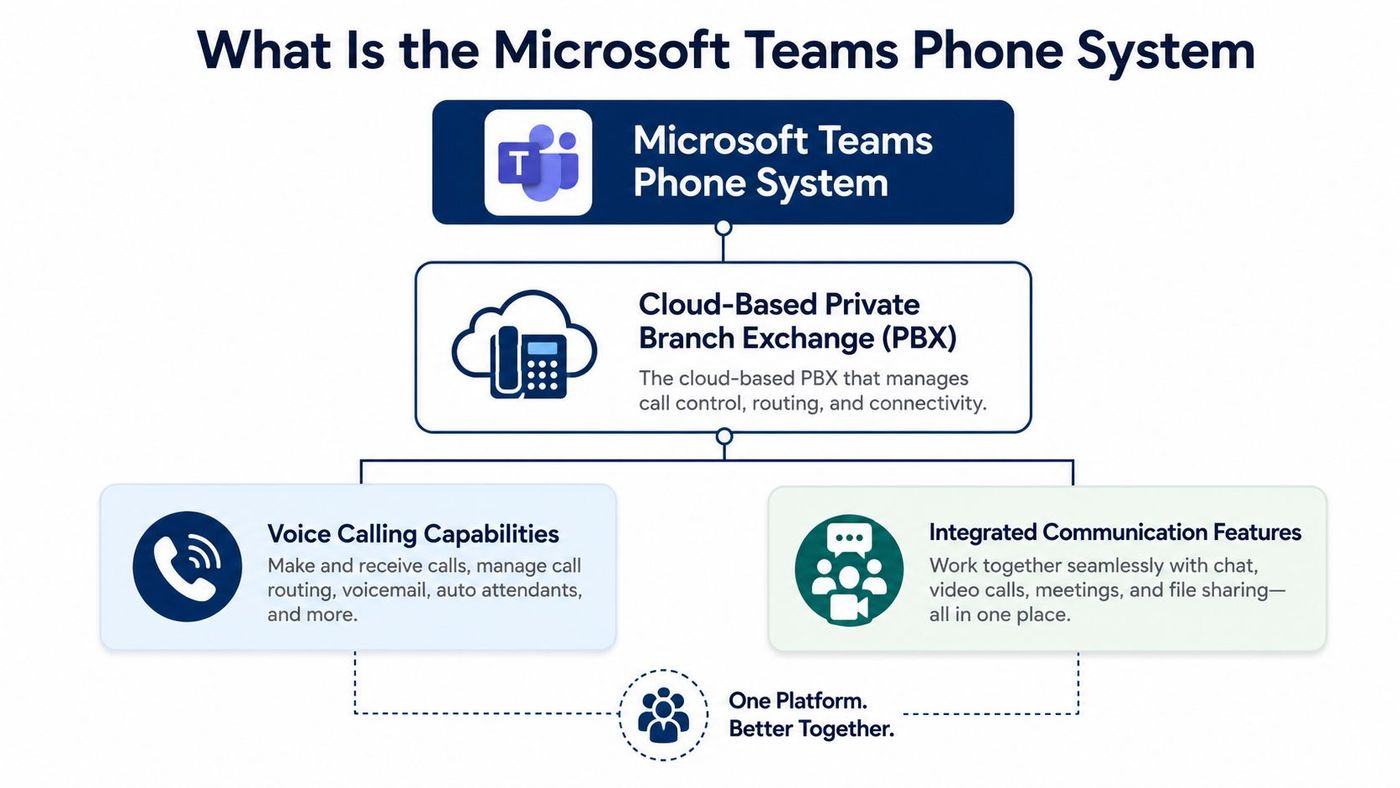
When Teams Phone is enabled, the Teams app becomes more than a chat and meeting tool. It can handle business calling functions such as:
This isn't a separate communications universe. That's the operational advantage. Calls, meetings, presence, chat, and user administration can sit much closer together than they do in a traditional telecom model.
Adoption tells you whether a platform is still experimental or already established. Microsoft Teams Phone closed out 2025 with more than 26 million PSTN users globally, up 30% from 20 million in April 2024, according to Pure IP's report on Teams Phone growth. That puts it among the largest cloud telephony platforms in the market.
For an SMB leader, the point isn't the headline number alone. It's what the number signals. Teams Phone isn't a niche add-on. It's an enterprise-grade calling platform with enough scale to support multi-site operations, regulated industries, and gradual migration from legacy voice systems.
When the phone system lives where your users already work, adoption friction usually drops. People don't have to learn an entirely separate communications tool just to answer calls.
Features only matter if they remove friction. Teams Phone does that best when you translate technical functions into business outcomes.
A clinic, law office, or logistics company can't afford to have incoming callers bounce around or hit voicemail because one person is away from their desk. An auto attendant answers with a menu and routes callers based on business rules.
That sounds technical, but the business effect is simple. Customers reach the right destination faster. Reception doesn't become a bottleneck. After-hours handling becomes more consistent.
A support desk or sales line often has the opposite problem. Too many calls arrive at once. Call queues let a group of users handle incoming calls collectively rather than relying on one extension.
That's useful when a manufacturing office has a dispatch function, or when a healthcare practice wants front-desk calls answered by the next available team member. If your team is working on optimizing inbound and outbound communications, queue design becomes part of the customer experience, not just a telecom setting.
A manager travelling between sites doesn't always have time to listen to every voicemail in sequence. Voicemail transcription changes the rhythm of work because users can review messages quickly, prioritise responses, and move on.
That matters most for professionals who spend their day switching contexts. A sales lead can scan a message between meetings. A partner in a legal firm can decide whether a voicemail needs immediate action. A clinic administrator can triage follow-ups faster.
Practical rule: If a feature reduces handoffs, missed calls, or duplicate work, it isn't just a phone feature. It's an operations feature.
For teams assessing the broader payoff of unified communications, these examples line up closely with the business gains described in this overview of communication technology benefits.
Many Canadian SMBs encounter a common hurdle. They understand what Teams Phone does, but they're unsure how it connects to the public phone network. In practice, most organisations compare two main paths: Microsoft Calling Plans and Direct Routing.
The easiest way to understand the difference is to think about electricity delivery. Calling Plans are closer to an all-in-one utility package. Microsoft provides the phone capability and the dial tone service together. Direct Routing is more like choosing your own energy supplier while keeping the same building. Teams remains the phone system, but a third-party carrier provides the PSTN connection.
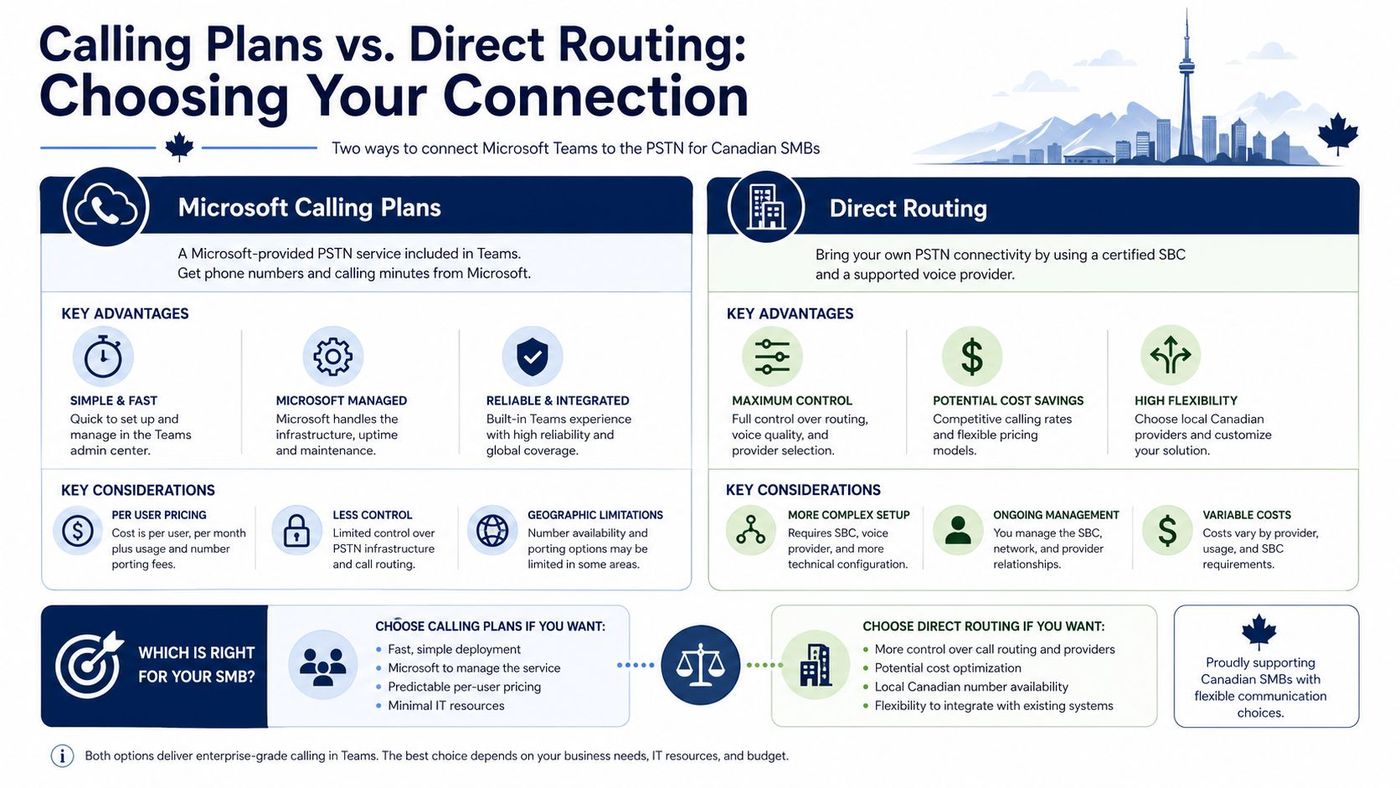
Calling Plans appeal to businesses that want fewer moving parts. Procurement is straightforward. Setup is typically simpler. Administrative ownership stays more tightly inside the Microsoft ecosystem.
For a smaller office with standard requirements, that simplicity can be valuable. If speed and minimal decision-making matter more than deep telecom optimisation, Calling Plans can be a sensible choice.
Direct Routing gives businesses more control over carrier choice, number strategy, and often cost structure. For Canadian SMBs, this isn't a minor detail. According to Pure IP's Teams Phone FAQ for 2025, 68% of small businesses in Ontario and Alberta still overpay by using Microsoft's native Calling Plans instead of Direct Routing with local carriers such as Telus or Cogeco, and Direct Routing can reduce voice costs by 30–45% annually.
That's the kind of gap executives should pay attention to. Not because Calling Plans are wrong, but because convenience can become expensive when a business has enough users, locations, or calling volume to benefit from local carrier economics.
| Option | Best fit | Main strength | Main consideration |
|---|---|---|---|
| Microsoft Calling Plans | Businesses that want a simpler, more bundled setup | Easier procurement and administration | May cost more in some Canadian SMB scenarios |
| Direct Routing | Businesses that want carrier flexibility and tighter cost control | Greater customisation and potential annual savings | Requires better planning and partner coordination |
Don't ask which model is “better.” Ask which model fits your organisation's priorities.
A Canadian SMB evaluating voice strategy should understand local market factors, carrier options, and service trade-offs. This overview of VoIP services in Canada is a helpful companion when comparing those choices.
Licensing confusion is one reason Teams Phone projects stall. Leaders often assume their Microsoft 365 subscription already covers business telephony in full. Sometimes it doesn't.
The simplest way to budget is to separate the project into two layers. First, you need the licence that enables phone system capability. Second, you need the connection that provides external calling.
Here's the plain-English version:
That split matters because a business can have Microsoft 365, Teams, and even advanced security features, yet still need an additional telephony component. This is why finance teams and IT teams sometimes talk past each other during planning.
A practical review should include:
For Canadian organisations using Microsoft's bundled route, the Teams Phone with Calling Plan includes exactly 3,000 domestic minutes per user for calls within the US and Canada, while other markets include 1,200 minutes, according to ITCloud's overview of Teams Phone with Calling Plan.
Budgeting goes sideways when businesses price only the licence and forget the connection model, or price the connection model and assume the licence is already included.
If your team needs help understanding how Microsoft licensing components fit together more broadly, this guide to the Microsoft enterprise license is a useful reference point before you finalise a telecom budget.
For regulated organisations, a phone migration isn't only about convenience. It's a governance decision.
When telephony sits outside the rest of your Microsoft environment, records, voicemail handling, permissions, and administrative controls can scatter across different tools and vendors. Centralising those functions inside Microsoft 365 can simplify oversight. That's one reason the Microsoft Teams Phone System is particularly relevant to healthcare, legal, and finance teams that need stronger control around communications.
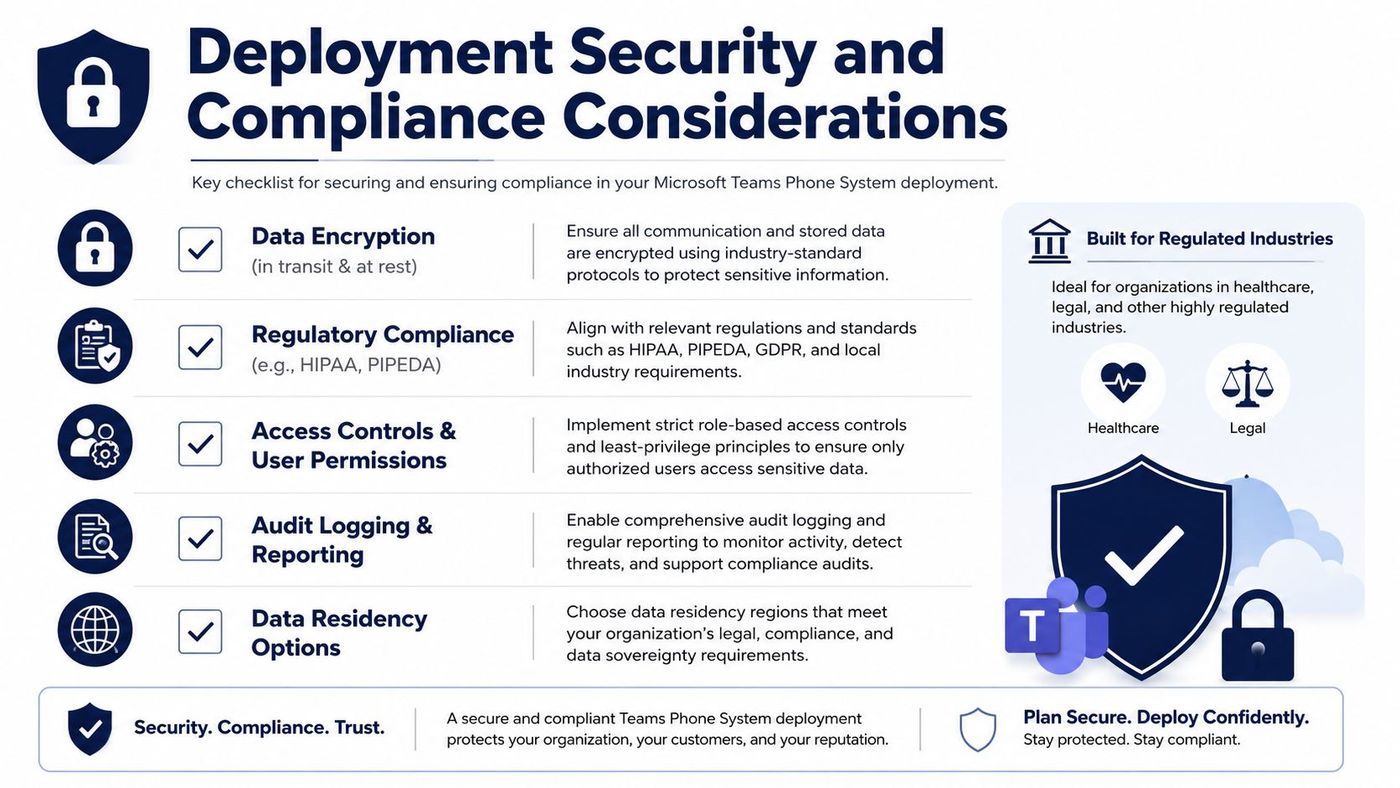
According to EPC Group's Microsoft Teams Phone System enterprise guide, Teams Phone replaces on-premises PBX hardware by delivering dial tone, call routing, auto attendants, call queues, and PSTN connectivity within Microsoft 365, which can reduce telephony costs by 30–60% for Canadian organisations deploying cloud-native VoIP. The same guide notes that this architecture supports healthcare and legal compliance requirements, including HIPAA and PIPEDA, by centralising call recording and voicemail transcription under Microsoft's enterprise compliance framework.
For leadership teams, that creates a different conversation. The phone system stops being a standalone utility and becomes part of your security and compliance posture.
A sound deployment should include more than licences and handsets. It should include policy.
Security teams should treat telephony migration as a chance to tighten permissions, retention, and auditability, not just modernise call handling.
For Canadian firms standardising on Microsoft, this is closely connected to a broader Microsoft 365 security strategy in Calgary, especially where compliance and identity management overlap.
A Teams Phone migration feels much more manageable when leaders treat it as a business transition, not a handset swap. The smartest projects start with facts, move through a controlled pilot, and then roll out in phases.
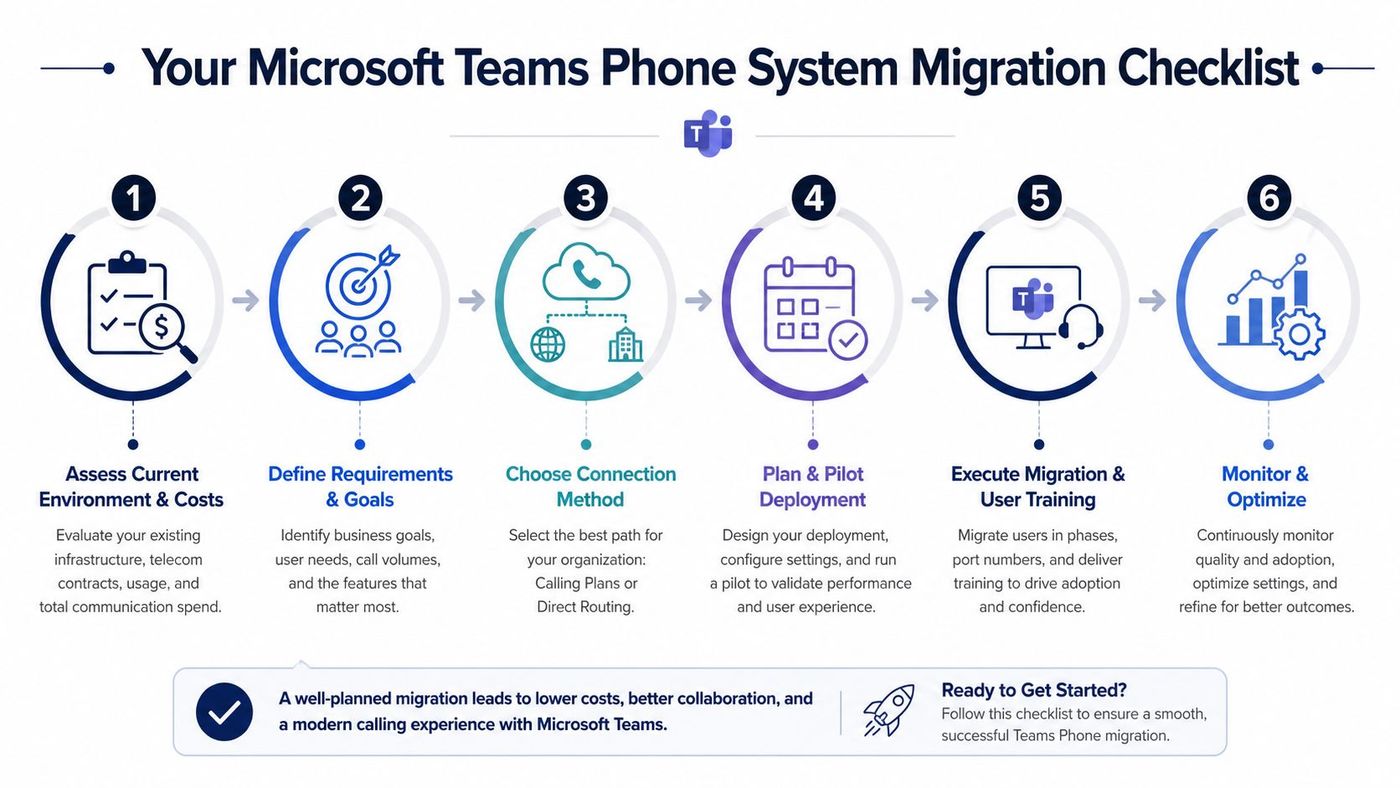
The technical build matters, but so does orchestration. Number porting, licensing choices, emergency settings, user training, and support readiness all affect whether the migration feels smooth or disruptive.
That's where an experienced managed IT and cloud communications partner can make the difference between a basic deployment and a well-governed business platform.
CloudOrbis helps Canadian SMBs plan, deploy, secure, and support Microsoft Teams Phone with a practical focus on licensing clarity, Direct Routing strategy, compliance, and user adoption. If you're weighing Calling Plans against Direct Routing, modernising an ageing PBX, or looking for a managed partner that can align voice with your broader Microsoft environment, talk to CloudOrbis Inc..
Book a 30-minute call with a senior engineer. No sales script, just straight answers about your environment.


