Secure Canadian SMBs: Cloud Application Security
Secure Canadian SMBs with our cloud application security guide. Learn to manage threats, meet compliance, & implement best practices for robust protection.

Secure Canadian SMBs with our cloud application security guide. Learn to manage threats, meet compliance, & implement best practices for robust protection.
Your business probably runs on cloud apps already. Microsoft 365 holds your email and files. A line-of-business platform handles billing, scheduling, or inventory. Staff sign in from the office, home, and their phones. That flexibility is the point.
It's also the risk.
Most Canadian SMB owners I talk to don't have a cloud problem. They have a control problem. The business moved faster than its security model. Permissions piled up. Admin accounts stayed too powerful. Data went into cloud systems without anyone deciding what belongs in public cloud, what needs tighter controls, and who should hold the keys.
Cloud application security fixes that. It protects the apps your team uses, the data inside them, and the identities that open the door.
Cloud adoption feels practical because it is. You get faster deployment, lower infrastructure overhead, and easier remote work. For a growing clinic, manufacturer, logistics firm, or accounting practice, cloud apps remove a lot of friction.
But they also remove the old perimeter. Your files, workflows, and customer data no longer sit safely behind one office firewall. They sit across SaaS platforms, cloud storage, APIs, admin consoles, and third-party integrations. If you're still relying on the old idea that “our network is secure, so we're covered,” you're already behind.
Cloud application security means protecting the applications your staff use every day, along with the identities, data, and connections those applications depend on. That includes access controls, logging, encryption, secure configuration, API protection, and continuous monitoring.
Moving from a locked back office to a storefront on a busy street brings increased visibility and convenience. However, it also necessitates better locks, cameras, access rules, and staff procedures. Traditional security models weren't designed for such exposure.
The urgency is growing. The Canada Cloud Application Security market is projected to expand at a CAGR of 13.73% from 2025 to 2035, driven by cyber threats and digital transformation across sectors including healthcare, logistics, and finance, according to Market Research Future's Canada cloud application security outlook.
This isn't just an IT task. It's a revenue, reputation, and compliance issue.
Practical rule: If a cloud app can affect payroll, customer records, scheduling, finance, or regulated data, it needs deliberate security controls, not default settings.
If you want a broader view of how cloud protections fit into your overall data strategy, CloudOrbis has a useful article on cloud data protection for modern businesses.
Most cloud incidents don't start with movie-style hacking. They start with ordinary mistakes in busy businesses. An exposed API. A storage container configured too loosely. An admin account protected by a reused password. A former employee who still has access.
That's why cloud application security has to focus on how attacks happen.
Cloud breaches are no longer edge cases. Data breaches in cloud environments account for roughly 45% of all data breaches globally, and nearly 38% of those incidents result from simple cloud misconfigurations, based on SentinelOne's cloud security statistics roundup. For Canadian businesses, the financial impact can climb well beyond the first estimate once recovery work, operational disruption, and regulatory exposure are factored in.
APIs connect cloud applications to each other. Your CRM talks to your billing platform. Your logistics software pulls shipment updates. Your portal syncs with another system. If an API is exposed, poorly authenticated, or over-permissioned, attackers may pull data without ever “breaking in” the way most owners imagine.
That's one reason API security belongs in your core security plan, not as an afterthought. This practical guide to API security best practices for business systems is worth reviewing if your business relies on software integrations.
This is the classic SMB problem because it's easy to create and hard to spot. A cloud storage location may be left open to the wrong audience. Logging may be disabled. A test environment may stay live too long. Admin privileges may be broader than necessary.
None of that looks dramatic on the day it happens. It becomes dramatic when sensitive files are exposed or an attacker finds the weakness first.
Attackers love passwords because employees reuse them, share them, and rarely change them unless forced. If a staff member uses the same password on a breached consumer site and a business cloud app, credential stuffing does the rest. The attacker doesn't need sophistication. They need one successful sign-in.
The fastest path into a cloud app is often a legitimate account with weak protection.
A cloud application breach doesn't always begin in your servers. It can start with your people, your settings, or your integrations. That's good news in one sense, because those are controllable problems.
A smart SMB doesn't chase every possible threat. It locks down the common paths first. Identity, configuration, API exposure, and monitoring deserve your attention before you buy another shiny security tool.
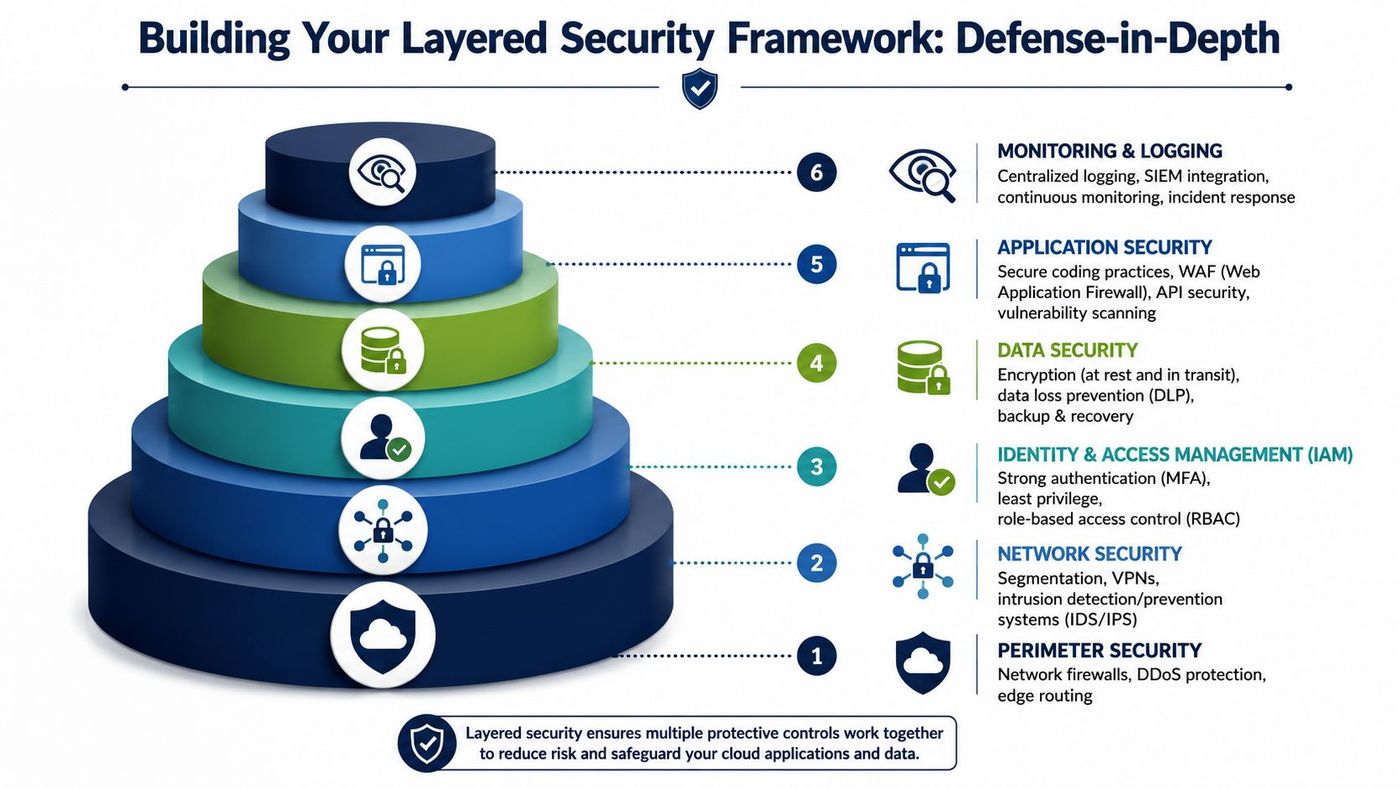
One control won't save you. Not MFA alone. Not a firewall. Not endpoint protection. Effective cloud application security uses layered defence.
Think of a bank. It doesn't rely on one front door lock. It uses cameras, guards, access cards, vaults, alarms, and audit trails. Your cloud environment needs the same logic. If one layer fails, another should catch the problem.
Identity is the first control because attackers prefer to log in rather than break in. If you don't control who has access, which accounts hold admin privileges, and what each user can do, every other control weakens.
Canadian guidance is clear on this point. Cloud authentication standards mandate enforced MFA and explicitly recommend disabling cloud-based Self-Service Password Reset for all cloud administrators, with SSPR exposure correlating with 30% higher admin account compromise rates, according to the Government of Canada guideline on cloud authentication.
For most SMBs, that translates into four immediate moves:
If you need a practical starting point, this overview of identity and access management for growing businesses helps frame the operational side.
A lot of owners still think data protection means backups. Backups matter, but they aren't enough. You need to know what data you hold, where it sits, who can reach it, and whether it's encrypted in transit and at rest.
For Canadian SMBs, this matters even more when client records, financial documents, legal files, or health information move into public cloud services. Encryption should be standard. Access should be role-based. Key management should be deliberate, especially if your business handles sensitive information that carries contractual or regulatory obligations.
A practical rule is to classify data before moving it, not after.
This layer protects the application itself. That means secure coding, patching, vulnerability scanning, API controls, and web application firewalls where appropriate. If you build custom apps or rely on custom integrations, this layer deserves more attention than many SMBs give it.
Runtime security matters because not every issue starts in development. Applications change. Dependencies change. New integrations appear. Someone enables a feature that creates new exposure. You need visibility into how the app behaves in production, not just confidence that it passed a test once.
Security that only exists at deployment time won't protect an app that changes every week.
Email still plays a major part here because many cloud attacks begin with phishing, credential theft, or business email compromise. If your team is automating inbox workflows or using AI-driven assistants, this guide to AI agent email security is a useful companion read.
Cloud doesn't eliminate network decisions. It changes them. You still need to control where traffic can come from, what systems can talk to each other, and which services should be public versus private.
That means segmenting environments, reducing exposed services, reviewing firewall rules, and tightening remote access. If your line-of-business application is internet-facing, assume it will be scanned constantly. Design accordingly.
A cloud access security broker or similar control layer can also help businesses govern SaaS usage, enforce policies, and spot risky behaviour across cloud services. The exact product matters less than the discipline behind it. Visibility first. Policy second. Enforcement third.
If your business develops software, custom automations, or internal tools, your pipeline is part of your attack surface. A rushed release process can push secrets, insecure code, or unreviewed dependencies straight into production.
Keep it practical:
| Control area | What to enforce |
|---|---|
| Code changes | Peer review for sensitive changes |
| Secrets | Never store credentials in code repositories |
| Dependencies | Review third-party packages before release |
| Deployment | Use approval gates for production changes |
This isn't bureaucracy. It's quality control for security.
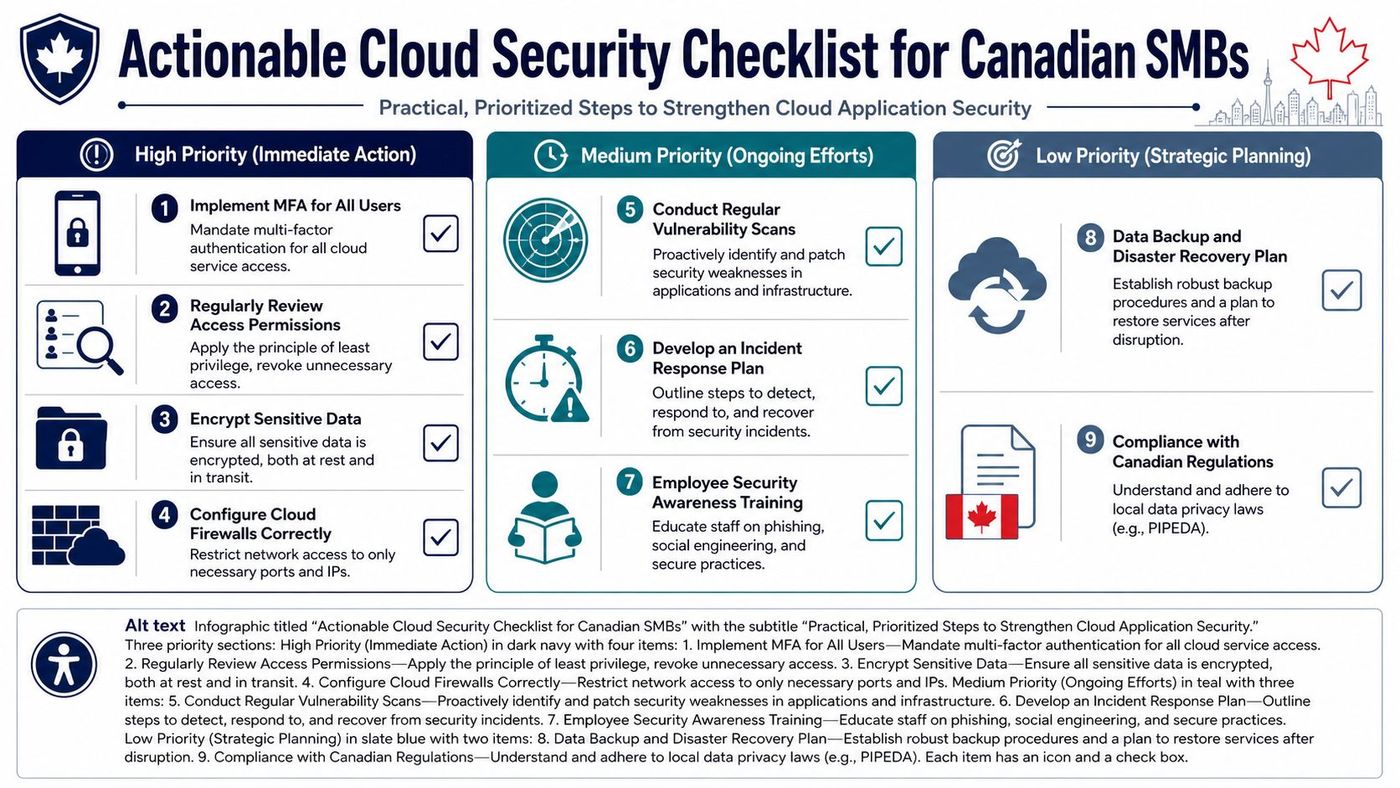
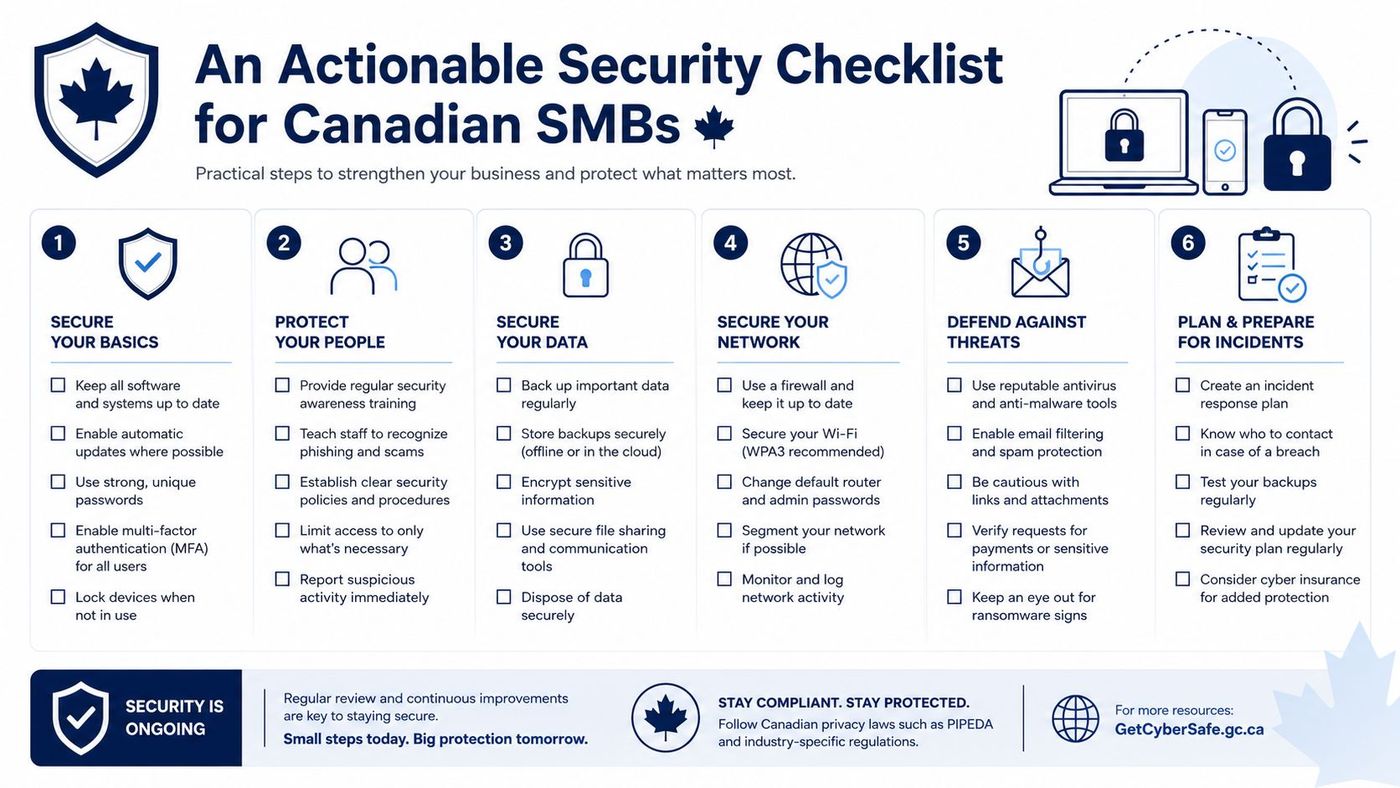
Most SMBs don't need a giant transformation to improve cloud application security. They need a short list of actions with clear ownership. Start with controls that reduce exposure quickly, then build discipline into operations.
Canadian businesses often assume “hosted in Canada” equals compliant. It doesn't. The more important question is whether the workload belongs in a standard public cloud in the first place.
Government guidelines in Canada state that only data up to and including Protected B should be stored in commercial public clouds. Higher-sensitivity data requires specialized protected-cloud contracts or private deployments, according to the Government of Canada white paper on data sovereignty and public cloud.
For SMBs in healthcare, finance, legal, and related sectors, that's a serious design issue. If your cloud application stores highly sensitive client or operational data, don't let convenience drive architecture.
A checklist only works if it becomes operational. Put these into a recurring rhythm:
Tools can help here. A good cloud security posture management approach makes it easier to catch drift before it becomes a breach.
The most expensive cloud security mistakes aren't usually advanced. They're assumptions.
A team deploys a cloud app, confirms users can log in, and moves on. Months later, permissions have drifted, integrations have expanded, and nobody has reviewed the configuration. That's how ordinary environments become risky ones.
Cloud settings change. Staff roles change. Vendors change. If nobody is checking, your security posture is decaying in the background.
Many SMBs misunderstand the shared responsibility model. They assume Microsoft, AWS, Google, or a SaaS vendor is “handling security.” The provider secures its platform. You still own your users, your data handling, your access policies, and your configurations.
That misunderstanding creates blind spots fast.
A lot of Canadian businesses focus on where the server sits and stop there. That's incomplete thinking. Many Canadian businesses focus on data sovereignty while ignoring that 74% of Canadian breaches occur due to credential compromise and insider access. True security requires controlling encryption keys and enforcing least-privilege policies, as outlined by the Canadian Cybersecurity Network report.
If the wrong person can access the data, the postal code of the server won't save you.
SaaS sprawl is a security issue. When departments buy tools independently, permissions scatter, data duplicates, and offboarding gets messy. One of the easiest ways to tighten control is to know what you're paying for and who still has access. Good SaaS licence management practices help reduce both waste and risk.
The fix is discipline. Fewer admins. Fewer unnecessary integrations. Fewer forgotten accounts. Better review habits.
There's a point where DIY cloud application security stops being efficient. For many SMBs, that point comes early.
If your internal team is already stretched handling user support, vendor issues, Microsoft 365 administration, devices, and day-to-day operations, expecting them to deliver mature cloud security on top of that isn't realistic. Security needs consistency. It needs follow-through. It needs someone watching when nobody else is.
You should consider managed support when any of these are true:
A Canadian cloud security study found that a robust posture across multi-cloud environments requires 24/7 monitoring, detection, and response capabilities, along with up-to-date incident response plans, and noted that these capabilities are often beyond the scope of a typical SMB's internal IT team, according to this Canadian cloud security study preview.
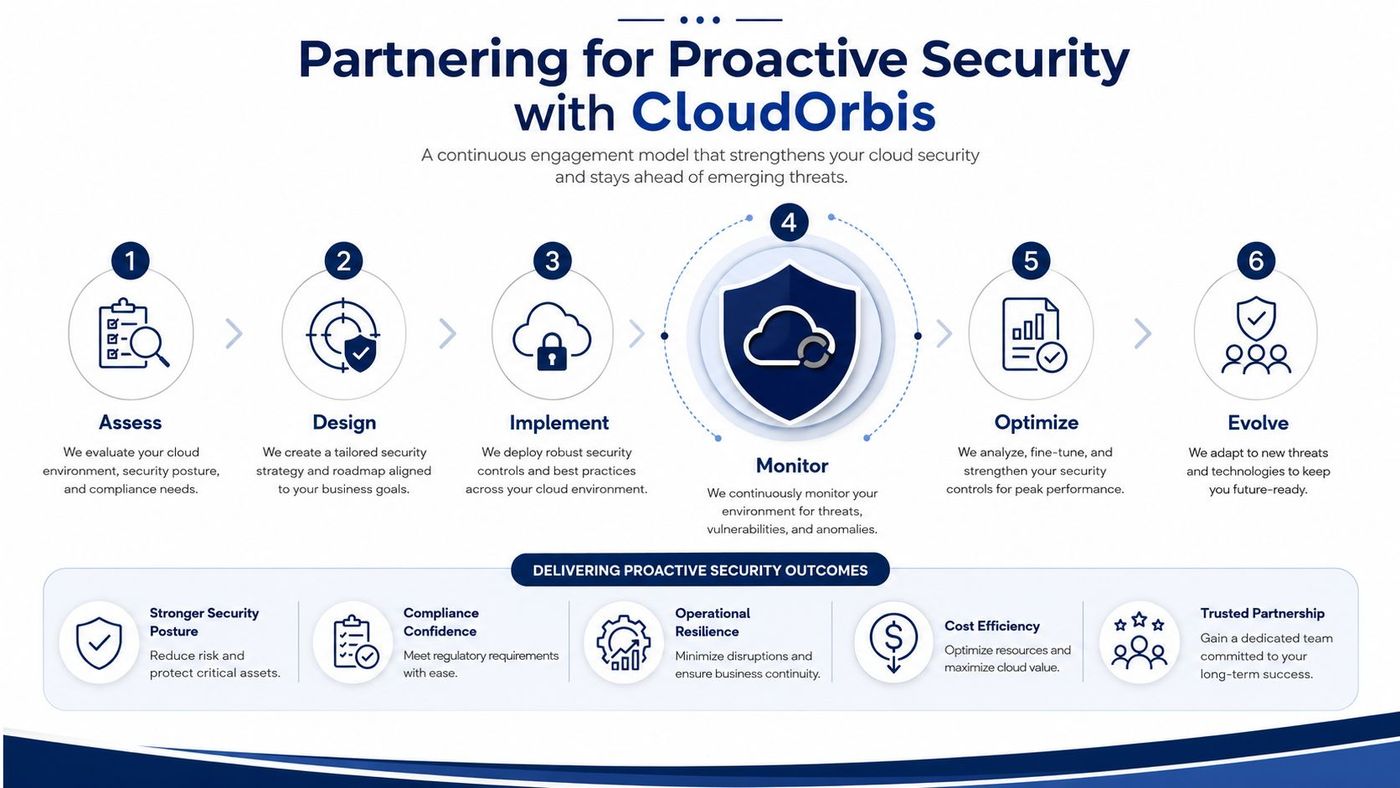
Reactive IT fixes tickets. Proactive security reduces the number of incidents worth ticketing in the first place.
That means monitoring sign-ins, tightening access, reviewing drift, validating backups, checking integrations, and improving policy before a regulator, client, or attacker forces the issue. It also means aligning security decisions with business reality. A clinic, a logistics company, and a legal practice don't carry the same cloud risk profile.
The strongest security posture for a Canadian SMB is the one that your team can sustain. If you can't sustain it internally, get help before a preventable problem becomes a public one.
If your business needs a clearer view of its cloud risks, CloudOrbis Inc. can help assess your environment, tighten cloud application security controls, and support your team with proactive managed IT and cybersecurity services backed by a 24/7, 100% Canada-based helpdesk. Book a consultation to review your current posture and identify the highest-priority fixes.
Book a 30-minute call with a senior engineer. No sales script, just straight answers about your environment.


