Maximize Efficiency: Workflow Automation Tools 2026
Boost efficiency & ROI for Canadian SMBs with workflow automation tools. Explore benefits, use cases, and our implementation roadmap.

Boost efficiency & ROI for Canadian SMBs with workflow automation tools. Explore benefits, use cases, and our implementation roadmap.
Most business owners don't need another pitch about “working smarter.” They already know where time disappears. Staff re-enter the same client data into multiple systems. Approvals stall because one manager is buried in email. A paper form gets scanned, renamed, filed, and then keyed into an ERP by someone who should be doing higher-value work. None of that feels dramatic on its own. Together, it slows billing, service delivery, reporting, and customer response.
That's where workflow automation tools start to matter. Not as a shiny IT project, but as a practical way to remove the handoffs, copy-paste work, and process gaps that drain margin. For Canadian SMBs in regulated sectors, the central question isn't whether automation sounds useful. It's how to implement it without creating security exposure, compliance issues, or a tangled mess of half-working integrations.
If your team spends its day chasing signatures, moving files, updating spreadsheets, and forwarding requests between departments, you already have an automation case. The issue usually isn't effort. It's that too much effort is going into repeatable work.
Workflow automation tools tackle that drag by moving routine processes into rules-based systems. An intake form can trigger a client record. A purchase request can route to the right approver. A completed job can notify finance, update the CRM, and generate a follow-up task without anyone acting as the messenger. Those changes don't just make work faster. They make it more consistent.
The business case is no longer theoretical. Global workflow automation spending was estimated at $20.3 billion in 2023, and industry research cited by This and That Chat on AI workflow automation statistics says 60% of organizations report ROI within 12 months of implementation and 25% to 30% productivity gains in automated processes. For a Canadian business owner, that matters because sustained market growth usually means better products, broader integrations, and less risk of investing in a niche platform that won't keep up.
Practical rule: Automation pays off fastest when it removes repetitive coordination work, not when it tries to replace judgement-heavy work.
The strongest results usually come from fixing process friction that employees complain about every week:
When leaders approach automation as part of business process optimization, the conversation improves quickly. It stops being about buying a tool and starts being about protecting revenue, service quality, and staff capacity.
The easiest way to understand workflow automation tools is to think of them as a digital assembly line. Work enters at one end, moves through a defined sequence, pauses where a decision is needed, connects to other systems, and exits as a completed action.
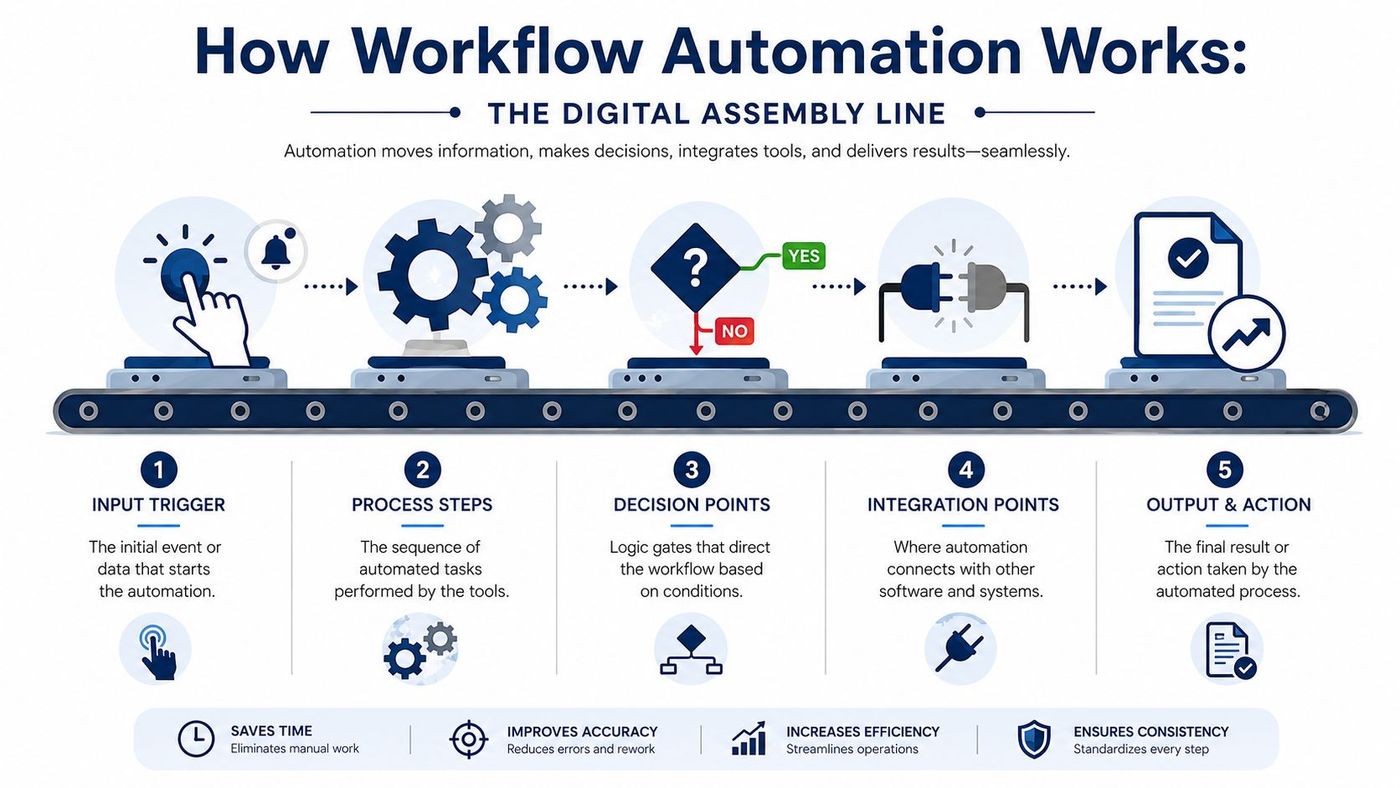
A lot of software claims automation. Not all of it orchestrates a workflow. A simple inbox rule that forwards an email is task automation. A process that receives a form, validates fields, checks a CRM, creates a record, routes approval, updates a document repository, and alerts the right team is workflow automation.
Every workflow begins with a trigger. That trigger can be an employee action, a customer action, or a system event.
Common examples include:
The trigger matters because it defines when work begins without someone manually kicking it off.
After the trigger, the platform performs actions. These are the specific tasks the system handles on its own. Good workflow design breaks these actions into steps that are easy to test and easy to govern.
A single workflow might:
Strong automation design keeps each step visible. If a workflow fails, you should know exactly where it failed and why.
Value comes from decision points and integrations. Decision logic handles branching. If a transaction is above a threshold, route it for extra approval. If client data is incomplete, send it back for review. If the request comes from a specific region or business unit, assign it accordingly.
Integrations let one system pass information to another, usually through APIs. That's what turns separate tools into a working process instead of a chain of manual handoffs. In Microsoft-heavy environments, software workflow management often depends on how well automation can connect Microsoft 365, Teams, document repositories, and business apps into one governed flow.
There's also an important technical split to understand. Some processes can be API-first, meaning the tool connects directly to supported systems. Others still depend on desktop or UI-based RPA, where the automation interacts with an older application through its user interface. API-first workflows are usually cleaner and more stable. RPA can still be useful, but it needs tighter monitoring because legacy screens, field changes, or timing issues can break it.
In Canada, businesses aren't adopting digital workflows in a vacuum. The federal government's Digital Operations Strategic Plan 2021–2024 and the fact that 91.4% of households responded to the 2021 Census online show how normal digital-first service delivery has become at scale, as noted by Kissflow's workflow automation trends summary. That wider shift matters because staff, clients, and citizens now expect forms, approvals, documents, and service interactions to move digitally.
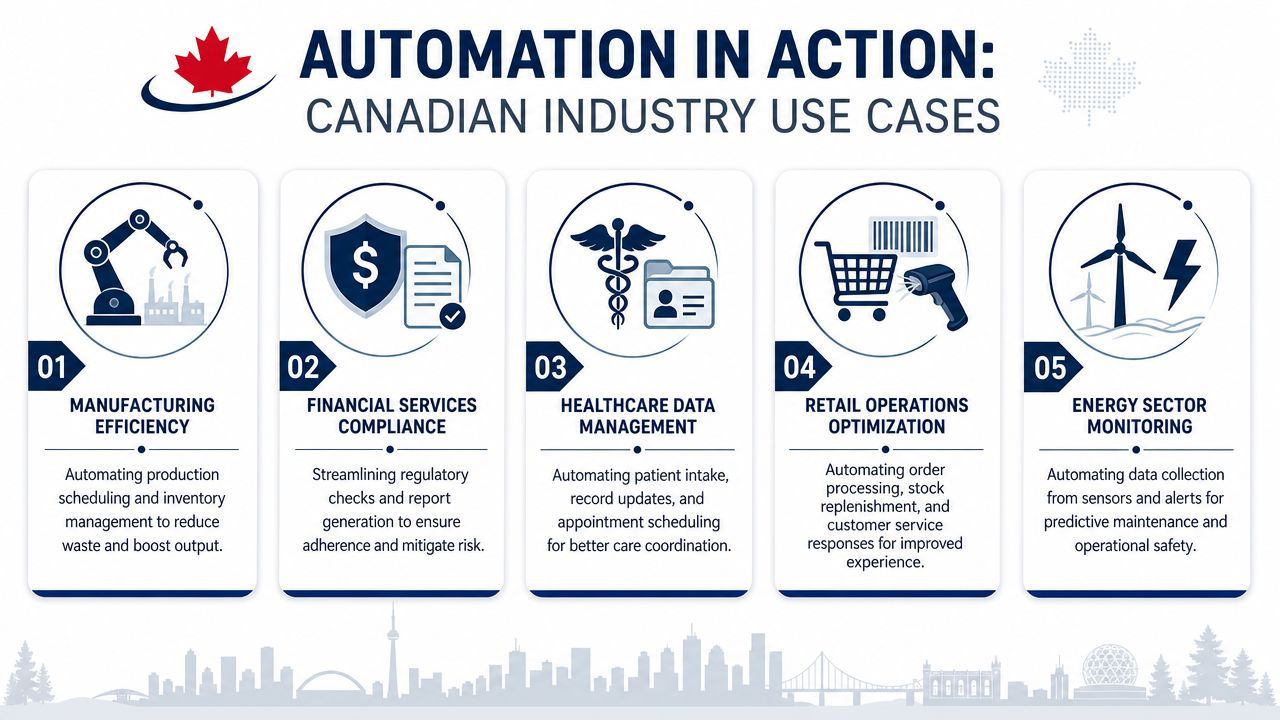
A clinic often has the same problem in three places at once. Front-desk staff collect intake details, clinicians need complete records, and administration needs documentation to be stored correctly. When those steps are manual, information gets delayed or duplicated.
A practical workflow can capture digital intake, route incomplete forms back for correction, notify the right care team, and file documentation in the proper repository. Appointment reminders and follow-up tasks can be tied to the same process, which reduces missed handoffs between admin and care delivery.
The important limit is this. Clinical judgement and exceptions still need human review. Automation works well around coordination, scheduling, document movement, and standardised intake. It works badly when someone tries to force nuanced clinical decisions into rigid rules.
Manufacturers usually feel process friction in purchasing, production updates, maintenance requests, and shipment communication. A planner updates one system, warehouse staff work from another, and customer service answers questions from a third. The result is delay, not because people aren't working, but because information doesn't move cleanly.
A better workflow might link order intake, inventory alerts, internal approvals, and outbound notifications. If a part hits a reorder point, the system can create a task, route approval, and notify the buyer. If a shipment status changes, the workflow can update internal records and trigger customer communication.
This is also where AI can help selectively. Teams using Microsoft environments can combine process automation with tools such as Microsoft Copilot use cases for summarising status updates or drafting internal responses, while keeping final operational actions inside governed workflows.
Law firms, accounting practices, and financial teams deal with highly structured work that still includes sensitive records. New client onboarding, conflict checks, document requests, approval routing, and file retention are all candidates for automation when the rules are clear.
A common example is client intake. Instead of staff manually collecting the same information across email, PDFs, and shared folders, the workflow can gather required inputs, validate fields, route for review, create the file structure, and notify the assigned professional. That reduces admin load and improves consistency.
The strongest automation in regulated firms usually sits around intake, document control, and approvals. It doesn't replace professional judgement. It protects it from interruption.
Construction companies often struggle with forms moving between field crews, project managers, finance, and subcontractors. Site reports arrive late. Change requests sit in inboxes. Signed documents end up on someone's desktop instead of the project record.
Workflow automation tools can route digital forms from the field into central systems, alert the right approver, and create a clean audit trail. That's useful for project documentation, safety reporting, procurement requests, and invoice approvals. The gain isn't just speed. It's having a record of who approved what, when, and where the file lives now.
Most buyers get distracted by templates, glossy demos, and promises of “no code.” Those things matter less than fit. The right workflow automation tools match your systems, your risk profile, and your team's ability to maintain them after the consultant leaves.
For Microsoft-based businesses, one fact matters early in the shortlist. Vellum's overview of low-code AI workflow automation tools notes that Power Automate is significant because it brings Microsoft 365, Dynamics, and desktop RPA under a single governance model. That can reduce integration friction, but it also forces a key question. Can your process run through clean API connections, or will it depend on UI-level RPA for legacy software?
Before comparing licensing, identify one or two workflows you need to fix. If you can't map the current handoffs, you can't evaluate a platform properly.
A useful secondary resource when evaluating AI workflow tools is any framework that pushes you to compare integration depth, governance, and real operating fit instead of feature lists alone. That keeps the discussion grounded in implementation reality.
| Criterion | What to Look For |
|---|---|
| Integration fit | Native connections to your core systems, especially Microsoft 365, ERP, CRM, document management, and line-of-business apps |
| Security controls | Role-based access, audit visibility, approval controls, and clear admin governance |
| Data handling | Support for your privacy requirements, retention rules, and data location expectations |
| API versus RPA | Whether the workflow can connect directly through APIs or needs screen-based automation for legacy apps |
| Ease of change | How easily your team can update forms, rules, approvers, and notifications without rebuilding the whole flow |
| Exception handling | Clear paths for rejected requests, missing data, duplicate records, and manual review |
| Reporting | Visibility into failed runs, stuck approvals, bottlenecks, and usage patterns |
| Scalability | Ability to start small and extend to other departments without creating tool sprawl |
| Vendor and support model | Access to implementation help, governance guidance, and long-term support |
| Total operating effort | The real burden of administration, testing, documentation, and user training |
Use direct questions. They expose weak spots quickly.
One more practical point. CloudOrbis offers workflow automation software as one option for organisations that want workflow management tied to broader managed IT, security, and Microsoft environments. That matters when the automation project touches identity, endpoints, cloud access, and compliance at the same time.
Automation can reduce risk, but it can also multiply mistakes quickly if governance is weak. A bad manual process creates isolated problems. A bad automated process repeats the same problem across systems, faster and with more confidence.
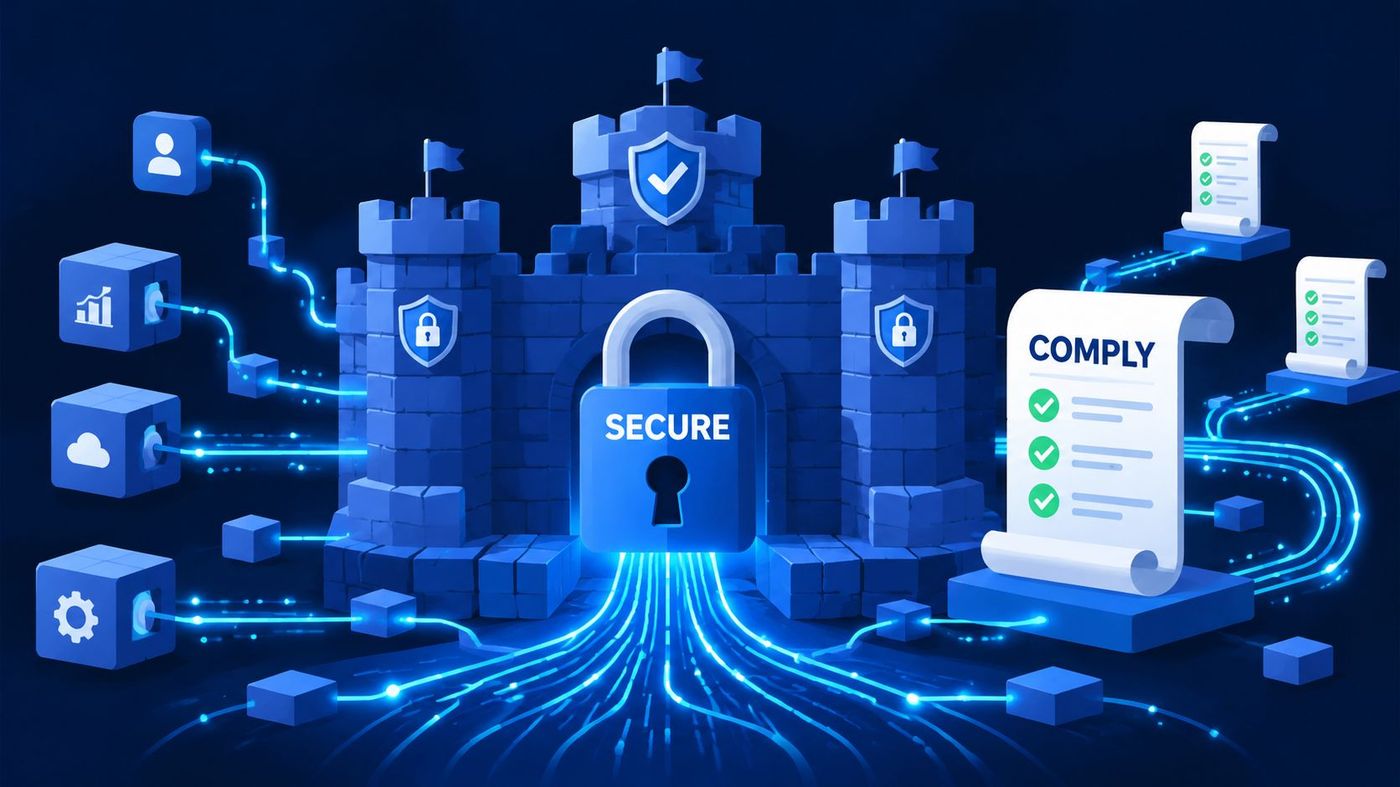
For Canadian SMBs, that issue is more than theoretical. CloudAngles' analysis of workflow automation decisions frames the core question correctly: it isn't just whether AI can automate a workflow, but whether it should. The same source notes that a significant share of Canadian businesses experience cyber incidents, which is exactly why regulated firms need a more selective approach. Many workflows are better left partially automated, with human oversight for sensitive, exception-heavy, or judgement-based steps.
Full automation usually makes sense when the workflow is structured, repetitive, and low in ambiguity.
Examples include:
These workflows still need testing and monitoring, but the rule set is usually clear.
Some processes look automatable until you hit real-life exceptions. That's where over-automation causes trouble.
Keep a person in the loop when the workflow involves sensitive data, ambiguous inputs, policy interpretation, or actions that are hard to reverse.
In practice, that often includes:
The integration work is where many projects become unstable. A vendor demo usually shows the happy path. Real environments contain old applications, inconsistent field values, duplicate records, and users who find edge cases within the first week.
A safer rollout includes:
Security teams also need visibility into how workflow tools interact with existing controls. If the tool touches identity, email, file storage, or customer records, it becomes part of your broader data security management approach, not a side project owned only by operations.
The firms that struggle with automation usually make the same mistake. They buy a platform first and ask process questions later. That leads to rushed builds, poor adoption, and workflows that work in the demo but fail in daily operations.
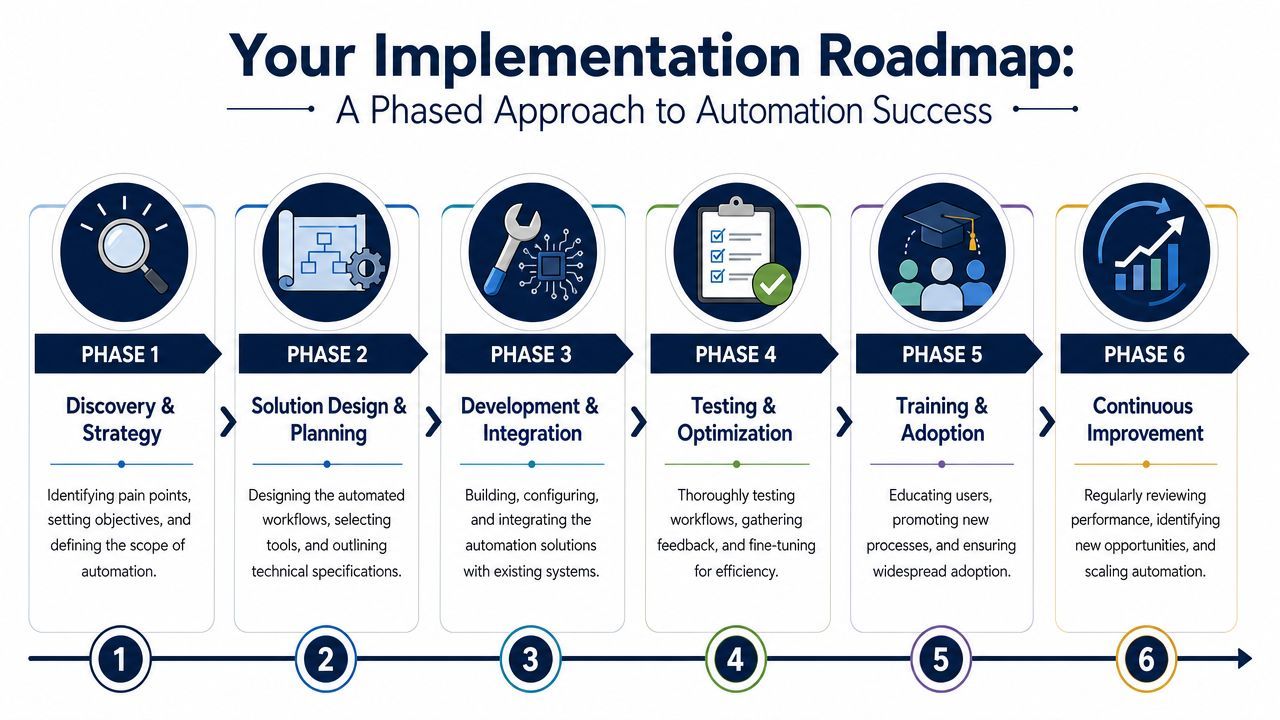
Synergy Codes' review of workflow automation challenges and benefits makes the overlooked point clearly. Success depends on clearly defined goals and phased rollout. For regulated Canadian SMBs, the hard part isn't choosing software. It's mapping, phasing, and governing automation across fragmented systems without breaking compliance or losing user adoption.
Start with discovery and strategy. Pick one process with obvious friction, visible ownership, and manageable complexity. Good pilot candidates usually involve repetitive coordination work, not judgement-heavy exceptions.
Then move into solution design and pilot build. Map the current workflow, define what “done” looks like, and build a version for a small group first. If the process has recurring handoffs between departments, a practical companion read on solving handoff problems with workflow tools can help frame where automation adds structure and where it shouldn't force artificial rigidity.
Next comes development, integration, and testing. Weak assumptions get exposed in this phase. Test bad inputs, delayed approvals, duplicate records, and permission issues. If the workflow only works when everything is perfect, it isn't ready.
After testing, move into training and adoption. Staff need to know more than which button to click. They need to understand what changed, when to intervene manually, and who owns escalation when the workflow fails.
A practical phased rollout usually follows this pattern:
Good automation isn't a one-time installation. It's an operating discipline.
The payoff comes from consistency. Once a business learns how to map processes, secure integrations, train users, and monitor outcomes, each new workflow gets easier to deliver and easier to trust.
If your organisation is dealing with approval delays, duplicate data entry, disconnected systems, or compliance pressure, CloudOrbis Inc. can help you plan automation as a controlled business initiative, not a risky software experiment. That includes assessing the right workflows to target first, aligning tools with your Microsoft and security environment, and rolling out automation in a way your team can adopt.
Book a 30-minute call with a senior engineer. No sales script, just straight answers about your environment.


