Unlock Growth: Your CRM and Small Business Guide
Crm and small business - Master crm and small business strategies for 2026. Learn to choose, implement, and secure your CRM effectively. Guide covers needs,

Crm and small business - Master crm and small business strategies for 2026. Learn to choose, implement, and secure your CRM effectively. Guide covers needs,
A lot of small businesses reach the same point at roughly the same stage of growth. Sales notes live in one spreadsheet, service history sits in Outlook, quotes are buried in inboxes, and nobody feels fully confident that the next follow-up will happen on time. The business is busy, but the process behind it is fragile.
That's where the conversation around crm and small business usually starts. Not with software demos. With missed handoffs, duplicated data, inconsistent follow-up, and a growing sense that the team is working harder than it should to stay organised.
For Canadian businesses in healthcare, legal, finance, manufacturing, logistics, and other regulated or high-touch environments, the demands are greater. You don't just need better contact management. You need a reliable customer record, controlled access, cleaner reporting, and a system that fits the tools you already use.
Spreadsheets work until they don't. The same goes for shared mailboxes, sticky-note reminders, and sales updates passed around in Teams chats. Once your business has multiple people touching the customer journey, those tools stop being practical and start creating risk.
The main problem isn't that the data exists. It's that the data is scattered. A salesperson sees one version of the account, service sees another, and management gets a report assembled manually at month-end. That's how leads go cold, renewals get missed, and customer experience becomes inconsistent.
A CRM gives your business a single operational record for the customer. It connects sales activity, service interactions, follow-up tasks, and reporting in one place so your team can work from the same facts instead of personal memory.
A Canada-focused benchmark indicates that about 44% of Canadian SMEs use CRM software, which means many firms still have room to improve how they manage customer data and workflows (Grand View Research). That matters because CRM is no longer a “nice to have” admin tool. It's becoming standard business infrastructure.
When the CRM is set up properly, a few things improve quickly:
The real cost of scattered customer data isn't inconvenience. It's lost accountability.
This is also where many firms discover that CRM quality depends on the quality of the data feeding it. If your marketing and lead sources are already messy, your reports will stay messy. A useful parallel is understanding ad attribution data quality, because the same principle applies inside CRM. If the inputs are unreliable, the dashboard won't fix the problem.
Businesses already standardising around Microsoft tools usually have an advantage here, because CRM adoption is easier when user identity, email, files, and collaboration are already connected. For teams evaluating that broader environment, this guide to Microsoft tools for small business growth is a practical starting point.
Most CRM buying mistakes happen before a business ever sees a proposal. They start when the team shops by feature list instead of by operational need. If you don't know what problem the CRM should solve, every demo will look impressive and none of them will be useful.
The better approach is to map your real process first. Start with what happens from first enquiry to closed sale, then from active customer to support, renewal, or repeat business. Look for the points where your team loses visibility, duplicates work, or relies too heavily on one person's inbox.
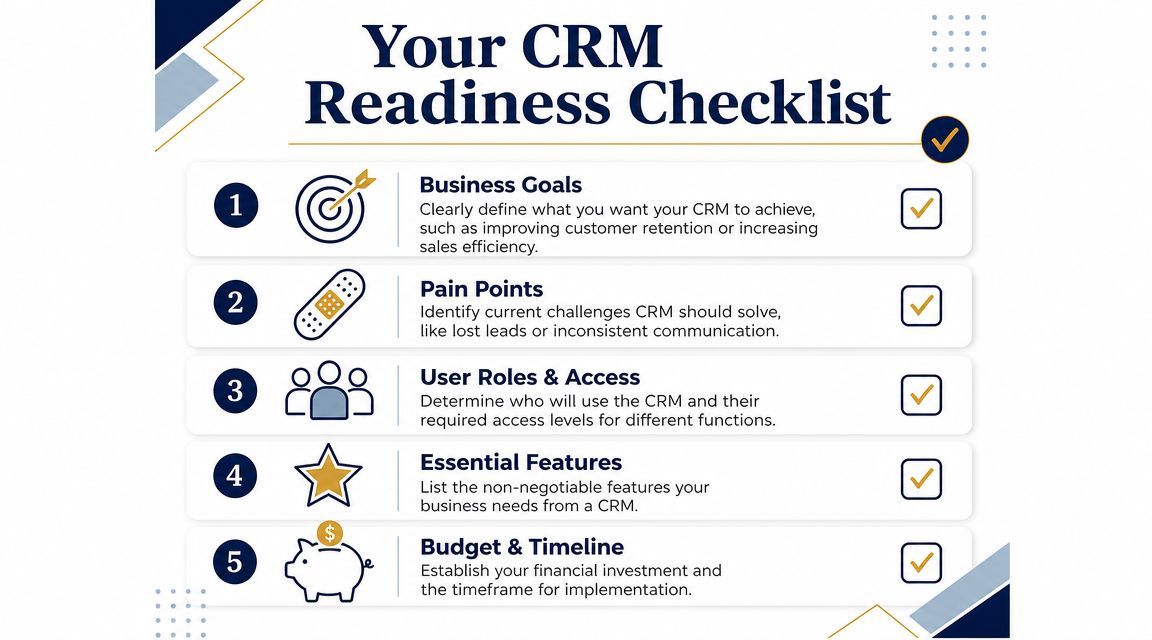
A useful CRM assessment usually includes questions like these:
If you can answer those clearly, the shortlist becomes much easier.
This is the step many business owners skip. A complaint like “we lose track of leads” is too vague to configure around. A requirement like “every inbound enquiry must create a record, assign an owner, and trigger a follow-up task” is specific enough to build and test.
Translate your current frustrations into practical requirements such as:
Practical rule: If a requirement can't be tied to a workflow, a role, or a report, it probably isn't a requirement yet.
In regulated sectors, CRM planning can't stop at sales pipeline design. You also need to define who can access records, which actions need to be auditable, how data should move between systems, and where customer communications are stored.
That's why CRM planning often overlaps with broader business process and IT planning. If your organisation needs to align software choices with security, operations, and growth priorities, business leaders should treat CRM as part of business technology alignment, not as a stand-alone software purchase.
Once your requirements are clear, vendor selection becomes less emotional. You're no longer choosing the platform with the best demo. You're choosing the one that fits your workflows, supports your users, and integrates cleanly with the rest of your stack.
Not all CRMs are built for the same job. Some are strongest in day-to-day sales execution. Others are more reporting-heavy, or better suited to cross-team collaboration between sales and service. The right fit depends on how your business operates.
Here's a practical way to think about the main categories.
| CRM type | Best fit | Watch out for |
|---|---|---|
| Operational CRM | Sales-focused businesses that need structured pipelines, tasks, reminders, and workflow automation | Can become cluttered if teams over-customise early |
| Analytical CRM | Firms that care deeply about forecasting, segmentation, and management reporting | Reporting value drops if frontline users don't enter data consistently |
| Collaborative CRM | Businesses where sales, service, and operations all need the same customer record | Requires stronger governance around roles, ownership, and process |
For many Canadian SMBs, the practical answer isn't one category only. It's a platform that handles core sales workflows well, while also supporting reporting and service visibility.
Modern CRMs are moving beyond basic contact management. Relevant capabilities for Canadian SMBs include AI-assisted forecasting, deeper analytics, and tight integration with collaboration suites like Microsoft 365, but the useful question is which features reduce manual work and improve decisions without adding admin burden (Salesforce CRM for small business).
| Feature Category | Essential Features | Good to Have |
|---|---|---|
| Contact and account management | Shared customer record, activity timeline, notes, ownership fields | Relationship mapping, duplicate detection rules |
| Sales workflow | Pipeline stages, task reminders, follow-up automation, quote tracking | AI-assisted forecasting, next-step suggestions |
| Service visibility | Case or issue logging, escalation notes, service history | SLA dashboards, customer portal features |
| Reporting | Pipeline reports, conversion tracking, activity dashboards | Predictive analytics, advanced segmentation |
| Integration | Outlook sync, Teams visibility, document links, accounting or VoIP connectors | Low-code automation across departments |
| Security | Role-based access, audit trails, permission control | Advanced compliance policies and custom retention workflows |
A CRM that fits your Microsoft 365 environment can reduce friction immediately. Users spend less time switching systems, account activity is easier to connect to Outlook and Teams, and identity management is simpler to control.
That's one reason Microsoft Dynamics 365 often comes up in serious SMB evaluations. It's not the right answer for every business, but it's worth considering when your organisation already relies on Microsoft 365 and wants sales, service, reporting, and collaboration to work in the same ecosystem. Businesses comparing that route can review what a Dynamics 365 consulting engagement typically involves before committing.
If marketing workflow is part of the project, don't evaluate CRM in isolation. This overview of integrating CRM for marketing is useful because it shows how reporting and campaign execution often depend on cleaner customer data and tighter system connections.
A CRM project usually fails long before go-live. It fails in planning, in vague ownership, in messy imports, or in a rollout that asks users to change behaviour without giving them a better process.
Industry reporting shows that over 70% of CRM projects fail to meet their objectives, with poor planning, unclear goals, and weak adoption among the main causes (Salesforce small business statistics). That's why implementation should be treated as an operational change project, not a software install.
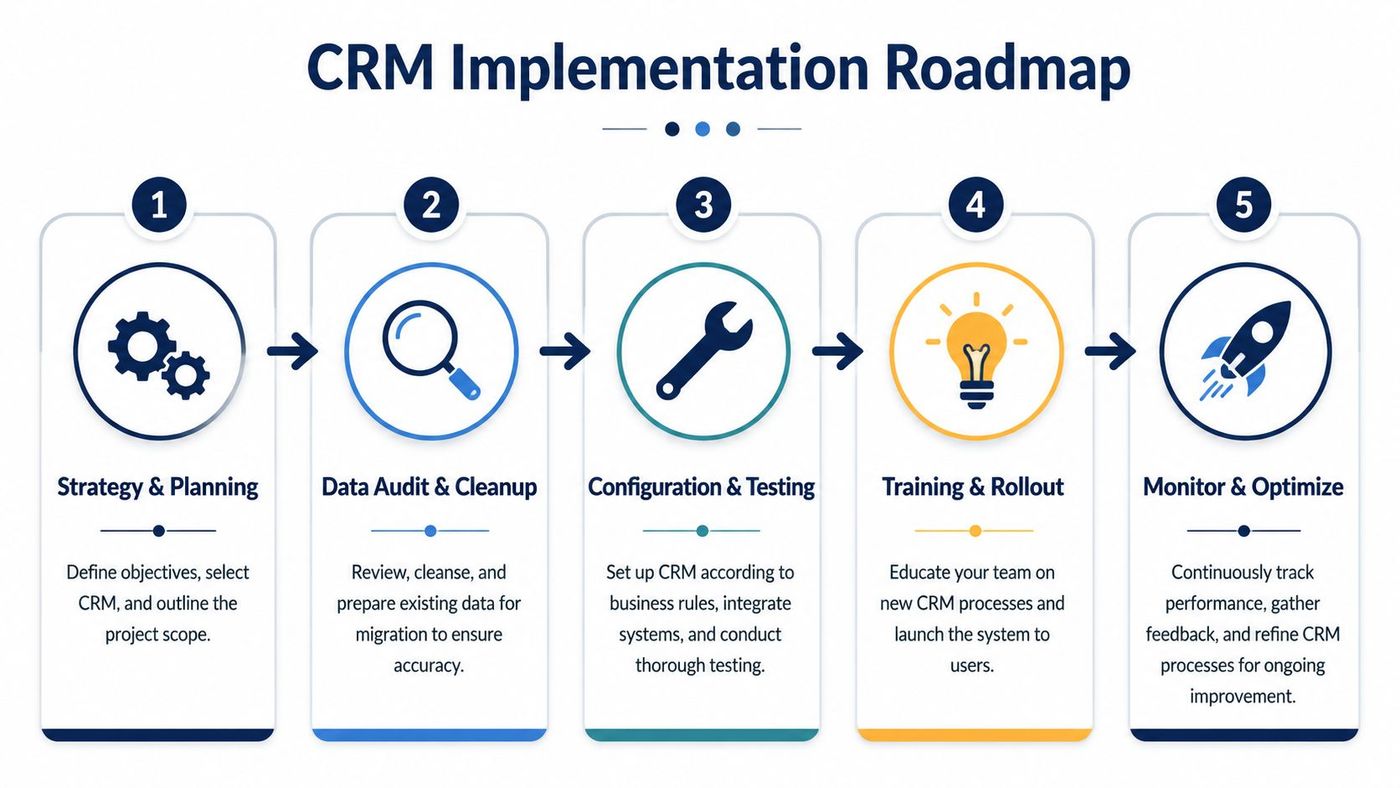
The strongest rollouts are phased. Don't begin by trying to automate everything your business does. Start with the customer journey that matters most, usually lead capture, qualification, follow-up, deal progression, and handoff.
A practical initial rollout often includes:
That's enough to create consistency without overwhelming users.
The fastest way to make a new CRM feel unreliable is to load it with bad data. Old spreadsheets, duplicate contacts, inconsistent company names, and personal note formats don't become structured data just because they're imported into a modern platform.
Before migration, review:
If users find bad data in the first week, they'll start keeping side spreadsheets in the second week.
User acceptance testing should follow real work. Don't just confirm that a field appears on screen. Confirm that a new lead can be created, assigned, followed up, converted, and reported on without confusion.
For example, test scenarios such as:
This matters even more if you're comparing lower-cost or free customer relationship management tools, because many businesses discover later that “free” becomes expensive when integration, permissions, or reporting are too limited for real operations.
In regulated businesses, CRM security isn't a configuration step at the end. It's part of the buying decision from the start. If the platform can't support controlled access, auditability, and safe integration with your existing systems, it doesn't fit the business.
That matters because the most important CRM question for a Canadian SMB often isn't which platform has the longest feature list. It's how to connect CRM securely to Microsoft 365, accounting, service tools, and communications systems without creating new risk or more manual work (Oregon SBDC on CRM benefits).
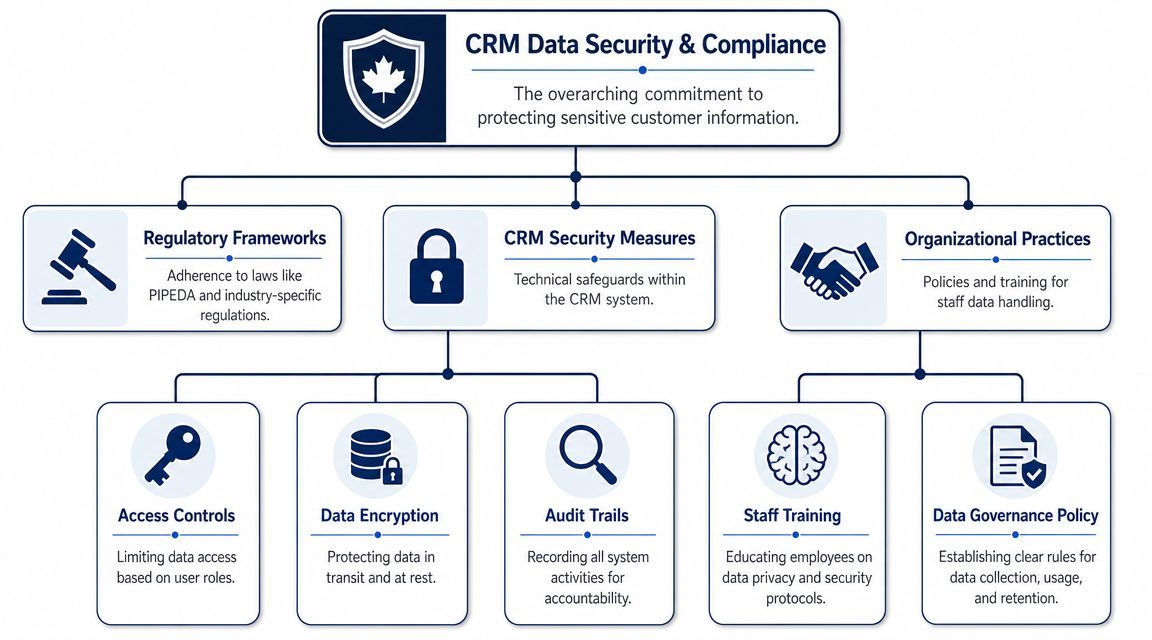
For most SMB CRM environments, there are a few basics you shouldn't compromise on:
These controls matter in every industry. They become even more important when customer records include financial, legal, medical, or contractual information.
A secure CRM doesn't depend only on technical settings. It also depends on how your people use it. Staff need clear rules for where customer notes belong, what can be exported, who can share documents, and how records should be updated.
That's why mature CRM governance usually includes:
Security problems often begin with convenience. Someone exports data “just for today,” then that file becomes a shadow system.
If your team is evaluating the broader operational side of secure customer data, this primer on data security management is a useful companion to CRM planning.
A CRM proves its value in ordinary moments. A salesperson logs a client call from Outlook. A service coordinator checks the account history before responding. The owner reviews the pipeline without waiting for someone to merge notes from email, spreadsheets, and a shared drive. If those tasks still happen outside the system, the project is not finished.
Adoption comes from fit. Staff use the CRM when it matches real work, removes duplicate entry, and connects properly to tools they already rely on, especially Microsoft 365. In regulated Canadian SMBs, that fit also has to hold up under privacy rules, retention requirements, and audit expectations.

Generic training rarely sticks. Sales staff need to know when to create an opportunity, what must be captured after a call, and which fields affect forecasting. Service teams need rules for case updates, escalations, and customer notes. Managers need to run reviews from CRM data itself, not from side conversations or exported reports.
A few habits usually decide whether usage becomes consistent:
This matters even more where records must be handled carefully. If the CRM connects to Exchange, SharePoint, Teams, or other Microsoft 365 services, the setup has to respect permissions, retention policies, and audit logging. That is often where small businesses underestimate the work. The CRM can be configured well, but the project still stalls if identity, document access, or mailbox integration were treated as afterthoughts.
ROI shows up in operating results first. Fewer missed follow-ups. Better visibility into active deals. Cleaner handoffs between sales, service, and administration.
Broad CRM ROI studies can be directionally useful, but owners should be careful with headline numbers. Actual returns depend on adoption, data quality, and whether the CRM is tied properly to quoting, email, document storage, and service workflows.
The metrics worth tracking are the ones that change decisions:
| Metric | Why it matters |
|---|---|
| Lead-to-opportunity conversion | Shows whether qualification and follow-up are improving |
| Sales cycle duration | Reveals whether the process is getting faster |
| Task completion and SLA adherence | Shows whether staff are following the agreed workflow |
| Retention and renewal visibility | Connects CRM activity to ongoing customer value |
| Forecast quality | Shows whether management can trust the pipeline |
Good reporting should help an owner decide where to invest, which deals need attention, and where service issues keep repeating.
I usually advise business owners to review adoption at 30, 60, and 90 days after launch. If reporting still requires manual cleanup, if staff keep asking where documents belong, or if Microsoft 365 sync issues are creating duplicate work, the problem is operational and technical at the same time. That is the point to bring in an IT partner. A good partner can review workflows, permissions, integration points, support ownership, and compliance risks before weak habits become the permanent process.
Book a 30-minute call with a senior engineer. No sales script, just straight answers about your environment.


