IT Support Services GTA: Expert Guide for SMBs
It support services gta - Need top-tier it support services gta? Our 2026 guide helps SMBs evaluate, select, & onboard the ideal managed IT partner. Get

It support services gta - Need top-tier it support services gta? Our 2026 guide helps SMBs evaluate, select, & onboard the ideal managed IT partner. Get
Finding it support services gta is rarely a task undertaken on a calm day. More often, the search starts after a frustrating week: staff can't access Microsoft 365, a line-of-business app keeps freezing, printers still need manual workarounds, and someone on the leadership team is asking whether your backups would work if you had to restore them.
That mix of operational friction and low-grade security anxiety is common in growing GTA businesses. Toronto, Mississauga, Brampton, Markham, Vaughan, and Oakville firms rely on connected systems for sales, collaboration, finance, customer service, and compliance. In a region with a dense business base, IT support has become part of the operating model, not a side function. That aligns with the broader expansion of IT services, with global IT services spending estimated at 1.72 trillion U.S. dollars in 2025 according to the U.S. Bureau of Labor Statistics reference used here.
The practical question isn't whether you need support. It's what kind of partner reduces downtime, protects the business, and helps you make better technology decisions before problems become outages.
A lot of small and mid-sized companies still treat IT as a repair function. Something breaks, someone calls. A consultant logs in, fixes the symptom, invoices for the time, and leaves the underlying issue in place. That approach can work for a very small office with simple systems and low security exposure. It stops working once your team depends on cloud apps, remote access, VoIP, shared files, and identity controls every day.
Break-fix is reactive by design. It rewards motion, not stability. If your provider only engages after users complain, nobody is accountable for patch cadence, backup validation, endpoint standards, or whether your Microsoft 365 tenant is configured sensibly.
Managed support changes the conversation. The better providers don't just answer tickets. They maintain endpoints, watch for recurring incidents, standardise tools, and tie support activity to uptime, productivity, and risk reduction. For many leaders, that's the shift that matters most.
A good IT partner shouldn't just fix the laptop that failed this morning. They should reduce the chances of the same category of failure showing up next month.
In the GTA, that matters because businesses compete in a fast-moving market where delays ripple outward. A clinic can't afford systems access problems during patient intake. A logistics firm can't wait hours for line-of-business connectivity to return. A legal office can't treat document access or email security as optional.
The baseline has changed. Support now includes user assistance, device management, security controls, vendor coordination, cloud administration, and planning. If your provider still talks mainly about printers, server reboots, and ad hoc troubleshooting, they're behind the actual needs of a modern business environment.
For a useful overview of how this support model creates operational value, CloudOrbis has a practical article on the benefits of managed IT services.
The main takeaway is simple. The right provider protects time, reduces avoidable disruption, and gives leadership a clearer handle on technology risk.
Most provider evaluations go sideways before the first meeting. The business says, "We need better IT support." The provider hears, "Quote a helpdesk." Those aren't the same thing.
Before you compare vendors, write down what your business needs to protect, support, and improve.

List the tools your team uses to generate revenue, serve clients, or stay compliant. For many GTA firms, that includes Microsoft 365, accounting systems, EMRs, ERPs, CRMs, industry apps, SharePoint, Teams, and VoIP platforms.
Then ask:
This becomes your baseline. Without it, you'll end up comparing glossy service descriptions instead of actual fit.
Modern support isn't limited to troubleshooting. One of the biggest gaps in many Ontario businesses is governance around the Microsoft stack. According to the source material provided, 75% of knowledge workers globally said they already use AI at work, while only 39% of leaders said their organisation was planning to provide training, which makes governance, Copilot readiness, and data security in Teams and SharePoint highly relevant for local businesses. That point is summarised in this GTA support services reference.
That matters because a provider may be able to reset passwords quickly and still be weak at identity controls, external sharing, retention, backup, and change management.
Practical rule: If you're planning to expand Microsoft 365, Copilot, or hybrid work, your provider should be able to discuss tenant hardening, MFA, conditional access, data loss prevention, and secure collaboration in plain language.
A useful pre-shopping document can fit on one page. Include:
If you want a broader planning prompt before speaking to vendors, this ultimate IT checklist for Canadian small businesses is a useful starting point.
The most expensive support model isn't always the one with the highest monthly fee. It's often the one that looks cheaper up front and leaves you paying for downtime, recurring issues, and rushed projects later.
The market has moved toward managed support for a reason. The tech support services market is projected to grow from 73.1 billion U.S. dollars in 2025 to 122.5 billion by 2035, with a 5.3% CAGR, and companies report up to a 25% productivity increase when using IT help desk services due to reduced downtime, according to Fact.MR's tech support services market analysis.
The choice usually comes down to three models.
Break-fix works when you only want occasional help. You pay for labour when something goes wrong. It offers flexibility, but little prevention. If nobody owns standards, patching, backup verification, or recurring root causes, your business absorbs the risk.
Fully managed IT is a better fit when you want one provider to run support, monitoring, maintenance, and core security operations. This model suits businesses that don't want to build an internal IT department.
Co-managed IT sits in the middle. Your internal team keeps control of business-specific systems or strategy, while the external provider adds helpdesk capacity, monitoring, endpoint management, project delivery, or after-hours coverage.
When evaluating it support services gta providers, don't get distracted by long service menus. Focus on whether they can handle the operational essentials:
If you want a framework for assessing whether a provider's processes are immature or well-governed, this guide to ITIL maturity model gives useful context for how support operations evolve.
| Model | Best For | Cost Structure | Key Benefit |
|---|---|---|---|
| Per-user | Office-heavy teams with multiple devices per employee | Monthly fee based on each supported user | Predictable budgeting when staff use laptops, phones, and cloud apps |
| Per-device | Shared workstation environments or operational sites | Monthly fee based on each supported endpoint | Simple to map when support scope centres on hardware count |
| Tiered | Businesses with mixed requirements across locations or departments | Bundled service levels with different inclusions | Lets buyers align service depth with operational criticality |
Pricing structure matters, but scope matters more. A lower quote that excludes security administration, Microsoft 365 support, vendor liaison, and after-hours escalation can become costly quickly.
For a plain-English overview of what a managed relationship should include, this managed IT service guide is worth reviewing before you compare proposals.
Once you've narrowed the field, the conversation should shift from marketing language to operating discipline. You aren't hiring a website. You're trusting a team with user productivity, business continuity, and incident handling.
In Ontario, that deserves careful scrutiny. The Ontario Cyber Security Centre reported that 71% of Ontario businesses experienced at least one cyber incident in the prior year, and best practice includes 15-minute acknowledgment for priority incidents and tracking Mean Time To Restore (MTTR), as discussed in this IBM piece on data quality and AI-readiness.
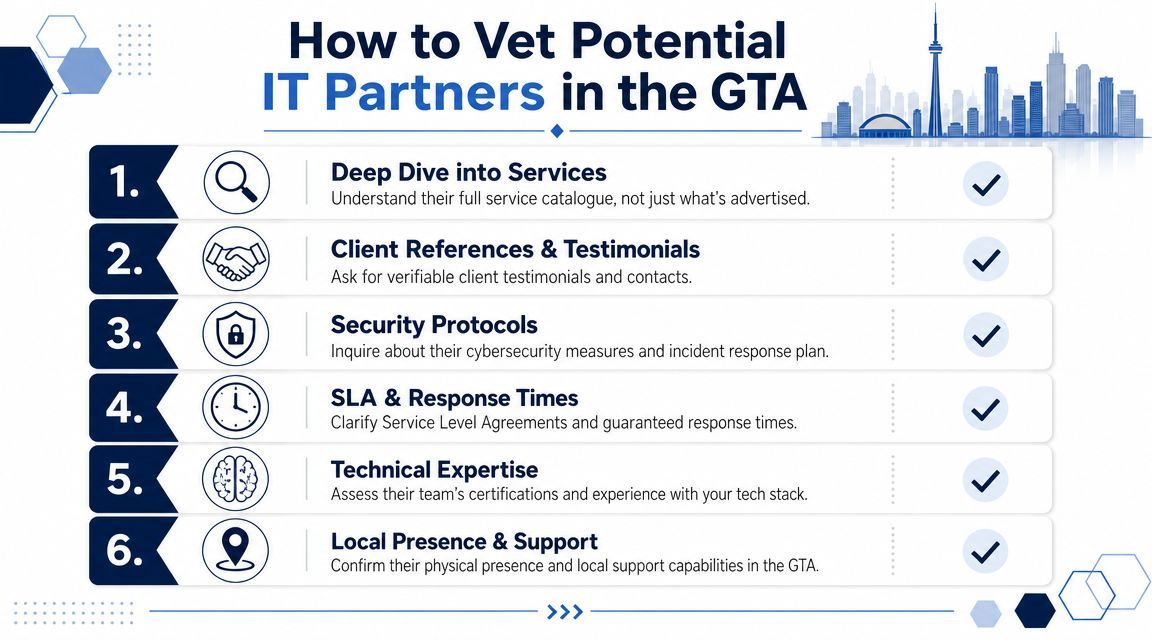
A sales call becomes useful when you ask how the provider operates.
Try questions like these:
A provider may be technically competent and still be wrong for your business. A healthcare clinic, legal office, manufacturer, and logistics company don't experience downtime the same way.
Look for evidence that they understand your environment:
| What to verify | Why it matters |
|---|---|
| Experience in your sector | They should understand the pace, systems, and risk profile of your operation |
| Canada-based support | This often improves continuity, communication, and regional context |
| Local GTA presence | On-site support and project work are easier when the provider knows the region |
| Clear onboarding method | A structured handoff reduces disruption and hidden surprises |
One example in the local market is CloudOrbis's Toronto IT consultant approach, which outlines advisory and operational support rather than limiting the conversation to ticket handling.
Red flags to watch for
Vague answers about security ownership, reluctance to discuss escalation procedures, no clear documentation process, and heavy pressure to sign before an assessment.
If a provider can't explain how they handle a serious incident, they probably won't perform well during one.
Don't settle for generic testimonials. Ask for references from companies with a similar size, sector, or support model. Then ask those references what happened during a difficult issue, a migration, or a security event. That's where service quality shows up.
The strongest providers answer with specificity. They can explain their tools, their standards, their triage model, and the boundaries of responsibility without sounding rehearsed.
Some support features are negotiable. These aren't. If a provider is weak on security operations, vague on SLAs, or casual about compliance obligations, keep looking.
Canadian businesses face practical threats, not theoretical ones. Ransomware and credential theft remain dominant concerns for SMBs, which is why a strong provider follows a controlled modernization sequence and measures basics such as patch compliance within 14 days for critical updates, endpoint encryption coverage, and tested backup recovery point objectives, as outlined in this Dataversity article on data strategy pitfalls.
A mature provider can walk you through how they manage:
A lot of firms buy tools without buying discipline. That's why environments look secure on paper and still fail during phishing, credential abuse, or restore events.
A support agreement should distinguish between response time and resolution time. Fast acknowledgment is useful. It isn't the same as service restoration.
Read the SLA closely and ask:
Security promises are easy to sell. Measurable controls, tested recovery, and clear responsibility are harder. Those are the parts that matter.
If you work in healthcare, legal, finance, or another regulated environment, support has to respect retention, access control, privacy handling, and audit expectations. A provider doesn't need to act as your lawyer, but they do need to understand the operational side of regulated data.
For business leaders wanting a broad primer on layered protection, this resource on comprehensive security for growing businesses is a useful companion read.
For a more direct view of what managed security support can include in practice, CloudOrbis outlines its IT security services in business terms rather than tool jargon.
A provider change usually fails in the handoff, not in the contract. Risk is loss of control. Missing admin credentials, undocumented vendor relationships, unclear escalation paths, and rushed tool changes can create more downtime than the old provider ever did.
A smooth transition starts with project discipline. The incoming IT partner should treat onboarding as a risk-management exercise with named owners, a timeline, and clear sign-off points.
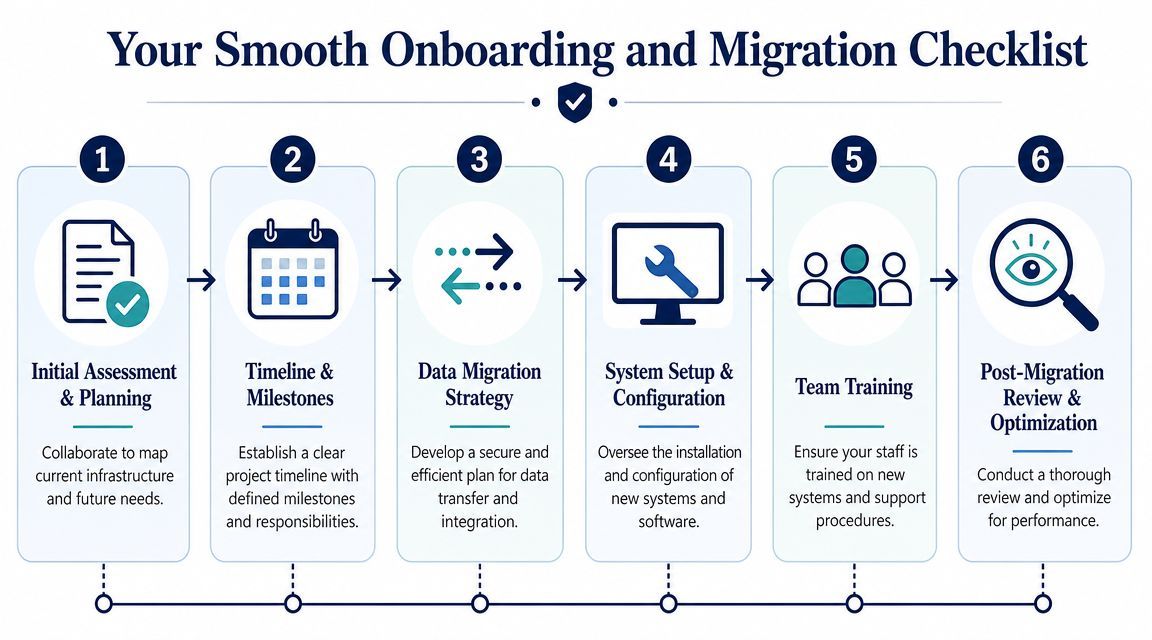
Strong onboarding plans usually include these stages:
The first 90 days should not be judged by how much the provider replaces. Judge them on whether they gain control of the environment, reduce uncertainty, and lower business risk.
You should expect:
Good onboarding removes confusion before it introduces change. A provider that wants to swap every tool in week one is often optimizing for its own process, not your business.
Employee communication also needs a plan. Staff should know where to request help, what changes are coming, and which new security steps will affect day-to-day work. Training belongs in onboarding because adoption problems turn into support volume, workarounds, and avoidable security mistakes.
If you're evaluating providers with a structured transition process, CloudOrbis Inc. describes a 10-step engagement model that includes assessment, implementation, employee training, and ongoing optimization. That level of detail is worth looking for, whether you choose them or another partner.
Book a 30-minute call with a senior engineer. No sales script, just straight answers about your environment.


