

September 21, 2026
Secure File Sharing Guide for Canadian BusinessesLearn secure file sharing essentials for Canadian SMBs — encryption, compliance, protocols and best practices to protect data and stay compliant.
Read Full Post%20(1).webp)
Usman Malik
Chief Executive Officer
May 9, 2026
Most Canadian SMB owners are in the same spot. Your team uses Outlook for email, Teams for meetings, a file server nobody wants to touch, a few cloud apps that don't talk to each other, and at least one spreadsheet that runs a critical process. Growth is the goal, but IT keeps turning into a brake pedal.
That's where small business microsoft decisions usually go wrong. Companies buy licences before they decide on outcomes. They add Teams but don't fix document control. They turn on OneDrive but ignore security policies. They hear about Copilot, Azure, and Dynamics 365, then get stuck because Microsoft's ecosystem looks bigger than what a small or mid-sized business can realistically manage.
My view is simple. Microsoft is one of the strongest platforms an SMB can standardise on, but only if you treat it as a business system, not a pile of apps. The right setup can tighten collaboration, improve security, support compliance, and reduce the friction that slows hiring, service delivery, and day-to-day operations. The wrong setup creates licence waste, governance gaps, and constant user frustration.
Canadian businesses also face a practical challenge. You need tools that work across offices, home users, field staff, and regulated workflows without building an enterprise-sized IT department. That's why the primary decision isn't just which Microsoft product to buy. It's how the stack fits your business functions, and who will manage it well.
A growing business rarely has a clean technology environment. It has history. One team uses shared inboxes. Another keeps files in local folders. Sales tracks opportunities in one place, finance uses another, and leadership wants better reporting without paying for another disconnected platform.
Microsoft can solve a lot of that, but only if you stop thinking in product silos.
Many owners still think Microsoft means Word, Excel, and email. That's outdated. Today, Microsoft covers collaboration, document management, identity, security, business applications, cloud infrastructure, automation, and AI. If you use it properly, it becomes the operating layer for how your business communicates, stores information, protects data, and runs core workflows.
That matters for SMBs because complexity is expensive. Every extra app adds another login, another admin task, another support issue, and another place where sensitive data can end up unmanaged.
Practical rule: If two systems overlap and nobody owns the process between them, your business will pay for it in delay, rework, and risk.
Don't ask, “Which Microsoft product should I buy?” Ask these instead:
If you answer those questions first, the Microsoft ecosystem becomes easier to understand. You stop chasing features and start making better business choices.
The Microsoft stack looks confusing because it's marketed by product family. SMBs should look at it by business function.

Microsoft 365 is the foundation. It covers email through Outlook, meetings and chat through Teams, file storage through OneDrive and SharePoint, and the familiar Office apps your staff already know.
For an SMB, the core value isn't the apps themselves. It's standardisation. When your team works inside one platform, collaboration gets cleaner, documents stop living in random places, and user access becomes easier to control. Microsoft 365 is the layer most businesses should fix first because everything else builds on it.
If your business still treats Teams as only a video meeting tool, you're leaving value on the table. For firms comparing communication options, this article on small business video platforms offers useful perspective on where dedicated meeting tools may fit better than Teams alone.
Dynamics 365 matters when your business has outgrown disconnected systems for sales, service, finance, or operations. Think of it as the business process layer. It helps you track customer interactions, manage pipelines, improve service workflows, and connect operational data to actual business decisions.
This isn't necessary for every small company on day one. But if you're juggling CRM tools, accounting workarounds, and manual status updates between teams, Dynamics 365 deserves a serious look.
Azure is Microsoft's cloud platform. SMB owners don't need to know every service inside it. You need to know what it's for. Azure supports hosted workloads, backups, virtual servers, application environments, and broader cloud architecture when your business needs more than email and file sharing.
Azure becomes relevant when you have line-of-business systems, remote access requirements, data residency considerations, or plans to move away from ageing on-premise servers.
Copilot is Microsoft's AI layer. Power Platform gives you automation, analytics, and low-code tools. Used together, they can remove repetitive work and surface better information inside the systems your team already uses.
A 2023 Microsoft study found that 79% of small business owners are interested in AI applications like Copilot, while 49% are underinvesting in data security amid economic pressure (Microsoft 365 statistics summary). That gap matters. AI without governance is a risk multiplier.
For practical examples of where AI fits inside daily work, CloudOrbis has a useful guide on how to use Microsoft Copilot.
The right order for most SMBs is simple. Standardise Microsoft 365 first, tighten security second, automate third, and expand into Dynamics or Azure when the business case is clear.
Licensing mistakes are common because businesses either buy too little security or too much software. Start with the user's job, not the cheapest plan.
For most firms, the core choice sits between Business Basic, Business Standard, and Business Premium. The names sound incremental. The business impact isn't.
| Feature | Business Basic | Business Standard | Business Premium |
|---|---|---|---|
| Primary fit | Web-based productivity and email | Desktop apps plus collaboration | Full productivity plus stronger security and device management |
| Office apps | Web and mobile apps | Desktop, web, and mobile apps | Desktop, web, and mobile apps |
| Email and Teams | Yes | Yes | Yes |
| OneDrive and SharePoint | Yes | Yes | Yes |
| Best for | Very lean teams with simple needs | Businesses that rely on installed Office apps | Growing firms that need tighter control, security, and compliance support |
One verified price point gives useful context. Microsoft 365 Business Premium is listed at US$22 per user per month in the source material (Microsoft 365 statistics summary). Don't treat that as the whole cost discussion. Treat it as a reminder that licence price is only one part of total IT cost.
Business Basic is fine for very small teams with light requirements. But it's often chosen for the wrong reason. It looks cheap. Then the business starts adding separate tools, manual controls, and ad hoc workarounds that cost more than the licence savings.
Business Standard is usually the practical middle ground when staff need installed Office apps and a more complete user experience.
Business Premium is the tipping point for any company that handles sensitive client data, supports hybrid work, or wants stronger control over devices and access. If you're in healthcare, legal, finance, or any environment where data handling matters, Premium is usually the smarter call.
Use these filters before you buy:
For a deeper breakdown of tiers and purchasing logic, this guide to Office 365 licensing is worth reviewing before renewal time.
Security isn't an add-on for Microsoft. It's one of the main reasons to standardise on the platform in the first place.

Canadian SMBs often try to piece security together with a mix of endpoint software, password policies, and user training. That approach breaks down fast. It depends too much on people doing everything right, every time.
Microsoft 365 gives you a stronger base when it's configured properly. According to the verified source material, Microsoft 365's infrastructure helps SMBs meet HIPAA and other compliance needs through integrated global malware protection, threat detection, and advanced controls like granular access restrictions in OneDrive for Business (Microsoft 365 features for small businesses). That's directly relevant for healthcare, legal, accounting, and other firms managing sensitive records.
If you operate under privacy expectations tied to PIPEDA or industry obligations around confidential records, your Microsoft environment should support at least these priorities:
OneDrive for Business is especially useful here because access restrictions can be applied at a more granular level. That's critical when different employees need different visibility into client, patient, or financial data.
Security maturity starts with fewer exceptions. Every unmanaged device, shared credential, or unrestricted folder creates another place where policy stops working.
A lot of businesses say they care about compliance, but what they really have is scattered intent. Real compliance shows up in day-to-day operations. It's in access reviews, data handling rules, alerting, and user offboarding.
That's also why independent validation matters. If your business uses multiple SaaS tools beyond Microsoft 365, this piece on securing SaaS applications for SMBs is a useful reminder that cloud adoption doesn't remove the need for proper testing and security review.
For local guidance on tightening your Microsoft environment, CloudOrbis has a relevant post on Microsoft 365 security in Calgary.
Most Microsoft rollouts fail for boring reasons. Poor planning, unclear ownership, rushed migrations, and weak training. The technology usually isn't the problem.

Before you migrate anything, get a clean picture of your current environment.
This phase should also answer one uncomfortable question. What should you stop carrying forward? A migration is the right time to remove clutter, not reproduce it in the cloud.
A smoother rollout usually happens in waves, not all at once.
For businesses moving broader infrastructure into the cloud, this guide on Azure migration in Calgary covers common planning considerations.
Training can't be a one-time login email.
Use a practical adoption plan:
Good deployment isn't just migration. It's behaviour change with technical guardrails.
If your team only uses Microsoft 365 for email and document editing, you're underusing what you're already paying for.
The strongest returns come when you redesign routine work inside the platform. Use Teams as the communication hub for projects and departments. Store documents in SharePoint instead of local drives or scattered attachments. Use Planner and task management inside the flow of daily work instead of chasing status by email.
Power Automate is another missed opportunity. It can route approvals, notify staff when documents change, move form responses into structured workflows, and reduce repetitive admin effort. None of that is flashy. It's valuable because it removes friction.
The strongest verified financial evidence in the source set sits with Copilot. A Forrester study on Copilot for Microsoft 365 found a 25% acceleration in new-hire onboarding, a 20% reduction in operating costs, and overall ROI for SMBs ranging from 132% to 353% (Forrester findings reported by BizTech Magazine).
Those numbers don't mean every business should rush to buy licences for everyone. They do mean AI should be evaluated as an operational tool, not a novelty. The best early use cases are usually internal:
Without governance, adoption creates clutter. Teams multiply, file structures become inconsistent, and users stop trusting where the latest version lives.
Set basic rules early:
| Governance area | What to define |
|---|---|
| Workspace creation | Who can create Teams, SharePoint sites, and shared spaces |
| File standards | Naming, storage location, retention expectations |
| Access control | Approval process for external sharing and privileged access |
| Lifecycle management | How inactive teams, projects, and users are reviewed |
You don't need enterprise bureaucracy. You need simple rules that scale.
Once the Microsoft stack is live, the next problem appears fast. Who owns it?
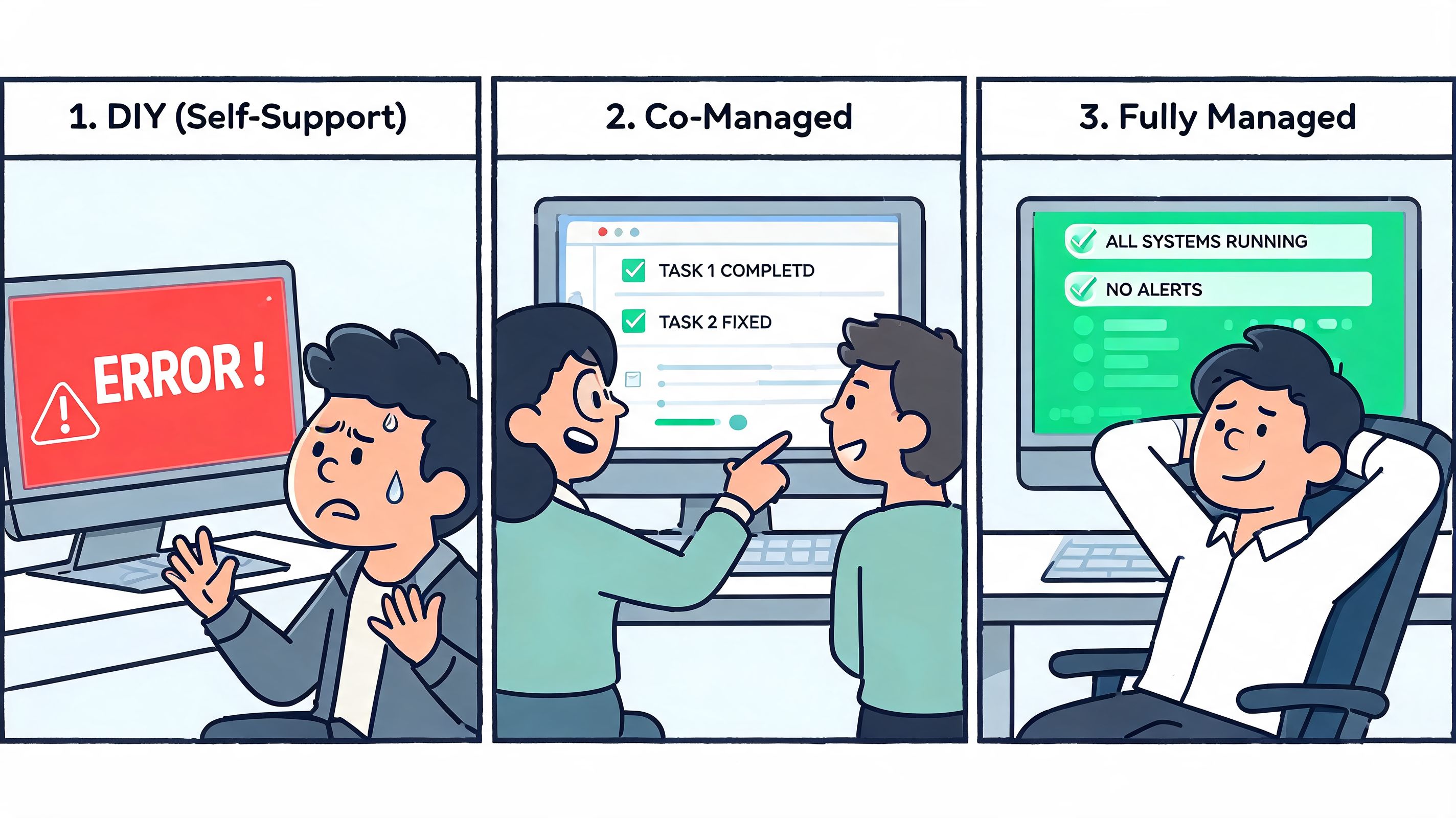
If you have a very small environment and an experienced internal admin, DIY can work for a while. The risk is that strategic work gets buried under support tickets, licence changes, device issues, access requests, and security follow-up. One person becomes the bottleneck.
Co-managed IT makes sense when you already have internal capability but need outside depth. Your staff keeps control of business context and internal priorities. The external partner fills gaps in security, escalations, after-hours support, project delivery, and platform optimisation.
That model is often the best fit for firms in active growth mode, especially when internal IT is competent but stretched. If that sounds familiar, this overview of co-managed IT services in Edmonton is a practical starting point.
Fully managed IT is the right call when the business wants accountability, consistency, and a single support model across users, devices, security, and cloud systems. It's also a strong fit for regulated firms that can't afford loose ownership.
CloudOrbis Inc. is one example of a provider that supports Canadian SMBs with Microsoft 365 administration, security, cloud migration, and ongoing managed IT operations. The point isn't to outsource for the sake of outsourcing. It's to decide whether your current team can realistically govern, secure, support, and optimise the platform as it grows.
If your Microsoft environment is business-critical, it needs named owners, defined processes, and support capacity that matches the risk.
If your business is trying to make sense of Microsoft 365, Copilot, Azure, Dynamics, and the support model behind them, CloudOrbis Inc. can help you turn the stack into a clear business plan. Start with a practical review of your licences, security posture, and operational gaps, then decide what to keep in-house and what to hand off.
September 21, 2026
Secure File Sharing Guide for Canadian BusinessesLearn secure file sharing essentials for Canadian SMBs — encryption, compliance, protocols and best practices to protect data and stay compliant.
Read Full Post
September 20, 2026
Disaster Recovery Plan Business Continuity for SMBsBuild a disaster recovery plan business continuity strategy tailored for Canadian SMBs. Covers risk assessment, RTO/RPO, backup, testing, and ownership.
Read Full Post
September 19, 2026
Database Migration Services Explained for Canadian SMBsLearn how database migration services move data to the cloud securely with minimal downtime. Types, risks, costs and a Canadian provider checklist.
Read Full Post
