Secure Your SMB: The Zero Trust Security Model
Learn the zero trust security model for your Canadian SMB. Our guide covers core principles, benefits, and implementation for better security.

Learn the zero trust security model for your Canadian SMB. Our guide covers core principles, benefits, and implementation for better security.
Your business probably no longer lives inside one office, one server room, or one firewall. Your staff work from home, from client sites, and from personal phones. Your files sit in Microsoft 365, cloud apps, shared drives, and line-of-business systems. Your vendors need access. Your contractors need access. Your team needs fast access.
That reality breaks the old security model.
For years, many businesses relied on a simple idea. Keep the bad actors outside the network, and trust what's inside. That worked when work happened in one place. It doesn't work when your network now includes laptops on home Wi-Fi, cloud software, mobile devices, and third-party connections.
For Canadian SMBs in healthcare, finance, legal, and other regulated sectors, this is no longer just an IT discussion. It's a business risk discussion. A zero trust security model gives you a more realistic way to control access, reduce damage when something goes wrong, and support compliance without grinding operations to a halt.
A typical SMB environment now looks messy by default. A clinic administrator checks patient files from a laptop at home. A bookkeeper approves payments from a mobile device. A lawyer opens client documents from Microsoft 365 while travelling. An outsourced vendor connects to a line-of-business application for support.
In that setup, the old “castle-and-moat” mindset fails. Once someone gets inside, too many systems still assume they belong there. That's exactly what attackers count on. They don't need to smash the front gate if they can slip in through a valid login, a weak remote access process, or an unmanaged device.
The term Zero Trust isn't new. It was introduced in 2010 by Forrester analyst John Kindervag, and it changed security thinking from trusting the internal network to verifying every connection between users, devices, and workloads. In Canada, that shift became more than theory when the federal government formally defined a Government of Canada Zero Trust Architecture strategy in 2023, signalling that this is now a public-sector design priority, not just a security best practice, as outlined by IBM's overview of Zero Trust.
If you run a regulated business, your problem isn't just “keeping hackers out.” Your real problem is controlling who can access sensitive data, from which device, under what conditions, and for how long.
That's why many business leaders start by reviewing practical small business cybersecurity services that cover modern threats beyond the firewall. If you need a plain-language refresher on the broader discipline behind this shift, CloudOrbis also breaks it down in its guide to what cybersecurity means for businesses.
Security used to focus on location. Modern security has to focus on identity, device health, and access context.
Zero trust is the right evolution because your business is already borderless. Your security model needs to catch up.
The simplest way to understand the zero trust security model is to stop thinking about one front door.
A traditional network works like an office where one key opens the main entrance. Once you're inside, people assume you belong there. A zero trust environment works more like a secure building where access is checked at every important door. Being in the lobby doesn't give you access to finance, HR, legal files, or the server room.
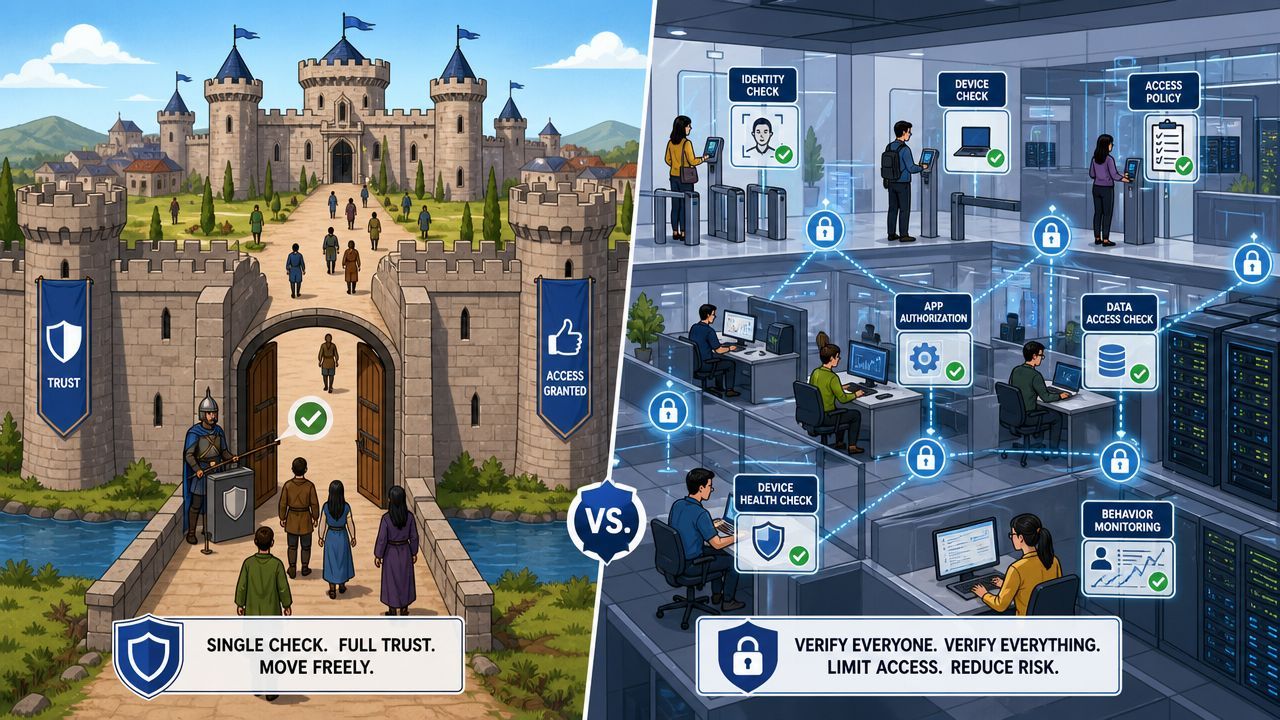
It doesn't mean your staff are untrusted people. It means your systems should never grant access based on assumptions.
A user shouldn't get access just because they signed in once this morning. A device shouldn't get access just because it belongs to the company. A connection shouldn't be approved just because it comes from the office or through VPN.
Instead, every request gets checked against context such as:
Verification becomes continuous. It happens before access is granted and can keep happening during the session.
That's why tools such as identity providers, conditional access policies, endpoint security, and privileged access controls matter. If you're sorting out who should access what, CloudOrbis has a useful primer on privileged access management, which sits at the heart of zero trust.
For businesses comparing remote access approaches, this guide on understanding Zero Trust Network Access is also worth reviewing because it helps separate the access layer from the broader architecture.
Practical rule: Trust should be earned per request, not inherited from network location.
Once you understand that, zero trust stops sounding abstract. It becomes a common-sense response to the way people work now.
Zero trust isn't a product you buy. It's a security architecture you build.
Canada's federal guidance defines it through five pillars: Identity, Device, Network/Environment, Application Workload, and Data. It also includes three enabling capabilities: Visibility and Analytics, Automation and Orchestration, and Governance. The key point from the Canadian Centre for Cyber Security is that zero trust works as a policy-and-telemetry system, so access decisions can be re-evaluated continuously, not just at the edge, as described in the government's Zero Trust security model guidance.
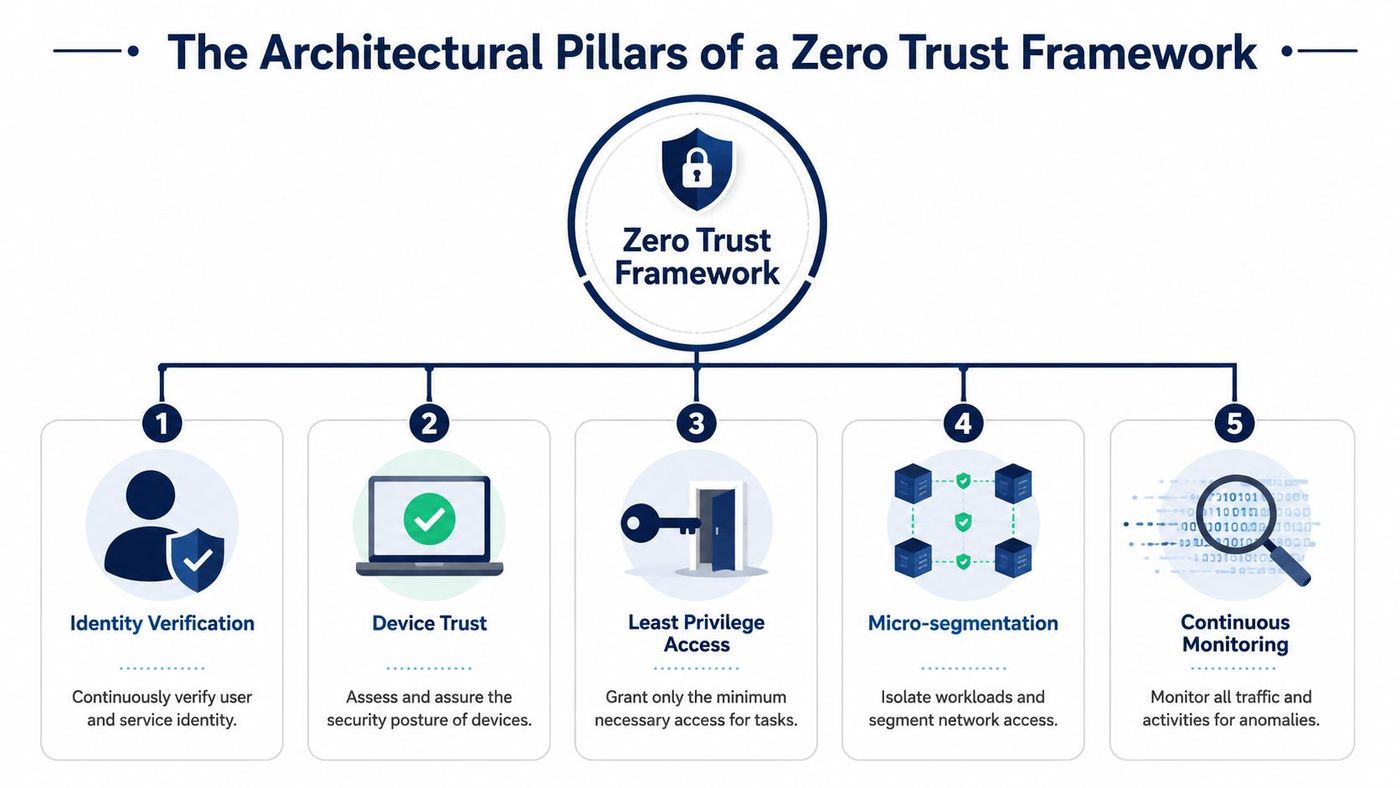
| Pillar | What it controls | Business example |
|---|---|---|
| Identity | Who is requesting access | An employee must use MFA before opening payroll or client systems |
| Device | Whether the device is safe enough to connect | A personal laptop with missing security controls gets blocked |
| Network and Environment | How systems communicate and where traffic can move | A compromised workstation can't freely reach finance servers |
| Application Workload | How apps and services are secured | A cloud app only accepts approved identities and service connections |
| Data | What information is sensitive and who can use it | Confidential files are restricted, encrypted, and tightly shared |
The five pillars are the control areas. The next three are what turn policy into action.
They look for a single “zero trust solution.” That's the wrong buying process.
A practical stack often combines Microsoft Entra ID or another identity platform, MFA, conditional access, endpoint tools, email security, privileged access controls, segmentation, and monitoring. Endpoint visibility is a major piece of this. If you need a clear explanation of that layer, review CloudOrbis's article on endpoint detection and response.
Zero trust works when your tools share signals and enforce policy together. If they operate in silos, gaps remain.
That's why architecture matters more than branding.
For regulated businesses, the value of a zero trust security model is straightforward. It gives you tighter access control, cleaner audit trails, and less damage when a user account or device is compromised.
That aligns well with Canadian compliance realities. Whether you're thinking about PIPEDA, Quebec's Law 25, client confidentiality obligations, or insurer expectations, the pattern is the same. You need to limit access to sensitive information, show that controls exist, and reduce unnecessary exposure.
The Canadian Centre for Cyber Security reported that over 65% of Canadian small businesses experienced at least one cyber incident in a recent 12-month period, and ransomware affected about 37% of medium-sized businesses in the same reporting context, according to Palo Alto Networks' summary of Zero Trust Architecture.
Those numbers matter because zero trust is built to reduce lateral movement. If an attacker gets one credential or lands on one machine, they shouldn't be able to roam freely across file shares, admin tools, cloud apps, and backup systems.
Compliance frameworks often sound abstract until an audit or breach forces the issue. Zero trust helps turn broad obligations into operational controls:
For firms handling sensitive records, this works well with broader data security management practices that classify, protect, and monitor information across its lifecycle.
The worst security programs force staff to work around them. The right zero trust design does the opposite. It lets employees work remotely, use cloud services, and collaborate with external parties under clear policy controls.
Strong security should narrow unnecessary access, not slow down legitimate work.
That's why zero trust is worth treating as a business enabler, not just a defensive project.
Most SMBs don't fail at zero trust because the idea is flawed. They fail because they try to do too much too fast.
A workable rollout starts with priorities, not perfection.
Before you touch tools, identify what matters most. That usually includes client data, financial systems, email, identity infrastructure, privileged admin accounts, and regulated records.
Ask three direct questions:
That gives you a sensible starting point. Not every app needs the same control level on day one.
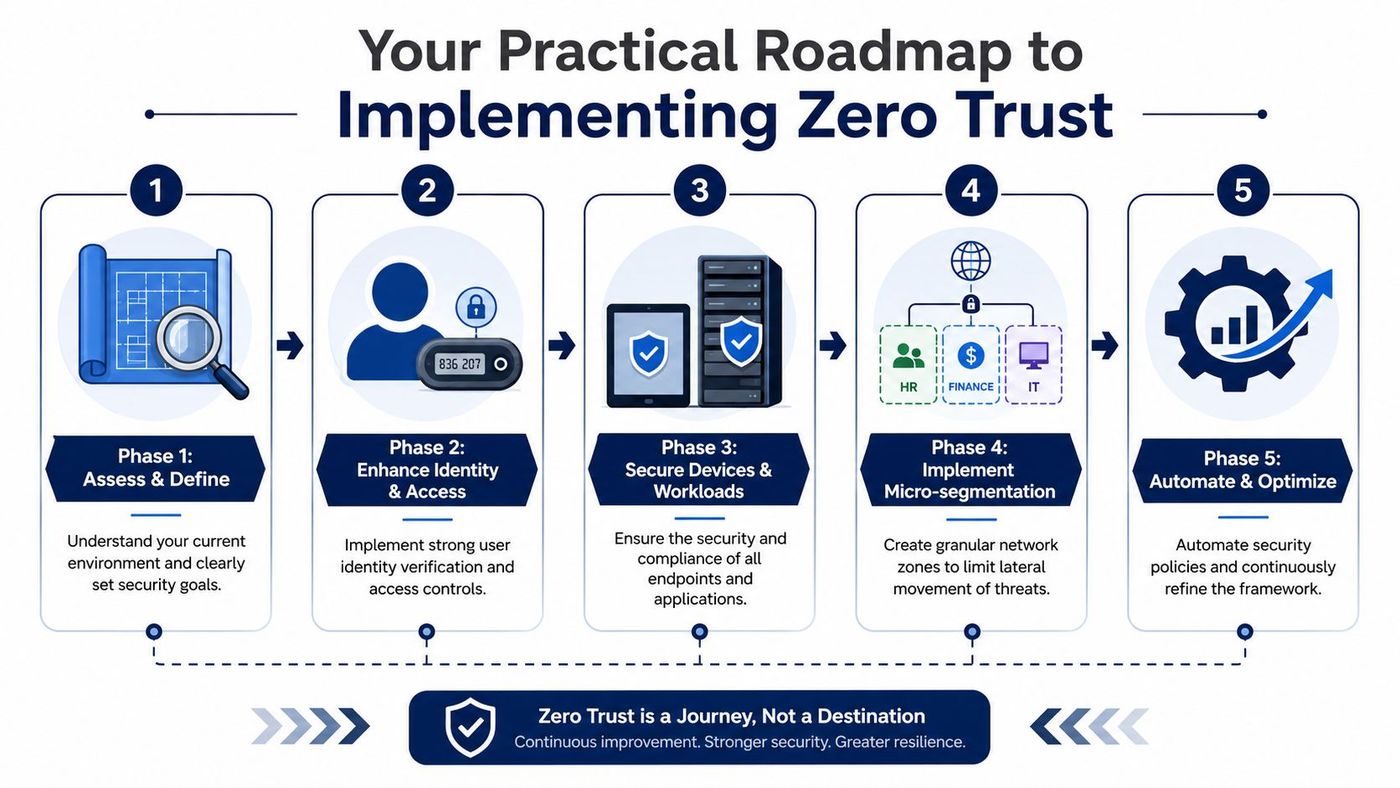
A practical SMB roadmap looks like this:
Projects often become expensive and messy. If your identity platform, endpoint tools, email security, access controls, and monitoring don't talk to each other, your team ends up managing exceptions by hand.
A better approach is to use platforms that share telemetry and enforce policy with minimal friction. For ongoing execution, many SMBs rely on security managed services to handle policy tuning, monitoring, incident response, and access reviews. CloudOrbis is one example of a provider that applies a zero-trust security model through verified access controls and encryption as part of its cybersecurity offering.
Security controls should feel firm, not chaotic. Staff will accept MFA and conditional access if the rules are consistent and sensible. They'll fight the project if every login becomes a support ticket.
A simple implementation checklist helps:
The best roadmap is progressive. Secure the most sensitive workflows first, then expand with evidence.
Zero trust gets oversold. That's a problem.
Many vendors and consultants present it like a universal fix. It isn't. Technical literature warns that microsegmentation and fine-grained controls can add complexity and even create single points of failure if the design is poor. The same research also points out that SMBs often get the most value from selective zero trust, where they protect crown-jewel data first instead of trying to enforce “full zero trust” everywhere at once, as discussed in this academic review of Zero Trust architecture tradeoffs.
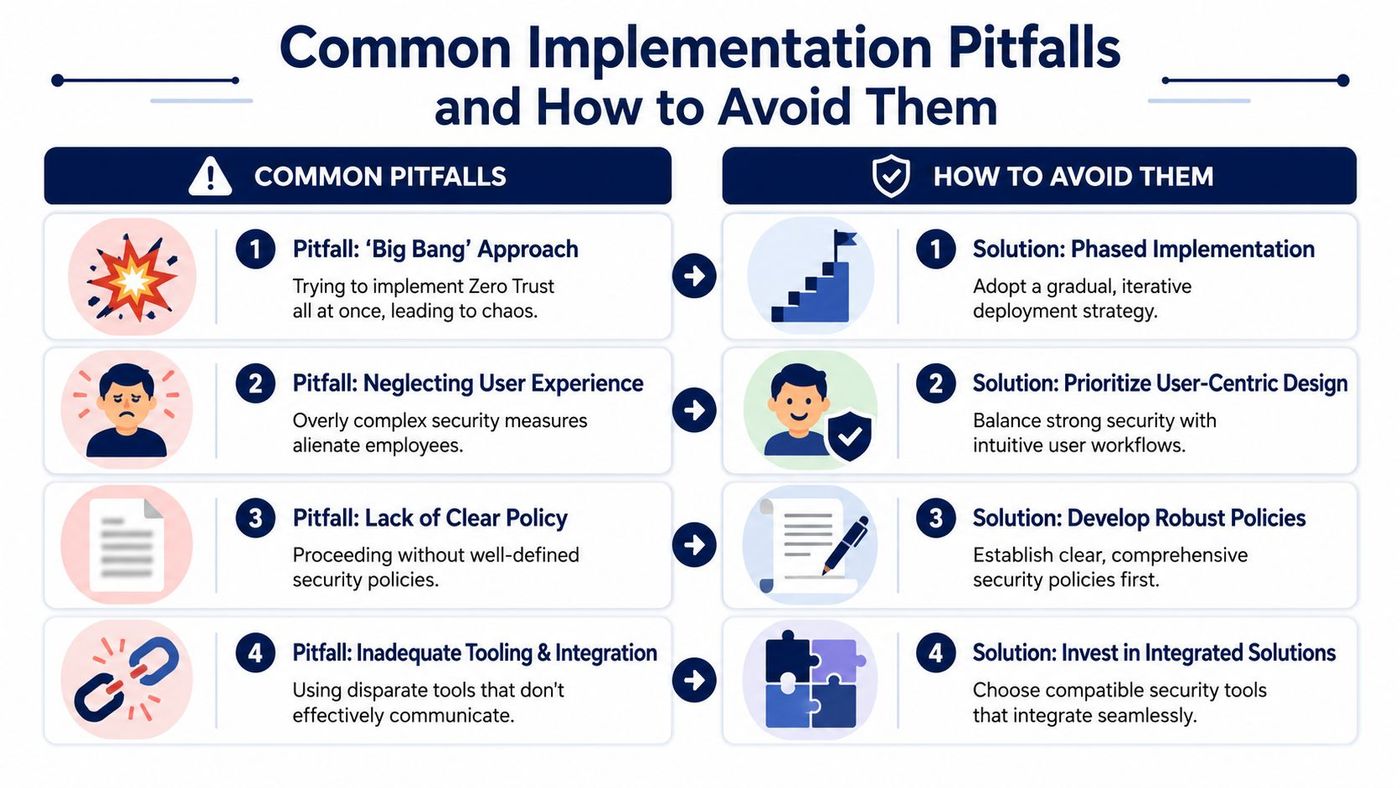
The biggest mistake is the big-bang rollout. If you lock down everything at once, you'll break legitimate workflows and create resentment fast.
Other common problems include:
Use a risk-based sequence instead.
| Pitfall | Better decision |
|---|---|
| Trying to secure everything at once | Start with sensitive data, privileged access, and key business systems |
| Blocking workflows without testing | Pilot policies with one group and review impact |
| Buying disconnected tools | Favour integrations that share identity and device context |
| Treating zero trust as a one-time project | Run it as an operating model with regular policy reviews |
Selective zero trust beats theoretical perfection. Protect what matters most, then expand carefully.
That approach isn't less serious. It's more likely to succeed.
A zero trust security model is the right direction for modern SMBs. But it only works when strategy, policy, tooling, and day-to-day operations line up.
That's where many internal teams get stuck. They understand the goal, but they don't have the time to map dependencies, harden identity, tune endpoint policy, review access exceptions, monitor alerts, and keep the business moving at the same time.
An experienced managed IT and cybersecurity partner closes that gap. The right partner helps you identify crown-jewel systems, design realistic access policies, phase implementation, integrate tools, and keep visibility across users, devices, workloads, and data. Just as important, they help prevent security improvements from becoming a burden on your staff.
For regulated Canadian businesses, that outside perspective matters. You need a roadmap that fits your risk profile, your compliance obligations, and your budget. You also need someone who can challenge bad assumptions early, before they turn into broken workflows or expensive rework.
Zero trust shouldn't be treated as a slogan. It should be treated as an operating model for a business that no longer has clear network boundaries.
If your organisation needs a practical zero trust plan that fits how your team works, talk to CloudOrbis Inc.. CloudOrbis can help you assess your current environment, prioritise your highest-risk systems, and build a phased security roadmap that strengthens access control without disrupting operations.
Book a 30-minute call with a senior engineer. No sales script, just straight answers about your environment.


