Total Cost of Ownership: Smart IT Investments for 2026
Master your IT's total cost of ownership. Canadian business leaders: calculate TCO, avoid hidden costs, & make smarter investments for 2026.

Master your IT's total cost of ownership. Canadian business leaders: calculate TCO, avoid hidden costs, & make smarter investments for 2026.
A lot of IT purchases look sensible in the first meeting and expensive six months later.
A new server seems affordable until support calls pile up. A cloud migration looks lean until data transfer, security tooling, and training land in separate budgets. A software subscription feels predictable until usage expands faster than anyone modelled. That's why smart leaders don't stop at sticker price. They look at total cost of ownership.
For Canadian SMBs, that discipline matters even more when security, compliance, and growth are part of the decision. The biggest budget overruns usually don't come from the invoice you approved. They come from the costs nobody priced properly.
The most expensive technology decision is often the one that looked cheapest at the start.
A business buys a “cost-effective” platform, rolls it out quickly, and feels good about keeping capital spending low. Then the hidden costs start to show up. Staff lose time waiting on slow systems. Managers approve emergency consulting. Backups need redesign. Security controls need upgrades. Downtime starts affecting customer service, billing, or scheduling.
That's the gap between purchase price and total cost of ownership. TCO is the full financial impact of an IT decision over time, not just the amount on the quote.
For Canadian businesses adopting cloud solutions, TCO calculations must include both tangible costs like equipment and licences and intangible costs like lost productivity and downtime. If those intangibles are ignored, TCO accuracy can swing by ±50%, according to Canadian Hosting Services guidance.
Many teams still evaluate IT with a procurement mindset instead of an operating mindset. They compare vendor quotes line by line, but they don't ask what happens after go-live.
That's where hidden SaaS sprawl, support inefficiencies, and underused licences start draining budget. If you're reviewing software spend, this practical guide to cutting hidden SaaS expenses is worth a look because licence waste often sits outside the formal TCO conversation, even though it directly affects it.
A similar issue shows up in service delivery. Companies that treat IT as break-fix support usually miss the cost of recurring interruptions, weak planning, and reactive maintenance. That's one reason many midsized firms move toward managed IT services benefits when they want more predictable operating costs and fewer surprises.
Practical rule: If a cost appears only after deployment, it still belongs in the decision.
Canadian organisations are making bigger bets on Microsoft 365, cloud infrastructure, cybersecurity, and hybrid work platforms. Those investments affect revenue, compliance, and staff productivity, not just IT budgets.
A proper TCO lens changes the conversation. It helps leadership compare options based on operational stability, risk exposure, and business growth. That's how you avoid approving a low-cost decision that becomes a high-cost problem.
Owning technology is a lot like owning a vehicle. The purchase price matters, but it isn't the whole story. Fuel, insurance, maintenance, repairs, and downtime all affect what that asset really costs you.
IT works the same way.
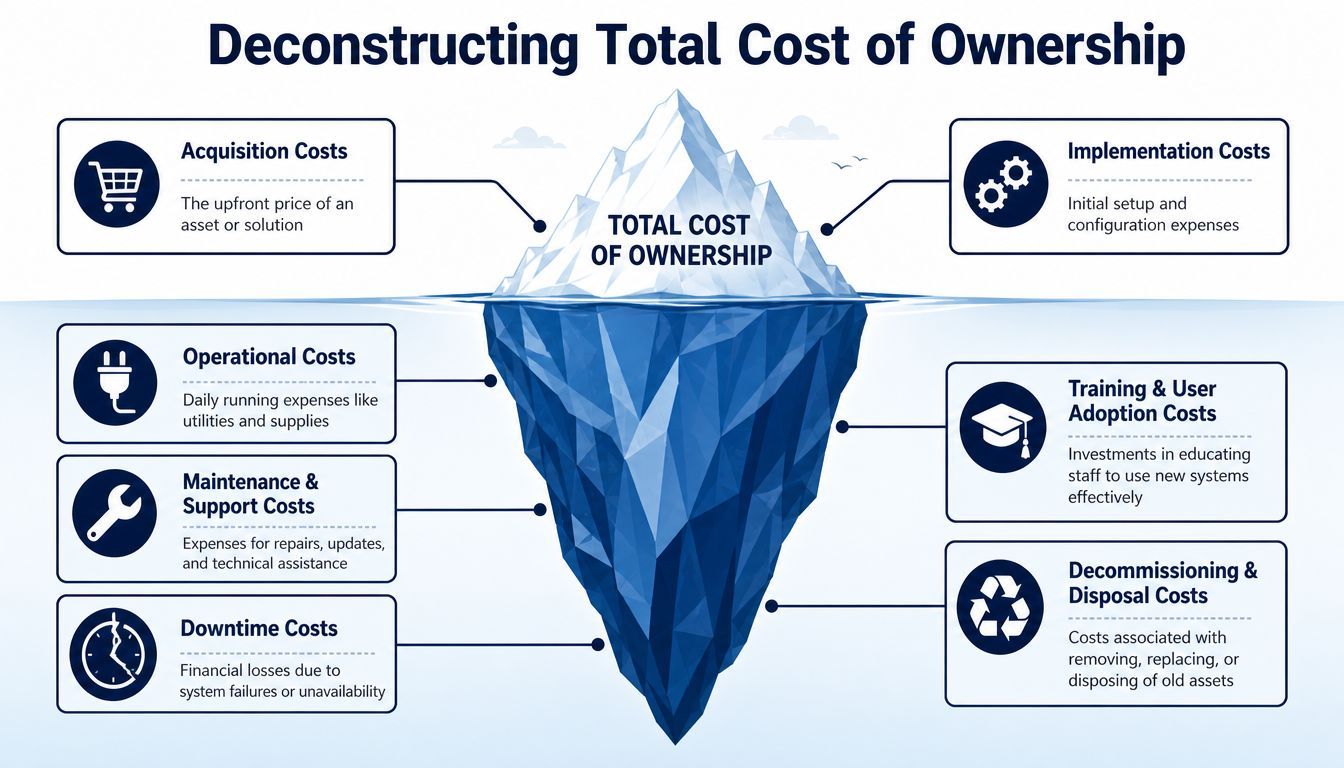
Most organisations are good at spotting direct spending. These costs are obvious because they show up in proposals, purchase orders, or monthly invoices.
They usually include:
These costs matter, but they're only the top of the iceberg.
The hidden layer is where TCO gets distorted. These expenses are real, but they're often spread across departments or absorbed into daily operations.
Common examples include:
Most TCO errors don't come from bad math. They come from missing categories.
A useful discipline here is asset visibility. If you don't know what equipment, subscriptions, warranties, and refresh cycles you already have, your TCO model will be incomplete from day one. That's why mature teams pay close attention to IT asset management practices before they compare replacement or migration options.
Some IT investments sit mostly in CapEx. Think server hardware, network switches, or storage arrays purchased upfront. Others sit mostly in OpEx, such as monthly cloud infrastructure, SaaS subscriptions, outsourced support, and security monitoring.
The mistake is comparing one side only. A lower monthly fee can still produce a worse TCO if support needs rise, data transfer grows, or governance is weak. A larger upfront investment can still be the smarter option if the environment is stable and the operating burden stays low.
When assessing cloud TCO, organisations must also evaluate network connectivity and disaster recovery resources because networking fees depend on data transfer volume and backup costs are mandatory parts of the total cost, as noted in NetSuite's cloud TCO guidance.
Here's the practical takeaway: if your model includes only acquisition and subscription costs, you don't have a TCO model yet. You have a pricing summary.
A useful TCO model doesn't need to be complicated. It needs to be complete.
The simplest way to build one is to compare options across a long enough period to capture setup, operations, support, and change. For cloud decisions, a five-year horizon is the right starting point because migration costs, including planning, data transfer, consultant fees, and training, can represent up to 30% of the total upfront investment before subscription fees begin, according to this cloud TCO analysis.
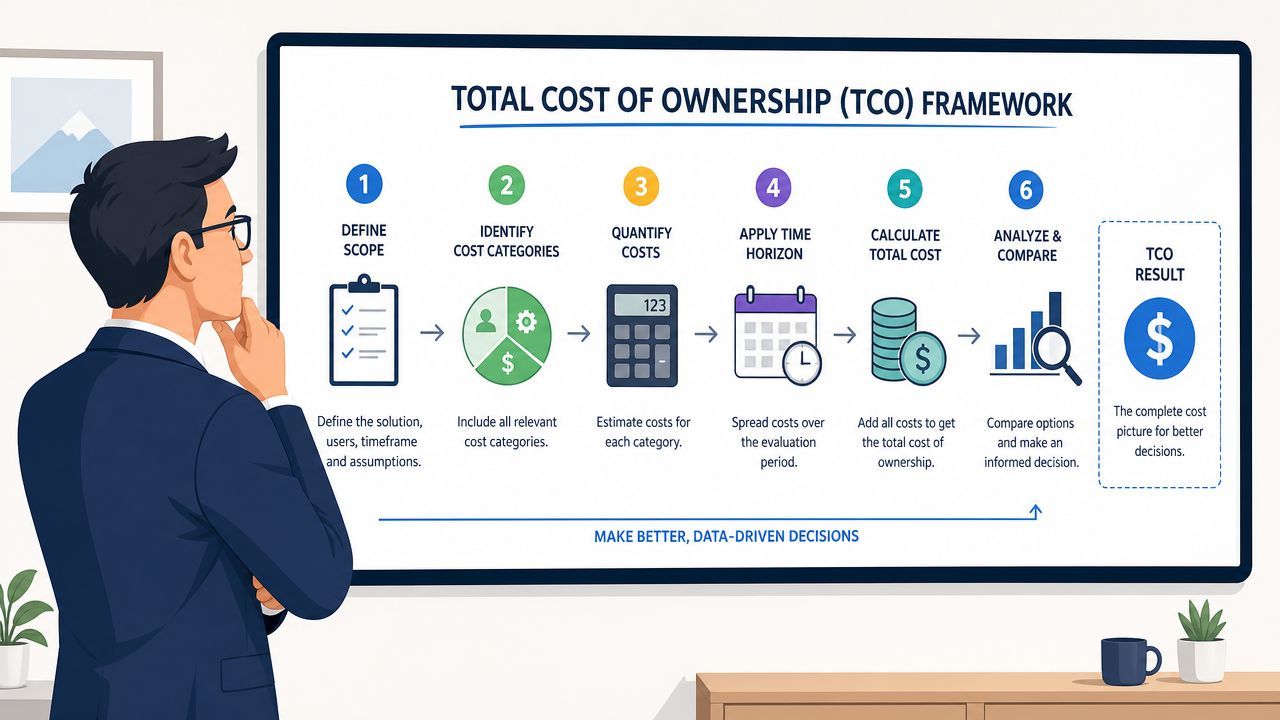
Don't model “move to cloud” as one giant concept. Model a specific decision.
Examples include replacing an on-premises file server, migrating a line-of-business app to Azure, standardising on Microsoft 365, or outsourcing user support. A narrow scope produces cleaner numbers and a more credible business case.
The finance team won't have all of this. Neither will IT. Pull data from multiple places:
If your organisation is already reviewing cloud cost management disciplines, those efforts deliver returns. Good cloud billing visibility makes TCO modelling much easier.
Build your worksheet using a consistent structure. A simple version looks like this:
| Cost area | What to include |
|---|---|
| Upfront costs | Hardware, licences, setup, migration, consulting |
| Recurring costs | Subscriptions, support, security tools, monitoring |
| Productivity costs | Training time, outages, slow performance, workarounds |
| Risk-related costs | Compliance effort, backup gaps, emergency remediation |
| End-of-life costs | Replacement, disposal, data transfer, contract exit |
This format helps leadership see where costs sit and which ones are likely to grow.
The first-year number is rarely the full story. Users increase. Storage grows. Security standards tighten. Vendors change licensing. Business units add new workflows.
Project costs by year, not just as one average. That's often where hidden volatility appears. A platform that looks economical in year one may become harder to justify once support complexity and scaling needs are visible.
A strong TCO model doesn't try to predict the future perfectly. It makes future costs visible enough to discuss before they become surprises.
Many teams go wrong when they compare one quote against another instead of comparing full operating models.
If you're deciding between cloud and on-premises, include all setup, support, backup, security, and growth assumptions in both scenarios. If you're deciding between internal IT and an external provider, compare outcomes as well as cost categories. Speed of response, after-hours coverage, and planning capacity all affect the total ownership cost.
Your final output should fit on one page for leadership, with backup detail underneath. Keep it simple:
That's enough to move the discussion from “What does it cost?” to “What will this do to the business over time?”
Theory helps. Side-by-side comparisons make TCO real.
Two decisions show up repeatedly in Canadian SMB environments. The first is on-premises versus cloud infrastructure. The second is in-house IT versus managed IT support. Both can look straightforward at quote stage and far less obvious once operational reality is added.
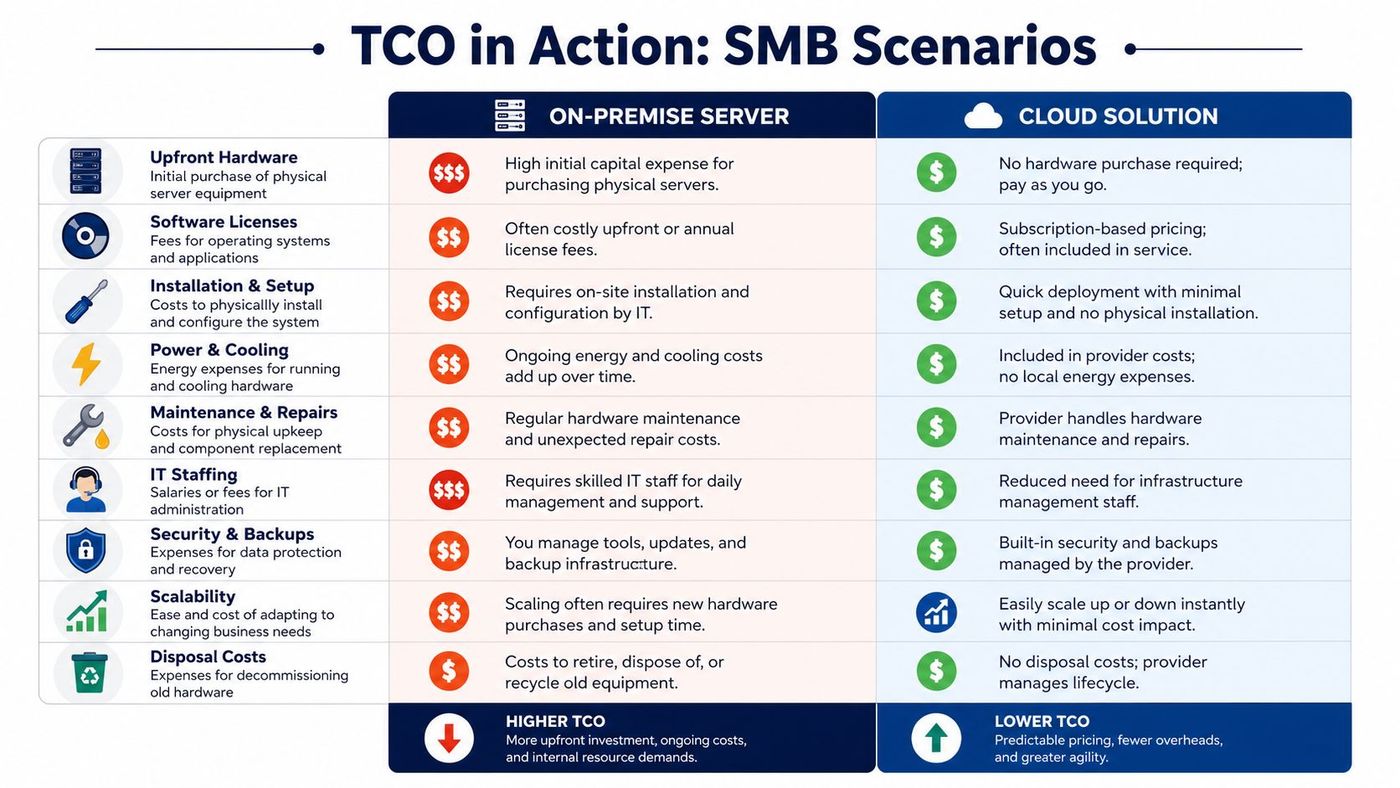
Cloud is often the better fit when workloads change, demand fluctuates, or the business expects to scale. For those cases, cloud TCO often shows a 20% advantage over on-premises. But for highly stable, predictable environments, that advantage can disappear and on-premises TCO may be 10 to 15% lower because usage fees and data transfer charges are eliminated, according to TierPoint's cloud TCO analysis.
That trade-off matters.
A firm with seasonal growth, remote teams, and changing storage needs may benefit from infrastructure that can expand without another hardware cycle. A firm with a fixed workload, mature internal controls, and low variability may find that owning the platform keeps costs steadier over time.
Here's a practical comparison:
| Scenario | Cloud usually fits better when | On-premises usually fits better when |
|---|---|---|
| Demand pattern | Workloads rise and fall | Workloads stay consistent |
| Expansion needs | New sites, users, or services are likely | Growth is modest and predictable |
| Cost risk | Usage can be actively governed | Monthly variability is undesirable |
| Control needs | Agility matters more than ownership | Infrastructure control is a priority |
Cloud migration planning also matters. Teams that are evaluating Azure migration services usually get better TCO outcomes when they model networking, backup, identity, and application dependencies before the move, not after it.
This comparison is less about a salary line and more about coverage, toolsets, and leadership capacity.
An internal team can be a strong choice when the company has enough scale to support specialisation. But many midsized organisations don't have that structure. They rely on one or two generalists who handle tickets, vendor coordination, device management, security alerts, and projects at the same time. The result is usually reactive work, deferred maintenance, and limited strategic planning.
Managed support changes the cost model in a few important ways:
If your IT team spends most of its time putting out fires, your TCO is already higher than the budget suggests.
The key lesson in both scenarios is the same. The cheaper-looking option can win on paper and lose in operations. TCO helps you see which choice supports the business with fewer financial surprises.
TCO isn't a generic spreadsheet exercise. The cost drivers change by industry, and in regulated environments the hidden line items are often the ones that matter most.
For Canadian healthcare, legal, manufacturing, and logistics firms, the risk sits in the gap between basic IT spending and operational resilience. That's where compliance exposure, downtime, and scaling mistakes start to distort the budget.
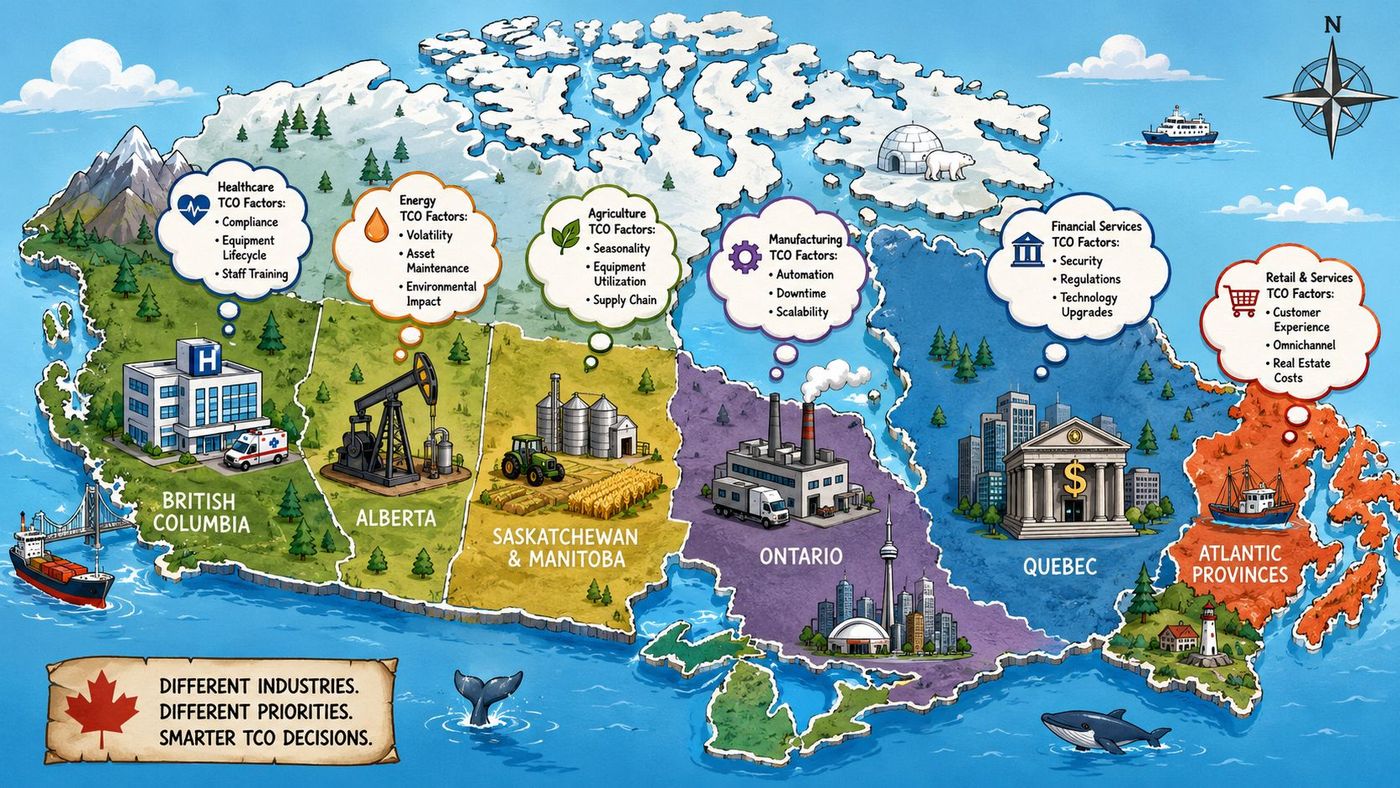
In clinics, healthcare groups, and legal practices, systems don't just need to run. They need to protect sensitive data, support audit readiness, and recover cleanly when something goes wrong.
That raises ownership cost in ways many basic models miss. For Canadian healthcare and legal firms, 68% of SMBs underestimated their first-year TCO by ignoring proactive threat detection premiums, which can lead to a 300% higher actual cost when a breach occurs, according to this reliability and maintenance context analysis.
That finding lines up with what practitioners see in the field. A basic support contract may look economical until a security incident triggers emergency response, forensic work, downtime, and urgent control upgrades. Suddenly the “savings” from skipping proactive monitoring disappear.
For these businesses, TCO pressure often comes from operations, not just compliance. A system outage can affect dispatch, production schedules, warehouse coordination, customer updates, or VoIP continuity.
The hidden issue is often scalability. Leaders approve a platform based on today's workload, then discover later that growth, new locations, or heavier collaboration tools change the economics. In these sectors, the TCO model needs to reflect traffic growth, cloud consumption changes, device expansion, and support coverage across sites.
Different industries should pressure-test different assumptions:
Sector-specific TCO work is less about buying technology and more about pricing operational risk honestly.
A generic model won't capture that. Industry-aware TCO does.
A good TCO model should change how you buy.
Too many vendor conversations still revolve around monthly price, discount percentage, or implementation timing. Those points matter, but they don't tell you whether the solution will be affordable to run, secure to operate, or flexible enough to support growth.
Use procurement meetings to surface the costs that usually appear later:
Security validation is another area where sticker-price buying fails. If you need deeper assurance on vendor risk, application exposure, or customer-facing systems, services like MSP Pentesting partner services can add a more disciplined security lens to procurement without turning the process into a checkbox exercise.
Lower TCO usually improves ROI and shortens payback because less money is lost to rework, outages, duplicated tooling, or unplanned remediation. That doesn't mean the cheapest quote wins. It means the solution with the clearest long-term operating model usually does.
Procurement works better when finance, operations, and IT all review the same TCO assumptions. That keeps the decision tied to business outcomes, not just negotiated pricing.
Reactive IT always looks cheaper until the invoices arrive.
Cost of ownership drops when issues are prevented early, security gaps are closed before they become incidents, and infrastructure decisions are aligned with the business plan. That's why proactive management changes the economics so much. It reduces downtime, limits emergency work, and gives leadership a clearer roadmap for growth.
For Canadian logistics firms, 72% faced a 40%+ TCO overrun in year 3 due to unanticipated scaling costs. The same analysis found that integrating strategic vCIO services, costing about 8% of initial TCO, can prevent those overruns by aligning infrastructure with growth, according to the OCI total cost of ownership guide.
That's the heart of the issue. TCO improves when someone is actively planning capacity, governance, security, and change, not just responding to tickets. Businesses that invest in proactive oversight usually avoid the most expensive category of IT spending: avoidable disruption.
If you want a practical view of that operating model, this perspective on proactive managed IT support as an investment is a useful next read.
A strong IT strategy doesn't eliminate every cost. It stops hidden costs from controlling the budget.
If you're reviewing a major IT investment and want a clearer picture of financial impact, talk to CloudOrbis Inc.. Their Canada-based team helps SMBs build practical IT roadmaps, strengthen security, and reduce total cost of ownership through proactive support, cloud planning, backup, cybersecurity, and vCIO guidance.
Book a 30-minute call with a senior engineer. No sales script, just straight answers about your environment.


