Threat Detection and Response: A Guide for Canadian SMBs
Learn to build an effective threat detection and response strategy. Our guide for Canadian SMBs covers key tools, implementation roadmaps, and compliance.

Learn to build an effective threat detection and response strategy. Our guide for Canadian SMBs covers key tools, implementation roadmaps, and compliance.
Your team finishes the day, closes laptops, and heads home. At 9:40 p.m., someone gets an alert about a suspicious Microsoft 365 sign-in, a finance user reports a strange email, and nobody is quite sure whether this is a real incident or just more noise. That's the moment when most small and mid-sized businesses discover the difference between having security tools and having a security process.
For many Canadian SMBs, the environment is already complex enough. Staff work remotely, files live in Microsoft 365, identity is the new perimeter, and one overloaded IT generalist is expected to keep everything running. If that sounds familiar, threat detection and response isn't an enterprise-only concept. It's the operating discipline that helps you spot trouble early, contain it quickly, and keep a security event from turning into downtime, lost data, or a reporting headache.
Threat detection and response is a continuous cycle of monitoring, identifying, investigating, and containing suspicious activity before it turns into a larger business problem. It isn't a single product, and it isn't solved by buying antivirus, turning on a few alerts, and hoping for the best.
A simpler way to think about it is this. Detection answers, “What's happening right now that looks wrong?” Response answers, “What do we do next, who does it, and how fast can we act?” Businesses need both. An alert without a response path is just anxiety. A response plan without visibility is guesswork.
In Canada, that matters because the risk is not theoretical. IBM notes that Statistics Canada reported 18% of Canadian businesses experienced at least one cyber security incident in 2023, while total spending on cyber security reached an estimated C$14.9 billion in 2022. Businesses are spending more, but incidents are still common enough that reactive security clearly isn't enough.
If you lead a clinic, law firm, manufacturer, logistics company, or finance team, you don't need to memorise security acronyms. You do need to know whether your business can:
Practical rule: If your only plan is “call IT when something looks odd,” you don't yet have threat detection and response.
For non-specialists, it helps to start with the basics of what a cyber threat is. CloudOrbis breaks that down clearly in its guide to what is a cybersecurity threat.
Most SMBs hit the same wall. They hear terms like EDR, SIEM, SOAR, NDR, and XDR, and the whole topic starts sounding like tool shopping. That's the wrong starting point. A modern threat detection and response strategy works when these tools support a process, not when they pile up in separate dashboards.
One useful analogy is a castle. Your business has doors, hallways, rooms, guards, and a command centre. If you only watch one entrance, an intruder can still move around inside unnoticed.
Here's the practical version of the “alphabet soup”.
| Tool | Plain-English role | Where it helps most |
|---|---|---|
| EDR | Watches laptops and desktops for suspicious behaviour | Malware, ransomware activity, suspicious processes, device isolation |
| NDR | Monitors network traffic patterns | Lateral movement, unusual internal traffic, hidden communications |
| SIEM | Collects and correlates logs from many systems | Central visibility, investigations, alert correlation |
| SOAR | Automates repetitive response steps | Triage, account disablement, ticketing, playbook execution |
| XDR | Brings multiple detection sources together | Cross-environment investigation across endpoint, identity, cloud, and network |
The strongest setups don't rely on one data source. Sophos explains that effective TDR depends on behavioural analytics across multi-source telemetry, correlating signals from endpoints, networks, and cloud services to detect both known and novel attacks. That point matters more than any acronym. A login anomaly by itself may be harmless. The same anomaly combined with impossible travel, mailbox rule changes, and endpoint activity is a very different story.
For a Microsoft 365-heavy SMB, the first concern usually isn't a data centre firewall. It's identity, email, endpoint, and cloud activity. That shifts the practical order of implementation.
Start with the places where attackers show up:
That's why endpoint protection still matters, but it shouldn't sit alone. If you need a plain-language primer before selecting tooling, CloudOrbis has a useful explainer on what is endpoint detection and response.
What works:
What usually fails:
Good TDR isn't about collecting more logs. It's about collecting the right signals, correlating them, and acting before the incident spreads.
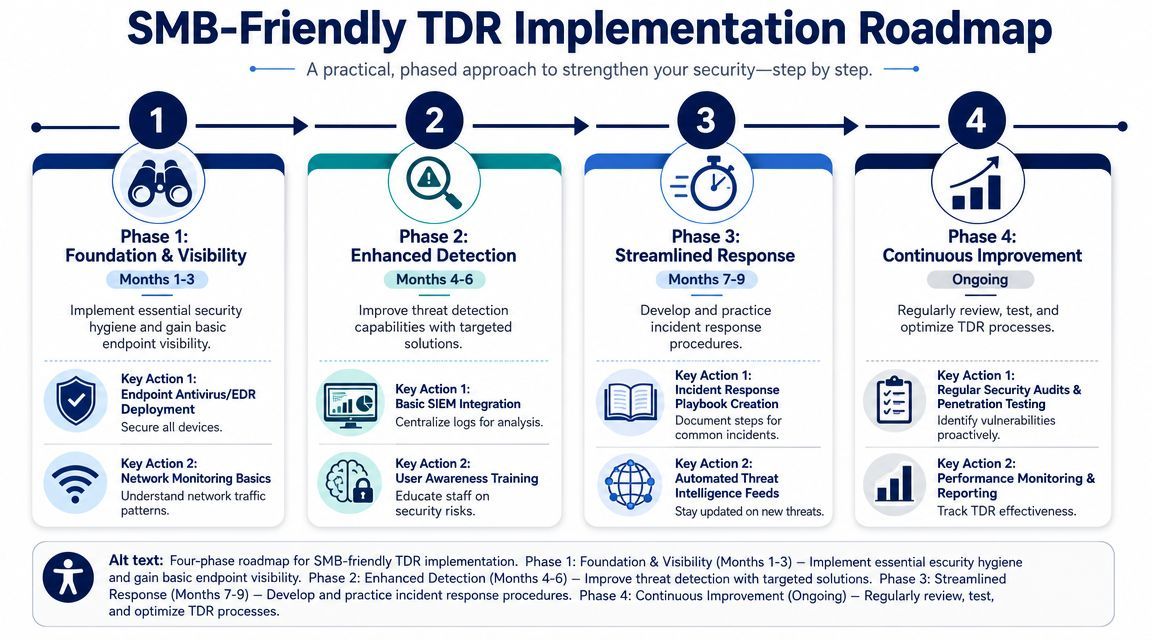
The biggest mistake SMBs make is treating threat detection and response like a giant transformation project. It doesn't need to be. If you run a lean IT team, a phased approach is usually more realistic and more effective.
If your business relies heavily on Microsoft 365, begin with the surfaces attackers target most often. Rapid7 highlights that for Canadian SMBs using cloud services like Microsoft 365, cloud adoption and identity-based compromise are major risks, and AI is helping cybercriminals scale phishing attacks.
That means your first implementation phase should focus on:
This is also the phase where many businesses decide whether to keep building internally or bring in outside support. For teams without deep in-house capacity, managed IT services for small business can provide the operational structure that keeps early TDR efforts from stalling.
Once the basics are in place, the next step is correlation. You don't need every log source on day one. You do need the ones that answer the most important questions during an incident.
Prioritise these feeds first:
At this stage, the goal is to stop working from isolated alerts. You want one place where someone can answer, “Is this a fake alarm, a compromised account, or the start of something bigger?”
Automation should come later than most vendors suggest. If you automate poor logic, you just make mistakes faster.
A practical third phase includes:
CloudOrbis Inc. offers managed detection and response as one option for businesses that need monitoring and response support without building a full internal security operation.
Start where the risk is highest. For most M365-heavy SMBs, that's identity, email, and endpoints. Not every log source in the business.
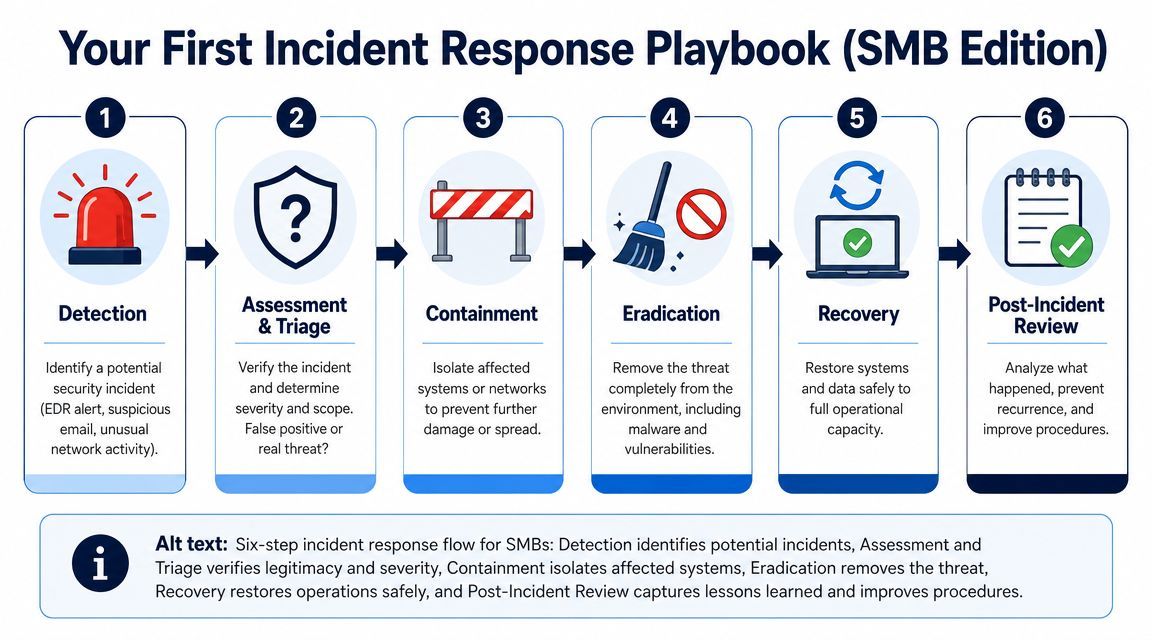
Most leaders don't need a thick incident response manual. They need a short, usable playbook that tells them what to do in the first hour. When a suspected incident starts, clarity matters more than complexity.
Not every alert is an incident. Someone needs to assess what happened, which user or system is involved, and whether there's enough evidence to escalate.
Do this first:
Don't start deleting things immediately. Early evidence often explains how the event began.
Containment is about limiting spread. If a workstation looks compromised, isolate it. If a user account appears hijacked, disable access or force a reset according to your playbook. If a mailbox is forwarding externally without authorisation, stop that rule and review the account.
A simple principle helps here. Containment actions should be pre-approved before the incident happens. That prevents delay when the team is under pressure.
In a real incident, the first bad decision is usually delay. Teams wait for certainty when they should be reducing exposure.
After containment, remove what caused the problem. That may mean malware cleanup, credential resets, privilege review, patching, or deleting malicious persistence mechanisms.
This is also where process matters. Teams that rely on ad hoc chats and memory tend to miss follow-through. If you're refining operations, these streamlined incident management procedures offer a useful reference for making escalation and handoff steps more consistent.
Recovery isn't just turning systems back on. Before restoring normal access, confirm the threat has been removed and the same path can't be used again.
Focus on:
For many SMBs, response and recovery planning overlap. A practical starting point is CloudOrbis's IT disaster recovery plan template, especially for businesses that need a clearer recovery sequence.
The incident review is where TDR improves. Ask what was detected, what was missed, what slowed the team down, and whether the playbook still fits the environment.
Keep the review concise. You're looking for operational fixes such as cleaner alerts, better escalation contacts, stronger identity controls, or clearer approval rules.
A security leader may care about detection logic and telemetry quality. A business leader usually asks a simpler question. “Is this reducing risk, or are we just buying more tools?”
That's the right question. Teradata notes that a major gap in TDR guidance for SMBs is ROI, and that only 47% of Canadian small organizations have dedicated cybersecurity staff, which makes simple business-facing metrics essential.
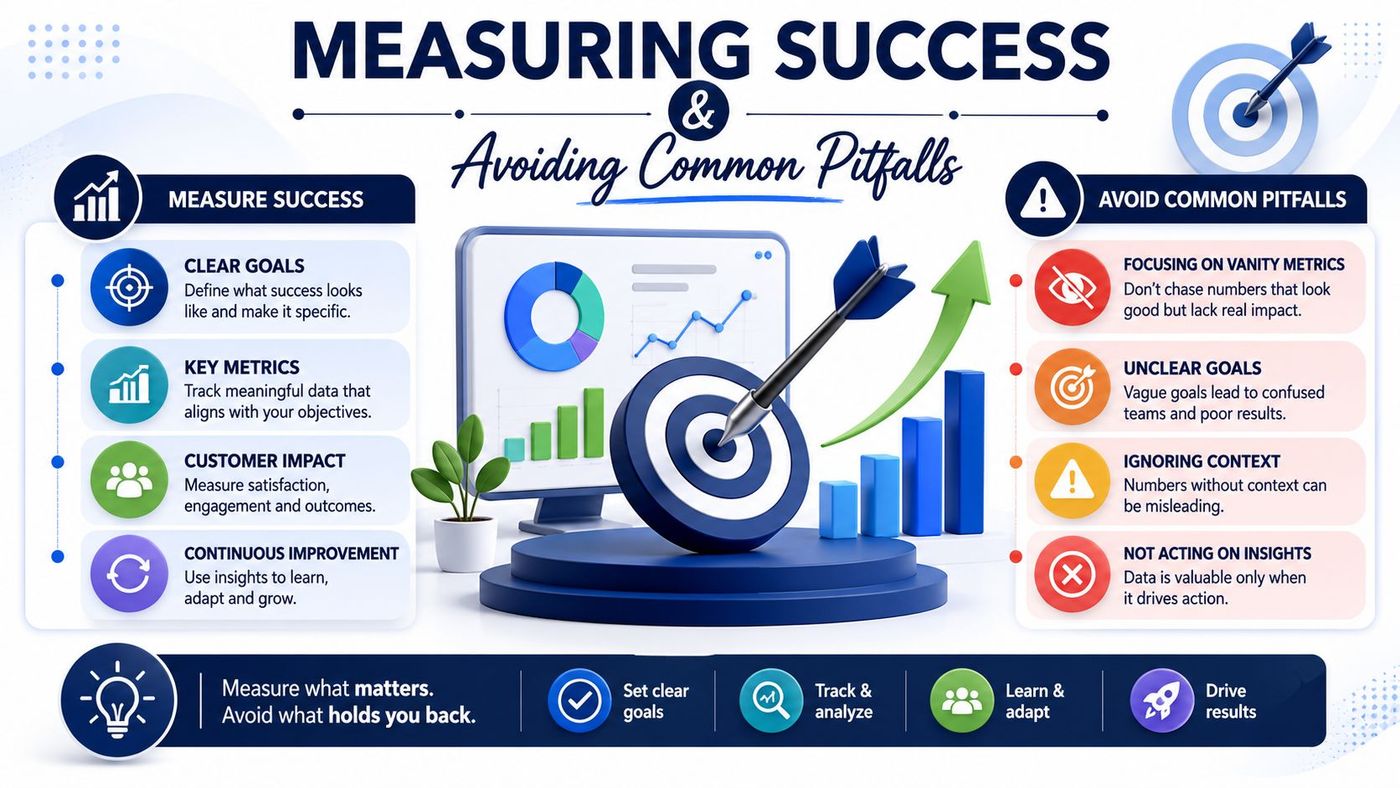
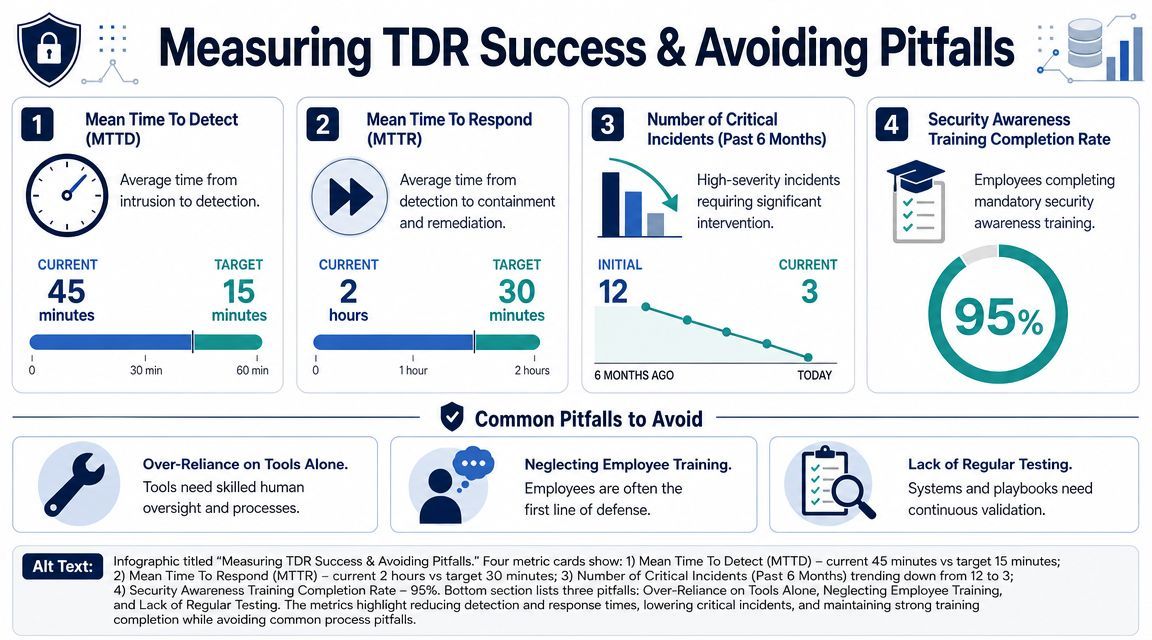
Don't lead with “alerts processed.” That's a workload number, not a value number. Start with metrics that connect security operations to business continuity.
If you want a broader operational view, these key incident recovery metrics are useful for tying response performance to recovery outcomes.
A mature SMB dashboard is usually simple. It should help a leadership team answer:
| Question | Better metric | Weak metric |
|---|---|---|
| Are we detecting threats sooner? | Time to detect | Total alerts generated |
| Are we limiting damage faster? | Time to contain | Tickets opened |
| Is security supporting resilience? | Downtime avoided or reduced interruption | Number of tools deployed |
| Is the team overwhelmed? | False positives and escalation quality | Raw event volume |
Key takeaway: If reporting doesn't help leadership understand downtime risk, response speed, or operational impact, it's probably measuring the wrong thing.
Three mistakes show up repeatedly in SMB environments:
The goal isn't to build a miniature enterprise SOC. It's to create a response capability your business can sustain.
For regulated businesses, threat detection and response isn't just a security improvement. It supports governance, evidence retention, reporting discipline, and defensible decision-making when something goes wrong.
In Canada, the compliance signal is getting clearer. NetWitness notes that federal regulations for critical sectors require operators to report cybersecurity incidents within 72 hours and maintain programs for detection and response. Even if your business isn't directly covered by that exact framework, the operational message still applies. Detection has to be continuous, response has to be documented, and escalation can't take days.
A small or mid-sized business may not run a formal security operations centre, but it still needs to answer practical compliance questions:
Those answers depend on logging, monitoring, and a repeatable response process. Without them, legal, privacy, and client communication become much harder.
Most SMBs won't staff round-the-clock monitoring internally. That's not a failure. It's a resource reality. The better decision is often to combine internal business knowledge with external operational support.
A managed provider can help by delivering:
For businesses assessing that route, CloudOrbis outlines the model in its guide to MSSP security services.
Threat detection and response doesn't have to start with a full SOC, an expensive platform stack, or a giant security programme. For most Canadian SMBs, it starts with a smaller shift. Get visibility into identity, email, endpoints, and cloud activity. Decide what gets escalated. Build a short playbook. Measure whether you're detecting and containing issues faster with less disruption.
That approach is practical, attainable, and far more valuable than collecting tools you don't have time to manage.
For Microsoft 365-heavy businesses, the priority is clear. Focus first on the attack paths most likely to affect daily operations. Then improve correlation, response discipline, and business-facing measurement over time. The result is not perfect security. It's a business that can see problems sooner, act with confidence, and recover with less chaos.
If your team needs a clearer view of where your current gaps are, CloudOrbis Inc. can help assess your environment, prioritise the right detection signals, and shape a threat detection and response approach that fits your business, staffing model, and compliance needs.
Book a 30-minute call with a senior engineer. No sales script, just straight answers about your environment.


