

September 21, 2026
Secure File Sharing Guide for Canadian BusinessesLearn secure file sharing essentials for Canadian SMBs — encryption, compliance, protocols and best practices to protect data and stay compliant.
Read Full Post%20(1).webp)
Usman Malik
Chief Executive Officer
December 24, 2025

For private career colleges in Alberta, choosing a Learning Management System (LMS) is not just a technology decision—it is a strategic one. You are balancing the delivery of high-quality vocational training with the strict demands of the Private Vocational Training Act. This requires an LMS that is more than a digital filing cabinet for course materials; you need a strategic partner in your compliance and operational efforts.
This is where Moodle shines. Unlike many rigid, off-the-shelf systems, Moodle is open-source. For an Alberta career college, that flexibility is essential. It allows you to shape the platform around your specific programs and, critically, meet Alberta’s unique reporting standards.
The pressure on Alberta’s private career colleges to demonstrate student success is immense. The government requires licensed institutions to maintain graduation and job placement rates of at least 70% over consecutive reporting periods. If your programs dip below that benchmark, their licences could be at risk.
A properly configured Moodle instance becomes your best ally in this environment. It helps you:
Moodle transforms your LMS from a simple teaching aid into a powerful compliance tool. Its ability to capture and organize the exact data regulators demand gives any Alberta career college a significant strategic advantage.
Of course, it helps to see where Moodle fits in the broader landscape. A good online course platform comparison can show you how its open-source model compares to other options on the market.
For a deeper dive into the specific challenges and solutions for local institutions, our guide on LMS support for Alberta private career colleges offers more targeted insights. Ultimately, Moodle gives you the power to build a learning environment that directly supports both your educational mission and your provincial obligations.
A successful Moodle deployment begins not with installing software, but with a solid plan. For an Alberta private career college, this blueprint is about connecting technology directly to your vocational training model and regulatory duties. Rushing this foundational stage is a common mistake that almost always leads to an LMS that complicates workflows instead of simplifying them.
This initial planning phase involves a deep dive into your college’s unique operational DNA. You need to map out how students and instructors currently interact, pinpoint daily frustrations, and clearly define what success will look like once Moodle is operational. Think of it less as an IT project and more as a strategic initiative requiring input from administrators, faculty, and even students.
Before you can build the right solution, you must understand the problem you are trying to solve. A needs assessment for your Moodle LMS for Alberta private career colleges must be specific and practical. Forget generic features for a moment and focus on what your programs, staff, and students genuinely need to succeed in a hands-on, vocational environment.
Start by asking the right questions:
This detailed analysis becomes the foundation for your entire project. Getting this right ensures the final Moodle setup is a perfect fit for your college's day-to-day reality—not a generic platform you are forced to work around.
To keep this process on track, a structured checklist can make all the difference. It forces you to think through each critical area and define your objectives before any technical work begins.
This checklist is more than a discovery tool; it is the beginning of your project's scope. It translates your college's needs into tangible goals that will guide every subsequent decision.
With your needs clearly identified, the next step is to translate them into measurable Key Performance Indicators (KPIs). These are not just internal goals; they are your direct line to satisfying Alberta's regulatory demands. Your Moodle configuration must be built from the ground up to track, manage, and report on these critical metrics.
This is where you turn compliance rules into technical requirements. The process should follow a simple but powerful flow.
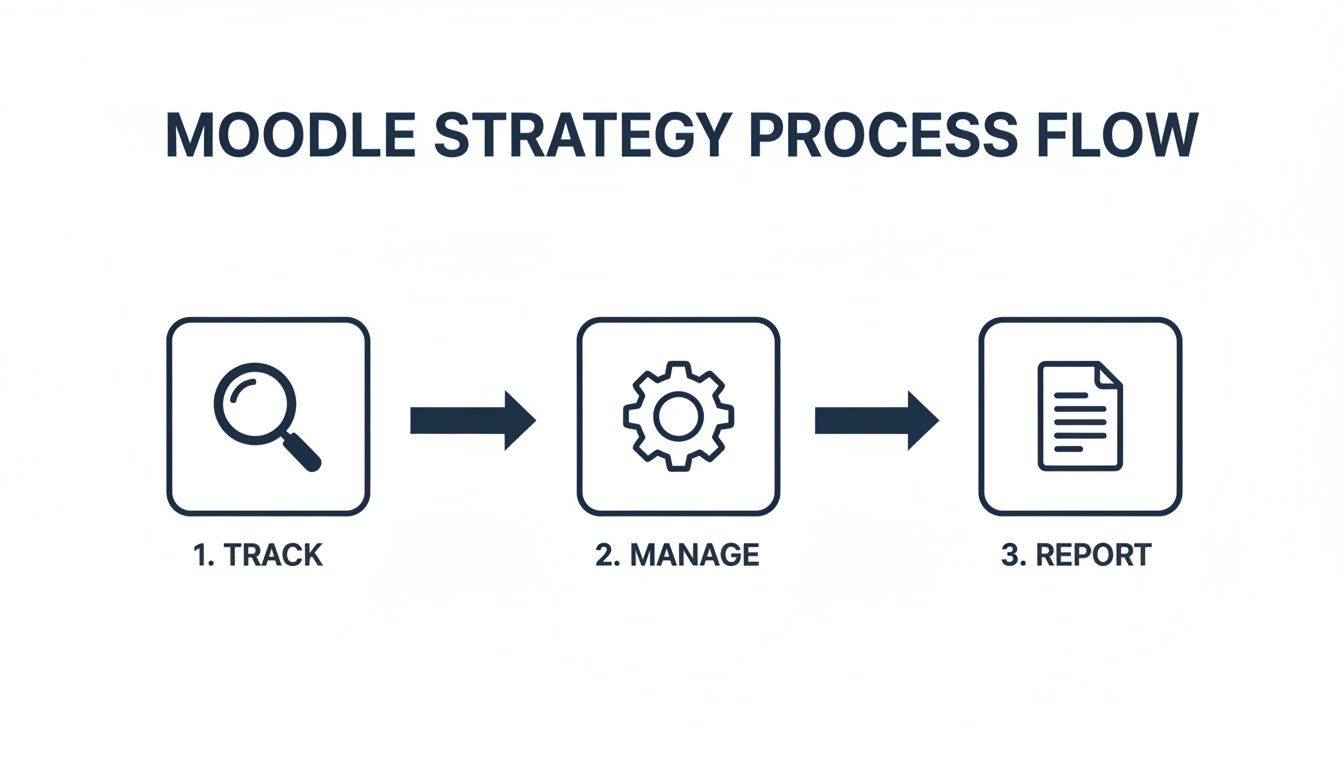
This structured approach is driven by real-world pressures. Between 2019 and 2024, private career college registrations in Alberta increased by approximately 30%, which naturally led regulators to tighten their oversight. Provincial rules now mandate that colleges report graduation and job placement rates annually, with a minimum threshold of 70% for both. Falling below this mark in consecutive years could put your licence on the line.
Your Moodle LMS must be configured to capture the attendance records, grades, and competency checks that feed directly into these reports, making it an essential tool for maintaining your good standing.
Your blueprint must explicitly connect Moodle's features to these government-mandated outcomes. For example, a KPI could be "Reduce the administrative time for generating annual compliance reports by 50%," a goal Moodle can achieve through automated data collection.
A successful implementation relies on people just as much as technology. You need a dedicated internal project team with clear roles. This group should include an executive sponsor, a project manager, a few faculty representatives, and an IT lead. This mix of perspectives ensures all angles are considered and helps secure buy-in from across the institution.
Once the team is in place, the final piece of your blueprint is a realistic timeline and budget. Break the project down into manageable phases—such as planning, configuration, data migration, training, and launch. For more complex projects, consider strategic IT outsourcing development partnerships for specialized skills or managed services, which can add scalability and efficiency.
A well-crafted implementation plan is your roadmap. You can also review fundamental IT project planning best practices to help guide your strategy and ensure a smooth rollout from start to finish.
For Alberta's private career colleges, compliance is not just a best practice—it is a core operational requirement. Your licence to operate hinges on meeting the strict mandates of the Private Vocational Training Act. A properly configured Moodle instance is more than a learning platform; it is your engine for building a culture of compliance from the ground up.
This means taking a deep dive into two critical areas: accurately capturing performance data and safeguarding sensitive student information. The provincial government has been clear about its expectations, and your Moodle setup must be deliberately designed to meet them.
One of the biggest pressures on your college is reporting on graduation and job placement rates. The province mandates a minimum success rate of 70% for both metrics in consecutive reporting periods. If you fall short, you could trigger audits, compliance actions, or even jeopardize your program's licence.
This is where a Moodle LMS for Alberta private career colleges becomes an indispensable tool. Its customizable nature means you can track the exact data points needed for these reports with surgical precision.
By configuring Moodle to align with the Private Vocational Training Act's requirements, you transform a regulatory burden into a streamlined, data-driven process. The platform becomes your single source of truth for compliance.
Beyond performance metrics, protecting student privacy is paramount. Alberta's Freedom of Information and Protection of Privacy (FOIP) Act governs how public bodies handle personal information—a category that can include private career colleges under certain circumstances. A key principle of FOIP is data residency, which strongly dictates that sensitive personal data should remain within Canada's borders.
Storing student information on servers based in the United States or elsewhere exposes it to foreign laws and jurisdictions. This is a significant compliance risk that cannot be overlooked.
This means your choice of where to host your Moodle instance is a critical one. You have a few practical options, each with its own set of considerations.
For most private career colleges, partnering with a managed Canadian hosting provider offers the best balance. It ensures FOIP compliance, gives you access to Moodle experts, and turns a variable capital expense into a predictable operational cost.
The link between system reliability and compliance cannot be overstated. Alberta's regulations demand that licensed colleges submit annual reports on key metrics, and the government has tightened oversight as enrolments have grown by roughly 30% in recent years. An LMS failure during a reporting period is not just a technical glitch; it is a potential regulatory crisis. It could prevent you from proving you meet the mandated 70% graduation and job placement thresholds, putting your licence at risk.
Ensuring your systems are robust and your data is secure is a foundational part of your duty to both your students and the provincial regulators. For a detailed breakdown of how to build and maintain a compliant IT environment, check out our guide on IT compliance services for Alberta private career colleges.
With your compliance and hosting strategy in place, it is time to move from planning to execution. This is where your Moodle LMS for Alberta private career colleges transforms from a concept on paper into a living tool for your students and staff.
Proper configuration is much more than just enabling a few settings. It is about carefully aligning Moodle's technical components with the day-to-day realities of your college. The end goal is a platform that is fast, stable, and secure—one that empowers learning instead of obstructing it. Every decision here, from the core components you choose to how you configure permissions, will shape the user experience for years to come.
The Moodle ecosystem is massive, which is both an asset and a challenge. Your first major decision is which version of Moodle to run. While it is always tempting to use the newest release, in a college environment, stability is paramount.
We almost always recommend sticking with the latest Long-Term Support (LTS) version. LTS releases receive security updates for a much longer period, giving you a more predictable and solid foundation to build upon.
Once the core is in place, you can enhance functionality with plugins. It is easy to go overboard here. Our advice? Resist the urge to install every interesting plugin you find. Each one adds complexity and another potential security vulnerability. Instead, be selective. Focus on a handful of plugins that directly solve the problems identified in your initial blueprint.
For a typical career college, a few plugin categories are non-negotiable:
An LMS that operates in isolation creates digital silos, forcing everyone to juggle multiple logins and confusing workflows. To create an environment that truly works, you need to integrate Moodle with your other key systems. For any Alberta career college, the three most critical integrations are your Student Information System (SIS), payment gateways, and single sign-on (SSO).
Connecting Moodle to your SIS is the foundational piece. This integration automates the flow of student data. When a student enrols at the college, an account is instantly created for them in Moodle and they are automatically placed in the right courses. This one step can save hundreds of hours of manual data entry and drastically reduce human error.
A seamless SIS integration is the cornerstone of an efficient Moodle setup. It ensures data consistency between your administrative and academic platforms, which is critical for accurate compliance reporting.
If your college charges for specific courses or materials, integrating a payment gateway like Stripe or PayPal is a game-changer. It automates the entire process: a student pays for a course and gains immediate access. It provides a better experience for them and a significant improvement to your cash flow.
Finally, setting up single sign-on (SSO)—usually with existing Microsoft 365 or Google Workspace accounts—makes life easier for everyone. Students and staff use one password to access their email, Moodle, and any other connected system. This simple change dramatically reduces "I forgot my password" tickets for your IT team and removes a major frustration for users.
With Moodle configured and your integrations in place, the final—and most important—step is to secure it. This is not a single action but a multi-layered approach to protect your data from both external threats and internal mistakes.
First, backups. Your data absolutely must follow the 3-2-1 rule: three copies of your data, on two different types of media, with at least one copy stored securely off-site in a Canadian data centre.
Next, turn your attention to user roles and permissions. Moodle's permissions system is incredibly detailed, letting you control precisely who can do what. Take the time to create custom roles for your instructors, students, and administrators based on the principle of least privilege. This means granting only the exact access someone needs to do their job, and nothing more. It prevents accidental data deletion and limits potential damage if an account is ever compromised.
Lastly, make accessibility a priority from day one. Ensure your Moodle theme and any content you create meet the Web Content Accessibility Guidelines (WCAG) 2.1 AA standards. This is not only essential for serving students with disabilities but also makes the platform more usable for everyone.
A strong security posture is more than a technical checklist; it is a fundamental part of managing your college’s risk. To dig deeper, check out our guide on cybersecurity for Alberta private career colleges for a broader look at protecting your entire digital campus.
You have a perfectly configured Moodle instance ready to go. That is a huge accomplishment, but it is only half the battle. The most advanced Moodle LMS for Alberta private career colleges is practically useless if your instructors do not know how to build engaging courses and students cannot figure out how to submit their work.
Now, we shift our focus from the technical to the human element of your rollout. This is the step that will make or break your return on investment. Technology is just a tool; real success comes from getting people to use it well. A smart training strategy is what turns Moodle into a genuine teaching asset, not just another piece of software your team has to tolerate.

Effective training is not a one-size-fits-all presentation. It must be tailored to the specific roles and daily workflows of your instructors, administrative staff, and students. The goal is to make the content immediately relevant by showing each group how Moodle solves their unique problems and makes their lives easier.
For your faculty, the training needs to centre on practical, outcome-driven skills.
For students, the training must be even more direct and accessible. You want to eliminate any technical hurdles to their learning. Think quick-start guides and short, concise videos on core tasks like navigating courses, submitting assignments, checking grades, and joining online discussions.
To help you map this out, here is a simple template to get you started on building a role-based training plan.
This table is just a starting point. The key is to break down the learning process into manageable, relevant chunks for each user group. By tailoring the content and format, you significantly increase the chances of successful adoption across your college.
A single launch-day workshop is never enough. People forget things, new staff join, and questions will arise long after the initial rollout. True adoption is built through a combination of initial training and robust, ongoing support.
Your training plan should be a living strategy, not a one-time event. By providing continuous learning opportunities and easy-to-access support, you build user confidence and ensure Moodle becomes deeply embedded in your college’s culture.
A multi-layered support system ensures no one is left behind. Here is what that could look like:
This comprehensive approach fosters a culture of continuous improvement and ensures your Moodle investment delivers long-term value. Moodle's significant presence across Canada, with thousands of registered sites, shows it is a viable, scalable, and affordable option for career-focused schools.
In the broader North American higher education market, Moodle holds about 9% of the enrolment-weighted market share. It is often chosen by smaller, private colleges for its customization and cost advantages over larger platforms. For Alberta colleges facing a 30% rise in enrolments and strict 70% graduation and job placement benchmarks, Moodle's open-source model is a statistically strong choice for tracking detailed KPIs without hefty licensing fees. You can dive deeper into these market dynamics in this detailed 2024 analysis.
Moving from the planning stage to a Moodle implementation brings up many questions. For administrators and IT staff at Alberta private career colleges, these are not just technical queries—they are about operations, compliance, and the bottom line.
Let's address some of a few of the most common questions we hear from colleges like yours.
This is usually the first question, and for good reason. The short answer is: Moodle is fantastic for this. Its real power is in making compliance tracking a manageable, data-driven process instead of a chaotic scramble for spreadsheets.
You can customize Moodle to track the exact metrics Alberta regulators care about. Think beyond simple grades. We are talking about logging student attendance, tracking assignment completions, and monitoring progress—all the data points you need to accurately calculate your graduation rates.
You can take it a step further. With the right plugins, you can manage practicum placements and even log employer feedback directly in the system. Everything is centralized, creating a single source of truth that is easy to audit. When it is time to report, you can generate the necessary documents to prove you are meeting or exceeding the 70% graduation and job placement thresholds required for your licence.
A properly configured Moodle LMS for Alberta private career colleges transforms compliance. It shifts from a manual, stressful task into an automated, evidence-based part of your operations.
On paper, self-hosting can seem like the cheaper option because the Moodle software itself is free. But this is where hidden costs can emerge. When you decide to self-host, you are responsible for everything.
That means you are on the hook for purchasing servers, maintaining them, implementing serious security measures, and managing daily backups. More importantly, you need to find and retain IT staff with deep Moodle expertise, which is not always easy or cheap. These costs are often unpredictable and can spiral quickly.
Now, let's look at a Canadian managed hosting provider. They bundle all those responsibilities into a predictable monthly or annual fee. This typically covers:
This approach turns a variable capital expense into a stable operating expense. The critical piece for Alberta colleges? It guarantees your student data stays within Canada, making compliance with the FOIP Act straightforward and removing a massive regulatory burden from your shoulders. For most institutions, the total cost of ownership ends up being lower—and far less stressful—with a managed host.
Absolutely. In fact, this is where Moodle truly shines compared to more rigid, one-size-fits-all systems that often feel built only for academic essays and multiple-choice quizzes. Its flexibility and massive library of plugins are perfect for vocational training.
You can shape Moodle to support and enhance your practical curriculum. Here are a few real-world examples:
The key difference is that Moodle adapts to your way of teaching. You are not forced to shoehorn your hands-on curriculum into a system that was not built for it.
You might be surprised to hear this, but the toughest part of a Moodle implementation is rarely the technology itself. The software is solid and has been proven over decades. The real challenge is almost always cultural.
It is about getting buy-in from instructors and staff who are set in their ways. They might be comfortable with an old, clunky LMS or even a patchwork system of emails and spreadsheets. Change is hard, and resistance is natural.
To overcome this, you must focus on the human side of the transition. Involve your team early in the process so they feel a sense of ownership. Do not just tell them you are getting a new system; show them how Moodle’s automated gradebook will save them hours of work each week. Most importantly, provide practical, role-based training that empowers them instead of overwhelming them. A successful rollout depends far more on your people than on the platform itself.
Ready to build a Moodle environment that drives compliance and student success for your Alberta private career college? The expert team at CloudOrbis Inc. specializes in secure, compliant, and high-performance IT solutions for the education sector. Contact us today to start the conversation.
September 21, 2026
Secure File Sharing Guide for Canadian BusinessesLearn secure file sharing essentials for Canadian SMBs — encryption, compliance, protocols and best practices to protect data and stay compliant.
Read Full Post
September 20, 2026
Disaster Recovery Plan Business Continuity for SMBsBuild a disaster recovery plan business continuity strategy tailored for Canadian SMBs. Covers risk assessment, RTO/RPO, backup, testing, and ownership.
Read Full Post
September 19, 2026
Database Migration Services Explained for Canadian SMBsLearn how database migration services move data to the cloud securely with minimal downtime. Types, risks, costs and a Canadian provider checklist.
Read Full Post
