
September 27, 2026
How to Recover from a Ransomware Attack: An SMB PlaybookLearn how to recover from a ransomware attack with a step-by-step SMB playbook covering containment, backup restore, compliance, and post-incident hardening.
Read Full Post%20(1).webp)
Usman Malik
Chief Executive Officer
June 29, 2026
Your HR lead is chasing overdue acknowledgements. Your operations manager wants proof that supervisors got the right safety content. Your IT team is trying to connect an LMS to identity management without creating a new security gap. Meanwhile, leadership wants a simple answer to a hard question: are we compliant, or are we just assigning courses?
Such is the state of compliance training for employees in many mid-sized Canadian businesses. The problem usually isn't intent. It's fragmentation. Legal obligations sit in one place, policies in another, training content somewhere else, and reporting often lives in spreadsheets that no one trusts during an audit.
A workable program has to do more than push annual modules. It needs to map obligations by role, deliver training in a way people will absorb, and produce records that stand up when regulators, clients, insurers, or internal auditors ask for evidence. It also has to fit your IT environment, because training platforms now hold user data, policy acknowledgements, assessment results, and reporting that can't be managed casually.
Most compliance failures start before training is assigned. They start when a business assumes one standard package covers everyone.
In practice, your compliance framework is layered. You have federal requirements, provincial requirements, industry rules, customer-driven obligations, and internal policy commitments. If you don't map those clearly, you'll over-train some employees, miss others entirely, and struggle to defend the program when someone asks why a person did or didn't receive a specific module.
In Canada, the legal baseline is already more demanding than many leaders realise. In Ontario, the Accessibility for Ontarians with Disabilities Act requires all employees to complete training on accessibility standards, and that requirement has been enforced since 2016. Across Canada, employers must provide basic safety training, and supervisors need enhanced training on communicating safety information and leading compliant teams according to First Reference's guide to Canadian workplace training requirements.
That means your first deliverable shouldn't be an LMS catalogue. It should be a requirements map.
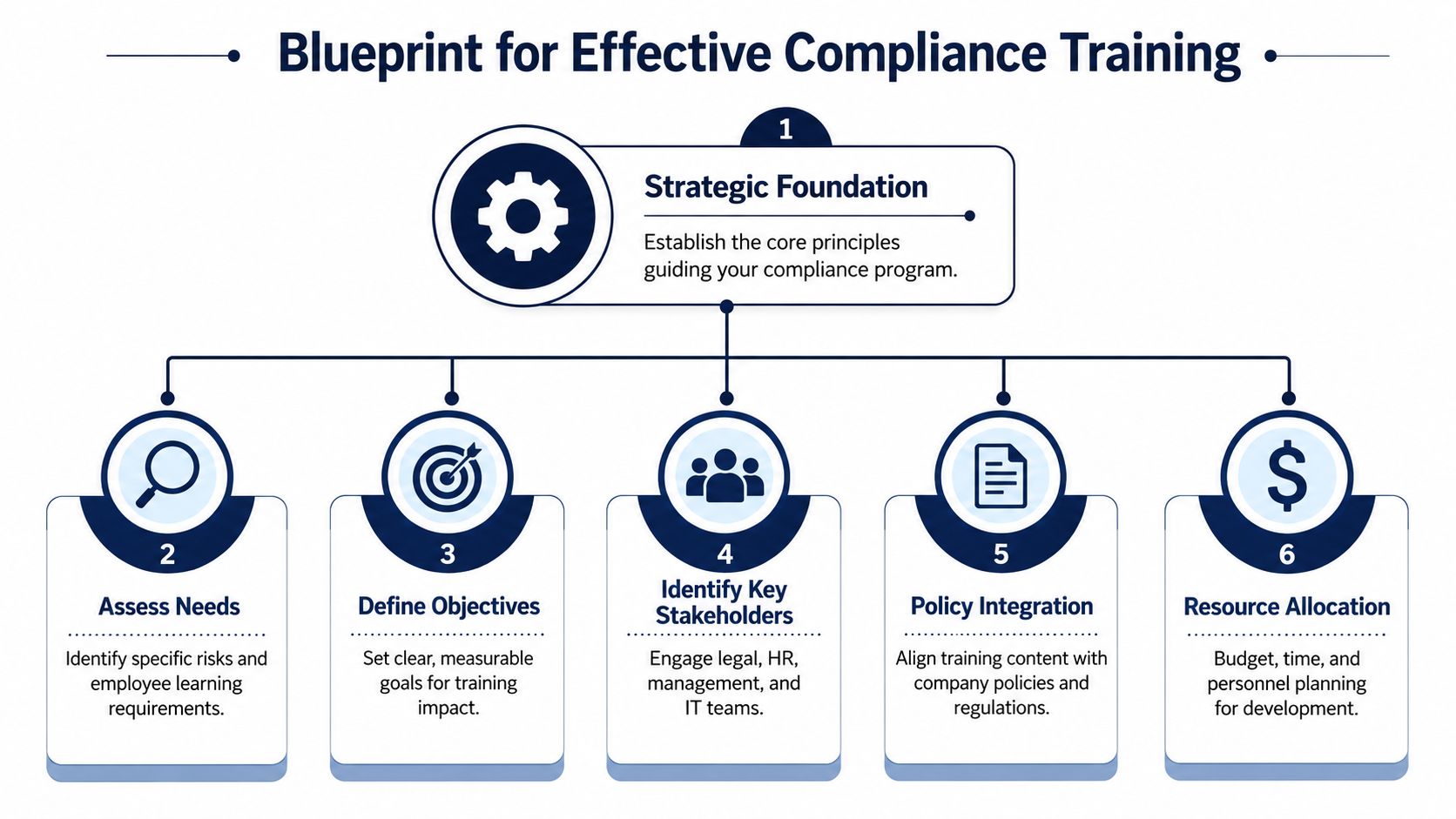
A practical mapping exercise usually includes:
Practical rule: If you can't explain why a role was assigned a course, you probably can't defend the assignment in an audit.
The most useful document in this process is a role-based training matrix. Keep it simple enough that HR, operations, and IT can all read it without translation.
| Role or group | Required training areas | Trigger | Evidence to retain |
|---|---|---|---|
| All employees | Accessibility, basic safety, core conduct and security awareness | Onboarding and scheduled refresh | Completion date, version, acknowledgement |
| Supervisors | Enhanced supervisor compliance and safety leadership content | New role and refresh cycle | Completion date, assessment result |
| Regulated functions | Industry or reporting-entity specific content | Role assignment and program cycle | Completion record, policy link, review trail |
IT's role extends beyond basic support. If you're assigning role-based content through identity groups, HRIS syncs, Microsoft 365 accounts, or SSO, your matrix should align with those systems. Otherwise, people change departments and keep the wrong learning path.
For businesses that operate across borders or manage transportation, adjacent frameworks can also affect curriculum planning. A resource on understanding DOT regulations is useful because it shows how quickly training requirements become role-specific once vehicles, regulated operations, or cross-border activity enter the picture.
Security belongs in the foundation too. Training data often includes personally identifiable information, manager notes, and policy acknowledgements. If your platform setup is weak, your compliance project creates a new risk. That's why training architecture should sit alongside broader data security management practices, not outside them.
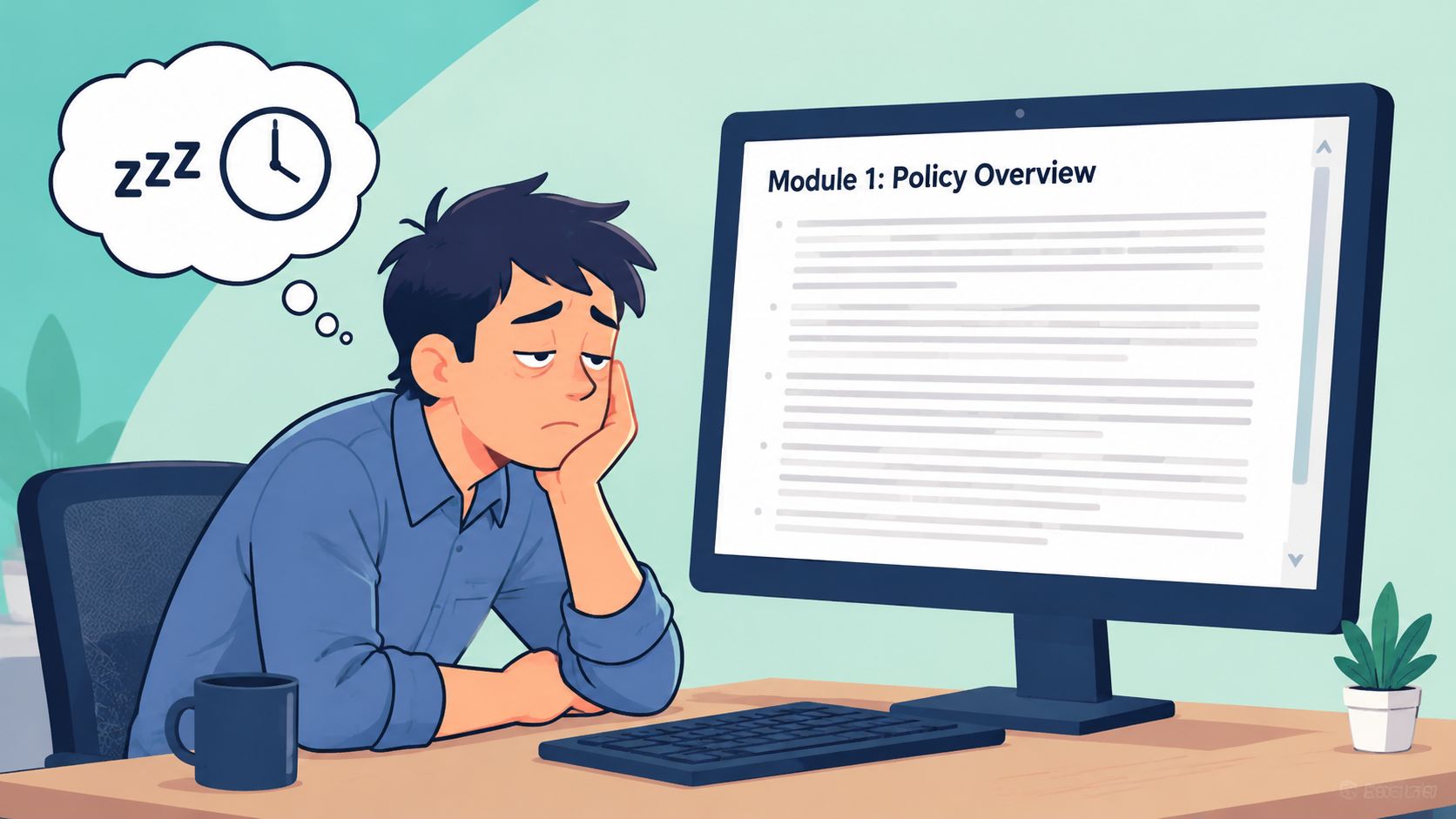
A curriculum fails long before the audit if employees click through it, forget it, and keep handling risky situations the old way.
Once the matrix is set, the next job is to turn obligations into training people can use. Generic content libraries look efficient on paper, but they often miss your systems, your reporting paths, and the decisions employees face in daily work. That gap matters. If the module says “report an incident” but never shows where to report it in Microsoft 365, your ticketing system, or your HR platform, completion records give leadership false confidence.
The strongest curricula use two layers. Start with core training for everyone, then add role-based modules tied to actual exposure.
Core content usually covers workplace conduct, accessibility, privacy basics, security awareness, reporting channels, and incident response expectations. Modular content handles the areas where one mistake carries higher legal, operational, or reputational cost. That includes supervisors dealing with complaints, finance teams handling payment fraud, IT staff managing access, and frontline teams working with sensitive client or patient data.
This structure also helps when requirements change mid-year. Ontario employers, for example, may need to address accessibility obligations for volunteers and role-specific health and safety topics that do not fit a once-a-year generic course, as noted in Compliance Works' guide to mandatory employee training.
Use exposure groups, not just org charts:
Employees retain more when the material reflects the tools and decisions in front of them. Policy summaries have a place, but they should support the lesson, not be the lesson.
Use short scenarios, realistic choices, and clear consequences. Show employees what to do inside the systems they already use. A privacy lesson should reference the forms, folders, approval paths, and communication tools your business operates. A harassment reporting lesson should identify the reporting channel, expected documentation, and manager escalation path. An acceptable use lesson should explain how account sharing, unmanaged devices, and weak passwords create both compliance failures and security incidents.
A few design choices work well across mid-sized organisations:
For leaders rebuilding a program, these strategies for organizational training are useful because they focus on aligning curriculum with job function instead of forcing every topic into one annual course.
Cybersecurity should stay inside the main curriculum, not sit off to the side as a separate awareness effort. In practice, phishing, credential misuse, data handling mistakes, and weak device habits often trigger both compliance exposure and operational disruption. That is why many firms tie compliance modules to broader cybersecurity training for employees, with examples drawn from their actual email platform, file-sharing rules, MFA setup, and incident reporting process.
There is a practical IT trade-off here. The more customized the curriculum becomes, the more you need clean user data, dependable group assignment, version control, and audit-ready reporting in the LMS. A managed services partner can help standardise those connections, map content to identities and roles, and reduce the administrative drift that turns a good curriculum into a tracking problem six months later.
Delivery method changes completion, retention, cost, and administrative overhead. There isn't one perfect model. There is only a model that fits your workforce and your controls.
A manufacturing firm with shift work won't deploy training the same way as a clinic network or a professional services office with hybrid staff. What matters is choosing deliberately instead of inheriting whatever your LMS vendor defaults to.
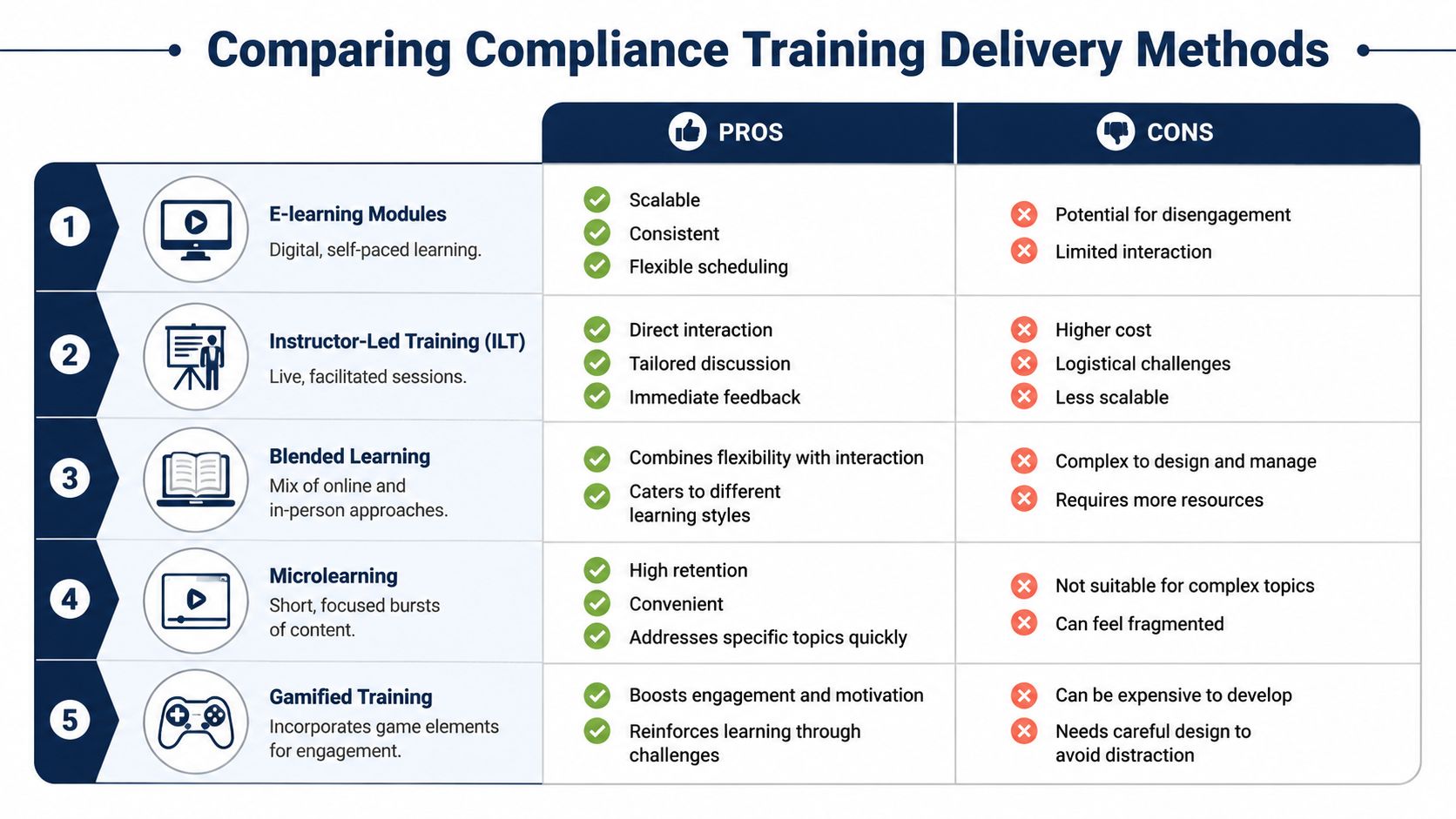
Here's the trade-off most leaders need to see clearly:
| Delivery method | Where it works well | Main limitation |
|---|---|---|
| E-learning modules | Distributed teams, standardised topics, onboarding at scale | Easy to complete without deep engagement |
| Instructor-led sessions | Sensitive topics, discussion-heavy material, leadership training | Scheduling and cost |
| Blended learning | Mixed workforce, moderate complexity, stronger retention goals | More administration |
| Microlearning | Policy updates, reminders, issue-based refreshers | Too narrow for foundational topics |
| Gamified training | Engagement-focused populations, reinforcement | Can distract if poorly designed |
A mid-sized business usually lands on blended delivery. Core modules sit in the LMS. High-risk or management topics use facilitated sessions. Updates and reminders are pushed as short refreshers.
Many compliance programs often run into difficulties. Leaders often buy an LMS through HR or L&D, then ask IT to “hook it up” later. That sequence creates avoidable problems.
Your LMS should be evaluated like any other business system that stores user data and compliance evidence. Check:
If the system can't produce clean records, secure access, and role-based assignments, it isn't just inconvenient. It weakens the whole compliance program.
For regulated education and structured learning environments, the operational lessons in LMS support for Alberta private career colleges are relevant even outside that sector. The same issues show up repeatedly: permissions, content governance, reporting quality, and support ownership.
A managed services partner can help here by handling tenant configuration, identity integration, access reviews, backup considerations, and reporting workflows. That keeps the platform aligned with the rest of your environment instead of becoming another unmanaged SaaS island.
Even a well-built program fails if employees can't fit it into the workday or if managers treat deadlines as optional.
Adoption improves when training is scheduled like an operational requirement, not a side task that people are expected to squeeze in after hours. Enforcement works when it's clear, documented, and consistent.
The strongest rollout plans match training windows to how work happens. Office teams may handle self-paced modules during low-interruption blocks. Shift-based teams often need pre-booked sessions, kiosk access, or staggered release windows. Supervisors need time allocated for both their own training and follow-up conversations with staff.
Three scheduling approaches tend to work:
Communication matters just as much as timing. Employees complete required training faster when the message explains why it matters, what is due, how long it should take, and what support exists if the content or platform creates a barrier.
Enforcement doesn't need to be punitive, but it does need to be visible. Completion deadlines should sit in policy, be reflected in the LMS, and be escalated through managers when missed.
This is especially important in regulated environments. Under Canada's Proceeds of Crime (Money Laundering) and Terrorist Financing Act, reporting entities must maintain a written, ongoing compliance training program and conduct a mandatory effectiveness review at least every two years that covers policies, risk assessments, and training plans, as set out in FINTRAC guidance.
That requirement has an operational implication. You can't enforce what you can't track. At minimum, you need a process for:
A common failure point is the “manager discretion” model where some leaders chase completions and others don't. That produces patchy records and inconsistent risk exposure. Accountability has to be systemic.
People follow the signal leadership sends. If training due dates move every time the business gets busy, staff learn that compliance is negotiable.
A mid-sized business can hit a 100 percent completion rate and still fail an audit, miss a reporting obligation, or repeat the same preventable security mistake. The gap is usually measurement. Leaders track who finished the module, but not whether people can apply the rule under pressure, in the systems they use every day.
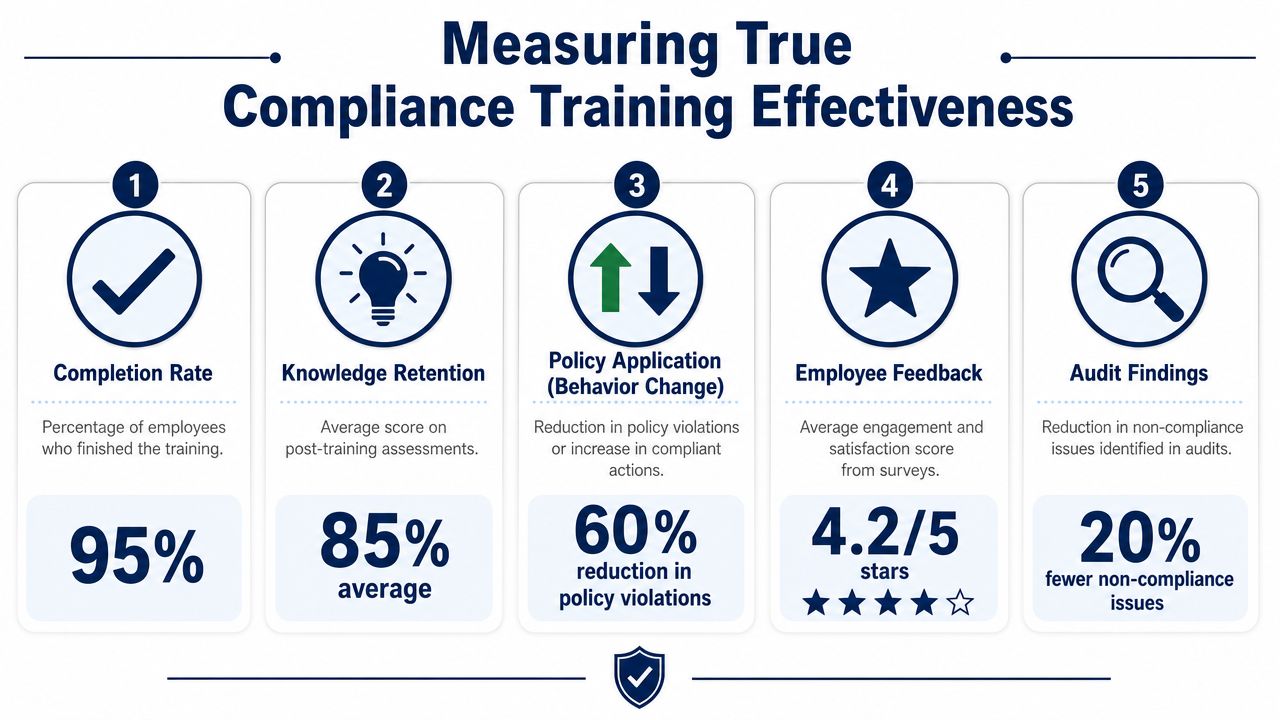
Useful measurement connects training results to operational behaviour. For IT and cybersecurity teams, that means looking at whether staff classify data correctly, follow incident reporting steps, use approved tools, and avoid repeat policy exceptions after training is assigned.
A practical scorecard usually includes:
The review process matters as much as the metrics. If employees pass quizzes but still send sensitive files through the wrong channel, the content may be too generic, the workflow may be poorly designed, or the system controls may not support the policy. If one business unit keeps missing the same requirement, check manager reinforcement, role mapping, and tool configuration before rewriting the course.
Traliant notes that behaviour-based scenarios, interactivity, post-training surveys, and clear learning objectives improve comprehension and help measure whether employees can apply what they learned at work in its review of compliance training effectiveness.
A simple review rhythm looks like this:
| Review activity | What to examine | What action follows |
|---|---|---|
| Post-training check | Quiz results, confidence survey, scenario errors | Clarify weak topics |
| Manager review | Behaviour on the job, reporting habits, repeated issues | Coaching or targeted refresh |
| Program review | Content currency, policy alignment, reporting gaps | Update modules and assignments |
This is also where the LMS and your broader IT stack either help or create blind spots. If training records sit in one system, HR data in another, and incident trends in a third, reporting becomes manual and audit preparation turns into cleanup. Consolidated analytics and reporting for operational decision-making gives leadership one view of assignments, learning evidence, and business outcomes.
For regulated environments with privacy obligations, platform features affect measurement quality too. Audit trails, access controls, retention settings, and reporting exports all shape how defensible your program is. LearnStream's HIPAA compliance guide is US-focused, but the underlying LMS considerations are still useful for Canadian organizations that need stronger controls around training records and sensitive content.
Continuous improvement should be scheduled, not assumed. Set a review cadence, assign an owner, compare training data against incident and audit patterns, and update content when the business changes. That is how training becomes a control, not just an annual exercise.
Most businesses don't struggle because they don't care about compliance. They struggle because the program spans too many owners. HR manages policy acknowledgements. Operations owns some procedures. Legal interprets obligations. IT controls systems, access, and data security. Without coordination, training becomes a patchwork.
That's why the IT and cybersecurity layer matters so much. Your training platform is a business system. Your reporting is a control function. Your user provisioning process affects who gets trained and when. Your security stack influences whether policy and training show up in daily behaviour.
When a managed services partner is involved early, the compliance program is easier to govern. The technical work becomes structured:
For healthcare or cross-border privacy environments, specialized content still has to sit within that broader governance model. A resource like LearnStream's HIPAA compliance guide is useful because it highlights platform features that matter when regulated training must be documented, secured, and repeatable.
This is also where a vCIO perspective adds value. The question isn't just which course library to buy. It's how training fits into your overall risk posture, your identity strategy, your documentation standards, and your management cadence. One option in that model is CloudOrbis Inc., which provides managed IT, cybersecurity support, and strategic IT consulting that can support LMS integration, access control, reporting workflows, and broader compliance operations.
A sustainable program doesn't depend on one HR administrator remembering deadlines or one manager manually exporting reports. It runs through defined ownership, reliable systems, and a maintenance cycle that keeps content and records current.
That's the same discipline required for broader proactive IT maintenance in Calgary and across any distributed business environment. Reactive support won't keep a compliance program healthy. Ongoing oversight will.
The right outcome isn't “everyone completed training.” The right outcome is simpler: the right people receive the right training at the right time, the business can prove it, and the training changes behaviour where risk resides.
If your compliance training program is spread across HR files, disconnected platforms, and manual reporting, it's time to tighten the system. CloudOrbis Inc. helps mid-sized Canadian businesses align training delivery, cybersecurity, reporting, and IT governance so compliance becomes operationally manageable instead of audit-season chaos.
September 27, 2026
How to Recover from a Ransomware Attack: An SMB PlaybookLearn how to recover from a ransomware attack with a step-by-step SMB playbook covering containment, backup restore, compliance, and post-incident hardening.
Read Full Post
September 26, 2026
On-Premise to Cloud Migration Checklist: 10 StepsUse this on-premise to cloud migration checklist to plan assessment, compliance, backups, sequencing, testing, cutover, and optimization for SMBs.
Read Full Post
September 25, 2026
Is VoIP Good for Small Business in Canada? a 2026 GuideIs VoIP good for small business in Canada? Explore costs, benefits, reliability, security, and migration tips for SMBs considering VoIP in 2026.
Read Full Post
