IT Support Services for Alberta Private Career Colleges
A practical guide to IT support services for Alberta private career colleges, covering helpdesk, cybersecurity, cloud, backups, and compliance choices.

A practical guide to IT support services for Alberta private career colleges, covering helpdesk, cybersecurity, cloud, backups, and compliance choices.

A registrar notices the problem during enrolment week. The student information system is slow, the learning platform is rejecting logins, a campus printer has stopped working, and the finance team can't reconcile a tuition record with the college's approved program list. Nobody sees a dramatic cyberattack. Yet the college is already exposed, because Alberta private career colleges depend on digital records for licensing, student aid, outcomes reporting, contracts, refunds, and daily instruction.
That makes IT support services for Alberta private career colleges more than a helpdesk purchase. The right provider protects the systems that support the licence. The wrong provider waits for failures, closes tickets without addressing recurring causes, and leaves the college unable to produce clean evidence during regulatory review.
Alberta's sector has become larger and more operationally complex. By November 2023, the province reported 222 private career colleges, 1,235 licensed programs, and about 50,000 students in the sector, while an earlier provincial overview recorded roughly 170 colleges and more than 890 vocational programs. Alberta's private career college engagement summary shows why technology decisions now need to account for multiple campuses, delivery formats, programs, and reporting obligations.
A private career college may look like a modest training centre from the street. Inside, it runs a tightly connected operating environment. Admissions staff use a student information system, instructors depend on a learning management system, finance teams process payments, administrators maintain contracts and records, and students expect reliable access to email, portals, video classrooms, and course materials.
A failure in one system spreads quickly. If identity services fail, students may lose access to the LMS, Microsoft 365, exams, and support channels at the same time. If a program record changes in the provincial registry but the internal master record doesn't, admissions staff can send incorrect information or create duplicate tickets. If a backup can't be restored, a routine audit request becomes an urgent reconstruction exercise.
Alberta's public registry should anchor the technology environment. Before an IT provider designs integrations or workflows, the college should validate licensing status, campus locations, and program listings in the Private Career Colleges Registry. Those details should then align with the SIS, LMS, CRM, identity platform, and student communications tools.
Your MSP should document ownership, dependencies, and recovery priorities for at least these systems:
Alberta requires private career colleges to file annual reports covering graduation, job placement, enrolment, and withdrawals. The provincial overview also states that a 70% minimum benchmark for graduation and job placement over four consecutive reporting periods can trigger possible licence action. The Alberta government engagement summary makes the operational implication clear: data quality and availability affect more than convenience.
Practical rule: Treat the SIS, registry data, and outcome records as compliance infrastructure. They shouldn't sit outside the IT service plan.
A college that loses Wi-Fi for an hour has a teaching problem. A college that loses access to enrolment records, attendance data, or outcome evidence during a reporting deadline has a governance problem. The distinction matters because break-fix support usually measures activity, not whether the college can prove that its records are accurate and recoverable.
The province's enforcement approach reinforces that risk. In April 2025, CBC reported that Alberta had sanctioned more than 20 private career colleges, suspended two colleges' licences for select courses, and stopped 15 colleges from enrolling new students in 64 programs. The same report described a public database covering hundreds of programs from 214 institutions, including tuition, books, supplies, and licence status. CBC's report on Alberta's tighter career-college oversight shows why colleges need accurate records and dependable public-facing information.
IT support should therefore protect enrolment deadlines, reporting periods, student communications, and audit evidence. If you need to manage event images and digital files alongside institutional records, a resource such as troubleshoot your photo collection can help staff resolve collection and access issues without turning every problem into an internal IT escalation. For a broader explanation of why proactive support matters, see the benefits of managed IT services.
A college shouldn't buy a list of tools and hope they work together. It should buy defined outcomes, documented controls, and evidence that the provider is meeting its obligations. The registrar needs dependable records. Finance needs stable payment and accounting workflows. Instructors need usable classrooms. Leadership needs to know whether security and recovery controls work before an incident exposes the gap.
The following service set is the minimum sensible baseline for a multi-campus or hybrid private career college.
| Service | Deliverable | Proof metric | Alberta outcome protected |
|---|---|---|---|
| 24/7 helpdesk | Canada-based support, ticket ownership, escalation, and coverage for enrolment periods | Response and resolution reports by severity, system, and campus | Student access, intake continuity, and registrar operations |
| Managed cybersecurity | EDR, MDR, patching, phishing education, MFA support, and dark-web monitoring | Protection status, patch compliance, incident records, and training completion | Student privacy, breach readiness, and business continuity |
| Microsoft 365 or Google Workspace management | Tenant hardening, conditional access, identity lifecycle, and licensing administration | MFA coverage, risky sign-in review, privileged-account review, and configuration records | Secure staff access and controlled Student Aid submissions |
| Backup and disaster recovery | Immutable copies, documented retention, recovery priorities, and tested restores | Restore test evidence, backup success reports, and recovery results | Student records, contracts, refunds, and outcome-data audits |
| VoIP and unified communications | Managed calling, auto attendants, queues, softphones, and classroom communication | Call quality trends, outage records, and queue performance | Student service, emergency contact, and distributed-campus coordination |
| Endpoint management | Managed faculty laptops, lab workstations, software deployment, and device inventory | Inventory accuracy, patch status, encryption status, and device health | Teaching availability and controlled access to records |
| Network monitoring and SD-WAN | Campus monitoring, segmented networks, secure remote access, and location-aware alerting | Uptime reports, Wi-Fi incidents, VPN events, and recurring-failure analysis | Hybrid instruction and reliable service across campuses |
24/7 helpdesk support only has value when the contract defines what happens next. Require severity-based response targets, named escalation contacts, ticket notes that explain the fix, and trend reporting that separates student access problems from infrastructure failures. Tie enhanced coverage to enrolment, reporting, and examination periods instead of accepting a generic business-hours promise.
Cybersecurity should include more than antivirus. EDR monitors endpoint behaviour, MDR adds human or automated investigation, patching closes known weaknesses, phishing training reduces avoidable account compromise, and dark-web monitoring can identify exposed credentials. MFA should apply to every staff and administrator account, with conditional access restricting risky sign-ins and unmanaged devices.
A backup dashboard showing green status doesn't prove that a college can recover. Ask the provider to demonstrate restoration of a representative student record, shared document, application, or server image. Copies should be protected against unauthorised alteration, and restore tests should produce records that an auditor can understand.
Cloud management also needs discipline. Whether the college uses Microsoft 365, Google Workspace, or a combination, the provider should document tenant ownership, administrator roles, retention settings, security defaults, and the process for removing access when an employee or instructor leaves.
Buy evidence, not reassurance. If the provider can't show a restore report, MFA coverage record, ticket trend, or configuration baseline, the control may exist only in the sales presentation.
VoIP and network monitoring deserve equal attention in hybrid delivery. Alberta program listings include combined onsite and online occupational diplomas, including a 640-hour, 32-week Computer Support Technician program in Calgary and Edmonton. The Alberta program listing illustrates why endpoint support, MFA, remote troubleshooting, Wi-Fi, VPN, and lab resilience need to work together.
For providers building a broader operating model, an outsourced IT growth playbook offers useful context on how external support can scale with an organisation. Colleges comparing service models can also review managed IT services in Alberta before writing a procurement specification.
Compliance starts with a control map, not a software catalogue. The college should identify each regulatory obligation, the record that proves compliance, the system that stores it, the staff member who owns it, and the recovery method if the primary system becomes unavailable.
The Private Career Colleges Registry is the authoritative provincial control point for due diligence. Reconcile the registry against an internal master record for approved campuses, program names, delivery locations, tuition information, and contact details. Don't let each department maintain its own spreadsheet.
Use a three-step control model:
A registry record isn't static. When a college adds a delivery mode or expands its operating footprint, unsynchronised systems can produce incorrect notices, reporting gaps, and duplicated support tickets. One source of truth for campus metadata should feed downstream systems.
The Alberta private career college compliance guidance confirms that student records must be maintained separately for each student. Your document platform should enforce individual record structures, role-based access, secure archival, retention rules, and retrieval that doesn't require a technician to search personal inboxes.
Alberta's reporting framework requires annual information on graduation, job placement, enrolment, and withdrawals. The provincial benchmark of 70% for graduation and job placement over four consecutive reporting periods creates a direct technology requirement. The SIS must preserve the source of each data field, identify corrections, record timestamps, and export a consistent reporting package.
That means admissions, attendance, academic progress, graduation, and employment follow-up can't operate as disconnected workflows. Assign data owners, document definitions, and prevent unauthorised edits to closed reporting periods. A dashboard can help leadership identify issues, but it doesn't replace source records and change history.
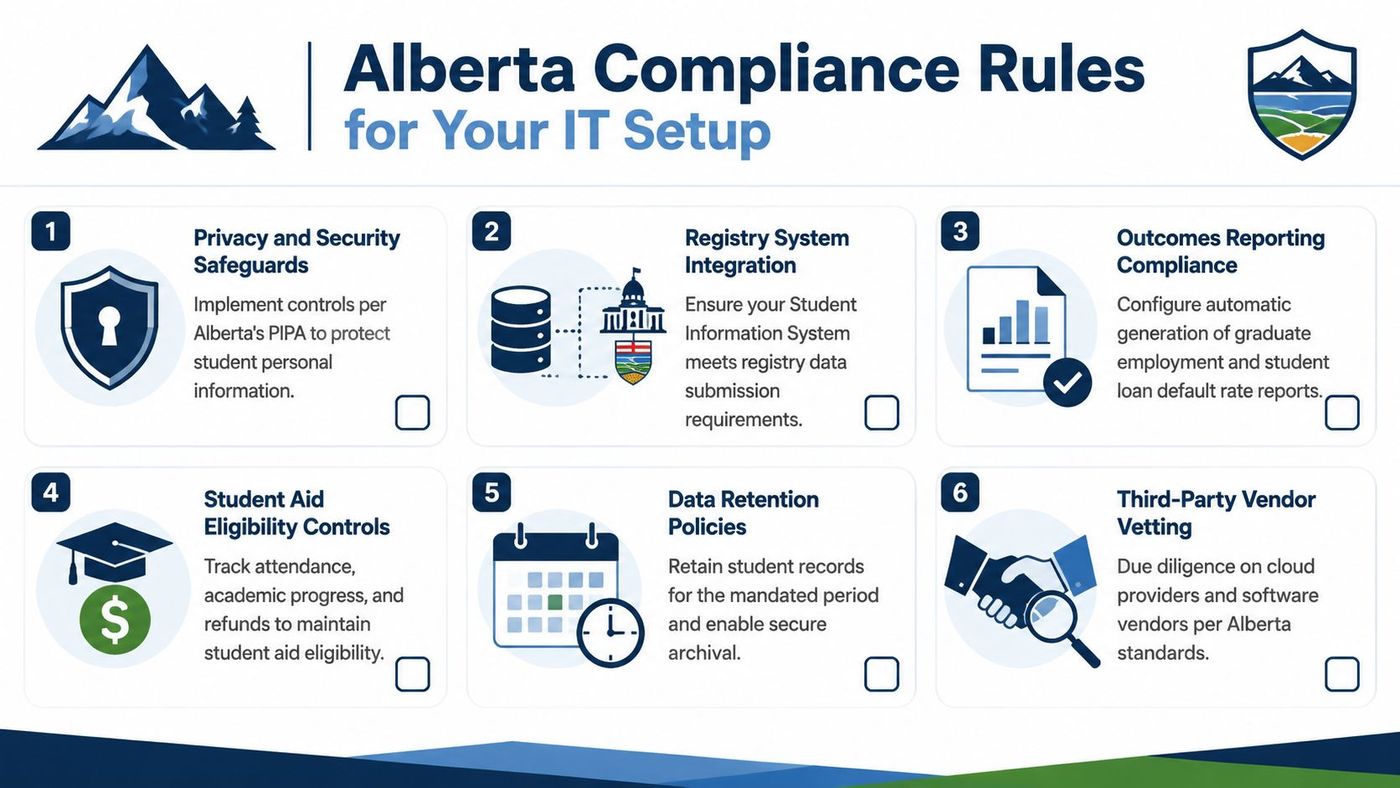
Before a private career college program can qualify for Alberta Student Aid designation, it must be licensed under the Private Vocational Training Act by the Director of Private Vocational Training in the Private Career Colleges and Compliance Branch. Alberta Student Aid states that a full-time designated program must be post-secondary in nature, lead to a certificate, diploma, or degree, run for at least 12 weeks, and average at least 20 instruction hours per week. The Alberta Student Aid policy manual sets those requirements out directly.
Your scheduling, attendance, academic progress, refund, and records systems need to preserve evidence of those conditions. IT should also maintain a documentation package covering access controls, vendor arrangements, data flows, backup procedures, incident response, and system ownership.
PIPA controls belong in the same design. Use consent records where required, MFA for staff, conditional access, encryption, access reviews, audit logs, breach-response procedures, and vendor due diligence. If a SaaS provider stores information outside Canada, legal and privacy teams need to assess the transfer arrangement and contract terms before the service is approved. IT should document the decision and retain the relevant vendor evidence.
For a detailed operational perspective, review IT compliance needs for Alberta private career colleges. The technology stack should defend the licence by making compliance evidence accurate, accessible, and difficult to alter unnoticed.
Don't shortlist providers because their sales deck includes education logos. Score them against the work your registrar, instructors, finance team, and compliance lead need completed.
Ask each candidate for evidence of experience with institutions governed by the Private Vocational Training Act. The provider should understand licensing records, Student Aid designation, outcome reporting, student contracts, refunds, and the need to retrieve a single student's file without exposing other records.
| Evaluation criterion | Weight | Vendor A | Vendor B | Vendor C |
|---|---|---|---|---|
| Alberta private career college experience | High | Evidence required | Evidence required | Evidence required |
| Registry and SIS data governance | High | Score after demonstration | Score after demonstration | Score after demonstration |
| Microsoft 365 or Google Workspace security | High | Verify tenant controls | Verify tenant controls | Verify tenant controls |
| Canadian hosting and data-residency options | High | Confirm in writing | Confirm in writing | Confirm in writing |
| Student Aid and audit evidence support | High | Request sample evidence pack | Request sample evidence pack | Request sample evidence pack |
| Helpdesk and after-hours coverage | High | Review SLA | Review SLA | Review SLA |
| Cyber insurance and security controls | High | Validate certificates | Validate certificates | Validate certificates |
| Backup immutability and restore testing | High | Witness a test | Witness a test | Witness a test |
| Named technicians and onsite coverage | Medium | Identify team | Identify team | Identify team |
| Exit process and credential handback | Medium | Review contract | Review contract | Review contract |
The table should become a procurement worksheet, not a decorative appendix. Require a live demonstration of a registry reconciliation workflow, a privileged-access review, a restore test, and a ticket escalation. If the provider avoids demonstrations, lower its score.
Per-user pricing can suit colleges with predictable staff and instructor populations, but it may not reflect lab workstations or shared classroom devices. Per-device pricing gives clearer endpoint visibility, yet can become difficult to manage when campuses rotate equipment or support personal devices. All-inclusive managed pricing simplifies budgeting, but only if the agreement defines included services, exclusions, project fees, and onsite work.
Ask for:
A generic vendor may be able to reset passwords. An Alberta-ready MSP should help the college preserve evidence, control changes, recover records, and explain the environment to leadership. Use this Alberta MSP evaluation resource to sharpen the questions before issuing a request for proposal.
A Calgary college moving from on-premises servers to a Canadian-hosted cloud environment can't treat migration as a weekend technology project. It has to protect enrolment, classes, assessments, and the one classroom server still needed by a trades program.
Spend two weeks documenting devices, users, applications, network paths, administrator accounts, SIS and LMS integrations, and the records that feed registry reconciliation. Identify which systems support instruction, which support administration, and which contain regulated or sensitive information.
The discovery output should include an application dependency map and a cutover risk register. It should also identify unsupported devices, stale accounts, undocumented vendor access, and local files that staff may mistakenly treat as official records.
Build the Microsoft 365 tenant, endpoint policies, conditional access, MFA, EDR, backup jobs, and administrative roles in a staging environment before moving production users. Configure identity groups around actual roles, such as registrar, instructor, finance, admissions, and student support.
Back up the systems before migration and verify that the copies can be restored. The trades classroom server can remain onsite if the college documents its purpose, access path, backup method, patch responsibility, and recovery sequence.
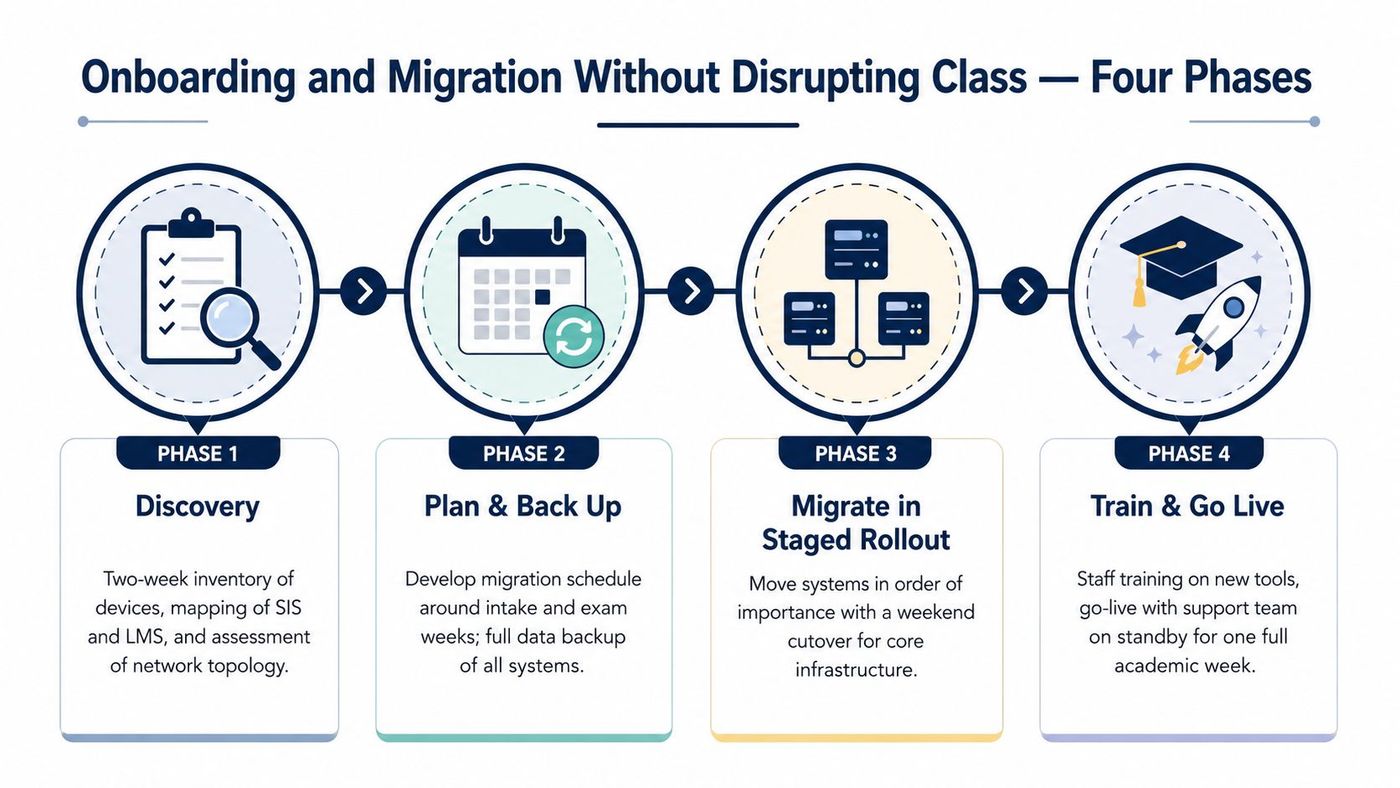
Migrate users by cohort or department during low-traffic evenings. Start with a small operational group, confirm sign-in, email, shared files, printing, LMS access, and mobile access, then expand the rollout.
Keep a rollback plan and parallel access during the first 10 business days. That window gives the helpdesk time to identify account, device, and permission problems before the college relies completely on the new environment.
The provider should monitor VPN, Wi-Fi, printing, classroom displays, video tools, and authentication by campus. Ticket analysis matters here because repeated incidents often reveal a missing policy or network design problem rather than individual user error.
Training should be short and role-based. Instructors need instructions for classroom access, MFA recovery, file sharing, and video teaching. Registrars need record-handling and reporting workflows. Students need simple guidance for passwords, MFA, LMS access, and support requests.
Schedule a go-live review with the college's leadership and service provider. Review unresolved tickets, backup status, privileged accounts, registry-related integrations, and the remaining risks. A structured cloud migration approach for Alberta organisations can help the project team keep the work tied to business continuity rather than infrastructure alone.
Put service levels in the contract, not only in the proposal. A college needs written commitments for severity-based response, communication, resolution or recovery, after-hours escalation, monthly uptime reporting, and named coverage across Calgary, Edmonton, and other operating locations.
The agreement should define a ransomware recovery time objective under 24 hours, with the recovery sequence and assumptions documented rather than left to interpretation. It should also include a 24/7 critical-incident line for active cyber events.
A quarterly business review should compare the prior quarter's performance, not just repeat a list of completed tasks. Require reporting on:
Pricing models should reflect the environment. Fully managed support in Alberta is often presented in the range of CAD 110 to 220 per user per month, while co-managed arrangements may use per-device or per-ticket blocks. Treat that range as a budgeting reference, not a substitute for a scope review, and require every included and excluded item in writing.
Annual tabletop exercises should cover ransomware and data-breach scenarios. Every instructor and administrator should receive cyber-awareness training, with completion records retained as part of the Student Aid designee file where relevant.
Renewal clauses should require the provider to improve or maintain prior-quarter performance. A vendor shouldn't receive a renewal just because it answered tickets. The contract should make service quality visible and give the college a clear remedy when performance declines.
Cheap support becomes expensive when it leaves the college unable to prove what happened. Break-fix service without an SLA doesn't protect reporting deadlines. Shared administrator passwords destroy individual accountability. A single-site helpdesk ignores remote instructors and distributed campuses. Backups stored in the same environment as production systems can fail alongside the systems they are supposed to protect.
Cloud sprawl creates another problem. Staff may adopt separate file-sharing, forms, video, and student communication tools without checking privacy, retention, access, or vendor terms. PIPA obligations and Student Aid documentation don't disappear because a department bought the application on a credit card.
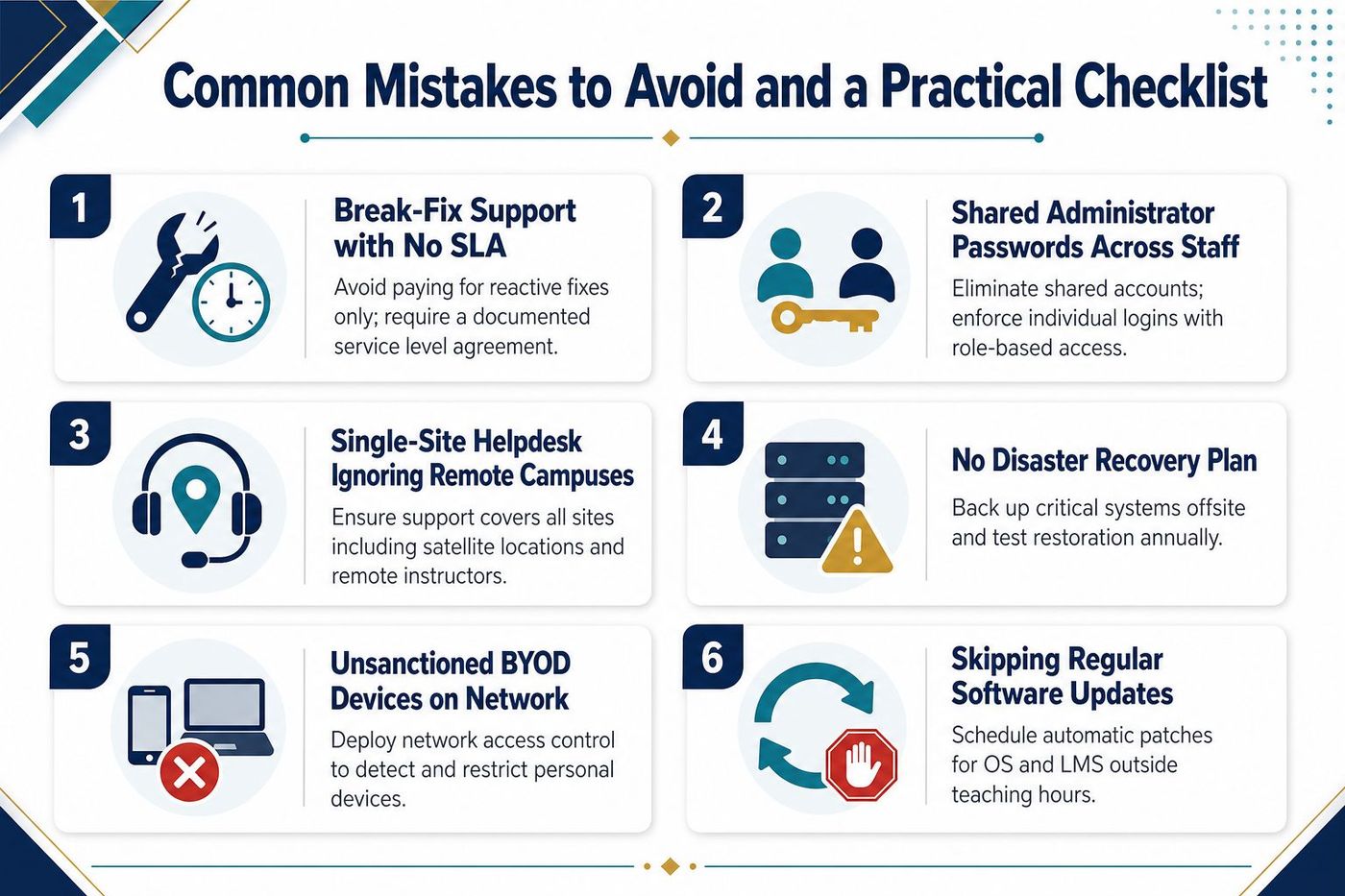
Use this pre-procurement checklist with the board, registrar, finance lead, and privacy owner:
Don't sign until the provider can explain how each item will work in your environment. The right IT partner will connect technology decisions to licensing, student records, privacy, and operational continuity instead of treating compliance as paperwork added after implementation.
CloudOrbis Inc. provides managed IT support, cybersecurity, Microsoft 365 management, cloud migration, backup and disaster recovery, VoIP, and strategic IT consulting for organisations that need dependable operations. If your Alberta private career college needs an audit-ready support model with 24/7 Canada-based helpdesk coverage and proactive monitoring, visit CloudOrbis Inc. to discuss your environment and next steps.
Book a 30-minute call with a senior engineer. No sales script, just straight answers about your environment.


