Cloud Migration in Alberta: A Guide to Seamless Cloud Adoption
Plan a cloud migration Alberta with our proven playbook for strategy, PIPA compliance, and selecting the right vendors to ensure a smooth transition.

Plan a cloud migration Alberta with our proven playbook for strategy, PIPA compliance, and selecting the right vendors to ensure a smooth transition.
For any business charting its future, a successful cloud migration in Alberta is much more than a simple tech upgrade. It's a strategic pivot toward building a real competitive advantage. At its core, this shift means moving your company's data, applications, and IT infrastructure from on-site servers to a cloud environment, which in turn unlocks a new level of flexibility, security, and resilience.
Alberta is quickly becoming a prime destination for businesses moving to the cloud, and for good reason. The province offers a unique blend of economic and technological advantages that create an ideal environment for growth and innovation. For medium-sized organizations, this is a golden opportunity to tap into enterprise-level capabilities without the staggering price tag.
This trend isn't just a coincidence; it's fuelled by a potent mix of factors that directly benefit local businesses. A smart cloud migration in Alberta is less about just moving servers around and more about plugging into these provincial opportunities to build a stronger, more agile operation.
Alberta’s supportive business climate translates into tangible benefits for organizations planning a move to the cloud. The key drivers are clear:
A well-planned cloud migration allows your business to directly tap into these local strengths. Instead of sinking time and money into managing physical hardware, you can focus your resources on what you do best, knowing your IT is backed by a powerful and cost-effective infrastructure.
The momentum behind cloud migration in Alberta isn't just talk; it's backed by hard numbers. Alberta's cloud computing market is expanding at a remarkable 19.18% compound annual growth rate (CAGR), blowing past the national average. This rapid adoption shows just how eager local businesses are to modernize and seize new opportunities.
This powerful surge is a clear signal: now is the time to seriously evaluate how the cloud can empower your organization. By aligning your business with this trend, you’re not just keeping up, you’re positioning yourself to lead. As you map out your own strategy, remember that partnering with a managed services provider in Alberta can give you the on-the-ground expertise needed to navigate this dynamic market.
Before a single file moves, a thorough assessment is your most critical step. A successful cloud migration in Alberta doesn't start with technology; it starts with a deep, honest look at your current IT environment. This discovery phase is your blueprint for a smooth, predictable, and cost-effective transition.
Think of it like surveying a plot of land before you build a house. You need to know the terrain, identify potential obstacles, and map out exactly where everything will go. Without this vital planning, you're inviting costly surprises and frustrating delays down the road. This initial audit gives you the clarity to make informed decisions, ensuring every part of your migration is aligned with your business goals.
First things first: you need a comprehensive catalogue of your current IT assets. This isn't just about listing servers. It means documenting every piece of hardware, software, and network component your business relies on day-to-day. For a mid-sized logistics company in Calgary, this could be everything from the warehouse servers running inventory software to the specific applications your finance team uses for invoicing.
Your inventory should detail:
This process often uncovers "shadow IT", software or services employees use without official approval. For a structured approach to this phase, our guide on IT project planning offers a solid framework.
Once you have your inventory, the real work begins: mapping how everything connects. Most applications don't operate in a silo; they depend on other systems to function. A customer relationship management (CRM) tool, for example, might pull data from your accounting software and link to an email marketing platform.
Mapping these dependencies is like creating a circuit diagram for your business operations. It shows you the flow of data and makes it obvious which components have to move together. Ignoring this can lead to massive post-migration headaches when a critical application breaks because its dependent database was left behind or reconfigured incorrectly.
A manufacturing firm near Edmonton learned this the hard way. They moved their primary production scheduling application to the cloud but overlooked a small, on-premise database it relied on for material codes. The resulting downtime halted their production line for hours until the connection could be re-established.
To build a compelling business case for moving to the cloud, you need to understand what your current on-premise infrastructure truly costs. This is done through a Total Cost of Ownership (TCO) analysis. A TCO goes far beyond the sticker price of a server.
It includes a whole range of direct and indirect expenses:
Alberta's unique position in the Canadian tech scene is shaped by its energy resources, supportive policies, and infrastructure growth. This flow from provincial advantages to market expansion is a key driver.
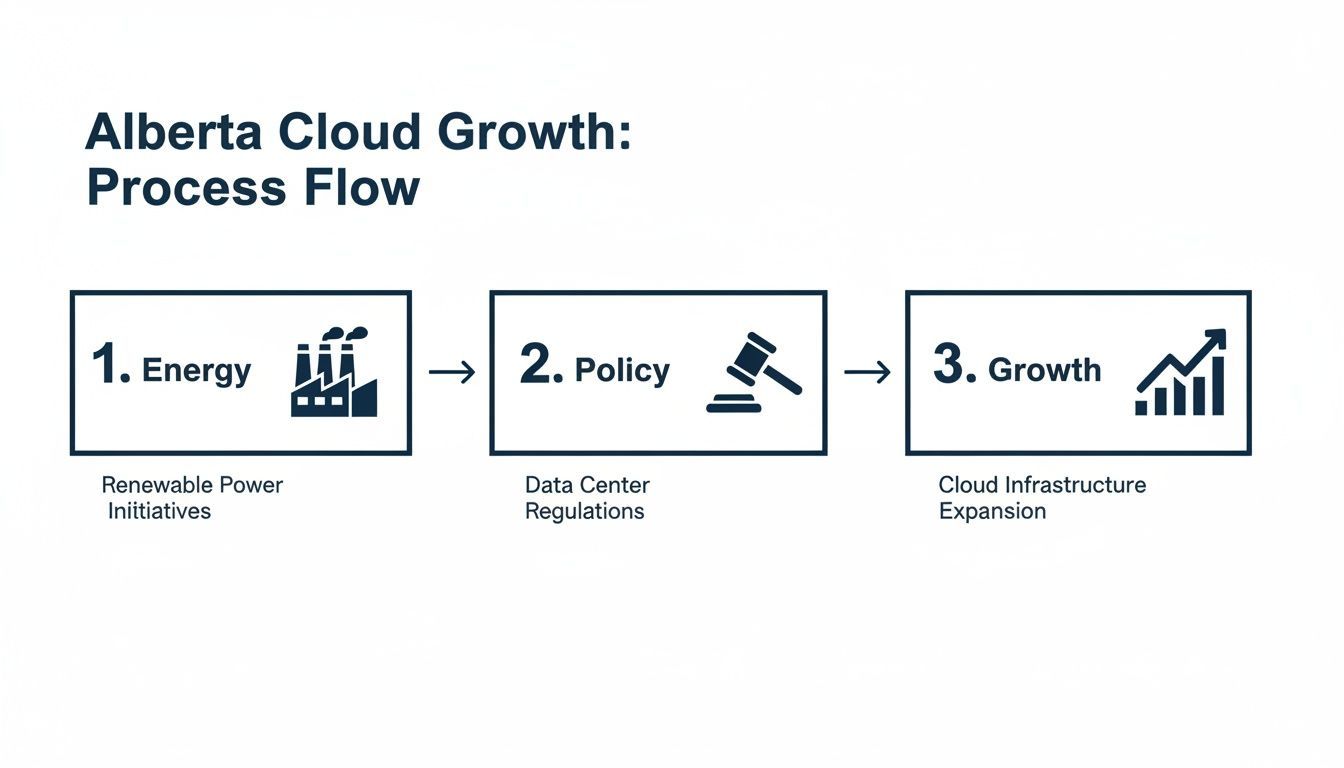
The combination of affordable energy and proactive government policy directly fuels the expansion of cloud infrastructure, creating a powerful growth cycle for Alberta's digital economy. By accurately calculating your TCO, you can draw a clear, data-driven comparison against the projected costs of a cloud solution. This financial clarity is essential for getting stakeholder buy-in and proving the long-term return on investment.
Getting your cloud migration right in Alberta means getting compliance right from the start. This isn’t just a box to tick, it’s the foundation of your entire project. If you fall foul of data privacy laws, you’re looking at serious fines, a damaged reputation, and customers who no longer trust you. For any Alberta business, navigating the legal side is just as important as the tech.
When you move your data to the cloud, you don’t offload the responsibility for it. You are still the custodian of that information and remain 100% accountable for keeping it safe. That means you must be sure your cloud provider’s setup and practices meet both provincial and federal rules. It's a detail you absolutely cannot afford to get wrong.
The core piece of legislation for private businesses here is Alberta's Personal Information Protection Act (PIPA). It lays out the rules for how organizations collect, use, and share personal information. If your business operates in Alberta and handles any data that could identify a person, from customer lists to employee files, PIPA applies to you.
As you plan your move to the cloud, PIPA demands you do your homework. You need clear, written policies for handling personal information, strong safeguards to protect it, and total transparency with people about the data you hold. The cloud adds another layer; you must be able to prove your cloud vendor provides the same level of protection you’re legally required to have.
If you’re in healthcare, the standards are even higher. Alberta's Health Information Act (HIA) governs everything to do with health information. This data is rightly considered some of the most sensitive out there, and the HIA sets a very high bar for protecting it. For any business serving the health industry, your entire cloud strategy has to be built around HIA compliance. This isn't optional. It means you must have:
Running a full Privacy Impact Assessment is often a required first step. If you're new to this, our guide on conducting a Privacy Impact Assessment in Alberta is a great place to start.
To make things more interesting, the federal Personal Information Protection and Electronic Documents Act (PIPEDA) also factors in. PIPEDA generally covers federally regulated industries like banks and airlines, as well as any data that crosses provincial or international borders.
The good news? Alberta's PIPA is considered "substantially similar" to the federal law, so it usually takes precedence for business conducted within the province. The catch is that if your business transfers personal data across provincial lines, PIPEDA’s rules kick back in. This is why working with a cloud vendor that guarantees data residency within Canada is almost always the safest and simplest choice.
| Legislation | Governs | Key Cloud Requirement |
|---|---|---|
| PIPA | Private-sector businesses operating within Alberta. | You must ensure your cloud provider has "comparable" security safeguards to protect personal information. |
| HIA | Health information custodians (e.g., clinics, health service providers). | Requires extremely strong security controls, audit logs, and careful management of data location to prevent unauthorized disclosure. |
| PIPEDA | Federally regulated industries and inter-provincial/international data transfers. | If you move data across provinces, your cloud architecture must comply with federal transfer rules. |
Understanding these distinctions ensures you pick a cloud solution that doesn't just work technically but also keeps you on the right side of the law.
Your choice of a cloud partner directly shapes your compliance posture. Don't just take a sales pitch at face value, you need to dig in and ask tough questions to confirm they can walk the talk.
Here is a practical checklist to use when you’re talking to potential providers:
Tackling these legal requirements head-on ensures your cloud migration in Alberta is built on a solid, secure, and compliant foundation.
You’ve done the hard work of discovery and sorted out your compliance obligations. Now for the interesting part: deciding how you’ll actually move to the cloud and what that new environment will look like. The best path forward hinges entirely on your specific applications, budget, timeline, and long-term goals. Making a smart choice at this stage is absolutely critical to getting a real return on your investment.
This comes down to two key decisions. First, you need a migration strategy that defines how each application gets to the cloud. Second, you’ll pick the cloud service models that will become the foundation of your new IT architecture.
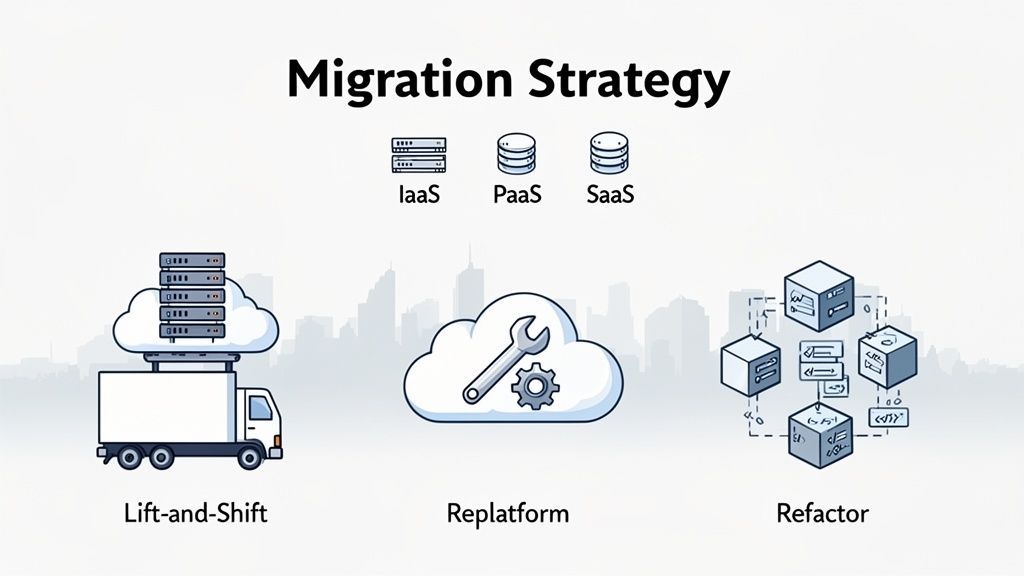
While there are many approaches, they boil down to three core strategies. Getting familiar with these will help you map out the most sensible path for every piece of your IT puzzle.
Rehosting, better known as lift-and-shift, is the most direct route. Think of it like moving houses without redecorating. You’re essentially packing up your existing servers and applications and running them on a cloud provider’s hardware. It’s the fastest and usually cheapest way to get started.
An Alberta oil and gas firm, for example, might use this for archiving massive amounts of historical geological data. The goal isn’t to improve the application, just to move it to a more cost-effective and scalable home. But be warned: lift-and-shift won’t tap into most cloud-native benefits. For a deeper look at the trade-offs, our article comparing on-cloud versus on-premise solutions offers valuable insights.
Replatforming is the happy medium. Here, you move an application to the cloud while making a few smart tweaks to take advantage of cloud capabilities. A common move is switching from a self-managed database to a managed database service from your cloud provider.
Imagine a Calgary-based logistics company replatforming its fleet management software. The core application works just fine, but by shifting its database to a managed service like Azure SQL, they instantly offload the headache of patching, backups, and routine maintenance.
Refactoring is the most intensive, and transformative, strategy. This involves a full-scale redesign of an application to make it truly cloud-native. It’s a bigger investment in time and money, but it’s how you unlock the full power of the cloud, from auto-scaling and serverless computing to incredible resilience.
A growing Edmonton fintech company would be a prime candidate for refactoring its client-facing mobile banking app. By re-architecting it with microservices, they could update individual features without taking the whole app offline and automatically scale to handle massive traffic spikes.
The strategy you choose isn't a one-time decision for your entire company. Most businesses use a mix-and-match approach: rehosting legacy archives, replatforming key business applications, and refactoring customer-facing systems where performance is paramount.
While you’re planning the how, you also need to decide on the what. Your cloud service model determines how much you manage versus how much the provider handles for you.
Making an informed decision requires a deep understanding of what a solid cloud migration strategy involves. By choosing the right combination of IaaS, PaaS, and SaaS, you can build a flexible, powerful architecture that adapts as your business grows.
Your strategy is solid and the blueprint is ready. It's time to move from planning to action. This is the execution phase, where all the pieces of your cloud migration in Alberta finally come together. We're talking about moving your data, firing up the new systems, and getting your team comfortable in their new, more agile IT home.
A smooth execution isn't about flipping a switch and hoping for the best. It's a carefully orchestrated process designed to keep business running without a hitch and lock down security from the get-go. This is where having the right partner with a Canada-based helpdesk becomes critical, providing boots-on-the-ground support to guide you through the technical steps.
Before a single byte of data makes the trip, you need to address security. Your new cloud environment is a fresh start, a golden opportunity to build in powerful protections from the ground up, not as an afterthought.
Let's start with the absolute essentials:
Nailing these foundational security measures gives you a strong defensive line from the moment you cut over. For a deeper dive, these cloud migration best practices offer a great overview of key steps to ensure you're on the right track.
The cutover is the moment of truth. It's when you officially switch from your old on-premise setup to the new cloud environment. The number one goal here? Minimal to zero downtime.
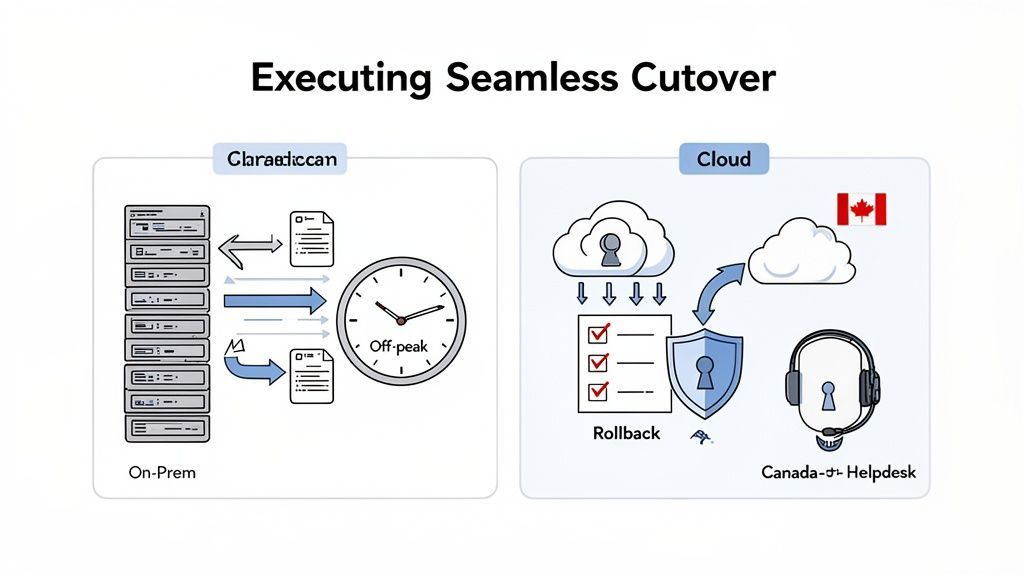
The secret to a smooth cutover is all in the timing and preparation. The most successful migrations happen during off-peak hours, like late on a Friday night or over a weekend. This gives the technical team a quiet window to get the work done, test everything thoroughly, and handle any surprises without the pressure of a normal business day.
Just as crucial is having a rollback plan. If something completely unexpected and serious goes wrong, you need a clear, pre-defined process to switch back to your old systems quickly. This safety net gives everyone the confidence to move forward.
The technology is only half the equation. A successful cloud migration in Alberta truly depends on your people, their willingness and ability to embrace the new way of working. The human side of this change needs to be part of your plan from day one. Instead, focus on proactive training and open communication.
For businesses here in Alberta, a well-executed migration can unlock some serious advantages. To see what this looks like in practice, you can learn more about the steps involved in an Azure migration for Calgary businesses in our detailed guide.
Getting your business to the cloud is a huge milestone, but it's really just the starting line. The true, lasting value of your cloud migration in Alberta comes to life long after the cutover is finished. Now, your focus shifts from the move itself to mastering your new environment, making sure it’s secure, cost-effective, and perfectly in sync with your business goals.
This post-migration phase is not about just "keeping the lights on." It's about continuous improvement. By building solid processes for backups, cost control, and performance tuning, you turn the cloud from a simple utility into a powerful strategic asset.
Your data doesn't magically become safer just because it's in the cloud, in fact, protecting it becomes even more critical. A cloud environment requires a completely different approach to backup and disaster recovery (DR). Cloud-native tools offer amazing options for automated backups and lightning-fast recovery, but they have to be set up correctly to work.
Your DR plan needs to be built around two key metrics for every single application:
A well-designed cloud DR plan almost always involves replicating data to a secondary Canadian region. This geo-redundancy ensures that even a major, localized outage at one data centre won’t take your business offline. That’s true business continuity.
One of the biggest post-migration surprises for many businesses is the first cloud bill. Without a watchful eye, costs can spiral out of control seemingly overnight. This "bill shock" is common, and it usually happens when resources are over-provisioned or left running when they aren't needed. Great cloud management is a constant cycle: monitor, analyze, and optimize.
To keep spending in check, you need to put proven cost-control strategies in place from day one:
This ongoing process of performance tuning and cost optimization is exactly where a managed services partner becomes so valuable. A good partner provides the 24/7 monitoring and deep expertise needed to continually adjust resources, keeping your environment secure, compliant, and perfectly aligned with your business. This proactive partnership is what unlocks the full long-term value of your cloud migration in Alberta.
Even with the best-laid plans, it’s normal to have questions pop up during a major project like a cloud migration. We hear many of the same ones from Alberta business and IT leaders, so we've gathered the most common queries to help clear things up and give you the confidence to move forward.
The duration of a cloud migration in Alberta really comes down to the complexity of what's being moved.
For a straightforward project, such as migrating a couple of applications or a single server, you could be looking at 1–3 months from start to finish. If your business has a more tangled web of legacy systems and data, a more realistic timeline would be 6–12 months, sometimes longer.
The project breaks down into a few key phases:
An experienced IT partner can structure the process to avoid unnecessary delays and keep everything on track.
For most Alberta businesses, the answer leans heavily toward "yes." While not every single piece of data is subject to strict residency laws, it's a critical factor you can't ignore. If you handle any personal information covered by Alberta's PIPA or sensitive health data governed by the HIA, keeping that information inside Canada isn't just a good idea, it's often a legal or contractual requirement.
The simplest and most direct way to tick this box is to use a cloud provider with a physical data centre in Canada, like the AWS Calgary Region. An expert can assess your specific data to confirm the exact residency rules that apply to your business.
The most common budget surprises in a cloud migration usually aren't about the technology itself. They come from the work around the migration. From our experience, here’s what to watch out for and budget for upfront:
A comprehensive discovery phase is your best defence against these hidden costs. It’s all about identifying these potential expenses early so you can plan for them, not be surprised by them.
Navigating the complexities of a cloud migration requires expert guidance. The CloudOrbis team brings a proven, 10-step methodology to ensure your transition is seamless, secure, and perfectly aligned with your business goals. Get in touch with us to start building your cloud strategy today at https://cloudorbis.com.
Book a 30-minute call with a senior engineer. No sales script, just straight answers about your environment.


