Managed Services Cost: A Practical Guide for Canadian SMBs
Understand managed services cost for Canadian SMBs. Learn pricing models, industry factors, ROI, and how to choose the right provider for your business.

Understand managed services cost for Canadian SMBs. Learn pricing models, industry factors, ROI, and how to choose the right provider for your business.

Most Canadian SMBs pay roughly CA$150 to CA$250 per user per month for fully managed IT. Your first-year spend typically runs higher because onboarding, migrations, security tooling, and compliance work sit outside the recurring fee.
An Oakville owner with 18 employees recently described the problem I hear across Ontario. Two managed service providers had submitted quotes, one at CA$125 per user per month and another at CA$210. Both promised proactive support, cybersecurity, backups, and Microsoft 365 administration. On paper, the lower quote looked like the obvious choice. In practice, the owner couldn't tell whether the difference reflected better protection, more support coverage, or a different billing strategy.
That confusion is avoidable. The right question isn't “What's the monthly managed services cost?” It's “What will this relationship cost during the first year, and what will I receive for that money?” The monthly subscription is only the entry point. Onboarding, remediation, migration work, backup design, security licences, compliance scoping, and project work can materially change the total.
A fully managed plan in Canada commonly falls between CA$100 and CA$250 per user per month, with mid-tier plans often clustering around CA$150 to CA$180 according to a Canada-focused 2026 managed IT pricing guide. More security-heavy or 24/7 arrangements tend to sit near the upper end.
For a 10-person company, standard coverage can therefore mean roughly CA$1,000 to CA$2,500 per month, before any implementation or project charges, as outlined in the same Canadian pricing guidance. That recurring structure is useful because spending scales with users rather than arriving as an unpredictable series of break-fix invoices.
Take the 18-person Oakville business. The lower proposal might look cheaper at the quote stage, but the comparison changes if it excludes Microsoft 365 remediation, endpoint detection, backup validation, or a formal onboarding project. The higher proposal may include those items, or it may have a broader margin. You won't know until the provider separates recurring services from one-time work and excluded services.
Your first-year total should identify at least these components:
Practical rule: Never approve an MSP quote until you can see the recurring fee, first-year implementation cost, project rate card, and exclusions on separate lines.
A broader explanation of the operating model appears in what every business leader must know, particularly the distinction between ongoing managed responsibility and reactive support. For a direct comparison of reactive billing and recurring coverage, review CloudOrbis's break-fix versus managed services guide.
The sticker price matters, but it isn't the decision. Ask what's bundled, what's billed separately, and what remains your responsibility.
Managed services providers usually price their work in one of four ways. Each model can be reasonable. The mistake is choosing a model that doesn't match how your people, devices, and support demand behave.
Per-user pricing works like a gym membership. Each employee receives a defined service package, regardless of whether that person uses one laptop or several Microsoft 365 applications. Canadian fully managed plans commonly land between CA$125 and CA$250 per user per month, based on the Canadian pricing ranges already cited.
This suits professional services firms, offices, and knowledge-based teams where each employee depends on identity, email, collaboration tools, endpoint security, and helpdesk access. Costs rise predictably as headcount grows. Shared accounts and seasonal workers need careful treatment, since an unclear user definition can create billing disputes.
Per-device pricing resembles insuring each laptop, server, or tablet separately. A business pays for the endpoints within scope, rather than for every person who touches them. This can work well for manufacturers, retailers, warehouses, or field operations with shared workstations and tablets.
The assigned range in the Canadian scenario is CA$40 to CA$150 per endpoint per month, but the range isn't a universal market quote. It reflects how device complexity, monitoring depth, and included support can differ. Device-heavy environments may benefit from the model, while offices with several devices per employee can find the total less attractive.
Tiered packages typically present Bronze, Silver, and Gold levels. The analogy is a service plan with progressively broader coverage. A basic tier may focus on monitoring and patching, while higher levels add security operations, backup management, strategic consulting, or tighter response commitments.
Tiering makes internal approval easier because leaders can compare defined service levels rather than negotiate every line item. It also gives a growing business a path to upgrade. Read the managed IT support services overview before comparing package names, because labels mean little unless the inclusions and exclusions are explicit.
À la carte pricing lets you select individual services, such as backup, helpdesk, Microsoft 365 administration, or virtual CIO support. It fits organisations with a capable internal IT lead that needs targeted assistance.
The trade-off is less predictable spending. Every uncovered task becomes a separate purchase, and a collection of small add-ons can eventually cost more than a coherent managed plan.
| Pricing Model | Typical Range (Canada) | Best Fit For |
|---|---|---|
| Per-user | CA$125 to CA$250 per user per month | Professional and knowledge-based teams |
| Per-device | CA$40 to CA$150 per endpoint per month | Shared workstations, tablets, and device-heavy operations |
| Tiered packages | Varies by selected service tier | SMBs wanting clear upgrade paths |
| À la carte | Varies by selected service | Businesses needing targeted support |
Choose the model that follows your real operating pattern, not the one with the lowest starting figure.
Two providers can quote the same office and still price the work very differently. The gap usually comes from staffing, security scope, coverage hours, tooling, and the amount of operational discipline included.
Ontario wage data puts the median wage for an IT Support Technician at C$33.00 per hour, with a high benchmark of C$51.28 per hour, according to the Government of Canada Job Bank wage report. At roughly 1,800 billable hours per year, that represents direct labour costs from about C$59,400 at the median to more than C$92,000 at the high end, before benefits, employer costs, software, management, and coverage premiums.
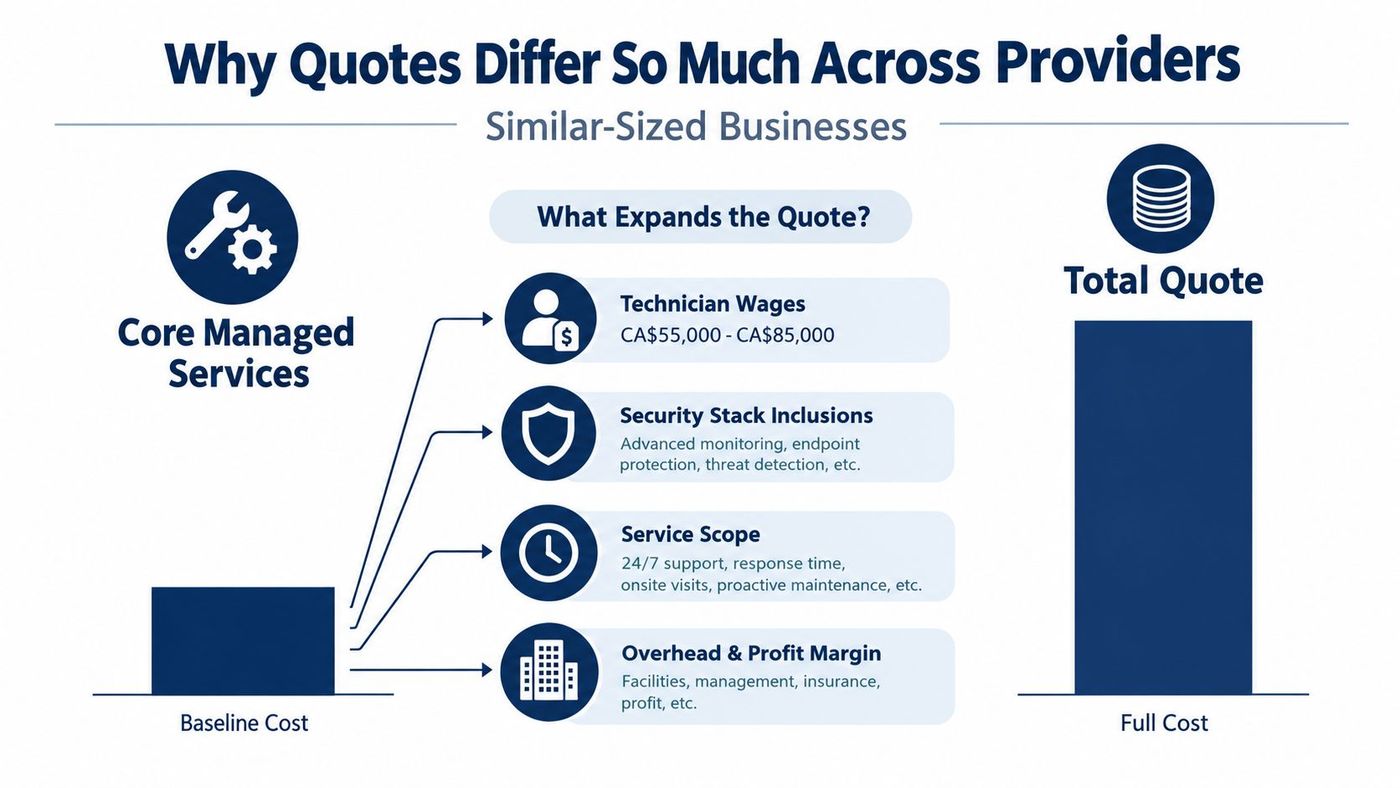
One quote may include basic antivirus and patching. Another may include endpoint detection, security monitoring, vulnerability assessments, phishing simulation, identity protection, incident response, and evidence collection. Those aren't cosmetic additions. They require licences, configuration, alert review, escalation procedures, reporting, and trained staff.
Regulated organisations feel that difference most sharply. Healthcare, legal, and finance environments often need stronger backup controls, access reviews, Microsoft 365 administration, and compliance support. A low-cost proposal may still be valid, but only if the buyer understands which controls remain outside the agreement.
A business asking for same-day onsite service, after-hours escalation, or 24/7 helpdesk coverage isn't buying the same product as a business accepting business-hours remote support. Shift rotations and senior escalation staff add operating cost. The provider must either allocate more people or restrict the promise in the SLA.
Canadian pricing analysis indicates that two quotes for identical headcount can differ by up to 60% once service scope, security depth, and SLA terms are compared, as explained in this Canadian managed IT pricing analysis. Compare the control set and response obligation, not just the fee.
Industry changes the answer because the provider is managing different risks. A general office and a healthcare clinic may have similar headcounts, but their identity controls, documentation, backup, and audit requirements are not equivalent.
The following scenarios use the Canadian ranges specified for each profile. The first-year uplift is a planning allowance for onboarding, security tooling, migration, and related implementation work. It isn't a guaranteed charge, so require the provider to replace it with an itemized proposal.
| Business Profile | Users | Per-User/Month Range | First-Year Uplift | Primary Cost Driver |
|---|---|---|---|---|
| General business | 10 | CA$150 to CA$200 | Higher than recurring fees because of onboarding and security setup | Standard support, Microsoft 365, endpoint management, and backup |
| Legal firm | 20 | CA$175 to CA$225 | Higher than recurring fees because of secure document handling and access controls | Confidential files, identity management, encrypted backups, and audit support |
| Manufacturing shop | 25 | CA$160 to CA$210 | Higher than recurring fees because of network and shop-floor implementation | Connectivity, shared devices, production availability, and operational support |
| Healthcare clinic | 15 | CA$220 to CA$300 | Higher than recurring fees because of layered security and compliance work | PHIPA obligations, audit logging, access reviews, and protected health information |
A 10-user general business should focus on whether the proposal includes Microsoft 365 administration, endpoint coverage, backup testing, and user support. A plan near the lower end can be appropriate when the environment is standard and the SLA is modest.
A 20-user law office should scrutinise document access, offboarding, encryption, retention, and recovery procedures. A 25-user manufacturer needs to ask whether shop-floor connectivity and shared workstations are included, or whether the MSP only supports office laptops.
A 15-user healthcare clinic sits in a different risk category. The CA$220 to CA$300 per user per month range reflects the extra effort associated with layered security, audit logging, and PHIPA-related obligations. The point isn't to pay more because of an industry label. It's to fund the controls your organisation must operate consistently.
For a broader overview of support considerations, see CloudOrbis's managed IT services for small business guide. Ask each provider to show both the monthly run rate and the first-year implementation line.
A useful managed services cost calculation starts with the annual recurring fee, then adds one-time work and subtracts costs the arrangement should remove. Keep the arithmetic simple enough that your accountant, operations lead, and board can follow it.
The basic formula is:
Net annual cost = annual MSP fee + onboarding and migration + project work + retained internal IT burden − avoided downtime and duplicate tool costs
One-time onboarding and migration work commonly sits around CA$1,500 to CA$5,000 for an SMB, according to the specified Canadian TCO pricing data. Microsoft 365 and Intune migrations can be materially larger. A separate fixed-scope migration for a 50-seat Canadian SMB was cited at CA$12,000 to CA$22,000, so don't treat every implementation as a small setup fee. See this total-cost guidance for managed IT services when building your first-year worksheet.
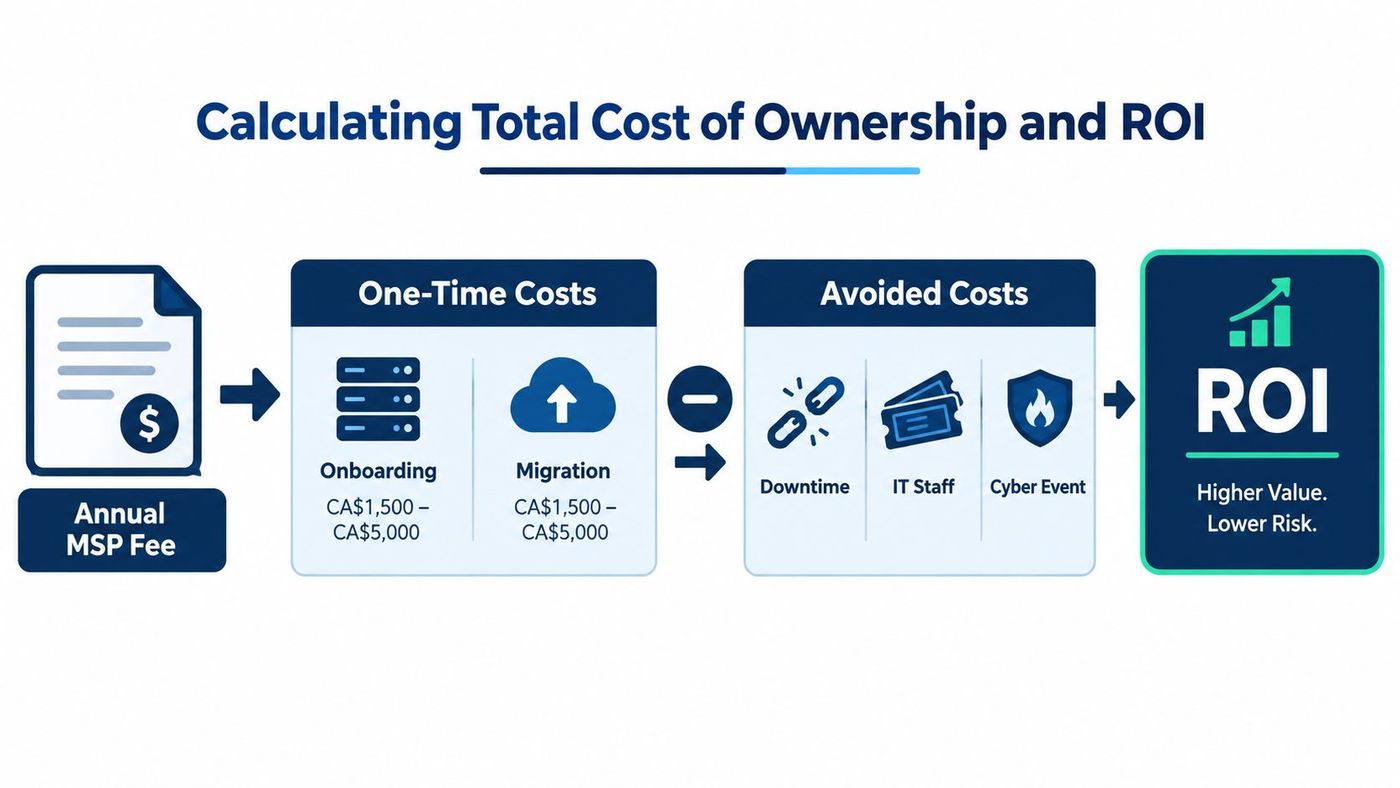
Suppose a 15-user Ontario business receives a fully managed proposal at a rate within the CA$150 to CA$250 per-user range established for Canadian SMBs. Multiply the selected monthly rate by 15 users and 12 months. Then add the quoted onboarding, security implementation, migration, and project amounts.
Next, quantify the current state. Include break-fix labour, software licences that the MSP will consolidate, internal staff time spent on routine support, and the cost of outages. For downtime, use a defensible internal estimate:
Avoided downtime cost = hours avoided × hourly productivity cost
Don't claim savings that you can't substantiate. Use ticket history, payroll assumptions, service interruption records, and finance-approved productivity estimates. The ROI case may come from predictable spend, reduced duplicate tooling, lower internal workload, improved recovery readiness, or faster issue resolution.
Board-ready test: If you can't explain which cost disappears, which risk decreases, and which service is added, you haven't calculated ROI yet.
The CloudOrbis total cost of ownership resource can help frame the comparison. Use the same assumptions for the current arrangement and the proposed MSP. That prevents a polished proposal from looking better because the status quo's hidden costs were left out.
The contract determines whether the quoted managed services cost remains credible. A low per-user rate can rise by 15% to 25% when a buyer adds stricter SLAs and broader coverage, based on the specified Canadian pricing guidance. Treat that figure as a negotiation planning range, not an automatic surcharge.
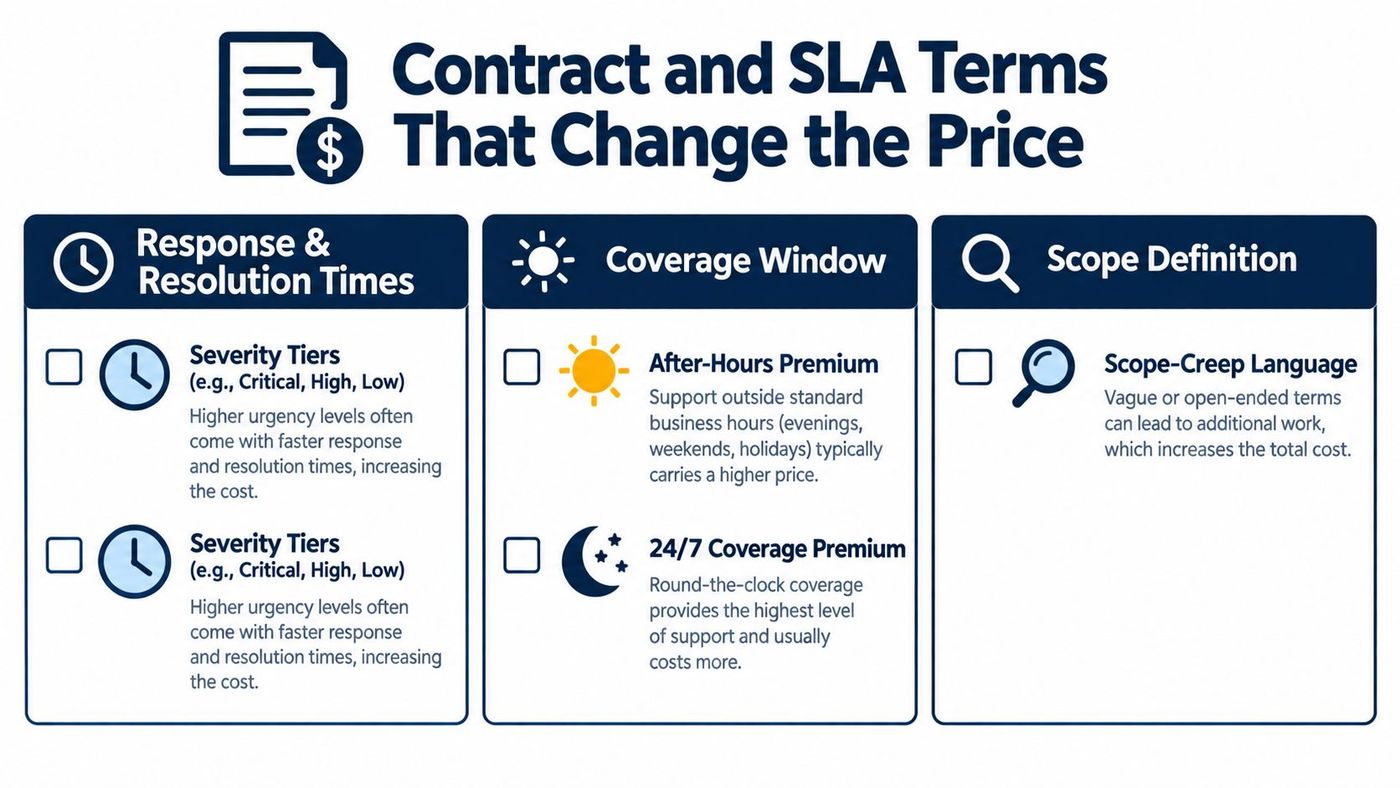
An SLA should separate acknowledgement, response, restoration, and resolution. It should define severity levels, the clock used, exclusions for client-caused delays, and the remedy when the provider misses the commitment.
A “critical” outage affecting the whole business shouldn't sit under the same language as a low-priority software question. Ask whether the clock runs during business hours only, whether escalation is automatic, and whether service credits apply.
After-hours support and 24/7 coverage require additional staffing. The contract should state which incidents qualify, whether planned maintenance is excluded, and whether onsite work carries a separate charge.
Scope-creep language deserves equal attention. “Reasonable use” sounds friendly but gives both sides room to disagree. Define supported applications, included devices, user onboarding, vendor coordination, project work, and emergency response.
Check the auto-renewal notice period, termination-for-convenience rights, transition assistance, data return, documentation ownership, and exit fees. An Ontario SMB shouldn't accept a long renewal cycle without a practical exit window.
Also review annual price escalation, preferably with a clear cap or agreed index. The liability section matters too. Compare the liability cap, hold-harmless language, cyber insurance requirements, and responsibility for lost data or service failure.
Insist on written terms for:
A low monthly fee isn't a good deal if the provider leaves onboarding, security, and project work outside the contract. Walk away from proposals that make the recurring number look attractive by hiding the work required to operate safely.
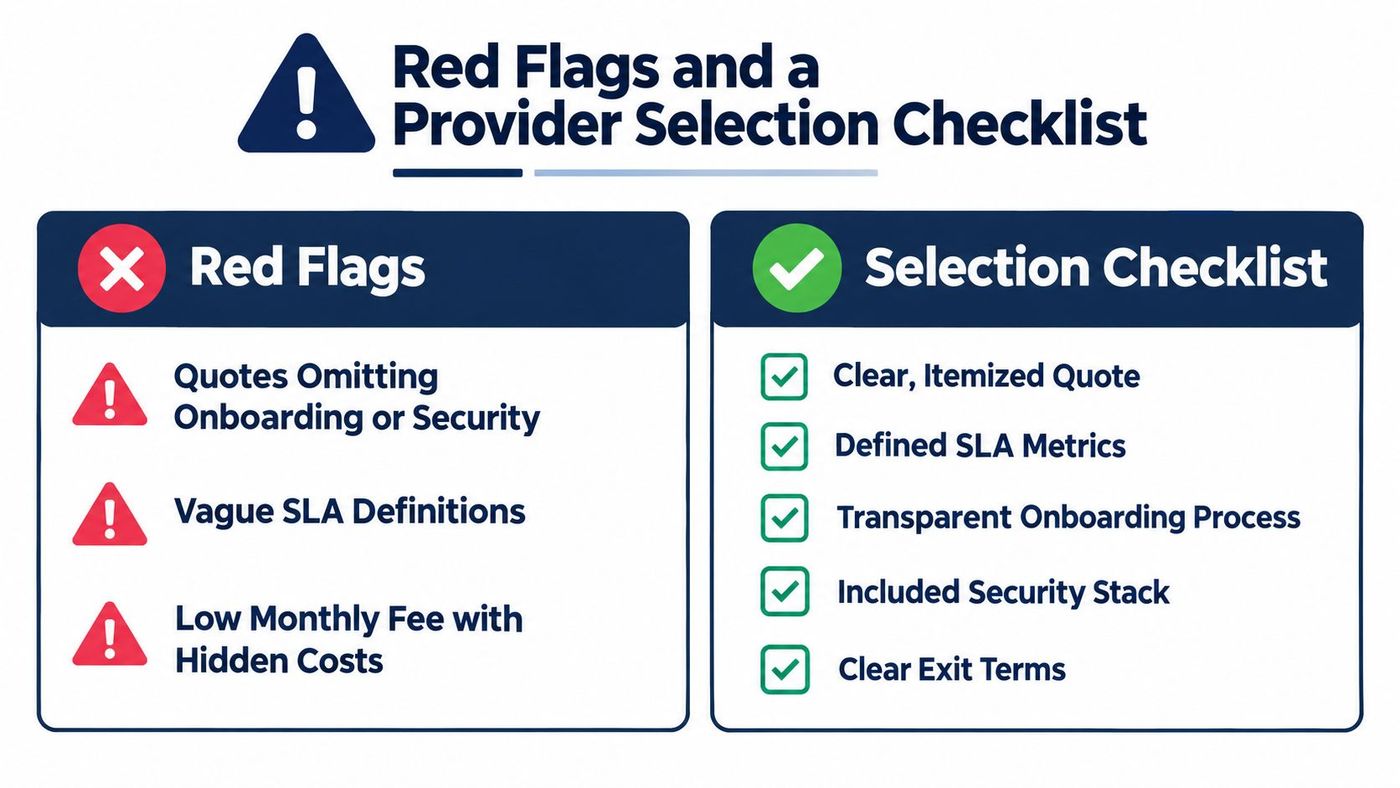
Be cautious when a quote omits onboarding or security-stack line items, uses “best effort” instead of measurable response commitments, or describes support as unlimited without defining project exclusions. An auto-renewal term longer than 12 months without a 60-day exit window deserves challenge.
The provider should also name its ticketing system and provide references from organisations with comparable size and industry requirements. If it won't explain how requests are logged, escalated, measured, and reviewed, you can't verify the service.
Use this list during an initial call or proposal review:
CloudOrbis's managed services questionnaire provides a practical starting point for collecting comparable answers. Don't let a polished sales presentation replace evidence, contract language, and references.
Stop comparing monthly fees in isolation. Request a first-year total cost picture, then test the same assumptions against the 12-month and 36-month view.
Start with an inventory of users, devices, applications, locations, Microsoft 365 configuration, backup arrangements, current security controls, and compliance obligations. Include the operational details that often change price, such as shared shop-floor devices, remote workers, line-of-business applications, and required response windows.
Then ask at least three providers for itemized proposals. Each quote should separate recurring services, onboarding, migrations, security licences, backup and recovery, project work, onsite support, after-hours coverage, and exclusions. Give every provider the same environment summary so you're comparing service depth rather than different assumptions.
Request two references in your industry and size band. A healthcare clinic should speak with a healthcare client. A legal firm should ask how the provider handles confidential documents and staff departures. Require a sample SLA before signing, including severity tiers, response times, coverage windows, escalation, service credits, renewal, and exit terms.
The cheapest first quote often becomes the most expensive after year-one add-ons. A transparent provider should be willing to show the complete first-year worksheet, identify assumptions, and explain what changes at renewal.
CloudOrbis Inc. offers managed IT support, cybersecurity, cloud migrations, Microsoft 365 administration, backup and disaster recovery, and strategic vCIO services through predictable subscription models. For an Ontario SMB, the useful next conversation isn't another generic sales call. It's a 30-minute cost review that produces numbers you can defend to your accountant and board.
CloudOrbis Inc. helps Canadian SMBs build a transparent managed services cost plan that separates recurring support from onboarding, security, migrations, and project work. Visit CloudOrbis Inc. to request a 30-minute cost review and get a first-year view of what your IT environment will require.
Book a 30-minute call with a senior engineer. No sales script, just straight answers about your environment.


