How to Improve IT Service Delivery for Canadian SMBs
Learn how to improve IT service delivery with practical steps for Canadian SMBs. Covers SLAs, automation, security, cloud, and quick-win roadmaps.

Learn how to improve IT service delivery with practical steps for Canadian SMBs. Covers SLAs, automation, security, cloud, and quick-win roadmaps.

A 75-person professional services firm in Mississauga starts each Monday with the same problem. Staff lose time waiting for a frozen CRM, tickets move between technicians without a clear owner, and the CEO keeps hearing, “It's the firewall.” By lunch, the business has spent hours diagnosing symptoms instead of serving clients.
That pattern isn't caused by one poor hire or one inadequate tool. It usually reflects a service-delivery model that hasn't kept pace with the business. How to improve IT service delivery starts with fixing ownership, workflows, system connections, and resilience together.
For Canadian organizations, the need is clear. In 2023/2024, only 419 Government of Canada services were completed entirely online, representing 24.4% of federal services, while online applications accounted for 267 million applications, or 65.5% of the total. The contrast shows why digital service delivery depends on removing manual steps and designing practical, complete workflows, not adding another portal. (Statistics Canada's analysis of digital government services)
IT problems become visible once informal habits stop scaling. A founder may once have solved issues through a quick message to one technician. As more employees, applications, locations, and compliance obligations arrive, that approach creates inconsistent decisions and hidden queues.
The first is undocumented triage. Technicians classify tickets differently, so an urgent client-facing outage can wait behind a low-impact access request. The second is siloed systems. Microsoft 365, line-of-business applications, on-premises servers, identity services, and third-party SaaS platforms each hold part of the user's workflow.
Third, reactive staffing keeps the team in break-fix mode. Technicians close the loudest issue instead of removing the cause. Fourth, nobody clearly owns change windows. A well-intentioned update to identity, networking, or a core application can create an outage with no agreed rollback decision.
The fifth is neglected cyber hygiene. Unpatched endpoints, weak administrative access controls, incomplete asset records, and untested backups eventually become service-delivery problems, not just security findings.
Practical rule: If a ticket, change, or security alert has no named owner, it isn't being managed.
The downstream costs include lost billable time, delayed client work, audit findings, frustrated employees, and avoidable staff turnover. Reliability isn't merely a technical concern. This broader explanation of why system reliability matters is useful for business leaders who need to connect infrastructure decisions to operational performance.
Treat improvement as a programme with five parts: assess the current state, redesign workflows, establish SLA governance, connect systems, and build resilience into everyday operations. Buying a new ticketing platform before doing that usually preserves the same confusion in a more expensive interface.
Don't begin with a software demonstration. Begin with a one-week diagnostic using the tools you already have.
Start by pulling recent help-desk records from your existing platform, shared inbox, or spreadsheet. Sort tickets by category, urgency, requester, first response, and resolution time. Tag the ten issues that recur most often, then identify which ones affect revenue, compliance, or a large group of employees.
Next, inventory what users touch during a normal workday:
Capture a small set of operational measures. Useful starting points include P1 incident MTTR, first-contact resolution, change failure rate, patch compliance, backup success, and user satisfaction from a five-question pulse survey. For context, a 2024 benchmark reports Canada at 99.0% CSAT, 10.41 hours average first response time, and 27.64 hours average resolution time. (Freshservice IT service management benchmark report)
A one-page scorecard forces leadership to see the gaps before approving new tooling. Use the following structure, then replace the illustrative targets with commitments that match your contracts and operating risk.
| Metric | What It Reveals | Typical SMB Baseline | 90-Day Target |
|---|---|---|---|
| P1 incident MTTR | Speed of restoring critical service | 4 to 8 hours | Set a documented target by business impact |
| First-contact resolution | Triage quality and technician capability | 60% to 70% | Improve through knowledge and routing |
| Patch compliance | Exposure from unmanaged updates | 95% | Define an owned compliance threshold |
| Change failure rate | Quality of planning and testing | Establish baseline | Reduce repeat failures |
| Backup success rate | Whether recovery data is usable | Establish baseline | Monitor failures daily |
| User satisfaction | Perceived service quality | Pulse survey baseline | Improve trend over time |
The scorecard should show the owner, source, reporting frequency, and next action for each metric. For practical guidance on turning operational data into management visibility, review CloudOrbis's analytics and reporting approach.
Incident, change, and problem management should operate as one connected system. Incident management restores service. Change management controls risk. Problem management removes the conditions that create repeat incidents.
For incidents, define severity tiers with explicit response and resolution targets. Assign one triage owner for each shift, then publish an escalation matrix with a backup decision-maker for after-hours P1 events. A technician shouldn't have to guess who can approve emergency action.
For changes, create a lightweight change advisory board. Two approvers and the requester may be enough for a mid-sized organization, provided every change touching identity, networks, backups, or core applications includes a tested backout plan.
Problem management needs a regular rhythm. Review the three most frequent or disruptive incidents each week, record the suspected root cause, assign an owner, and keep the item open until the recurrence stops. The objective isn't a longer report. It's fewer repeat tickets.
A recurring “VPN drops for remote staff” ticket illustrates the difference. Instead of closing each request separately, classify the pattern as a known error, publish a knowledge-base article, monitor the relevant health check, and deploy an automated remediation script where the cause is understood. Practical ideas such as these complement broader help desk reduction tips for venues, especially when users can solve predictable issues without waiting for a technician.
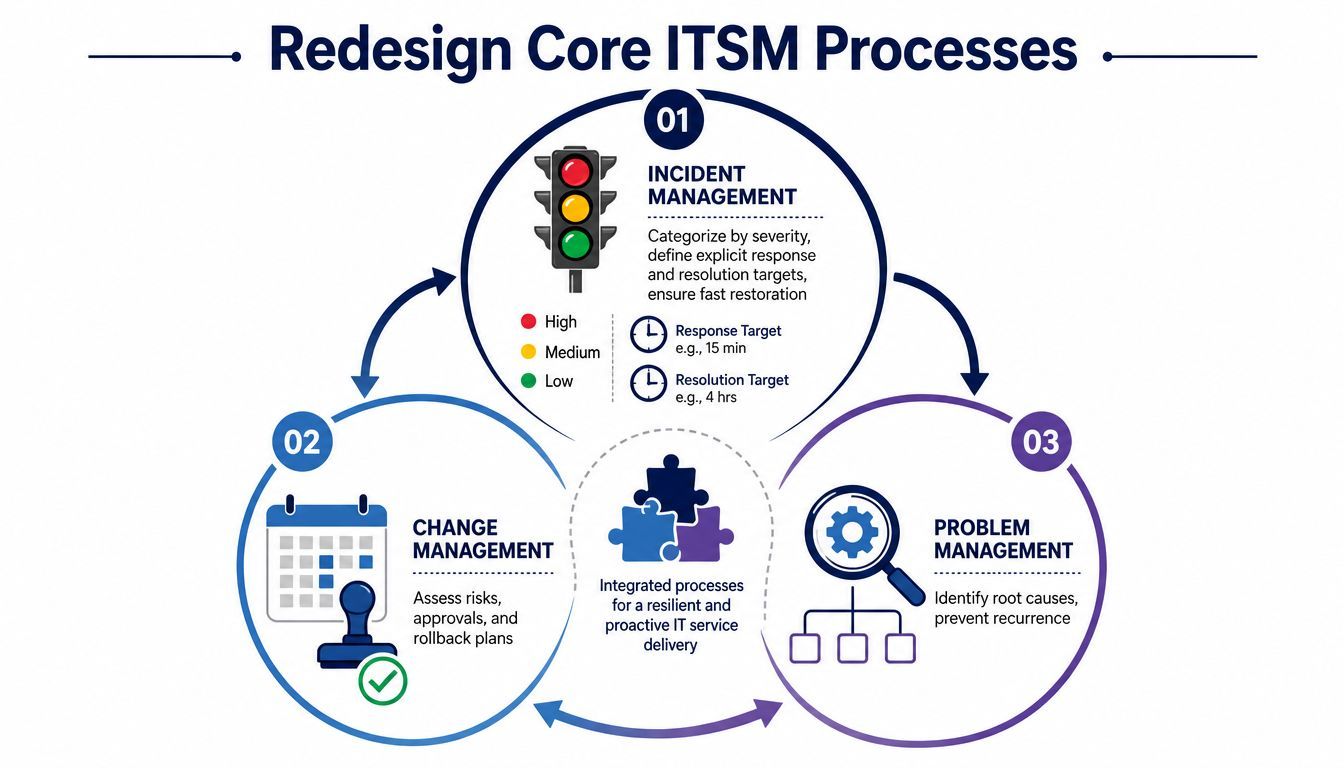
Process comes before automation. If routing, approvals, and ownership are broken, automation produces faster failures. CloudOrbis's change management process guidance provides a useful reference for formalising that control without turning every routine adjustment into bureaucracy.
A first-response SLA can look impressive while users remain unable to work. Set service levels around business outcomes: restoration of revenue-critical systems, resolution by severity, and the number of incidents created by failed changes.
For a professional services firm with 40 to 60 employees, a reasonable starting position may include 99.5% business-hours availability for core applications, a one-hour P1 response, and same-day P2 resolution. These are planning targets, not universal Canadian benchmarks. Your risk profile, support hours, vendor dependencies, and contractual obligations should determine the final agreement.
| Severity | Response Target | Resolution Target | Sample Metric |
|---|---|---|---|
| P1 critical outage | One hour | Restore service under the agreed emergency plan | P1 MTTR |
| P2 major degradation | Same business day | Same day where practical | P2 resolution compliance |
| P3 individual or low-impact issue | Next business day | Scheduled according to workload | Backlog age and CSAT |
Send a monthly report to leadership without waiting for a request. Combine operational measures, such as ticket volume, MTTR, change success, patch compliance, and backup status, with experience measures including CSAT and first-contact resolution.
Every SLA template should specify:
Use missed SLAs to trigger root-cause analysis, not blame. Canada's federal digital-service model emphasises service standards, performance reporting, data quality, and client feedback as inputs to continuous improvement. (Government of Canada guidance on service and digital) For help structuring the operating relationship, see CloudOrbis's support management services.
Faster tickets won't fix a workflow that crosses four systems and fails between them. A user may authenticate through one platform, enter information into a line-of-business application, trigger a document in another service, and send billing data to a separate finance system. If those handoffs don't work, the service desk becomes a manual bridge.
Federal digital-government data highlights the scale of this challenge. Only 22.5% of government services were fully end-to-end online in 2022–23, and just 38% of current applications were considered healthy, with legacy systems creating integration and security risks. A 2025 Canadian public-sector analysis reports that 57% of leaders say major improvements are needed in data compatibility, while 66% are unsure current strategies will deliver the interoperability required. (Canada Digital Ambition 2024–25)
Create an integration map with business processes on one axis and systems on the other. Annotate each handoff with its data owner, failure mode, audit requirement, and recovery method. Prioritise seams that affect patient intake, client onboarding, invoice-to-cash, procurement, or security response.
For small automations, Make or Zapier may be suitable. Workato or a native API connection may make more sense when governance, volume, or data sensitivity demands stronger control. Don't move sensitive information between platforms until you understand retention, permissions, logging, and audit requirements under PIPEDA, PHIPA, or applicable Law Society rules.
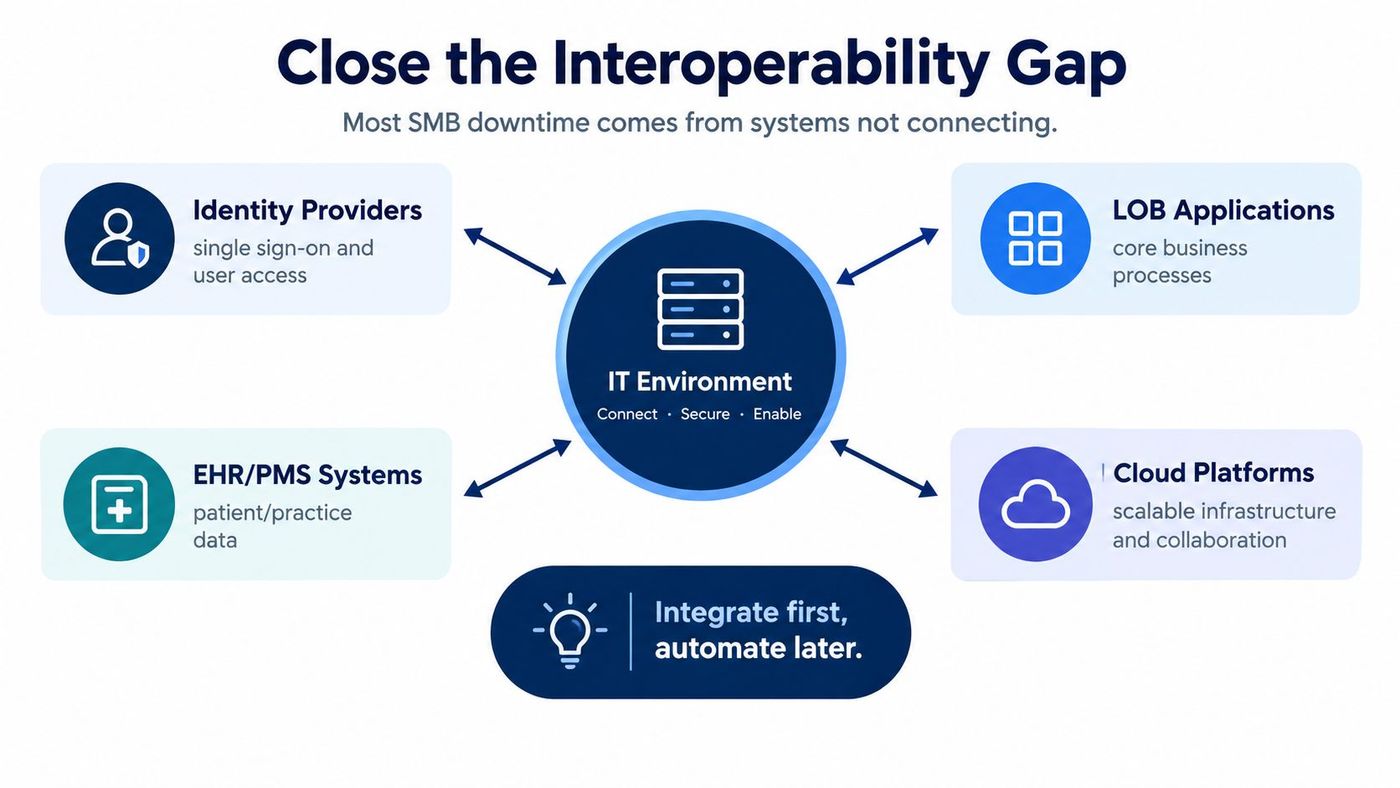
The desired result is concrete: fewer manual handoffs, cleaner records, and one service record instead of three disconnected tickets. Use workflow automation tools only after defining the process and the data that must move through it.
Cybersecurity can't sit in a separate queue while the service desk handles ordinary requests. In a clinic, law firm, or financial organisation, a compromised account, unavailable backup, or incomplete asset record can stop service delivery entirely.
Make security part of every standard workflow. Onboarding should include MFA, conditional access, endpoint standards, and documented access approval. Changes should include rollback steps. Incident runbooks should be exercised regularly so people know who isolates devices, who communicates with leadership, who contacts vendors, and who makes recovery decisions.
A practical baseline for managed devices should cover:
For regulated clients, report compliance posture beside uptime and support performance. Healthcare teams should align controls with PHIPA obligations. Legal practices should account for Law Society expectations around confidentiality and records. Financial organisations should map operational controls to relevant OSFI guidance.
The Auditor General of Canada found significant gaps in federal cybersecurity services, monitoring, response during active attacks, asset inventories, and coordination. (Auditor General of Canada cybersecurity report) The lesson for SMB leaders is direct: resilience means maintaining coordinated service under pressure, not merely reporting normal uptime.
CloudOrbis's cybersecurity best practices for business can help teams connect everyday IT operations with security controls. The service desk should receive alerts automatically, track them to closure, and learn from every near miss.
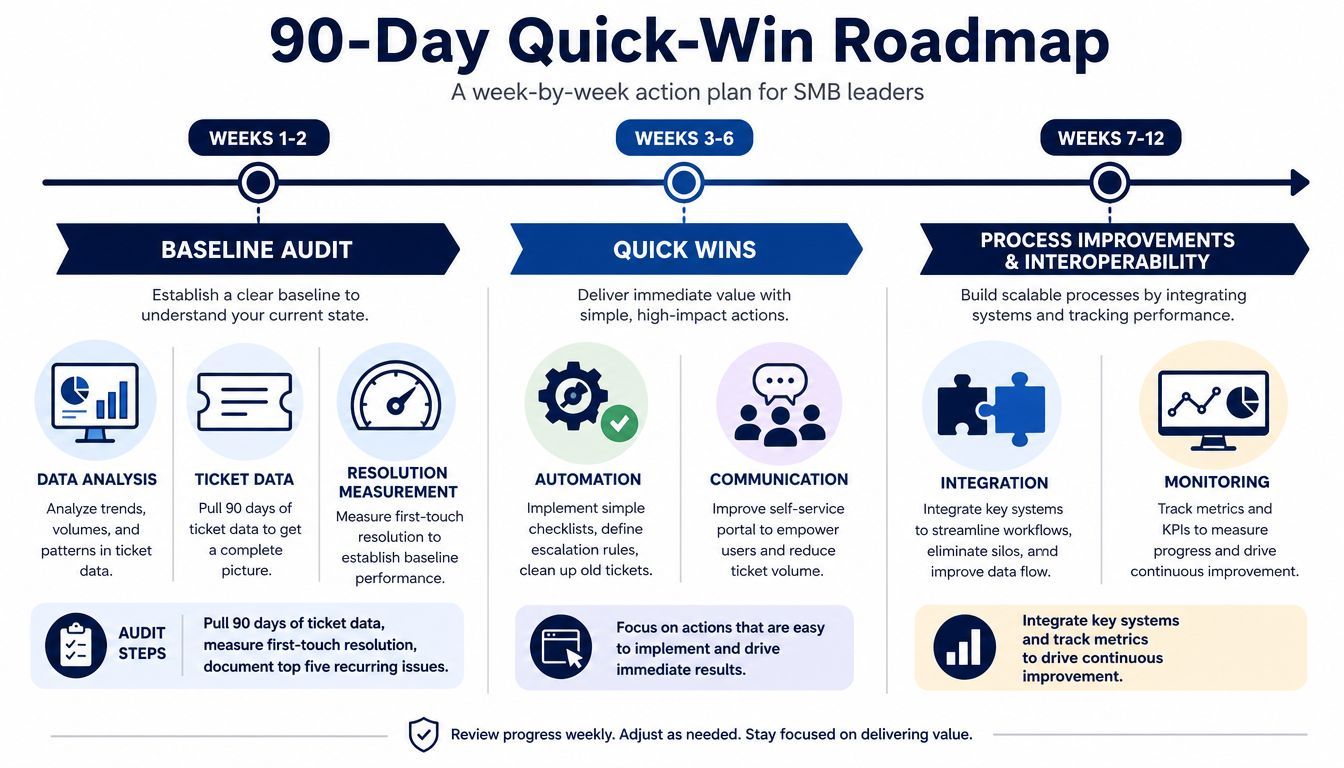
A 90-day plan works when every phase produces a usable deliverable. Don't wait for a perfect IT strategy. Start with evidence, fix the loudest operational problems, then invest in tools that support the redesigned model.
During the first two weeks, pull 90 days of ticket data, measure first-touch resolution, document the five most frequent incidents, and capture current SLA performance. Deliver a one-page scorecard, a system inventory, and an integration-risk list.
During weeks three and four, correct categorisation, write three runbooks for the most disruptive issues, and hold one weekly change approval meeting. Use Microsoft Lists, SharePoint, or an existing ITSM knowledge base before buying a larger platform. The deliverable is a small, visible operating system for support.
Turn on automated patching, deploy an RMM dashboard, and configure alerts for the systems that drive downtime. Consolidate identity into one MFA-protected directory where practical. Then enable audit logging, run a phishing simulation, and document a ransomware-recovery tabletop exercise.
Choose tools based on budget and control needs. Microsoft 365 security and management features may cover foundational requirements for organisations already using that ecosystem. A lightweight ITSM platform, RMM service, password manager, and backup platform should each have a named owner and a clear integration purpose.
Use the evidence to choose between in-house, co-managed, and fully outsourced support. If internal staff understand the business but lack after-hours capacity, co-managed support may fit. If ownership, monitoring, security, and coverage are all weak, a managed service partner can provide a more complete operating model.
Finish by publishing a weekly IT health report, assigning owners to four KPIs, and briefing leadership on a 12-month maturity path. Your final checklist should confirm:
Statistics Canada's research shows Canadian organisations already rely heavily on remote digital delivery. In 2016, 57% of Canadian services exports were delivered remotely, and computer services were upwards of 93% digitally delivered. (Statistics Canada research on remote delivery of services) Your service model should reflect that reality, with disciplined remote operations, clear process control, and resilience designed into every handoff.
CloudOrbis Inc. helps Canadian SMBs assess, redesign, secure, and manage IT service delivery through managed IT support, cybersecurity, cloud solutions, backup and disaster recovery, and strategic IT consulting. Visit CloudOrbis Inc. to discuss your baseline, interoperability risks, and 90-day improvement plan with a Canada-based IT services team.
Book a 30-minute call with a senior engineer. No sales script, just straight answers about your environment.


