Support Management Services: A Practical Guide for SMBs
Learn how support management services help SMBs cut downtime, meet compliance, and scale IT. Includes delivery models, SLAs, KPIs, and a buyer checklist.

Learn how support management services help SMBs cut downtime, meet compliance, and scale IT. Includes delivery models, SLAs, KPIs, and a buyer checklist.
Your Monday morning is already on fire. A clinician can't open the EHR, a warehouse supervisor can't process a shipment, or your team's phones are working while email and shared files are down. That's the moment most owners realise they didn't buy “support”, they bought a queue, and a queue is a terrible operating model for a Canadian SMB.
Support management services are not a help desk dressed up in nicer language. They're the layer that keeps work moving when systems, users, and security controls all have to line up at once. For Canadian businesses in healthcare, legal, finance, manufacturing, logistics, and other regulated sectors, that matters because downtime is never just inconvenient. It hits compliance, revenue, and customer trust at the same time, which is why managed services have become a core operating model rather than a backup plan, especially as the global managed services market is projected to rise from USD 460.59 billion in 2026 to USD 705.22 billion by 2031 at an 8.9% CAGR (MarketsandMarkets).
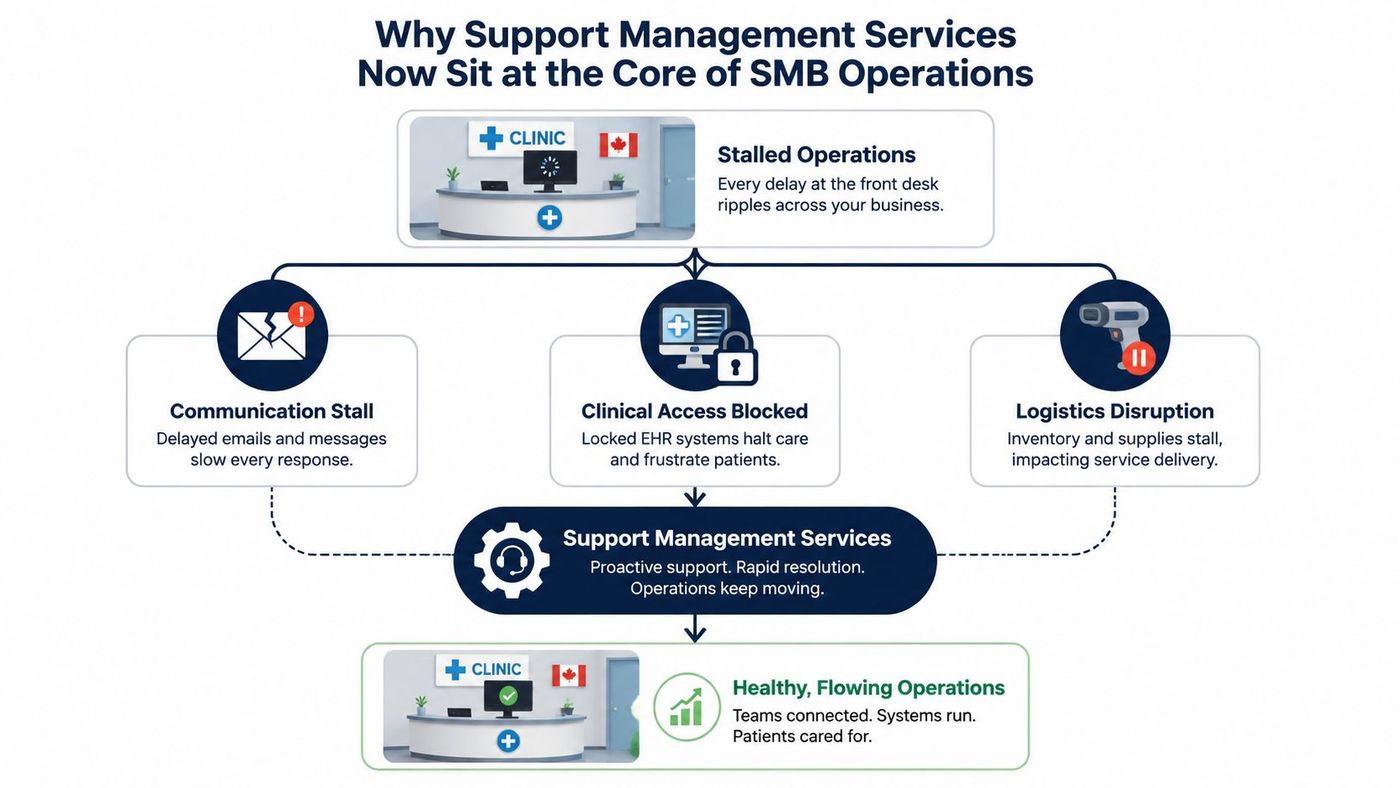
A 40-person clinic in Ontario does not need an abstract theory of IT. It needs the front desk to work, the patient record system to open, and the phone tree to stop dropping calls before the morning rush. A distributor in Alberta faces the same pressure in a different form, because one stalled email inbox or scanner outage can slow the whole day before lunch.
That is why I do not treat support management as a discretionary IT expense. It is the operating layer that prevents disruption, not the team you call after disruption has already spread. Industry analysts at MarketsandMarkets describe managed services as a mix of monitoring, maintenance, security, communications, and collaboration, which is the right model for organisations that need continuous coverage and fast issue resolution.
For Canadian SMBs, that pressure is sharper in regulated sectors. Healthcare, legal, finance, and manufacturing all carry direct business and compliance risk when systems fail or security weakens. A provider that only reacts after users complain is already behind.
Practical rule: if a vendor talks more about closing tickets than preventing repeat disruption, they are selling labour, not operational resilience.
Buy support management for how it keeps work moving across the business, not for how many tickets it can close. If you want a clear example of what that should look like, compare your current provider against CloudOrbis's managed IT services overview and a partner that can also secure M365 and compliance solutions.
A provider that treats support as a real operations function will show the same discipline across five areas. If any one of them is missing, you are usually buying gaps, not coverage.
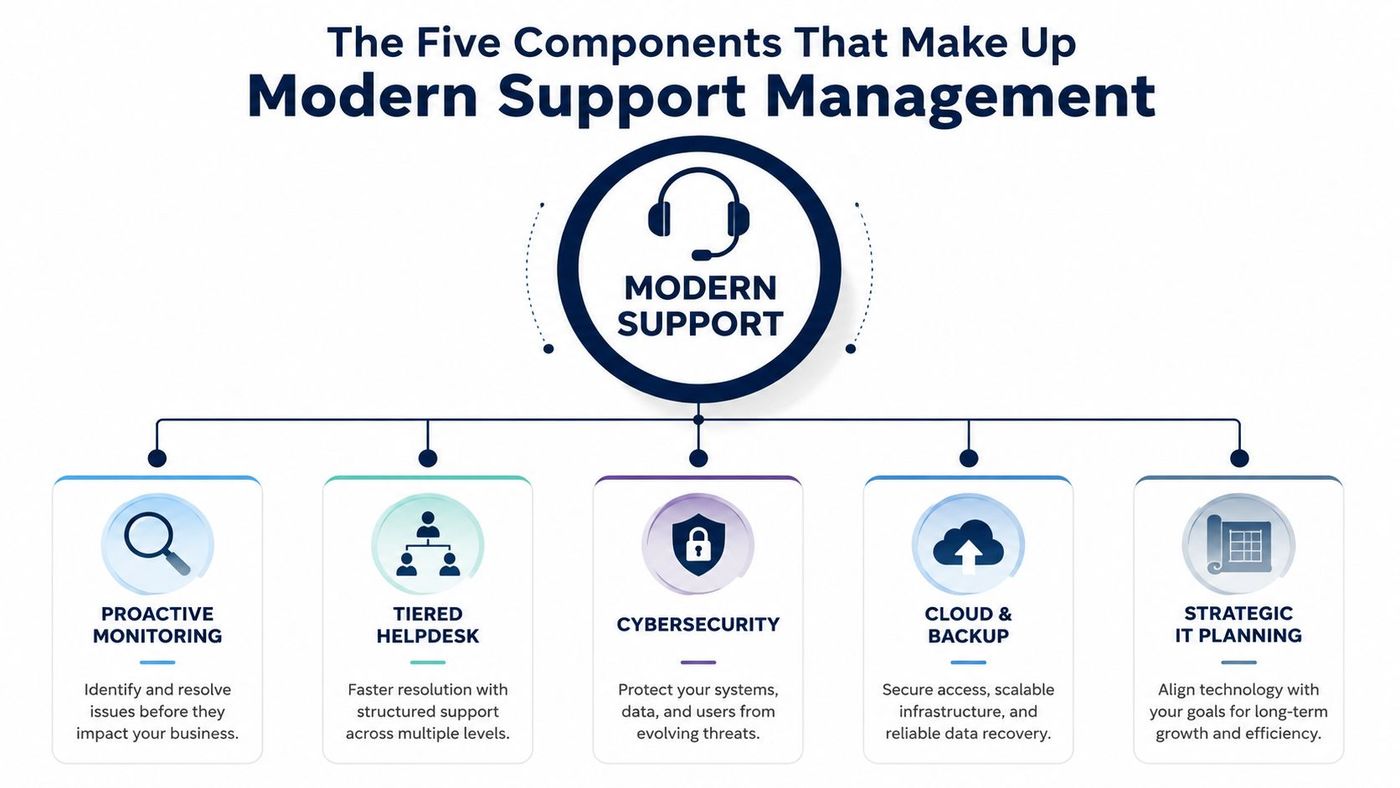
This is the part that keeps problems small. It watches endpoints, servers, network health, and cloud services before users start flooding the inbox with complaints.
Salesforce describes managed support as covering monitoring, patch orchestration, backup/recovery workflows, and broader IT operations optimisation, which is the right model for SMBs that need issues caught early instead of after downtime spreads (Salesforce). If a provider cannot explain what they watch, what triggers an alert, and who responds first, they are running a ticket queue, not an operations layer.
A real helpdesk is structured. Simple requests get handled quickly, while problems that need access, engineering, or escalation move to the right person without wasting time.
That structure matters because support performance is uneven across providers. Research from Unthread shows that the slowest teams leave customers waiting far longer than the best teams, and that strong first-contact resolution depends on disciplined triage, not just more agents. If a vendor cannot describe how they sort incidents, route approvals, and keep high-priority work from getting buried, expect slow resolution and a lot of internal chasing.
Security belongs inside the support function. Patches, endpoint protection, identity changes, and incident response all affect whether people can work safely, so support staff need clear handoffs into security controls.
A provider should be able to explain how a password reset, device replacement, or access request is handled without creating a security gap. If they cannot tie support tickets to policy enforcement, they are recording risk after the fact instead of reducing it. For a practical benchmark on the security side, see Ollo's guide to IT help desk services and compliance for secure M365 and compliance solutions.
Cloud support is not just moving mailboxes and files into Microsoft 365. It includes backup administration, restore testing, retention controls, and a clear process for getting data back when an outage or deletion hits production.
The buyer question here is simple. Who confirms the backup restores, who owns the restore runbook, and who tells your staff when it is safe to resume work? Without those answers, cloud support becomes storage administration with a fancy label. In a decent setup, cloud and backup sit beside the helpdesk, because recovery has to be part of day-to-day support, not a separate scramble after something breaks.
Support management should shape the roadmap, not just clear the queue. Service management tools are used to keep technology usable, secure, and available through monitoring, updates, documentation, and strategic planning (ServiceAide). A provider that understands this will ask about refresh cycles, standard devices, upcoming site changes, and system dependencies before they become urgent problems.
That is where a real partner stands out. A ticket-taker waits for requests, while a support manager sees patterns, closes repeat issues, and keeps the business from drifting into avoidable outages. If you want a co-managed model that does this well, review CloudOrbis's co-managed IT services in Edmonton and compare it with vendors that only talk about response times.
Most SMB owners don't need a philosophical debate about delivery models. They need to know who is on the hook at 7 p.m. when payroll fails or a warehouse laptop dies. That's the difference between owning support and hoping someone answers.
| Delivery model | Staffing responsibility | Typical coverage | Best fit |
|---|---|---|---|
| In-house | Your internal team handles most or all support | Usually limited by your staff hours and on-call habits | Smaller environments with simple systems and strong internal IT depth |
| Co-managed | Shared between your team and an external partner | Better after-hours and escalation coverage without losing control | Firms with internal IT leaders who need extra depth and 24/7 backup |
| Fully managed | External provider owns day-to-day support delivery | Broad coverage, including continuous monitoring and helpdesk response | SMBs that want predictable operations and fewer vendor gaps |
The biggest mistake is buying a model that conflicts with your internal reality. If you have one senior IT person, in-house support looks cheap until that person is on holiday or buried in project work. If you have a mature internal team, fully managed may be too blunt unless you're ready to hand over most operational control.
Co-managed is the right middle ground when internal staff know the business but lack coverage depth, security breadth, or after-hours redundancy. That's especially true in oil and gas, manufacturing, and healthcare, where continuity matters and internal control still has value. If you want to see how that model is handled in practice, review CloudOrbis's co-managed IT services in Edmonton and compare it to your own staffing gaps.
A good SLA is not a marketing document. It is the operating agreement that shows how fast help arrives, how escalations move, and how incidents, problems, and change requests are controlled inside one ITSM workflow. If those controls are split across tools or owned by different teams with no discipline, a provider can answer tickets quickly while the underlying issue keeps returning.
The numbers matter because they expose the gap between average and strong support. A mature provider should be able to show where it sits on first-contact resolution, resolution speed, and repeat-issue rates, then explain how those figures are measured and reviewed. If the answer is vague, you are hearing sales language, not an operations plan.
The four monthly metrics I would demand are simple:
A provider that refuses to publish operational metrics is asking you to trust the vibe instead of the process.
If you want a clean way to pressure-test those conversations, use CloudOrbis's help desk ticketing system overview as a reference point, then ask every bidder to show the same workflow discipline in writing.
A support contract that treats compliance as an add-on is already behind. If your business handles healthcare records, the provider must show how its controls line up with HIPAA expectations. If you store personal data in Canada, PIPEDA and Quebec Law 25 belong in the operating agreement. If you take card payments in retail or finance, PCI-DSS has to be part of the support design, not a promise buried in an email thread.
The contract should also spell out change control, monitoring, and documentation in plain language. Patches, identity changes, and cloud updates need approval, testing, and rollout steps that reduce service disruption. Service-management tools are there to keep systems usable, secure, and available through controlled workflow, not just to record incidents after the damage is done. If a provider cannot explain how updates are reviewed and released, you are buying avoidable risk.
Security managed services should sit inside the same operating model, because support and security touch the same endpoints, users, and logs. CloudOrbis's security managed services overview is a practical reference point for what that baseline should include. Use it to judge whether a bidder talks about controls, or only talks about response times.
Device coverage also needs to be explicit. Modern support has to cover Windows, macOS, iOS, and Android fleets, plus lifecycle management, threshold monitoring, capacity planning, and break-fix response. For a Canadian SMB with mixed devices and remote staff, that is not extra polish. It is the difference between a controlled environment and a support mess that fails an audit.
Compliance is the result of disciplined operations. If the provider cannot show how it protects the environment while keeping it usable, it is a ticket-taker, not a partner.
Per-user pricing looks simple until your headcount changes or contractors flood the environment. Per-device pricing can punish businesses with growing endpoint counts, especially when mobile and shared devices expand faster than staff numbers. Tiered pricing gives you more control, but it also creates scope arguments if the service definition is sloppy.
All-inclusive pricing often sounds safest, but it can hide low utilisation. You pay for broad coverage whether your environment uses it heavily or not, which is fine only if the scope matches your risk profile. Co-managed pricing sits between those poles, because your SMB keeps senior staff and outsources 24/7 coverage or specialist depth.
The wrong way to buy is by comparing monthly invoices only. The right way is to model total cost over a three-year horizon, including onboarding, after-hours surcharges, project work, escalation fees, and any extra security or compliance add-ons. If a vendor won't show utilisation assumptions or scope caps, you're not comparing providers, you're comparing guesses.
For a sharper way to think about that, use CloudOrbis's total cost of ownership perspective and pressure-test each quote against your actual operating pattern.
A weak provider gets defensive when you ask hard questions. A strong one answers them quickly, with documents, not adjectives.
The strongest vendors welcome this checklist because it gives them a chance to prove they run a real operation. The weak ones talk around it, which tells you enough on its own.
Slow response, fragmented vendors, compliance anxiety, and break-fix support all point to the same problem. Your IT partner is acting like a dispatcher instead of an operator. CloudOrbis approaches support differently, with a 24/7, 100% Canada-based helpdesk, proactive monitoring, custom cloud solutions, advanced cybersecurity, business VoIP, and strategic IT consulting through vCIO services.
That mix matters for SMBs that need one partner to keep systems available, secure, and aligned with growth. It also fits the needs of Canadian businesses that want support, cloud, and security handled as one operational model instead of three disconnected contracts.
If you want a provider that treats support management as an operating discipline, not a ticket queue, take the next step and have CloudOrbis review your environment, your SLA gaps, and your coverage model before the next outage forces the conversation.
CloudOrbis Inc. helps Canadian SMBs replace reactive support with proactive, structured operations across helpdesk, monitoring, cloud, backup, security, and strategic IT planning. If you want a partner that can assess your current setup and show you what to fix first, visit CloudOrbis Inc. and book a discovery conversation.
Book a 30-minute call with a senior engineer. No sales script, just straight answers about your environment.


