Device Management Microsoft: A Practical Roadmap for SMBs
Learn how device management Microsoft works for SMBs, planning, enrollment, policies, patching, and monitoring explained in a clear, practical guide.

Learn how device management Microsoft works for SMBs, planning, enrollment, policies, patching, and monitoring explained in a clear, practical guide.

A 40-person Canadian firm can have Microsoft 365 Business Premium assigned to every employee and still manage laptops through spreadsheets, email requests, and memory. A new hire receives a device that isn't encrypted, a former contractor's phone remains connected to company apps, and nobody can say which machines are missing current security controls. The organisation owns a management platform, but uses it as a help-desk chore instead of an operational control plane.
That gap is the opportunity in device management with Microsoft. Microsoft Intune, Microsoft Entra, and Microsoft Defender for Endpoint can connect device inventory, configuration, compliance, identity, and remediation. The practical question isn't always whether to buy another tool. It's whether the tools already included in your Microsoft 365 plan are configured, measured, and used consistently.
A laptop can be encrypted, patched, and assigned to the right employee, yet still become a blind spot if nobody records its owner or checks its status. Microsoft 365 Business Premium already gives many SMBs a control plane for these decisions. The value comes from operating it consistently, not from enrolling devices for its own sake.
Microsoft Intune handles device and application management across supported platforms. Configuration Manager can work with Intune through co-management when an organisation still relies on on-premises administration. Defender for Endpoint supplies security signals, and Microsoft Entra can use those signals when access decisions are made. The result connects device state with identity and security response.
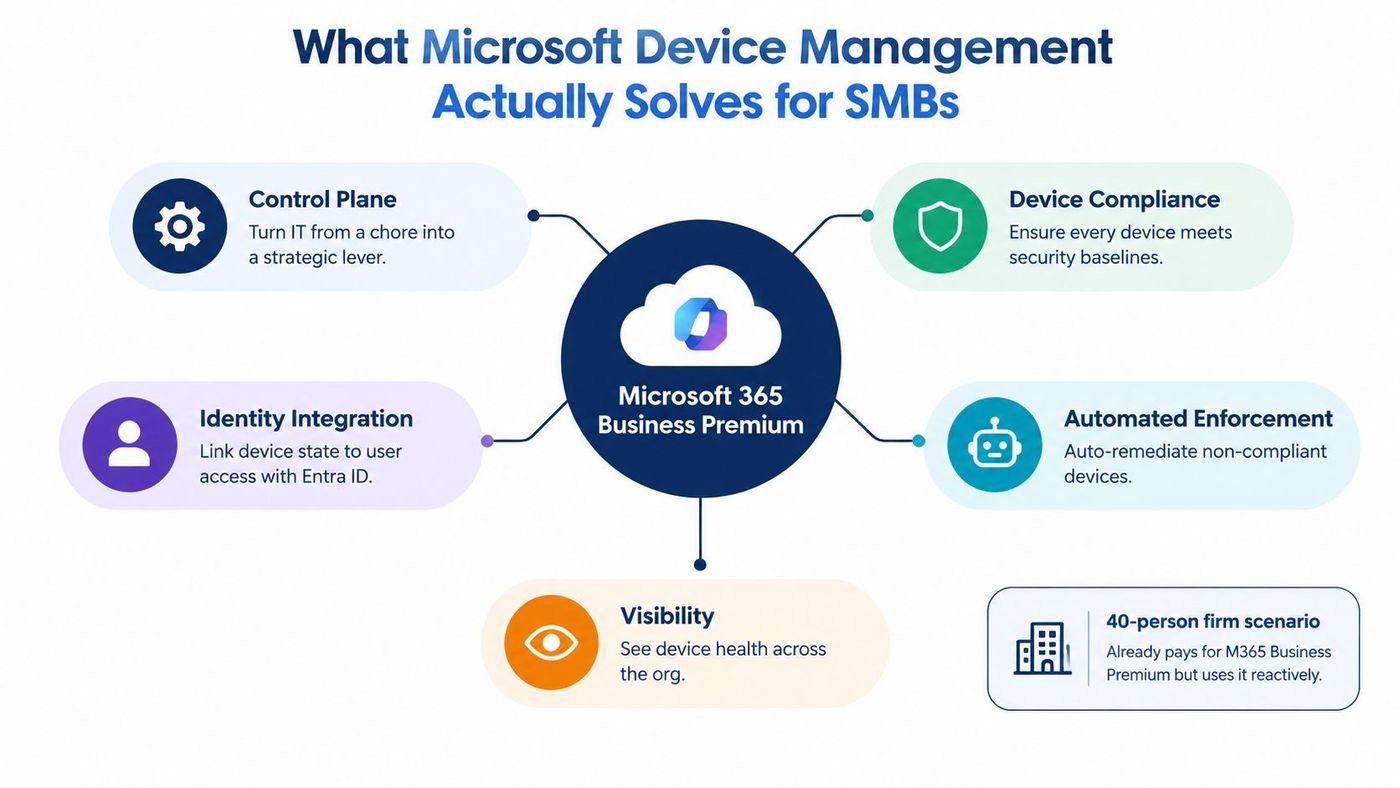
The operating model has four jobs: inventory, configuration, compliance enforcement, and recovery. Inventory identifies devices, owners, operating systems, and active status. Configuration applies repeatable controls such as encryption, password requirements, application deployment, and security baselines. Compliance converts those controls into an access condition. Recovery covers remote actions, support, offboarding, and returning a device to a known state. Microsoft's device management documentation covers remote actions, inventory, lifecycle management, remote assistance, scripts, remediations, and reporting.
Practical rule: If a device can access company data, assign it an owner, a management path, and a defined offboarding action.
For Canadian SMBs, this creates evidence that access is controlled and devices are protected. Insurers, customers, and regulators may ask how those controls operate. Ransomware, hybrid work, and third-party access are harder to manage when laptops and mobile devices sit outside policy.
A federal policy implementation notice effective April 1, 2025 signals movement toward a more standardised Microsoft management model across institutions. That does not make a federal approach automatically suitable for an SMB. It does reinforce the value of documenting ownership, policy coverage, and response actions before an incident.
For broader technical context, F1Group's complete Intune guide explains Intune's role. The practical test remains direct: can your team identify every device, enforce a baseline, connect device health to access, and recover when something fails?
A laptop arriving at the office without its expected Autopilot registration creates immediate rework. IT must build it manually, the user waits, and the organisation loses a consistent starting point. Choose enrollment by ownership and operating context, not by personal preference. Microsoft Intune offers several paths, each suited to a different operating model.
| Enrollment Path | Best For | License Needed | Key Trade-off |
|---|---|---|---|
| Windows Autopilot | New corporate Windows devices | A subscription that includes Intune, such as Microsoft 365 Business Premium | Requires the OEM or reseller to provide the device hardware hash |
| BYOD enrollment | Personal phones and tablets that need business access | A subscription that includes Intune app or device management | Privacy boundaries and offboarding require careful design |
| Hybrid Microsoft Entra join | Organisations retaining on-premises Active Directory | A subscription that includes Intune and the required identity capabilities | More dependencies and troubleshooting than cloud-native enrollment |
| Manual enrollment | One-off exceptions and temporary testing | A subscription that includes Intune | Slow, inconsistent, and easy to forget during replacement cycles |
Microsoft's Canadian Intune product information describes endpoint lifecycle control from setup to decommissioning. Use that lifecycle as the selection test. Enrollment is only the first handoff. Assign an owner, define how the device will be replaced, and document how access and registration will be removed.
For new corporate Windows laptops, standardise on Windows Autopilot. The OEM or reseller must upload the hardware hash, while the internal team prepares profiles, applications, and user assignment before delivery. Confirm registration before shipment. Otherwise, a missing hash or incorrect assignment pushes IT back to manual setup.
BYOD can suit contractor phones that need Outlook, OneDrive, or Teams. App protection can keep corporate data separate from personal content, but the privacy boundary must be explained in plain language. State what the business can remove and what it cannot. Test offboarding as well. A personal device may retain registration or access when identity actions and app protection actions are not coordinated.
An organisation that still depends on on-premises Active Directory may require hybrid Microsoft Entra join while applications and workstation dependencies are modernised. It preserves current operating arrangements, but synchronisation, registration, and policy assignment add failure points. Assign an owner to each dependency before treating the path as standard.
Manual enrollment belongs in an exception register for temporary testing or one-off cases. It is slow, varies by technician, and is easy to miss when equipment is replaced.
For a deeper Canadian implementation perspective, use the CloudOrbis Intune device management guide. The practical recommendation is direct: standardise owned hardware on Autopilot, use BYOD only when business access justifies its privacy and offboarding trade-offs, and document every exception.
Start with a small policy set that improves control without creating a support crisis. A sensible order is compliance, configuration, then mobile application protection.
In the Intune admin centre, create a Windows compliance policy under the device compliance workload. Check encryption status, operating system version, and Microsoft Defender status. Assign it to a pilot device group first, then an early-adopter group, and finally the broad production population. Use measured rollout rings rather than assigning immediately to All Users, because broad assignment makes it difficult to distinguish a policy defect from a device defect.
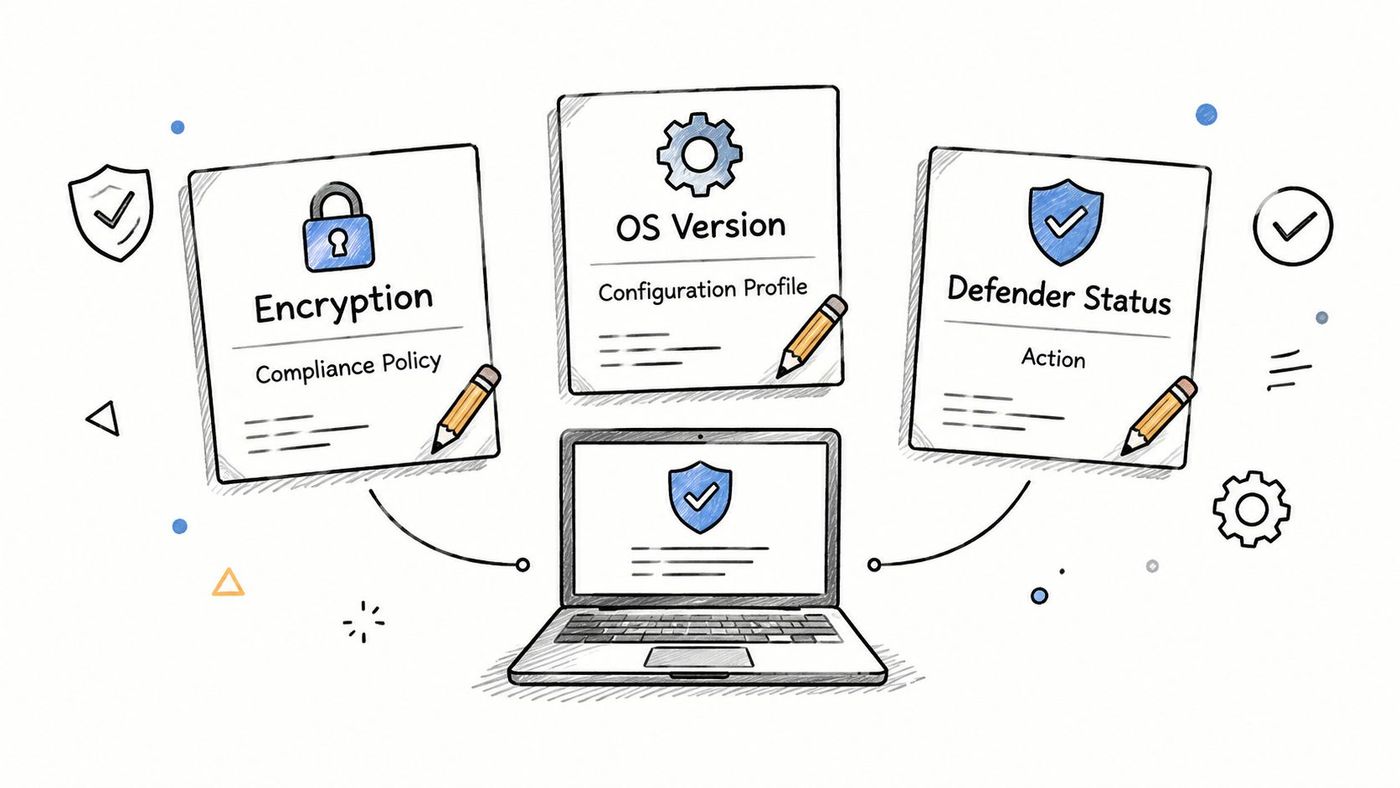
Create a device configuration profile that enforces BitLocker, removes unnecessary local administrator rights, and establishes a practical password or Windows Hello baseline. Pilot the profile on representative hardware, including older laptops and devices used by executives or field staff. If a firmware or driver dependency causes a failure, you'll want to find it before the policy reaches the entire organisation.
Organisations still dependent on traditional directory services should align this work with their broader Active Directory management practices. Conflicting Group Policy and Intune settings can create confusing results, especially during a transition to co-management.
Create an app protection policy for Outlook, OneDrive, and Teams on mobile. Configure the policy to protect corporate data and allow a business wipe without removing an employee's personal content. Test account removal, device loss, and employee departure with a real test user before enabling destructive actions.
Common first-week mistakes include these:
Before conditional access, confirm that enrollment works, compliance results refresh, encryption is enabled, app protection behaves as intended, and support staff can explain recovery. Microsoft's Intune reports expose assignment failures, conflict devices, remediated devices, and incomplete enrollments, so those states should be reviewed before access policies begin enforcing them.
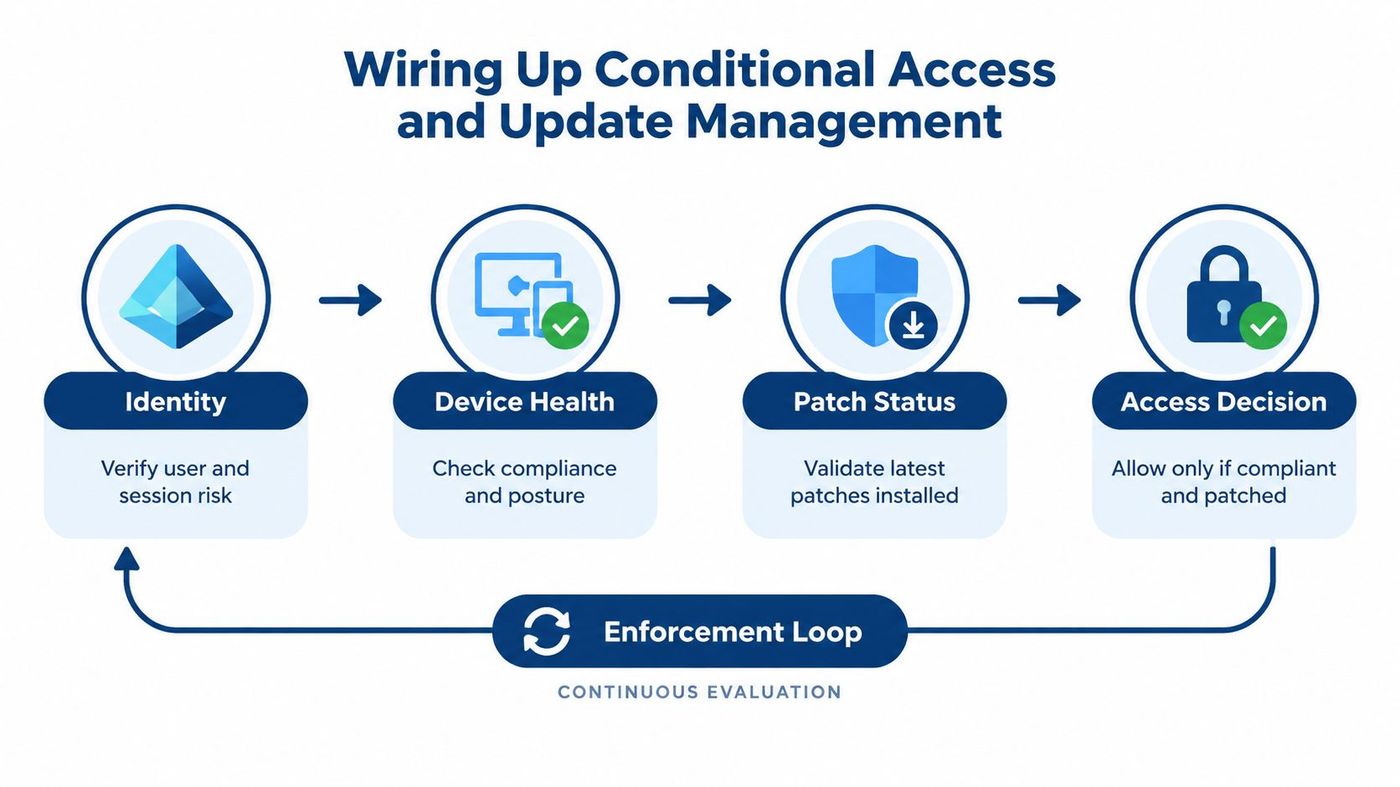
Conditional access is where device management becomes an access control system. Microsoft Entra evaluates the user and session, Intune supplies compliance state, and Defender for Endpoint contributes security posture. Together, they can require a managed, compliant device before granting access to Exchange, SharePoint, and line-of-business applications.
Build access rules in report-only mode first. Filter the initial policy to a pilot group, review sign-in results, identify service accounts or legitimate exceptions, and only then expand enforcement. Keep an emergency access plan outside the normal policy scope, and test it before a mistake locks out administrators.
Use Intune's Windows Update for Business controls to separate feature-update timing from security-update urgency. Quality updates should move quickly enough to reduce exposure, while feature updates need a controlled ring that accounts for application compatibility and device sensitivity. Set compliance deadlines that flag devices when they fall behind, then make the conditional access policy respond to that state.
The enforcement loop should be visible to the user. A laptop misses required updates, its compliance state changes, and access to company email can be restricted until remediation. That approach reduces the need for technicians to chase every stale machine manually, but it only works when the deadline, notification, grace period, and exception process are designed together.
Microsoft Defender for Endpoint integration adds another layer of device health and threat information. Microsoft 365 Business Premium includes the relevant Intune entitlement, while the Canadian Intune product page also lists Intune in Microsoft 365 E3, E5, F1, F3, Enterprise Mobility + Security E3 and E5, and Business Premium subscriptions. Verify the tenant's exact licensing and feature availability before promising a control to leadership.
For a broader identity design, CloudOrbis' identity and access management guidance is a useful companion to the device policy work. The key is to avoid building identity and endpoint rules as separate projects. A device that isn't trustworthy shouldn't receive the same access just because the password is correct.
A weekly review should be short enough to happen every Friday and specific enough to trigger action. For a 25 to 150-seat operation, elaborate dashboards often become another system nobody owns. A repeatable review of a few current signals is more useful.
Microsoft's Intune reporting workflow is available from Reports > Device compliance > Reports. Administrators can select a platform filter and generate current-state data. Microsoft also supports export through Microsoft Graph at deviceManagement/reports/exportJobs, with schemas that include compliant, conflict, error, noncompliant, not applicable, remediated, and unknown device states. Reports must be regenerated when updated data is needed, so don't treat an old export as a current control statement.
| Report | Signal to Watch | Action Threshold |
|---|---|---|
| Enrollment status | Incomplete enrollments and ownership gaps | Investigate every incomplete enrollment and assign an owner |
| Device compliance | Noncompliant, conflict, error, and unknown states | Escalate a rising trend immediately, with leadership review when the noncompliant share exceeds the organisation's agreed tolerance |
| App protection status | Mobile users without effective protection | Contact the user and verify policy targeting before blocking access |
| Endpoint Analytics | Boot-time and reliability anomalies | Open a problem record when the same model, update, or user group repeatedly appears |
The Friday routine starts with report generation, followed by anomaly triage and owner assignment. A repeated BitLocker failure may point to firmware or hardware conditions. Rising application crashes may correlate with a feature-update issue. A jailbroken mobile device should trigger an automatic block or restricted access path, not a manual debate each time.
Use CloudOrbis analytics and reporting services as a reference point for turning operational data into assigned work. Finish the meeting with a short leadership note: current posture, unresolved risk, owner, and next action. The value comes from acting on the same signals every week, not from adding more charts.
Many SMBs treat Microsoft 365 Business Premium as an email and collaboration subscription, then buy separate tools for functions Intune can already support. Microsoft's Canadian business pricing lists Business Premium at CAD 29.80 per user per month on annual commitment, and Intune Plan 1 is bundled with it, as described in this Canadian overview of mobile device management benefits. The waste isn't only financial. Unused controls leave gaps between policy intent and actual device state.
The quiet failures are familiar:
Track licence activation, Intune enrollment coverage, and Defender for Endpoint onboarding as separate measures. Review inventory, compliance, assignment failures, and remediation throughput rather than focusing only on enrollment counts. Teams looking at the wider asset and lifecycle picture can also review ways to optimise IT costs and compliance with Beyond, particularly where procurement, disposal, and device records are disconnected.
A practical 90-day extraction plan begins with Windows security baselines, Outlook mobile app protection, and identity protection defaults. The next phase can introduce controlled Windows Autopatch rollout and self-service BitLocker recovery through the Intune portal, with support procedures ready before users depend on them. For licensing decisions, CloudOrbis' Microsoft 365 licence optimisation guidance can help separate subscriptions you need from controls you already own but haven't operationalised.
CloudOrbis Inc. helps Canadian SMBs assess, implement, and operate Microsoft Intune, Microsoft Entra, Defender for Endpoint, compliance policies, and device lifecycle controls as part of a managed IT and cybersecurity programme. Visit CloudOrbis Inc. to arrange an assessment of your current Microsoft 365 licensing, enrollment coverage, conditional access, and weekly reporting routine.
Book a 30-minute call with a senior engineer. No sales script, just straight answers about your environment.


