Microsoft Dynamics 365 Services Explained for Growth
Explore Microsoft Dynamics 365 services, benefits, costs and implementation tips for Canadian SMBs. Learn how CloudOrbis helps you deploy securely.

Explore Microsoft Dynamics 365 services, benefits, costs and implementation tips for Canadian SMBs. Learn how CloudOrbis helps you deploy securely.

A mid-sized Canadian business can have a sales system, an accounting platform, shared spreadsheets, email threads, and service records, yet still lack a reliable view of the customer. A manager may wait for someone to reconcile a report, a service representative may search several systems for case history, and finance may work from data that operations updated days earlier.
That's the problem Microsoft Dynamics 365 services are designed to address. Dynamics 365 brings modular customer relationship management and enterprise resource planning applications into the Microsoft Cloud, while implementation, migration, integration, security, and managed support turn the technology into a working operating model. For leaders evaluating Microsoft tools, this guide to Microsoft solutions for small business provides useful context before you assess a larger Dynamics 365 programme.

Dynamics 365 isn't a CRM replacement or an accounting application. It can connect sales, customer service, finance, supply chain, and operational data so teams work from a more consistent view of the business. That shared foundation matters when a customer's order, service issue, contract, and payment history need to inform the same decision.
Canadian adoption shows that the platform can support highly governed environments. A 2024 Government of Canada contract record identifies Microsoft Dynamics 365 as the government's standard case-management solution, with the Department of Justice's LEX production adaptation fully operational for over 4,000 users according to the federal contract record. That doesn't mean every mid-market company needs a government-scale deployment. It does show that Dynamics 365 can operate as a structured workflow system, not only as a commercial database.
Practical rule: Treat Dynamics 365 as a business operating model. The applications matter, but governance, adoption, data quality, and support determine whether the investment produces value.
This guide follows the questions Canadian business and IT leaders usually ask. What do the services include? Where can the platform help in healthcare, manufacturing, legal, and logistics? How should a team plan migration, security, Copilot adoption, support, and total cost of ownership?
The right starting point isn't a product demonstration. It's a clear view of the work you want to improve, the systems that hold the relevant data, and the controls your organisation must maintain.
Think of Dynamics 365 as a connected business hub rather than a single application. Dataverse acts like a shared set of shelves where structured business information can be stored and governed, while individual Dynamics 365 applications provide the tools different teams use to do their work.
The main application families are:
A sales representative might update an opportunity in Dynamics 365 Sales, while a service team reviews the customer's case history in Customer Service. Finance and operations can use related information without relying on a manually assembled spreadsheet. The value comes from the relationship between the applications, not from collecting software under one brand.
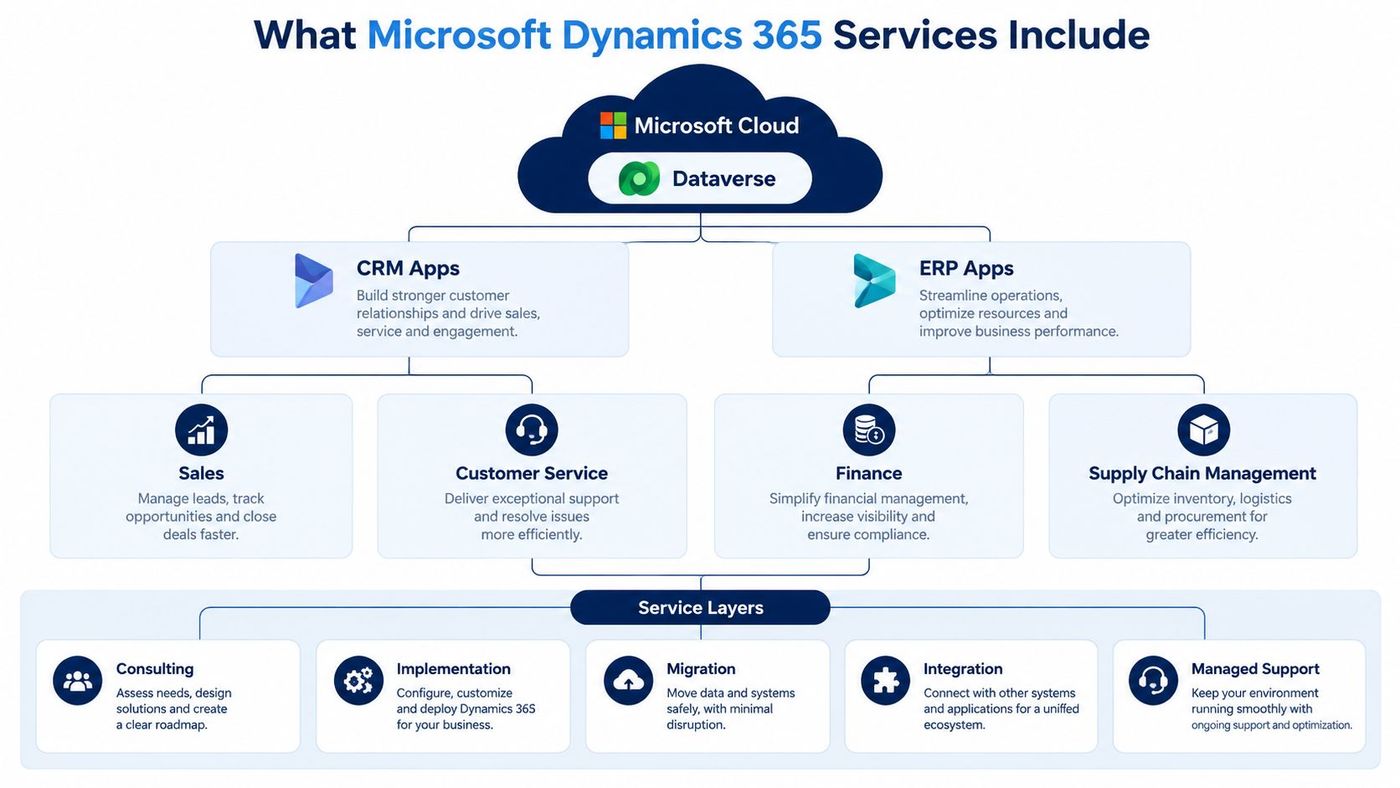
Licences provide access to software, but a successful deployment usually needs a wider service layer:
Canadian organisations replacing older Microsoft ERP products may also benefit from reviewing Microsoft Dynamics NAV software and its modern successor path. For service-focused companies comparing CRM approaches, this guide to CRM for Australian services businesses offers another useful perspective on process design and customer data.
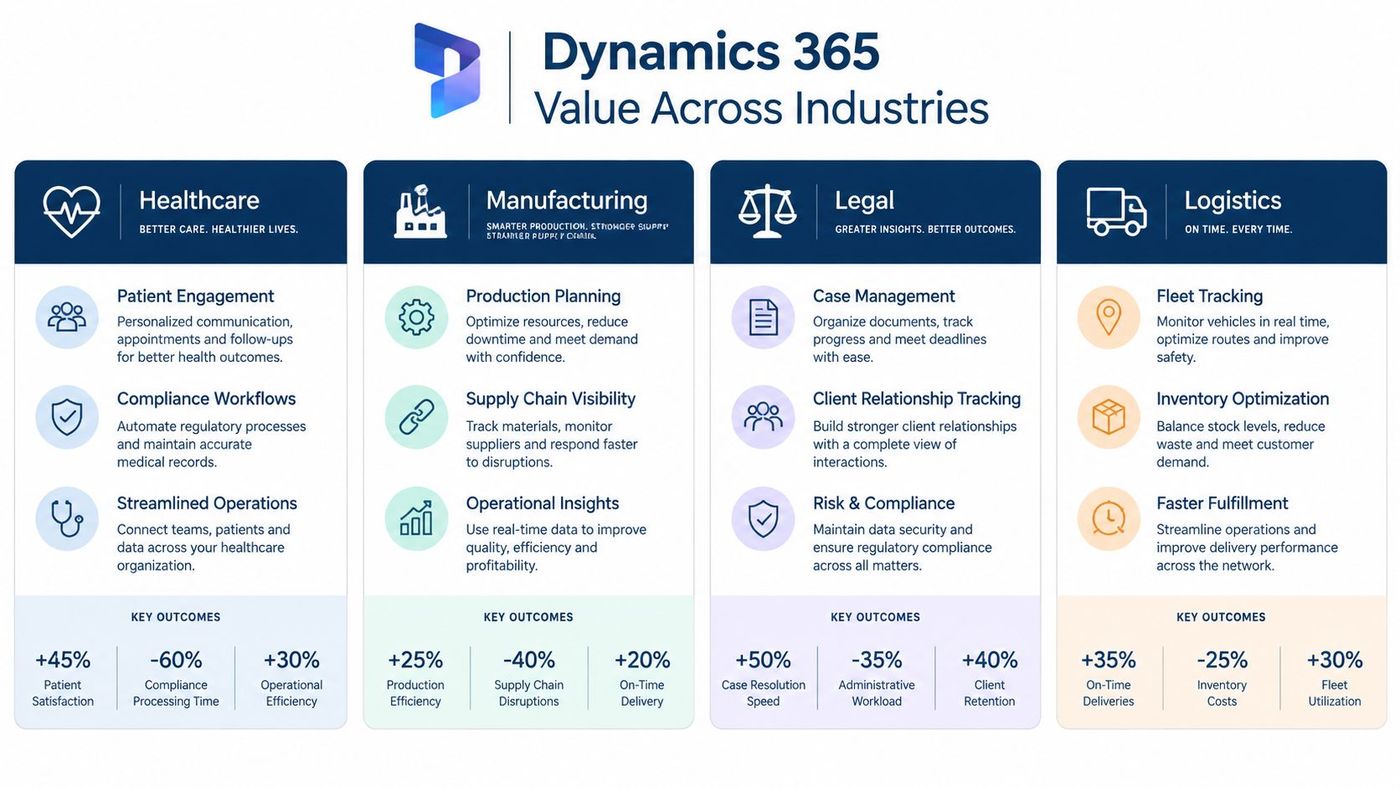
The strongest Dynamics 365 business case usually begins with a workflow, not an application name. Ask where staff re-enter information, where managers wait for reports, and where a handoff can lose customer or operational context.
A clinic or healthcare organisation may need to coordinate patient engagement, referrals, service requests, documentation, and privacy controls. Dynamics 365 Customer Service can provide structured case management, while Dataverse and Microsoft security tools can support role-based access and controlled workflows.
The platform doesn't make a process compliant automatically. It can, however, provide a governed place to design intake, escalation, approval, and reporting processes. A team can replace shared inboxes and disconnected spreadsheets with defined queues, ownership rules, and auditable activity.
Manufacturers often manage customer orders, production planning, purchasing, inventory, and service commitments across separate systems. Dynamics 365 Finance and Supply Chain Management can connect operational records, while Sales and Customer Service can give commercial teams better visibility into fulfilment and customer issues.
The practical benefit is a shorter path from question to answer. A sales manager can investigate an order status without asking operations to build a manual report, while planners can work from information that reflects current business activity.
Legal teams need more than contact management. They may need matter intake, client relationships, document collaboration, billing coordination, and controlled access to sensitive information. Dynamics 365 can support structured case and relationship processes, with Microsoft 365 integration helping teams work in familiar tools.
A firm should define its matter model carefully before configuration. Poorly designed categories and permissions can make a new system harder to use than the old one.
Logistics companies coordinate customers, shipments, inventory, exceptions, drivers, carriers, and service communications. Dynamics 365 can connect customer records with order and operational workflows, while Power Platform can help create targeted portals, notifications, and approvals.
For teams exploring customer-facing logistics workflows, a resource on a drayage portal for container operations can help clarify how self-service and shipment visibility fit into a broader service design.
A useful test: If an employee must copy the same customer, order, or case information into multiple systems, map that handoff before selecting another feature.
The right starting point varies by sector. CloudOrbis outlines its broader industry-focused IT services, which can help leaders frame Dynamics 365 alongside cybersecurity, cloud, collaboration, and operational support.
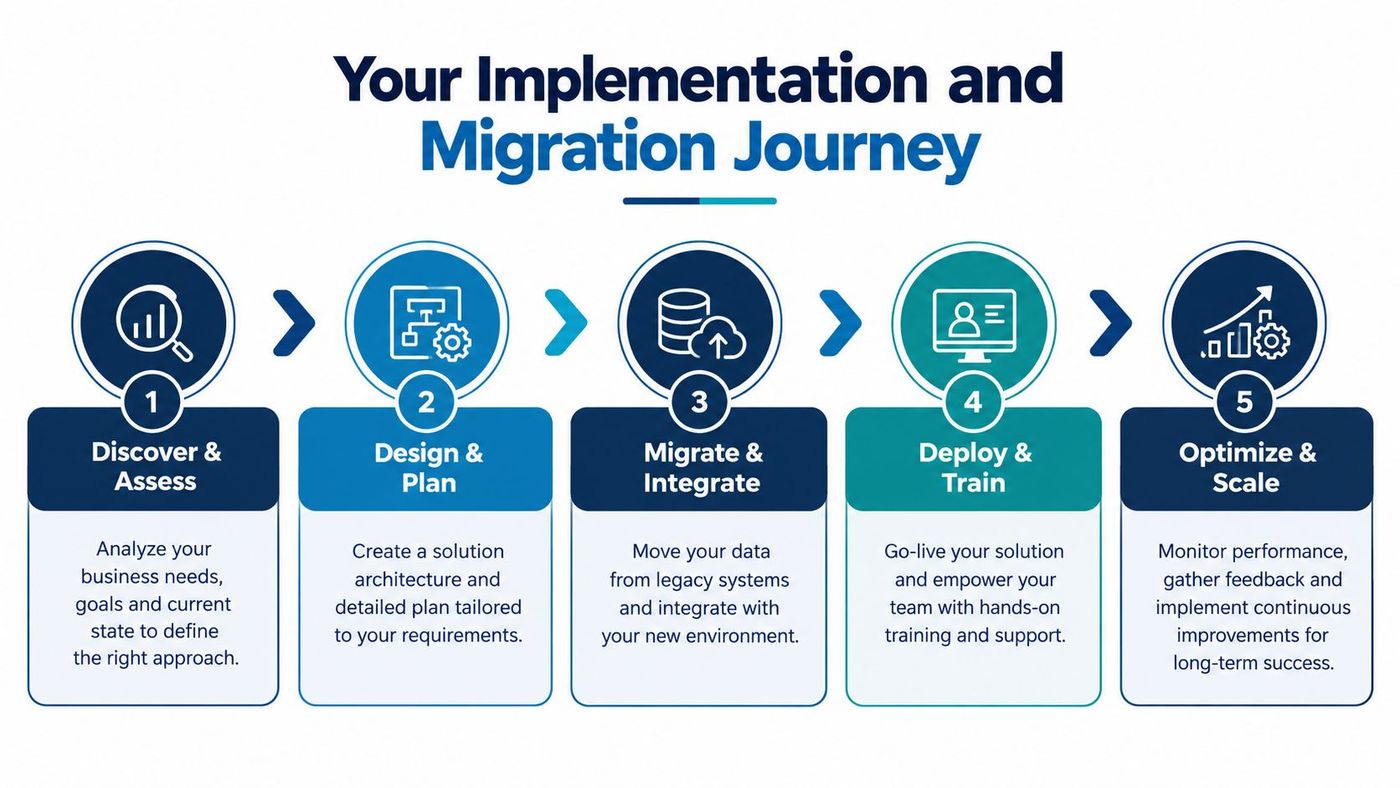
A Dynamics 365 rollout should feel more like moving a warehouse than installing an app. You need to decide what comes across, where it belongs, what must be discarded, and how staff will work during the transition.
Microsoft's Canadian implementation guidance uses five stages, Strategize, Initiate, Implement, Prepare, and Operate, reflecting a lifecycle approach associated with Success by Design in Microsoft's implementation guide. Microsoft's adoption materials also describe four adoption stages, Start, Implement, Learn, and Connect, which can help medium-sized organisations plan user readiness through the Dynamics 365 adoption journey.
Data migration deserves its own workstream. Legacy records often contain duplicate accounts, inconsistent addresses, obsolete contacts, and fields that no longer match current processes. Migrating every record can create more clutter, not more value.
Cloud migration planning should also account for identity, network dependencies, backup, security, and business continuity. Microsoft's Azure migration services guidance can help leaders consider the wider cloud environment around Dynamics 365.
Go-live is a change in responsibility, not the end of the project. Dynamics 365 environments need user support, security administration, release planning, performance review, workflow maintenance, and decisions about future enhancements.
The best support model depends on what your internal team can own consistently. A small IT department may handle Microsoft 365 administration but lack the time or specialist knowledge to manage Dataverse, integrations, security roles, and application improvements.
| Support model | Internal responsibility | Partner responsibility | Best fit |
|---|---|---|---|
| Break-fix | Users report incidents and wait for assistance | Resolves issues as they arise | Stable environments with capable internal ownership |
| Co-managed | Internal team owns daily decisions and some administration | Provides specialist support, escalation, and advisory help | Organisations with an established IT function |
| Fully managed | Business supplies priorities and approves material changes | Provides monitoring, helpdesk, administration, optimization, and governance | Teams seeking predictable ownership and limited internal capacity |
Break-fix support may appear simple, but it tends to focus attention on visible incidents rather than recurring causes. Co-managed support offers flexibility, although responsibilities must be written clearly. Fully managed services can reduce internal coordination, provided the agreement defines response expectations, escalation paths, security responsibilities, and change approval.
A Canadian business may also prefer support that understands local operating hours, privacy expectations, and the realities of mid-market IT teams. CloudOrbis describes a 24/7 Canada-based helpdesk and ongoing Microsoft 365 and Dynamics 365 optimization as parts of its managed IT model. The important evaluation point is not the label. It's whether the provider will take clear ownership of the work your team currently struggles to sustain.
Canadian leaders should separate three questions that are often bundled together: Is the platform secure? Is the configuration appropriate for our obligations? Will the investment produce enough operational value?
Microsoft 365 and Dynamics 365 environments need deliberate identity and information governance. Guidance relating to Ontario's PHIPA requirements states that no Microsoft 365 plan is PHIPA-compliant out of the box in the Microsoft compliance discussion. The organisation must configure and operate controls such as a Canadian datacentre tenant, sensitivity labels, data loss prevention policies, retention policies, multifactor authentication, Conditional Access, Intune, Defender for Endpoint, and Purview auditing.
That checklist doesn't replace legal or privacy advice. It does clarify the work involved. A Dynamics 365 project should include identity design, least-privilege roles, access reviews, audit requirements, data retention, incident response, and supplier responsibilities from the beginning.
Licensing is only one part of the financial model. Include implementation, data cleansing, integration, testing, training, support, security tooling, governance, and future change. Legacy decommissioning can reduce cost, but only after the organisation confirms that required records, reports, and integrations have been replaced.
Copilot requires especially careful analysis for Canadian buyers. Microsoft's Canadian Business Central Copilot is included at no extra cost, while Microsoft 365 Copilot for business is a paid add-on with a 300-user cap as described in Microsoft's Canadian Business Central Copilot overview. These are different commercial situations, so a company shouldn't assume that an AI feature in an ERP workload has the same cost structure as an add-on for productivity users.
Cost discipline: Don't buy Copilot because a demonstration looks impressive. Choose a workflow, define who will use it, estimate training and governance effort, and confirm whether the feature is bundled or separately licensed.
ROI should be tracked through operational measures that your team can observe, such as fewer manual handoffs, faster access to customer history, improved data completeness, reduced report preparation, lower legacy maintenance, and stronger user adoption. Microsoft's Canada-specific reporting documentation also shows why regional configuration matters. The legacy Sales Statistics report isn't available in Canada, and Canadian users must use the Customer Sales Statistics report, 10047 instead per Microsoft's report availability documentation.
Selecting a Dynamics 365 partner is a governance decision as much as a technical one. A provider may configure the application well but still leave your organisation without a migration plan, adoption support, security ownership, or a workable operating rhythm.
Use these criteria during evaluation:
CloudOrbis provides Dynamics 365 consulting and implementation for small and mid-sized organisations, with services spanning assessment, strategy, migration, implementation, employee training, and ongoing optimization. Its wider managed IT offering includes a 24/7, Canada-based helpdesk, cybersecurity, cloud migration, backup and disaster recovery, Microsoft 365 support, and strategic IT consulting.
That combination matters because Dynamics 365 rarely operates alone. Identity lives in the Microsoft ecosystem, users collaborate through Microsoft 365, data may move through Azure or Power Platform, and security obligations extend beyond the CRM or ERP interface. A partner that can see those dependencies can help prevent a successful application rollout from becoming an unmanaged environment.
CloudOrbis serves sectors including healthcare, logistics, manufacturing, legal, finance, construction, education, and engineering. Its Microsoft Dynamics 365 consulting services are positioned for organisations that need customized guidance rather than a one-size-fits-all deployment.
The next step is a focused assessment. Bring your current systems, priority workflows, data concerns, compliance requirements, and internal capacity to the conversation. A useful partner should help you decide what to implement first, what to postpone, and what must be governed from day one.
CloudOrbis Inc. helps Canadian small and mid-sized businesses plan, implement, secure, and optimize Microsoft Dynamics 365 alongside Microsoft 365, Azure, and cybersecurity services. Visit CloudOrbis Inc. to request an assessment and discuss a practical roadmap for replacing disconnected workflows with a supported, governed business platform.
Book a 30-minute call with a senior engineer. No sales script, just straight answers about your environment.


