Managed Endpoint Detection and Response Guide for SMBs
Learn how managed endpoint detection and response protects Canadian SMBs with 24/7 monitoring, rapid containment, and clear ROI for growing businesses.

Learn how managed endpoint detection and response protects Canadian SMBs with 24/7 monitoring, rapid containment, and clear ROI for growing businesses.
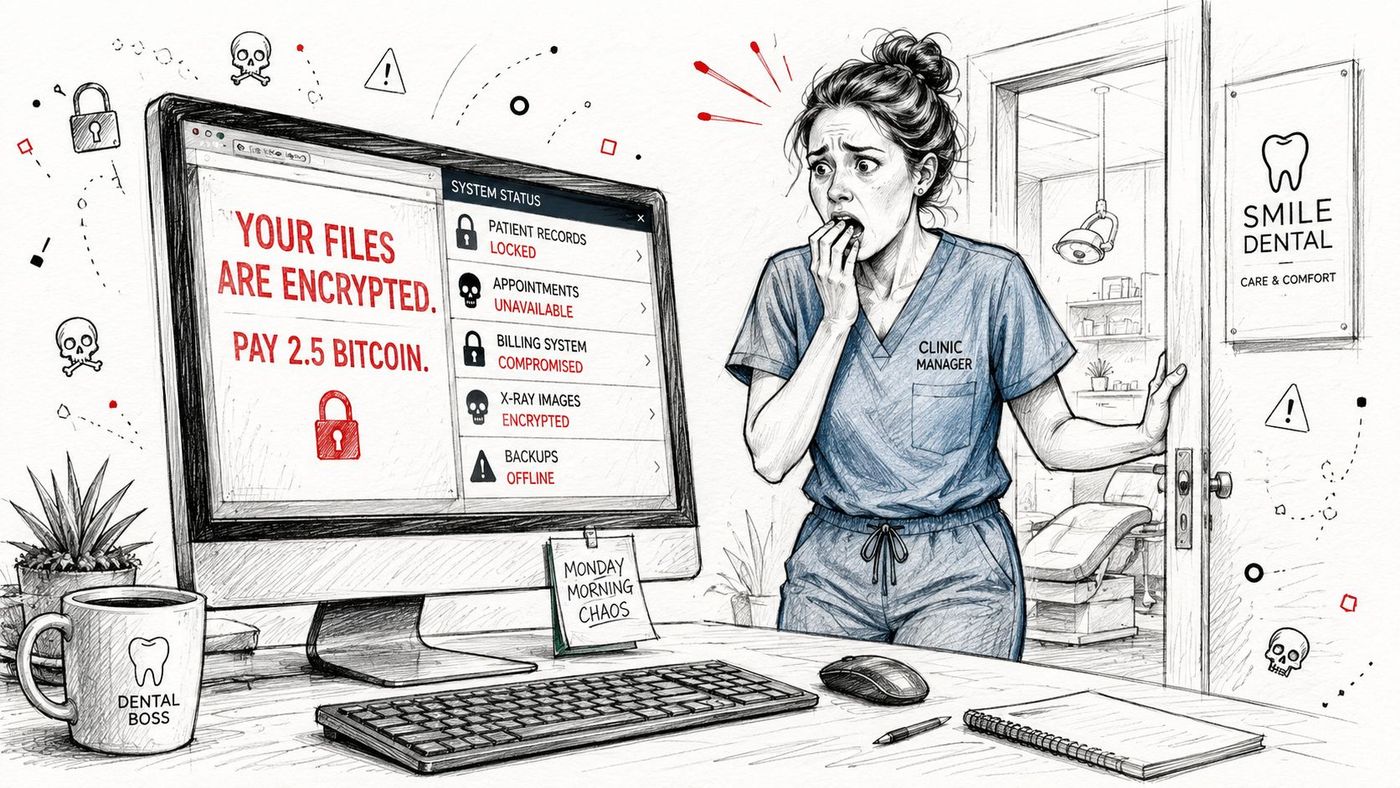
A 45-employee dental clinic can have antivirus installed on every workstation and still discover a ransomware attack on Monday morning. The owner arrives to encrypted patient records, a ransom note, and a console that says every device is healthy. The software logged activity, but nobody was watching closely enough to decide that the activity was dangerous.
That gap is the reason managed endpoint detection and response matters. EDR software collects endpoint telemetry and raises alerts. A managed service adds people, procedures, investigation, and pre-authorized action when your team is offline. For Canadian SMBs, the practical question isn't whether another security tool is installed. It's who responds at 11 p.m., what they can do without waiting for approval, and whether they can see the identity and Microsoft 365 activity surrounding the endpoint.
The clinic owner calls the IT provider. The technician starts checking backups, user accounts, and affected computers while staff wait to see which files still open. The antivirus console remains green because the attack used legitimate tools and behaviour that didn't match a known signature. Traditional antivirus can still play an important role, but it isn't an incident response team.
This isn't a rare endpoint concern in Canada. A TELUS study reported that 67% of Canadian organizations experienced a ransomware incident, while 98% reported a cyberattack in the previous 12 months. It also found that 25% experienced at least one attack per day, with an average of 3.1 ransomware incidents per organization over a 12-month period. Larger organizations averaged 3.7 incidents. Canadian managed security guidance from TELUS puts the endpoint at the centre of the problem, with 67% of respondents reporting affected devices or endpoints, compared with 47% for on-premises IT systems and 26% for cloud-based systems.
Practical rule: If your provider only calls after an alert becomes an outage, you bought notification, not response.
Managed EDR changes the operating model. Sensors run on laptops, servers, and supported workloads. A security operations team reviews suspicious activity, confirms whether it represents a real threat, and follows agreed containment procedures. That might mean isolating a workstation, disabling a malicious process, or escalating to your internal contact before the attacker reaches shared systems.
The trade-off is straightforward. You pay for continuous oversight and must accept that a provider may isolate a device before someone in your office has explained the odd behaviour. In return, you close the overnight gap that leaves a small business dependent on luck. The difference between threat detection and response becomes operational rather than theoretical.
Managed EDR combines endpoint software with an external security operations team. The software records activity from each covered device and sends relevant telemetry to a central platform. Analysts then review the signals, investigate suspicious behaviour, and act for the customer under an agreed response policy.
A 50-seat business should expect four connected stages.
At 2 a.m., an employee's workstation launches PowerShell, creates an unusual scheduled task, and begins contacting an unfamiliar external service. The EDR agent records the process chain, account involved, files touched, and related network activity. Behavioural detection can flag the sequence even when the specific malware sample hasn't appeared in a signature database.
Detection alone isn't protection. An alert sitting in a portal doesn't contain an attack.
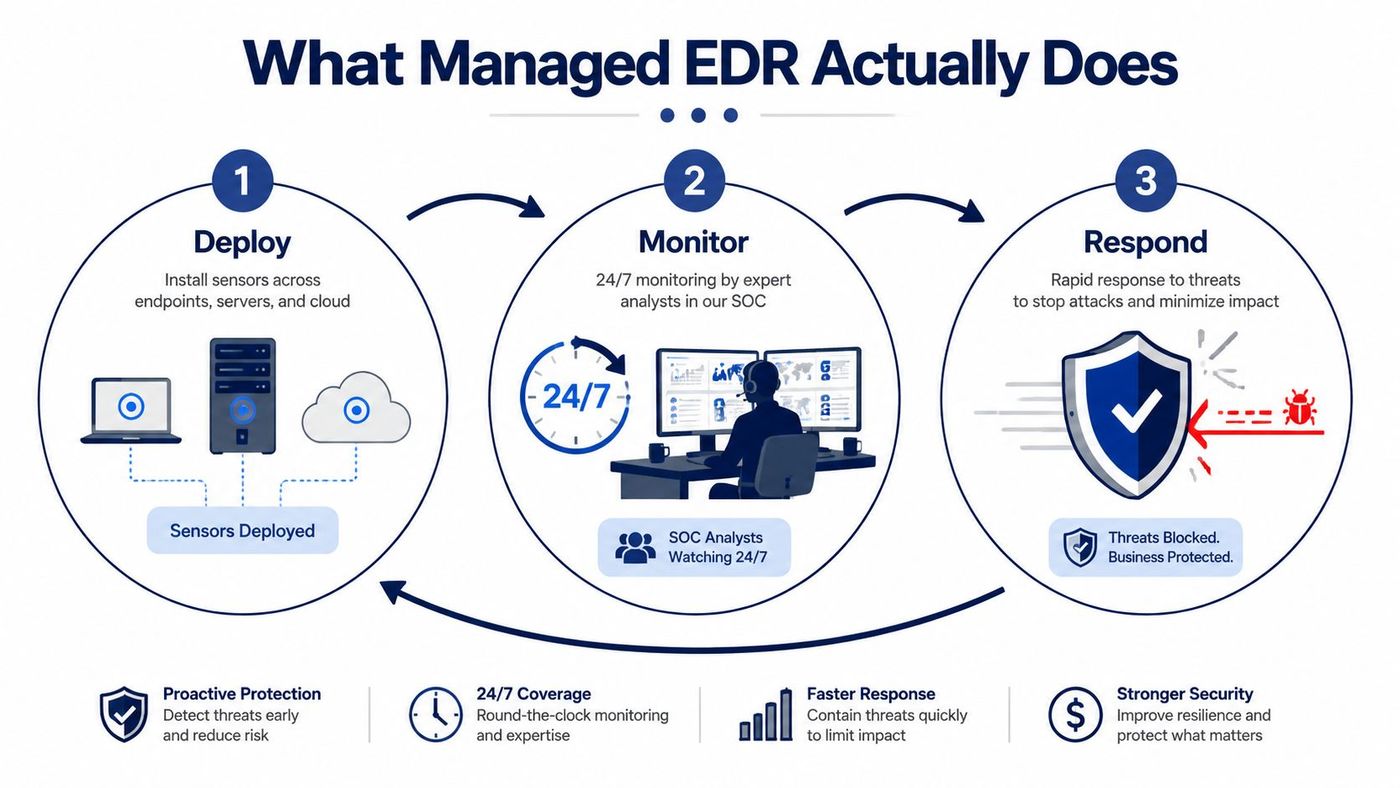
The analyst examines the full timeline instead of treating the PowerShell event in isolation. They check whether the user signed in from an unusual location, whether Microsoft 365 shows suspicious access, and whether another endpoint displays the same process. This context separates a legitimate administrative script from an attack using a stolen account.
The plain-language explanation of endpoint detection and response is useful for understanding the technology, but buyers should focus on the human workflow attached to it.
If the evidence supports an active compromise, the SOC can isolate the workstation from the network according to the permissions in your service agreement. The employee may lose access temporarily, but the attacker loses an easy path to file shares and other endpoints. A provider might also terminate the malicious process or block a related indicator, depending on the platform and approved playbook.
After containment, the provider documents what happened, identifies affected accounts and systems, supports eradication, and helps your team restore normal operation. Canadian federal guidance describes this sequence as detection and assessment followed by mitigation and recovery, including containment, eradication, patching, or temporary shutdown of vulnerable services. The Government of Canada's cyber security event management plan also makes clear that incident detection must connect to escalation and reporting processes.
The labels sound similar, but the responsibility split is more important than the product names. Ask one question before comparing features: who has the keyboard when the alert arrives outside business hours?
| Service | Who Monitors 24/7 | Who Investigates Alerts | Who Contains Threats | Endpoint Scope | Identity & Cloud Coverage |
|---|---|---|---|---|---|
| Antivirus | Nobody, unless internal staff check the console | Internal IT, if an alert is noticed | Internal IT, usually manually | Malware prevention on protected devices | Usually limited |
| EDR software | The customer, unless separately staffed | Customer security or IT team | Customer team using the platform | Detailed endpoint telemetry and response controls | Varies by product and integration |
| Managed EDR | Provider SOC | Provider analysts | Provider under approved playbooks, with escalation where required | Managed endpoint detection and response | May be limited unless included |
| MDR | Provider SOC | Provider analysts across connected sources | Provider across endpoint, identity, network, and cloud controls | Endpoint coverage within broader service | Core part of the wider service, subject to scope |
Traditional antivirus focuses on prevention and known malicious patterns. It may block a recognised file, but it doesn't guarantee that anyone will review suspicious activity overnight. Standalone EDR provides richer telemetry, investigation tools, and containment controls, yet your business still owns the staffing problem.
Managed EDR is the practical floor for an SMB that needs endpoint coverage without building a security operations function. The provider operates the EDR platform and handles the agreed response. That doesn't remove your responsibilities. You still need an incident contact, backup decisions, business context, and a clear approval model.
MDR extends the view beyond devices. It can correlate endpoint events with identity, email, network, and cloud activity. That matters because an attacker may use a valid Microsoft 365 session or compromised credentials after the initial endpoint event. The EDR versus MDR comparison is less about choosing a fashionable acronym and more about deciding how much of the environment one team must monitor.
A managed endpoint detection and response service earns its place through operations, not dashboard design. For a 50-seat Canadian business, four capabilities determine whether the service reduces risk or just creates another queue of alerts.
Your office may close at 6 p.m., but endpoints continue to generate activity. Continuous monitoring means an analyst or managed security workflow reviews relevant telemetry when your internal IT contact is unavailable. A small company doesn't need a large internal SOC to maintain overnight coverage, but it does need a provider that defines exactly what “24/7” means.
Ask whether monitoring is performed by people, automated triage, or a combination. Then ask how the provider contacts you when an event crosses the escalation threshold. The answer should identify the channel, recipient, and expected action.
Signature matching catches known threats. Behavioural analytics looks for suspicious sequences, such as unusual scripting, credential use, persistence, or rapid file changes. That helps identify an attack that doesn't resemble a previously catalogued file.
Detection quality depends on tuning. A provider should understand your normal administrative tools, line-of-business applications, and maintenance routines. Otherwise, the system may either bury real incidents in noise or isolate legitimate activity.
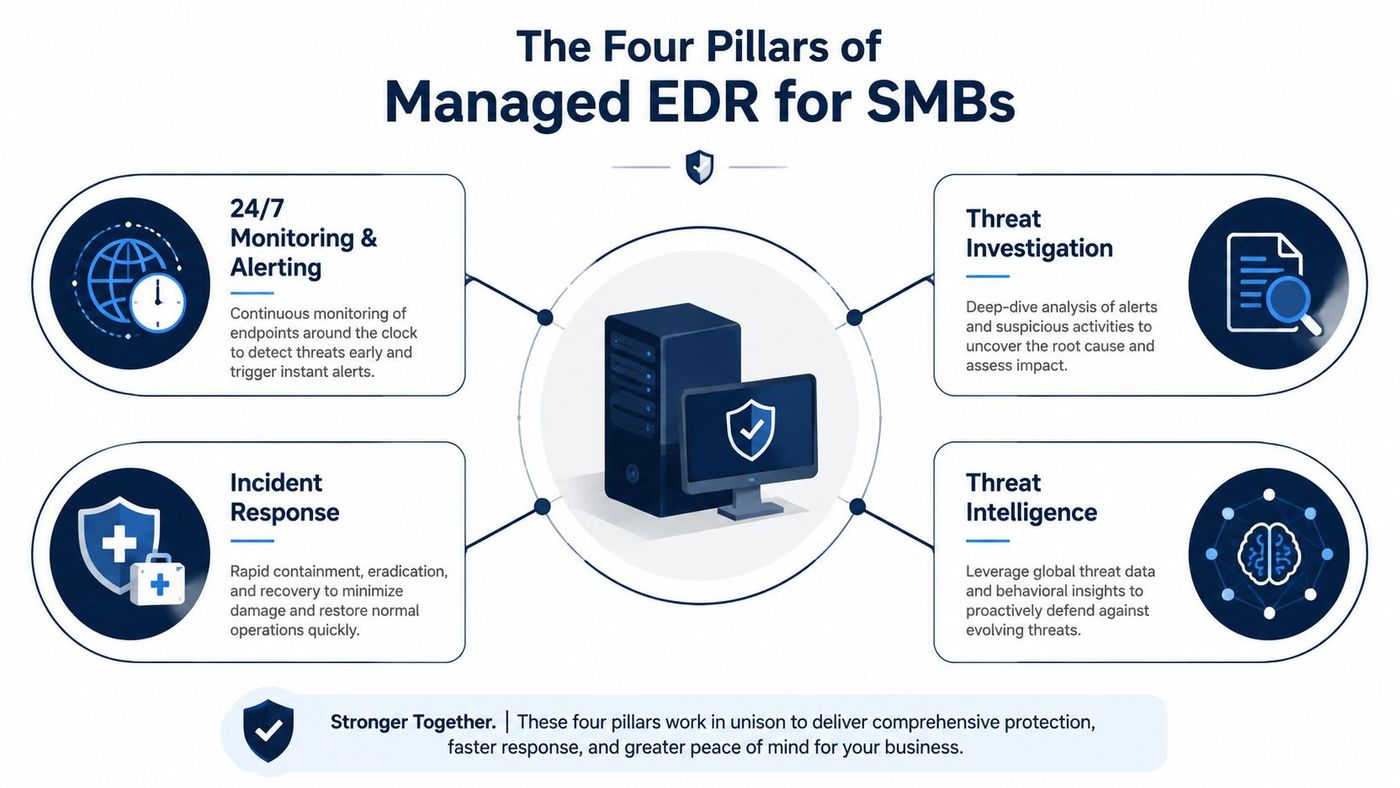
Speed matters most before an attacker moves laterally. Automated isolation can remove a compromised laptop from the network while analysts investigate, rather than waiting for a busy employee to report that files won't open.
Pre-authorisation is the dividing line. Your agreement should state whether the provider can isolate devices, stop processes, disable accounts, or block indicators without calling first. If every action requires approval from a single owner, the service will slow down at the moment it needs to move.
Automation sees patterns. Analysts decide what those patterns mean. They correlate endpoint telemetry with sign-in activity, Microsoft 365 events, user context, and previous incidents to determine whether the alert is benign, suspicious, or confirmed.
For an SMB, human review also protects against unnecessary disruption. A legitimate PowerShell script used by an IT contractor shouldn't receive the same treatment as a script launched by a compromised account. A properly staffed security operations centre service gives your business judgement as well as tooling.
Government of Canada endpoint guidance requires endpoint logging aligned with federal event logging guidance to improve detection of anomalous behaviour. The federal endpoint management standard reinforces a basic point: if devices don't produce useful logs, analysts can't investigate what happened.
Choose the architecture that matches your operating reality, not the provider's preferred sales motion. Cloud-native managed EDR usually suits distributed SMBs with lean IT teams. The management console and analytics run in the provider's environment, so your company avoids maintaining additional security servers.
On-premises deployment still has a place. A manufacturer with isolated production networks, strict data handling requirements, or limited tolerance for third-party processing may need local management and storage. Healthcare, legal, and financial organisations should confirm how telemetry is stored, accessed, and transferred before selecting a model.
Hybrid deployment can preserve local control over selected policies while sending appropriate telemetry to a provider for analysis. It offers flexibility, but it also introduces more administration, connectivity planning, and troubleshooting responsibility. Don't choose hybrid only because it sounds more advanced.
| Deployment Model | Best Fit For | Compliance Posture | Bandwidth Need | In-House IT Skill |
|---|---|---|---|---|
| Cloud-native | Distributed SMBs with lean IT | Confirm provider controls and residency | Dependent on endpoint connectivity | Lower |
| On-premises | Controlled or isolated environments | Greater local control, with internal obligations | Local collection reduces external dependency | Higher |
| Hybrid | Organisations needing local control and external analysis | Shared responsibility across locations | Requires careful traffic and policy design | Moderate to high |
Bandwidth planning should consider the whole environment. A normal office fleet may operate comfortably with ordinary connectivity, while production systems sharing the same uplink need traffic shaping and careful collection policies. In-house maturity is the decisive factor. A part-time administrator should default to the simplest model that gives the provider reliable visibility.
Canadian public-sector deployments show the value of centralised correlation across endpoint, gateway, and cloud signals. Shared Services Canada's network detection and response service protects approximately 95 departments and agencies, and the Cyber Centre has completed 90 cloud detection and response deployments, according to a federal government response document. The lesson for SMBs is practical: endpoint coverage shouldn't become an isolated silo.
Treat the sales process like an incident-response exercise. Ask the provider to explain who acts at 11 p.m., under whose authority, and what happens when your staff are unavailable. A product demonstration cannot answer those questions.
Before signing, require clear answers:
Review the provider's wider operating model through a review of our cybersecurity services. A Canadian provider such as CloudOrbis Inc. offers expert-managed EDR with real-time monitoring, investigation, and response, including isolation of affected computers or servers when a threat is detected. Compare that scope with competing vendors, and put every material promise in the agreement.
Federal threat reporting identifies ransomware as a persistent, evolving threat, while Statistics Canada reported 40,437 incidents of cybercrime in the first six months of 2025. Those reports make the buying decision difficult to ignore. Choose a service with people, authority, and a tested workflow, not another green console.
CloudOrbis helps Canadian SMBs implement managed endpoint detection and response with continuous monitoring, threat investigation, endpoint containment, and Microsoft 365 and identity considerations. Visit CloudOrbis Inc. to discuss current coverage, response permissions, and the right managed security model for your business.
Book a 30-minute call with a senior engineer. No sales script, just straight answers about your environment.


