

September 25, 2026
Is VoIP Good for Small Business in Canada? a 2026 GuideIs VoIP good for small business in Canada? Explore costs, benefits, reliability, security, and migration tips for SMBs considering VoIP in 2026.
Read Full Post%20(1).webp)
Usman Malik
Chief Executive Officer
September 26, 2026

A successful on-premise to cloud migration checklist must cover assessment, governance, resilient backups, dependency-aware sequencing, testing, controlled cutover, and ongoing optimization, not just moving servers and data. In Canada, cloud-service consumption by Shared Services Canada rose from C$1.4 million in fiscal 2019-20 to C$156.9 million in fiscal 2022-23, showing how quickly cloud use has moved from experimentation into daily operations.
A growing clinic, manufacturer, law firm, or construction company often reaches the same point. On-premise servers are expensive to maintain, remote access is becoming harder, and leaders want cloud flexibility. Yet nobody wants downtime during patient care, lost engineering files, a compliance gap, or an argument over whether the internal team or IT partner owns the recovery plan.
This 10-step on-premise to cloud migration checklist follows the full lifecycle, from assessment through post-migration optimization. It includes decision points, practical examples, checkboxes, and controls that business and IT leaders can turn into a working runbook. Healthcare, finance, legal, manufacturing, logistics, construction, and education teams can adapt each checkpoint to their data, users, contracts, and risk profile.
Canadian organizations should also take a cloud-smart approach. The federal government made cloud a delivery priority in its Cloud Adoption Strategy, later updating that approach to emphasize suitability and risk rather than moving everything indiscriminately. A sound migration plan follows the same principle.
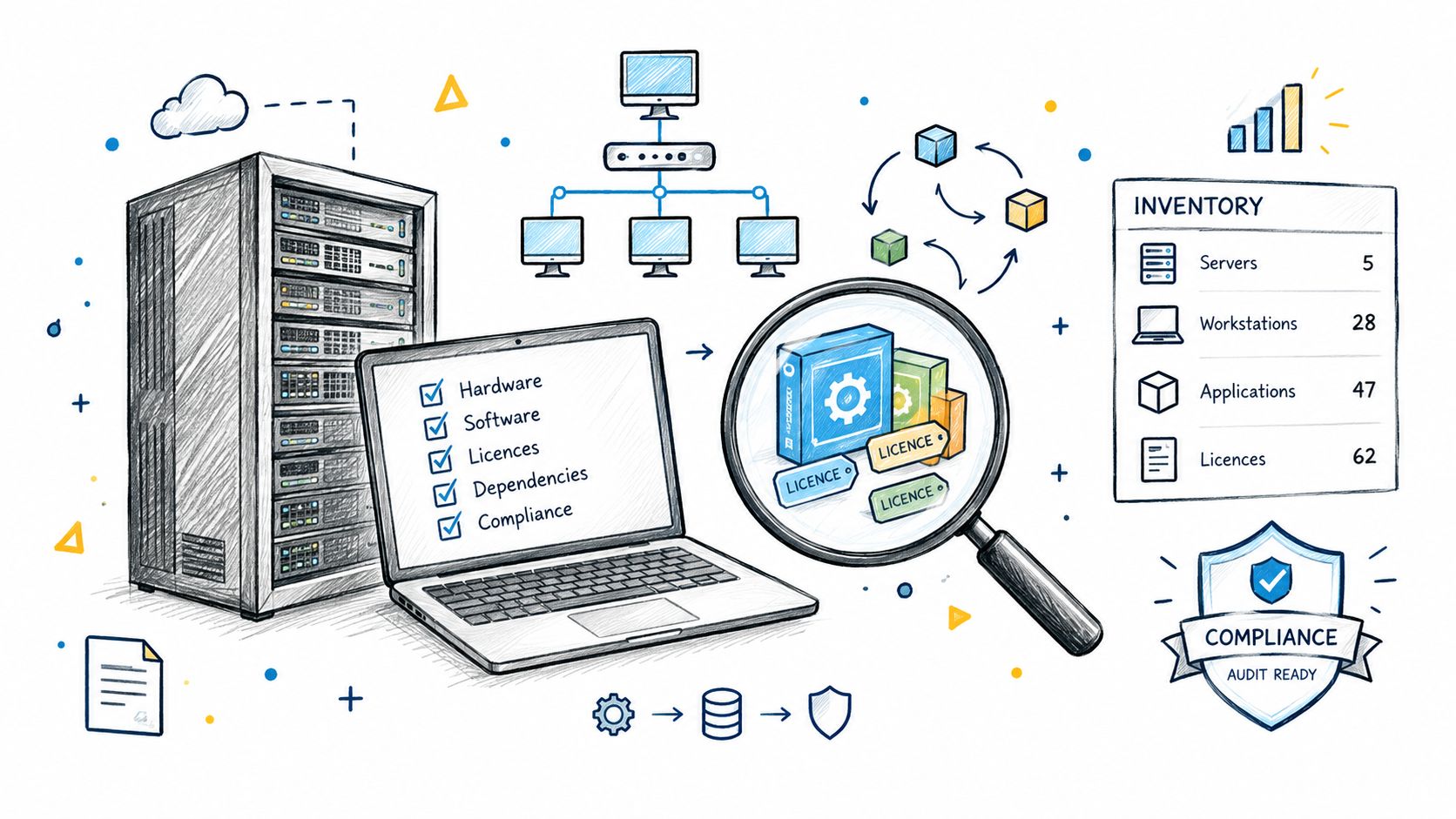
Start with evidence, not assumptions. Build an inventory of servers, virtual machines, applications, databases, storage, licences, network connections, backup jobs, integrations, and security controls. Include systems that users depend on but IT may not formally manage, such as departmental file shares, specialized production software, or locally installed tools.
Application owners should confirm what each workload does, who uses it, how critical it is, and what happens if it becomes unavailable. A manufacturing company may discover that its production software relies on an old database driver. A clinic may find sensitive records on an unsecured file server. A legal practice may uncover licences that no longer match actual usage.
The assessment should record:
Use automated discovery tools to accelerate collection, but validate the results with department heads. A tool may identify a server but not reveal that a clinical, accounting, or production workflow depends on it.
Practical rule: If nobody can explain an application's owner, dependency chain, recovery method, and business impact, it isn't ready to migrate.
For a more focused review of vulnerabilities and controls, use CloudOrbis's computer security audit guidance.
Cloud migration should solve a business problem. “Move everything to Azure” is an implementation preference, not a useful outcome. Leaders should decide whether the priority is stronger resilience, simpler remote access, better collaboration, improved security, faster provisioning, predictable support, or a more flexible operating model.
Set a baseline before work begins. If users complain about slow file access, record the current experience and affected locations. If recovery is unreliable, document the present recovery steps and evidence. If the finance team wants lower infrastructure spending, define which costs belong in the comparison, including support, licensing, connectivity, training, and dual-running environments.
Use a balanced scorecard rather than a single cost target:
A construction firm may prioritize access for distributed project teams. A logistics company may need reliable systems across warehouses and offices. A healthcare provider may put controlled access and auditability ahead of convenience. The metrics must reflect the operating reality of each sector.
Avoid unsupported promises. A cloud migration may reduce infrastructure burdens, but the result depends on architecture, usage, contracts, and operational discipline. Define a success test for every phase, not only for the final cutover.
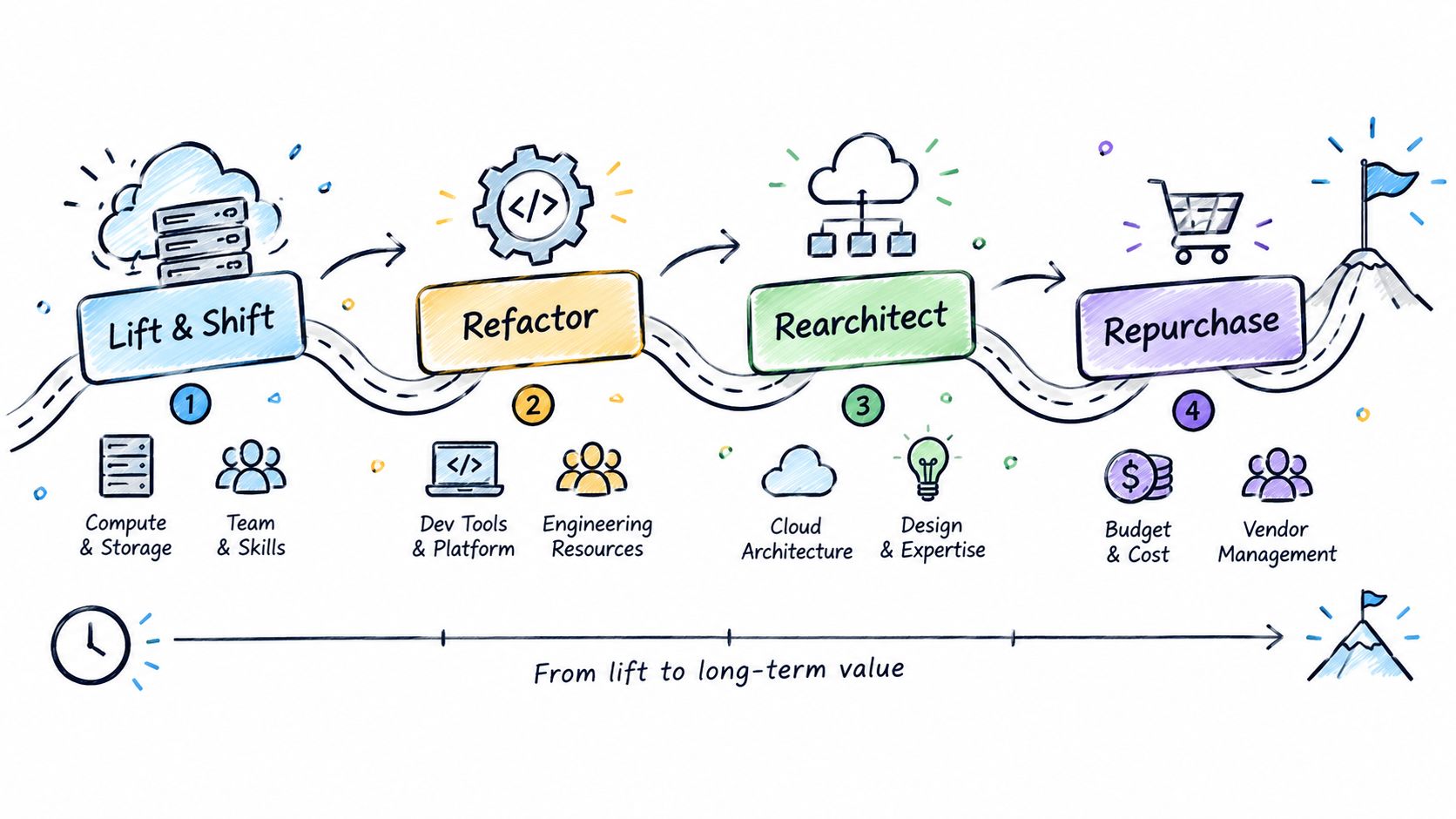
Not every workload deserves the same migration treatment. A stable internal web application may suit rehosting. A database with performance constraints may need replatforming. A legacy manufacturing application may require replacement. A collaboration workload may be better repurchased as software as a service.
Classify each workload using a clear decision record:
Dependency mapping should determine the sequence. An email platform may move before a production system, but an application and its database may need to move together. A law firm could run collaboration services first, then migrate document storage, then transition case management after integrations and permissions have been tested.
Use pilot workloads to prove the process. Select systems with manageable business impact, but don't choose a workload that is so simple it teaches the team nothing. Each phase needs an owner, a runbook, a validation window, a go or no-go decision, and a rollback path.
A phased plan helps teams learn without exposing the whole organization to one untested cutover. CloudOrbis's cloud migration roadmap template can help structure the work.
Governance belongs at the beginning, not in the final week before launch. Before data moves, define who can approve resources, who can access sensitive information, where data may be stored, how activity will be logged, and what evidence auditors will require.
Canadian organizations must begin with classification and workload suitability. The federal cloud approach has included a rule that only data up to and including Protected B could be stored in a commercial public cloud environment at that time. That milestone illustrates the practical point: data classification, security controls, and workload risk must shape the destination before migration starts.
Regional placement also matters. Canadian guidance recommends considering Canada-based regions such as Azure Canada Central or AWS ca-central-1 when PIPEDA, provincial health-information rules, or federal-adjacent contracts apply, as outlined in this Canadian cloud migration checklist for growing businesses.
Map requirements to controls:
A healthcare clinic may need controlled access to patient information. A legal firm must protect confidential client material. A finance team may need payment-data controls and strong audit trails. The provider's certification doesn't automatically prove that the customer's configuration is compliant.
Use CloudOrbis's information governance resources to support policy design and ownership decisions.

Cloud performance depends on the path between users, offices, devices, and hosted services. A workload can be correctly configured and still feel unusable if the organization has weak bandwidth, high latency, poor DNS design, or one unreliable internet connection.
Begin with application requirements, not current network capacity. Identify which services are sensitive to latency, which transfer large files, which need constant connectivity, and which can tolerate temporary interruption. Include branch offices, remote users, warehouse devices, production equipment, and third-party connections.
A practical network plan may include:
A multi-location construction company may use SD-WAN to direct traffic intelligently across offices. A clinic may need network segmentation to isolate patient information systems. A manufacturer may keep redundant connectivity for production operations.
Don't design for an ideal day. Test the network while backups run, users work remotely, and migration traffic is active. Then document who owns circuit support, firewall changes, cloud routing, and outage escalation. CloudOrbis's computer network services provide a useful reference for that responsibility discussion.
Data migration deserves its own workstream. Teams must know what will move, what will be archived, what will be deleted under policy, and what must remain on-premise. They also need a repeatable way to prove that the destination matches the source.
Start by identifying data owners and classifying information by sensitivity, business criticality, retention, and growth. Quantify volume and transfer constraints. Online transfer may suit smaller or continuously changing datasets, while staged or offline methods may be better for large repositories or limited connectivity.
Before production transfer, run a representative test:
A healthcare organization may transfer non-critical records first, then validate sensitive records with checksums. A manufacturer may need a staged approach for engineering designs and production data. A legal firm must ensure privileged documents remain protected and that temporary copies don't remain in uncontrolled locations.
The cutover plan should name the change freeze, final synchronization, verification tasks, decision owner, communication steps, and rollback trigger. Don't decommission the old environment because the copy exists. Decommission only after business validation, backup verification, and an approved retention decision.
CloudOrbis's database migration services can support planning where databases, integrations, and validation requirements are tightly connected.
The destination architecture should reflect the workload, not the latest cloud trend. Decide whether each application belongs on infrastructure as a service, a managed platform, or software as a service. Then define compute, storage, database, identity, network, backup, monitoring, and recovery components as one design.
A hybrid model may be the right answer. A legal practice might retain a legacy file server for an application that cannot yet move while using Microsoft 365 for collaboration. A clinic may use managed databases and identity services to reduce operational effort. A manufacturer may containerize a production planning component only after confirming that its integrations and support model can handle the change.
Evaluate architecture through four lenses:
Data residency must be explicit. Don't assume that a provider's Canadian presence means every service, backup, log, or support process remains in Canada. Confirm region behaviour, replication, disaster recovery, and subcontractor terms for the workloads in scope.
Architecture records should explain decisions, assumptions, rejected alternatives, and future dependencies. They help internal teams and co-managed IT providers understand what they own. They also reduce the risk of rebuilding undocumented on-premise complexity in a new environment.
For related business systems, teams may also consider how to centralise HR and payroll in Microsoft 365 while keeping identity, access, and data governance consistent.
Cloud migration changes the security boundary. The old perimeter no longer defines trust, and an account with excessive permissions can create more risk than a locked server room. Identity hygiene, logging, least privilege, and tested recovery should be prerequisites for migration.
Canadian SMB guidance aligned with baseline security practices highlights logging, MFA, least privilege, and backup testing as minimum control areas. Common gaps include logging that isn't enabled, MFA that hasn't been enforced, dormant accounts, and roles that grant more access than users need. These are preventable configuration failures, not reasons to delay every cloud project.
Create a control checklist for each workload:
A clinic should limit patient-record access by role and location. A manufacturing company should protect production endpoints and remote administration. A law firm should classify sensitive documents and preserve access records for investigations.
Moving faster can increase risk if identity hygiene, audit logging, and rollback evidence aren't proven first.
The security design should also state responsibilities. The cloud provider protects parts of the platform. The organization still owns identities, permissions, data configuration, devices, policies, and user behaviour. Review those responsibilities with the internal team and IT partner before go-live.
Users experience migration as a change to daily work, not as an infrastructure project. A new sign-in method, file location, approval workflow, or remote-access process can disrupt productivity even when the technical cutover succeeds.
Start communication early. Explain why the change is happening, which groups are affected, what will change, what won't change, and where users can get help. Give department leaders a clear message they can repeat. Identify change champions in healthcare, operations, finance, legal, and field teams who can surface practical concerns before launch.
Training should match real tasks:
A clinic needs workflow practice around patient systems. A construction company may need mobile access guidance for field teams. A school or education provider may need support for teachers, administrators, and students with different access models.
Don't treat training as a single event. New employees will join, services will change, and permissions will evolve. The co-managed IT agreement should identify who updates documentation, who handles first-line support, who escalates technical incidents, and who owns adoption reporting.
Go-live is a control point, not the finish line. Teams need visibility into application performance, infrastructure health, network behaviour, security events, backup status, user experience, and cloud consumption from the first production day.
Set alert thresholds that trigger action. A useful alert should identify the affected service, business owner, severity, response target, and escalation path. Centralized logging and dashboards are more useful than asking staff to inspect individual systems during an incident.
Cost realism matters because the first cloud bill can expose assumptions that a migration budget missed. Canadian guidance flags hidden steady-state costs such as egress, dual-run periods, support-tier upgrades, training, and refactoring labour. It also warns that choosing the cheapest region without considering residency can create compliance problems, as discussed in this overview of cloud migration challenges.
Review the environment regularly:
Shared Services Canada's closure of 25 legacy data centres demonstrates why migration planning increasingly includes application rationalization, dependency mapping, and data-centre exit activities, not only server relocation. The same principle applies to medium-sized organizations. Retiring obsolete systems and documenting remaining dependencies can matter as much as provisioning the new environment.
| Item | Implementation complexity | Resource requirements | Expected outcomes | Ideal use cases | Key advantages |
|---|---|---|---|---|---|
| Conduct a Comprehensive IT Assessment and Audit | Moderate–High, detailed discovery and analysis | IT staff, automated discovery tools, consultants, time | Complete inventory, baseline metrics, identified risks and licence optimizations | Pre-migration planning; legacy-heavy or regulated environments | Reduces surprises, informs scope/compliance, reveals cost savings |
| Define Clear Migration Goals and Success Metrics | Low–Moderate, alignment and KPI definition | Stakeholders, business analysts, historical data, executive sponsorship | Measurable KPIs, aligned stakeholders, ROI visibility | Organizations needing measurable outcomes or executive buy-in | Prevents scope creep, enables course corrections, clarifies priorities |
| Develop a Detailed Migration Strategy and Roadmap | High, sequencing, phasing and rollback planning | Project managers, architects, vendors, budget allocation | Phased migration plan, minimized disruption, timeline visibility | Multi-workload migrations; medium to large organizations | Risk mitigation, staged validation, optimized resource use |
| Establish a Robust Governance and Compliance Framework | High, policy design and regulatory mapping | Compliance/legal experts, security tools, audits, ongoing review | Audit readiness, enforced data controls, reduced regulatory risk | Regulated industries (healthcare, finance, legal), data-sensitive orgs | Prevents penalties, ensures consistent controls, clarifies accountability |
| Plan and Optimize Network Architecture and Connectivity | Moderate–High, topology and carrier coordination | Network engineers, carrier services, possible capital upgrades | Adequate bandwidth, lower latency, redundancy and failover | Distributed offices, performance-sensitive apps, remote workforces | Improved UX, resilience, cost-optimized connectivity options |
| Conduct Thorough Data Migration Planning and Validation | Very High, integrity, transfer methods, verification | Data engineers, migration tools (online/offline), test environments | Verified transfers, zero data loss, controlled cutover | Large-data migrations, regulated data, mission-critical datasets | Protects data integrity, supports rollback, ensures compliance |
| Architect Cloud Infrastructure and Choose Appropriate Services | High, design trade-offs and provider selection | Cloud architects, provider expertise, budgeting for services | Scalable, secure, cost-effective cloud architecture | Cloud-native builds, hybrid deployments, growth-focused orgs | Optimized performance/cost, managed services reduce ops burden |
| Implement Comprehensive Security Controls and Threat Protection | High and ongoing, continuous monitoring and response | Security tools, skilled staff, monitoring, training | Reduced breach risk, audit trails, regulatory alignment | Any migration; essential for sensitive or regulated data | Strong data protection, rapid incident response, compliance support |
| Plan and Execute User Training and Change Management | Moderate, organizational engagement and training delivery | Trainers, change champions, helpdesk support, time for users | Higher adoption, fewer support requests, smoother transitions | Large user bases or significant workflow changes | Boosts adoption, reduces downtime, builds internal expertise |
| Establish Monitoring, Optimization, and Ongoing Support | Moderate, tooling and process setup with continuous effort | Monitoring/observability tools, managed services or staff, budget | Performance visibility, cost control, proactive issue detection | Post-migration operations, SLA-driven services, cost-conscious orgs | Prevents outages, identifies cost savings, enables continuous improvement |
An on-premise to cloud migration is a controlled business transformation, not a one-time infrastructure move. The safest sequence starts by understanding the current environment, then defining measurable outcomes, governing sensitive information, designing resilient connectivity and architecture, protecting and validating data, preparing users, testing rollback paths, and monitoring the cloud after cutover.
Canadian adoption has already become mainstream. Statistics Canada estimated that 39% of Canadian businesses were using cloud computing in 2019, according to Canada-focused cloud research. That adoption doesn't make every migration safe by default. It makes disciplined planning more important, because cloud environments still require clear ownership, suitable controls, and active optimization.
Assign one accountable owner for each workload. Document the application owner, data owner, technical lead, security approver, business validator, and support contact. In a co-managed IT arrangement, write down which party handles identity, backups, network changes, provider tickets, monitoring, incident response, user support, and cost reviews.
Before each phase, require a go or no-go decision supported by evidence. The decision pack should include test results, open risks, backup verification, user readiness, rollback steps, communications, and named people available during the cutover. If those materials aren't ready, delay the phase rather than hoping the missing work won't matter.
Post-migration reviews should occur while the details are still fresh. Compare performance and user feedback with the baseline. Review access and logging. Check actual consumption against the financial model. Remove temporary accounts, migration tools, duplicated data, and old firewall rules. Confirm that the business can restore critical information without depending on one person's memory.
CloudOrbis can support this lifecycle with assessment, customized cloud migration, cybersecurity, backup and disaster recovery, training, 24/7 Canada-based support, and ongoing optimization. Its work is relevant to healthcare, logistics, manufacturing, construction, education, legal, finance, and other medium-sized organizations that need practical controls without losing sight of day-to-day operations.
The right next step isn't to move a server. It's to review the environment, choose a suitable first workload, assign ownership, and build a migration plan that includes compliance, rollback, adoption, and post-cutover support.
CloudOrbis Inc. offers cloud migration planning and execution, cybersecurity, backup and disaster recovery, user training, and ongoing managed IT support for small and mid-sized organizations. Visit CloudOrbis Inc. to review your migration readiness and discuss a practical, sector-aware plan for moving from on-premise systems to the cloud.
September 25, 2026
Is VoIP Good for Small Business in Canada? a 2026 GuideIs VoIP good for small business in Canada? Explore costs, benefits, reliability, security, and migration tips for SMBs considering VoIP in 2026.
Read Full Post
September 24, 2026
Helpdesk vs Service Desk: Choosing the Right IT SupportHelpdesk vs service desk: understand the key differences and choose the right IT support model for your organization in 2026.
Read Full Post
September 23, 2026
DDoS Protection for Canadian SMBs: What Works in 2026Learn what DDoS protection really does, the latest Canada-specific threats, and a practical playbook for small and mid-sized businesses
Read Full Post
