

September 25, 2026
Is VoIP Good for Small Business in Canada? a 2026 GuideIs VoIP good for small business in Canada? Explore costs, benefits, reliability, security, and migration tips for SMBs considering VoIP in 2026.
Read Full Post%20(1).webp)
Usman Malik
Chief Executive Officer
December 27, 2025
A computer security audit is a systematic, measurable technical assessment of your company's security posture. Think of it as a comprehensive health check for your entire digital infrastructure, designed to find hidden vulnerabilities before cybercriminals can exploit them. Far from being just a technical task, it is a critical strategy for protecting data, keeping your operations running, and building trust.
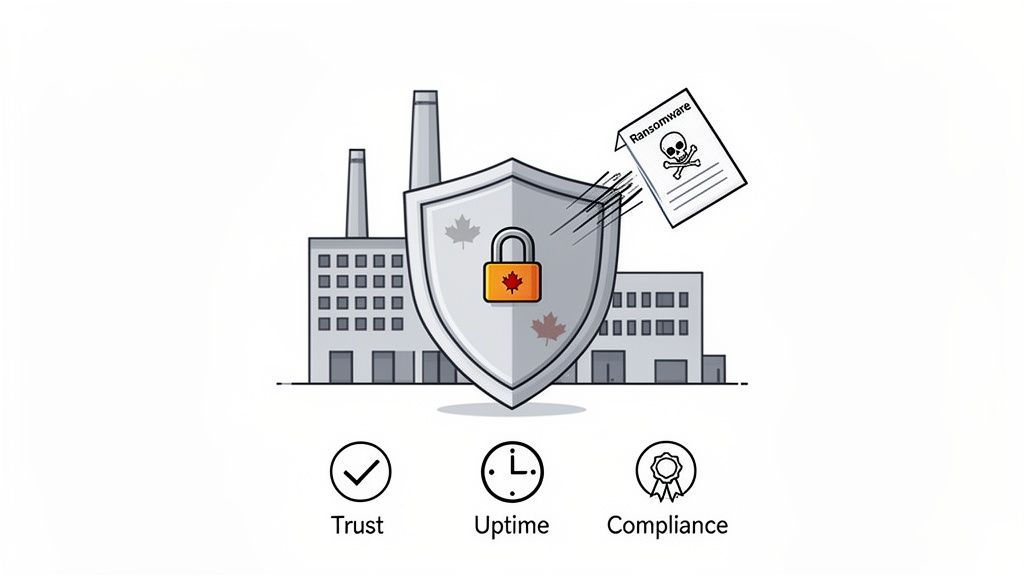
In a world where a single cyber incident can cause staggering financial and reputational damage, a proactive defence is not just a good idea—it is non-negotiable. For Canadian medium-sized organizations, a security audit is a foundational part of a smart survival and growth strategy.
Too many leaders fall into the trap of thinking, "we're too small to be a target." This is a dangerous myth. Cybercriminals often see smaller organizations as prime targets precisely because they expect weaker defences.
The reality is that the cost of inaction far outweighs the investment in a thorough audit. The risks of a security breach—from financial loss to brand erosion—are simply too high to ignore.
Imagine a medium-sized Ontario manufacturing firm, confident in its security measures. A routine audit uncovered a critical vulnerability in a third-party logistics portal, creating a direct path for a ransomware attack. By finding and closing that gap, the audit prevented a shutdown that could have halted production for weeks and cost millions.
This real-world scenario shows how a formal audit is much more than just ticking boxes. It connects technical findings to tangible business outcomes.
An effective security audit provides more than just a list of problems; it delivers a clear roadmap to resilience. It transforms cybersecurity from a cost centre into a competitive advantage by safeguarding your reputation and ensuring operational stability.
For businesses in regulated fields like finance, healthcare, or legal services, regular audits are often mandatory to comply with acts like PIPEDA. But beyond compliance, a proactive audit process delivers key benefits that strengthen your entire organization.
Key outcomes of a successful audit include:
Ultimately, a computer security audit gives you the clarity and direction needed to take control of your cybersecurity posture. This guide will walk you through a clear, practical path to help you do just that.
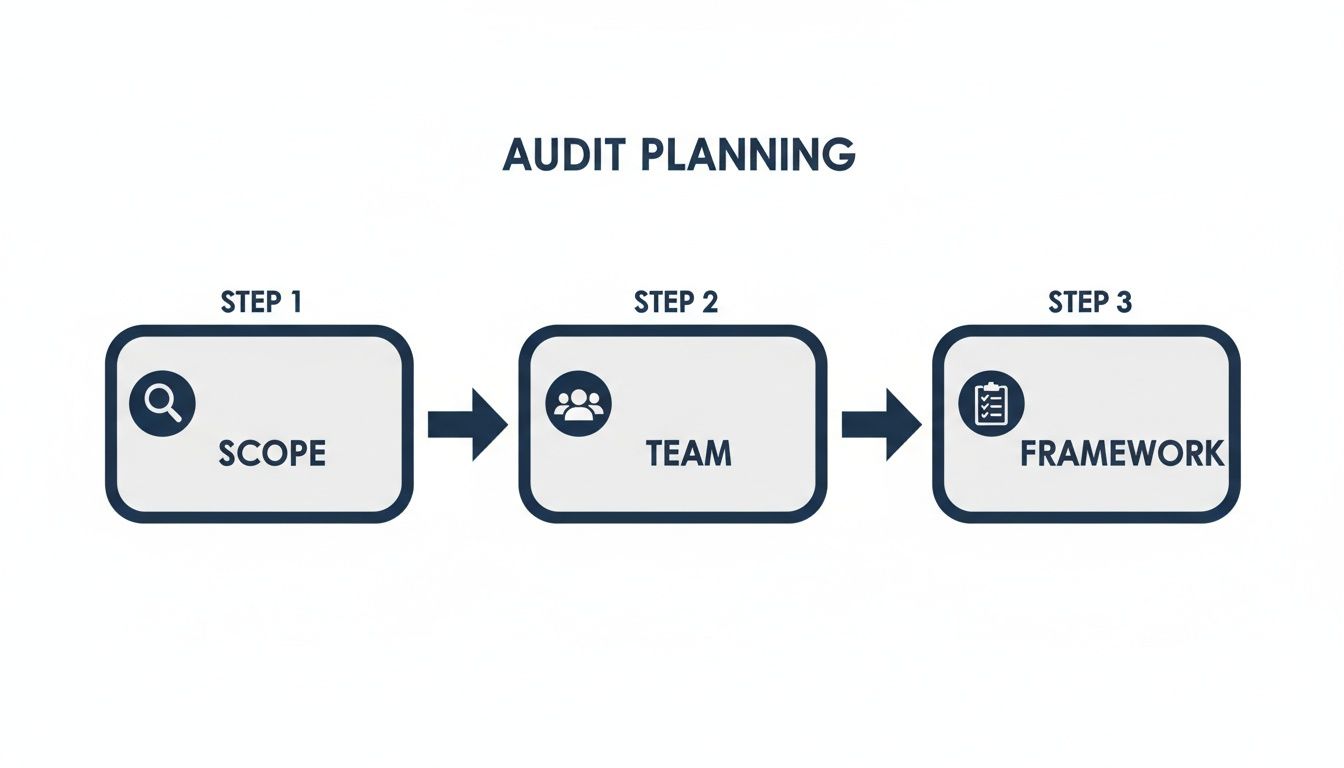
The success of a computer security audit is decided long before the first scan is run. Thorough preparation leads to clear, actionable insights, while poor planning results in confusion and wasted resources. This initial phase is your game plan for making the entire process smooth, efficient, and genuinely valuable.
It all starts with defining a clear and realistic scope. You cannot protect everything with the same level of intensity, so your first step is to identify your most critical assets. For a healthcare clinic, this is likely the patient records in your EMR system. For a design firm, it is your intellectual property and client project files.
By identifying these "crown jewels" immediately, you can concentrate the audit on the systems, data, and processes that pose the greatest risk to your business. This ensures your time and money are spent where it truly counts.
An audit is not just an IT project; it is a business-wide initiative. To get it right, you need input from people across the organization. Assembling the right internal team ensures that the audit's scope and findings align with how your business operates day-to-day.
You will want to include representatives from a few key areas:
This collaboration prevents the audit from happening in a vacuum and guarantees the final report is useful for the entire business, not just the IT team.
There is no need to reinvent the wheel. You can lean on an established security framework to give your audit structure. These frameworks are recognized sets of best practices and controls that help you perform a thorough and consistent assessment. Think of them as a blueprint for building a solid security posture.
For Canadian businesses, two frameworks are particularly relevant:
Let’s make this practical. Imagine a Calgary legal firm handling sensitive client case files. They would map their operational processes directly against PIPEDA requirements to ensure client confidentiality is secured. This goes beyond just technology—it includes strict policies on who can view or modify files. Managing those permissions is a significant part of their audit. You can learn more about controlling data access in our guide on what is privileged access management.
Choosing a framework is not about picking the most complicated one. It is about finding a model that fits your company's size, industry, and unique risks. The real goal is to create a repeatable process that helps you improve over time.
Finally, a smooth audit hinges on having the right information ready. Gathering key documents before the auditors arrive saves considerable time, reduces friction, and gives the audit team a clear picture of your environment from the start.
Being prepared shows you are committed to the process and helps the auditors focus on important tasks instead of chasing paperwork.
Create a pre-audit checklist that includes items like:
With your scope defined, team assembled, framework chosen, and documents ready, you have officially set the stage for a successful and insightful computer security audit.
With your plan in place, it is time to execute the computer security audit. This is where we move from theory to practice, with auditors actively testing, probing, and reviewing your entire digital environment. For any business leader, understanding what happens here is crucial to seeing the real value of the audit. Think of it as a blend of a technical deep-dive and a common-sense policy review, both designed to find different kinds of risks.
The planning stage is the foundation for everything that follows. A successful audit always starts with these key steps before any technical work begins.
This is where your systems, networks, and applications are put under the microscope. Auditors bring in specialized tools and techniques to hunt for weaknesses that a cybercriminal could exploit. It is not just a quick scan; it is a methodical search for vulnerabilities that are not always obvious on the surface.
Two of the most common technical assessments you will see are:
A significant part of the technical audit is ensuring sensitive data is not being exposed. One critical but often overlooked area is code repositories. This helpful GitHub secret scanning guide explains how to find credentials that were accidentally left in code—a mistake that could give an attacker the keys to your kingdom.
Technology is only half the battle. A proper security audit also digs deep into your administrative controls—the policies, procedures, and human processes that govern security. This is often where we find some of the most significant and easily fixed gaps.
A firewall can be perfectly configured, but if every employee shares the same administrative password, your security is fundamentally broken. The administrative audit checks for these critical human-factor risks.
Auditors will pay close attention to a few key areas:
To understand the importance of this, look at the public sector. The federal government faces significant cyber threats, and consistent audits are a key part of its defence strategy. For example, the Communications Security Establishment (CSE) regularly performs proactive actions to protect federal networks, highlighting the necessity of ongoing vigilance for any organization.
Finally, one of the most vital parts of the audit process is testing your safety nets. This means checking your data backup and disaster recovery plans to ensure they actually work when you need them.
It is one thing to have a backup system in place; it is another to know for certain that you can restore your operations from it during a real crisis. Auditors will verify the integrity of your backups and might even run a test restoration to confirm everything is functioning as it should. This simple step turns a theoretical plan into a proven capability, giving you genuine peace of mind.
An audit report is a snapshot in time, not the final destination. Its real value comes from what you do next. Without a clear plan of action, even the most detailed findings will gather digital dust. This is where you transform the audit’s insights into a strategic, prioritized roadmap for genuinely improving your security posture.
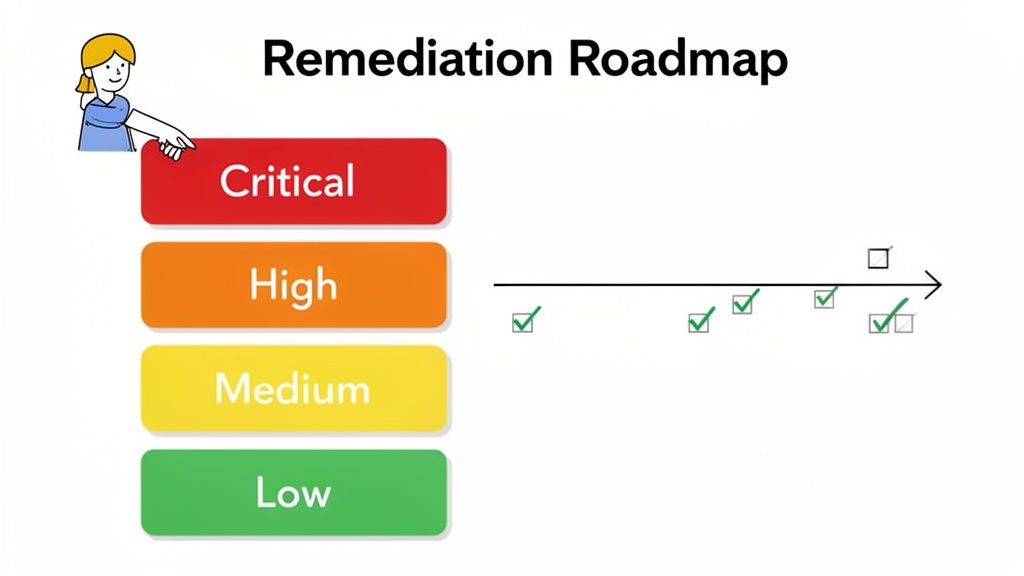
The first step is to interpret the results by categorizing each vulnerability based on its potential business impact. Not all risks are created equal, and a structured approach ensures you focus your limited time and resources where they will make a real difference.
A standard and highly effective method is to classify findings into distinct risk levels. This simple framework brings immediate clarity to what can often feel like an overwhelming list of issues.
Your risk categories should look something like this:
Let’s look at a real-world example. Imagine an Edmonton construction company that just completed a computer security audit. The report flags a critical SQL injection vulnerability in their web-based project management software, which houses sensitive client blueprints and financial data. That same report notes a low-risk issue: an outdated software version on a rarely used internal marketing website.
Clearly, fixing the project management software flaw is the top priority. It directly protects the company's core operations and client trust. The internal website, while needing attention eventually, poses a far smaller immediate threat. This is risk-based prioritization in action.
Once you have sorted your findings by risk, it is time to build a formal remediation plan. This is your documented roadmap, outlining exactly how you will address each issue and turning vague findings into concrete, actionable tasks.
A remediation plan is more than a to-do list; it is an accountability tool. It ensures that every identified weakness has a clear owner, a realistic timeline, and the necessary resources allocated for a successful fix.
Your plan needs to be structured and detailed. By assigning specific responsibilities, you prevent critical tasks from falling through the cracks.
A strong remediation plan must include:
The urgency here cannot be overstated. The Government of Canada's National Cyber Threat Assessment highlights escalating cybercrime, with fraud losses climbing to a staggering $567 million in 2023. With ransomware threatening critical infrastructure and many exposures stemming from identity misconfigurations, audits are your best defence against becoming another statistic. You can explore more of these findings in the full federal report.
By documenting every step and focusing on the underlying causes, you turn the audit from a simple checkup into a powerful driver for continuous security improvement. For organizations needing expert guidance through this process, exploring security managed services can provide the specialized support required to build and maintain a resilient security program.
A successful computer security audit is not a one-time event that ends with a remediation report. To build real, lasting resilience, the goal must be to move beyond the annual checkup. It is about fostering a culture where security is a constant, forward-looking process woven into the fabric of your daily operations.
This means shifting from a reactive mindset—fixing things after they break—to a proactive one.
This cultural shift begins by establishing an ongoing audit and monitoring schedule. Instead of a single, massive audit each year, a continuous approach lets you align security efforts with actual business risk. Your high-value, high-risk systems demand more frequent attention.
For instance, a healthcare clinic's patient portal, which handles sensitive personal health information, should likely undergo vulnerability scans and access reviews quarterly. On the other hand, an internal HR system with more static data might only need a comprehensive audit annually. This tiered approach focuses your resources where they will have the greatest impact.
A strong security culture is not just an IT department initiative; it must be championed from the top down. When leadership visibly prioritizes and invests in security, it sends a powerful message that this is a core business value, not just another technical requirement.
This commitment needs to be communicated clearly and consistently across the entire organization. Every team member, from the front desk to the executive suite, has a part to play.
Security becomes a shared responsibility when employees understand the 'why' behind the policies. It is not about restricting them; it is about protecting the organization, its clients, and their own jobs from very real threats.
This proactive stance pays off. The Communications Security Establishment (CSE) is constantly working to defend Canadian organizations. Their proactive measures, such as notifying organizations about pre-ransomware activity, have prevented numerous incidents and saved millions of dollars. As these findings show, timely threat identification is critical for a strong defence. You can discover more insights from the CSE's annual report on their proactive security measures.
One of the biggest hurdles in maintaining security momentum is bridging the gap between technical data and business-level understanding. Your leadership team does not need to know the specifics of every vulnerability, but they absolutely need to grasp the associated business risks.
Developing meaningful dashboards is key. These tools should translate complex technical metrics into clear, actionable business risk indicators that anyone can understand at a glance.
Your security dashboard could include:
For many medium-sized organizations, maintaining this constant state of vigilance internally is a significant challenge. This is where a managed IT services provider becomes an invaluable partner. They bring the specialized tools and deep expertise needed to implement and manage a continuous security program.
A dedicated partner can maintain this proactive stance through constant monitoring, strategic guidance, and expert management of your security stack. They handle the day-to-day work of threat hunting and system maintenance, freeing up your team to focus on core business objectives. This partnership turns security into what it should be: a constant, forward-looking process, not a reactive, once-a-year headache.
Even with a clear plan, it is natural to have questions about computer security audits. For many business leaders, the process can feel overwhelming, sparking concerns about costs, timing, and whether their internal team is up to the task.
Here are some of the most common questions we hear, answered in a straightforward way to help you move forward with confidence.
For most medium-sized businesses, we recommend a comprehensive external audit at least annually. This rhythm ensures you are consistently checking your defences against a threat landscape that changes constantly.
However, some situations call for more frequent check-ins. If you are in a regulated industry like healthcare or finance, or if you are making major changes to your IT environment, you should consider increasing that to semi-annually or even quarterly.
It is also a smart move to run a targeted audit after any significant technological shift—such as a cloud migration, launching a new application, or a company merger. In between these formal audits, continuous vulnerability scanning is non-negotiable. It is your early warning system for new threats as they appear.
This is a common point of confusion, but the distinction is critical. Think of a vulnerability assessment as a quick check for unlocked doors. It is typically an automated scan that identifies and ranks known weaknesses in your systems, like unpatched software.
A full security audit, on the other hand, is a much deeper, more strategic exercise. It includes a vulnerability assessment, but it goes much further by involving:
In short, the assessment finds potential weak spots. The audit confirms if they are exploitable, reviews the human processes around them, and tells you how to fix the underlying issues for good.
An assessment gives you a list of potential problems. An audit gives you a holistic view of your security posture, blending technical findings with human and procedural analysis to uncover systemic risks.
While your internal IT team should absolutely be running regular security checks and vulnerability scans, a formal audit benefits immensely from a fresh, independent perspective. An external auditor brings an unbiased eye, free from internal politics or "we've always done it this way" blind spots.
An internal team is busy with day-to-day operations. External experts live and breathe cybersecurity. They bring specialized knowledge of the latest attack methods and evolving compliance rules that an internal team might miss.
Furthermore, an impartial report from a trusted third party carries more weight with your clients, partners, regulators, and cyber insurance providers. It is credible proof that you are taking security seriously.
Audit costs can vary widely because they are tied directly to the scope and complexity of the job. For a medium-sized business in Canada, the investment could range from a few thousand dollars for a basic assessment to tens of thousands for a deep-dive audit that includes penetration testing and compliance validation.
The key factors that influence the price are:
Yes, it is a significant investment. But you must weigh it against the potential cost of a data breach. A single security incident can easily run into hundreds of thousands—or even millions—in fines, legal fees, downtime, and reputational damage. When you look at it that way, a proactive audit is one of the smartest investments you can make in your company's future.
Navigating the complexities of computer security audits requires a partner with deep expertise and a proactive mindset. CloudOrbis Inc. provides comprehensive cybersecurity services, from vulnerability assessments to strategic remediation planning, helping Canadian businesses build a resilient and compliant security posture.
Secure your business and achieve peace of mind by partnering with CloudOrbis today.
September 25, 2026
Is VoIP Good for Small Business in Canada? a 2026 GuideIs VoIP good for small business in Canada? Explore costs, benefits, reliability, security, and migration tips for SMBs considering VoIP in 2026.
Read Full Post
September 24, 2026
Helpdesk vs Service Desk: Choosing the Right IT SupportHelpdesk vs service desk: understand the key differences and choose the right IT support model for your organization in 2026.
Read Full Post
September 23, 2026
DDoS Protection for Canadian SMBs: What Works in 2026Learn what DDoS protection really does, the latest Canada-specific threats, and a practical playbook for small and mid-sized businesses
Read Full Post
