

September 24, 2026
Helpdesk vs Service Desk: Choosing the Right IT SupportHelpdesk vs service desk: understand the key differences and choose the right IT support model for your organization in 2026.
Read Full Post%20(1).webp)
Usman Malik
Chief Executive Officer
February 10, 2026
For any Edmonton business, securing your Microsoft 365 environment is non-negotiable. It’s about more than just IT; it’s about protecting your organization from crippling data breaches and downtime. As more of us embrace hybrid work, our digital footprint expands, making robust Microsoft 365 security in Edmonton an absolute must. The default settings simply don’t cut it anymore.
For most businesses in Edmonton, Microsoft 365 is the central nervous system. It holds everything from sensitive client files and financial statements to confidential project blueprints. While it’s an incredible platform for productivity, assuming it's secure out of the box is a massive gamble. The basic settings offer a starting point, but they aren't designed to fend off a determined attacker.
This security gap opens up real risks, especially for businesses tied to our local economy. Cybercriminals know which Edmonton industries are the most lucrative targets, and a successful attack can yield a trove of valuable data.
Let’s bring this home with some real-world examples of what a breach could look like for businesses right here:
These aren't just hypotheticals; they highlight a critical truth. Cybersecurity isn't an IT problem to be solved—it's a fundamental business risk. The shift to remote and hybrid work only amplifies this, with staff accessing vital data from countless locations and networks, stretching your organization’s attack surface. To get a better sense of the bigger picture, check out our insights on cybersecurity in Edmonton.
A proactive security stance is no longer a “nice-to-have.” It’s a core part of modern business resilience. If you fail to properly configure and manage your Microsoft 365 environment, you’re leaving the door open to threats that can jeopardize your operations, finances, and hard-earned reputation.
Ultimately, strengthening your Microsoft 365 security is about building a digital fortress around your most valuable assets. It means going far beyond the default settings and implementing a smart, tailored strategy that directly counters the specific threats your Edmonton business faces every day.
Knowing the risks is one thing, but taking decisive action is what truly protects your business. For any Edmonton company running on Microsoft 365, building a rock-solid security foundation isn't about implementing a dozen complex tools. It’s about being methodical and applying a few high-impact controls that shut the door on the most common ways attackers get in.
The first move is always a clear-eyed assessment of where you stand right now. Before you can build up your defences, you need a map of your current vulnerabilities—especially the low-hanging fruit that cybercriminals love.
Think of Microsoft Secure Score as a credit score for your organization's cybersecurity health. It's a fantastic built-in tool that checks your security posture against Microsoft's best practices and gives you a simple number. This isn't just a vanity metric; it’s your actionable roadmap.
The Secure Score report shows you exactly where your security is weak and gives you a prioritized list of specific items to fix. It might flag that too many people have admin rights or that you haven't turned on key threat protection policies. Addressing these items one by one provides measurable progress and builds a much stronger defensive layer.
Your initial Secure Score cuts through the noise. It gives you an objective baseline and tells you precisely where to focus your efforts first for the biggest security impact.
To get started, here's a quick-glance table of the absolute must-haves for any Edmonton business looking to lock down their M365 environment. These are the foundational pieces you can't afford to ignore.
Getting these essentials in place drastically reduces your attack surface and builds a resilient defence against the most common threats we see targeting local businesses every day.
If you do only one thing to improve your Microsoft 365 security in Edmonton, make it Multi-Factor Authentication (MFA). The overwhelming majority of cyberattacks start with a stolen password, which makes relying on just a password dangerously outdated.
But not all MFA is created equal. Attackers are getting good at tricking users into approving simple push notifications through "MFA fatigue" attacks—they just keep spamming prompts until someone accidentally clicks "approve." This is why phishing-resistant MFA is the new gold standard.
The diagram below shows how a typical cyber threat unfolds, from the first attempt to breach your system to the potential impact on your business.

This flow highlights how a single compromised login can escalate quickly, showing why strong authentication is so critical for stopping threats at the front door.
The numbers don't lie. In the first half of 2025, Canada was the 6th most impacted country globally for Microsoft customers, with over 97% of identity attacks being password-based. The good news? Phishing-resistant MFA stops over 99% of these credential theft attempts, making it an absolute game-changer for SMBs. You can discover more about these cybersecurity trends from Microsoft's research.
Once MFA is locked in, your next defensive layer is Conditional Access. This powerful feature is like a smart bouncer for your digital front door. It enforces specific security rules before granting access, looking beyond just the password. Instead of a simple "yes" or "no," Conditional Access asks: Who is signing in? What device are they using? And where are they?
This lets you create granular, common-sense security rules that protect your data without frustrating your team.
Here are a few practical examples that any Edmonton business should consider:
Getting these basics right—assessing your Secure Score, deploying robust MFA, and setting up smart Conditional Access policies—forms the bedrock of a secure Microsoft 365 environment. Our team can help ensure your setup is both secure and efficient with expert Microsoft 365 optimization.
Once you've got a solid security foundation, it's time to unleash the more powerful tools hiding within your Microsoft 365 subscription. Many Edmonton businesses are already paying for these enterprise-grade features but haven't activated them yet. Moving beyond the basics means activating intelligent defences that protect your data 24/7, often stopping a threat before your team even sees it.
At the top of that list is Microsoft Defender for Office 365. This is worlds beyond a standard spam filter. Think of it as an intelligent shield built to neutralize the sophisticated, malicious emails that easily slip past basic security. Its main job is stopping phishing attempts and malware cold, which is absolutely critical as cyberattacks become more convincing and targeted.
Two of Defender's most powerful features are Safe Links and Safe Attachments. We like to describe them as a security checkpoint for every single link and file that tries to enter your organization.
When an employee clicks a link, Safe Links doesn't just let them go to the website. It first checks the destination against a massive, constantly updated database of malicious sites. If the link is a known threat, the user is blocked, preventing a potential credential theft or malware download. It's a simple concept with a massive impact.
Safe Attachments does something similar for email attachments. Before an attachment ever reaches an inbox, it's opened and analyzed in a secure, isolated environment—a "sandbox"—to see if it behaves maliciously. Only after it's proven safe is it delivered. This proactive scan is a game-changer for catching zero-day threats hidden in what look like harmless PDFs or Word documents.
This dashboard from Microsoft gives you a sense of the broad protection Defender offers, from endpoints to cloud applications.
This visual shows how Defender provides a single, unified view of your security posture. That’s key to seeing the full picture of the threats aimed at your organization.
Blocking incoming threats is only half the battle; you also have to control sensitive data on its way out. This is where Data Loss Prevention (DLP) policies are absolutely essential. DLP helps you identify, monitor, and automatically protect sensitive information across your entire Microsoft 365 environment—email, Teams chats, SharePoint, and OneDrive.
Here’s a real-world scenario we see all the time with Edmonton-based financial advisory firms:
The firm handles highly confidential client data, including social insurance numbers and detailed financial statements. A well-meaning advisor is rushing to finish a report and tries to email a spreadsheet packed with client SINs to their personal email address to work on it from home.
Without a DLP policy in place, that sensitive data would instantly leave the organization's secure environment. That’s a huge compliance risk and a potential data breach waiting to happen.
With a properly configured DLP policy, the outcome is completely different. The system would automatically:
This automated stopgap prevents a potential disaster without anyone having to manually watch over every email. It’s a perfect example of a proactive Microsoft 365 security strategy in action.
For local businesses in regulated fields like healthcare, finance, or legal services, data management isn't just about security—it's about compliance. Microsoft 365 has robust tools for information governance and retention to help you meet strict regulations like Alberta's Health Information Act (HIA) or PIPEDA.
Retention policies let you automatically manage the lifecycle of your data. You can set rules to ensure specific information, like patient records or client contracts, is kept for the legally required period and then securely disposed of when that time is up. This prevents the accidental deletion of critical records while also shrinking your data footprint over time, which inherently reduces risk.
For any business navigating these complex requirements, learning how to align your M365 setup with regulatory standards is a crucial step that can be explored through specialized compliance solutions.
By putting Defender, DLP, and information governance tools to work, you elevate your security from a passive defence to an active, intelligent system. You stop just reacting to threats and start preventing them from ever becoming incidents.
All the technical controls in the world can't stop a well-meaning employee from making a single mistake. That one accidental click can bypass the most sophisticated security tools, which is why your team is one of the most critical lines of defence you have. Turning your people from a potential weak link into a vigilant "human firewall" is a cornerstone of any real Microsoft 365 security Edmonton strategy.
Technology can't catch every clever phishing attempt or social engineering trick. That's where your team comes in. Cultivating a security-first mindset is what closes that final, crucial gap between your security tools and a real-world threat.

This isn't about a once-a-year, check-the-box training session that everyone forgets by lunchtime. Real security awareness is an ongoing program that keeps your staff alert to the threats they actually face every day. To truly build up your defences, it's worth investing in comprehensive cybersecurity awareness training that educates your team on what to look for.
Generic training videos are boring and, frankly, ineffective. For the lessons to stick, they have to connect with your team's day-to-day work. For Edmonton businesses, that means tailoring the training to make it local and relevant.
A logistics company near the Edmonton International Airport should run phishing simulations based on fake shipping notifications or fraudulent customs fee requests. A construction firm working on a major downtown project is far more likely to see emails disguised as urgent invoices from a known subcontractor.
These realistic scenarios are what help employees recognize threats in the wild. An effective program should include:
The goal is to build muscle memory. When an employee sees a suspicious email, their first instinct should be to pause and report it, not to click. That cultural shift is your strongest possible defence.
Ultimately, you want to create an environment where employees feel empowered to speak up without fear. If someone is afraid they'll get in trouble for clicking a bad link, they're more likely to stay silent. That silence is how a minor incident spirals into a major breach.
A positive security culture encourages vigilance and treats every reported incident as a win for the team. Make sure everyone knows exactly who to contact and what the procedure is if they spot something that seems off. When they do report a potential threat, thank them for being watchful—even if it turns out to be a false alarm. You can learn more about locking down your communication channels in our guide on email security best practices.
This proactive approach turns every employee into an active player in your organization's defence. When your team is trained, alert, and confident about reporting threats, you've successfully built a human firewall that protects your Edmonton business from the inside out.
Securing your Microsoft 365 environment isn't a "set it and forget it" task. Think of it more as an ongoing cycle of vigilance and readiness. For business leaders in Edmonton, this means shifting from a purely defensive stance to a proactive one, where you’re actively looking for threats and have a solid plan to act when something happens.
This continuous process closes the gap between the security policies you’ve put in place and the real-world threats that target your organization every day. It's about having the visibility to spot trouble early and the plan to shut it down fast.
Your Microsoft 365 subscription comes with powerful tools that give you deep insights into what’s happening across your digital workspace. The real trick is knowing what to look for. Your two main hubs for this are the Microsoft Purview compliance portal and the Microsoft Defender portal.
These dashboards are designed to bring suspicious activities to the surface, flagging things that could signal a compromise. You don't need to be a top-tier cybersecurity expert to get value here; you just need to know which signals matter.
Here are a few key areas to check regularly:
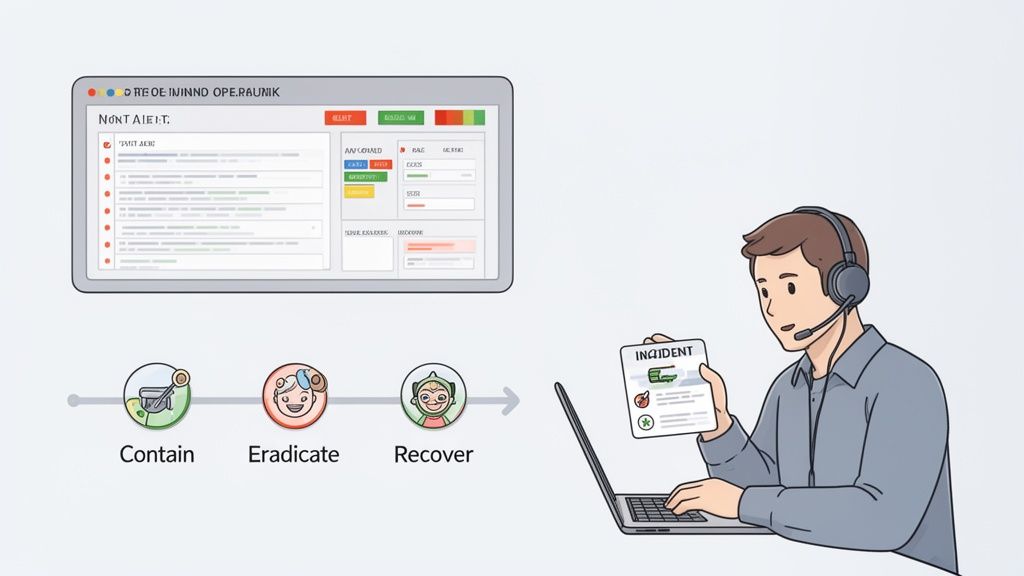
When a security incident hits, panic is the enemy. A clear, pre-written incident response (IR) plan is what separates a minor hiccup from a full-blown business catastrophe. It’s a calm, step-by-step guide your team can follow when the pressure is on.
When something goes wrong, having a well-defined plan is crucial for a fast and effective fix, as covered in guides for building a robust security incident response plan. At its heart, your plan should cover three critical phases.
Think of it like a fire drill for a data breach. You practice the steps so that when the alarm sounds, everyone knows exactly what to do, minimizing damage and confusion.
Let’s picture a logistics company near the Edmonton International Airport. An employee in accounting clicks a clever phishing email that looks like an urgent invoice from a regular vendor. Just like that, their account is compromised.
Here’s how a prepared response would play out:
This kind of swift, organized response turns a potential disaster into a contained, manageable event. This level of readiness is essential for any business serious about its Microsoft 365 security in Edmonton.
For many growing businesses in Edmonton, there comes a point where managing Microsoft 365 security in-house is no longer sustainable. What might have started as a manageable task for your IT person quickly snowballs as your company grows and cyber threats become more sophisticated. Knowing when you’ve hit that wall is key to keeping your business protected.
Is your team constantly putting out fires instead of working on projects that move the business forward? That’s a huge red flag. If you’re drowning in security alerts, it usually means you don't have the time for proactive threat hunting, leaving you vulnerable. Attackers know this—they often strike after hours, banking on the fact that no one is watching.
The need for a dedicated security partner often becomes painfully obvious when your internal team is stretched to its breaking point. These are the classic signs we see that tell an Edmonton business it’s time to call for backup on their Microsoft 365 security.
You might need a managed security provider if:
Bringing on a managed security provider isn’t about replacing your IT team. It's about giving them a team of 24/7 security specialists so they can get back to focusing on innovation and growth.
This is more critical than ever, especially as Microsoft doubles down on its investments to fight rising cyber threats in Canada. With over 50% of attacks being financially motivated and 80% involving data theft, Edmonton businesses can't afford to be a soft target. You can read about Microsoft's major investment in Canadian AI and security to see just how serious the situation is.
Working with a partner gives you immediate access to a dedicated security operations centre, strategic guidance, and a 100% Canada-based helpdesk. It’s the smart way to build resilience. To get a better sense of what that means for your entire operation, check out the benefits of working with a provider for managed IT services in Edmonton.
Even with a clear game plan, Edmonton's business leaders usually have a few lingering questions about getting their Microsoft 365 security just right. Here are some of the most common ones we hear, along with our straightforward answers.
The price tag really hinges on your license level. Many of the most powerful security tools, like Conditional Access and the foundational Defender protections, are already included in Microsoft 365 Business Premium. For most small and medium-sized businesses, that’s the perfect place to start.
If you need more advanced features—think full-blown endpoint protection or deep compliance tools for regulations—you would be looking at higher-tier licenses like E3 or E5.
The real secret? Squeeze every drop of value out of the tools you already pay for before you even think about upgrading. You’d be surprised how much security is sitting there, unused, in your current subscription.
Honestly, it depends on your team's bandwidth and expertise. You can absolutely handle the foundational steps in-house. But the reality is that the threat landscape changes daily. Keeping up with new attack methods, triaging alerts, and actively hunting for weak spots isn't just a task; it's a full-time job.
Most Edmonton businesses we talk to find it's far more cost-effective to partner with a managed security provider. It gives them 24/7 expert monitoring and, just as importantly, frees up their own team to focus on projects that actually grow the business.
Yes—if it’s configured properly. Microsoft's cloud infrastructure is one of the most secure on the planet, with layers of physical and digital protection that far exceed what most businesses could ever build on their own. The risk isn't the cloud itself; it's almost always a matter of how your specific setup is configured.
Building strong Microsoft 365 security in Edmonton is all about putting the right controls in place. Things like MFA, data encryption, and strict access policies ensure your data stays locked down within that incredibly robust framework. It's a shared responsibility: Microsoft secures the cloud platform, and you’re responsible for securing your data inside it.
Ready to stop wondering and start acting? The team at CloudOrbis Inc. provides expert guidance and 24/7 managed security to protect your Edmonton business. We make sure your Microsoft 365 environment is not just running but truly secure, so you can focus on growth with complete peace of mind. Secure your M365 environment today.
September 24, 2026
Helpdesk vs Service Desk: Choosing the Right IT SupportHelpdesk vs service desk: understand the key differences and choose the right IT support model for your organization in 2026.
Read Full Post
September 23, 2026
DDoS Protection for Canadian SMBs: What Works in 2026Learn what DDoS protection really does, the latest Canada-specific threats, and a practical playbook for small and mid-sized businesses
Read Full Post
September 22, 2026
Security Audit Services Guide for SMBs in CanadaDiscover why security audit services are vital for Canadian SMBs. Explore typical scope, deliverables, timelines, and tips to choose the right provider.
Read Full Post
