Office 365 for Enterprises: A Guide for Canadian SMBs
Unlock the power of Office 365 for enterprises. Our guide covers M365 licensing, security, compliance (PHIPA), and Copilot for Canadian businesses.

Unlock the power of Office 365 for enterprises. Our guide covers M365 licensing, security, compliance (PHIPA), and Copilot for Canadian businesses.
Your team has grown. The business has added new locations, more devices, more contractors, and more pressure to move quickly. But the technology stack still feels stitched together.
Email lives in one system. Files sit on a server someone’s afraid to touch. Staff message each other in consumer apps. Security tools don’t talk to each other. When a manager asks for a simple answer like “Who has access to this client folder?” or “Can we safely support remote staff?” the response is usually, “It depends.”
That’s where many mid-sized Canadian businesses get stuck. They’ve outgrown basic tools, but they haven’t yet turned IT into a unified business platform. In healthcare, finance, manufacturing, and logistics, that gap creates more than inconvenience. It creates exposure.
A clinic in Ontario adds physicians and administrative staff faster than its file permissions can keep up. Sensitive patient information gets shared through email because it’s the fastest option available. Nobody set out to create risk, but the process drifted there.
A logistics firm in Edmonton faces a different version of the same problem. Dispatch uses one system, operations uses another, and frontline staff rely on phone calls and text messages to fill the gaps. Documents move slowly. Version control disappears. Managers spend too much time chasing updates instead of making decisions.
These problems usually look operational before they look technical.
Most businesses don’t need more apps. They need fewer disconnected ones.
That’s why office 365 for enterprises matters. Not as a box of software licences, but as a way to bring communication, file management, security, device control, and governance into one operating model.
For Canadian SMBs, that shift is practical. It helps regulated teams manage data more carefully. It helps operational teams collaborate without delay. It gives leadership a clearer view of how work happens, where risk sits, and what needs to improve.
Many business leaders still say “Office 365” when they mean the wider Microsoft platform. That makes sense. Office 365 became familiar because it put Word, Excel, Outlook, and cloud services into a subscription model that enterprises quickly adopted. It launched in 2011, reached one million subscribers within its first 100 days, and was described as Microsoft’s fastest-growing product. By 2020, Microsoft had rebranded the broader suite as Microsoft 365, and today it has nearly 345 million paid subscribers globally (xperience-group.com on Office 365 growth and the Microsoft 365 shift).
The key change wasn’t just a name update. Microsoft 365 for enterprises became a broader platform.
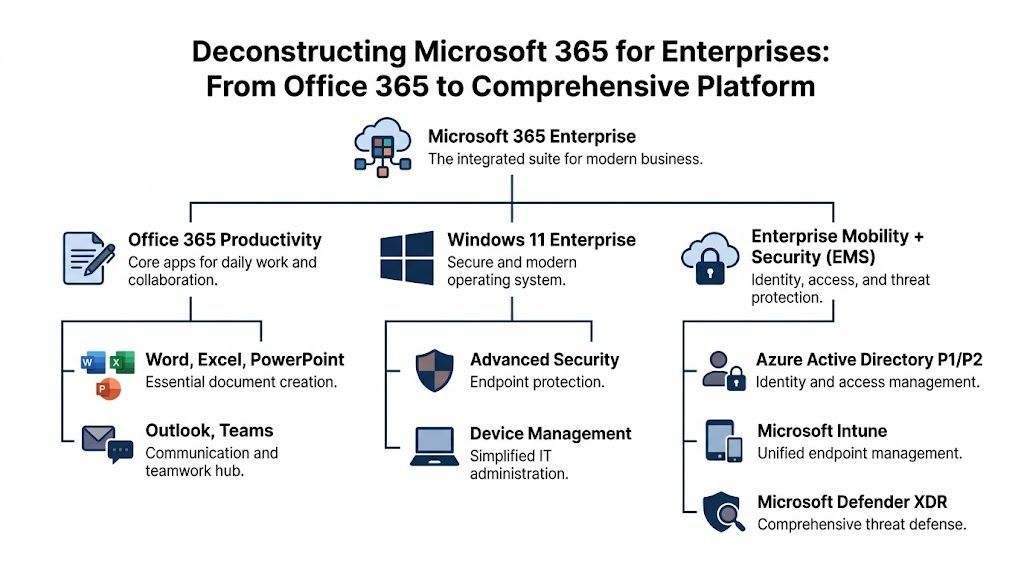
If Office 365 was the hammer, Microsoft 365 Enterprise is the full toolkit. You still get the core productivity tools, but you also get operating system controls, identity management, endpoint security, compliance capabilities, and analytics that work together.
That matters because most business problems aren’t isolated.
A file-sharing issue might be a permissions issue. A remote work issue might really be a device management issue. A compliance issue often starts as a governance issue. Enterprise licensing brings these pieces into the same environment.
This is the part people know best. It includes Word, Excel, PowerPoint, Outlook, Teams, Exchange Online, OneDrive, and SharePoint. These tools support communication, meetings, document creation, file sharing, and collaboration across locations.
This is where Enterprise plans start to stand apart. You’re not just buying email and documents. You’re adding capabilities that help control sign-ins, protect endpoints, enforce access rules, and respond to threats more effectively.
This layer helps IT manage devices, govern data, apply retention rules, support eDiscovery, and set policies that align with business and regulatory requirements.
Practical rule: If your business needs to manage risk across users, devices, data, and locations, you’re no longer choosing “office apps.” You’re choosing an operating model.
This is one of the most common points of confusion.
Microsoft 365 Business plans are designed for smaller organisations and are capped at 300 users, according to Microsoft’s SMB positioning in the research material. They can be a strong fit for smaller teams.
Microsoft 365 Enterprise plans are built for organisations that need more scale and deeper control. They’re the better fit when you need advanced compliance, stronger security options, broader analytics, or more structured governance.
A simple way to judge the difference is this:
| Need | Business plans | Enterprise plans |
|---|---|---|
| Core productivity apps | Yes | Yes |
| Best for smaller teams | Yes | Sometimes |
| Advanced compliance needs | Limited | Stronger fit |
| Large-scale identity and security controls | Limited | Stronger fit |
| Mid-sized regulated environments | Sometimes | Often the better fit |
For a growing firm in healthcare, finance, or logistics, the Enterprise conversation usually starts when leadership realises the problem isn’t “Which app do we need?” It’s “How do we standardise the way our business works?”
A good Microsoft 365 deployment changes day-to-day work first. That’s why the core workloads matter so much. If Teams, Outlook, SharePoint, OneDrive, and Exchange Online are set up properly, staff stop working around the system and start working through it.

Take a transportation and warehousing business with staff in the office, on the road, and at customer sites.
Dispatch needs fast communication. Operations needs shared access to schedules and shipping documents. Finance needs a reliable record of approvals and changes. Leadership wants fewer missed updates.
In a well-organised Microsoft 365 environment:
That sounds simple, but the value comes from how the tools connect.
A dispatcher can discuss a delivery in Teams, open the relevant document without leaving the conversation, and notify the right group without forwarding attachments back and forth. A manager can review a file in SharePoint and know they’re looking at the current version. Staff on mobile devices can work from the same source instead of local copies.
In a Toronto legal or accounting firm, the challenge usually isn’t moving freight. It’s managing documents, deadlines, and client communications without losing control of sensitive information.
Teams supports internal collaboration and secure meetings. SharePoint helps structure practice-area or client-specific document libraries. Outlook and Exchange Online keep business email within governed systems. Permissions can be aligned to business roles instead of handled informally.
The result is less document sprawl and fewer situations where someone says, “I think I have the latest version.”
When collaboration tools are configured well, staff spend less time asking where information is and more time acting on it.
Leaders sometimes think Teams replaced file management. It didn’t. Teams is the front door for conversations and teamwork. SharePoint is often the structured content layer underneath.
That distinction matters. If teams create channels without rules, files scatter. If SharePoint libraries have no naming standards or permission model, search becomes messy and governance suffers.
A useful primer on that relationship is CloudOrbis’s article on Office for Business 365, especially for leaders who want to understand how the everyday apps connect to business process.
Microsoft 365 Enterprise also reaches further into operations. Microsoft states that Enterprise plans integrate Power BI Pro and Power Apps for manufacturing and logistics scenarios, and that E5 users achieve 2.5x faster reporting. Microsoft also notes that predictive dashboards can help reduce stockouts by up to 25% in supply chain environments (Microsoft 365 Enterprise overview with Power BI and Power Apps details).
For a manufacturing or logistics leader, that means the platform can do more than email and meetings. It can support field forms, service workflows, operational dashboards, and faster reporting inside the same ecosystem.
The strongest Microsoft 365 environments don’t feel flashy. They feel organised.
People know where work happens. Files live where they should. Conversations connect to documents. Approvals are visible. Search improves. Handoffs get cleaner.
That’s the actual productivity gain. Not more notifications. Better flow.
The E3 versus E5 decision shouldn’t start with feature envy. It should start with your risk profile, reporting needs, and regulatory obligations.
For many mid-sized organisations, E3 is the solid foundation. For businesses with more demanding compliance, security, and analytics requirements, E5 is often the better fit.
| Feature Category | Microsoft 365 E3 | Microsoft 365 E5 |
|---|---|---|
| Core productivity apps | Strong foundation for daily work | Includes core productivity apps |
| Email and collaboration | Suitable for most enterprise collaboration needs | Suitable for most enterprise collaboration needs plus more advanced capabilities |
| Security | Good baseline for many organisations | Stronger threat protection and advanced security options |
| Compliance | Useful for organisations with standard requirements | Better suited to advanced compliance, eDiscovery, and regulated workflows |
| Analytics | Standard reporting capabilities | Includes Power BI Pro in the verified Microsoft 365 Enterprise material |
| Best fit | Growing businesses needing structured standardisation | Regulated, higher-risk, or analytics-heavy environments |
E3 often fits organisations that need to standardise collaboration, centralise files, improve identity management, and move away from fragmented tools.
A construction company, professional services firm, or regional business with moderate compliance requirements may find E3 gives them what they need without paying for capabilities they won’t use immediately.
E5 becomes easier to justify when your business needs stronger security controls, more advanced compliance workflows, and better analytics in the same subscription.
That’s common in:
A good next step for leaders comparing plans is this licensing overview from CloudOrbis on office 365 licensing.
Some businesses under-license. They buy a lower tier, then bolt on separate tools and manual processes to fill the gaps.
Others over-license. They buy E5 for everyone when only certain departments need the advanced features.
Buy for the control you need today, but design for the governance you’ll need next.
In practice, many organisations use a mixed licensing strategy. Executive leadership, compliance staff, security-sensitive roles, or analytics-heavy teams may justify E5, while other users remain on E3. The right answer depends on who handles regulated data, who needs advanced insight, and which controls must be enforced across the business.
Security conversations often become too abstract. Canadian business leaders don’t need more generic advice about “staying secure.” They need to know how platform features connect to actual obligations.
For healthcare, that means PHIPA in Ontario. For most private-sector organisations, it also means understanding how internal controls support broader privacy duties under PIPEDA. Microsoft 365 Enterprise can help, but only if it’s configured with governance in mind.

A clinic, legal practice, or financial firm usually needs to answer a few basic questions with confidence:
Those are governance questions as much as technical ones.
For the Canadian healthcare sector, Microsoft 365 Enterprise E5 plans include compliance-related capabilities such as eDiscovery and Azure Information Protection, which can automatically classify and encrypt sensitive patient data. The verified material also states that PHIPA fines can exceed CAD $100,000 per violation, and that Defender for Office 365 blocks 99.9% of phishing attempts (buchanan.com on Microsoft 365 Enterprise and PHIPA-related controls).
That matters because email is still one of the easiest ways for sensitive data to leave the business.
Microsoft secures the cloud platform. Your organisation still has to decide how identities are managed, how data is labelled, how sharing is controlled, and how retention rules are applied.
If multifactor authentication is inconsistent, if teams can overshare by default, or if nobody reviews external access, the platform won’t correct those decisions on its own.
Security posture depends as much on policy and administration as it does on licensing.
Purview-related tools help classify and protect data based on sensitivity. That’s useful when a business wants documents, emails, and files handled differently depending on content.
DLP policies can help reduce accidental sharing. This becomes important when staff work quickly and move information across email, Teams, and SharePoint.
Access decisions shouldn’t rely on passwords alone. Conditional access helps enforce rules around who can sign in, from where, and under what conditions.
If an issue occurs, you need records. Investigation and audit capabilities help compliance and IT teams reconstruct what happened.
Many security incidents begin before a user ever logs in. Spoofed email domains, poor sender authentication, and misaligned policies can weaken your controls even if Microsoft 365 is otherwise well configured.
If your team wants a quick way to assess domain email authentication posture, the DMARC checker from MailGenius is a useful starting point before deeper review.
Local context is important. A tenant can have strong features on paper and still be weak in practice if nobody aligns it to Canadian operational and privacy requirements.
That includes data handling decisions, role-based access, retention planning, and staff training. It also includes making sure the environment reflects how Canadian teams work across provinces, offices, and devices.
For businesses looking into that operational side, this article on Microsoft 365 security in Calgary is a useful reference point.
Most businesses already understand the value of collaboration software. The next question is whether the platform can help staff think faster, find answers faster, and move routine work forward without adding more administrative burden.
That’s where Copilot enters the conversation.
Copilot isn’t useful because it sounds advanced. It’s useful when it removes friction from work people already do.
Examples include:
These uses are practical because they reduce the time staff spend reconstructing context.
Owning Copilot doesn’t guarantee value. A verified IDC Canada finding states that Toronto and Calgary manufacturers using Microsoft 365 report only 18% Copilot adoption despite 45% productivity gain potential, often because of training gaps (Innosec summary citing the IDC Canada study on underused Microsoft 365 features).
That gap is common in SMBs. The licences may exist, but users don’t know where Copilot fits, what data it can access, or how to prompt it effectively inside existing workflows.
AI returns usually show up after process design and training, not before.
If your team is still comparing approaches to AI support in spreadsheet-heavy work, this 7-Point Guide to Choosing the Best AI Tool offers a useful outside perspective on how to evaluate fit.
Copilot becomes more valuable when it connects to operational systems rather than floating on top of disconnected documents.
That’s where Dynamics 365 matters.
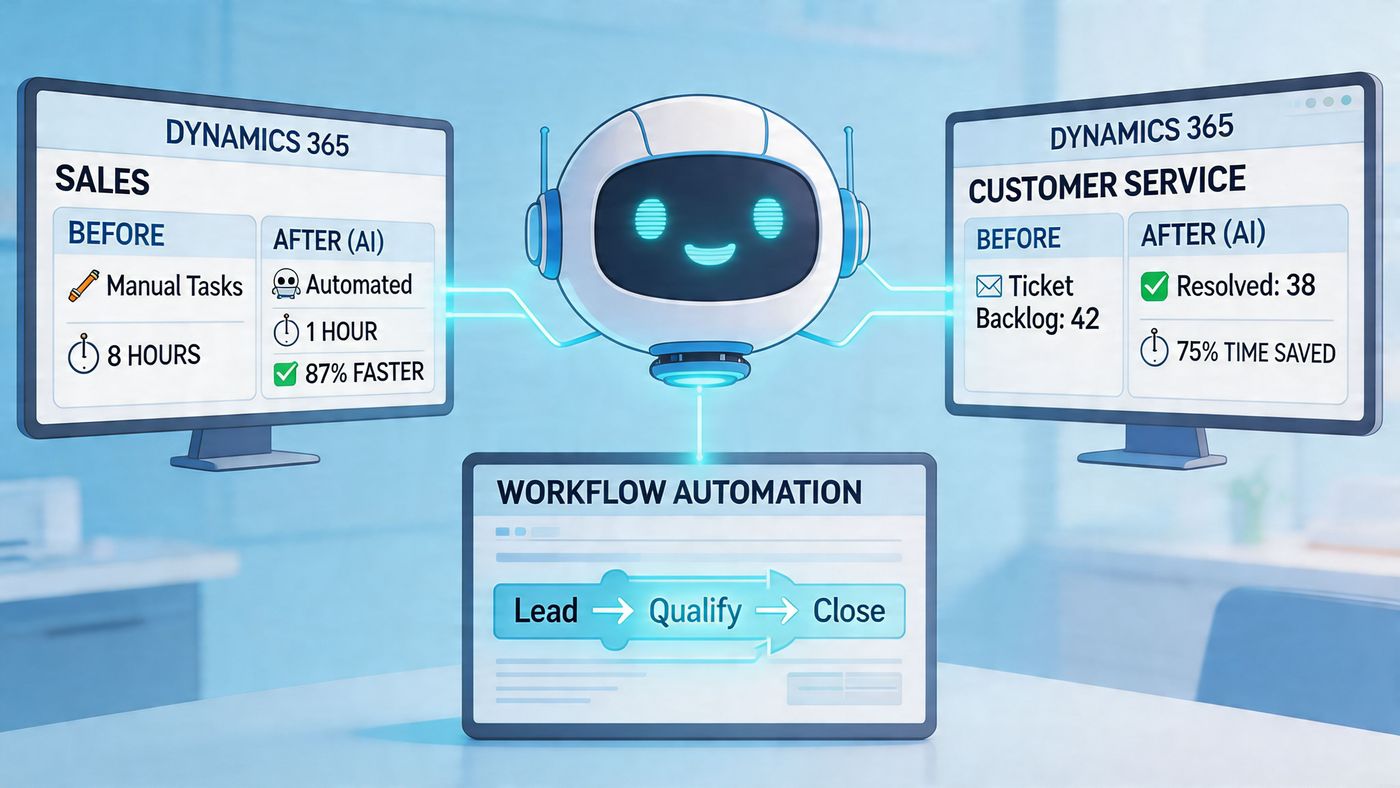
A sales team working in Dynamics 365 can manage customer records, pipeline activity, and service history in a structured system. When that environment connects with Microsoft 365, the gap between communication and execution narrows.
For example:
The same pattern applies in service, finance, and operations. Better data structure leads to more useful AI output.
A practical resource for leaders evaluating that workflow layer is CloudOrbis’s guide on how to use Microsoft Copilot.
The goal isn’t to add AI to everything. It’s to remove avoidable manual work from the places where people lose momentum.
When Copilot, Microsoft 365, and Dynamics 365 are aligned, staff spend less time gathering fragments and more time acting on information that’s already there.
A Microsoft 365 rollout succeeds when it’s treated as a business change initiative, not a mailbox move.
The technology matters. So do the decisions around naming, permissions, retention, device standards, user onboarding, and ownership. If those pieces aren’t planned early, the environment becomes harder to manage as adoption grows.
Before any migration begins, leadership should get clear on the current state.
That includes:
This stage shapes licensing and architecture decisions. It also helps avoid the common mistake of migrating old clutter into a new platform.
A good rollout usually moves in stages. Email first, perhaps. Then file collaboration. Then device controls, security baselines, and workflow improvements.
That approach helps the business absorb change. It also gives IT time to test permissions, validate access, and correct issues before they spread.
A common example is SharePoint migration. Moving data without rethinking structure often recreates the same mess in a new location. This guide on SharePoint migration in Calgary highlights the kind of planning businesses should consider before shifting large document sets.
Once the system is live, many organisations relax too early. That’s when sprawl starts.
Governance should cover:
Each team space, site, and shared resource should have a business owner, not just an IT contact.
Access should match roles and be reviewed regularly, especially for contractors, temporary staff, and departing employees.
Not every file needs to live forever. Retention and archival practices should reflect operational and regulatory needs.
Users need training that reflects their role. Generic platform demos rarely change behaviour.
The best Microsoft 365 environments are governed quietly in the background, so users can work simply at the front end.
A verified Forrester 2025 study indicates 40% cost savings for businesses that use managed services for Microsoft 365 optimisation over self-setup. The same verified material notes that many Canadian organisations underuse region-specific capabilities because they lack localised training, which can contribute to compliance gaps (Microsoft 365 Enterprise page cited in the verified material).
That doesn’t mean every business needs the same support model. But it does mean DIY deployment has hidden costs.
Those costs show up as:
In practice, many mid-sized businesses use a managed IT partner for assessment, migration planning, governance setup, and ongoing optimisation. CloudOrbis Inc. is one example in Canada that provides Microsoft 365 optimisation, security support, migrations, and ongoing management for SMB environments.
A well-run Microsoft 365 environment doesn’t just modernise tools. It changes how the business controls information, protects data, and supports growth.
If your organisation is weighing office 365 for enterprises and wants a practical roadmap for licensing, migration, security, or compliance, CloudOrbis Inc. can help you evaluate the fit, identify gaps, and plan a Microsoft 365 environment that matches how your business operates in Canada.
Book a 30-minute call with a senior engineer. No sales script, just straight answers about your environment.


