Best HIPAA Compliant CRM for Canadian Business 2026
Find the right HIPAA compliant CRM for your Canadian business in 2026. Get key requirements, vendor checklists, and navigate HIPAA & local privacy laws.

Find the right HIPAA compliant CRM for your Canadian business in 2026. Get key requirements, vendor checklists, and navigate HIPAA & local privacy laws.

A clinic manager in Canada usually starts the CRM search with an operational problem, not a regulatory one. Follow-ups are inconsistent, patient communications live across inboxes, spreadsheets, and practice systems, and staff waste time hunting for context before they call anyone back. A modern CRM looks like the obvious fix.
Then the hard questions land all at once. Can this system hold patient information? Will the vendor sign the right agreement? If the product says it supports HIPAA, does that matter if your clinic answers to provincial privacy rules first? And where is the data stored?
Those questions stop a lot of projects. They shouldn't. A HIPAA compliant CRM can work well for Canadian healthcare organisations, but only if you treat compliance as an operating model, not a software label. That means vetting the vendor, configuring the platform properly, and checking whether U.S.-style assurances line up with Canadian obligations.
A common situation looks like this. A growing clinic wants one system for intake enquiries, appointment reminders, referral follow-up, and non-clinical patient communication. The team has already outgrown shared mailboxes and manual spreadsheets. Front desk staff want visibility. Managers want consistency. Ownership wants less risk.
On the surface, a CRM seems simple. Buy a platform, migrate contacts, set up workflows, and train staff. In practice, healthcare changes the decision completely because patient data changes the risk profile.
A general business CRM might be fine for a retail chain or a field service company. It is not automatically suitable for a clinic. The moment staff start entering protected health information or any sensitive patient details, the discussion shifts from convenience to governance.
Many Canadian teams also get stuck between two compliance vocabularies. Vendors talk about HIPAA because the market is heavily U.S.-centric. Canadian buyers are thinking about provincial healthcare privacy rules, internal policy, and whether cross-border hosting will trigger concerns from leadership or legal review. That mismatch creates hesitation, even when the operational need is obvious.
Three issues usually drive the delay:
A good CRM decision in healthcare starts by reducing risk. It doesn't start with features, templates, or sales automation.
If your team is trying to sort out where CRM fits in day-to-day operations, this practical look at CRM for small business is a useful baseline. The healthcare version is stricter, but the core lesson still applies. Choose a system that matches how your staff work.
The good news is that this isn't guesswork. Once you know what makes a CRM acceptable, the shortlist gets much smaller and the right questions become obvious.
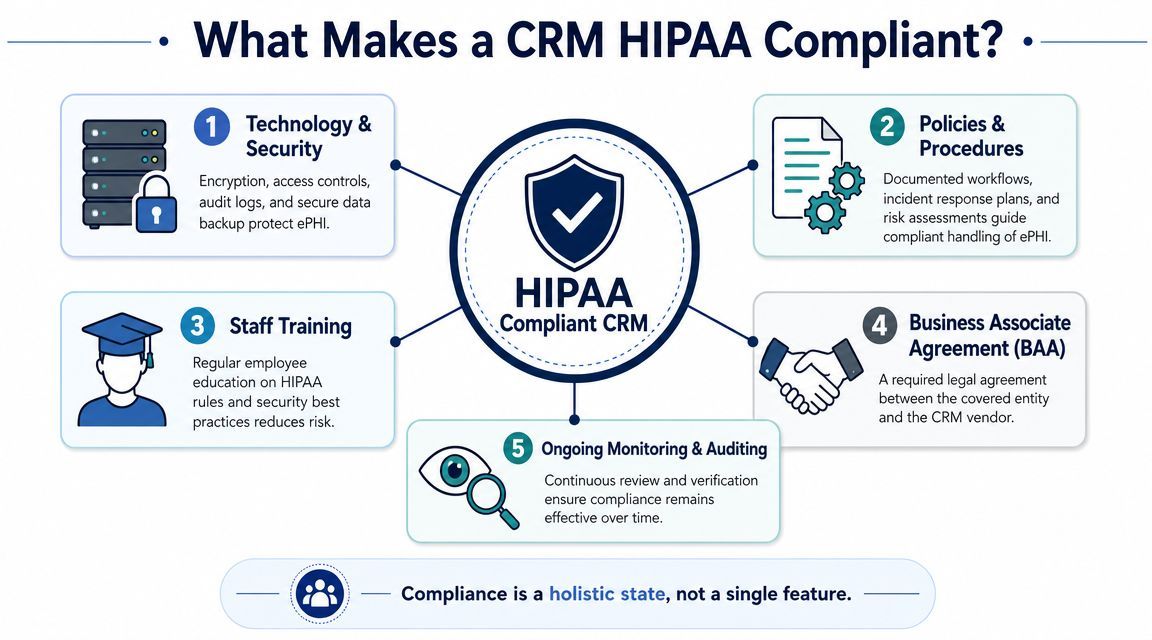
A clinic can buy a polished CRM, get a reassuring sales demo, and still end up with a system that should never hold patient data. The problem usually starts with a bad assumption. HIPAA compliance is not a product badge. It is a mix of vendor commitments, system controls, and how your clinic configures and governs the tool after purchase.
There is no government-issued HIPAA certification for CRM software. For any CRM that stores, transmits, or exposes protected health information, the baseline requirement is clear. The vendor must agree to a Business Associate Agreement, or BAA, and the platform must support the safeguards HIPAA expects for that use case, as outlined by the U.S. Department of Health and Human Services in its guidance on business associates.
If a CRM vendor will not sign a BAA for your planned use, remove it from the shortlist. Do that before your team spends time on demos, migration planning, or integration scoping.
But a signed BAA does not settle the risk. It confirms the vendor accepts certain responsibilities. It does not prove the product is configured safely, that your staff have the right access levels, or that the vendor's subcontractors and hosting model fit a Canadian clinic's privacy obligations.
That last point gets missed often. A U.S.-based vendor may be acceptable under HIPAA while still creating procurement problems under PHIPA or other provincial rules if data is stored outside Canada, backed up across borders, or accessed by foreign support teams. Clinic managers need answers on residency, subcontractors, support access, breach handling, and auditability before they trust a platform with patient communications.
In practice, a HIPAA-ready CRM becomes suitable for healthcare only when four layers line up:
That is why procurement and implementation should be tied together. If your team needs a structured way to test those gaps early, use this HIPAA risk assessment checklist for healthcare technology decisions before data migration starts.
Privacy gets most of the attention. Recovery deserves the same scrutiny.
If staff lose communication records during a migration, sync failure, or accidental deletion, your clinic can face patient service issues, reporting gaps, and compliance questions at the same time. Ask the vendor how backups work, how restores are handled, what recovery timelines are realistic, and what data you can export independently. For severe local device failures involving exported records, attachments, or legacy files, a specialised certified data recovery lab may also be part of your contingency plan.
A healthcare CRM is acceptable when the vendor will sign the BAA, the platform supports the right controls, and your clinic can prove it has set boundaries around data, access, and oversight. For Canadian organisations, add one more test. The system must fit provincial privacy expectations, not just U.S. marketing language.
A clinic buys a new CRM to improve intake follow-up and referral communication. Six weeks later, staff are storing appointment notes, insurance details, and patient messages in places no one reviewed properly. That is how compliance problems start. Usually not with a breach headline, but with ordinary workflow decisions that were never mapped to the rule set.
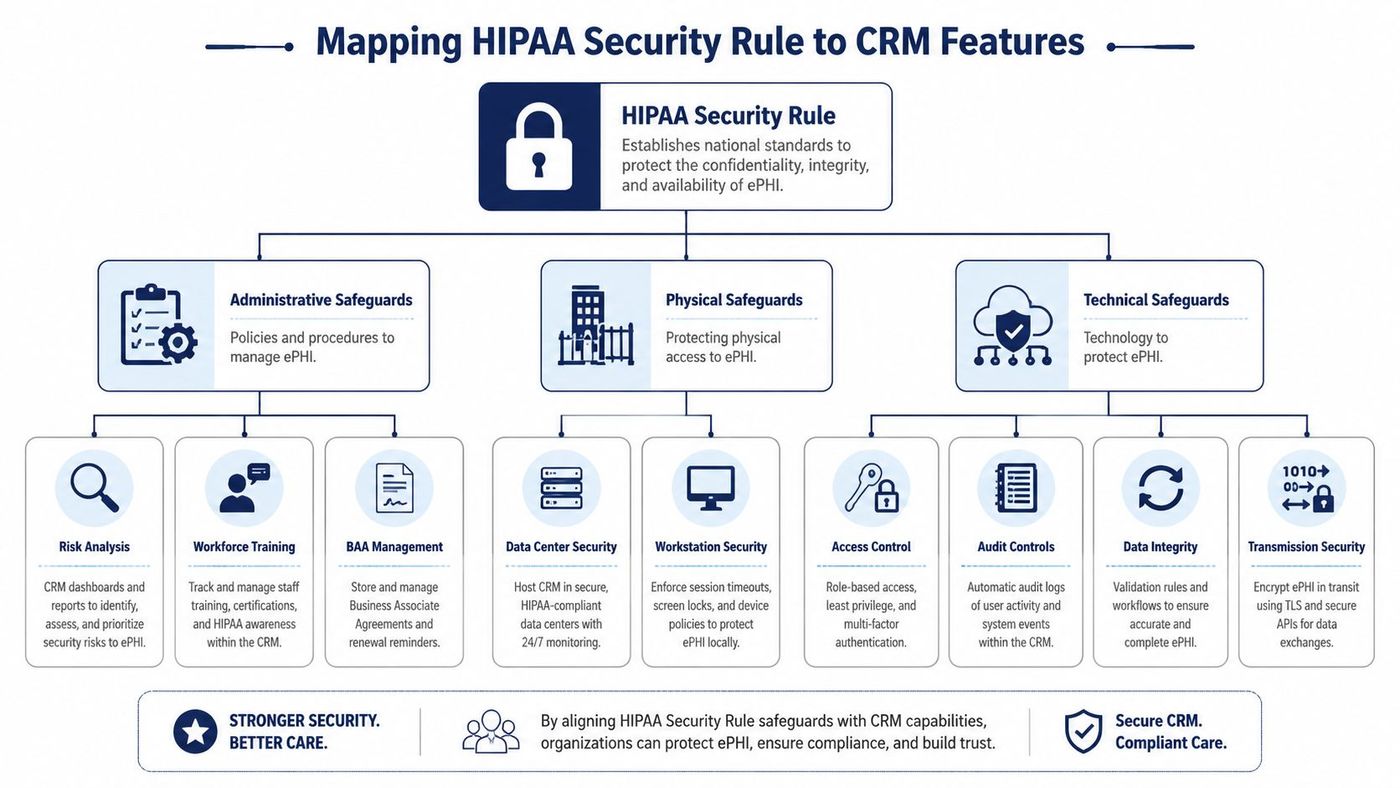
The HIPAA Security Rule breaks safeguards into administrative, physical, and technical categories. For a clinic manager, the useful question is simpler. Which CRM features control access to PHI, record user activity, protect data in storage and transit, and support your own policies on staff use, retention, and oversight? The U.S. Department of Health and Human Services outlines those safeguard categories in its Security Rule guidance.
The gap I see in CRM projects is not usually the contract. It is the translation from rule language into field settings, permission groups, mobile access, sync behaviour, and reporting.
Administrative safeguards show up in how the clinic defines and enforces use. The CRM should support role design that matches real jobs, not generic labels. Front-desk staff may need scheduling and contact details. Billing staff may need insurance and payment fields. Outreach staff may need communication history but not broad visibility into sensitive notes.
Training also belongs here. Staff need a clear rule for what can be entered into the CRM and what must stay in the EHR. Free-text fields are a common failure point because they invite convenience. Once people start pasting clinical detail into sales or service notes, the system scope expands whether anyone intended it or not.
For Canadian clinics, administrative review needs one more layer. Ask whether the vendor's support staff, subprocessors, and backup procedures create cross-border exposure. A BAA does not answer that. PHIPA and similar provincial requirements can turn vendor access, offshore support, or U.S.-hosted backups into a governance issue even if the vendor markets the product as HIPAA ready.
Cloud hosting shifts part of the physical safeguard burden to the vendor, but it does not remove the clinic's part of the job.
Your clinic still controls front-desk screens, shared workstations, idle session settings, laptop storage, printer areas, and what happens when a staff member leaves with a synced mobile device. The vendor controls data centre access, hardware disposal, and infrastructure security. Both matter. OCR's Security Risk Assessment Tool is useful here because it forces teams to review environmental and device risks, not just software settings.
That is why CRM security has to sit inside broader IT controls. A clinic with weak endpoint management or poor account offboarding can still expose PHI through a well-configured application. If your broader environment needs work, these cyber security services for healthcare IT environments are relevant to the CRM decision.
Technical safeguards are where many vendor demos sound polished and say very little. Ask the vendor to show the control, not describe it.
A useful mapping looks like this:
The National Institute of Standards and Technology provides a practical reference point in SP 800-66 Revision 2, which maps HIPAA Security Rule expectations to implementation activities. That is useful during CRM review because it helps clinics separate required control outcomes from vendor marketing language.
For Canadian organizations, technical mapping should also include data location, replication, and administrator access. If a vendor says data is hosted in Canada, ask where backups sit, where logs are processed, where support staff can log in from, and whether subprocessors move metadata outside the province or outside Canada. That is often the difference between a platform that looks acceptable on paper and one your privacy officer can defend.
If the vendor cannot show you a real audit log, a permission model, and a documented data flow, do not assume those details will be cleaned up after launch. They usually become your problem after PHI is already in the system.
A clinic can get through three polished demos, pick a CRM that looks secure, and still end up with a platform the privacy officer cannot approve. That usually happens because the review stayed at the promise level. The right vendor conversation gets specific fast, especially if your clinic has to satisfy both HIPAA expectations and provincial rules on custody, access, and data location.
Start by asking the vendor to prove how the product works in your environment. A signed BAA matters for U.S. compliance. For a Canadian clinic, it is only one document in a larger review. You also need clear answers on where data is stored, where backups go, which support staff can access the system, and whether any subprocessor touches patient data or metadata outside Canada.
Use a scripted demo and require evidence in writing after the call. If a sales engineer says a control is "supported," ask whether it is native, add-on, limited to certain plans, or dependent on custom work.
| Review Area | What to Verify | Question for Vendor |
|---|---|---|
| Contract terms | BAA and privacy commitments | Will you sign a BAA for this exact product and use case, and what contract terms cover data handling for Canadian healthcare customers? |
| Access model | Granular permissions | Can you restrict access by role, team, location, record type, or field, and show those settings live? |
| Logging | Real audit evidence | Can you export sample logs showing record access, edits, exports, permission changes, and admin actions? |
| Data residency | Hosting and replication | Where do production data, backups, logs, and disaster recovery copies reside? |
| Vendor access | Support and administration | Which vendor staff can access our instance, from which countries, and under what approval process? |
| Subprocessors | Third-party involvement | Which subprocessors handle hosting, email, analytics, support, or AI features, and where do they operate? |
| Integrations | Connected systems risk | Which integrations can transmit PHI, and how do you control access, logging, and failure handling across those connections? |
| Export controls | Data extraction limits | Can exports be restricted by user, role, approval workflow, or dataset size? |
| Incident handling | Breach response process | What are your notification timelines, investigation steps, and customer responsibilities during a security incident? |
| Recovery | Restore capability | How do you restore deleted or corrupted records, and what evidence can you provide that restores are tested? |
| Retention and deletion | End-of-life handling | What happens to our data at contract end, and how do you document secure deletion from primary and backup systems? |
One answer should trigger follow-up every time. "We host in Canada" does not settle the issue. Ask whether logs are processed in the U.S., whether support staff abroad can impersonate admins, and whether any optional feature routes data through another region. I see this missed often in clinic procurements, and it becomes a problem after implementation, when the team has already trained staff and loaded patient records.
Strong evaluations are run by a small group with clear roles. Operations checks workflow fit. IT checks identity, logging, and integration behavior. Privacy or compliance checks contracts, access paths, and provincial requirements that a U.S. vendor may not understand.
Weak evaluations usually fail in two places. First, the team accepts roadmap promises for controls that are not available today. Second, they assume an MSP or consultant can compensate for missing product functions. External support can improve configuration and monitoring. It cannot create field-level permissions, usable audit trails, or defensible residency controls if the CRM does not provide them.
The service model matters too. Clinics that need outside help should review how their managed cyber security service support model will handle CRM monitoring, access reviews, incident response, and vendor coordination after go-live.
End each vendor meeting with a decision status: approved, rejected, or pending evidence. Anything softer usually means the team has not answered the actual compliance questions yet.
For Canadian healthcare organisations, HIPAA is often only the starting line. It can be relevant, especially when the vendor, hosting model, or service architecture is U.S.-based, but it does not replace provincial privacy obligations.
Canadian healthcare organisations must reconcile CRM use with regional rules like Ontario's PHIPA and Alberta's HIA. Most HIPAA CRM guides are U.S.-centric and fail to address important Canadian concerns like data residency, cross-border processing, and whether a U.S. vendor's BAA is sufficient for provincial privacy obligations, as discussed in this review of HIPAA CRM issues for Canadian healthcare buyers.

A BAA is important in the U.S. compliance model. It is not a substitute for evaluating provincial requirements, internal policies, procurement expectations, and contractual terms around data handling.
A Canadian clinic should ask:
Many U.S. CRM vendors struggle. Their sales process is designed to answer HIPAA questions quickly, but Canadian healthcare buyers often need answers about regional obligations, local governance, and cross-border exposure that aren't covered by standard sales decks.
That doesn't mean U.S.-hosted SaaS is automatically off the table. It means the review must be more disciplined. In Alberta, for example, privacy review often benefits from a structured privacy impact assessment approach, especially when patient information may be processed by external providers.
Canadian clinics shouldn't ask only, “Is this CRM HIPAA compliant?” They should also ask, “Is this vendor's operating model acceptable under our provincial obligations?”
That question changes the procurement conversation in a useful way. It moves the team away from marketing labels and toward defensible governance.
A compliant CRM purchase can still become a non-compliant deployment if the rollout is rushed. Most of the risk appears after contract signing, when user roles, workflows, imports, and habits get locked into daily operations.
Start with role design before importing live data. Front desk staff, billing staff, managers, and technical administrators should not inherit the same permissions just because it speeds up launch.
Use the principle of minimum necessary access. If a user doesn't need a field, record type, or export capability, remove it. Clinics that skip this step often discover months later that too many users can view sensitive notes, download reports, or modify records without meaningful oversight.
A clean implementation usually includes:
Vendor onboarding often teaches users where to click. It doesn't always teach them what they should and should not enter into the system.
Your team needs practical training on secure data handling, password hygiene, approved communication methods, and phishing awareness. They also need examples tied to real clinic workflows. Reception should know what belongs in notes. Managers should know when a report export creates risk. Administrators should understand the impact of role changes and integration permissions.
Training works when it reflects the tasks staff actually perform. Generic privacy slides rarely change behaviour.
Run a review shortly after go-live. Don't wait for the annual compliance cycle to discover that roles drifted, logs aren't being checked, or staff created workarounds.
A useful post-launch review checks:
One managed option in this space is CloudOrbis Inc., which provides healthcare IT support, compliance-focused security services, and ongoing monitoring that can sit alongside CRM deployment and governance. The important point isn't the provider name. It's that someone must own the ongoing control process after the software goes live.
A hipaa compliant crm is never just a purchase decision. It's a continuing operational commitment shaped by contracts, system controls, user behaviour, and regional privacy obligations.
For Canadian clinics, the challenge is sharper because the buying conversation often starts in a U.S. framework and ends in a provincial one. That creates blind spots around hosting, vendor access, retention, and breach response. The clinics that handle this well don't chase labels. They document requirements, push vendors for specifics, and treat implementation as part of compliance, not a separate IT task.
That approach protects more than patient data. It protects continuity. Staff work faster when the system is organised properly. Managers make better decisions when auditability is built in. Procurement gets easier when the review criteria are clear. And patient trust is easier to maintain when your internal controls are disciplined.
If your clinic is evaluating CRM options or trying to clean up an existing deployment, bring IT, operations, and privacy review into the same conversation early. That's usually the difference between a system that helps the clinic and one that creates new risk.
If your organisation needs help evaluating a HIPAA compliant CRM, reviewing cross-border privacy implications, or building the security controls around a healthcare workflow, talk to CloudOrbis Inc.. A structured assessment can clarify vendor fit, implementation risk, and the operational safeguards needed to keep your clinic compliant and efficient.
Book a 30-minute call with a senior engineer. No sales script, just straight answers about your environment.


