Data Loss Prevention Tools: Guide for Canadian SMBs 2026
Discover the best data loss prevention tools & strategies for Canadian SMBs in 2026. Our guide covers selection, implementation, & compliance for finance &

Discover the best data loss prevention tools & strategies for Canadian SMBs in 2026. Our guide covers selection, implementation, & compliance for finance &
A lot of Canadian business owners are in the same spot right now. Your team works in Microsoft 365, files move through email, Teams, SharePoint, laptops, and phones, and someone occasionally sends the wrong attachment, shares the wrong folder, or stores sensitive records somewhere they shouldn't. Nothing about that feels dramatic in the moment. It still creates real exposure.
That's why data loss prevention tools matter. They help you control how sensitive information is identified, handled, shared, and protected before a routine mistake becomes a privacy incident, a compliance problem, or a client trust issue.
For SMBs, the practical challenge isn't understanding that data matters. It's choosing a sensible path that fits budget, staffing, and Canadian obligations such as PIPEDA and, in healthcare, PHIPA. The good news is that you don't always need a large enterprise platform to get started. In many cases, the strongest first move is to use the controls you already have and configure them properly.
At 4:45 p.m. on a Friday, a staff member sends a file in a hurry. It goes to the wrong client, includes personal information, and now the owner has a bigger problem than one bad email. They need to contain the exposure, assess reporting obligations, answer client questions, and document what happened.
That is why data loss prevention tools matter. They put controls around sensitive information so routine work does not turn into a privacy incident. In practical terms, DLP helps your business identify sensitive data, limit how it can be shared, and enforce rules before a file leaves your control.
For Canadian SMBs, this is not only an IT issue. It is a business risk, a compliance issue, and a trust issue. PIPEDA expects organisations to protect personal information with safeguards that match the sensitivity of the data, and healthcare practices may also need to meet PHIPA requirements. For many firms, the smartest starting point is not an expensive enterprise platform. It is using the Microsoft 365 controls you already pay for, then mapping them to policy and workflow. That approach aligns well with broader data security and privacy obligations without forcing a large capital project.
Once data is exposed, the impact spreads beyond IT. Management time gets pulled into incident response. Staff productivity drops. Legal, HR, operations, and client-facing teams all get involved. If regulated data is involved, the cost of documenting decisions and proving due diligence can exceed the cost of the original mistake.
According to IBM's Cost of a Data Breach Report, data breaches continue to carry multi-million-dollar average costs globally, and smaller organisations often feel the operational disruption more sharply because they have less margin for error.
Practical rule: If confidential data can leave through normal staff workflows, your business needs stronger controls around the workflow, not just another reminder email to employees.
That is especially true for clinics, accounting firms, legal offices, manufacturers, and professional services companies. These businesses handle employee records, financial files, contracts, and customer data every day. In healthcare, privacy controls also need to support care delivery and front-desk reality, which is why this primer on healthcare data security is a useful reference.
In SMB environments, the same patterns show up repeatedly:
Verizon's Data Breach Investigations Report has consistently shown that human error, misuse, and credential-related attacks remain common causes of data exposure.
For business owners, the takeaway is straightforward. Staff training matters, but it will not catch every rushed click or poor sharing setting. Good DLP reduces that risk by putting guardrails inside the tools your team already uses. For many Canadian SMBs, especially those running on Microsoft 365, that makes DLP one of the more cost-effective ways to reduce privacy risk without adding another large security stack.
The simplest way to think about DLP is this. It's a digital security guard that doesn't just watch the doors. It knows what matters, who should touch it, and what to do when someone tries to move it the wrong way.
That's the difference between ordinary monitoring and actual protection.
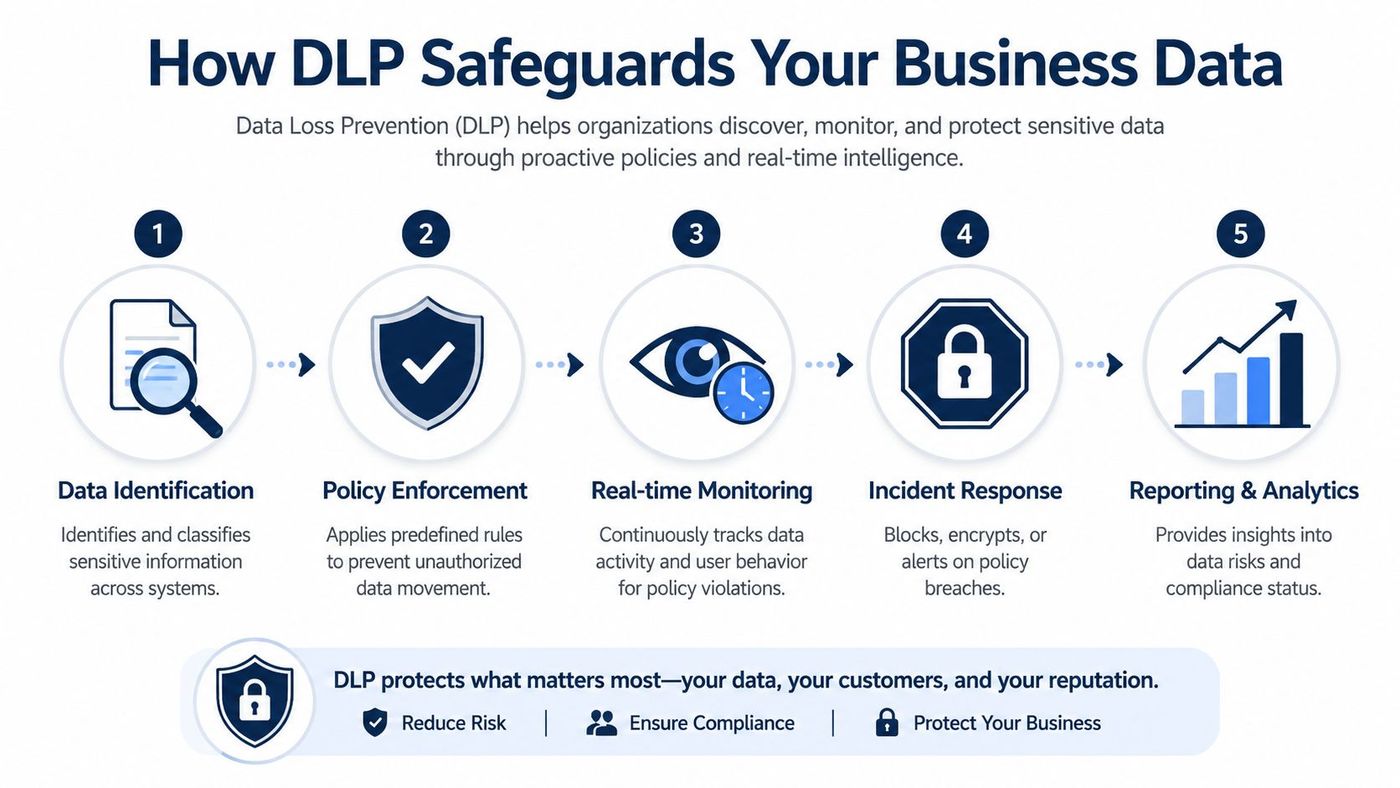
A DLP system first needs to know what counts as sensitive. That might include payroll files, patient records, financial statements, contracts, HR documents, or client lists. Modern tools inspect file contents, email text, databases, and communications to classify information by sensitivity.
Many SMBs often underestimate the technology. Good DLP goes beyond mere keyword searches; it integrates content inspection with context. This involves examining who is using the data, its destination, the device employed, and whether the action aligns with typical business behavior.
According to Palo Alto Networks' DLP overview, in the Canadian region, modern DLP tools can achieve a 94% reduction in accidental data exposure incidents when configured with real-time user behaviour analytics and content inspection engines that classify sensitive information across files, databases, and communications.
Once the system recognises sensitive data, policy tells it what to do.
A useful DLP policy doesn't try to block everything. It reflects real operations. For example:
That balance matters. If policies are too loose, they miss risk. If they're too rigid, staff look for workarounds.
Good DLP should protect the business without forcing employees to fight the system all day.
The best data loss prevention tools don't just log events for someone to read later. They act immediately when risk appears.
Typical actions include:
That progression is one reason DLP pairs well with broader cloud security planning. If your files, identities, and collaboration platforms already sit in Microsoft 365 or other SaaS systems, your controls need to follow them there. That's why many businesses connect DLP with their wider approach to cloud data protection.
The tools work best when they're tuned to actual workflows. A legal firm needs different handling rules than a logistics company. A clinic needs tighter controls around patient information than a manufacturer might need around product documentation.
What usually fails is a checkbox deployment. Teams buy software, enable a default policy pack, generate a flood of alerts, and then stop paying attention. DLP only becomes valuable when it's configured around real data, real users, and real decisions.
Not all DLP products solve the same problem. The category you need depends on where your data lives and how it leaves. For most SMBs, there are four practical lenses to use: network, endpoint, storage, and cloud.
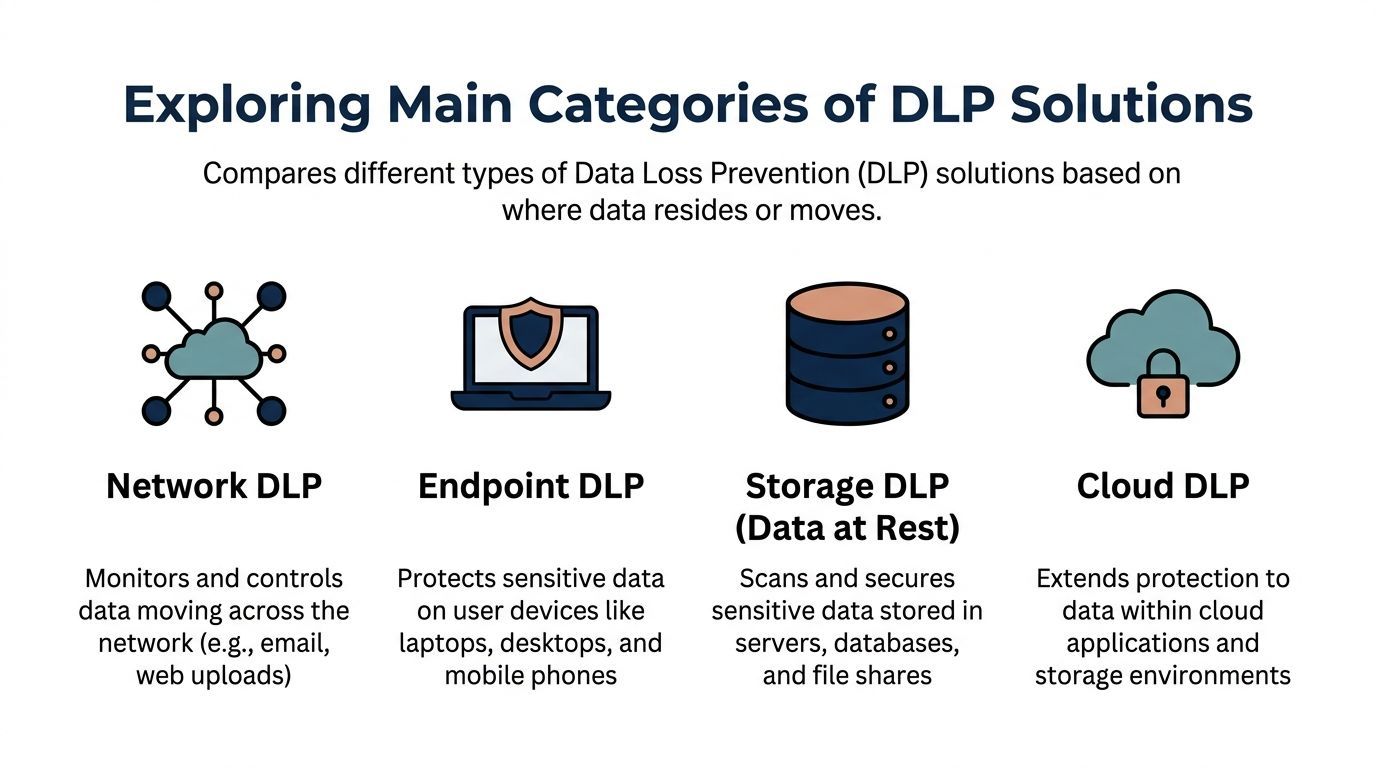
| DLP category | Best at protecting | Typical use case | Main limitation |
|---|---|---|---|
| Network DLP | Data in motion | Monitoring email or web uploads leaving the business | Less visibility once work happens inside cloud apps |
| Endpoint DLP | Data on user devices | Controlling USB copy, printing, local file movement | Requires device-level management and policy tuning |
| Storage DLP | Data at rest | Scanning file shares, servers, and repositories for exposed data | Doesn't always stop live user actions by itself |
| Cloud DLP | Data in Microsoft 365 and SaaS apps | Governing sharing, syncing, and collaboration in cloud platforms | Can miss unmanaged endpoints or local device actions |
Network DLP acts like a gatekeeper. It inspects traffic moving across your network and looks for sensitive information being sent out by email, web form, or file transfer.
This category still matters, especially in organisations with a defined perimeter or centralised email flow. It's useful when your biggest concern is data leaving through obvious channels.
Its weakness is modern work. If staff collaborate directly in cloud apps, network-only visibility won't tell the whole story.
Endpoint DLP sits on laptops, desktops, and sometimes mobile devices. It's where you control risky actions that happen locally, such as copying files to USB drives, printing confidential documents, or moving data into personal apps.
For regulated SMBs, this is often where policy becomes tangible. Staff don't think in terms of “exfiltration paths.” They copy, paste, print, upload, and forward. Endpoint controls let you govern those behaviours directly.
A strong identity strategy makes this category more effective because permissions and device trust affect what should be allowed. That's why DLP decisions often overlap with identity and access management.
Endpoint DLP is often the difference between seeing risky behaviour and actually stopping it.
Storage DLP scans repositories such as file shares, on-premises servers, and document stores. It's useful for finding sensitive data that's been sitting in the wrong place for years.
Cloud DLP covers what many SMBs rely on most heavily now: Exchange Online, SharePoint, OneDrive, Teams, and other SaaS platforms. If your staff collaborate in Microsoft 365 all day, cloud DLP is not optional. It's central.
The trade-off is straightforward. Storage DLP helps you clean up what already exists. Cloud DLP helps you govern how people work right now. Most growing SMBs need some mix of both, with endpoint controls layered in where the risk justifies it.
SMBs make the same mistake with DLP that they make with many security tools. They shop by vendor reputation instead of operational fit. That usually leads to one of two outcomes. The platform is too expensive and underused, or it's too shallow to support compliance.
The better approach is simpler. Start with your regulated data, your existing platforms, and the people you have to manage the system.

For many Canadian SMBs, the most practical first step is Microsoft Purview inside Microsoft 365. It's already close to where your files, email, and collaboration happen. That means lower friction, better policy alignment, and less duplication.
There's also a strong cost argument. As Fortinet's DLP glossary notes, for SMBs in Canada, the most effective DLP strategy is often policy-as-code within existing Microsoft Purview, and 60% of Canadian SMBs already pay for it but fail to configure it.
That's a real gap in the market. Many organisations buy more tooling before they've used the controls already sitting in their licence stack.
When assessing data loss prevention tools, I'd focus on five questions:
Native Microsoft controls are often the right starting point, not always the final answer.
A third-party platform may be justified when:
The wrong buying pattern is easy to recognise. A business chooses an enterprise-grade DLP suite because it looks complete, then discovers it needs heavy implementation effort, ongoing rule tuning, and security staff it doesn't have.
Buy for the environment you operate, not the one a vendor demo assumes you have.
For most SMBs, a phased model is stronger. Use Microsoft Purview where it fits, define clear classifications and policies, then add specialised controls only where a real gap remains. That path is more affordable, easier to govern, and much more likely to be maintained.
A staff member in HR emails a spreadsheet to the wrong recipient. Nobody notices for two days. By then, you are dealing with privacy risk, internal cleanup, and uncomfortable questions about whether your controls were reasonable under PIPEDA or PHIPA.
That is why DLP implementation needs a plan. A rushed rollout creates friction and false positives. A staged rollout reduces risk without slowing the business down.
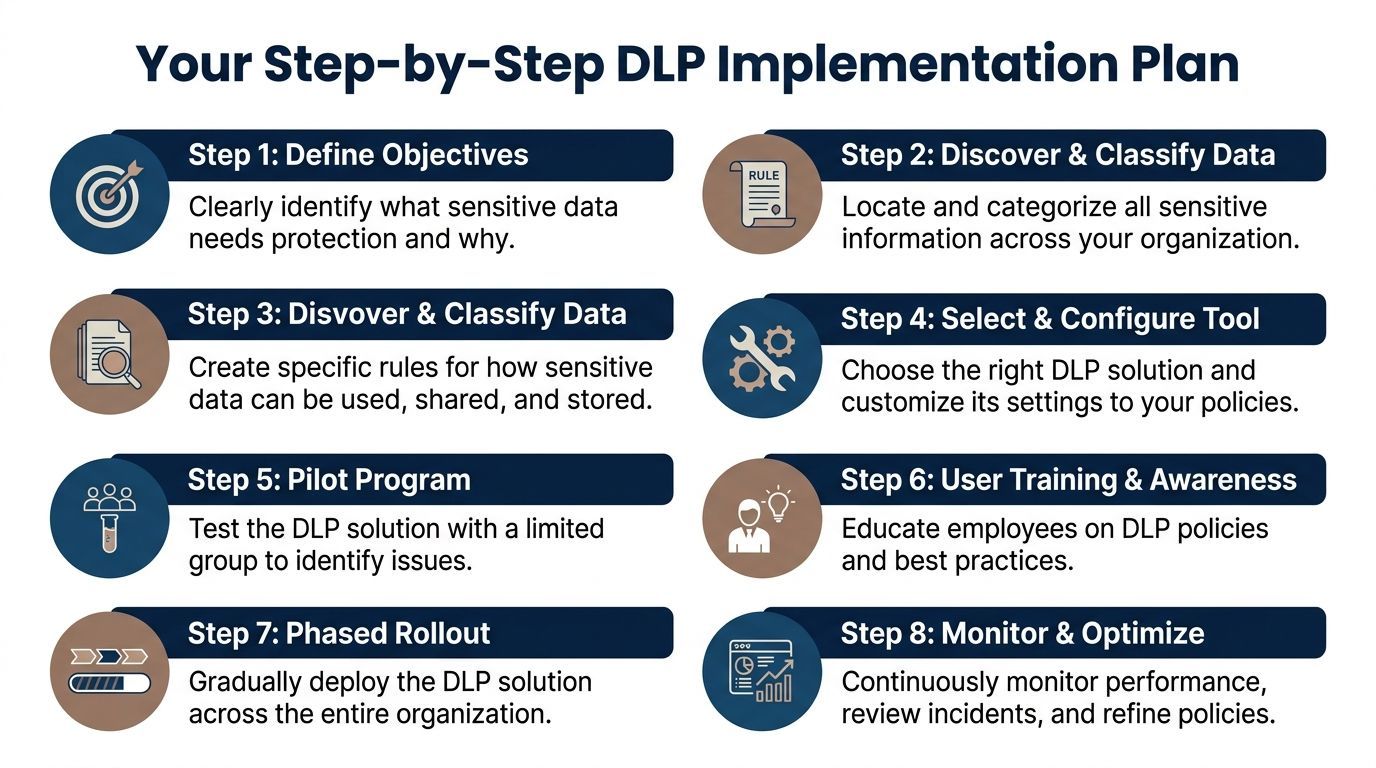
Start with the business problem, not the tool.
For SMBs, it determines whether projects stay practical or become expensive. If Microsoft 365 already handles your mail, files, and collaboration, Purview usually gives you enough control to start reducing exposure without buying a second platform on day one.
The middle stage determines whether users accept DLP or work around it.
Use simulation mode first. Proofpoint's DLP guidance explains why testing policies before enforcement helps teams catch false positives, understand user impact, and adjust rules before they interrupt legitimate work.
A simple message works best: protect sensitive information without making normal work harder than it needs to be.
Once the pilot is producing clean results, expand by department, by data type, or by platform. Avoid switching on every policy at once. That is how small mistakes become company-wide frustration.
After rollout, tune the system based on what you see:
| Phase | Main question | Desired outcome |
|---|---|---|
| Discovery | What sensitive data do we hold, and where is it stored? | Inventory of personal, regulated, and business-critical information |
| Policy design | Which actions should be allowed, warned, encrypted, or blocked? | Rules tied to real business activity |
| Pilot | Do the controls catch risky behaviour without creating unnecessary tickets? | Lower false positives and better user acceptance |
| Rollout | Which teams or platforms should move into enforcement first? | Controlled deployment in higher-risk areas |
| Optimisation | What do incidents and exceptions show us about process gaps? | Better policies, stronger compliance, and less alert fatigue |
The strongest DLP deployments for Canadian SMBs are rarely the most complex. They are the ones built in phases, aligned to actual workflows, and matched to tools the business already owns.
A month after rollout, the software is still there, but the protection can already be slipping. A manager approves a new file-sharing app. Staff start working from home more often. Someone in payroll sends a spreadsheet in a way that made sense six months ago, but now creates a PIPEDA or PHIPA issue. DLP loses value when nobody is reviewing those changes and adjusting the controls.
For Canadian SMBs, that ongoing work matters as much as the initial setup. The goal is not to collect alerts. The goal is to keep personal, financial, and health information under control as the business changes, while avoiding unnecessary friction for staff. In many Microsoft 365 environments, the native tools can handle a large share of that job at a reasonable cost, but only if someone owns the policies, reviews incidents, and tunes the rules over time.
Daily DLP operations usually come down to four responsibilities:
That workload is where many SMBs stall. The issue is rarely the tool itself. The issue is that nobody on staff has time to check false positives, refine Microsoft 365 policies, and investigate whether repeated violations point to a training gap, a process problem, or deliberate misuse.
Managed support closes that operational gap without forcing a small internal IT team to become full-time DLP specialists. It helps with policy tuning, incident review, exception handling, and escalation paths that stand up during an audit or privacy investigation.
This approach is often the practical choice for organizations with multiple offices, hybrid work, lean IT staffing, or regulated data. It also fits the budget reality for Canadian SMBs better than buying a separate enterprise platform before using the Microsoft 365 controls they already have. In many cases, the better investment is disciplined management of existing tools, backed by a managed security services team that can monitor and adjust them consistently.
A DLP product can block a risky action. Ongoing management keeps the policy accurate, defensible, and aligned with how the business works.
The best result for an SMB is steady protection that supports compliance, reduces avoidable exposure, and stays workable for staff month after month.
If your business needs a practical DLP roadmap that fits Microsoft 365, PIPEDA, PHIPA, and the realities of an SMB budget, CloudOrbis Inc. can help you assess your current exposure, configure the tools you already own, and build a managed protection model that doesn't get in the way of day-to-day work.
Book a 30-minute call with a senior engineer. No sales script, just straight answers about your environment.


