

September 26, 2026
On-Premise to Cloud Migration Checklist: 10 StepsUse this on-premise to cloud migration checklist to plan assessment, compliance, backups, sequencing, testing, cutover, and optimization for SMBs.
Read Full Post%20(1).webp)
Usman Malik
Chief Executive Officer
September 27, 2026
Only 25% of Canadian organizations attacked by ransomware fully restored their data, while ransom payments represented just 18% of total incident costs. Recovery therefore has to centre on validated backups, downtime control, and compliance, not on paying criminals and hoping for a working key.
That distinction matters for every medium-sized Canadian business. Ransomware recovery isn't a single restoration step. It's a controlled sequence that protects evidence, limits spread, meets reporting obligations, restores trustworthy systems, and closes the entry point before the attacker returns.
The Canadian Centre for Cyber Security's ransomware guidance says reported ransomware incidents involving Canadian victims rose by an average of 26% each year between 2021 and 2024. Your recovery plan should assume repeat exposure, not treat the attack as a freak event.
Paying a ransom feels like a decision that ends the crisis. It doesn't. Canadian survey data found that 94% of respondents felt confident they could recover from ransomware, yet only 25% of attacked organizations fully restored their data, while 3% recovered none at all. Those figures expose the gap between confidence and recoverability. (SecurityBrief Canada)
The larger cost usually comes after the encryption. Your team still has to investigate the intrusion, preserve evidence, determine whether data was stolen, brief legal counsel, assess notification duties, rebuild compromised systems, validate restored data, and keep the business operating while systems remain offline. Canadian cyber incident recovery costs doubled to CAD 1.2 billion in 2023, according to Statistics Canada data cited by the Cyber Centre. (Canadian Cyber Centre ransomware threat outlook)
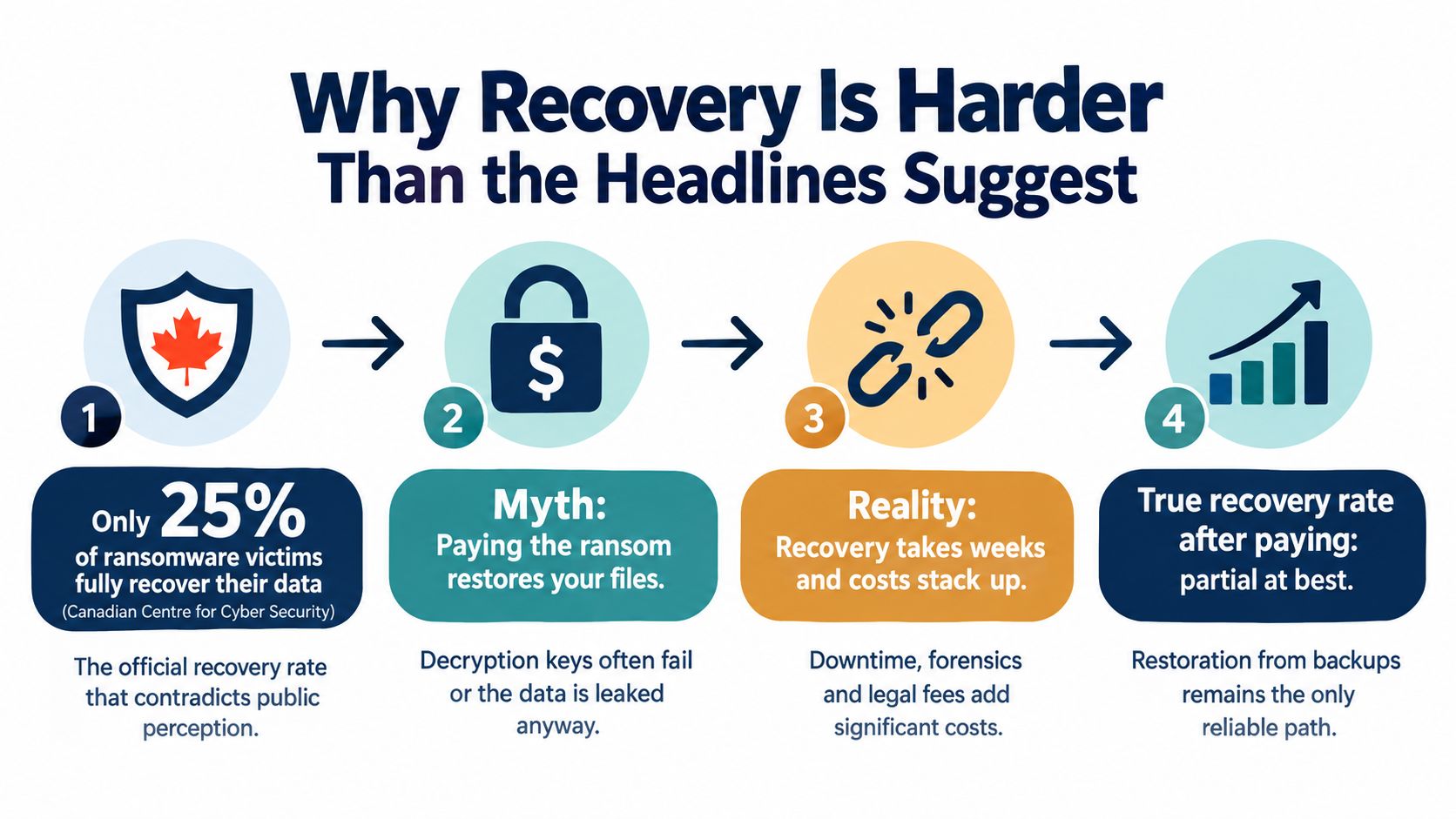
A useful ransomware recovery playbook follows this order:
That sequence is deliberately slower than clicking “restore all.” It is also faster than restoring contaminated backups, reconnecting an unpatched server, and starting the attack again.
Practical rule: Treat every restored system as untrusted until someone verifies its image, credentials, logs, patches, and data integrity.
The first hours determine whether a ransomware incident remains contained or becomes an enterprise-wide outage. Start by isolating affected devices and network segments from internal and internet connections. Disconnect VPN access where necessary, stop replication that could copy encrypted data into clean recovery environments, and isolate backup infrastructure.
Don't immediately power off an infected machine. The Cyber Centre warns that shutting down an isolated device can destroy forensic evidence and complicate recovery. Preserve memory and active sessions for the incident response team, while preventing further network communication. Don't connect USB drives or external storage to collect files casually, because removable media can spread malware or alter evidence.
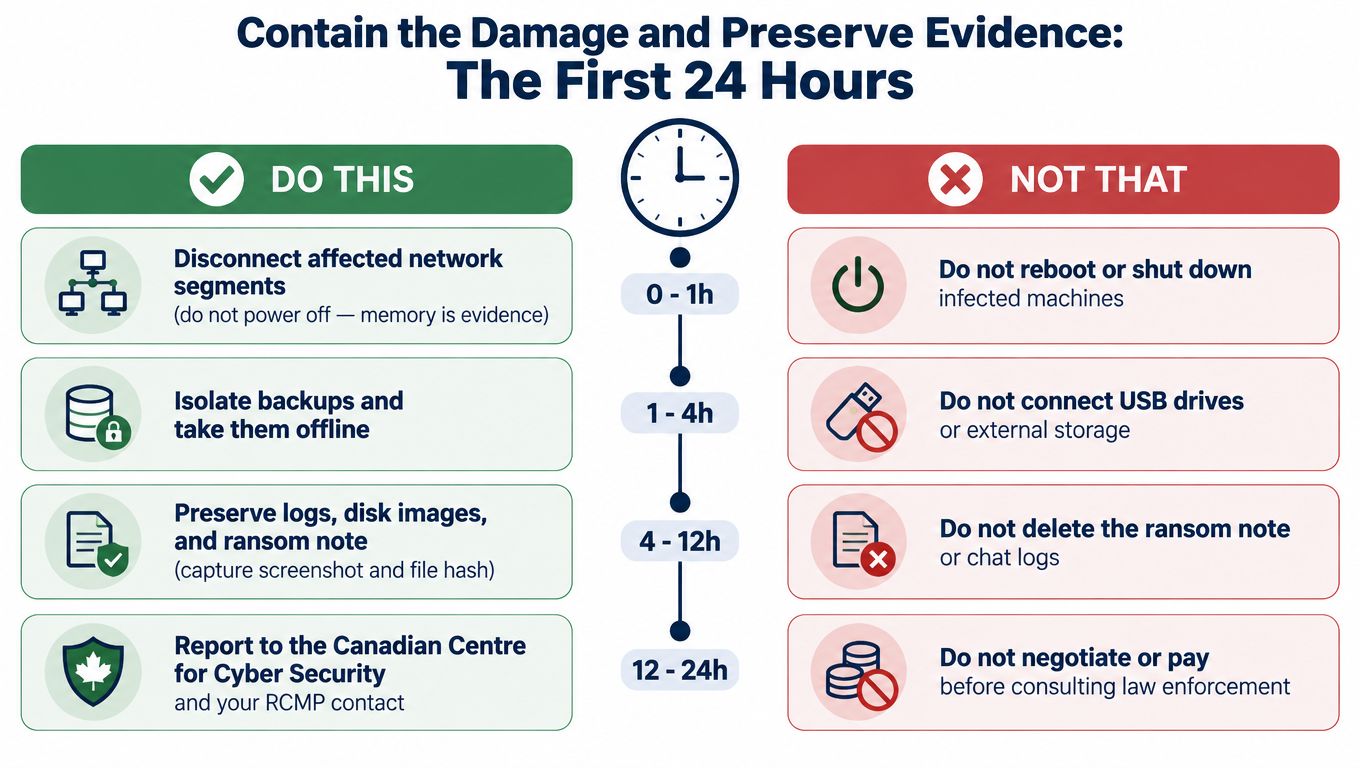
Use a named incident lead and record each decision, timestamp, and person responsible.
The strain matters, but don't let strain identification delay containment. Collect ransom-note text, file extensions, sample encrypted files, and indicators from endpoint and identity systems. Double-extortion groups may threaten to publish stolen information even when some files remain accessible, so data theft requires its own investigation.
Paying shouldn't be the default. It may encourage repeat attacks, won't guarantee usable decryption, and can create sanctions and insurance issues. Before any negotiation or payment discussion, hand control to legal counsel, the insurer, and law enforcement. External statements should also wait until legal and communications owners approve the facts.
Ransomware creates two separate communication problems. The first is regulatory and law-enforcement reporting. The second is explaining operational disruption and potential data exposure to customers, employees, vendors, and partners. Don't combine them into one hurried email.
Under PIPEDA, an organization must report a breach to the Office of the Privacy Commissioner of Canada when it poses a real risk of significant harm, and it must notify affected individuals. Records of every breach must also be maintained. Quebec organizations need to assess obligations under Law 25 and coordinate with the Commission d'accès à l'information. Use the Canadian data privacy laws guide to identify the privacy regimes that apply to your operations, then have counsel confirm the response.
| Recipient | Trigger | Notification Window | Owner |
|---|---|---|---|
| Board, owner, or executive team | Confirmed ransomware, material outage, or possible data exposure | Immediately after initial containment | Incident lead and vCIO |
| Cyber insurer and broker | Suspected or confirmed cyber incident | Immediately, before hiring vendors outside the policy process | Executive sponsor |
| Canadian Centre for Cyber Security | Ransomware affecting Canadian operations or requiring federal assistance | As soon as practical | Incident lead |
| Local police, RCMP contact, and Canadian Anti-Fraud Centre | Extortion, fraud, criminal intrusion, or ransom demand | As soon as practical | Legal counsel and incident lead |
| Office of the Privacy Commissioner of Canada | PIPEDA breach presenting a real risk of significant harm | Within the applicable PIPEDA reporting window, including the 72-hour trigger where applicable | Privacy officer and counsel |
| Commission d'accès à l'information | Quebec privacy incident requiring notification | Within the applicable Law 25 process and any required follow-up or supplementation window | Quebec privacy lead and counsel |
| Customers, employees, or partners | Confirmed impact or credible risk requiring communication | After facts, scope, and legal wording are approved | Legal and communications |
PIPEDA's 72-hour breach notification trigger applies when the organization determines that a breach presents a real risk of significant harm. Quebec Law 25 can also require an organization to confirm or supplement information after notifying the relevant privacy authority. Your counsel should calculate the exact deadline from the facts, not from the date an attacker first appeared in a log.
Don't let IT publish a technical incident report before legal and communications review it. A precise internal timeline can help investigators, while an improvised external statement can expose confidential details, create inconsistent commitments, or undermine an ongoing investigation.
Ransom decisions require a documented risk assessment. Screen the actor and payment route for sanctions exposure, involve the insurer, and record why the organization chose to pay or not pay. A ransom transaction isn't a shortcut around reporting duties.
Once containment and evidence collection are underway, the recovery team should choose a restoration path quickly. Waiting for perfect certainty can prolong downtime, but restoring the wrong system can restart the incident. The decision belongs to IT, legal, the insurer where applicable, and a vCIO or equivalent executive advisor.
Use offline or immutable backups when they were isolated from the compromised environment, remain accessible, and pass malware and integrity analysis. Restore the most recent known-clean version into a segregated recovery environment first. Verify applications, permissions, databases, file relationships, and business workflows before production reconnection.
The Cyber Centre specifically warns against restoring backups without scanning and validating them. An offline copy isn't automatically clean.
Choose a wipe-and-rebuild approach when backups are encrypted, suspect, contaminated, unavailable, or tied to credentials that attackers may have stolen. Safely wipe affected devices, reinstall operating systems from trusted gold images, rebuild applications from known-good sources, and restore data only after validation.
This approach takes more labour, but it gives you a defensible baseline. It also forces the team to remove persistence instead of hoping a decryptor removed every malicious component.
A decryption tool can be appropriate when the ransomware strain is confirmed, a reputable tool exists, and decryption is demonstrably faster or safer than rebuilding. Treat the output as recovered data, not as proof that the host is clean. Scan, validate, and migrate the data into a rebuilt environment.
| Path | Best When | Typical Recovery Time | Main Cost Driver | Compliance Risk |
|---|---|---|---|---|
| Validated offline or immutable backup | Backups are isolated, clean, and restore-tested | Depends on scope and dependencies | Restoration labour and validation | Unverified data or incomplete audit trail |
| Wipe and rebuild | Systems or backups are compromised or untrusted | Depends on image, application, and data complexity | Rebuild labour and downtime | Missing evidence if wiping happens too early |
| Trusted vendor decryptor | Strain is confirmed and a reputable decryptor exists | Depends on encryption volume and validation | Decryption, reconstruction, and testing | Incomplete recovery or unsafe payment decision |
A ransom payment is not a restoration path. It is a separate legal, financial, and operational decision, and Canadian recovery data shows it still doesn't guarantee full restoration. Review your data backup and recovery strategies before an incident so the team knows which path is viable.
A representative scenario makes the economics clearer. Consider a 60-person Canadian professional services firm hit by a mid-tier ransomware strain. The business loses access to core systems, staff can't work normally, and leadership must make decisions while the facts are still incomplete.
The first block is mobilisation. During hours zero through eight, the firm brings in incident response specialists, contacts the Cyber Centre, preserves evidence, and activates managed IT support. The planning range supplied for this scenario is CAD 8,000 to CAD 15,000, depending on the response team and scope.
Hours eight through twenty-four add forensic imaging, legal analysis of possible PIPEDA obligations, insurer coordination, and communications preparation. That block can add CAD 12,000 to CAD 25,000. The firm isn't paying for paperwork. It's paying for decisions that prevent evidence loss, missed notification duties, and contradictory statements.
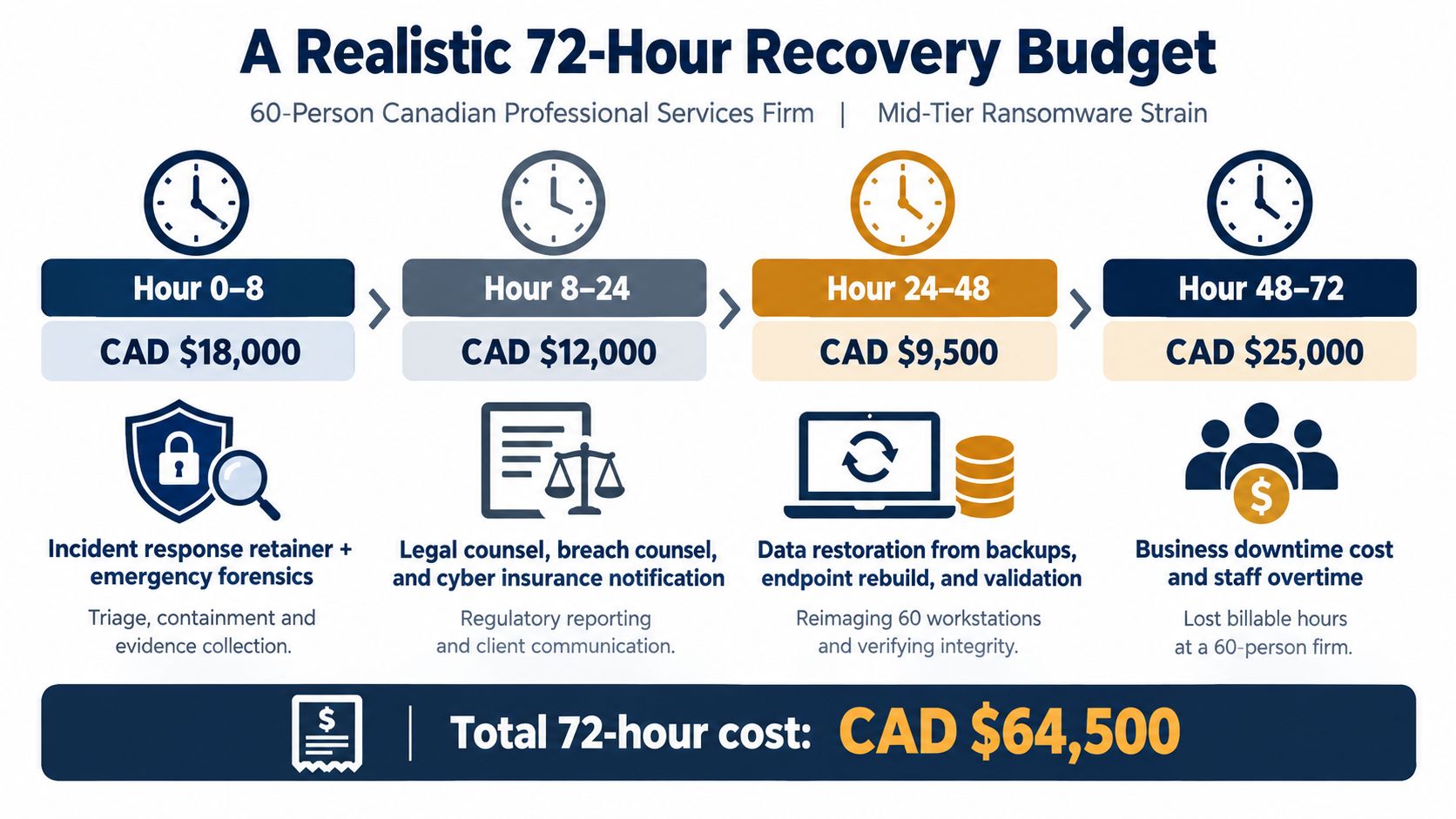
The largest block usually combines lost billable work, overtime, temporary infrastructure, rebuild effort, and deferred revenue. For this representative firm, that block may reach CAD 60,000 to CAD 120,000, depending on the sector, systems affected, and ability to operate manually.
| Recovery window | Primary work | Representative cost range |
|---|---|---|
| Hours 0 to 8 | Response mobilisation, containment, and initial evidence collection | CAD 8,000 to CAD 15,000 |
| Hours 8 to 24 | Forensics, legal review, insurance, and communications | CAD 12,000 to CAD 25,000 |
| Hours 24 to 72 | Downtime, restoration labour, temporary infrastructure, and deferred revenue | CAD 60,000 to CAD 120,000 |
These are planning ranges, not a quotation or a universal forecast. They show why a ransom can distract leadership from the actual budget. Canadian reporting found ransom payments accounted for 18% of total incident costs, while downtime, infrastructure repair, forensics, legal, regulatory, and public relations work accounted for 82%. (TELUS and IDC data cited by GRMCCallum)
A vCIO reduces waste by assigning decision rights, sequencing vendors, protecting the restore environment, and keeping executives from repeatedly revisiting settled questions. Your continuity plan should define acceptable downtime and recovery priorities, much like guidance on business continuity for Florida firms, even though the regulatory context here is Canadian. Set the recovery time objective for each critical service before an attack forces you to guess.
A clean image isn't enough. The rebuilt environment must use fresh credentials, current patches, active monitoring, and a controlled reconnection sequence. Otherwise, you may restore availability while leaving the original attacker's access intact.
Reset credentials across every account touched by the incident:
Don't reuse pre-incident passwords. Revoke active sessions and tokens where the platform supports it, rotate API keys, and document which identities were reset and when.
Use forensic findings to prioritise the vulnerability or exploit chain that enabled access. Apply emergency operating-system and application patches, update antivirus and antimalware tools, and confirm firewalls enforce the intended rules. If no public decryption tool exists, the Cyber Centre says the affected device should be safely wiped and its operating system reinstalled before reconnection. (Cyber Centre prevention and recovery guidance)
Before a system touches production, verify that its EDR agent, central logging, alerting, and time synchronisation are active. Test that alerts reach someone who can respond. MFA must protect remote access, administrator accounts, and SaaS consoles before those services return to normal use.
Reconnect by segment, not all at once. Restore identity and core data services only after integrity checks, then critical business applications, then internal tools and general workstations. Monitor each wave for suspicious authentication, encryption activity, unexpected processes, or outbound traffic.
Finish with a written sign-off. The vCIO or designated security lead should record that credentials were reset, systems were patched, monitoring was verified, backups were checked, segmentation was enforced, and the environment was ready for production.
Recovery closes the outage. Hardening changes the conditions that allowed the outage to happen. Set owners and deadlines instead of leaving the post-incident report as a document nobody revisits.
Focus on access and visibility:
Make the environment harder to traverse and easier to restore. Place production, backup, and administrative planes on separate network segments. Deploy application allowlisting on servers where the workload supports it, and convert backups to immutable, offline-tested snapshots. Run a full restore test, not just a job-success review.
Review email authentication, privileged access, vendor connections, remote administration, and alert escalation. A control that exists only in a policy document won't protect the business during the next incident.
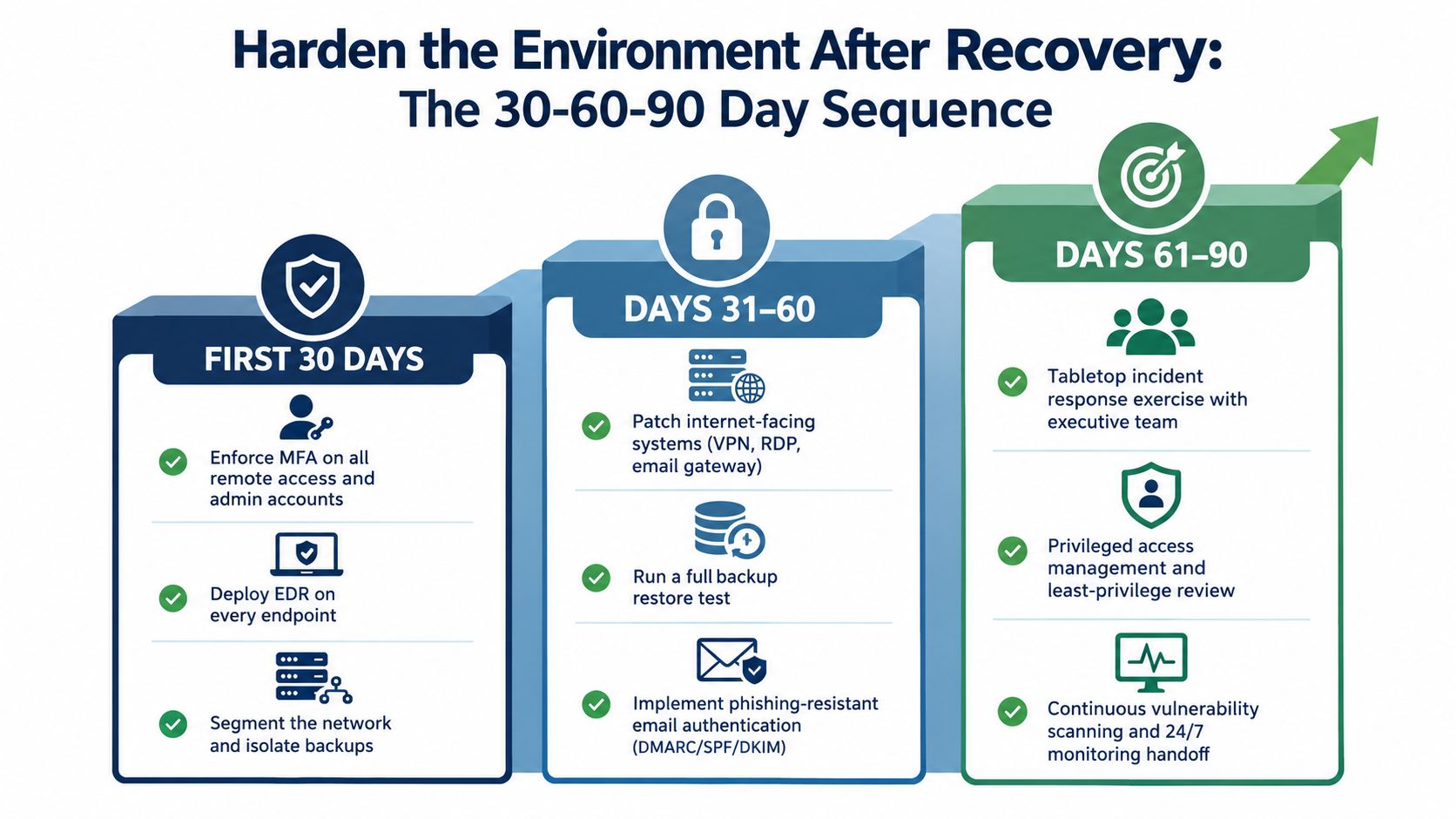
Test the original attack chain with a purple-team exercise. Update the incident response runbook with the decisions, delays, and missing contacts discovered during recovery. Review cyber insurance requirements and document the improved control posture before renewal.
For a 25-person IT team, this sequence can compete with every operational demand. A 24/7 managed service, managed backup and disaster recovery, and vCIO-led remediation program can provide the monitoring, testing, escalation, and accountability that internal staff can't sustain alone. CloudOrbis Inc. offers managed IT, cybersecurity, backup and disaster recovery, and vCIO services for Canadian SMBs, while a zero-trust security model provides a useful framework for limiting trust after an incident.
The durable truth is simple. Recovery is a project plan. Hardening is the operating model.
CloudOrbis Inc. can help you assess backup validity, define recovery priorities, coordinate incident response, and build a 30-60-90 day remediation plan before the next ransomware event. Visit CloudOrbis Inc. to discuss managed IT, cybersecurity, backup and disaster recovery, and vCIO support for your Canadian organization.
September 26, 2026
On-Premise to Cloud Migration Checklist: 10 StepsUse this on-premise to cloud migration checklist to plan assessment, compliance, backups, sequencing, testing, cutover, and optimization for SMBs.
Read Full Post
September 25, 2026
Is VoIP Good for Small Business in Canada? a 2026 GuideIs VoIP good for small business in Canada? Explore costs, benefits, reliability, security, and migration tips for SMBs considering VoIP in 2026.
Read Full Post
September 24, 2026
Helpdesk vs Service Desk: Choosing the Right IT SupportHelpdesk vs service desk: understand the key differences and choose the right IT support model for your organization in 2026.
Read Full Post
