9 Data Backup and Recovery Strategies for SMBs
Compare 9 data backup and recovery strategies for SMBs, including RTO/RPO tradeoffs, ransomware resilience, testing, and implementation tips.

Compare 9 data backup and recovery strategies for SMBs, including RTO/RPO tradeoffs, ransomware resilience, testing, and implementation tips.
A Tuesday morning outage can expose the weakness in an otherwise reassuring backup plan. Staff can't access the file server, the accounting database is only partially backed up, and the one person who knows how to restore the virtual machines is unavailable. The backups exist, but nobody has confirmed that they're complete, isolated from attackers, or fast enough to meet the business's recovery needs.
Effective data backup and recovery strategies must match business impact, Recovery Time Objective (RTO), Recovery Point Objective (RPO), retention requirements, connectivity, compliance obligations, and budget. Canadian businesses spent C$1.2 billion recovering from cyber-security incidents in 2023, double the amount reported for 2021, even though 16% of businesses said they were affected in 2023, according to Statistics Canada's cyber-security release. Recovery planning is therefore a financial control, not only an IT task.
The nine strategies below address different outcomes. Some provide rapid local recovery, others protect against site loss or ransomware, and several prove whether restoration will work. Most medium-sized organizations need a layered combination rather than one technology. CloudOrbis supports Canadian organizations with managed IT, cybersecurity, cloud, and backup and disaster recovery services, making it a relevant resource when internal teams need help turning backup coverage into dependable recovery.
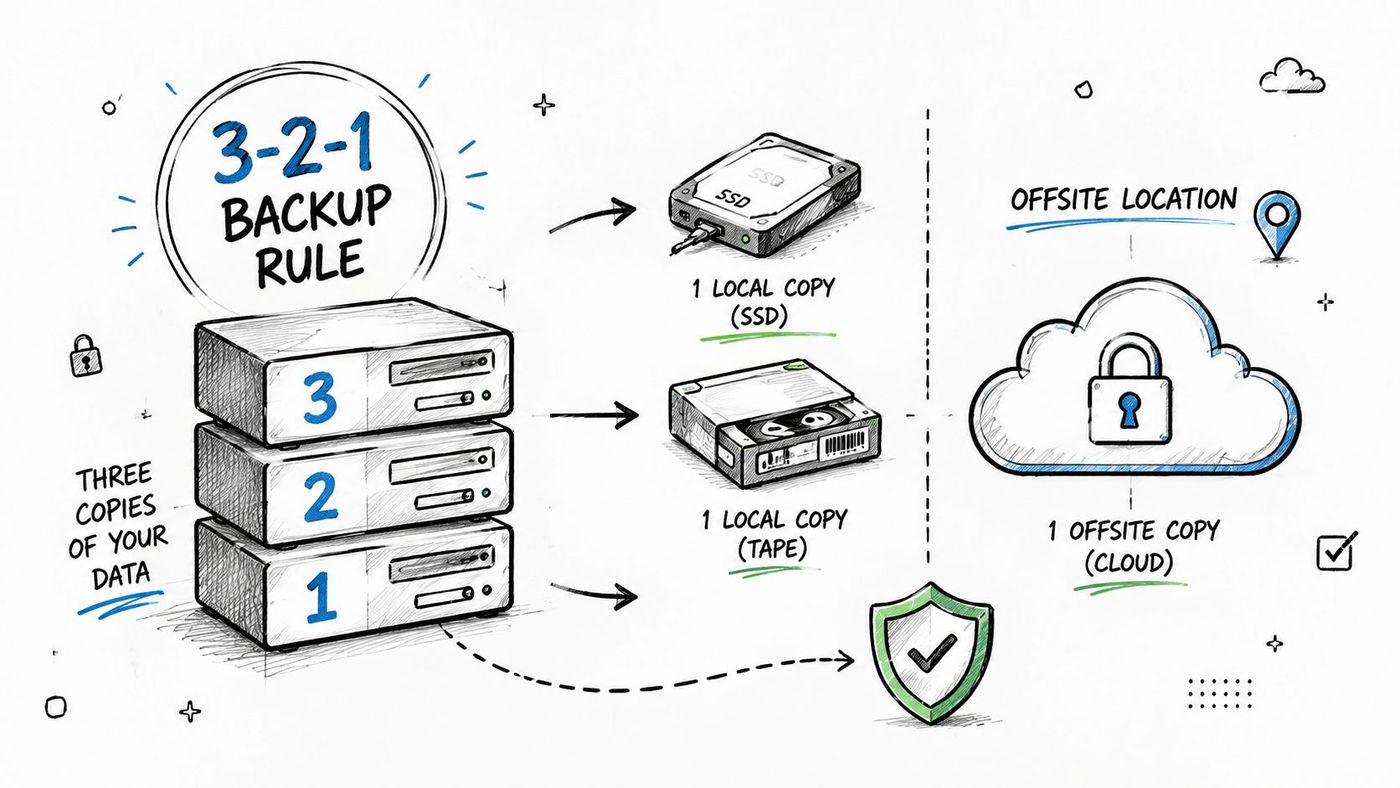
The 3-2-1 backup rule gives an organization a practical foundation: maintain three copies of important data, use two different storage media types, and keep one copy offsite. The strength of the model comes from separating failure domains. A failed server shouldn't destroy every copy, and a ransomware incident shouldn't give an attacker access to the entire recovery environment.
A healthcare clinic might keep a local NAS copy for fast file recovery, a cloud backup for geographic protection, and a tape archive for long-term retention. A legal practice could combine on-site backup, removable media, and a secure cloud vault for case files. Manufacturing teams may use local disk storage for production systems and an offsite repository for plant-level disruption.
Practical rule: A backup that shares the same credentials, network, and building as production data is not an independent recovery layer.
The offsite copy should be geographically separate from the primary location, with the distance selected according to regional hazards, connectivity, and operational needs. Don't assume that a second device in the same server room counts as disaster protection. Automate backup jobs, record which systems belong to each protection tier, and assign ownership for recovery decisions.
Use immutable storage for the offsite copy where possible, particularly for systems containing patient information, financial records, or client documents. Recovery testing should include each copy, not just the easiest local repository. CloudOrbis's data backup and recovery guide provides a useful reference point for building this layered approach.
Full backups are straightforward, but they can consume substantial time, bandwidth, and storage. Incremental backups capture changes since the previous backup of any type. Differential backups capture changes since the last full backup. The distinction affects both daily operating costs and the complexity of a restore.
Incrementals usually create smaller backup jobs and support frequent protection for active data. Their trade-off is a longer recovery chain, because the restore may need the last full backup plus every relevant incremental set. Differentials grow as more data changes after the full backup, but recovery can be simpler because fewer backup sets may be required.
A logistics company updating shipment and inventory databases throughout the day may favour frequent incrementals to reduce the backup window. A healthcare system with regular patient-record changes might use differentials for a critical application when a more consolidated recovery chain is valuable. Manufacturing teams can protect CAD files and production logs incrementally without repeatedly copying unchanged data.
A practical pattern is to schedule full backups at a regular interval, then use incrementals or differentials between them. The right schedule depends on data change rates, network capacity, storage cost, and the RPO assigned to each workload. Don't apply the same frequency to an archival file share and a transaction database.
Monitor backup sizes and investigate sudden growth. Unexpected changes can indicate a workload change, misconfiguration, or malicious activity. Synthetic full backups can also validate a chain without retransmitting every source file.
The main mistake is optimizing backup speed while ignoring restore complexity. Test the full recovery sequence, including application consistency, database dependencies, and credentials. A job that completes successfully can still produce an unusable recovery set if the chain is incomplete or the application state wasn't captured properly.
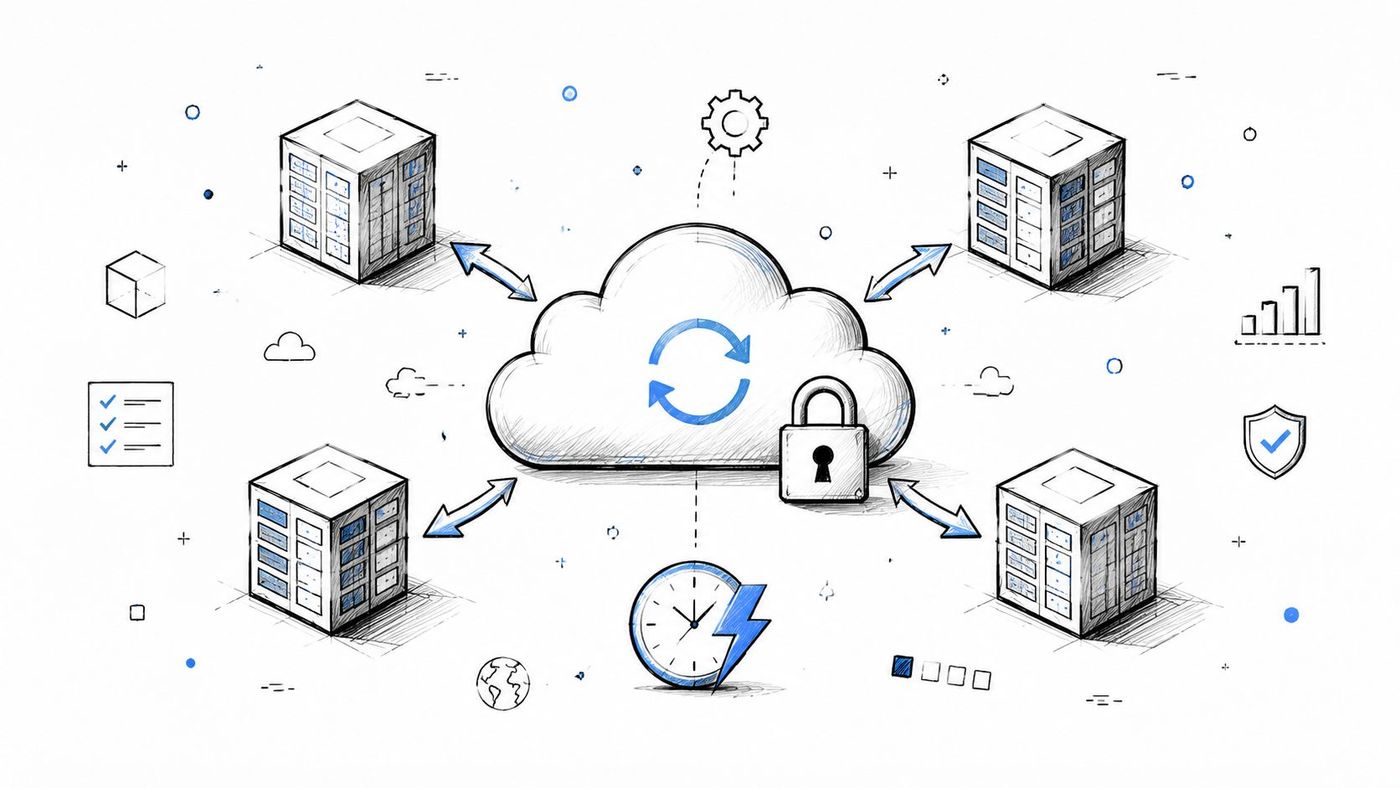
Cloud backup and disaster recovery services move backup infrastructure into a provider-managed environment. Backup-as-a-Service, or BaaS, can reduce the hardware and administrative burden for medium-sized organizations that don't want to operate a complete offsite platform themselves. It can also provide automated scheduling, remote access, encryption, and scalable retention.
The cloud doesn't remove planning decisions. A clinic handling sensitive health information must examine data location, access controls, encryption, provider obligations, and recovery procedures. A legal firm needs dependable retrieval of client files, while a manufacturer may prioritize recovery of ERP systems and production applications. A construction company may focus on project documentation that must remain available when a jobsite or office is inaccessible.
Cloud-only recovery can be slow when a large workload must be downloaded over a constrained connection. A hybrid model often works better. Keep a local recovery copy for common file or server failures, then use cloud storage for site loss, extended outages, and retention.
Ask providers where Canadian data is stored, how data is encrypted before transmission, how access is separated from production credentials, and how recovery charges are calculated. Lifecycle policies can move older backups into lower-cost storage, but retrieval may take longer and may carry additional fees. The service agreement should define support responsibilities during an incident, not just backup completion.
CloudOrbis's guidance on cloud data protection can help teams frame these decisions. Organizations comparing operating models may also review these managed backup best practices, then test a real cloud recovery before treating the service as mission-ready.
Snapshots provide point-in-time copies of a storage volume, virtual machine, or application environment. They're fast because the system records a storage state rather than copying every block immediately. For a virtualized manufacturing workload, a snapshot can provide a quick rollback after a failed update. A healthcare provider may use snapshots to restore a patient-record system to a known state after corruption.
Snapshots are especially useful for short-term operational recovery. They can support rapid rollback after accidental deletion, configuration errors, or application changes. They're also convenient for administrators who need several recent recovery points without creating a complete standalone backup each time.
A snapshot usually remains dependent on the underlying storage array, hypervisor, or platform. If that platform fails, is encrypted, or is deleted by an attacker with sufficient privileges, the snapshot may disappear with it. Storage consumption can also grow as more changes accumulate, eventually creating capacity pressure.
Use scheduled snapshot retention that reflects business change windows. Monitor capacity, automate deletion of expired snapshots, and document which applications can be recovered from them. A legal practice might combine Hyper-V snapshots for fast rollback with a cloud backup for site-level protection. An oil and gas operator could capture frequent states of control-system data while maintaining a disconnected recovery copy elsewhere.
A snapshot reduces recovery friction. It doesn't replace geographic separation, immutable storage, or restore testing.
Test snapshot-to-recovery procedures regularly, including application startup and data consistency. Treat snapshots as the local component of a broader 3-2-1 strategy, not as the only copy. The right question isn't whether a snapshot was created. It's whether the business can use it after the storage platform, credentials, or primary site has been compromised.
Some workloads can't tolerate a long gap between scheduled backups. Continuous Data Protection, or CDP, records changes continuously or near continuously, often through transaction journaling. Instead of selecting only scheduled points, administrators can recover a database or workload to a specific moment before corruption, accidental deletion, or malicious activity.
Financial services teams may use journaling to protect transaction databases. A legal practice can preserve granular recovery points for a case-management system. Healthcare providers may need precise restoration for an electronic health record environment, while an insurer could use transaction journals for policy databases.
CDP has a clear trade-off. It can deliver a much tighter RPO, but it requires more storage, processing, monitoring, and operational discipline. Busy databases can generate substantial journal volumes. Retention policies must define how long granular points remain available and when older journal data can be consolidated into periodic backups.
A virtual-machine snapshot may capture the server state without guaranteeing that every database transaction is consistent. Database-aware protection should account for application logs, transaction ordering, dependencies, and recovery procedures. CloudOrbis's database protection guidance is relevant when teams are deciding between application-aware backups, journaling, and snapshots.
CDP also shouldn't stand alone. Pair it with periodic full backups and an offsite or isolated copy. Test point-in-time restoration across several recovery scenarios, including corruption that began before the most recent scheduled backup. The strongest design uses CDP where data loss is expensive and simpler backup methods where the business can tolerate a wider recovery point.
A tiered backup storage strategy places recent recovery points on fast storage and moves older data to less expensive media. This approach recognizes that not every backup needs the same retrieval speed. Current operational data may belong on SSD or high-speed disk, while historical records can move to cold cloud storage or tape.
A healthcare organization might keep recent system backups on NAS and retain older records in an archive governed by its legal and regulatory requirements. A law firm could keep active matters on fast storage while moving closed matters to a controlled archive. A manufacturer may retain recent ERP backups on high-performance arrays and preserve historical production records on tape.
The design should begin with recovery needs and retention obligations, not with a storage product. Define which workloads require immediate access, which can tolerate delayed retrieval, and which records must be retained for legal or regulatory reasons. Then automate lifecycle movement so administrators aren't manually transferring files between tiers.
Cold cloud storage can reduce ongoing storage expense, but retrieval may take longer and may incur charges. Tape can offer high-capacity, long-term retention, but recovery requires compatible hardware, catalogues, media handling, and documented procedures. Neither option is useful if nobody knows where the required backup resides or how to restore it.
Test recovery from every tier. A recent file restore and an old archive restore exercise different controls, permissions, catalogues, and dependencies. Review lifecycle policies regularly as applications, retention rules, and data volumes change.
CloudOrbis's explanation of information lifecycle management can help connect backup retention with broader data governance. Tiering works best when it's transparent to operators and tied directly to RTO, RPO, retention, and compliance requirements.
A ransomware-resilient design assumes attackers may reach production systems, administrator accounts, and connected backup repositories. The recovery environment therefore needs immutability, isolation, separate credentials, and offline protection. The Canadian Centre for Cyber Security recommends offline and tested backups because network-connected copies can also be infected, as described in its ransomware guidance.
Confidence alone isn't proof of recoverability. OpenText's 2025 survey found that 94% of Canadian organizations were confident they could recover from ransomware, yet only 25% of affected Canadian organizations fully restored their data. The same survey reported that 31% experienced an attack in the prior year, 48% of victims were attacked more than once, and 3% of affected organizations couldn't recover any data, according to SecurityBrief Canada's coverage.
Use dedicated backup service accounts with limited privileges. Protect administrative consoles with strong authentication, restrict deletion rights, and alert on unusual backup failures, repository changes, or retention-policy modifications. Keep at least one copy fully offline or otherwise inaccessible from ordinary production credentials.
A healthcare organization may use immutable cloud storage for patient systems. A manufacturer might maintain offline tape in a secure location away from the plant. A legal practice could use an isolated repository updated through controlled, one-way processes. These measures add cost and administrative complexity, but they address a failure mode that ordinary redundancy doesn't solve.
CloudOrbis's ransomware protection guidance for Edmonton businesses is a useful starting point for connecting technical controls with incident procedures. Test isolation and clean restoration, not just backup completion. Recovery plans must also address data exfiltration, notification, investigation, and business prioritization.
Active-active replication keeps synchronized workload copies operating across separate sites or cloud regions. Both environments can serve production traffic, so a failed site can shift users to the alternate environment rather than waiting for a full restore. This is a continuity architecture, not just a backup method.
A healthcare provider with sites in Toronto and Calgary could replicate critical electronic health record databases between locations. A manufacturer may operate manufacturing execution systems across plants with local-to-regional failover. Financial services organizations may replicate transaction systems across data centres, while an oil and gas operator could maintain alternate control-system capacity.
The investment and engineering demands are significant. Synchronous replication can reduce data divergence but requires dependable, low-latency, high-bandwidth connectivity. Asynchronous replication can work across greater distances and may cost less, but the alternate site can lag behind production. Active-active systems also create application, licensing, DNS, identity, and operational dependencies that must be designed together.
Use active-active replication for systems where prolonged downtime would threaten safety, contractual obligations, or core revenue. Less critical file shares, reporting tools, and internal applications may be better served by tested backup recovery. A hybrid design can replicate the critical database tier while using cloud or local backups for secondary workloads.
Failover testing should confirm bidirectional operation, data consistency, user access, monitoring, and failback. A system that fails over once but can't return safely to the primary site remains an operational risk. Define who authorizes failover and how teams communicate during the event.
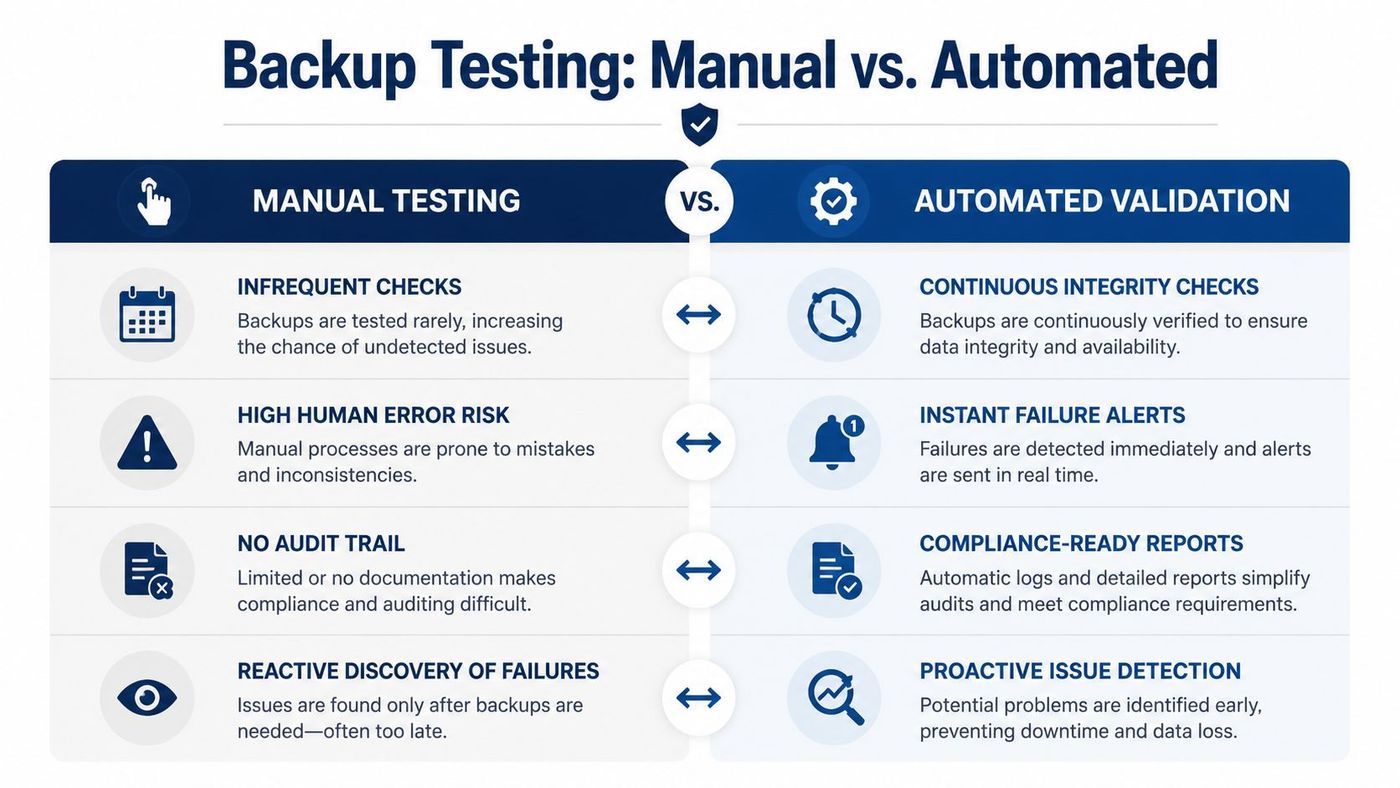
A backup job marked “successful” only confirms that a process completed. It doesn't prove that the data is complete, the backup chain is usable, the credentials still work, or the application can start after restoration. Canadian evidence makes the gap clear. A CDW Canada study found that 36% of Canadian organizations could fully restore data and systems from backups when needed, while 21% couldn't recover at all, according to CDW Canada's security study.
Automated validation uses verification engines, synthetic restores, isolated test environments, and application checks. A manufacturing company can restore an ERP backup into a test environment and confirm that services, databases, integrations, and user access work together. A law firm can validate that case files open with the expected permissions. A financial services team can test a transaction database at an alternate site.
Run automated verification frequently for critical systems, then perform actual recovery exercises on a documented schedule. The test should record the restore point, elapsed recovery time, missing dependencies, operator actions, and any data-integrity failures. Monitoring alerts must reach the people responsible for correcting failures, not disappear into a backup console.
Canadian guidance defines RTO as how quickly systems and data must be restored and RPO as the acceptable amount of data loss measured in time. An RPO of 24 hours means the business can lose up to one day of data and requires daily backups at minimum, according to Canadian Baseline Control BC.7. The Financial Consumer Agency of Canada states that IT recovery infrastructure should support recovery within three days, with staff available within the first 24 hours to begin recovery steps, as outlined in its business continuity plan.
| Strategy | Implementation complexity | Resource requirements | Expected outcomes | Ideal use cases | Key advantages |
|---|---|---|---|---|---|
| 3-2-1 Backup Rule | Low–Medium | Multiple storage media (local + secondary + offsite), offsite logistics, basic backup software | High redundancy, reduced single-point failures, improved RTO/RPO | Mid-sized businesses with compliance needs (healthcare, legal, finance) | Simple, industry-proven, cost-effective redundancy |
| Incremental & Differential Backups | Medium | Sophisticated backup software, management of backup chains, moderate storage/bandwidth | Smaller backup windows, lower storage use, potentially longer recovery chains | Large datasets, bandwidth-constrained sites, frequent-change systems | Efficient use of bandwidth/storage, enables frequent backups |
| Cloud Backup / Backup-as-a-Service (BaaS) | Low–Medium | Reliable internet, subscription fees, provider SLAs/compliance | Scalable offsite protection, automated backups, variable recovery speed (bandwidth-dependent) | Organizations lacking on‑prem infrastructure, needing geographic redundancy/compliance | Managed service, scalability, built‑in compliance/certifications |
| Snapshot-Based Backups | Medium–High | Enterprise storage or hypervisor snapshot capability, fast local storage | Near-instant backups and restores, minimal production impact, limited long-term retention | Virtualized environments, mission‑critical VMs and applications | Very fast capture/restore, space-efficient incremental snapshots |
| Continuous Data Protection (CDP) & Journaling | High | Continuous journaling storage, high network/CPU, specialized software | Near-zero RPO, point‑in‑time recovery to seconds or minutes | Mission‑critical databases and trading systems, compliance-sensitive apps | Fine-grained recovery, minimal data loss, strong audit trails |
| Tiered Backup Storage Strategy | Medium | Multiple storage tiers (SSD, disk, tape, cold cloud), lifecycle management tools | Optimized cost vs performance, long-term retention support | Large-volume backups with retention mandates (healthcare, legal) | Cost-effective long-term storage while preserving fast recovery for recent data |
| Ransomware-Resilient Backup Architecture | High | Immutable storage, air-gapped/offline copies, segregated credentials, additional ops controls | Guaranteed recoverability after compromise, reduced ransom risk | All organizations in current threat landscape; critical for healthcare, finance, infrastructure | Immutable, isolated backups; strong protection against ransomware/insider threats |
| Active‑Active Replication & Failover | Very High | Multiple sites/regions, low-latency/high-bandwidth networks, replication software, duplicated infra | Zero/near-zero RPO/RTO, continuous availability, automatic failover | Systems that cannot tolerate downtime (financial trading, critical healthcare systems) | Instant failover, continuous service, load distribution |
| Backup Testing & Validation Automation | Medium | Test environments or isolated restores, compute/storage for synthetic restores, integration with monitoring | Verified recoverability, earlier detection of backup issues, reduced RTO surprises | Regulated industries and large/complex environments requiring proven recoverability | Automated proof of recoverability, compliance evidence, early failure detection |
The right strategy starts with business impact, not a storage catalogue. Classify systems by the work they support, the harm caused by downtime, the sensitivity of the data, and the order in which services must return. A clinic may prioritize patient-record access and communications. A manufacturer may restore production planning, ERP, and shop-floor systems before less critical reporting tools. A legal practice may restore document management and case systems before general archives.
Set an RTO and RPO for each meaningful workload. Canadian Baseline Control BC.7 defines RTO as the time required to restore systems and data after disruption, while RPO expresses how much data loss is acceptable in time. These targets give the backup team a basis for selecting schedules, storage, replication, network capacity, staffing, and recovery procedures.
Then layer the controls. Local snapshots and fast disk backups can support quick recovery from common failures. Cloud or other geographically separate copies protect against site loss. Immutable, isolated, or offline repositories address ransomware and compromised credentials. Incremental backups, differentials, CDP, and journaling help narrow the recovery point for active workloads. Tiered storage controls retention cost without placing every historical copy on premium infrastructure.
Replication has a different purpose from backup. An active-active environment can help maintain service availability, but it may replicate corruption or encrypted data unless the design also preserves clean historical recovery points. Cloud backup can provide geographic separation, but it still requires connectivity, provider governance, access controls, and tested retrieval. Snapshots can restore quickly, but they aren't independent if they rely on the same storage platform as production.
Validation turns these technologies into an operational capability. CIRA found that 68% of Canadian organizations sought external help for incident response and recovery following cyberattacks or incidents in the previous 12 months. Its survey also found that 52% recovered pre-incident IT capacity in less than a week, while 41% recovered compromised or stolen data in less than a week, according to the CIRA 2024 Cybersecurity Report. Those findings reinforce the practical value of documented procedures, trained staff, and recovery partners.
Schedule restore tests, record actual outcomes, and update the plan after infrastructure changes. Test the local copy, the offsite copy, the immutable repository, and the oldest retention tier that the business may need. Include application owners, finance, operations, legal, and executive decision-makers, because recovery priorities aren't purely technical.
CloudOrbis Inc. can help Canadian SMB leaders assess their current backup coverage, define recovery objectives, and connect managed IT, cybersecurity, cloud, and data backup and disaster recovery services into an ongoing resilience plan. The objective isn't to purchase every strategy. It's to build a proportionate architecture that protects the workloads that matter, recovers them in the required order, and provides evidence that restoration will work when the business needs it.
CloudOrbis Inc. offers managed IT, cybersecurity, cloud, and data backup and disaster recovery services for Canadian small and medium-sized businesses. Visit CloudOrbis Inc. to assess your current recovery readiness and create a tested, layered backup strategy.
Book a 30-minute call with a senior engineer. No sales script, just straight answers about your environment.


