Disaster Recovery Plan Business Continuity for SMBs
Build a disaster recovery plan business continuity strategy tailored for Canadian SMBs. Covers risk assessment, RTO/RPO, backup, testing, and ownership.

Build a disaster recovery plan business continuity strategy tailored for Canadian SMBs. Covers risk assessment, RTO/RPO, backup, testing, and ownership.
Saturday at 8:12 a.m., the phones start ringing. A regional clinic can't reach its EMR line. A small manufacturer can't get into ERP, shipping labels won't print, and the production supervisor is back to whiteboards and guesswork. IT is restoring servers. The CEO is fielding calls from patients, customers, and board members who don't care whether the root cause sits in storage, identity, or a cloud tenant.
That's where most disaster recovery discussions fall apart. Restoring systems is necessary, but it isn't the same as keeping the business operating while those systems are down. Payroll still has to run. Staff still need a way to communicate. Leaders still need a tested chain of decisions, not a vague promise that backups are “healthy”.
In practice, disaster recovery plan business continuity work only holds up when those two disciplines are planned together, funded together, and tested together.
A lot of SMBs still split this into two binders. One belongs to IT and covers backups, failover, and restore order. The other belongs to operations and says who calls whom if the office is closed. That split looks tidy until a real incident lands on a weekend and both teams discover they're solving the same outage from opposite ends.
In the clinic scenario, restoring the EMR platform is the DR problem. Keeping patient flow moving with manual intake, alternate communications, and a priority schedule is the BC problem. In the manufacturing scenario, rebuilding the ERP server is DR. Deciding how orders are accepted, what gets produced first, and how finance tracks shipments while systems are unstable is BC.
Restoring servers without preserving the business process around them is half a plan.
The Government of Canada defines business continuity planning as procedures and information used to maintain or recover critical services during disruptions, which is broader than getting technology back online. That definition has been embedded in public emergency management guidance for years, and it aligns with how leadership teams experience disruption in practice. Critical operations come first, not just technical restoration. See the Government of Canada continuity guidance.
If you need a plain-language primer before building your own approach, CloudOrbis has a useful explainer on what business continuity means for SMBs. For a web-facing example of continuity thinking beyond servers alone, this guide on how SMBs can stay online in 2026 is worth scanning.
When DR and BC are separated, companies usually pay twice for the same lesson:
A practical definition works better: disaster recovery restores technology, while business continuity keeps critical services operating until normal conditions return.
Most SMBs don't need a complicated methodology. They need a sequence that leadership can approve and teams can follow under pressure. The Government of Canada's operational standard for business continuity planning gives a solid structure: governance, business impact analysis, continuity plans and arrangements, and maintenance of program readiness. It also requires recovery options to flow from the BIA and selected strategies to be approved and funded by senior management, which is exactly where many plans stall. See the federal BCP operational standard.
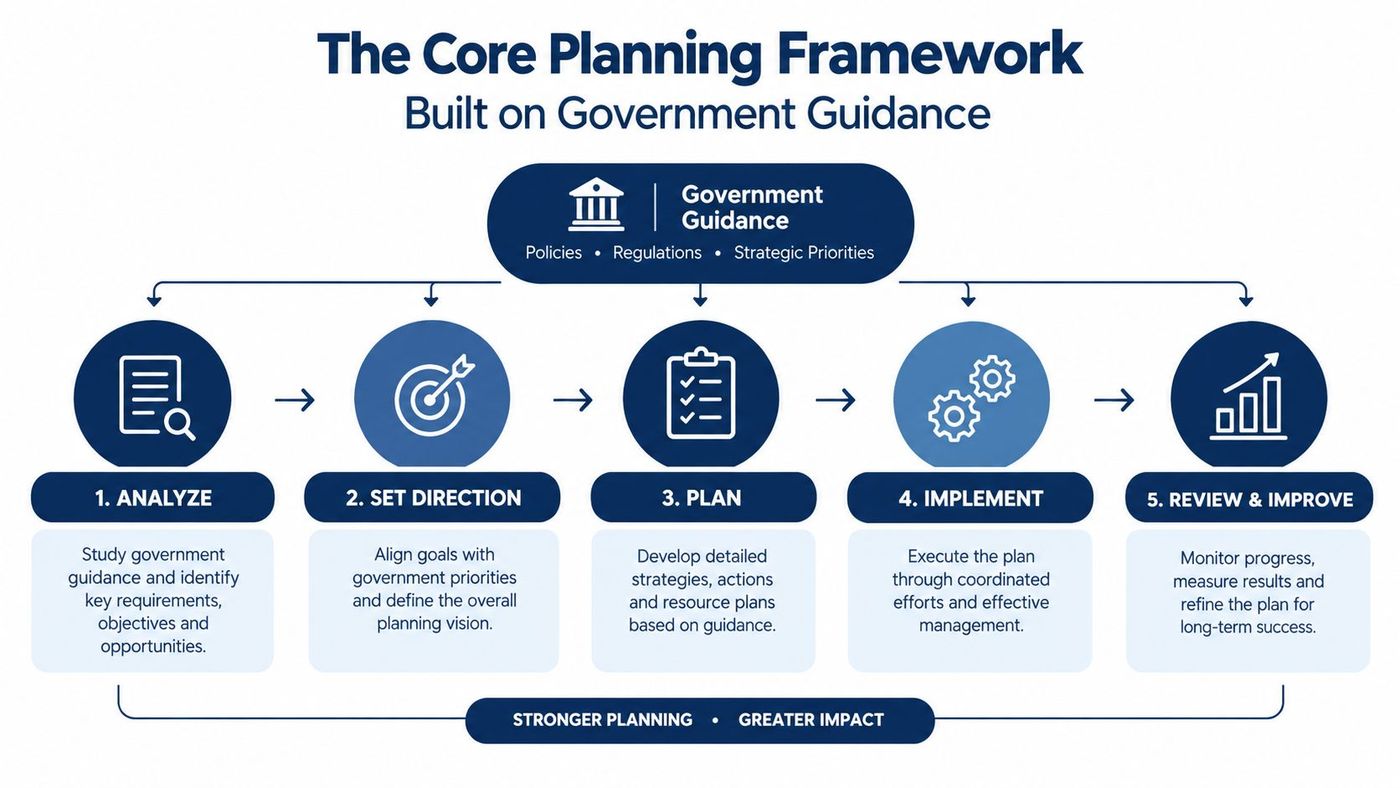
Here's what that framework looks like in an SMB this quarter.
A clean order keeps momentum:
For regulated organisations, the paper trail matters more than many teams expect. Ontario's securities regulator requires registered firms to establish, maintain, and apply a written business continuity plan, while OSFI states that plans require ongoing review, revision, regular testing, and validation. That's a useful signal even for firms outside those sectors. Written, maintained, tested, updated. Not shelfware. See the Ontario and OSFI continuity expectations.
A lot of teams pair this with a control framework so the continuity work doesn't drift from security and governance. CloudOrbis has a practical overview of the NIST Cybersecurity Framework 2.0 that fits well with this planning model.
Practical rule: If leadership can't read the plan in about 20 minutes and tell you who decides what, it's still too abstract.
RTO and RPO get thrown around as if they're technical settings. They're business decisions with technical consequences. Recovery time objective answers how long a service can be down. Recovery point objective answers how much data loss is tolerable. If you set both without a business tier model, vendors will happily sell you premium recovery for systems that don't need it.
Think in services people recognise. Patient scheduling, EFT payment processing, and order intake usually sit in a different category from archived HR records or historical reporting. The right targets follow business consequence, not whichever application happens to be loudest in the server room.
| Tier | Example Functions | RTO Target | RPO Target | Typical Strategy |
|---|---|---|---|---|
| Tier 1 | Patient scheduling, EFT payment processing, order intake | Minutes | Near zero | Active-active cloud, warm standby, or continuous replication with clean failover |
| Tier 2 | Email, ticketing, CRM | A few hours | 15 to 60 minutes | Warm standby, frequent snapshots, replicated virtual infrastructure |
| Tier 3 | Historical reporting, HR archives, low-change back-office systems | Up to 24 hours | End of day | Nightly backups, immutable storage, cold restore |
A common mistake is copying Tier 1 targets onto Tier 3 systems because nobody wants to say a system can wait. That inflates cost fast. Continuous replication, duplicate infrastructure, and complex orchestration make sense where interruption creates immediate financial, clinical, or legal pain. They don't make sense for every archive and reporting workload.
The opposite mistake is worse. Teams give a revenue-critical function a cheap nightly backup because “we can always restore tomorrow”. That sounds acceptable until someone calculates the operational backlog, customer impact, and manual re-entry burden.
Use the BIA to ask three questions for each service:
If you're setting these targets for the first time, this guide to recovery time objective planning is a useful companion.
A realistic RTO that leadership funds is better than an aggressive RTO that exists only in a spreadsheet.
Most SMBs don't have one recovery stack. They have a patchwork of snapshots, cloud sync, endpoint backup, maybe a legacy appliance, and a handful of assumptions nobody has challenged. The job isn't to pick one winner. It's to assign the right protection method to each service tier.
At a minimum, keep the 3-2-1-1 idea in mind: multiple copies, different media, one copy offsite, and one copy that's isolated or immutable. That last piece matters when ransomware reaches backup repositories or admin credentials.
| Option | Relative Cost | Recovery Speed | Ransomware Exposure | Complexity |
|---|---|---|---|---|
| Nightly file backup to cloud storage | Low | Slower | Moderate to high if credentials and data paths are shared | Low |
| Image-based backup for servers and VMs | Moderate | Faster for full system restore | Moderate, depends on backup isolation | Moderate |
| Storage snapshots only | Moderate | Fast for local rollback | Higher if the production environment is compromised | Moderate |
| Immutable object storage vault | Moderate to high | Moderate | Lower, especially where retention and deletion controls are isolated | Moderate |
| Continuous replication to standby environment | Higher | Fastest | Depends on isolation and clean failover design | Higher |
| Air-gapped or offline copy | Moderate | Slower to access, strong last-resort value | Lower | Moderate |
Cheap cloud sync gets mistaken for backup all the time. It's convenient. It also tends to copy deletions, corruption, and encrypted files just as efficiently as clean data. That makes it weak as a ransomware control on its own.
Snapshots are useful, but they aren't magic either. If an attacker gains broad control over the platform or storage layer, local snapshots may disappear with everything else. That's where immutable object storage or an isolated vault earns its keep.
For some workloads, replication is the right answer. For others, it's overkill. A replicated mistake is still a mistake if you fail over into a compromised or corrupted environment. Clean recovery matters as much as fast recovery.
One option in this space is managed offsite backup and DR services. For example, CloudOrbis Inc. offers managed backup, recovery support, and disaster recovery planning for Canadian SMB environments. That kind of service can fit well when internal teams don't have time to monitor backup jobs, retention, and recovery runbooks themselves. The key is still the same. Match the tool to the service tier, then prove it restores.
If you're comparing architectures, CloudOrbis has a practical piece on data backup and recovery strategies that helps non-technical leaders ask the right questions.
Green dashboards create false confidence. Backup jobs can complete on schedule while restore credentials are stale, encryption keys are missing, or the runbook lists servers in the wrong order. Those failures don't show up until a team is racing the clock.
The Canadian gap here is hard to ignore. A Canadian security benchmark reported that 90% of surveyed organisations had been attacked in the past year, yet only 36% said they could fully restore data and systems from backups when needed, while 21% said they could not recover at all, according to Statistics Canada survey material.
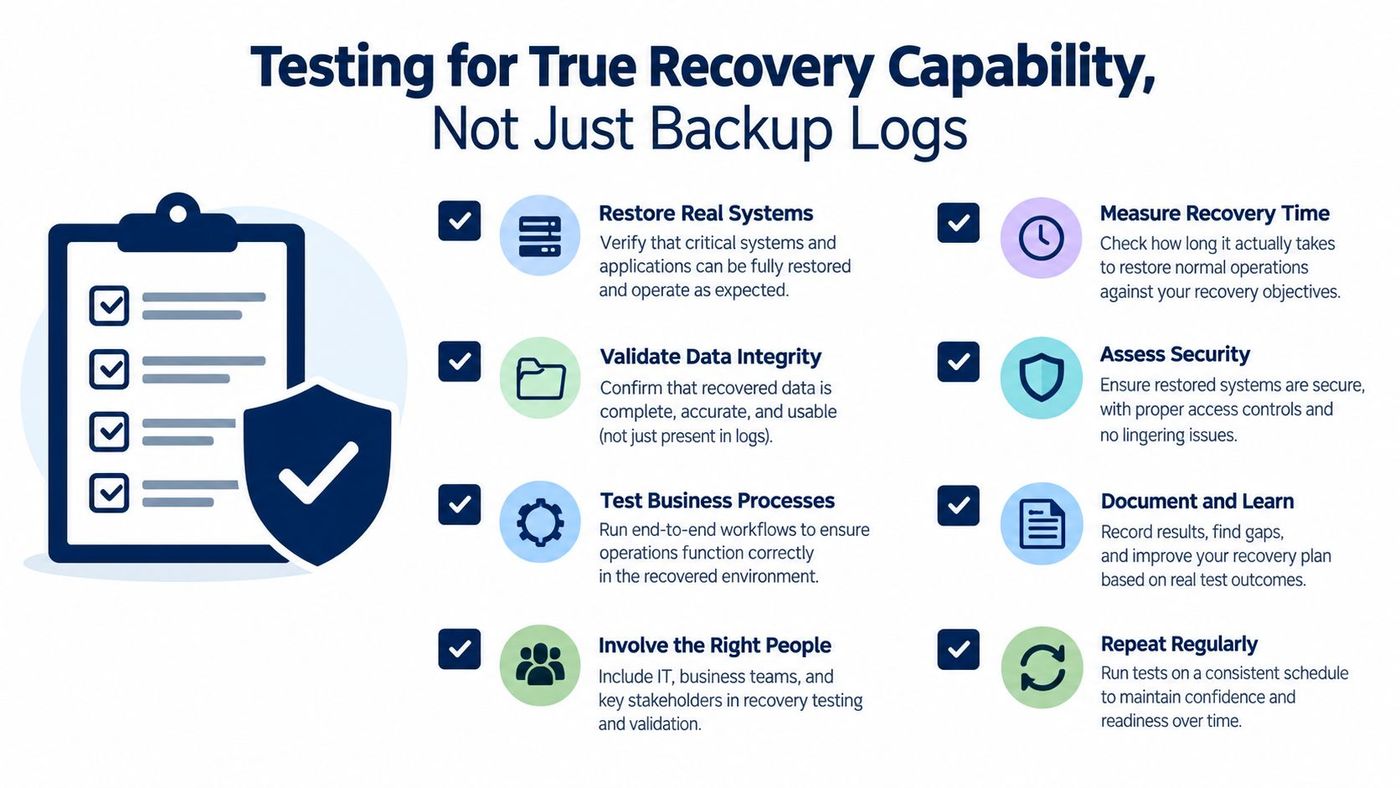
A useful drill ladder looks like this:
These issues show up more often than many teams expect:
A minimum viable quarterly drill is enough to expose most of that. Pick one critical service. Restore it into isolation. Verify data integrity. Confirm who signs off. Note every manual step that depended on memory. Then fix the runbook while the test is still fresh.
This is the awkward part most guides skip. Your internal plan can be excellent and still fail because a vendor contract gives you no practical recovery rights. If a cloud platform holds the application, data, logs, and support path, then your recovery capability is partly legal and commercial, not just technical.
OSFI's Third-Party Risk Management Guideline expects critical third-party agreements to address continuity through disruption, regular testing of business continuity and disaster recovery programs, notification of test results, and remediation of material deficiencies. That matters far beyond federally regulated financial institutions because it points to a mature buyer behaviour: don't assume the provider's continuity posture. Contract for it, test it, and keep evidence. See the DRI reference to continuity practice and governance context.
Shared responsibility models blur accountability. In SaaS, the provider may operate the application, but you may still own data extraction, identity dependencies, endpoint access, customer communications, and alternate workflows. In IaaS, the provider may keep the platform up while your team still owns backup policy, replication design, and restore orchestration.
If the vendor controls the platform, your disaster recovery plan business continuity effort must include contract language, not just architecture diagrams.
Review critical vendor and cloud agreements for these items:
A short contract review checklist catches a lot:
For a broader governance lens, CloudOrbis has a solid overview of third-party risk management.
Plans fail less often from missing technology than from missing ownership. When the alarm fires, somebody has to decide, somebody has to communicate, and somebody has to confirm the recovered service is actually usable.
Keep the structure lean:
The Government of Canada's procedures also require awareness, training, regular testing, maintenance, and co-ordination with partners and stakeholders, which is exactly why these roles can't exist only on an org chart. They need named people, training, and review triggers. See the federal procedure for awareness, training, testing, and maintenance.
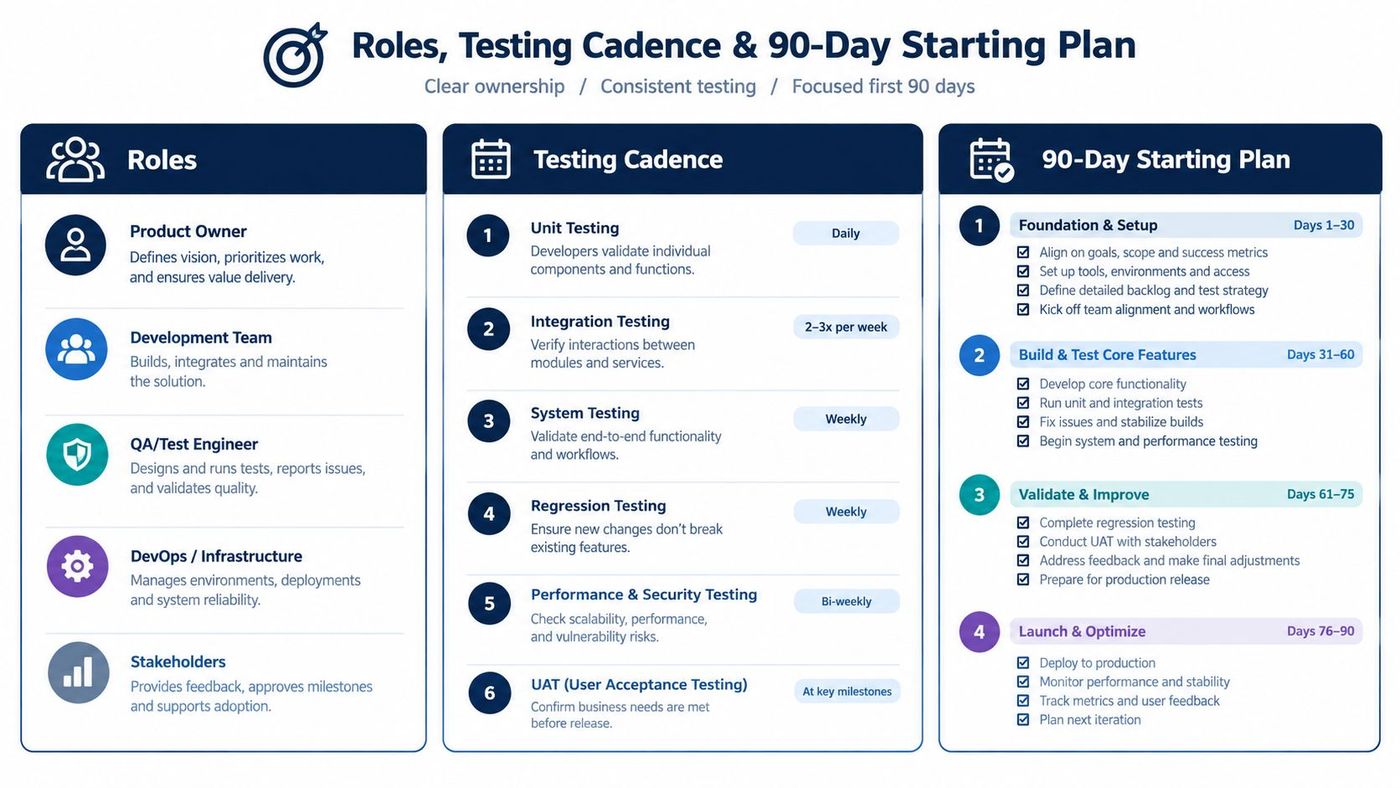
A practical rhythm looks like this:
The first 90 days don't need to be elegant. They need to be real.
One more candid point. Maintenance triggers need to be explicit or nobody acts. Staff departures, major vendor changes, infrastructure redesigns, regulatory updates, and any material incident should force review. Otherwise the plan slowly becomes a history document.
CloudOrbis Inc. helps Canadian SMBs turn continuity planning into something teams can execute in practice, from BIA workshops and backup design to recovery testing, cloud resilience, and managed IT support. If your current plan stops at backups or leaves third-party recovery assumptions untested, visit CloudOrbis Inc. to see how they support disaster recovery and business continuity in real operating environments.
Book a 30-minute call with a senior engineer. No sales script, just straight answers about your environment.


