How to Build a PHIPA Compliant Telehealth Program
Learn how to design, launch, and maintain a PHIPA compliant telehealth program with practical steps for Ontario clinics covering privacy, security, and consent.

Learn how to design, launch, and maintain a PHIPA compliant telehealth program with practical steps for Ontario clinics covering privacy, security, and consent.
Between 47% of GP encounters by phone and 1% by video during April 2020 to April 2021, Ontario and the rest of Canada proved that virtual care wasn't a side channel, it was a core delivery model. That scale is exactly why PHIPA-compliant telehealth can't be treated like a video app with a privacy notice bolted on. It has to be built as a governed clinical workflow, with consent, identity checks, auditability, and vendor controls all pulling in the same direction. CIHI's reporting on virtual care in Canada makes the operational reality hard to ignore.
Ontario clinics still get this wrong in the same predictable way. They buy a platform, assume the vendor handled compliance, and only later discover the risks sit in the patient's environment, the staff laptop, the access logs, and the documentation trail. If you run clinics in Ontario, the right question isn't whether the tool can connect a call, it's whether your telehealth process can survive a privacy review, a breach, and a skeptical auditor.
PHIPA sets the rules before any platform choice does. In Ontario, personal health information includes identifying information about a person in oral or recorded form when it relates to physical or mental health, including family health history, so a virtual visit is automatically a PHI event if the clinic is collecting, using, or disclosing that information. The province's virtual-care guidance also expects workflows that protect privacy through verification processes, and Ontario review materials note that custodians need patient consent to collect, use, and disclose PHI through virtual care technologies. That's the legal floor, not a nice-to-have.
Practical rule: if the visit can create, store, transmit, or display PHI, treat it as a governed business process, not an IT convenience.
That is why Ontario's vendor-verification process matters so much. The framework described in the province-specific review requires a self-attestation plus a Privacy Impact Assessment and Threat Risk Assessment completed within the last two years. In practice, that pushes clinics beyond generic “we use encryption” language and into actual evidence. If a vendor can't show how it handles consent, identity, recordkeeping, and secure governance, the platform is not ready for clinical use.
The most common mistake is letting the workflow follow the tool. It should be the opposite. First decide how patient identity gets verified, where consent gets captured, what gets logged, and how staff handle edge cases. Then choose the platform that can support that process without forcing shortcuts.
That's also where a Canada-based managed-IT partner earns its place. The work is often paperwork, governance, and configuration discipline, not just network uptime. If you want a practical reference point for the compliance side, see CloudOrbis's healthcare IT compliance guidance, because the clinics that stay out of trouble usually have someone owning the document trail, not just the helpdesk queue.
A Privacy Impact Assessment is not a box-ticking exercise. It's the document that proves you understand where PHI is created, where it moves, who can see it, and where it can leak. For a telehealth rollout, start by mapping the full data path from booking to intake, the visit itself, the chart note, any recording, and the handoff back to the EMR. If a workflow touches PHI, it belongs in the assessment.
The Threat Risk Assessment is the other half of the file set. That's where you document realistic failure modes such as lost devices, compromised credentials, misdirected visits, exposed recordings, and unapproved sharing inside the clinic. The goal is not to write dramatic security prose, it's to show the risk decision behind each control you plan to use.
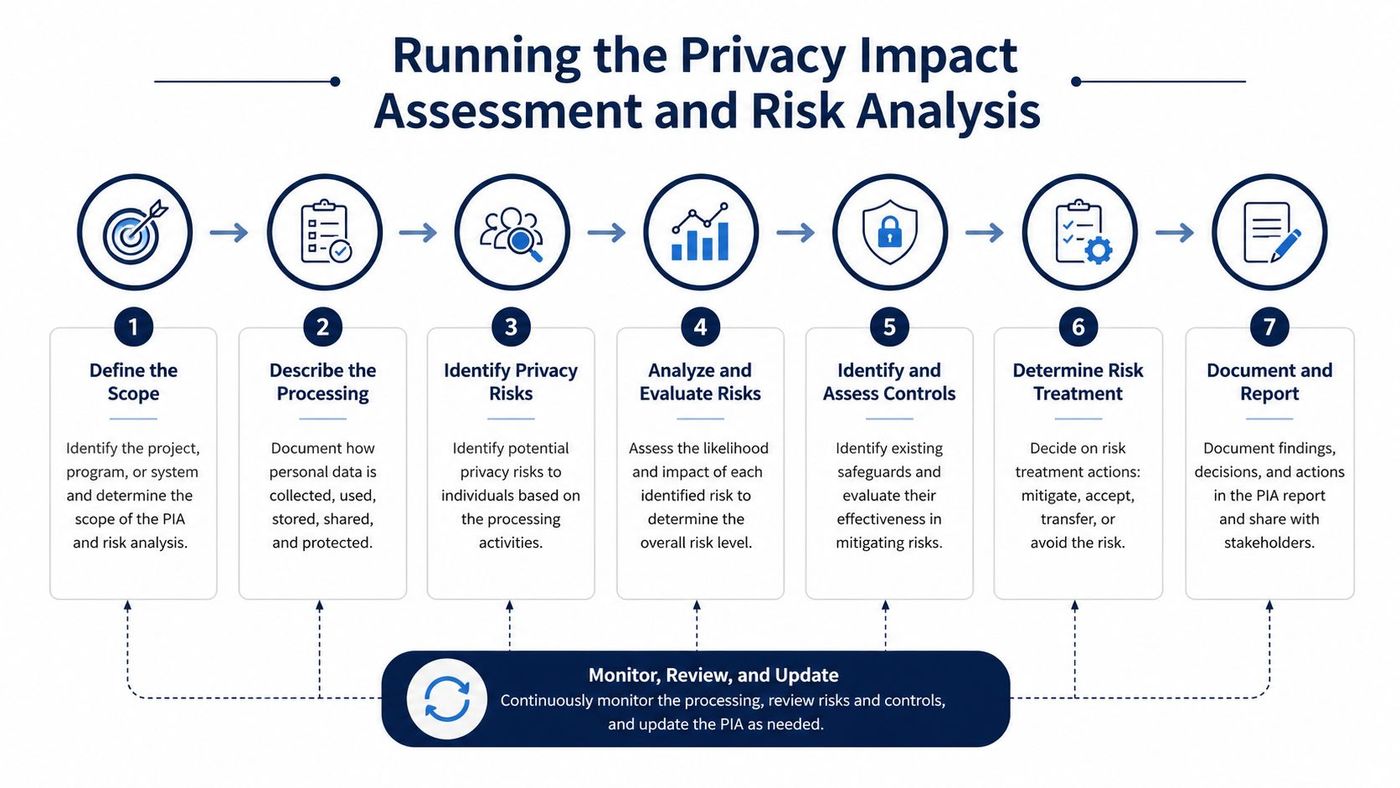
A clinic manager can assign the work in a straight line:
A strong deliverable set is simple: a PIA, a TRA, an asset list, a data-flow map, a consent procedure, and an exception log. If legal, your vCIO, or your MSP can't read those documents and tell you where the exposure sits, the work isn't finished. For a template-oriented view of this discipline, the privacy impact assessment guidance from CloudOrbis is a useful starting point.
Skip the assessment and you'll end up retrofitting controls after the first policy question or breach scare. That's the expensive way to do it.
Vendor selection should be a risk decision, not a feature parade. Ontario clinics usually land in one of three paths: an enterprise platform with Canadian data residency, a mid-market virtual care suite tied into the EMR, or a small-clinic video-plus-encryption stack that meets baseline PHIPA expectations. Each can work. Each can also fail if the contract and governance pieces are weak.
| Vendor Procurement Paths for PHIPA-Aligned Telehealth | |||
|---|---|---|---|
| Vendor Path | Best Fit | Strengths | Trade-offs |
| Enterprise platform with Canadian data residency | Multi-site practices with heavier governance needs | Stronger controls, clearer segregation, usually better auditability | Higher complexity, more admin overhead, more contract negotiation |
| Mid-market virtual care suite with EMR integration | Clinics that want one workflow from booking to charting | Less manual work, smoother staff adoption, fewer swivel-chair tasks | Integration quality varies, and vendor lock-in can creep in |
| Small-clinic video-plus-encryption stack | Solo and small group clinics with a narrow use case | Fast rollout, simpler user experience, lower operational sprawl | Weaker workflow depth, fewer governance features, more manual oversight |
The contract matters more than the demo. You want a written agreement that covers breach notification timing, sub-processor disclosure, data-location commitments, and exit terms for the return or deletion of PHI. If a vendor won't commit in writing to how data is handled, you don't have a compliance platform, you have a liability wrapped in branding.
Rule of thumb: if the sales team talks only about interface quality and never about logging, retention, or vendor governance, keep walking.
After shortlisting, ask for the vendor's own two-year PIA and TRA artefacts where they're part of the Ontario verification path. That's the evidence clinics need when they're asked to show due diligence, and it stops compliance from being a promise made during procurement and forgotten after launch. If you want a practical procurement lens, CloudOrbis's PHIPA-compliant IT services guidance lines up with the kind of evidence-driven review I'd expect a clinic to run.
The technical stack should come straight out of your risk analysis. If the vendor can't support the controls you documented, don't soften the requirement. You're not buying convenience, you're buying a defensible operating environment.
Use AES-256 for PHI at rest and TLS 1.2+ for data in transit. Those are not marketing features, they're basic expectations for protecting patient information in storage and during transmission. Then enforce authenticated access and least-privilege role design so staff can only do the work their job requires.
Every PHI event needs an audit log. That includes access, changes, exports, and administrative actions. Clinicians who move between sites also need secure storage on their laptops and phones, plus mobile device management so lost or unmanaged devices don't become the weakest link.
Your identity checks should happen before each virtual encounter, not just at onboarding. That stops the awkward but common failure where the right patient name is on the screen, but the wrong person is on the call.
The deployment sequence should stay boring:
CloudOrbis's healthcare cybersecurity best practices guidance is the kind of operational reference I'd expect a managed-IT provider to align to when they're configuring a clinic environment.
The platform is only half the control. The other half is whether your staff can use it without creating exceptions every day.
Compliance doesn't end when the first visit goes live. That's when the work starts, because a telehealth program drifts unless someone is watching the logs and challenging the exceptions. I'd rather see a clinic with plain, consistent monitoring than one that bought a premium platform and never reviews it.
A useful monitoring routine is simple and repeatable. Review privileged-access logs every day, set alert thresholds for unusual PHI access, and perform access reviews on a regular cycle. Then compare live controls against the original PIA so the clinic can see whether the workflow still matches the approved design. If it doesn't, update the paperwork and the configuration together.
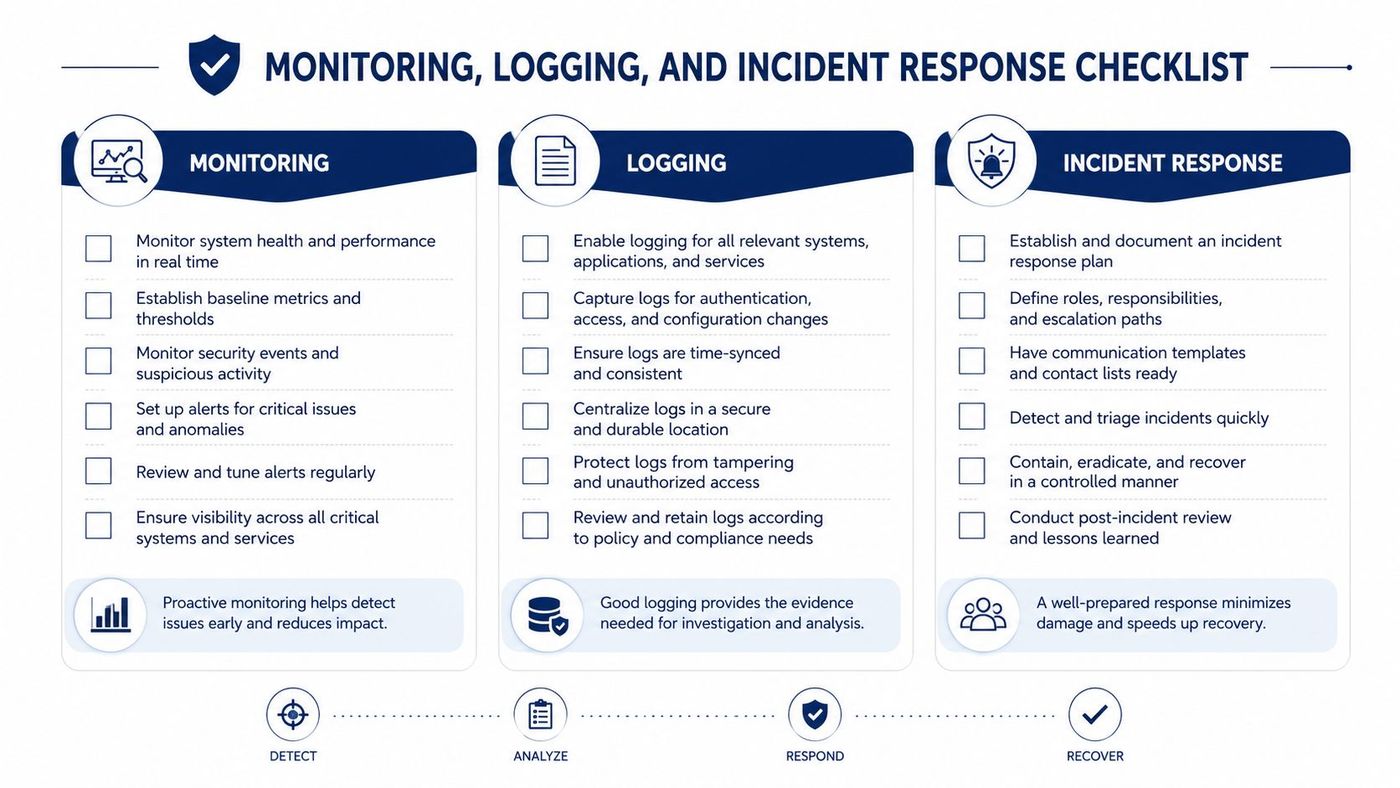
When something goes wrong, use the Contain, Notify, Investigate, Prevent sequence. That's the practical incident-response flow Ontario clinics should internalise for misdirected visits, compromised accounts, or exposed recordings. First stop the bleed. Then decide who gets told, what was exposed, what caused it, and what has to change so it doesn't happen again.
The clinic also needs a clear call tree. Front-line staff should know who to alert, the clinical lead should know when patient communication starts, and the IT contact should know how to preserve evidence without making the situation worse. Write down every step. Verbal plans collapse the moment the first urgent call lands.
CloudOrbis's event logging guidance is relevant here because logs are only useful if someone reads them and acts on them. That's the part many clinics skip, then they wonder why they missed the warning signs.
If you can't explain your breach process in one minute, you don't have one yet.
A clinic in downtown Toronto once told me the platform was working perfectly, but the complaints kept coming from patients who couldn't find private space at home. That's the telehealth problem. The risk often sits in the kitchen, the hallway, the shared apartment, or the borrowed phone, not in the software stack.
A peer-reviewed review of telehealth privacy and security risk factors points to exactly that problem, including lack of private space, difficulty discussing sensitive information remotely, limited internet access, and low digital literacy, especially for people with serious mental illness, substance use disorder, children, and older adults. Canada's federal virtual-care work also treats equitable access as a core issue, which is why a PHIPA-safe program can't pretend every patient has the same home environment or the same device access. healthcare accessibility matters here because privacy and accessibility collide in the same visit.
Clinics still act like video is automatically better. It isn't. In some cases, audio-only telehealth is the more private and more realistic option, especially when the patient can't guarantee a quiet room or a stable connection. The patient should not be punished with a worse process because their environment is imperfect.
A patient who can talk safely by phone is better served than a patient who has to choose between a video visit and being overheard.
That means staff need a script for consent and confidentiality limits. If the patient can't secure privacy, document that reality, verify identity without demanding the camera stay on, and explain the trade-offs plainly. Under U.S. HIPAA guidance, providers may use audio-only telehealth with reasonable safeguards, private settings to the extent feasible, and practical mitigations such as lowered voices and not using speakerphone, which is a helpful comparison point when clinics think through process design across borders. HHS telehealth guidance is useful here because it shows how process controls carry the weight when the environment is messy.
The better clinic policy is not “video for everyone.” It's “the safest workable mode for this patient, documented properly.”
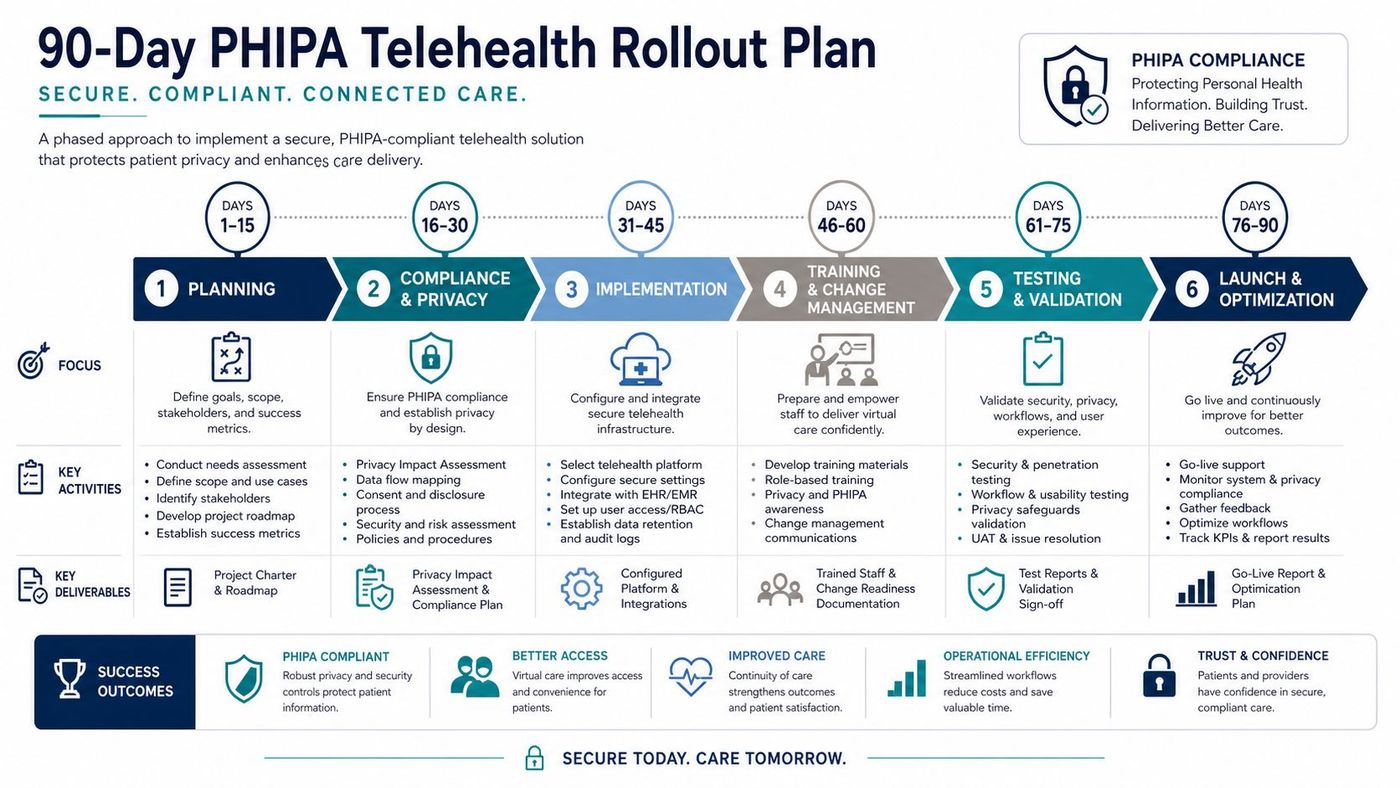
Days 1 to 30 should be about assessment and paperwork. Build the PIA, finish the TRA, map the data flows, and decide how identity verification and consent will work in the clinic. The biggest mistake in this phase is rushing to sign a platform before the risk decisions are documented. Fix that by freezing procurement until the assessment file is complete.
Days 31 to 60 are for vendor selection, control deployment, and policy drafting. Pick the platform that matches the approved workflow, lock down encryption, access controls, logging, and device management, then write the telehealth procedure staff will follow. Skipping the policy work here usually means staff invent their own process later, and that's where compliance falls apart.
Days 61 to 90 should be training, a pilot cohort, and then full go-live with monitoring turned on. Run a tabletop drill before launch so the team knows what happens when a recording is exposed or a visit is misdirected. Treat training as an ongoing discipline, not a single lunch-and-learn, because staff turnover and workflow drift are predictable.
A leadership sign-off checklist should be blunt:
If a clinic can't say yes to all five, it isn't ready to launch. Delay the go-live, fix the gap, and move only when the controls and the documents match.
CloudOrbis Inc. helps Ontario clinics build telehealth environments that are secure, documented, and ready for review, from compliance planning and vendor governance to monitoring, endpoint protection, and staff training. If you're putting together a PHIPA-compliant telehealth rollout or cleaning up an existing one, visit CloudOrbis Inc. to see how a Canada-based managed-IT partner can support the work end to end.
Book a 30-minute call with a senior engineer. No sales script, just straight answers about your environment.


