

September 28, 2026
VoIP in Business: A Guide for Canadian LeadersDiscover how VoIP in business transforms communications for Canadian SMBs. Explore key features, security, QoS, and industry use cases in this guide.
Read Full Post%20(1).webp)
Usman Malik
Chief Executive Officer
August 14, 2026

Your clinic's EHR is up, staff are moving patients through the day, and then the screens go blank. Phones light up, nurses can't pull charts, the front desk can't see appointments, and the person who usually “fixes IT stuff” is suddenly trying to decide whether to switch to paper and for how long. That's the moment a HIPAA disaster recovery plan stops being a compliance document and becomes the thing that keeps care moving.
I've seen small practices assume their backup software was enough, only to find that restores were slow, incomplete, or missing the one system everyone depended on. A plan that looks tidy in a binder can still fail the first time identity, imaging, scheduling, and e-prescribing all have to come back in the right order. HIPAA expects more than a copy of your data, it expects a recoverable, tested way to protect ePHI and continue operations during an outage.
At 8:10 on a Tuesday, a five-provider clinic loses access to its EHR, its lab interfaces, and its phone system after a ransomware event spreads from one workstation. The front desk can't verify insurance, nurses can't see medication lists, and the physician on call is staring at a login screen that no longer trusts anyone. By the end of the day, the clinic is back to handwritten intake forms and memory.
That's the exact gap a HIPAA disaster recovery plan is meant to close. A generic backup plan might tell you where the data lives, but it won't tell you how to restore clinical workflows, validate interfaces, or keep patient care safe while systems are still coming back online. HIPAA treats recovery as part of security governance because downtime is also a privacy and safety issue.
Practical rule: if staff can't use the restored system without guessing, the recovery isn't finished yet.
The U.S. Department of Health and Human Services Office of Inspector General found that 83% of hospitals reported a written data backup plan, 78% reported a written disaster recovery plan, and only 68% said their contingency plans addressed all four HIPAA contingency-plan requirements reviewed by auditors, which shows how often “we have a plan” falls short of “we can recover” (OIG review of hospital contingency planning). That gap matters even more in California, where clinics and practices have to restore systems and protect ePHI during outages, ransomware, and natural disasters. A plan that doesn't cover the full set of HIPAA contingency elements leaves real compliance exposure.
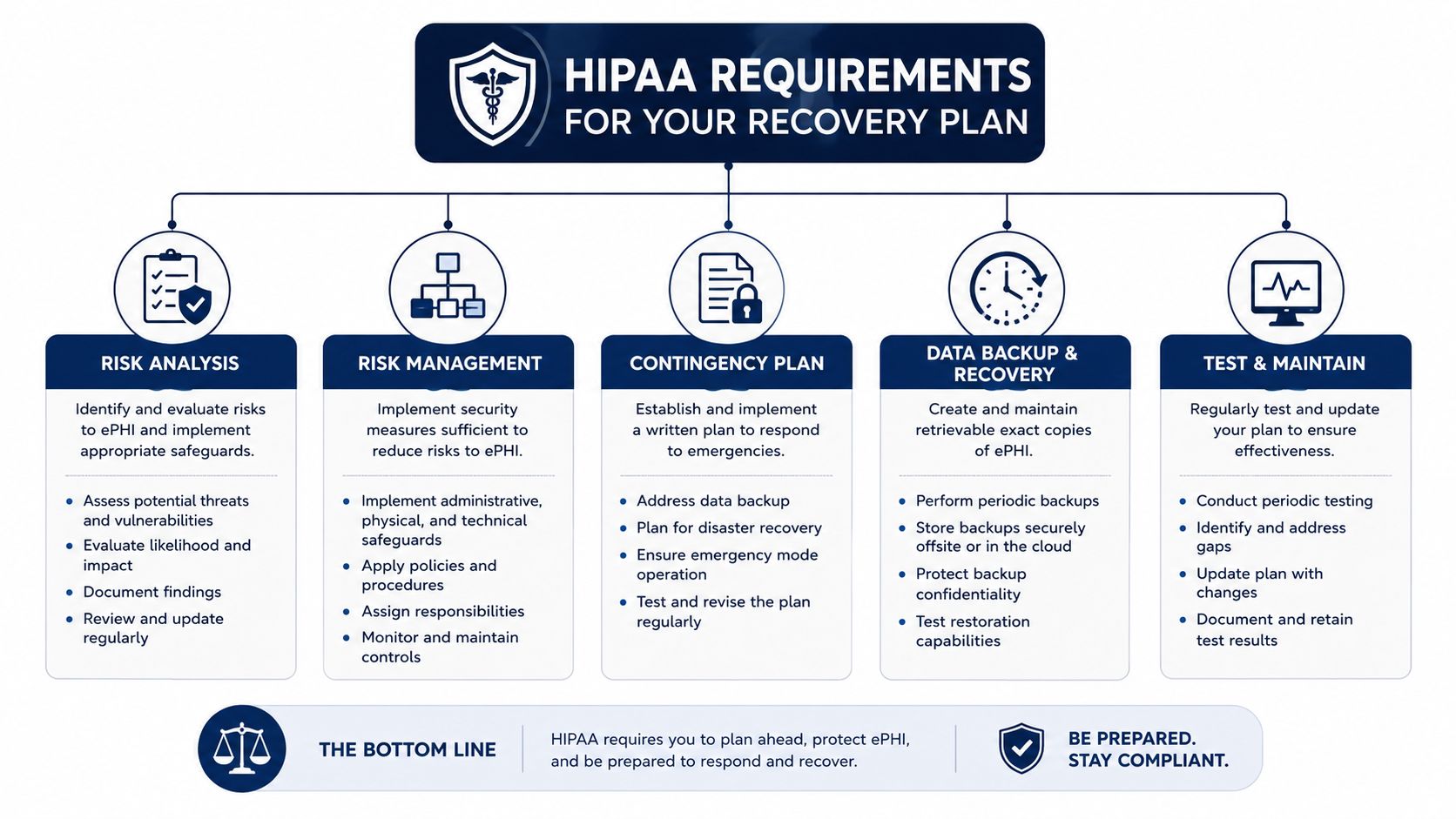
The contingency planning standard at 45 CFR § 164.308(a)(7)(ii) breaks disaster readiness into five implementation specifications, and each one has a real operational job to do. The first three are required, the last two are addressable, and auditors do care about that distinction because it changes how you prove reasonable safeguards. The five are a data backup plan, a disaster recovery plan, an emergency mode operation plan, testing and revision procedures, and an application and data criticality analysis (HIPAA contingency planning summary).
A practical way to think about them is simple. The backup plan creates retrievable copies, the disaster recovery plan restores systems, the emergency mode plan keeps care going while systems are down, testing proves the plan works, and criticality analysis tells you what comes back first. If one of those pieces is missing, the plan may look compliant on paper and still fail in a live outage.
Start by inventorying every system that creates, stores, or transmits ePHI. Then list the operational owners, the dependencies, and the systems that patients will notice first when they fail. That's the work that turns policy into something a small healthcare team can run.
A good starting point is to pair governance with practical documentation, not just technology. The HIPAA compliance solutions guide is useful for seeing how broader compliance controls fit around recovery, while a focused internal checklist like CloudOrbis's HIPAA compliance checklist helps you map those controls to day-to-day obligations.
The OIG findings are the right benchmark here, not because your clinic is a hospital, but because even established organisations often miss the full set of contingency requirements. That's why the risk assessment and business impact analysis should come first. If you don't know what would hurt patient care, you can't define recovery priorities in a defensible way.
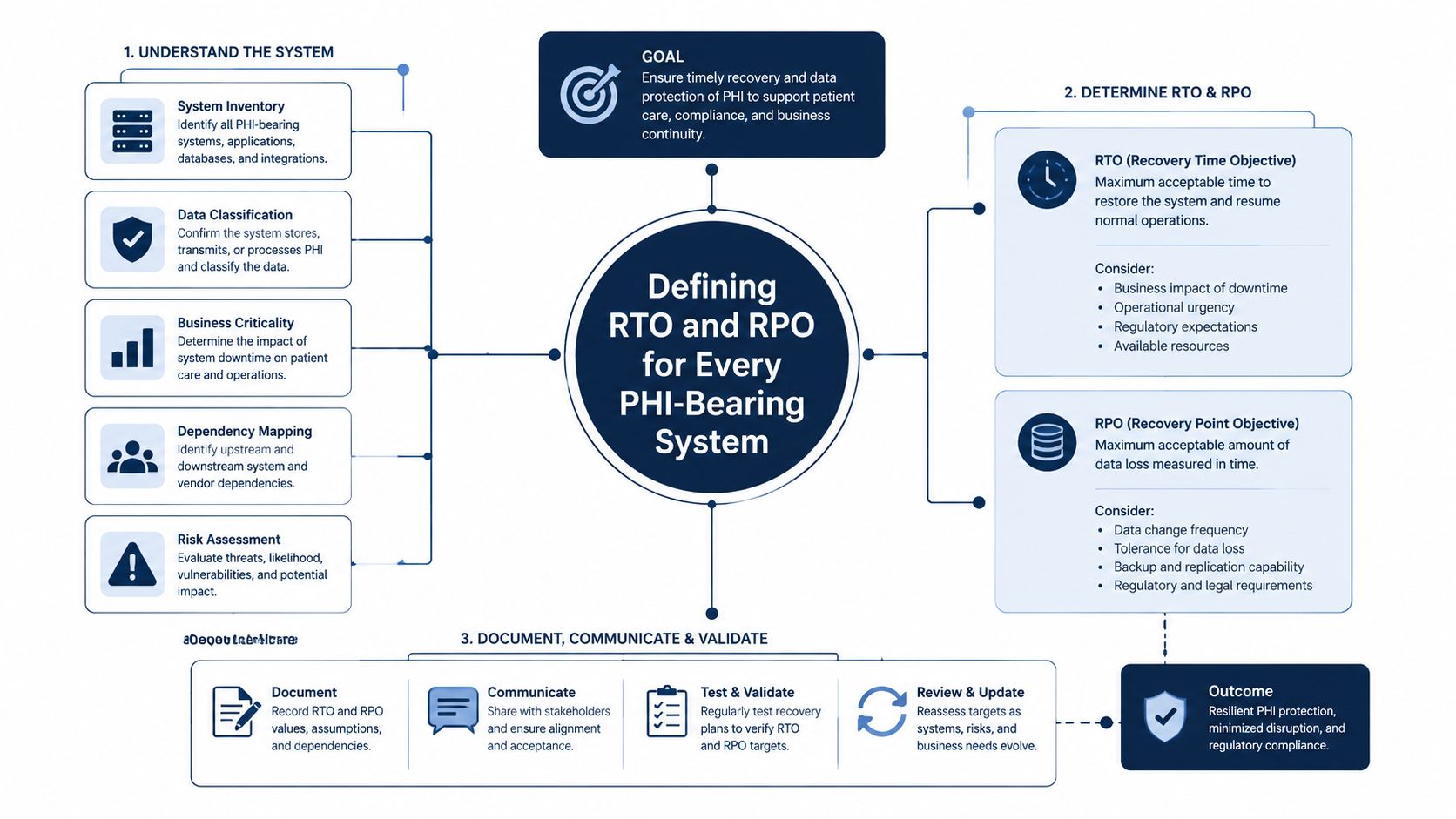
A clinic can have backups and still face a morning of patient care if no one has decided which systems must come back first. Recovery Time Objective (RTO) is the amount of downtime a system can absorb before clinical work starts to break. Recovery Point Objective (RPO) is the amount of data loss you can tolerate, measured by how old the last recoverable point is. Those two numbers drive the recovery design, because they determine whether a workload needs synchronous replication, frequent snapshots, or a solid backup schedule, and choosing the wrong approach can waste money without improving recovery.
A tiered model is the practical way to set those targets. Tier 1 should cover systems that support immediate patient care, such as the EHR, identity, and e-prescribing. Tier 2 should cover core operations like scheduling, billing, and imaging. Tier 3 should hold the systems that can come back later, including non-clinical collaboration tools.
Operational truth: near-zero RTO and RPO usually requires expensive architecture, and small clinics rarely need that level of design for every workload.
Cloud and hybrid environments need the recovery method matched to the objective. Near-zero targets usually call for synchronous replication or active-active clustering, short RPOs fit frequent snapshots or asynchronous replication, and longer objectives can rely on daily incremental or differential backups. The same recovery planning guidance also ties restore order to patient-care criticality, which is why EHR, PACS, LIS, e-prescribing, identity, DNS, telecom, and power all need a place in the sequence.
The 3-2-1-1-0 model is the benchmark I use most often in small and mid-sized practices. Keep three copies of the data, on two media types, with one offsite copy, one offline or immutable copy, and verify zero restore errors through testing (source guidance). That last part separates stored backups from recovery you can trust in an outage.
For a concise way to turn those objectives into targets a team can defend, the RTO guide from CloudOrbis gives a clear framework for matching recovery goals to service impact.
A restore that brings files back but leaves users blocked at login isn't a recovery, it's a delay with a progress bar. The runbook needs to tell someone exactly how to bring systems online in the right order, who signs off each stage, and what gets checked before users return. That's the part most backup tools can't do for you.
For each critical system, write down failover steps, restore procedures, validation checklists, and rollback criteria. An EHR runbook should mention authentication, data integrity checks, downtime reconciliation, and interface validation. A PACS or LIS runbook should include image or result verification, while identity recovery needs a separate path because everything else depends on it.
A backup is only useful when the restored system can support the workflow it used to run.
Application-consistent snapshots matter because databases and EHR components can corrupt if they're captured mid-write. Quiescing the system before the snapshot helps avoid that problem, especially where orders, encounters, and interface queues are active. That's also why a single successful file restore doesn't prove the dependency chain works.
The best recovery tests reconcile downtime records, orders, and interfaces before anyone resumes live work. That validation step is where many generic backup guides stop, but it's the step that proves the restoration is safe to use. If the data comes back but the messages between systems don't, staff end up duplicating work and creating new errors during a stressful event.
For a practical format, the IT disaster recovery plan template is a useful way to structure the document without turning it into a vague checklist. In a real clinic, the value is in the order of operations and the sign-off points, not in writing more pages.
Cloud-first clinics often assume the vendor “handles recovery.” In reality, recovery usually spans the EHR SaaS provider, Microsoft 365, backup software, an MSP, and maybe a separate identity platform, which means nobody owns the full path unless you write it down. When something fails, the first question isn't technical, it's contractual.
Start by mapping every vendor that touches ePHI or recovery data. Then identify who can initiate a restore, who approves it, who provides evidence, and who can see the logs. That ownership should be in the Business Associate Agreement, not buried in a support email thread that disappears during an outage.
The under-discussed failure mode in cloud healthcare is identity or retention, not the primary application. The EHR might still be available, but if the admin account is locked, the tenant is misconfigured, or the SaaS retention window is gone, the restore still stalls. That's why vendor dependency mapping needs to include logs, exports, backups, and account recovery, not just the headline application.
For teams sorting out those relationships, the what is IT vendor management guide is a useful companion because it frames vendors as operational dependencies, not just contracts. In practice, that mindset makes restore authority and evidence capture much easier to define.
CloudOrbis Inc. is one option for teams that want managed IT support, data backup and recovery, and HIPAA-oriented cloud services under one operating model. The value isn't in having more vendors, it's in having fewer handoffs when systems fail.
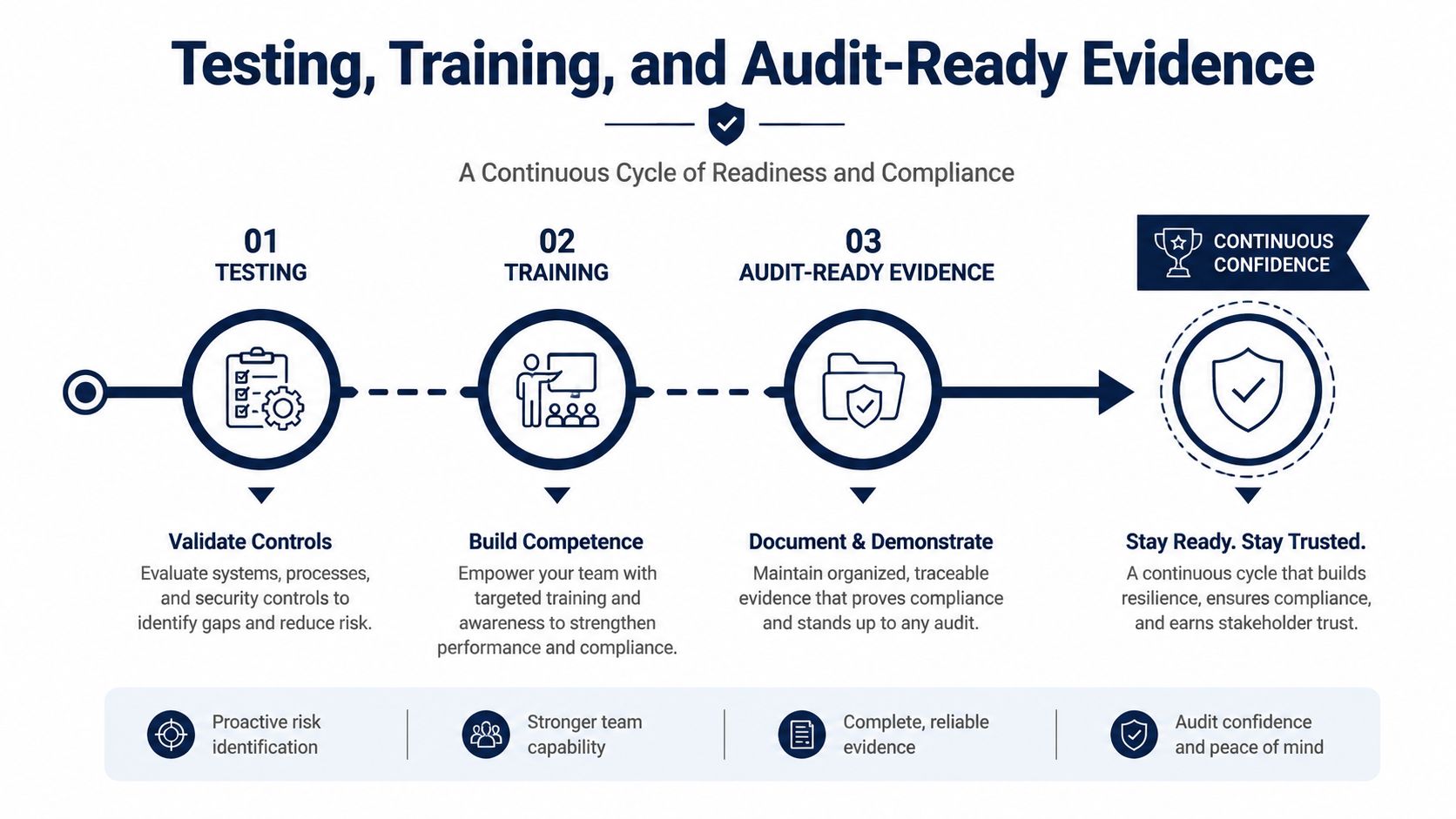
A recovery plan that has never been tested is only a statement of intent. In practice, teams should test it on a regular schedule, and they should test again whenever vendors, cloud settings, or clinical workflows change. The formats that expose real gaps are tabletop walkthroughs, partial restores, full failovers, and failback exercises.
The tests also need to reflect how recovery works in a clinic or practice. A cloud EHR, a backup platform, and an identity provider can each come back on their own timeline, and the plan has to show that staff can still reach the right records and resume care. That is where the testing guidance from earlier planning work becomes useful, because it pushes teams to verify the whole chain instead of assuming one successful restore means the job is done.
Every test should leave behind evidence that someone can review later. Keep timestamps, validation logs, reconciliation reports, issues found, and the corrective actions that followed. If a restore takes longer than planned, or a dependency comes back in the wrong order, document the failure, the workaround, and the change made after the test.
For staff training, the goal is practical readiness. Receptionists, nurses, billing staff, and managers do not need to become IT analysts, but they do need to know how emergency mode operations work, which paper process replaces the normal workflow, and who has authority to declare a return to normal operations. A short refresher tied to compliance training for employees helps make that clear before an outage forces the issue.
A clean way to keep the records organized is to tie testing into change management documentation. The same record that shows a configuration change should also show the related recovery update, because if the system changed, the recovery path should have changed too. That makes audit conversations easier and gives you a defensible trail when a restore does not behave the way the old plan expected.
The result is a plan that can be demonstrated, not just described. Auditors and internal reviewers both look for the same thing, staff who know their role, test results that show what happened, and evidence that the recovery process was corrected when it fell short.
A recovery plan gets stale fast if it only changes once a year. New systems, vendor swaps, staffing changes, cloud migrations, and real incidents should all trigger a review, because each one can change restore order, access rights, or the evidence you need later. If the environment changed and the plan did not, the plan is already behind.
After any outage or test, ask three questions. What failed that we did not expect, what did staff have to improvise, and what evidence do we need next time to prove the recovery worked? Those answers should become tracked updates, not informal notes in someone's inbox. They also need to reflect how the recovery behaved across EHR, cloud storage, identity tools, and any SaaS service that holds PHI, because HIPAA reviewers care less about the theory and more about whether the process can be shown to work.
The plan also needs tiers. A practice does not recover every system the same way, and trying to force one recovery target across everything usually creates weak spots. An appointment scheduler may tolerate a longer interruption than a charting platform, while a billing app may need a different recovery path than image storage. A tiered RTO and RPO model gives each PHI-bearing system a clear place in the order of operations, which is easier to defend during an audit than a blanket statement that everything will come back as soon as possible.
Keep it current, or it will fail at the worst possible time.
The goal is a recovery programme that still works after the binder is closed and the audit team has left. Vendor changes, cloud drift, and staff turnover all change the way recovery happens, even when the written policy looks untouched. Regular review keeps the plan usable after the audit closes.
September 28, 2026
VoIP in Business: A Guide for Canadian LeadersDiscover how VoIP in business transforms communications for Canadian SMBs. Explore key features, security, QoS, and industry use cases in this guide.
Read Full Post
September 27, 2026
How to Recover from a Ransomware Attack: An SMB PlaybookLearn how to recover from a ransomware attack with a step-by-step SMB playbook covering containment, backup restore, compliance, and post-incident hardening.
Read Full Post
September 26, 2026
On-Premise to Cloud Migration Checklist: 10 StepsUse this on-premise to cloud migration checklist to plan assessment, compliance, backups, sequencing, testing, cutover, and optimization for SMBs.
Read Full Post
