

September 16, 2026
How to Send Secure Email in Outlook Made SimpleLearn how to send secure email in Outlook with encryption, S/MIME and compliance tips for Canadian businesses. Step-by-step guide inside.
Read Full Post%20(1).webp)
Usman Malik
Chief Executive Officer
June 18, 2026
A lot of Canadian business owners already have some security in place. There's a firewall at the edge, password policies in Microsoft 365, maybe endpoint protection on laptops and servers. On paper, that sounds solid.
The problem starts after someone gets in anyway.
A compromised account doesn't always look dramatic. It might be a staff login at an odd hour, a server making an unusual connection, or a workstation probing other systems it has never touched before. Those are the moments when leaders realise they don't just need stronger locks. They need visibility inside the building.
An intrusion detection system, or IDS, fills that visibility gap. If your firewall is the locked front door, an IDS is more like a network of silent security cameras inside the office. It watches activity, spots behaviour that doesn't fit, and alerts you when something deserves attention.
That matters because many incidents don't begin with an obvious smash-and-grab. An attacker may arrive through a stolen password, a phishing email, or a vulnerable device that looked routine to everyone else. Once inside, they often spend time looking around, testing access, and moving towards payroll systems, patient records, financial platforms, or shared file stores.
For business leaders, that makes IDS less of a niche security tool and more of a practical risk-management control. If you're reviewing your broader exposure, TekRecruiter's cybersecurity risk overview is a useful companion read because it frames security as a business issue, not just a technical one. If you want a simpler primer first, CloudOrbis also has a clear overview of what cybersecurity means for business operations.
Practical rule: Firewalls help control who comes through the door. IDS helps you notice what happens after the door opens.
Canadian organisations in healthcare, finance, legal, and other regulated environments often need that extra layer because they can't rely on prevention alone. They need monitoring, evidence, and a way to recognise suspicious activity before it turns into downtime, fraud, or a reportable incident.
Most owners think in terms of blocking threats. That's understandable. Blocking feels decisive.
But detection is what tells you whether your controls are working. Without it, you may not know that a device is behaving strangely, a user account has been abused, or a sensitive system is being accessed in a way that breaks your own policies.
That's where intrusion detection systems earn their place. Continuously, and with far less disruption than many people expect.
Primarily, an intrusion detection system is a monitoring tool. It watches network traffic, system activity, logs, or file changes and looks for signs of malicious behaviour or policy violations. Unlike a firewall, it doesn't exist mainly to stop traffic. It exists to observe, analyse, and alert.
Here's the simplest way to think about it. A firewall is like a locked entrance with a guard deciding who gets in. An IDS is the camera system and the analyst watching the screens. It may not tackle the intruder itself, but it tells you where to look, what happened, and how quickly you need to respond.
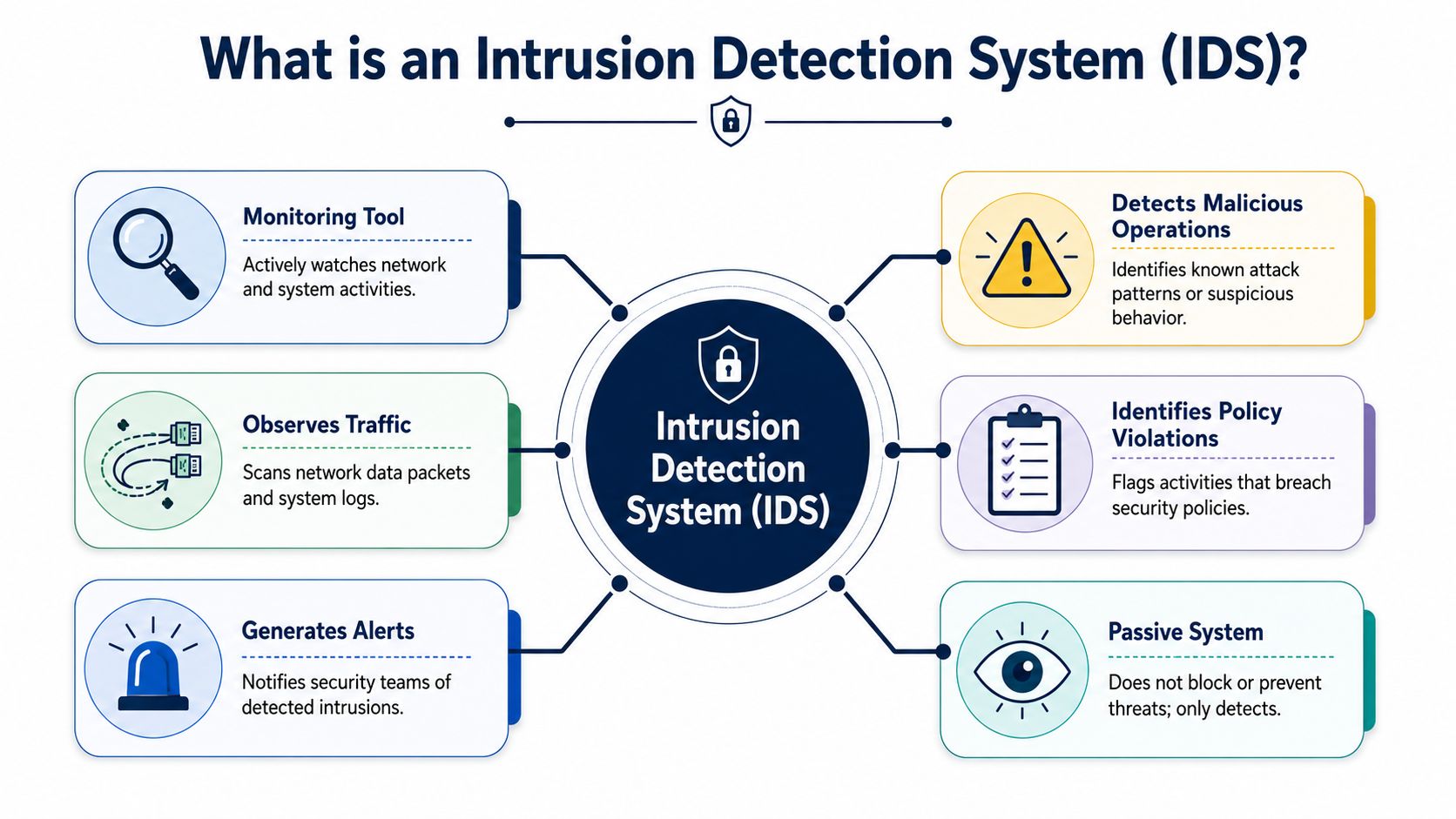
Most intrusion detection systems focus on a few core jobs:
That passive role is important for businesses that want better visibility without risking interruption to day-to-day operations.
IDS isn't new. It emerged as a distinct security discipline in the 1980s, and by the early 1990s researchers had developed real-time systems that reviewed audit data as it was produced, shifting the field from offline review to live monitoring, as noted in Darktrace's IDS overview.
That history explains why IDS remains foundational even in a world full of SIEM, MDR, and cloud-native tools. The basic idea still holds up. Learn what normal looks like. Watch for events that break that pattern. Alert the right people quickly enough to act.
For a Canadian SMB, that's not abstract. It means you can detect suspicious internal scanning, unusual server behaviour, or a compromised endpoint before the issue spreads further. It also gives security teams and IT providers far better context when they investigate.
If you're comparing this with broader monitoring services, CloudOrbis has a separate breakdown of threat detection and response that helps place IDS in the larger operational picture.
An IDS turns unknown activity into something your team can review, classify, and respond to.
Not all intrusion detection systems work the same way. The easiest way to understand them is to split the topic into two questions. Where does the IDS sit? And how does it decide something is suspicious?
The first category is about location.
A network intrusion detection system, often called NIDS, watches traffic moving across the network. Like a camera in a hallway, it sees movement between rooms, through the front entrance, and across shared areas. That makes it useful for spotting suspicious traffic patterns, reconnaissance, and movement between systems.
A host-based intrusion detection system, or HIDS, lives on an individual device such as a server or workstation. That's more like a camera inside a records room or finance office. It focuses on what's happening on that specific machine, such as file changes, local log activity, or unusual processes.
The second category is about detection method.
Signature-based detection looks for known patterns. It's similar to a watchlist. If traffic or behaviour matches a known attack signature, the IDS raises an alert. This approach is effective for recognised threats, but it depends on current rules and signatures.
Anomaly-based detection works differently. It builds a baseline of normal operations and then flags activity that deviates from that baseline. That idea aligns with NIST's long-standing description of IDS. Learn normal, compare current events against it, and look for incidents when behaviour departs from expected patterns.
| Category | Type | Analogy | Best For |
|---|---|---|---|
| Placement | NIDS | Camera in the hallway | Watching traffic across segments and gateways |
| Placement | HIDS | Camera in a locked room | Monitoring a specific server or endpoint |
| Detection | Signature-based | Matching against a watchlist | Known attack patterns and repeatable threats |
| Detection | Anomaly-based | Noticing someone acting out of character | Unusual behaviour and unknown activity |
Readers often get confused here because they assume they must choose one model only. In practice, businesses often combine approaches. A network sensor may watch traffic between key segments, while endpoint tools provide host-level visibility on important systems.
If you're evaluating visibility at the device level too, CloudOrbis has a helpful explainer on endpoint detection and response, which complements host-based monitoring.
The best IDS design usually reflects your business layout. Watch the hallways with NIDS. Watch the crown jewels with host-based controls.
When businesses start researching intrusion detection systems, they quickly run into a similar term. Intrusion prevention system, or IPS.
The names are close, but the operating model is different.
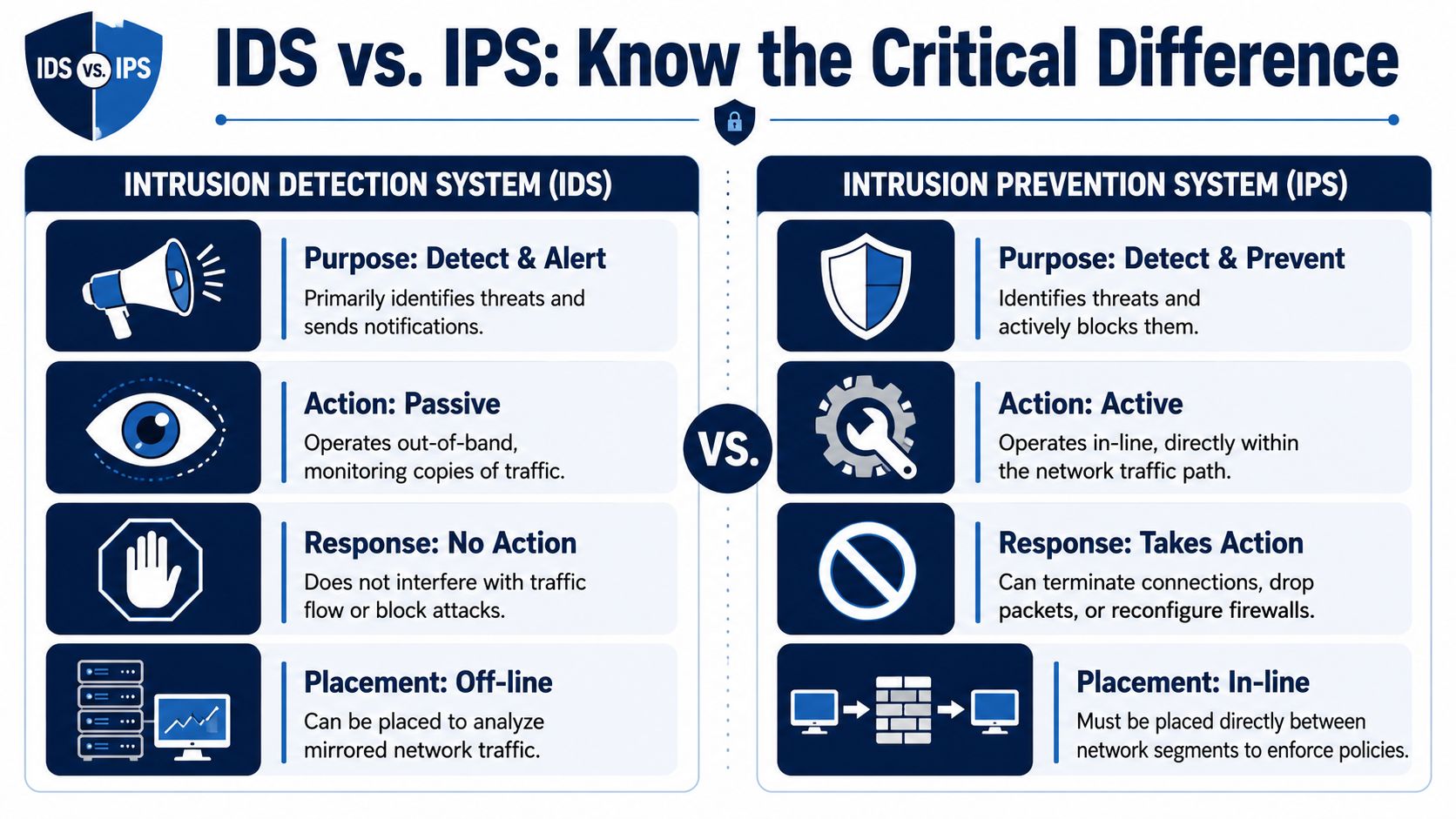
An IDS is a detect-and-alert tool. It observes activity and reports suspicious events. In most deployments, it sits out of band, meaning it monitors a copy of traffic rather than the traffic path itself.
An IPS is a detect-and-prevent tool. It sits inline and can take action when it sees something malicious. That may include blocking traffic, dropping packets, or terminating a connection.
Many owners assume IPS is automatically the better choice because prevention sounds stronger than detection. But that's only part of the story.
An IPS can affect production traffic because it sits directly in the path. If it's misconfigured or too aggressive, it can block legitimate business activity. That creates a trade-off between protection and operational stability.
An IDS usually avoids that risk because it's passive. It doesn't interrupt traffic flow. That makes it attractive for organisations that need visibility without introducing latency or the chance of accidentally breaking a business process.
Use this rule of thumb:
For many mid-sized Canadian organisations, IDS is the easier first step because it improves awareness without forcing immediate inline enforcement decisions.
Good IDS deployment isn't about putting sensors everywhere. It's about placing them where they'll tell you the most.
In practical terms, that means watching the points where traffic concentrates and where attackers are most likely to move after initial access. According to SecurityScorecard's explanation of IDS placement, IDS is most technically effective when sensors are placed out of band at network choke points using TAPs or SPAN ports. This lets the IDS inspect a full copy of traffic without becoming part of the live communication path.
For most SMB environments, three areas usually matter most:
If your IDS only watches the perimeter, you may miss what happens after an attacker lands on a user device and starts pivoting internally.
In many Canadian organisations, IDS isn't just about technical monitoring. It supports governance, audit readiness, and incident documentation.
For compliance, standards such as PCI-DSS require intrusion detection measures, and NIST describes IDS as useful for documenting threats and improving diagnosis and recovery after incidents, which makes it especially relevant in regulated sectors, as described in NIST SP 800-31,%202001-11.pdf).
That matters in healthcare, finance, legal, and other environments where leaders may need to show not just that they deployed controls, but that they can investigate and explain suspicious activity.
A clinic, for example, may place monitoring near internet access and around systems storing patient information. A manufacturer may care more about traffic between office IT and production systems. A finance team may prioritise systems handling payment data and privileged access.
The right deployment plan usually follows this sequence:
For organisations that want outside support with monitoring and compliance alignment, managed services can help. CloudOrbis outlines one approach in its guide to managed cybersecurity in Alberta, though the same operating model applies across Canadian SMB environments.
A well-placed IDS gives you more business value than a poorly placed one with more sensors.
An IDS by itself can become a very expensive noisemaker.
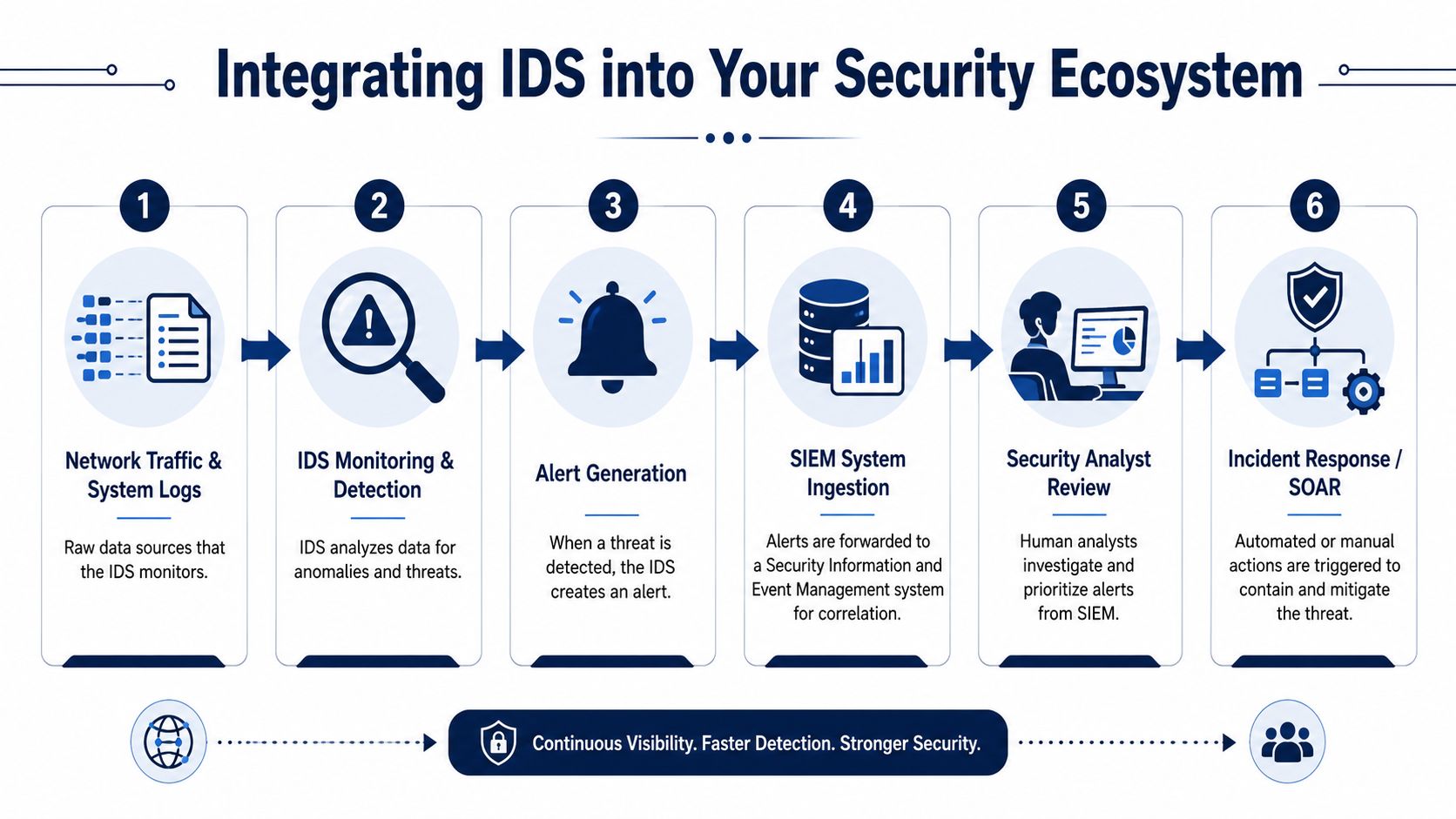
If alerts arrive but nobody reviews them in context, the organisation still lacks usable security insight. That's why intrusion detection systems work best as one input into a broader security ecosystem, not as a standalone purchase.
The usual next step is to feed IDS alerts into a SIEM, or Security Information and Event Management platform. A SIEM correlates IDS activity with firewall logs, endpoint events, authentication records, cloud activity, and application logs. That gives analysts a fuller picture of what's happening.
For example, an IDS alert about unusual internal traffic becomes much more meaningful if the SIEM also shows a privileged login, a suspicious file change, and an endpoint alert on the same device.
Many Canadian SMBs don't have an in-house security team available around the clock. Even strong internal IT teams may not have the time to triage alerts continuously, tune detection rules, and investigate every signal.
That's where managed monitoring and MDR become practical. A provider can review IDS alerts, suppress obvious noise, escalate meaningful incidents, and connect detection to containment steps. One example is CloudOrbis security managed services, which describes how managed monitoring fits into a broader business security model.
This issue becomes even more important in mixed environments that include specialised devices, branch locations, or industrial systems. Leaders dealing with operational technology or device-heavy environments may also find Sheridan Technologies' article on security in embedded systems helpful because it highlights why monitoring strategy needs to reflect what's connected to the business.
Good IDS operations aren't about collecting more alerts. They're about reducing uncertainty fast enough for someone to act.
The biggest problem with intrusion detection systems usually isn't detection capability. It's what happens after the alert fires.
A common issue with IDS is the generation of false positives and false negatives. In Canadian SMBs with constrained security staff, that alert noise can overwhelm teams and makes expert tuning and managed monitoring especially important, as explained in Stamus Networks' discussion of IDS limitations.
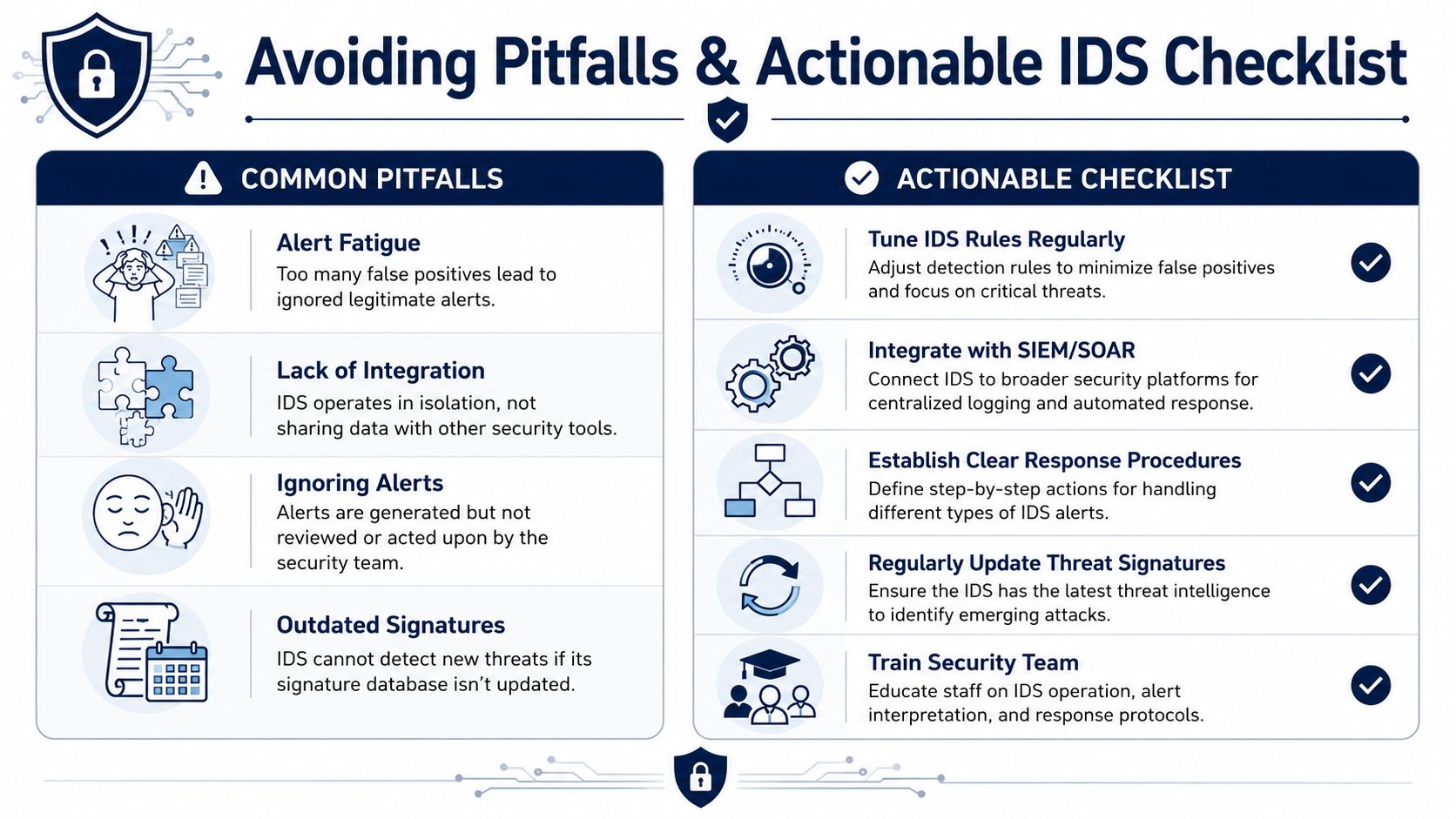
Some problems show up again and again:
Use this as a working checklist when you evaluate or improve an IDS deployment:
Don't judge an IDS by how many alerts it produces. Judge it by whether your team can respond to the right ones.
An IDS should lower uncertainty, support compliance, and improve resilience. If it only creates more dashboards and more noise, it needs redesign, tuning, or better integration.
If you're reviewing whether intrusion detection systems fit your environment, CloudOrbis Inc. can help you assess placement, tuning, managed monitoring, and how IDS should connect to your broader security and compliance program.
September 16, 2026
How to Send Secure Email in Outlook Made SimpleLearn how to send secure email in Outlook with encryption, S/MIME and compliance tips for Canadian businesses. Step-by-step guide inside.
Read Full Post
September 15, 2026
Why Managed IT Services Matter for Canadian SMBsDiscover why managed IT services are a smart move for Canadian SMBs. Learn the benefits, real ROI, and how to choose the right provider.
Read Full Post
September 14, 2026
Vulnerability Management vs Vulnerability AssessmentVulnerability management vs vulnerability assessment explained for Canadian SMBs. Compare scope, process, tools, and how to choose the right approach.
Read Full Post
